


 Video Dönüştürücü Ultimate
 Ekran kaydedicisi
 Video Onarımı
 Güvenli İndirme
Kanıtlanmış ve Test Edilmiş Görüntü Dönüştürücüleri Kullanarak JPEG'i JPG'ye Dönüştürme
Bazı insanlar JPEG ve JPG’nin aynı formatlar olduğunu söyler. Aslında öyledir. Ancak bazı programlar yalnızca üç harfli uzantıları kabul eder. Bu yüzden JPEG yerine JPG kullanılır. JPG formatı günümüzde oldukça popülerdir. Eğer sen de JPEG resim dosyanı JPG formatına dönüştürmek istiyorsan, şanslısın. Bu rehber sana deneyebileceğin en iyi çözümü sunacak. JPEG’den JPG’ye anında JPEG’i JPG’ye dönüştürebilir ve bunun için JPEG’den JPG’ye dönüştürücüler kullanabilirsin. Bu dönüştürücüler hem çevrimiçi hem de mobil cihazlarda kullanılabilir. Bu uygulamaları keşfetmek istiyorsan, bu makaleyi okuyarak fırsatı değerlendirebilirsin.

Bölüm 1. JPEG'i Çevrimiçi JPG'ye Dönüştürmenin Yararlı Yolları
FVC Free Image Converter'da JPEG'i JPG'ye Dönüştürme
JPEG’i JPG’ye dönüştürmenin en iyi yolu FVC Free Image Converter kullanmaktır. JPEG’i JPG’ye veya PNG ve GIF gibi diğer formatlara dönüştürmek için harika bir seçenektir. JPG, JPEG, PNG, SVG, BMP, TIFF ve GIF dahil tüm resim formatlarını işleyebilir. Böylece, belirli araçlarda veya cihazlarda görüntü dosyalarının açılamamasından endişe etmen gerekmez. En iyi yöntem, bunları bu çevrimiçi resim dönüştürücüyle çevirmektir. Ayrıca, orijinal görüntülerin mükemmel kalitesini koruyabilir. Dönüştürme işleminden sonra orijinalle arada fark görmezsin. Buna ek olarak, FVC’nin resim dosyası dönüştürücüsü toplu dönüştürme işlemini destekler. Bu da aynı anda çok sayıda resmi dönüştürebileceğin anlamına gelir. Bu yöntem çok daha kullanışlı ve verimlidir. Piyasadaki diğer resim formatı dönüştürücülerle kıyaslanamaz.
FVC Free Image Converter, tek seferde 40 adede kadar görüntüyü işleyebilir. Böylece daha fazla zaman kazanabilirsiniz. Ayrıca bu program için bir kuruş ödemenize gerek yok. Kullanımı ücretsiz bir görüntü dönüştürücüsüdür. Ayrıca, onu çalıştırmak için bir hesap oluşturmanız gerekmez. Tek yapmanız gereken web sitesini ziyaret etmek ve dönüştürmeye başlamak. Hepimiz reklamların can sıkıcı olduğunu biliyoruz. Ancak bu araçta reklam yoktur, böylece barışçıl bir şekilde dönüşüm yapabilirsiniz. Bu çevrimiçi yazılıma Chrome, Mozilla, Edge, Explorer ve daha fazlası dahil olmak üzere tüm web tarayıcılarından erişebilirsiniz.
Adım 1: Tarayıcını aç ve FVC Free Image Converter’ın ana sitesine git. Şuna dönüştür (Convert to) seçeneğine git ve JPG formatını seç.
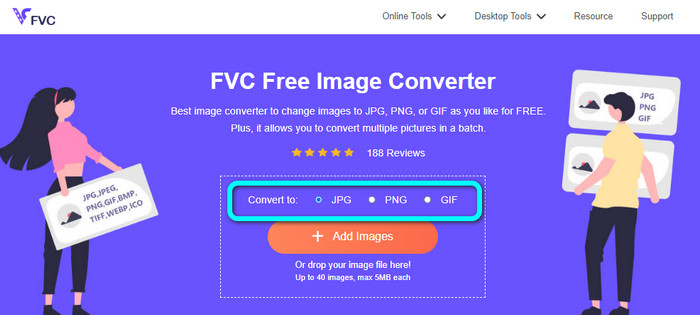
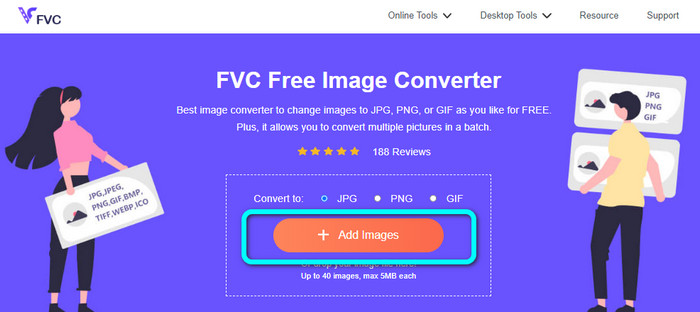
Adım 2: JPG dosya formatını seçtikten sonra Add Images (Resim Ekle) düğmesine tıkla. Ardından, dosya klasörün bilgisayar ekranında görünecek. Dönüştürmek istediğin JPEG görüntüyü ekle.
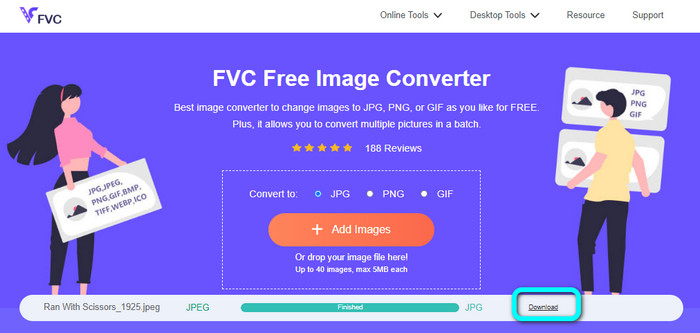
Adım 3: JPEG görüntü formatını eklediğinde, resmin otomatik olarak dönüştürüldüğünü göreceksin. JPEG’den JPG’ye dönüşecektir. Dönüştürme işlemi bittiğinde Download (İndir) düğmesine tıkla. Bu şekilde JPG görüntünü bilgisayarına kaydedebilirsin.
Convertio'da JPEG'i JPG'ye Dönüştürme
Kullanabileceğin bir başka JPEG’ten JPG’ye dönüştürücü de Convertio’dur. Bu resim dönüştürücü, JPEG’i JPG’ye son derece basit bir yöntemle dönüştürebilir. Ayrıca anlaşılır bir kullanıcı dostu arayüz sunar. Böylece, hem profesyonel hem de profesyonel olmayan kullanıcılar bu çevrimiçi dönüştürücüyü rahatlıkla kullanabilir. Buna ek olarak, bu programda toplu dönüştürme işlemi de vardır. Yani birden fazla görüntü formatını aynı anda dönüştürebilirsin. Dönüştürme işlemi de hızlıdır; birkaç saniye içinde resimleri dönüştürebilirsin. Convertio, Google Chrome, Firefox, Explorer ve daha birçok popüler tarayıcıda kullanılabilir. Dahası, Convertio’nun sunacağı daha pek çok özellik vardır. Sadece resimleri dönüştürmekle kalmaz, videoları, ses dosyalarını, belgeleri ve daha fazlasını da dönüştürebilirsin.
Ancak, bu programın erişilebilir sürümünün kısıtlamaları vardır. Yalnızca 100 MB'a kadar olan resimleri yükleyebilirsiniz. Bundan sonra, artık görüntüleri dönüştüremezsiniz. Bu nedenle, tüm özelliklerini deneyimlemek istiyorsanız bir abonelik planı satın alın. Ayrıca üst düzey performansını görmek için güçlü bir internet bağlantısı gerekiyor.
Adım 1: Convertio’nun ana web sitesine git. Choose files (Dosya seç) düğmesini seç. Bilgisayar klasöründen JPEG resim dosyasını seç ve aç.

Adım 2: JPEG resim dosyasını açtıktan sonra, format seçeneklerinden JPG formatını seç.
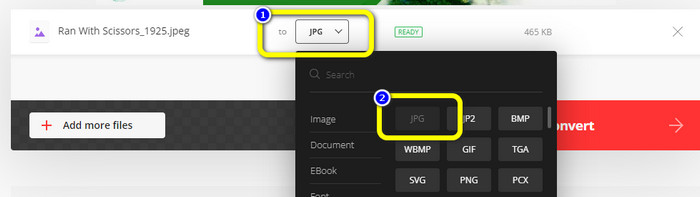
Adım 3: JPEG resim dosyasını açtıktan sonra, format seçeneklerinden JPG formatını seç. Toplu dönüştürme işlemi yapmak için Add more files (Daha fazla dosya ekle) düğmesine de tıklayabilirsin.
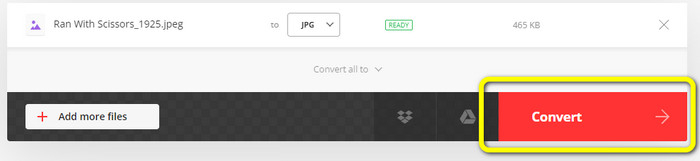
Adım 4: Dönüştürme işlemini başlatmak için Convert (Dönüştür) düğmesine tıkla. Ardından, dönüştürme işleminden sonra Download (İndir) düğmesine tıkla.
CloudConvert'te JPEG'i JPG'ye Dönüştürme
CloudConvert, JPEG’i JPG’ye dönüştürmek için web tabanlı bir araçtır. Bu dönüştürücünün yardımıyla JPEG’i hızlıca JPG’ye dönüştürebilirsin. Ayrıca bu araç, dönüşüm için temel talimatlar içeren sezgisel bir arayüz sunar. Böylece ister deneyimli bir kullanıcı ister yeni başlayan biri ol, JPEG’i JPG’ye dönüştürmek kolaydır. Üstelik CloudConvert çeşitli tarayıcılarda kullanılabilir. Mozilla, Explorer ve Firefox gibi tarayıcılar dahil olmak üzere erişimi oldukça rahattır. Bu aracın en iyi yanlarından biri, görüntülerde değişiklik yapabilmendir. Görüntü çözünürlüğünü, dosya boyutunu ve kalitesini değiştirmek için seçenekleri kullanabilirsin. Bu yazılımın önceliklerinden biri de, dönüştürmenin yanı sıra kullanıcının gizliliğidir. CloudConvert bilgilerinin güvende olmasını sağlar. Verilerini başkalarıyla paylaşmaz. Dönüştürme işleminin ardından, 24 saat sonra resmini otomatik olarak siler.
Ancak, bu web tabanlı görüntü dönüştürücünün dezavantajları vardır. Yalnızca ücretsiz sürümü kullanırsanız, günde yalnızca 25 görüntüyü dönüştürebilirsiniz. Daha fazla görüntüyü dönüştürmek için bir abonelik planı satın almanız gerekir. Ayrıca, bu dönüştürücünün gereksinimlerinden biri de internet erişimidir. Çevrimiçi bir araç olduğu için internet bağlantısı gereklidir.
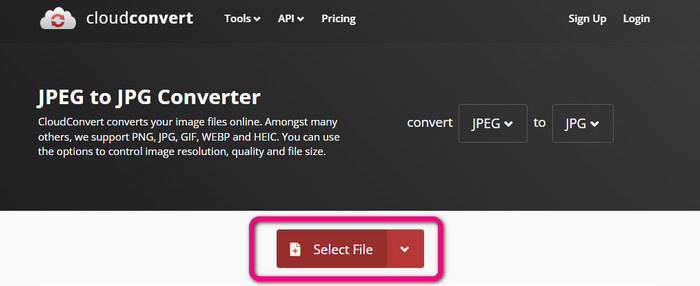
Adım 1: Select File (Dosya Seç) düğmesine tıkla. Ardından, dosyalarından JPEG görüntüyü aç.
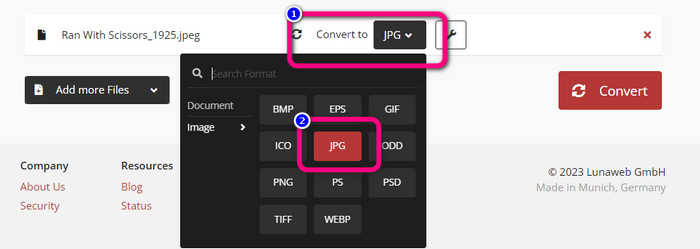
Adım 2: Convert to (Şuna dönüştür) seçeneğine git. İstediğin format olan JPG’yi seç.
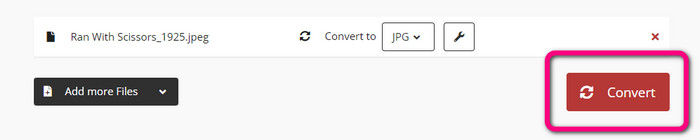
Adım 3: JPG dosyasını seçtiğinde, Convert (Dönüştür) düğmesine tıkla. Dönüştürme işlemini bekle ve son görüntüyü masaüstüne kaydet. Bu aracı ayrıca JPG’yi PNG’ye dönüştürmek için de kullanabilirsin.
Bölüm 2. Android ve iPhone Kullanarak JPEG'i JPG'ye Dönüştürme
Image Converter'da JPEG'i JPG'ye Dönüştürme
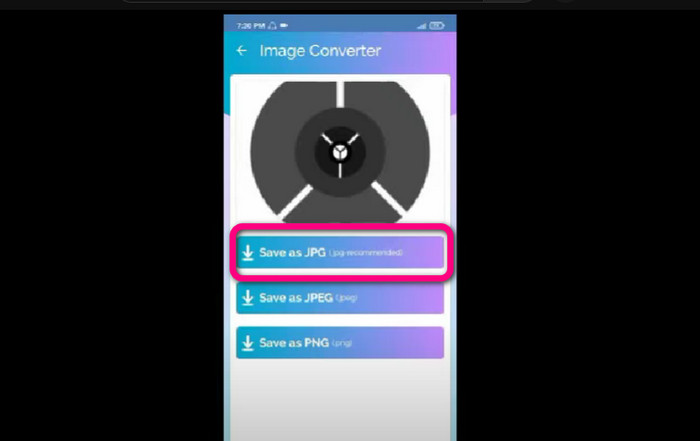
JPEG’i Android’de JPG formatına dönüştürmek istiyorsan, Image Converter kullan. Bu uygulama Android cihazlarda kullanılabilir. Resim dönüştürme işlemi için basit bir yönteme sahiptir ve bu da onu profesyonel olmayan kullanıcılar için uygun kılar. Ayrıca bu uygulamayı ücretsiz olarak indirebilirsin. Kolay anlaşılır bir arayüze de sahiptir. Böylece kimse dönüştürücüyü kullanırken kafası karışmaz. Dahası, Image Converter sorunsuz bir dönüştürme süreci sunar. Formatı seçtikten sonra, resmi zahmetsizce dönüştürür ve telefonuna kaydeder. Ancak, yalnızca PNG, JPG ve JPEG gibi sınırlı çıktı formatlarını destekler. Bu nedenle, resmi GIF, SVG, BMP vb. formatlara dönüştürmek istersen bu uygulamayı kullanamazsın.
Adım 1: Play Store uygulamasını aç ve Image Converter uygulamasını indir. Ardından, kurulum işlemi tamamlandıktan sonra uygulamayı başlat.
Adım 2: Telefon galerisinden JPEG fotoğrafı eklemek için Select Photo (Fotoğraf Seç) düğmesine bas.
Adım 3: Son adım olarak Save as JPG (JPG olarak kaydet) seçeneğine tıkla. Dönüştürme işlemini bekle. İşlemden sonra resim otomatik olarak galerine kaydedilecektir.
JPG Image Converter & Resizer'da JPEG'i JPG'ye Dönüştürme
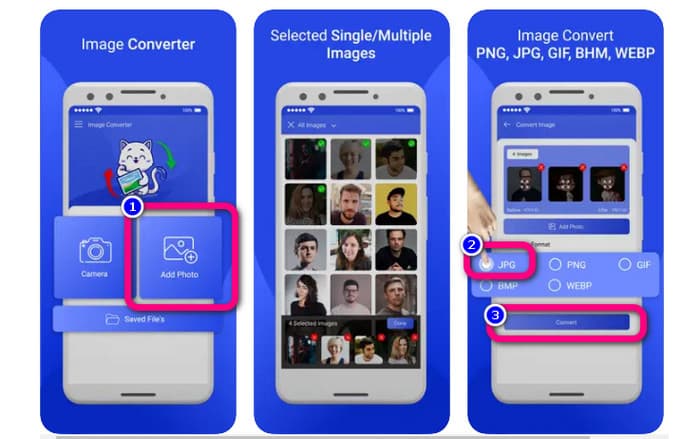
JPEG’i iPhone kullanarak JPG’ye dönüştürmek istiyorsan, JPG Image Converter & Resizer kullan. Bu yazılım Apple Store’da mevcuttur. Ücretsiz olarak indirebilirsin. Ayrıca dönüştürme işlemi kolaydır. Sezgisel bir arayüze sahiptir, bu da kullanıcılar için karmaşıklığı ortadan kaldırır. Bu uygulamada toplu dönüştürme işlemi de vardır. Böylece birden fazla görüntü formatını aynı anda dönüştürebilirsin. Ayrıca birçok görüntü formatını destekler. PNG, BMP, GIF, WebP vb. dahildir. Ancak bu uygulamayı yalnızca iOS 12.0 üzerindeki iPhone’larda kullanabilirsin. iOS 12.0 ve üzeri sürümlerde bu uygulamayı indirebilirsin.
Adım 1: Apple Store’a git ve JPG Image Converter & Resizer uygulamasını indir. Ardından uygulamayı çalıştır.
Adım 2: Dönüştürmek istediğin JPEG görüntüyü eklemek için Add Photo (Fotoğraf Ekle) simgesine bas. İstersen birden fazla resim de ekleyebilirsin.
Adım 3: Format seçeneklerinden JPG formatını seç. Daha sonra, dönüştürme işlemini başlatmak için Convert (Dönüştür) düğmesini seç.
Bölüm 3. JPEG'i JPG'ye Dönüştürme Hakkında SSS
1. Resimleri PNG'den JPG'ye nasıl dönüştürebilirim?
FVC Free Image Converter’ı kullanabilirsin. Bu çevrimiçi resim dönüştürücü PNG gibi giriş formatlarını destekler. Böylece PNG resmini JPEG formatına dönüştürebilirsin. Sadece format seçeneklerine gidip JPG’yi seç. Ardından PNG görüntüsünü eklemek için Add Images düğmesine tıkla. Sonrasında indirme düğmesine tıkla.
2. JPEG dosyalarım neden Mac'imde çalışmıyor?
JPEG görüntünüzün çalışmamasının iki olası nedeni vardır. Belki de MacOS'unuz güncellenmemiştir. Diğer bir neden de, JPEG görüntüsünün virüs bulaşması nedeniyle bozulabilmesidir. JPEG görüntünüzü düzeltmeniz veya macOS'unuzu güncellemeniz gerekiyor.
3. E-posta ile gönderilen bir fotoğraf .jpg formatında nasıl kaydedilir?
Görüntüyü indirdiğinizde, görüntüyü nereye kaydetmek istediğinizi soran bir diyalog kutusu açılacaktır. Bu noktada format seçeneğinden görselinizi istediğiniz formatta kaydedebilirsiniz.
Sonuç
Sonuç olarak, bu yazı sana çeşitli resim dönüştürücüler kullanarak JPEG’i JPG’ye dönüştürmenin en etkili yollarını sundu. Ancak çoğu kullanıcı resim dosyalarını dönüştürmek için basit yöntemleri tercih eder. Bu durumda, çeşitli dosyaları kolay ve anında dönüştürebilen FVC Free Image Converter’ı kullanabilirsin.
-
 PNG Dosyası Nedir: Nasıl Açılır ve Dönüştürülür? [Tüm detaylar]
 PNG formatının ne olduğunu biliyor musunuz? Bu dosyanın tüm temel ayrıntılarını öğrenebilirsiniz. Bu kılavuz direği okuyun ve alabileceğiniz tüm bilgileri alın.
-
 JPEG ile JPG ile PNG arasındaki Farklar Hakkında Tüm Ayrıntılar
 Bu gönderi size JPEG ile JPG ile PNG arasındaki farklar hakkında yeterli bilgi verecektir. Ayrıca görüntüleri bu dosyalara nasıl dönüştüreceğinizi de öğreneceksiniz.
-
 Görüntüleri Çevrimiçi ve Çevrimdışı JPG'ye Dönüştürme Yöntemleri
 Herhangi bir nedenle dosyayı JPG formatına dönüştürmek istiyor musunuz? O zaman bu makale tam size göre. Resminizi JPG'ye dönüştürmek için size en iyi yöntemi öğreteceğiz
