


 Video Dönüştürücü Ultimate
 Ekran kaydedicisi
 Video Onarımı
 Güvenli İndirme
E-posta için Fotoğrafları Kolayca Sıkıştırmanın 3 Yolu [Rehber]
E-posta, fotoğraf ekleri ve ihtiyaç duyulan diğer dosyalarla mesaj göndermek için harika bir platformdur. Ancak bazı kullanıcılar, yavaş yükleme sürelerine, başarısız teslimatlara veya e-posta sağlayıcıları tarafından uygulanan ek boyutu sınırlarının aşılmasına yol açtığı için büyük dosyalı fotoğraflar göndermede zorluk yaşarlar. Bu sorunlardan kaçınmak için, fotoğraflarınızı göndermeden önce yeniden boyutlandırmanız önemlidir.
Bu makalede, fotoğraf eklerinizin kaliteyi çok fazla düşürmeden kolayca gönderilip alınabilmesini sağlamak için, sizi e‑posta için fotoğrafları sıkıştırmanın 3 yöntemiyle adım adım tanıştıracağız.

Bölüm 1. E-posta için Fotoğrafları Sıkıştırmanın Faydaları
Fotoğrafları sıkıştırmanın genel olarak e-posta kullanımı da dahil olmak üzere birçok faydası vardır. E-posta için fotoğrafları yeniden boyutlandırırken keyfini çıkarabileceğiniz şeyler şunlardır:
• Görüntü sıkıştırma, fotoğrafın daha küçük bir boyuta yeniden ölçeklendirilmesi anlamına geldiğinden, sıkıştırılmamış fotoğraflara kıyasla bir e‑postada birden fazla fotoğraf ekini çok daha kolay gönderebilirsiniz.
• Çoğu zaman e‑posta sağlayıcıları, gönderebileceğiniz eklerin boyutuna sınırlamalar getirir. Fotoğraflarınızı e‑posta için sıkıştırarak bu sınırlar içinde kalır, e‑postanızın sorunsuz bir şekilde teslim edilmesini sağlarsınız. Bu, e‑postayı birden fazla alıcıya gönderirken veya fotoğraflarınızla birlikte başka türde ekler de dahil ederken özellikle kullanışlıdır.
• Fotoğraflar sıkıştırıldığında yalnızca daha az yer kapladıkları anlamına gelir; bu da e‑posta depolama kotanızı daha verimli kullanmanızı sağlar.
• Büyük e‑posta ekleri bazen e‑posta sunucuları tarafından işaretlenebilir, bu da teslimat hatalarına veya e‑postaların spam olarak işaretlenmesine yol açabilir. Fotoğraflarınızı e‑posta için sıkıştırmak, bu sorunlardan kaçınmanıza yardımcı olur ve eklerinizin hedef alıcılarına sorunsuz bir şekilde ulaşmasını sağlar.
• Bazı durumlarda kullanıcılar e‑postalarını telefonlarından kontrol eder. Gönderilen sıkıştırılmış fotoğraflar, sıkıştırılmamış olanlara kıyasla mobil cihazlarda indirilip görüntülenmesi daha kolay dosyalardır.
Bölüm 2. Görüntü Formatını Dönüştürerek E-posta İçin Fotoğrafları Sıkıştırın
E-posta için fotoğraf sıkıştırmak istiyorsanız, deneyebileceğiniz ilk yöntem bir resim dönüştürücü aracı kullanmaktır. Bu araçla, görüntünüzü istediğiniz bir biçime dönüştürebilir ve dönüştürme işlemi fotoğrafınızı istenen ve daha yönetilebilir bir boyuta optimize eder.
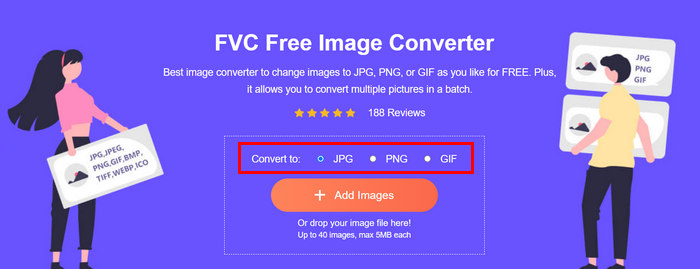
FVC Free Image Converter, kullanıcıların fotoğraflarını JPG, PNG ve GIF gibi çeşitli görüntü dosya formatlarına dönüştürmelerini sağlayan ücretsiz bir dönüştürücü araçtır. Bu nedenle, e‑postayla daha fazla veri içeren ve bu yüzden dosya boyutu daha büyük olan bir formatta görsel gönderiyorsanız, bu araçtan kesinlikle yararlanabilirsiniz. Ayrıca, aynı anda en fazla 40 resmi toplu olarak dönüştürebildiği için birden fazla büyük dosya göndermek istediğinizde de idealdir. İşte bu aracı fotoğraflarınızı e‑posta için sıkıştırırken nasıl kullanabileceğiniz:
Adım 1. Öncelikle, çevrimiçi araca erişebilmek için tarayıcınızda FVC Free Image Converter’ı aratın.
Adım 2. Ardından, Convert to seçeneğinden tercih ettiğiniz çıktı dosya formatını seçin. Sonrasında dönüştürmek istediğiniz görselleri içe aktarmak için Add Images düğmesine tıklayın.
Adım 3. İşlem tamamlandığında, Download All düğmesine tıklayın.
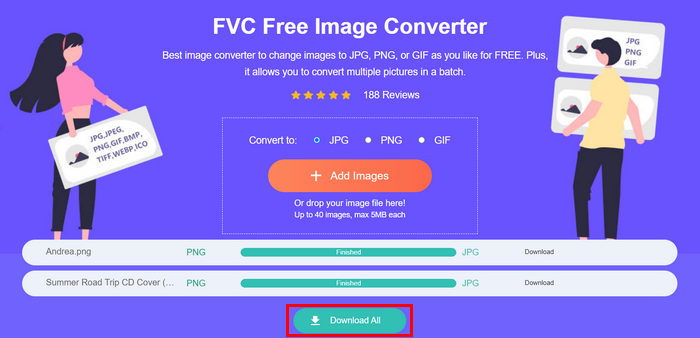 FVC Free Image Converter aracıyla, dönüştürülen fotoğraflarınızın artık sıkıştırılmış ve boyutlarının küçültülmüş olması garantilidir; bu da e-posta kullanımı için mükemmeldir.
 Bölüm 3. Çevrimiçi Sıkıştırma Aracıyla E-posta İçin Fotoğrafları Küçültün
FVC Free Image Compressor, fotoğrafları e‑posta için sıkıştırma sürecini basitleştiren, ücretsiz çevrimiçi bir sıkıştırma aracıdır. Kullanıcıların tek yapması gereken, görüntü dosyalarını yüklemek veya içe aktarmak ve aracın bunları otomatik olarak sıkıştırmasına izin vermektir. Kalite kaybından endişe ediyorsanız, bu araç en iyi optimizasyonu ve gelişmiş sıkıştırma algoritmalarını kullanır. Bu da fotoğraflarınızı e‑posta için sıkıştırırken görüntü kalitenizin korunmasını sağlar.
Ayrıca, bir resmi toplu olarak sıkıştırmanız gerekiyorsa, bu araç aynı anda 40 resmi sıkıştırmanıza olanak tanır. Son olarak, JPEG, PNG, SVG ve animasyonlu GIF'ler gibi çeşitli popüler resim formatlarını destekler.
Adım 1. Tarayıcınızdan resmi web sitelerine erişin.
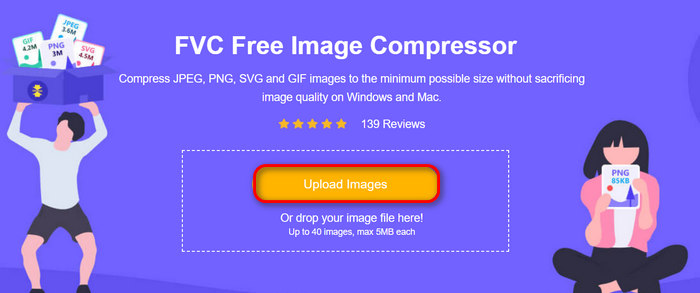
Adım 2. Bundan sonra, web için sıkıştırmak istediğiniz görselleri içe aktarmak üzere Upload Images düğmesine tıklayın. Lütfen, bu aracın fotoğraflarınızı seçip “Aç”a tıkladığınız anda otomatik olarak sıkıştıracağını unutmayın.
Adım 3. Görsellerinizi sıkıştırdıktan sonra, yeni boyutlarını kontrol ederek önizleyebilirsiniz. Son olarak, görsellerinizi kaydetmek için Download All düğmesine tıklayın.
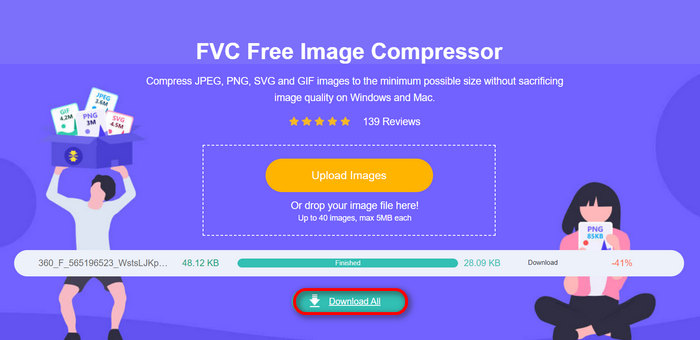
Bu yöntem, karmaşık adımlara ve abonelik ücretlerine katlanmadan e-posta için fotoğraflarınızı sıkıştırmanıza gerçekten yardımcı olabilir. Dahası, kullanıcı dostu ve sezgisel arayüzü onu her seviyedeki kullanıcı için ideal bir araç haline getirir. Bu nedenle, fotoğraflarınızı e-posta kullanımı için optimize etmek istiyorsanız, bu yöntemi hemen deneyin.
Bölüm 4. E-posta için Fotoğrafların Boyutlarını Belirli Bir Boyuta Yeniden Boyutlandırın
E-posta için fotoğraflarınızı belirli bir boyuta yeniden boyutlandırmak istiyorsanız, IMGonline aracını deneyebilirsiniz. Bu görüntü sıkıştırma aracı, görüntünüzü istediğiniz boyuta yeniden boyutlandırmanıza olanak tanır. İşte nasıl yapacağınız:
Adım 1. Web sitelerinde, sıkıştırmak istediğiniz fotoğrafı eklemek için Choose File düğmesine tıklayın.

Adım 2. Sonra, JPEG dosya sıkıştırma ayarlarını yapın. Tercihinize göre istediğiniz boyutu KB veya MB cinsinden girin.

Adım 3. Size Reducing in Megapixel menüsünde, fotoğrafınızı ne kadar sıkıştırmak istediğinizi ya da sıkıştırmayı nasıl sınırlamak istediğinizi seçin.
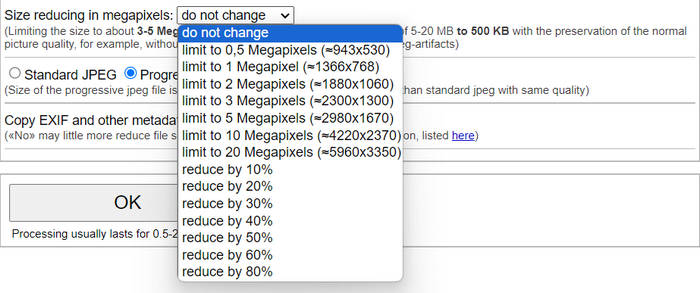
Adım 4. Ardından, Standard JPG veya Progressive JPG arasında seçim yapın.

Adım 5. İşiniz bittiğinde, sadece OK düğmesine tıklayın.
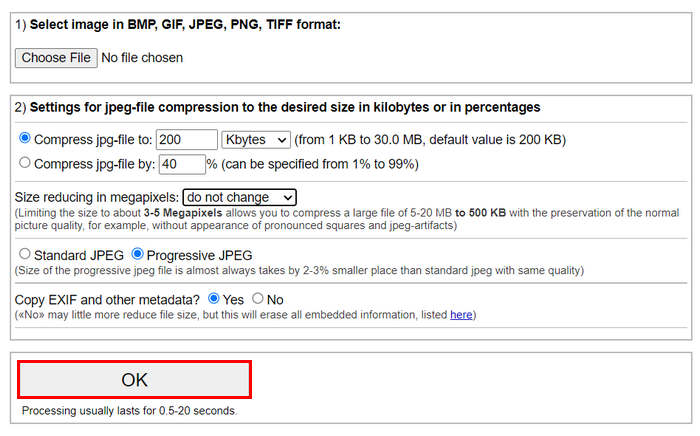
Standart JPG ile progressive JPG arasında seçim yaparken, progressive jpeg dosyasının boyutunun aynı kalitedeki standart jpeg'e göre her zaman 2-3% daha küçük yer kapladığını unutmayın.
Bölüm 5. E-posta için Fotoğrafların Sıkıştırılması Hakkında SSS
Fotoğraflarımı e-posta için hangi boyutta yeniden boyutlandırmalıyım?
E-postada fotoğraf göndermek için ideal boyut söz konusu olduğunda, herhangi bir kısıtlama olmasa da, fotoğraflarınızı maksimum 1024x768 piksele yeniden boyutlandırmanız önerilir. Ayrıca, görüntü boyutunuzu 1 MB'ın altında tutmak, ek sınırlamalarıyla ilgili sorunları önlemeye yardımcı olur ve alıcıların görüntüleri indirmesini ve görüntülemesini kolaylaştırır.
Gmail için resimler nasıl sıkıştırılır?
Gmail için görselleri sıkıştırmak çeşitli yöntemlerle yapılabilir. En kolay yollardan biri, FVC ücretsiz görsel sıkıştırma aracı gibi çevrimiçi sıkıştırma araçlarını kullanmaktır. Bunu kullanmak için, sadece görsel dosyalarınızı yüklemeniz yeterlidir; araç bunları otomatik olarak sıkıştıracaktır.
E-postalar için hangi görsel türü en iyisidir?
E‑postalar için en iyi görsel türleri JPEG ve PNG’dir. JPEG, dosya boyutu ve kalite arasında iyi bir denge sunan etkili sıkıştırma oranı sayesinde, çok renkli fotoğraflar ve görseller için yaygın olarak kullanılır. PNG ise, şeffaflık gerektiren görseller veya metin, logo ya da keskin kenarlı grafikler içeren görseller için tercih edilir; çünkü bu unsurların kalitesini daha iyi korur, ancak dosya boyutu JPEG’e kıyasla daha büyük olabilir.
Sonuç
Yavaş yükleme süreleri, teslimat hataları ve ek boyutu sınırlamalarından kaçınmak için fotoğrafları e‑posta için nasıl sıkıştıracağınızı bilmek gerçekten önemlidir. Bu makalede ayrıntılı olarak açıklanan yöntemleri uygulayarak, fotoğraf eklerinizin yönetilebilir, hızlı gönderilip alınabilir olmasını sağlayabilirsiniz.
Daha ne bekliyorsunuz? E-posta eklerinizi bu 3 kolay yolla bugün optimize etmeye başlayın.
-
 Aşırı Sıkıştırılmış Fotoğraf: Bunları Kolayca Nasıl Düzeltebileceğinizi Öğrenin
 Görüntünüz aşırı sıkıştırıldığında ne yapacağınızı mı merak ediyorsunuz? Bu makaleyi okuyun ve bu görüntü sorununun neden meydana geldiğini öğrenin ve bunları nasıl düzelteceğinize dair 2 yöntem öğrenin.
-
 Resmi 100KB'a Yeniden Boyutlandırma: Verimli Sıkıştırma İçin En İyi 3 Yol
 Görüntünüzü 100KB'a yeniden boyutlandırmanıza yardımcı olacak bir araç mı arıyorsunuz? Bu makaleyi okuyun ve görüntülerinizi istediğiniz dosya boyutuna nasıl küçültebileceğinize dair 3 yöntemi öğrenin.
-
 Word'de Resimler Nasıl Sıkıştırılır [Windows ve Mac]
 Word'deki görüntü sıkıştırma özelliğini nasıl kullanabileceğinizi merak ediyor musunuz? Bu kılavuz, Word'de sorunsuz sıkıştırma için görüntüleri nasıl sıkıştıracağınızı öğretecektir.
