


 Video Dönüştürücü Ultimate
 Ekran kaydedicisi
 Video Onarımı
 Güvenli İndirme
Denemeniz Gereken En İyi 5 Harika Fotoğraf Yeniden Boyutlandırma Uygulaması
Diğer insanlar, kayıpsız sıkıştırma yapabilen bir araç bulamadıkları için bir fotoğrafın boyutunu değiştirmeyi zor buluyor. Ayrıca birçok kişi, görüntü kalitelerini iyileştirmek için fotoğraflarının boyutunu değiştirir. Bir görüntünün yeniden boyutlandırılması kaliteyi etkileyecek olsa da, cihazınızda yeterli depolama alanı yoksa bu en iyi seçimdir. Dahası, bir görüntüyü yeniden boyutlandırmak, bulanık fotoğraflarınızı iyileştirmek için de harika bir seçenektir. İyi haber şu ki, görüntünüzü kalite kaybı olmadan yeniden boyutlandırabilecek çevrim içi, çevrim dışı, Android ve iPhone uygulamaları mevcut. Bu nedenle, en iyi beş fotoğraf yeniden boyutlandırma uygulamasını öğrenmek için bu makaleyi sonuna kadar okuyun.

Bölüm 1. Fotoğraf Yeniden Boyutlandırma Uygulaması Ücretsiz Çevrimiçi
Birçok kişi, cihazınıza herhangi bir şey indirmenizi gerektirmeyeceği için çevrimiçi bir fotoğraf boyutlandırıcı kullanmak ister. Cihazınız için depolama alanından tasarruf etmek istiyorsanız, çevrimiçi bir araç en iyi seçimdir. Ayrıca, tıpkı birçok kullanıcının önerdiği FVC Free Image Upscaler aracı gibi, çevrimiçi uygulamaların kullanımı genellikle ücretsizdir.
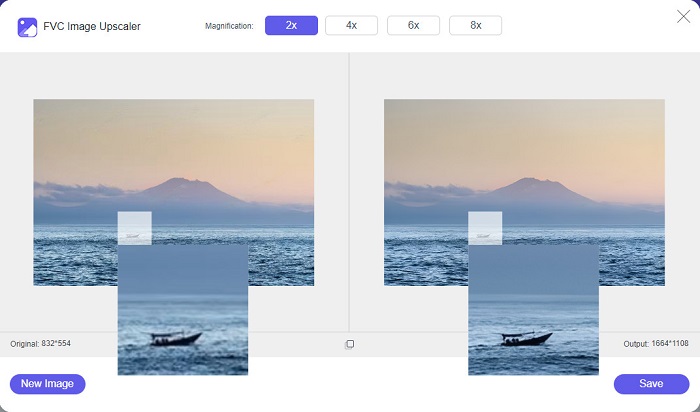
FVC Free Image Upscaler, Google, Firefox ve Safari dâhil tüm web tarayıcılarından erişilebilen çevrim içi bir yeniden boyutlandırma uygulamasıdır. Ayrıca bu harika uygulama, görüntünüzü 2x, 4x, 6x ve 8x büyütme oranlarında ölçeklendirebilir. Buna ek olarak PNG, JPG, JPEG ve BMP gibi neredeyse tüm görüntü formatlarını destekler. Bu aracın daha da mükemmel yanı, sezgisel kullanıcı arayüzüne sahip olması ve bu sayede yeni başlayanlar için uygun bir araç olmasıdır. Dahası, FVC Free Image Upscaler, görüntünüzdeki bulanık kısımları otomatik olarak tespit edip anında iyileştiren yapay zekâ (Artificial Intelligence – AI) teknolojisi kullanır. İstediğiniz büyütme oranını seçerek görüntünüzü büyütmenin yanı sıra, bu araç özellikle yapay zekâ ile iyileştirme yetenekleriyle bilinir. Ve çevrim içi bir uygulama olduğu için cihazınıza hiçbir şey indirmeniz gerekmez; bu da depolama alanından tasarruf etmenizi sağlar. Öyleyse ne bekliyorsunuz? Fotoğrafları yeniden boyutlandırmak için bu en iyi ücretsiz uygulamayı şimdi tarayıcınızdan açın.
Artıları
- Hızlı bir yükseltme sürecine sahiptir.
- Bir hesap için oturum açmanızı gerektirmez.
- Kullanımı kolay bir yazılım arayüzüne sahiptir.
- Windows veya Mac cihazınızdan erişebilirsiniz.
Eksileri
- İnternete bağlı bir araçtır.
Bölüm 2. Bilgisayarınız İçin En İyi Fotoğraf Yeniden Boyutlandırma Uygulaması
Bir görüntü yeniden boyutlandırıcı veya büyütücü arıyorsanız, bilgisayarınızda birçok uygulamayı kullanabilirsiniz. Ancak, indirilebilir tüm uygulamaların kullanımı ücretsiz değildir. Çoğu zaman, PC'niz için yazılım uygulamaları ücretsiz değildir. Neyse ki, bilgisayarınız için ücretsiz indirilebilen bir uygulama bulduk. Windows PC'niz için bu en iyi ücretsiz fotoğraf yeniden boyutlandırma uygulaması hakkında daha fazla bilgi edinmek için bu bölümü okuyun.
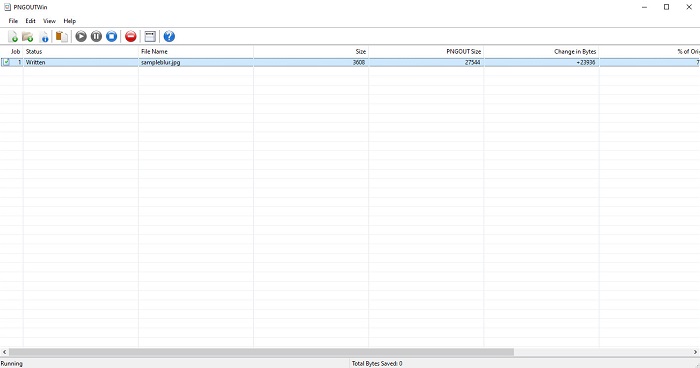
PNGOUTWin, Windows bilgisayarınıza ücretsiz indirebileceğiniz çevrim dışı bir fotoğraf yeniden boyutlandırma yazılımıdır. Bu fotoğraf yeniden boyutlandırma uygulaması PNG ve JPG gibi standart görüntü formatlarını destekler. Ayrıca, sıkıştırmak istediğiniz görüntüyü yükledikten sonra fotoğrafınızı otomatik olarak yeniden boyutlandırır. Kullanımı kolay olsa da, işlevleri arasında gezinmek zordur. Ancak birkaç kez kullandıktan sonra bu araca mutlaka alışacaksınız. Toplu yeniden boyutlandırma özelliği sayesinde, aynı anda birden fazla görüntünün boyutunu değiştirebilir ve hepsini tek bir klasöre kaydedebilirsiniz.
Artıları
- İndirmek ücretsizdir.
- Güvenli ve kullanımı kolaydır.
- Toplu yükseltme işlemi sunar.
Eksileri
- Yalnızca Windows cihazlarda kullanılabilir.
- Yükseltilmiş resminizi önizleyemezsiniz.
Bölüm 3. Android'de Fotoğrafları Yeniden Boyutlandırmak için En İyi Uygulama
Günümüzde birçok kişi Android telefon kullanıyor. Ve galerinizde düşük kaliteli bir görüntü varsa, onu bir fotoğraf boyutlandırma uygulamasıyla geliştirmek isteyebilirsiniz. Neyse ki, düşük kaliteli görüntünüzü geliştirmenize yardımcı olmak için PlayStore'da indirebileceğiniz birçok ücretsiz fotoğraf boyutlandırma uygulaması var.
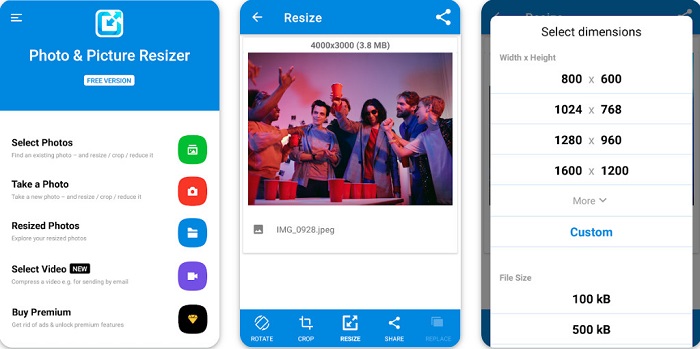
Photo & Picture Resizer, PlayStore’da fotoğraf yeniden boyutlandırma uygulamaları aradığınızda listede ilk çıkanlardandır. Android cihazınıza indirebileceğiniz en iyi fotoğraf yeniden boyutlandırma uygulamalarından biridir. Ayrıca, iki veya daha fazla görüntüyü aynı anda sıkıştırabileceğiniz toplu ölçeklendirme süreci sunar. Bunun yanı sıra, görseliniz için hangi boyutu istediğinizi hazır boyut (presets) seçeneklerinden belirleyebilirsiniz. Ek olarak, görüntünüzün dosya boyutunu ve çözünürlüğünü de değiştirebilirsiniz. Photo & Picture Resizer uygulaması videolarınızı da sıkıştırabilir. Photo & Picture Resizer’ın dezavantajı, özel düzenleme özelliklerine erişmeden önce premium sürümü satın almanızı gerektirmesidir.
Artıları
- İndirmek ücretsiz ve güvenlidir.
- Hızlı bir yeniden boyutlandırma işlemine sahiptir.
- Çıktınızı diğer sosyal medya platformlarına aktarabilirsiniz.
Eksileri
- Özel özellikleri kullanmak için premium sürümü satın alın.
- Sinir bozucu reklamlar içerir.
Bölüm 4. iPhone için En İyi Fotoğraf Boyutlandırma Uygulamaları
Bugünlerde birçok kişi iPhone kullanıyor ve bunu biliyor muydunuz? Resminizi yeniden boyutlandırmak veya geliştirmek için iPhone'unuza birçok ücretsiz fotoğraf boyutlandırma uygulaması indirebilirsiniz. Ve en iyisinin ne olduğunu bilmek istiyorsanız, bu bölümü baştan sona okuyun.
hatırlatma
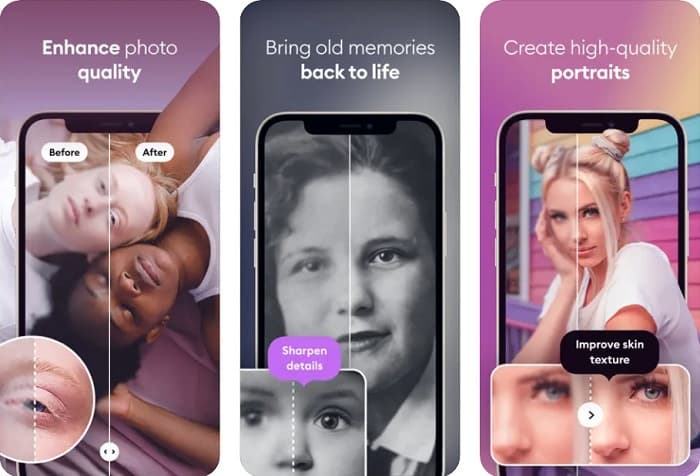
Remini, iPhone için en iyi fotoğraf yeniden boyutlandırma uygulamasıdır. Remini, AppStore’dan ücretsiz indirilebilir ve kullanımı güvenlidir. Ayrıca, görüntünüzü otomatik olarak yeniden boyutlandırıp iyileştiren yapay zekâ (Artificial Intelligence – AI) teknolojisi kullanır. Buna ek olarak, bu uygulama görüntünüzde yapılan değişiklikleri, cihazınıza kaydetmeden önce görmenizi sağlar. Çıktınızı Facebook, Instagram ve TikTok gibi popüler sosyal medya platformlarına aktarmanıza da imkân tanır. Pro sürümünde ise, görüntünüzü geliştirmek için kullanabileceğiniz daha fazla düzenleme özelliği bulunur. Bu yüzden, fotoğrafınızın daha keskin ve net görünmesini istiyorsanız, aradığınız uygulama bu olabilir.
Artıları
- İPhone için görüntü formatlarını destekler.
- Basit bir kullanıcı arayüzüne sahiptir.
- Düşük çözünürlüklü görüntüleri düzeltebilir.
Eksileri
- Görüntüleri geliştirmek için uygulamayı satın almanız gerekir.
Görüntü Yeniden Boyutlandırma
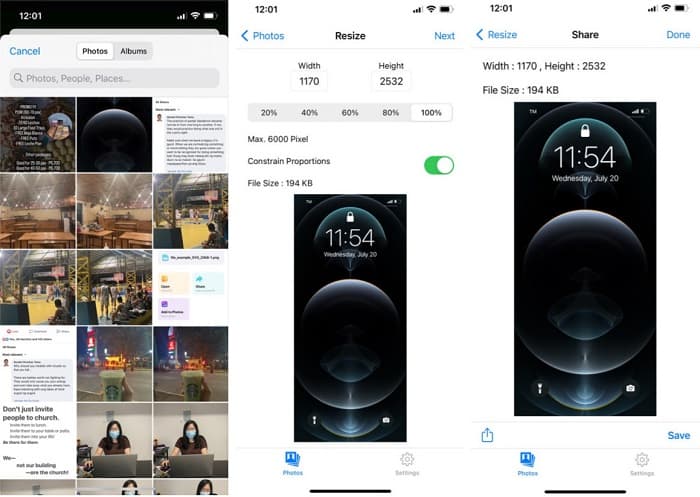
Görüntü boyutunu değiştirmek için kullanabileceğiniz bir diğer en iyi uygulama Image Resize’dır. Image Resize, iPhone cihazınıza da ücretsiz indirilebilir. Bu uygulama, görüntünüzün yüzdesini seçerek boyutunu değiştirmenize olanak tanır. Buna ek olarak, bu uygulama ile görüntünüzün genişliğini ve yüksekliğini ayarlayabilirsiniz. Bu uygulamayı daha da harika yapan şey ise, birçok kullanıcının son derece pratik bulduğu hızlı yeniden boyutlandırma sürecidir.
Artıları
- HEIC, Exif ve PNG görüntülerini destekler.
- Kullanıcı dostu bir uygulamadır.
Eksileri
- Yalnızca resminizin çerçevelerini yeniden boyutlandırabilir, ancak geliştirmez.
İlgili:
Windows ve Mac’te Görüntü Kalitesi Kolayca Nasıl Artırılır
Görüntünün Çözünürlüğü Nasıl Artırılır [Kaliteyi Artırmanın 5 Yolu]
Bölüm 5. En İyi Fotoğraf Yeniden Boyutlandırma Uygulaması hakkında SSS
Bir fotoğrafı kaliteden ödün vermeden yeniden boyutlandırabilir miyim?
Bir görüntüyü yeniden boyutlandırmak, mutlaka görüntünüzün kalitesini bozacağı anlamına gelmez. Resminizin boyutunu etkilese de çoğu zaman uygulamalar kaliteden ödün vermeden bir resmi yeniden boyutlandırabilir.
Adobe Photoshop kullanarak bir görüntüyü yeniden boyutlandırabilir miyim?
Evet. Adobe Photoshop, görüntünüzün boyutunu değiştirebileceğiniz bir özelliğe sahip, son derece gelişmiş bir fotoğraf düzenleme uygulamasıdır. Bunu yapmak için, Adobe Photoshop’u açın, boyutunu değiştirmek istediğiniz görüntüyü seçin ve ardından görüntünüzün boyutunu ayarlamak için ana menü çubuğu > Image’ı Seç > Image Size’a tıklayarak Image Size iletişim kutusunu açın.
Adobe Photoshop hangi görüntü biçimlerini destekler?
Adobe Photoshop, JPG, JPEG, PNG, GIF, TIFF ve daha fazlası gibi neredeyse tüm bilinen görüntü biçimlerini destekler.
Sonuç
Artık en iyi fotoğraf yeniden boyutlandırma uygulamasını bildiğinize göre, hangisini tercih edeceğinizi seçebilirsiniz. Çevrim içi, çevrim dışı, Android ve iPhone için farklı uygulamalar vardır ve seçim hangi cihazı kullandığınıza bağlıdır. Ancak cihazınıza herhangi bir şey indirmek istemiyorsanız, hemen FVC Free Image Upscaler kullanın.
-
 En İyi Geliştiricilerle iPhone Fotoğraf Çözünürlüğünü Daha İyi Hale Getirin
 iPhone fotoğraf çözünürlüğünü iyileştirmeye mi ihtiyacınız var? Pekala, bu yazıda kullanabileceğiniz en iyi araçları ve bilmeniz gereken diğer püf noktalarını ele alıyoruz!
-
 Çevrimiçi ve Çevrimdışı Eski Fotoğraf Restorasyonu [Kolay Adımlar]
 Eski bir fotoğrafı geri yüklemek mi istiyorsunuz? Bu araçlarla eski fotoğraf restorasyon sürecini bileceksiniz. En basit yöntemleri öğrenmek için bu gönderiyi okuyun.
-
 Kullanmanız Gereken Tüm Web Tarayıcıları için En İyi 7 Piksel Geliştirici
 Kullanılacak en iyi piksel geliştiricileri bilmek istiyorsanız, bu gönderiye göz atsanız iyi olur. Bu makale, tüm web tarayıcıları için en iyi yedi fotoğraf pikseli geliştiricisini listeler.
