


 Video Dönüştürücü Ultimate
 Ekran kaydedicisi
 Video Onarımı
PicWish İncelemesi: Fotoğraf Geliştiriciye Derinlemesine Bir Bakış
Görsel olarak çekici bir sonuç yaratmak için fotoğraf iyileştirme ihtiyacı bir zorunluluk haline geldi. Fotoğrafçılar, içerik oluşturucular ve hatta sıradan kullanıcılar aktif olarak görsel hikaye anlatımlarını geliştirmenin yollarını arıyor. Daha yüksek kaliteli görsellere yönelik arayış, görsellerin düzenlenmesi ve dışa aktarılmasıyla bitmiyor. Fotoğraf geliştirme kullanımı, görüntünün olabileceği en iyi kalitede görünmesini sağlar. PicWish, fotoğraf geliştirme özelliklerine sahip olan ve her görüntüye en iyi kaliteyi getiren araçlardan biridir. Teknoloji, görsel içerik oluşturma dünyasındaki olanakları yeniden tanımlamaya devam ederken, PicWish, fotoğraf geliştirme araçlarının gidişatını şekillendirmede yardımcı bir araç olarak ortaya çıkıyor.
Bu Picwish Photo Enhancer incelemesi, aracın işlevlerini, kullanım alanlarını, artılarını ve eksilerini ve ayrıca ihtiyaçlarınıza uygun olabilecek alternatif bir aracı derinlemesine inceleyen kapsamlı bir değerlendirme sunar. Bizimle birlikte bu yolculuğa çıkın ve okumaya devam edin; PicWish’in inceliklerini parça parça ele alırken, görselleri büyütme (upscale etme) konusunda nasıl konumlandığını da ortaya koyacağız.

Bölüm 1. PicWish Fotoğraf Geliştirici
Fotoğraf iyileştiricilere özel odaklanan çevrim içi bir resim düzenleyici olan PicWish, yeteneklerini bu temel işlevin ötesine taşıyor. Fotoğraf geliştirmedeki becerisinin yanı sıra PicWish; arka plan kaldırma, sıkıştırma ve rötuşlama gibi görevlerde de öne çıkıyor. Tüm bu özellikler, profesyonel seviye yapay zekâ entegrasyonu sayesinde mümkün kılınmıştır. Piyasadaki diğer gelişmiş yazılımların karmaşıklığıyla boy ölçüşemese de temel rötuşları ustalıkla gerçekleştirir ve size profesyonel görünümlü sonuçlar sunabilir.
Yalnızca web ve masaüstü uygulamaları üzerinden değil, hem iOS hem de Android mobil cihazlardan da erişilebilen PicWish, kullanımında çok yönlülük sunuyor. Onu benzerlerinden ayıran PicWish, yapay zeka destekli özelliklere sahiptir ve görüntü düzenleme yeteneklerine ekstra bir gelişmişlik katmanı ekler. Dikkat çekici bir şekilde, çekiciliğini artıran şey maliyetidir. PicWish'in excel için hazırlanmış araçlardan biri olduğu ortaya çıktı.
Bölüm 2. PicWish İncelemesi
Artıları
- Kullanımı kolay.
- Yapay zeka entegre teknolojisi.
- Web sürümlerinde daha fazla özellik sunar.
- Fotoğraf geliştirmek için harika.
- Çok çeşitli araçlar ve işlevler sunar.
Eksileri
- Uygulamalardaki ve webteki özellikler farklıdır.
- Uygulama ve web için bulut senkronizasyonu kullanılamıyor.
- Bazı özellikler ücretli abonelik kapsamında kilitlenmiştir.
- Dosyalar 20 MB'ın altında çalışacak şekilde sınırlıdır.
- Fiyatlandırma pahalı olabilir.
fiyatlandırma
PicWish ücretsiz mi? PicWish'in fiyatlandırması, aylık olarak veya doğrudan yararlanmak istediğiniz kredi/fotoğraf sayısına göre değişir. Bir kredinin bir fotoğrafa eşdeğer olduğunu unutmayın.
Fiyatlandırma Modeli: Ücretsiz ve Abonelik Tabanlı
Aylık abonelik $5,99/ay’dan başlar - 50 Kredi veya kredi başına $0,120
Kullandıkça öde $17,99’dan başlar - 300 Kredi veya kredi başına $0,060

İşlevsellikler
PicWish işlevleri, fotoğraf geliştirmeden aşağıdakilere kadar genişledi:
◆ Arka Plan Kaldırıcı. Arka plan kaldırma özelliği, ürün ve kimlik fotoğrafı hazırlama süreçleri için ideal beyaz bir arka plan ve görselleriniz için arka plan oluşturan bir yapay zekâ destekli arka plan sunar.
◆ Fotoğraf İyileştirici. Her bulanık resmi bir anda daha net hale getirir. Yapay zekâ destekli fotoğraf iyileştiricisi, görselleri daha keskin ve canlı yaparak çok daha net ve yüksek kaliteli sonuçlar elde edilmesine yardımcı olur.
◆ Yapay Zekâ Arka Plan Oluşturucu. Özellikle e-ticaret için çok kullanışlıdır. Ürünleriniz için gerçekçi bir yapay zekâ stüdyo arka planını kolayca oluşturabilir.
◆ Fotoğraf Rötuş. Nesneleri hassasiyetle kaldırır. Yapay zekâsı istenmeyen kişiler, metinler, dağınıklıklar ve logoları tanıyıp görüntülerden metinleri kaldırabilir.
◆ Görüntü Büyütücü. Görsellerinizi 2x’ten 4x’e kadar kalitede büyütürken kalite kaybı yaşamanıza engel olur.
PicWish Kullanım Durumları
Potansiyel kullanıcılar PicWish'i aşağıdaki durumlarda kullanabilir:
◆ Kimlik Fotoğrafı. Kimlik fotoğraflarını anında oluşturabilir. Çok çeşitli kimlik fotoğrafı ebatları sunar ve arka planları düz renklere dönüştürme imkânı verir.
◆ Eski Fotoğrafları Onarma. Eski fotoğrafları en iyi kalitede onararak anıların kalıcı olmasını sağlar. Ayrıntıları iyileştirmek, eski fotoğrafları onarmanın temel özelliklerinden biridir; ayrıca siyah fotoğrafları renklendirerek daha canlı hale getirir.
◆ Anime Büyütücü. Yalnızca anime ve çizgi film görsellerini büyütmek veya kalitesini artırmak için tasarlanmıştır. Çözünürlük kaybı yaşamadan görüntü kalitesini yükselterek bir görseldeki ayrıntıları ortaya çıkarır.
◆ Logo. Yapay zekâ, logoları sadece birkaç saniye içinde kaldırarak arka planı temizleme konusunda hızlı ve güvenilir bir çözüm sunar.
◆ İçerik Üretimi. Paylaşımlar, hikâyeler veya reklamlar için özel olarak düzenlenmiş görüntü iyileştirmeleriyle sosyal medya varlığınızı güçlendirir; böylece görselleriniz dikkat çeker ve hedef kitlenizle daha iyi etkileşim kurar.
◆ Belge İşleme. Görüntülerden veya taranmış belgelerden metin çıkararak belge işlemeyi kolaylaştırır, dijital arşivlemeyi mümkün kılar ve sonraki işlemleri verimli hale getirir.
◆ Dijital Sanat. Yapay Zekâ Sanat Oluşturucusunu kullanarak dijital sanat projelerinizde yaratıcılığınızı serbest bırakın; dijital çalışmalarınıza veya sanatsal üretimlerinize özgün bir dokunuş katan farklı görseller üretin.
PicWish, umut verici sonuçlar sunan ve araçları kullanmaya devam ettiğinizde üreteceğiniz çıktılardan paranızın iadesini garanti edebilen bir araçtır. Gerçekten pahalı olabilir, ancak özellikleri ve kullanımları açısından çok yönlülüğü göz önüne alındığında, ödenmesi gereken küçük bir bedeldir.
Bölüm 3. PicWish Alternatifi
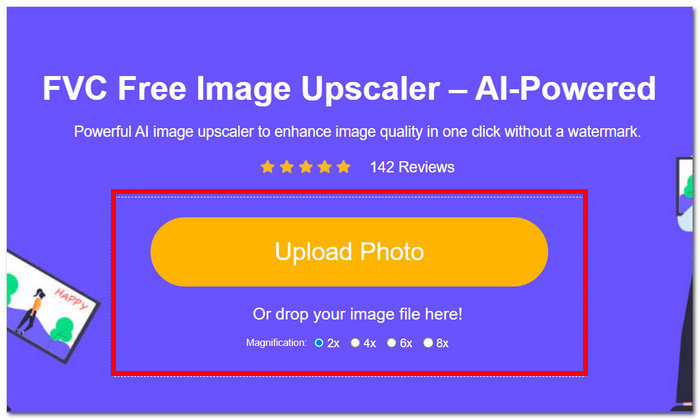
Eğer aracı karmaşık bulursanız ve yalnızca web tabanlı, tamamen ücretsiz araçları kullanıp saklamak isterseniz, alternatifler burada devreye giriyor. FVC Online Image Upscaler, yapay zekâ tarafından desteklenen ve görüntü kalitesini filigran olmadan doğru bir şekilde iyileştiren bir araçtır. PicWish ile FVC arasındaki benzerlik, her ikisinin de fotoğraf iyileştirmede kusursuz sonuçlar elde etmek için yapay zekâ teknolojisi kullanmasıdır. Öte yandan, PicWish sunduğu özellikler bakımından çok yönlü olabilir; ancak FVC Online Image Upscaler’dan farklı olarak yalnızca 4 kata kadar büyütme seçeneği sunar; FVC ise 8 kata kadar daha yüksek kalite sağlar. FVC’nin yeteneklerini daha iyi anlamak için, aşağıdaki adımları izleyerek görselinizi dilediğiniz gibi büyütebilirsiniz.
Adım 1. FVC Online Image Upscaler web sitesinde, fotoğrafınızı görsel yükleme alanına yükleyin.
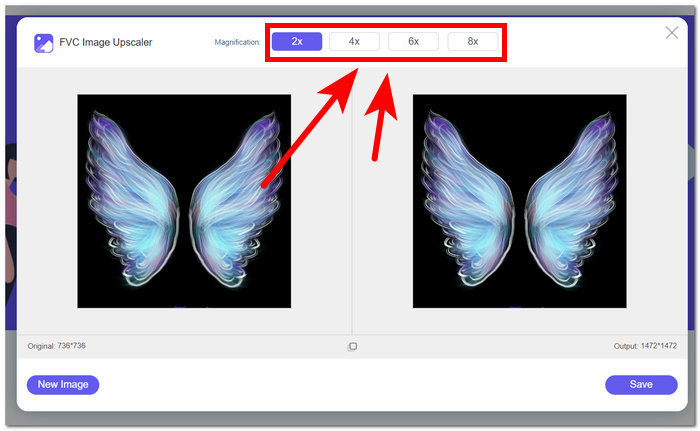
Adım 2. Görseliniz araçta yüklenmeyi tamamladıktan sonra büyütme işlemini yapmanız gerekir. Görselinizi büyütmek için, aracın üst kısmında yer alan seçeneklerden Büyütme değerini 2 ila 8 kat arasında seçin.
Adım 3. Araç görselinizi otomatik olarak işleyecek ve kontrol edebilmeniz için önceki ve sonraki hâlini size gösterecektir.
Adım 4. Sonuçtan memnun kaldığınızda, ekranınızın sağ alt kısmında yer alan Kaydet düğmesine tıklayarak görseli masaüstünüze kaydedebilirsiniz.
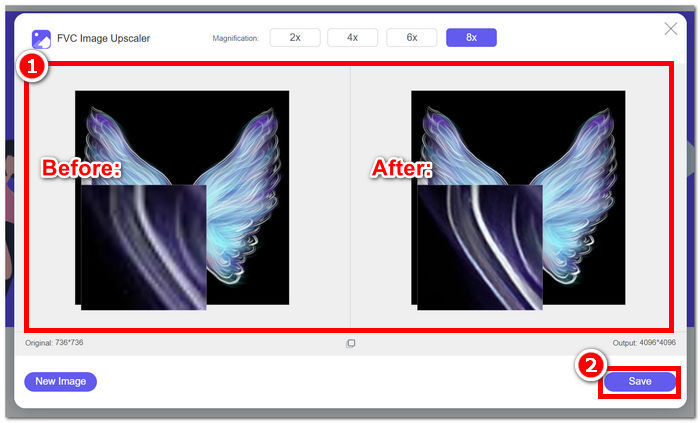
Özetlemek gerekirse, FVC Online Image Upscaler, fotoğraf geliştirmede standart aracın ne olması gerektiği konusundaki beklentileri karşılıyor. Bu nedenle, fotoğraflardaki bulanık kısımları tanır ve yapay zekanın, süreçte tek bir piksel bile kaybetmeden görüntüyü otomatik olarak ayarlamasını sağlar.
Bölüm 4. PicWish Fotoğraf Geliştirici Hakkında SSS
PicWish'in kullanımı güvenli midir?
PicWish'in kullanımının genellikle güvenli olduğu kabul edilir, ancak herhangi bir çevrimiçi hizmette olduğu gibi, uyumluluk ve kullanıcı güvenliğini sağlamak için politikasını ve kullanım koşullarını gözden geçirmeniz önerilir.
PicWish veri topluyor mu?
Birçok çevrimiçi platform gibi PicWish de gizlilik politikasında belirtildiği şekilde veri toplayabilir. Kullanıcılar, toplanan verilerin türünü, nasıl kullanıldığını ve üçüncü taraflarla paylaşılıp paylaşılmadığını anlamak için gizlilik koşullarını incelemelidir.
PicWish aboneliği nasıl iptal edilir?
Bir PicWish aboneliğini iptal etmek için kullanıcıların genellikle hesap ayarlarına erişmeleri veya yardım için PicWish'in müşteri desteğiyle iletişime geçmeleri gerekir. Tam adımlar farklılık gösterebilir; bu nedenle platformun destek belgelerini kontrol etmeniz veya müşteri hizmetleriyle iletişime geçmeniz önerilir.
PicWish nasıl çalışır?
PicWish muhtemelen görüntüleri geliştirmek ve değiştirmek için çeşitli görüntü işleme algoritmaları ve muhtemelen yapay zeka kullanarak çalışıyor. Spesifik çalışmalar, istenen iyileştirmeleri elde etmek için görüntünün özelliklerini analiz eden ve ayarlayan arka plan süreçlerini içerebilir.
Bir resmin kalitesini nasıl artırabilirim?
PicWish veya benzeri araçları kullanarak resmin kalitesini artırmak için parlaklık, kontrast ve keskinlik gibi öğeleri ayarlamayı düşünün. Ayrıca renk düzeltme, filtreler ve yeniden boyutlandırma gibi özellikleri denemek, genel görüntü kalitesinin artırılmasına katkıda bulunabilir. Bu ayarlarla denemeler yapmak, kullanıcıların görüntüyü tercihlerine göre uyarlamasına ve görsel olarak daha çekici bir sonuç elde etmesine yardımcı olabilir.
Sonuç
Özetle, PicWish Photo Enhancer sunduğu özellikler ve aldığınız ücretli abonelik karşılığında beklentileri karşılıyor. Fotoğraf iyileştirme araçları arasında, amacına hizmet etmesi ve fotoğraf düzenlemenin birçok alanında potansiyelini göstermesiyle dikkat çekiyor. İşlevleri ve kullanım alanları, PicWish’in yalnızca fotoğraf iyileştirme için değil, sunduğu zengin özellikler için de bilindiğinin kanıtı. Yine de, bazı araçların FVC Online Image Upscaler gibi fotoğraf iyileştirmeyi ücretsiz sunabildiği göz önünde bulundurularak, potansiyel kullanıcıların abonelik maliyetlerini sağladığı faydalarla dikkatlice karşılaştırması gerekir. Her iki araç da görselleri iyileştirme konusunda ön sıralarda yer almaktadır. PicWish ve FVC, kullanıcıları görsel olarak büyütülmüş görüntüler için sınırsız fırsatları keşfetmeye davet ediyor.
-
 Arka Plan Sökücü ve Fotoğraf İyileştirici İçin Fotor İncelemesi
 Fotor Arka Plan Sökücü ve Fotoğraf İyileştirici hakkında bilmeniz gereken her şey. Bazı özelliklerine bakın ve ihtiyaçlarınıza uygun önerilen alternatifi görün.
-
 Görüntü Boyutu Çevrimiçi ve Çevrimdışı Nasıl Artırılır
 Kaliteyi kaybetmeden görüntü boyutunu artırmanın en kolay yolunu keşfedin. Resimleriniz için en iyi kaliteyi sağlamak için yeniden boyutlandırma araçlarımıza ve yazılımımıza bakın.
-
 Photoshop'ta Bir Görüntü Nasıl Yeniden Boyutlandırılır: Bilinmesi Gereken Kılavuz
 Photoshop'ta bir görüntünün nasıl yeniden boyutlandırılacağına ilişkin adım adım süreci öğrenin. Resimlerinizin boyutunu kolay ve kaliteli bir şekilde, verimli bir şekilde değiştirmek için bu kılavuzu izleyin!
