


 Video Dönüştürücü Ultimate
 Ekran kaydedicisi
 Video Onarımı
 Güvenli İndirme
Kullanılacak En İyi 3 Çözümle Bir Görüntüyü Hızla Çözme
Görüntü netleştirme, piksellenmiş hale gelen ya da üzerinde küçük karelerden oluşan bitmap efektleri bulunan bir görsele makyaj yapmak için ihtiyacınız olan çözümdür. Birçok kullanıcı görüntüyü düzenlemenin, ayarlamanın, değiştirmenin ve geliştirmenin zahmetli olduğunu düşünür; dürüst olmak gerekirse eskiden öyleydi. Ancak artık erişebildiğimiz gelişmiş teknoloji sayesinde, doğru aracı kullandığınızda bu görev kolayca çözülebiliyor.
Fotoğrafınızdaki pikselleşmeyi kaldırmak için doğru araca sahip değil misiniz? Neyse ki, bu makale size fotoğrafın pikselleşmesini düzenlemenize yardımcı olabilecek bulduğumuz en iyi üç yazılımı ve sorunu çözmek için her biri için bir öğretici getirecek.

Bölüm 1. En İyi Seçim Fotoğraf Düzenleyici ile Çevrimiçi Bir Görüntünün Piksel Çözülmesi [Önerilen]
FVC Free Image Upscaler, görüntüleri çevrimiçi ve ücretsiz şekilde netleştirmek için kullanabileceğiniz, tamamen otomatik bir çevrim içi araçtır. Erişebildiğiniz herhangi bir web tarayıcısında bunu açabilirsiniz; başlatmak için herhangi bir başlatıcı indirmenize gerek yoktur, bu yüzden araca erişir erişmez hemen kullanabilirsiniz. Bu yazılım web üzerinden kullanılabilir olsa da, görüntüleri netleştirme gücü ve performansı, çevrimiçi ya da çevrimdışı kullanabileceğiniz en profesyonel fotoğraf düzenleyicilerle eşdeğerdir. Bu aracı kullanmakta zorlanacağınızı düşünüyor olabilirsiniz; ama zorlanmayacaksınız. Hâlâ ikna olmadınız mı? Öyleyse, bu aracı kolayca nasıl kullanacağınızı adım adım gösteren aşağıdaki eğitimi okuyabilir ya da takip edebilirsiniz.
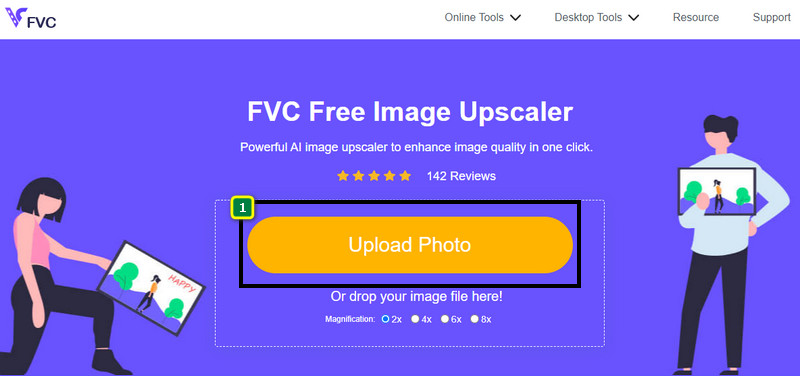
Adım 1. Bu web aracına, cihazınızda kullandığınız herhangi bir web tarayıcısından adını aratarak ya da ana sitesini açmak için bu bağlantıya tıklayarak erişebilirsiniz.
Adım 2. Web aracına girdikten sonra, piksellenmiş görseli yüklemek için Add Image düğmesine tıklayın. Ekranınızda bir dosya klasörü açılacaktır; yerel sürücünüze kaydedilmiş görseli buradan bulup Open tuşuna basarak yükleyebilirsiniz.
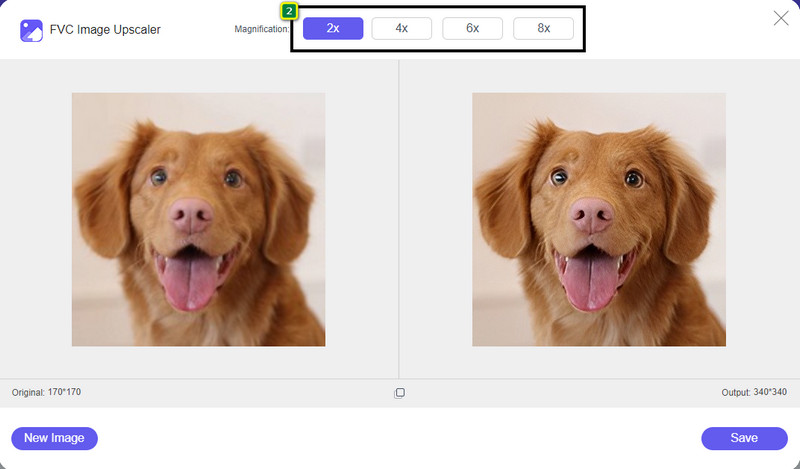
Adım 3. Sonraki adımda, görselinizdeki küçük kareli, bit eşlemli görünümü ortadan kaldırıp pürüzsüzleştirmek için uygulamak istediğiniz büyütme seçeneğini belirleyin.
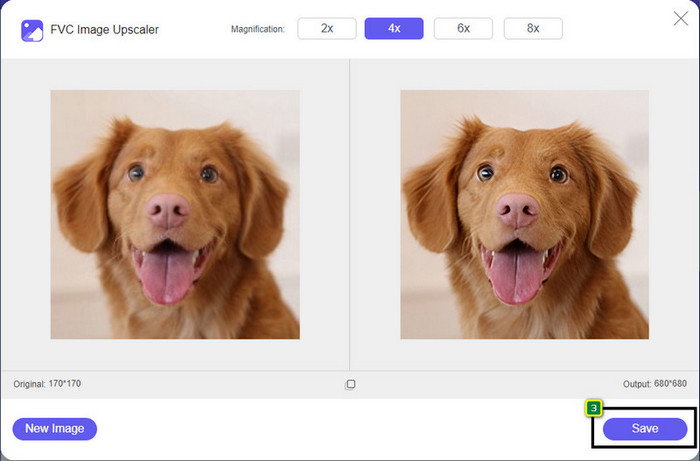
Adım 4. Bu kadar basit; netleştirilmiş sürümü yerel sürücünüze indirmek için Save düğmesine tıklayın.
Bölüm 2. Windows ve Mac'te 2 Yol Kullanarak Çevrimdışı Bir Görüntünün Piksellerini Çözme [Kolay]
Pixbim - Windows'ta Fotoğrafları Pikselleştirme
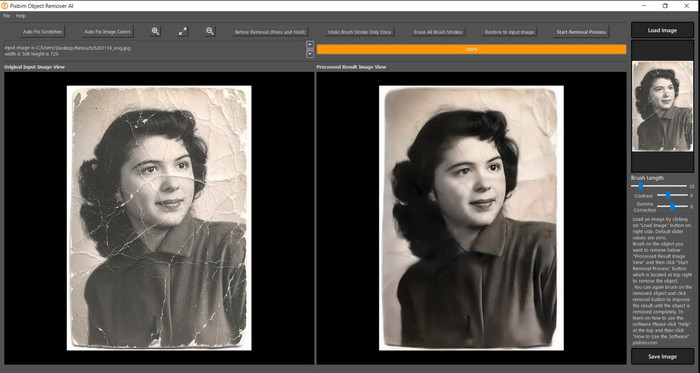
Pixbim, bu sorunu çözmek için Windows’a indirebileceğiniz, en güçlü ve yapay zekâ destekli görüntü netleştirme araçlarından biridir. Piksellenmiş görselleri hızlı ve verimli şekilde düzelttiği için bu yazılımdan bu yazıda bahsetmeyi hak ediyor. İçerisindeki yapay zekâ, yazılımı kullanırken zorluk yaşamamanız için parametreleri sizin yerinize ayarlar. Ancak sahip olduğu özellikler ve işlevler nedeniyle, deneme süresinden sonra kullanmaya devam etmek için bir lisans anahtarı satın almanız gerekir. Bu da, onu bilgisayarında kullanmak isteyen birçok kişi için pahalı olabilir.
Adım 1. Yazılımı indirdikten sonra, bir sonraki adıma geçebilmemiz için onu başlatmanız gerekir.
Adım 2. Buraya geliştirmek istediğiniz piksellenmiş görseli eklemek için Load Image düğmesine tıklayın.
Adım 3. Ardından, ulaşmak istediğiniz değere göre kaydırma çubuklarını sürükleyerek parametreleri ayarlayın.
Adım 4. Görseli ayarlamayı bitirdikten sonra sonucu kaydedip dışa aktarın.
Movavi Fotoğraf Düzenleyici [Windows ve Mac]
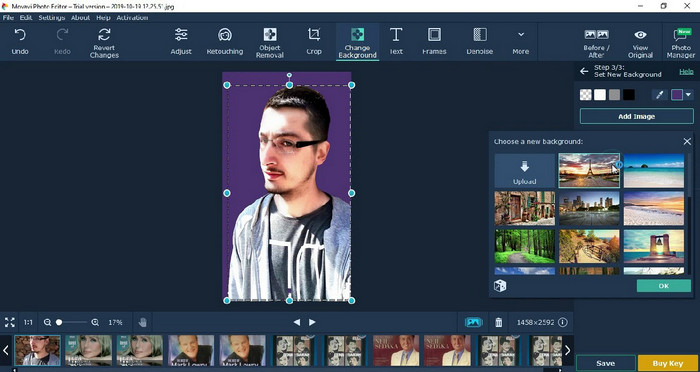
Birçok kullanıcı, sunduğu çok yönlü düzenleme imkânları nedeniyle Movavi Photo Editor’ı çoktan denedi. Pixbim’e benzer şekilde, yapay zekâsının sinir ağları desteğiyle görselin kaybolan piksellerini geri kazandırabilir. Bu düzenleyici elinizin altında olduğunda, kırpma, döndürme, filtre ekleme, pikselleri düzeltme ve daha fazlası gibi hem temel hem de gelişmiş düzenlemeleri yapabilirsiniz. Ancak masaüstünüzde premium sürümünü satın almadığınız sürece tüm bu özelliklere erişemezsiniz.
Birçoğu için oldukça pahalı olan Pixbim ile neredeyse benzer bir fiyatı var. Ancak bir editör satın almak için bir bütçeniz varsa, ihtiyacınız olan şey bu olabilir. Adımları izleyerek bu uygulamayla görüntülerin piksellerini nasıl çözeceğinizi öğrenin.
Adım 1. Uygulamayı Windows ya da Mac OS cihazınıza indirin.
Adım 2. Yazılımı başlatın ve netleştirmek istediğiniz fotoğrafı buraya yükleyin.
Adım 3. Görseli yüklediğinize göre, görüntüyü yapay zekâ ile otomatik olarak düzenlemek için Magic Enhance düğmesine tıklayın.
Adım 4. Görseli dışa aktarın ve elde ettiğiniz sonucun keyfini çıkarın.
Bölüm 3. Bir Görüntüyü Pikselleştirmeye İlişkin SSS
Dışa aktarılan pikselsiz görüntüde neden bir filigran var?
Uygulamanın ücretsiz deneme sürümünü kullandığınızda, dışa aktarıldığında filigran bırakma olasılığı vardır. Bu nedenle, filigran olmadan bir görüntüyü dışa aktarmak istiyorsanız, uygulamanın lisansını satın alabilir veya FVC Free Image Upscaler'ı kullanabilirsiniz, çünkü dışa aktarılan görüntüde filigran bırakmaz.
Bulanık ve pikselli arasındaki fark nedir?
Birçok makale, bazı faktörler nedeniyle bulanık ve pikselli olanın aynı olmadığını kanıtladı. Bulanık görüntüler, yüksek hızlı bir hareket yakalamanızın veya titreyen bir kamerayla fotoğraf çekmenizin nedenidir. Pikselleştirilmiş durumdayken, bir anlık görüntüyü büyüttüğünüzde bir pikselleşmeye başlar ve küçük bir kareye sahip bir bitmap görürsünüz.
Görüntüyü pikselli yapan faktör nedir?
Bazı nedenler görüntüleri piksellere dönüştürür; yaygın bir neden, bir raster görüntüyü büyütmenizdir. PNG, JPG, GIF ve daha fazlası gibi tarama biçimleri, bu kaplarda depolanan nesnenin görünümünü oluşturan küçük karelerden oluşur. Genellikle, görüntüyü büyüttüğünüzde, görsel olarak sunulan renk verilerini içeren piksel olarak bilinen kareler olduğunu görürsünüz. Özellikle pikselleşme meydana geldiğinde birçok editör için sorun olabilir.
Görüntü gürültüsünü nasıl düzeltebilirim?
Çektiğiniz görüntülerde karşılaşabileceğiniz bir diğer yaygın sorun ise farklı bir tür bozulmadır; ihtiyacınız olan çözüm ise bu yazıda olabilir. Kolayca okuyup öğrenmek, ardından sorunu çözmek için bu bağlantıya tıklayarak görüntü gürültüsünü nasıl gidereceğinizi keşfedebilirsiniz.
Sonuç
İşte bu kadar; şimdi en iyi fotoğraf düzenleyicilerinin yardımıyla, ister masaüstüne indirilebilir ister web tabanlı olsun, bir görüntüyü kolayca netleştirebilirsiniz. Bu sorun artık çözüldü! Yani bir gün pikselleşme problemiyle karşılaşırsanız, size yardımcı olması için bu yazıya güvenebilirsiniz. İhtiyacınız olan en iyi araç burada ve yardıma hazır; tıpkı FVC Free Image Upscaler gibi. Görüntünün pikselleşmesini düzeltmek, herkesin gözüne hoş görünen bir sonuç için en iyi ayarlamadır. Bu çevrimiçi fotoğraf düzenleyiciyi kullanırken pikselleşmeye elveda deyin.
-
 Her Görüntüyü Geliştirmek ve İyileştirmek için Kullanabileceğiniz 7 Görüntü Yükseltici [2022]
 Görüntü yükselticiye mi ihtiyacınız var? Neyse ki, bu makale masaüstünüze erişebileceğiniz ve indirebileceğiniz en iyi yazılımı kapsar.
-
 Bu 2022'yi Kullanmanız Gereken 5 Görüntü Çözünürlüğü Artırıcı [Son Seçimler]
 Hangi görüntü çözünürlüğü geliştiricisini kullanmanız gerektiğini bilmiyor musunuz? Görüntülerin çözünürlüğünü kullanmak ve geliştirmek için beş aracı incelerken bu makaleyi okuyun.
-
 Mobil Cihazlarınızda Görüntü Çözünürlüğünü Artıracak 4 Uygulama [En İyi Seçim]
 1080p, 4k veya benzeri elde etmek istiyorsanız fotoğraf çözünürlüğünüzü artırmak için uygulamalara ihtiyacınız olacak. Aşağıdaki liste ile kolayca yapabilirsiniz!
