


 Video Dönüştürücü Ultimate
 Ekran kaydedicisi
 Video Onarımı
3GP'yi MOV'a Dönüştürürken İzlemeniz Gereken Basit Adımlar
The users can store video, audio, effects, or text in the MOV file, a multimedia container file (e.g., subtitles). However, created by the Third Generation Partnership Project (3GPP), it is intended to transmit audio and video data between 3G cell phones and over the Internet. These two video formats have their differences, but to know more about the comparison between them and the converters that can convert 3GP to MOV, read this article thoroughly. Fasten your thoughts, and let's dig in!

Bölüm 1. 3GP ve MOV hakkında giriş
Üçüncü Nesil Ortaklık Projesi (3GPP) 3GP, kullanıcıların 3G'yi destekleyen cihazlarda oynatabilecekleri bir video dosyası formatıdır. Video verilerinin kayıplı sıkıştırılması için ideal olan H.263 veya H.264 kodekleri ve AMR veya AAC tabanlı ses akışları bu pakete dahildir. 3G ağları ve multimedya cihazları için, bu ISO standardı video formatı, videoları paylaşmak için ideal hale getiren daha küçük bir dosya boyutuna sahiptir. Başlangıçta 3G cihazlar için tasarlanmış ve amaçlanmış olsa da, modern 4G cihazlarda ve işletim sistemlerinde hala sorunsuz çalışır.
Ancak MOV, Apple tarafından oluşturulmuş bir video formatıdır. Kullanıcılar, video ve multimedya dosyalarını bu tür dosya kapsayıcısında saklayabilir. Apple geliştirdiği için, yalnızca Apple ürünleri veya Quicktime video oynatıcılarla uyumludur. MOV dosyalarında minimum sıkıştırmayla veya hiç sıkıştırma olmadan yüksek bit hızlarında depolanan video verileri. Büyük dosya boyutları nedeniyle, yine de mükemmel kalitededirler.
Bunlar, bu iki video formatının kısa bir açıklamasıdır. Daha fazla okumak için 3GP video formatınızı MOV'a dönüştürmenize yardımcı olabilecek yazılım veya çevrimiçi araçlar gibi tüm dönüştürücülerle karşılaşacaksınız.
Bölüm 2. Mac'te 3GP'yi MOV'a Dönüştürmeye Yardımcı Olan En İyi Dönüştürücü
Let this article introduce you to the best software to consider converting 3GP video files to MOV. Video Converter Ultimate is a free-to-download tool available for Windows and Mac that can convert 3GP to MOV in just a minute. Aside from the great features it holds, this software also supports a massive amount of video formats that other software or online converters don't support.
Şanslısınız çünkü bu özelliklerin yanı sıra videonuzun kalitesini mümkün olan erişilebilir yollarla iyileştirebilecek video geliştirme araçlarına da sahip. Artık bu yazılımın kısa bir açıklamasını öğrendiğinize göre, dönüştürme işlemini düzgün bir şekilde yürütmek için izlemeniz gereken tüm prosedürleri öğrenmeye başlayabilirsiniz.
Step 1. First, you have to click the Free Download button below this step to download the software. This software is available on both Windows and Mac so you don't have to worry about using it on both operating systems. After you download the software, you can now install the software and click Start Now to run it on your computer.
Ücretsiz İndirWindows 7 veya üstü içinGüvenli İndirme
Ücretsiz İndirMacOS 10.7 veya üstü içinGüvenli İndirme
Step 2. After you run the software, the interface of this software will pop up on your screen displaying the converter feature alongside the other features available in this software.
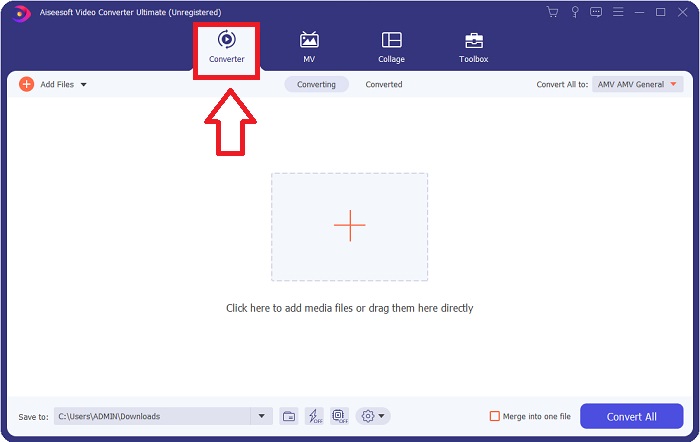
Step 3. You can now start uploading a video file you want to convert in this software by clicking the + icon or you can also drag your files from your desktop.

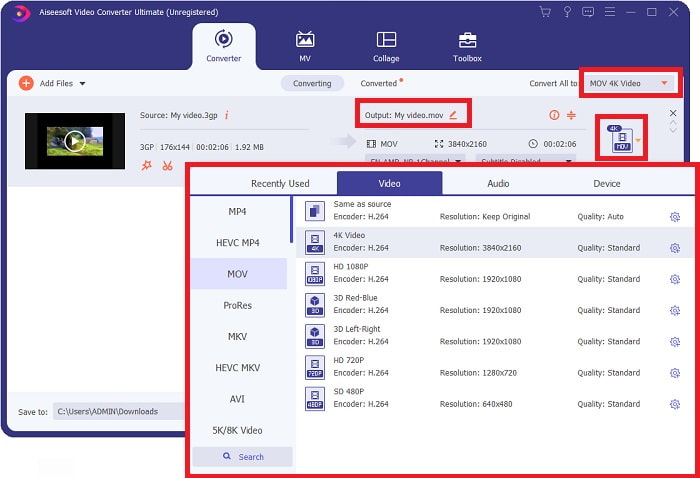
Step 4: Click the selection of format icon on the right corner of the interface. After that, you navigate and click the MOV format, proceed with choosing the preferred resolution you want to apply on your converted video file. In addition, you can also customize the quality or the output of the video by clicking the gear icon.
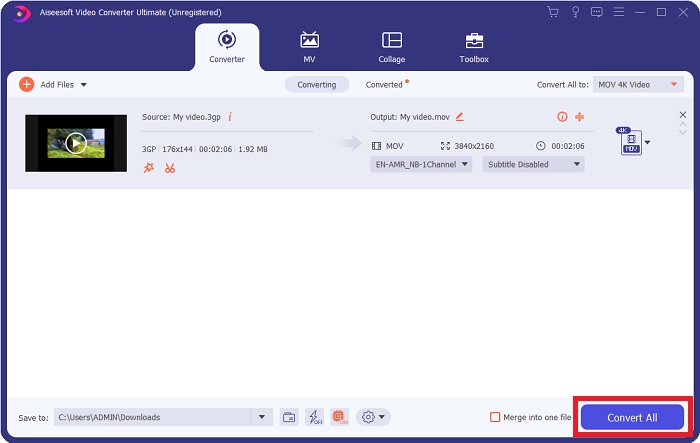
Step 5. After you finished customizing all the details that affect the video quality of the file you want to convert. You can now convert the file by clicking the Convert All button.
Bölüm 3. Diğer İpuçları! 3GP'yi MOV Online'a Dönüştürme
Here's another choice you also need to consider using whenever you're in a rush of converting a video and you don't have time to download a software just to convert a file. Introducing Free Video Converter Online, the best online converter available on the internet that has the same feature as Video Converter Ultimate. For instance, it is able to convert a file faster than any other online tool and it also supports numerous video formats. Since this tool is easy to use it doesn't need any tutorial in order for you to use, but for some beginner users here are guidelines of procedure you need to follow:
Step 1: Click this link to proceed to the main webpage of Free Video Converter Online.
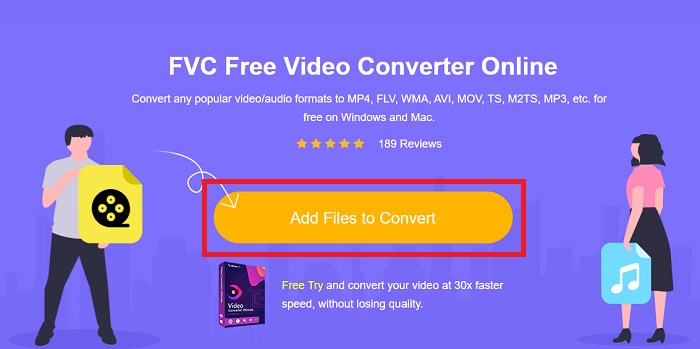
Step 2: When you're on the main webpage of Free Video Converter Online, you can now upload files from your computer by clicking Add Files to Convert.
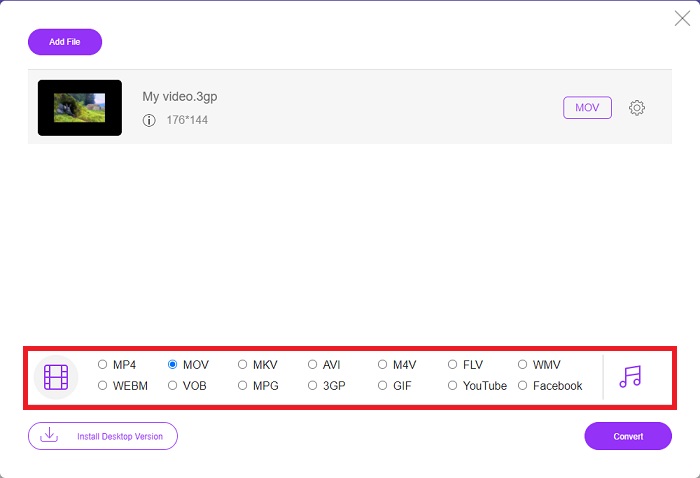
Step 3: After choosing a file you wish to convert, another window will pop up to your screen that displays your file and all the formats available below. Choose MOV at the video format selection.
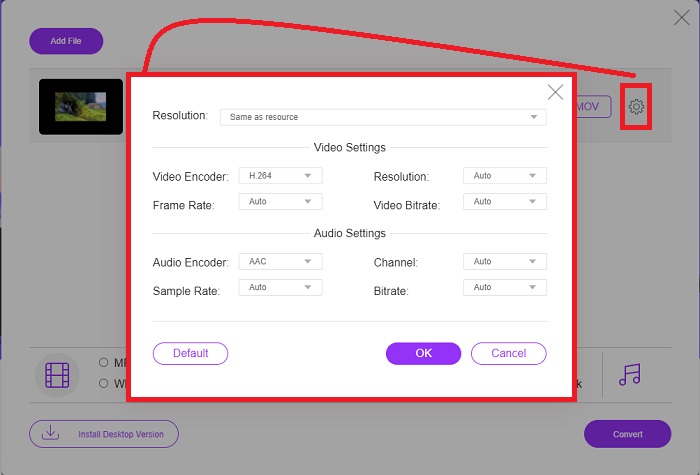
Step 4: You can also customize your video by clicking the gear icon and adjusting the resolution, video encoder, and frame rate of your video output.
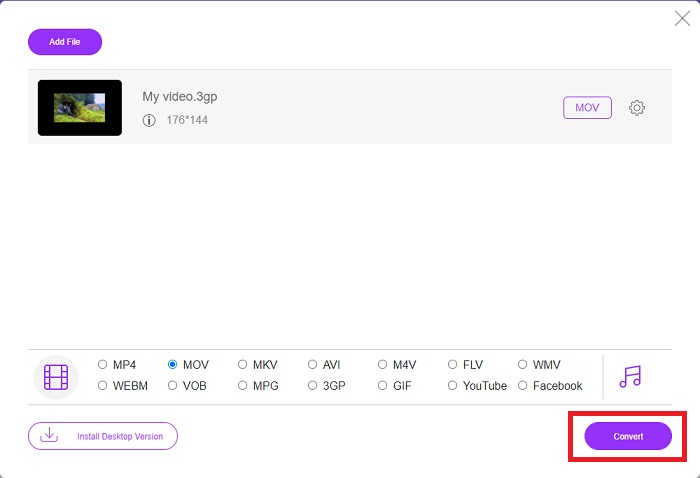
Step 5: After you adjust and customize all the details of the video output, you can now convert the file by clicking Convert.
Bölüm 4. 3GP'yi MOV'a Dönüştürme Hakkında SSS
MOV'un avantajları ve dezavantajları nelerdir?
Apple tarafından geliştirilen bir video dosyası formatı olan MOV yaygın olarak kullanılmaktadır. MOV dosyaları, videolar, ses, altyazılar, zaman kodları ve daha fazlası dahil olmak üzere çeşitli medya türleri içerir. QuickTimePlayer'ın hem Mac hem de Windows sürümleri desteklenir. MOV dosyaları, yüksek kaliteli videolar oldukları için bilgisayarda çok yer kaplar.
3GP uygun bir video formatı mıdır?
MP4 formatı, daha yüksek çözünürlüklü videoyu destekleyebildiğinden, bilgisayarınızın masaüstünde veya taşınabilir medya oynatıcısında video akışı için tercih edilir. 3GP ise yalnızca o cihaz için 3G tasarımlı ağ telefonlarında kullanılmalıdır.
3GP kayıplı mı yoksa kayıpsız mı?
3GP, which stands for Third Generation Partnership Project (3GPP), is a video file format supported by 3G-enabled devices and named after its creator. It contains video streams encoded with the H. 263 or H. 264 codecs and audio streams encoded with the AMR or AAC codecs, making it ideal for lossy video compression. If your 3GP files are two large, you can continue reading and learn how to compress 3GP files effortlessly.
Sonuç
Tartışma sona erdiğinde, 3GP'yi MOV'a çevrimdışı veya çevrimiçi dönüştürmek için yukarıda belirtilen farklı seçenekler vardır. Bu ikisi, bir dosyayı dönüştürürken göz önünde bulundurabileceğiniz en iyi seçenektir, yalnızca kullanılacak platformda farklılık gösterirler, ancak bir dosyayı geri yükleme konusunda size neredeyse kolay bir his verirler.
-
 3GP'yi AVI Formatına Dönüştürmenin En Etkili 4 Yolu [2025]
 3GP dosyalarımı AVI'ye dönüştürebilir miyim? 3GP'den AVI'ye dönüştürme probleminize olası tüm çözümleri bir araya getirdiğimiz için mevcut bu araçları denerseniz kolayca dönüştürebilirsiniz.
-
 Animasyonlu GIF'i MOV Formatına Dönüştürmek İçin En İyi GIF Dönüştürücü [2025]
 Video dosyasının kalitesini etkilemeden GIF'inizi MOV formatına zahmetsizce dönüştürün. Adımlar ve farklı araçlarla da.
-
 Kolay Adımlar ve Araçlarla AVI'yi MOV'a Dönüştürme
 AVI'yi oynanabilir bir MOV'a nasıl dönüştüreceğinizi bilmek ister misiniz? Bunu nasıl yapacağınızı ve başarılı bir dönüşüm elde etmek için ipuçlarını öğrenmek için bu makaleyi izlemelisiniz.
