


 Video Dönüştürücü Ultimate
 Ekran kaydedicisi
 Video Onarımı
[2021] 4'ten Hangisi En İyi Ücretsiz AVI - MOV Dönüştürücü Çevrimiçi ve Çevrimdışı
AVI, Microsoft tarafından geliştirilmiş sıkıştırılmamış bir formattır. Dosyanın kendisi kısıtlı olmasa da, format Microsoft’a özel (telifli) olduğundan Mac’te oynatılamaz. Bu yüzden AVI formatını oynatmanın en iyi yolu, onu bir MOV dosyasına dönüştürmektir. Eğer AVI’yi MOV’a nasıl dönüştüreceğinizi merak ediyorsanız, bunu nasıl yapacağınızı ve bu iş için en iyi aracın hangisi olduğunu öğrenmek için okumaya devam etmelisiniz.

Bölüm 1. AVI'yi MOV'a Dönüştürmenin En İyi Yolu
Nasıl ki günü güzel başlatmak için kahve ya da çayla başlamanız söyleniyorsa, burada da aynı şekilde FVC tarafından geliştirilen güçlü video dönüştürücüyle başlayalım. Video Converter Ultimate, herhangi bir formatı başka bir formata dönüştürebilir; örneğin AVI’yi MOV’a dönüştürmek bu aracı kullanırsanız çok kolaydır. Bunun yanı sıra, sadece bir, iki ya da üç dosyayı değil, aynı anda çok daha fazla dosyayı dönüştürebilirsiniz. Aslında dönüştürülebilecek dosya sayısına dair bir sınır yoktur. Ayrıca dönüştürme işlemi tamamlandıktan sonra, bu aracın araç çubuğu üzerinden videoyu iyileştirebilirsiniz. Listedeki ya da web aramasındaki tüm dönüştürücülerden daha iyi performans gösteren bir araç arıyorsanız, artık aramanızın bittiğini söyleyebilirsiniz. Bu araç hakkında şüpheniz varsa, önce mutlaka kendiniz test etmeli ve nihai dönüştürme sağlayan bu üstün dönüştürücünün nasıl kullanılacağını anlatan adımları takip etmelisiniz.
Adım 1. Aracı indirin ve sabit diskinize kurun. Kurulum ayarlarını değiştirin ve yaptığınız değişiklikleri kaydetmek için Son’u (Finish) tıklayın.
Ücretsiz İndirWindows 7 veya üstü içinGüvenli İndirme
Ücretsiz İndirMacOS 10.7 veya üstü içinGüvenli İndirme
Adım 2. Kurulum ve ayarlamayı tamamladıktan sonra araç otomatik olarak açılacaktır ve ekranınızda buna benzer bir arayüz görünmelidir.
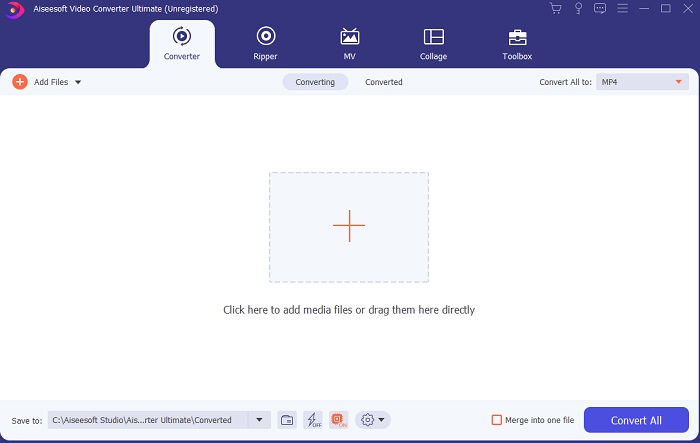
Adım 3. Ortadaki büyük artı işaretine tıklayarak AVI’yi MOV’a dönüştürmek veya başka bir formata dönüştürmek üzere dosya ekleyin.
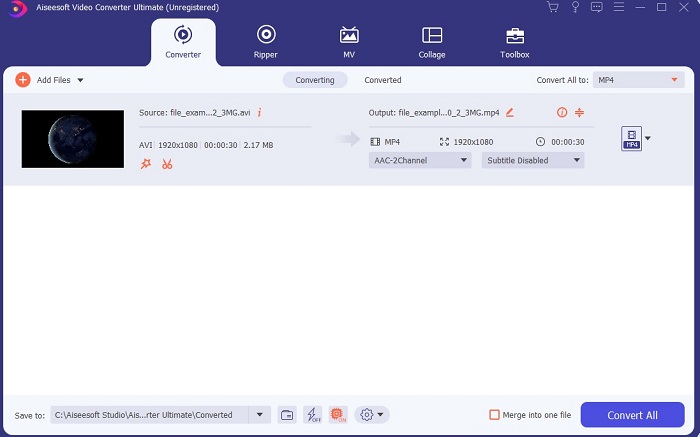
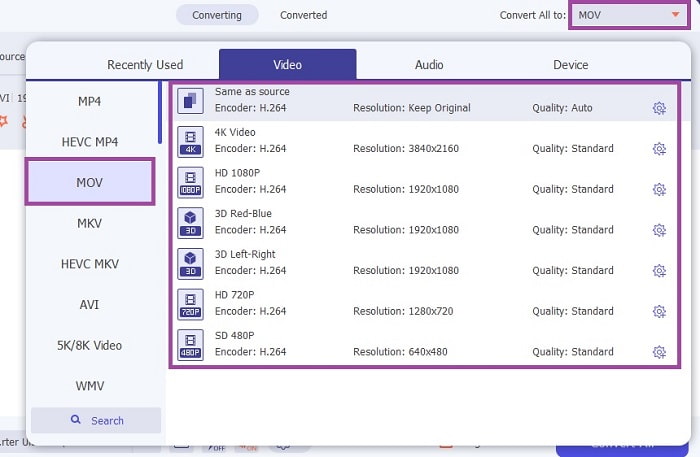
Adım 4. Formatı değiştirmek için açılır menü düğmesine tıklayın ve MOV’u ya da dönüştürmek istediğiniz başka formatı seçin. Dosya dönüştürülmeye hazırsa, dönüştürmeyi başlatmak için Tümünü Dönüştür seçeneğine tıklayın.
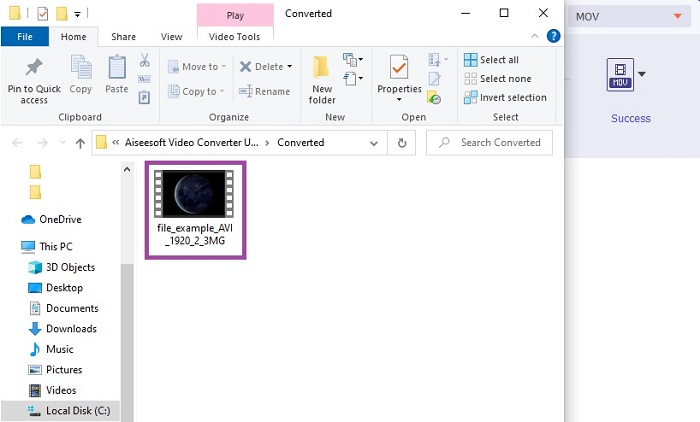
Adım 5. Dönüştürme işlemi yalnızca bir dakikadan daha kısa sürer. İşlem bittiğinde, ekranınızda bir dosya gezgini penceresi açılacaktır; dönüştürülen dosyaya tıklayarak onu izleyin. Daha sonra araç çubuğunun yardımıyla videoyu daha iyi bir kaliteye yükseltebilirsiniz.
Bölüm 2. AVI'yi MOV Online'a Dönüştürmenin Diğer Olası Yolları
1. FVC Ücretsiz Çevrimiçi Video Dönüştürücü
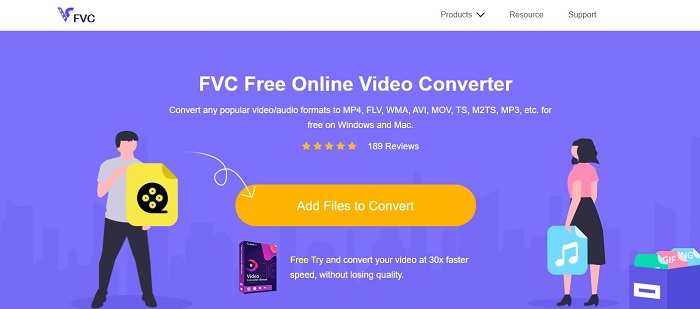
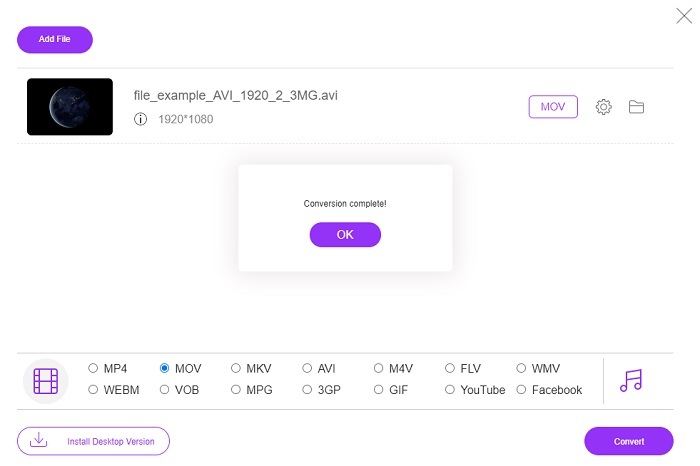
Yukarıdaki aracın aksine bu araç ücretsizdir. FVC Free Video Converter, yukarıdaki aracın ücretsiz sürümüdür; ancak videoyu iyileştirme gibi başlıca özellikler ve daha fazlası bu sürümde mevcut değildir. Yine de temel dönüştürme işlemleri bu araçla yapılabilir. Bu ücretsiz çevrimiçi AVI’den MOV’a dönüştürücünün nasıl çalıştığını öğrenmek istiyorsanız, dönüştürme sürecinin sorunsuz olması için aşağıdaki basit adımları takip etmelisiniz.
Adım 1. Bu bağlantıya tıklayın ve bilgisayarınızda ya da Mac’inizde başlatmak için Dönüştürülecek Dosyaları Ekle seçeneğine tıklayın.
Dosyaları toplu dönüştürmek için Masaüstü Sürümü indirin.
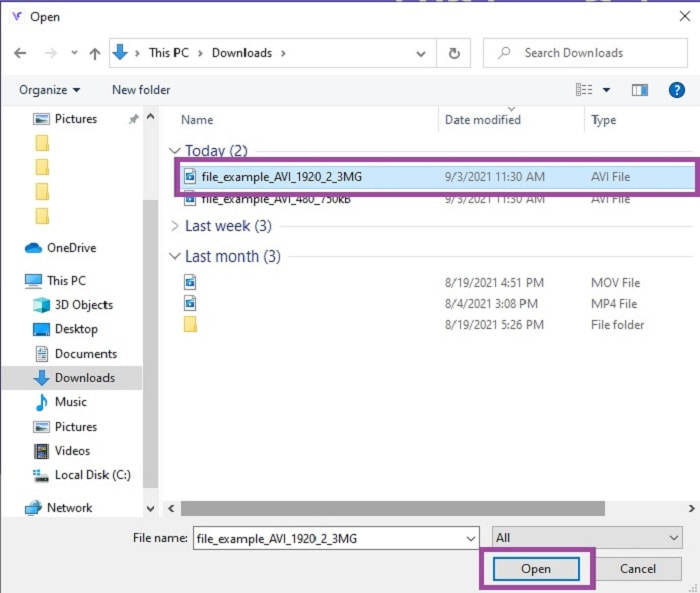
Adım 2. Buna tıkladıktan sonra, artık hangi dosyaların dönüştürüleceğini seçmelisiniz. Ardından başlatmak için Aç düğmesine tıklayın.
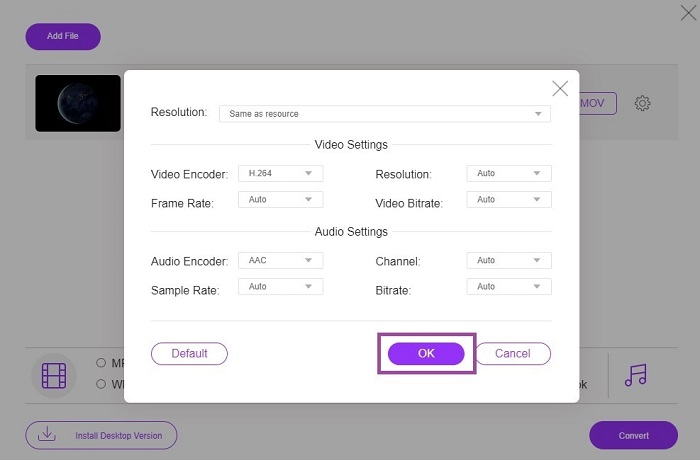
Adım 3. İsterseniz video ve ses ayarlarını değiştirmek için dişli simgesine tıklayın. Yaptığınız değişiklikleri kaydetmek için Tamam’a tıklayın.
Adım 4. Dosya arayüzde göründüğünde artık hangi formata dönüştürülmesini istediğinizi seçmelisiniz. Ana arayüze geri dönerek, işlemi başlatmak için Dönüştür düğmesine tıklayın.
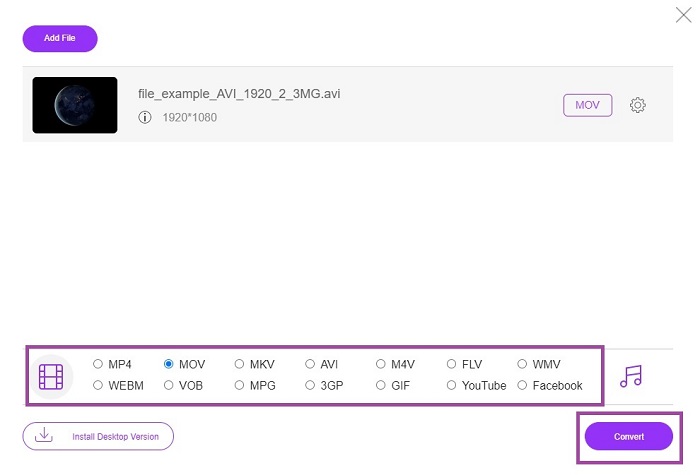
Adım 5. Dönüştürme işlemi tamamlandığında dosyayı daha sonra dosya yöneticinizden kontrol edebilirsiniz.
2. CloudConvert
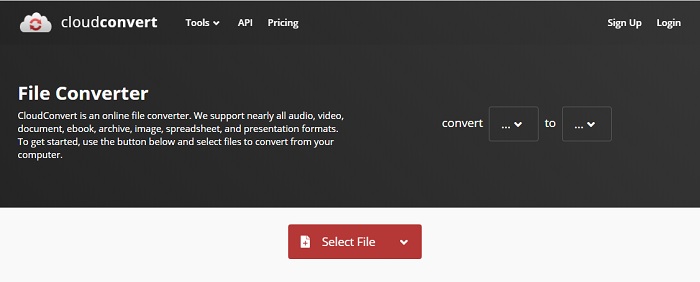
Çevrimiçi bir Mac için AVI’den MOV’a dönüştürücü arıyorsanız, CloudConvert’i deneyebilirsiniz. Kullanıcıların her tür video, ses, belge, PDF ve diğer dosyaları yeni bir formata dönüştürmesine olanak tanır. Ancak güçlü bir dönüştürme sunmasına rağmen, bu aracın herhangi bir düzenleme özelliği yoktur. Yani videoyu, onu daha iyi hale getirecek bir geliştirme uygulamadan dönüştürür. Genel olarak dönüştürme konusunda iyi olsa da, FVC Free Online Video Converter bundan daha iyidir.
3. FreeConvert.com
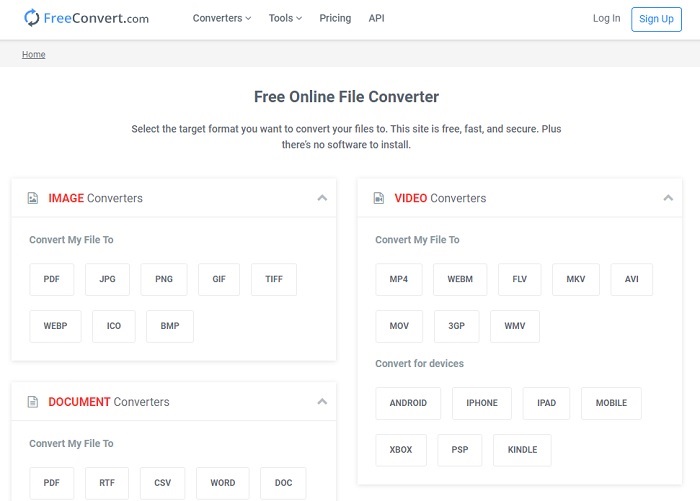
Dönüştürme için kullanılan bir diğer harika çevrimiçi araç ise FreeConvert.com’dur. Yukarıdaki araç güçlü sıkıştırma sunuyorsa, bu araç da listeye girmeyi hak edecek özelliklere sahiptir. Kırpma ve kesme gibi temel düzenleme özellikleri, dosya sıkıştırma ve cihaza özel dönüştürme imkânı sunar. Ancak bu aracın dezavantajı, desteklediği formatların oldukça sınırlı olmasıdır. Bu nedenle sağladığı sınırlı özellikler yüzünden format seçme özgürlüğünüz kısıtlanır.
Daha Fazla Okuma
MOV’u MP4’e Nasıl Dönüştürürsünüz
AVI ve MOV
Kaynak Değişim Dosyası Formatına (RIFF) dayalı olarak, AVI formatı 1992'de Microsoft tarafından tanıtıldı. Daha az sıkıştırma kullandığından yüksek kaliteli video/ses kaydedebilir. Ancak bu, sınırlı alan olduğunda sorun olabilecek bir AVI dosyasının büyük dosya boyutuna da neden olur.
MOV formatı bir film, TV programı, kısa video klip veya ev filmi depolamak için kullanılabilir. Aslında 1991'de Apple tarafından tanıtılan QuickTime Dosya Formatında (QTFF) kaydedilmiştir. MOV dosyaları genellikle insanlar bir videoyu yüksek kalitede kaydetmek istediğinde kullanılır.
Bölüm 3. AVI to MOV hakkında SSS
QuickTime, AVI'yi MOV'a dönüştürebilir mi?
QuickTime, Mac için yerleşik bir medya oynatıcısıdır. Aynı zamanda QuickTime’da AVI’yi MOV’a dönüştürebilir, fakat ortam formatını dönüştürmek için en iyi ve ideal seçenek olmasa da işi görebilir.
Hangisi daha iyi? AVI veya MOV?
Her formatın öne çıkan kendine özgü özellikleri vardır, ancak bu ikisi en iyilerinden biridir. AVI, video oynatmayı ve mükemmel kaliteyi senkronize etmek için Microsoft tarafından geliştirilen tescilli bir formattır. Ancak Apple rekabet etmek istediği için QuickTime'ın yerel formatı olan MOV'u geliştirirler. Birden fazla parçayı ses, video ve altyazı gibi verileriyle ayrı ayrı ancak tek bir kapta saklamak için.
AVI ve MOV kayıplı mı yoksa kayıpsız mı?
Sıkıştırma değiller çünkü AVI sıkıştırılmamış olarak yaratıldı, bu yüzden bu kayıpsız, ancak MOV sıkıştırılmış ve daha küçük boyutlu bir kayıptır.
Sonuç
Sonuç olarak, bir AVI dosyasını dönüştürmek şakaya gelmez; çünkü sıkıştırılmamıştır ve bunu ciddiye almalısınız. Yanlış dönüştürücüyü seçerseniz, süreç sırasında bazı kodların kaybolması ihtimali vardır. Ancak endişelenmenize gerek yok, çünkü günü kurtarmak için FVC Video Converter Ultimate burada. Başarılı bir dönüştürme süreci yaşamak istiyorsanız, mutlaka bu aracı ve yalnızca bunu kullanmalısınız. Hızlı ve güvenli olmasının yanı sıra, bu araç aynı anda çoklu dönüştürme yapabilir. İlk dosyanın bitmesini beklemek yerine, tüm AVI dosyalarını aynı anda dönüştürerek MOV formata ya da istediğiniz herhangi bir formata çevirebilirsiniz.
-
 FLV'den MOV'a - Mac / PC / Çevrimiçi Ücretsiz'de FLV'yi MOV'a Dönüştürme
 FLV'yi MOV'ye nasıl dönüştürebilirim? Mac'te FLV'yi MOV'a nasıl dönüştürebilirim? YouTube FLV'yi MOV'a çevrimiçi dönüştürmenin ücretsiz bir yolu var mı? Bu gönderi, FLV dosyalarını MOV olarak değiştirmek için 3 FLV'den MOV'a dönüştürücü paylaşıyor.
-
 QuickTime'ı Düzeltmek için Uygulanabilir 5 Yöntem MOV Dosyalarını Açamıyor
 MOV formatı esas olarak QuickTime Player'da oynatma için oluşturulur. Ancak, bazen içinde oynamadıklarını görebilirsiniz. QuickTime'ın bu gönderiden MOV dosyalarını oynatmayacağını nasıl düzelteceğinizi öğrenin.
-
 Android Mobil Cihazlarda MOV Dosyalarının Nasıl Oynanacağına İlişkin Olağanüstü Kılavuz
 MOV dosyalarınızın neden android medya oynatıcınızda oynatılmadığıyla ilgili bir sorun mu yaşıyorsunuz? O zaman bu makaleyi okuyun, size MOV dosyalarını düzeltmek ve oynanabilir hale getirmek için 2 farklı yöntem sağlayacaktır.

