


 Video Dönüştürücü Ultimate
 Ekran kaydedicisi
 Video Onarımı
Kaliteyi Bozmadan DV'yi MOV'a Dönüştürmek İçin Kullanılan 2 Dönüştürücü
DV dosyaları, en iyi düzenlenebilir ve izlenebilir videoyu sakladığı için her kamerada en yaygın dosya türüdür. Belki bu biçimi bir iMovie’de düzenlemek ya da QuickTime’da izlemek için kullanıp kullanamayacağınızı merak ediyorsunuz. Ancak bu ham dosyayı kullanamazsınız çünkü desteklenmeyen ve eski bir sürümdür. Yine de endişelenmenize gerek yok, çünkü DV dosyalarınızı Mac’te MOV gibi desteklenen bir formata dönüştürebilirsiniz. Bu makaleyi okumaya devam ederken, Mac’inizde neden DV’yi MOV’a dönüştürmeniz gerektiği konusunda derin bir anlayış geliştireceğiz.

Bölüm 1. Güçlü Çevrimdışı Dönüştürücü ile DV Dosyalarını Mac'te MOV'a Dönüştürün
FVC Video Converter Ultimate, DV’yi hem Mac’te hem de PC’de MOV’a dönüştürmek için kullanacağınız olağanüstü araçtır. Hiç şüphesiz, bu dönüştürücü dosyalarınızı hiç zorlanmadan yeni bir formata dönüştürmenize yardımcı olabilir. Ayrıca, bazı kullanıcılar bir dosyayı yeni bir formata dönüştürmenin hızlı bir yolunu ister; ne mutlu ki bu araç bunu hızla gerçekleştirmenize yardımcı olur. Dönüştürmenin yanı sıra, burada kırpma, birleştirme, kesme ve daha birçok düzenleme de yapabilirsiniz. Dolayısıyla, bu güçlü aracın dönüştürme kabiliyetini deneyimlemek istiyorsanız, bunu nasıl yapacağınıza dair aşağıdaki adımları izleyin.
Yardımcı FVC Video Converter Ultimate ile DV Dosyaları MOV’a Nasıl Dönüştürülür:
Adım 1. DV dönüştürücüsünü Mac veya PC’nize indirin, kurulum sürecini takip edin ve yazılımı açmak için Şimdi Başlat’a tıklayın.
Ücretsiz İndirWindows 7 veya üstü içinGüvenli İndirme
Ücretsiz İndirMacOS 10.7 veya üstü içinGüvenli İndirme
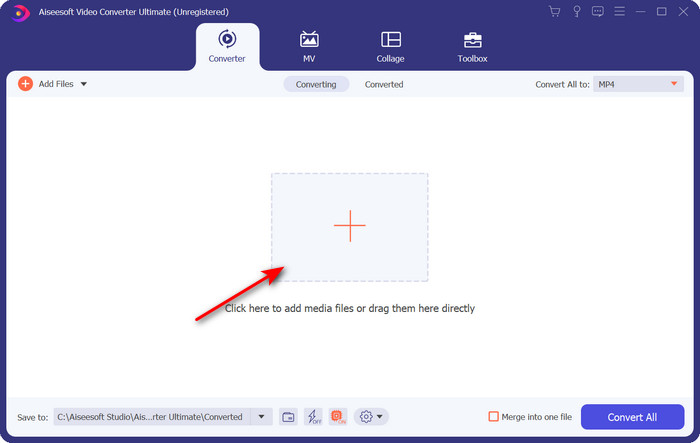
Adım 2. Başlattıktan sonra, dönüştürmek istediğiniz dosyayı yüklemek için + düğmesine tıklayın; bir klasör açılacak, dosyayı bulun ve ardından Aç’a tıklayın.
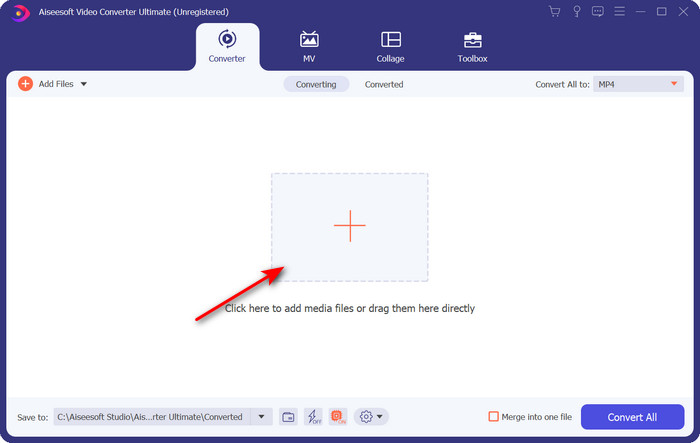
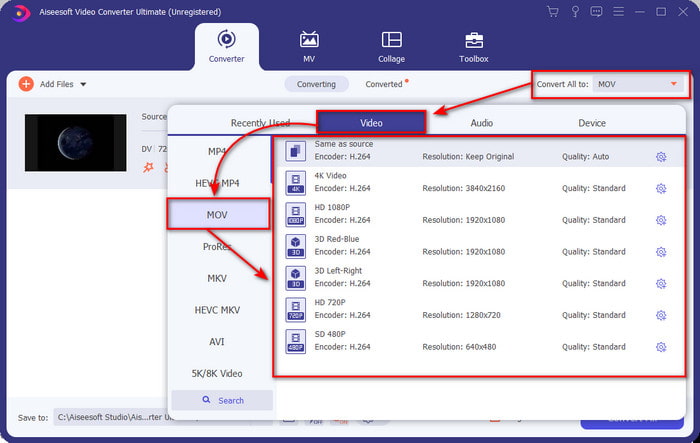
Adım 3. Biçimi seçmek için açılır menü düğmesine tıklayın, MOV biçimini ve istediğiniz çözünürlüğü seçin. Çıkışınızın kalitesini yüksek ayarlayabilirsiniz, ancak boyutu orijinaline kıyasla çok daha büyük olacaktır.
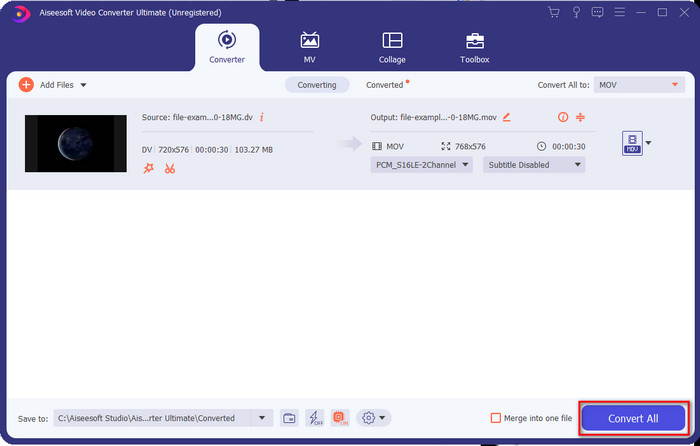
Adım 4. DV’yi MOV’a dönüştürme işlemini başlatmak için Tümünü Dönüştür’e tıklayın ve ardından dosyayı tek seferde indirin.
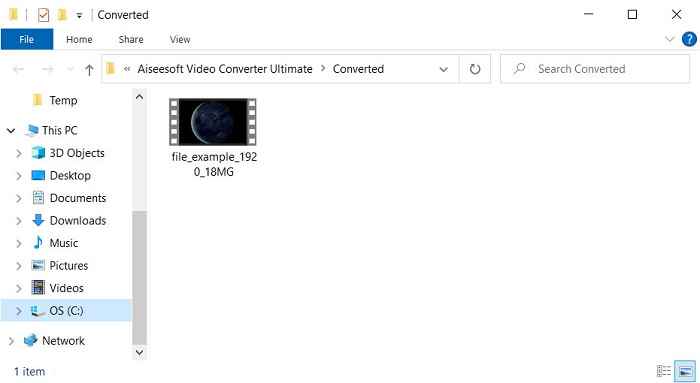
Adım 5. Dönüştürülen dosyanın konumu gösterilecektir; artık dosyayı Mac’inizde açılmama endişesi olmadan izleyebilir veya düzenleyebilirsiniz.
Bölüm 2. Çevrimiçi Dönüştürücü ile DV'yi MOV'a Ücretsiz Olarak Dönüştürün
Tarayıcınızda video dönüştürmek mi istiyorsunuz? O hâlde, FVC Free Video Converter Online kullanarak DV’yi ücretsiz olarak MOV’a dönüştürmeniz gerekir. Bu araçla, tıpkı FVC Video Converter Ultimate’ta olduğu gibi, yalnızca dönüştürme değil, çözünürlük, bit hızı ve kare hızını da değiştirebilirsiniz. Bunu çevrimiçi ve ücretsiz kullanabiliyor olsanız da, bu çevrimiçi aracın gücü yukarıdaki çevrimdışı dönüştürücüden oldukça farklıdır. Ancak yalnızca basit ve ücretsiz bir dönüştürme yapmak istiyorsanız, bu araç çevrimiçi başvuracağınız dönüştürücü olmalıdır. Kısaca, şimdi bunu nasıl kullanacağınıza dair adımlara geçelim.
Faydalı FVC Ücretsiz Video Dönüştürücü Çevrimiçi ile DV Dosyalarını MOV'a Dönüştürme;” /]Adım 1. Çevrimiçi aracı açmak için bu bağlantıya tıklayın; ardından yeni bir tarayıcı penceresi açılacaktır.
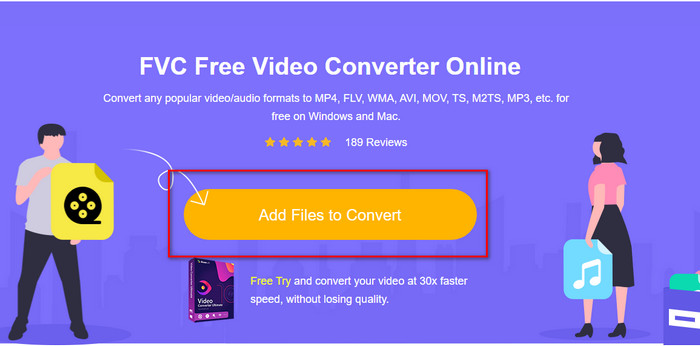
Adım 2. Çevrimiçi dönüştürücüyü çalıştırmak için Dönüştürülecek Dosyaları Ekle seçeneğine tıklayın, ardından klasörden dönüştürmek istediğiniz .dv dosyasını seçin.
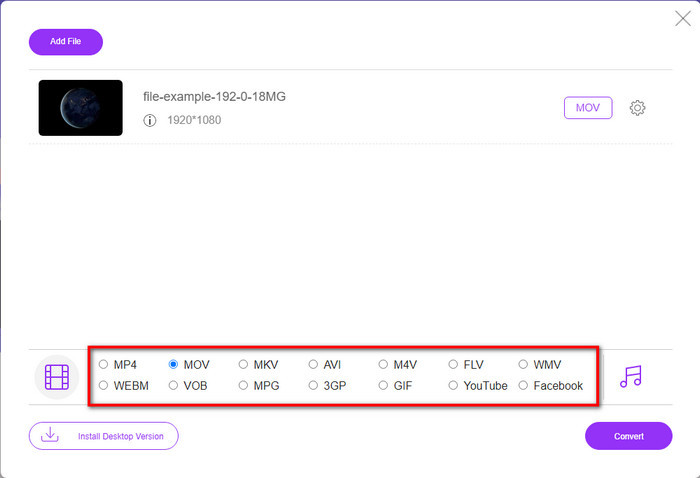
Adım 3. Aşağıdaki listeden MOV biçimini veya istediğiniz diğer biçimi seçin.
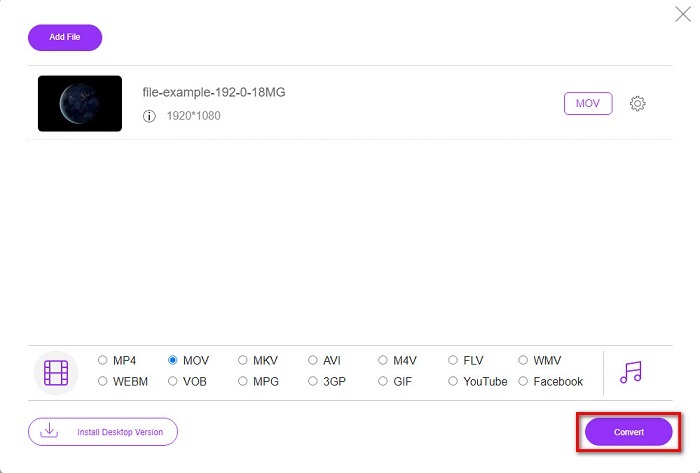
Adım 4. Dönüştürmeyi başlatmak için Dönüştür’e tıklayın ve işlemin tamamlanmasını bekleyin.
Adım 5. İşlem tamamlandığında, ekranda dönüştürülmüş dosyayla birlikte yeni bir klasör açılacaktır.
Bölüm 3. DV ve MOV
DV formatı, MPEG ile aynı algoritmayı kullandığından, video ve sesi kaydetmek için idealdir. Ancak bu, önceki kare hızını sıkıştırmaya dayanmadığı için MPEG'den çok farklıdır. Bu nedenle, oran içi sıkıştırmaya güvenmek yerine, oynatmayı daha hızlı düzenlemek için bağımsız sıkıştırma kullanır. Sonuç olarak, DV dosyaları 1995'in sonlarında tüm kameralarda standart bir video formatı olarak tanıtıldı. Ancak bugün, kayıtları depolamak için artık bir sabit sürücü, SSD'ler ve bellek kartları kullandığımız için daha az bant tabanlı video kamera göreceğiz.
Öte yandan, MOV formatı, Apple tarafından tüm düzenleyicilerde kullanılabilen veya medya oynatıcı ile oynatılabilen yüksek kaliteli bir medya dosyasını depolamak için geliştirilmiştir. Bu format, toplu medya öğeleri içerebildiği ve her biri video, ses ve metin için veri toplayabildiği için büyük saygı görüyor. DV ile aynı şekilde, bu formatın sağladığı sıkıştırma algoritmaya dayalıdır.
Tüm bunlara ek olarak, bu format eski olduğundan DV dosyalarını doğrudan Mac uygulamasına yükleyemezsiniz. Artık .dv'den daha iyi formatlar var. Ancak videolarınız bu biçimdeyse, bir DV'den MOV'a dönüştürücü kullanabilir ve dosyayı Quicktime'da oynatmak veya iMovie'de düzenlemek için dönüştürebilirsiniz.
Bölüm 4. DV'den MOV'a Dönüştürme hakkında SSS
DV dosyalarını neden Mac'te oynatamıyorum?
Bu durumda birçok neden değişebilir, özellikle de neredeyse tüm işletim sistemleriyle daha az uyumlu olan DV dosyaları. Ancak, yapamamanızın olası iki nedenini listeliyoruz ve ilki, kullandığınız medya oynatıcının bu formatı desteklememesi. Uyumluluk nedenleriyle ve dönüştürme çözümü nedeniyle çoğu formatta en yaygın sorundur. Diğeri ise .dv dosyalarınız bozuk veya bozuk olabilir. Hasarlı veya bozuk olduğu için dosya oynatılmayacak.
DV dosyası hala ideal bir format mı?
Önceden medya dosyalarını kaydetmek ve düzenlemek için idealdi, ancak bugün format en iyisi değil. Ana sebep, .dv'den daha iyi formatların olması, diğeri ise uyumluluk sebepleridir.
DV dosyaları nasıl sıkıştırılır?
DV dosyaları hâlâ sıkıştırılmış olsa da, video süresi çok uzunsa MB boyutları daha büyük olur. Bu nedenle, dosyayı sıkıştırmak hem daha kolay aktarım hem de yer tasarrufu için şarttır. DV dosyalarınızı veya diğer medya dosyalarını nasıl sıkıştıracağınızı öğrenmek için, kaliteden ödün vermeden videoları nasıl sıkıştıracağınızı anlatan bu makaleyi okuyun.
Sonuç
Kısaca özetlemek gerekirse, DV dosyaları eskiden ses ve video kaydı için en iyi seçenekti, ancak günümüzde yerlerini başka formatlar aldı. Ayrıca bu format, özellikle Mac’te videoları düzenlemek veya izlemek istediğinizde, MOV’a kıyasla çok daha az uyumluluk sunar. Biçim eski olduğundan, yukarıda bahsedilen araçlardan yararlanarak çevrimiçi veya çevrimdışı şekilde dönüştürmeyi mutlaka düşünmelisiniz. Genel olarak, web’de bulduğumuz en iyi araç FVC Free Video Converter Online’dır. Ücretsiz olmasının yanı sıra, bu çevrimiçi aracın performansı, mevcut diğer web araçlarından oldukça farklıdır. Ancak olağanüstü dönüştürücü FVC Video Converter Ultimate’a da hakkını vermeliyiz. Bu aracın tanıtıma ihtiyacı yoktur ve karşılaşacağınız her türlü dönüştürme sorununda size kuşkusuz yardımcı olacaktır. Artık hangisinin sizin için daha iyi olduğuna karar vermek sizin elinizde.
-
 Kolay Adımlar ve Araçlarla AVI'yi MOV'a Dönüştürme
 AVI'yi oynanabilir bir MOV'a nasıl dönüştüreceğinizi bilmek ister misiniz? Bunu nasıl yapacağınızı ve başarılı bir dönüşüm elde etmek için ipuçlarını öğrenmek için bu makaleyi izlemelisiniz.
-
 DivX'i MOV'a Ücretsiz Dönüştürmenin 4 Yolu [Çevrimiçi ve Çevrimdışı]
 Bir DivX'in sınırlamaları ile mücadele ediyor musunuz veya bu formattaki videolara erişmek için medya oynatıcılarınız yok mu? MOV formatına dönüştürmek istiyorsanız, boşlukları doldurmak için bu makaleyi okumaya devam edin.
-
 Ücretsiz M4V'den MOV'a Dönüştürücü – M4V'yi MOV'a Dönüştürme
 Medya yürütücünüz M4V'yi desteklemiyorsa, iPhone'unuzda film izlemek için hiç zorlandınız mı? Bu makalenin ana konusu, onu bir MOV video dosyasına dönüştürmektir.
