


 Video Dönüştürücü Ultimate
 Ekran kaydedicisi
 Video Onarımı
MPG Dosyalarını Masaüstünüzde veya Çevrimiçi Olarak MOV'a Dönüştürmenin 3 Farklı Yolu
Bir formatı dönüştürmek, özellikle de uyumluluk ve formatın amacı hakkında konuşacaksak, vazgeçilmezdir. MPG gibi, bu format da DVD’lerden meta veri iç içe geçirme, ses ve video gibi verileri depolar. Ancak bu formatı DVD’lerden kopyalayıp Quicktime’da oynatmak veya iMovie’de düzenlemek istediğinizde, format desteklenmediği için yüklenemez. Bununla birlikte, .mpg dosyanızı MOV gibi desteklenen bir formata dönüştürebilirsiniz. Bu makale, kalitesini bozmadan ve ücretsiz olarak Mac’te MPG’yi MOV’a dönüştürmek için kullanabileceğiniz en iyi dönüştürücü yazılımlardan bazılarını önerecektir.

Bölüm 1. Mac ve Windows'ta MPG'yi MOV'a Dönüştürme
Listede ilk sırada, Mac veya PC’de MPG’yi MOV’a nasıl dönüştüreceğinizi öğrenirken kullanabileceğiniz dönüştürücülerin en iyisi yer alıyor. FVC Video Converter Ultimate, bir dakikadan kısa sürede yapabileceğiniz en yüksek kaliteyi ve en hızlı dönüştürmeyi sunar. Ayrıca, dosya dönüştürme konusunda hiç deneyiminiz yoksa ve ilk denemenizde hayal kırıklığına uğramak istemiyorsanız bunu indirin. Ancak, özel efektler eklemek, kırpmak, birleştirmek ve daha fazlasını yapmak isteyen bir kullanıcı türüyseniz, bu dönüştürücünün Araç Kutusu’na göz atın. Bunların dışında, güvenilir ve kullanımı kolay bir yazılım arıyor ve anında olağanüstü bir çıktı elde etmek istiyorsanız, aşağıdaki talimatları izleyin.
Adım 1. MPG’yi MOV’a dönüştürücü programını Mac’inize veya PC’nize ücretsiz indirin. Ardından dosyayı kurun ve hızlı bir kurulum yapın.
Ücretsiz İndirWindows 7 veya üstü içinGüvenli İndirme
Ücretsiz İndirMacOS 10.7 veya üstü içinGüvenli İndirme
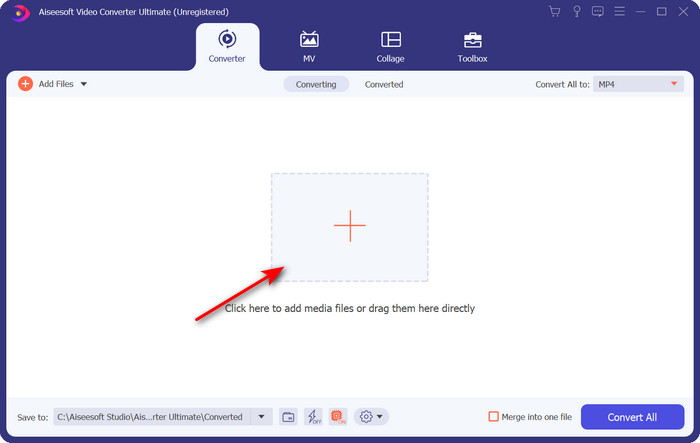
Adım 2. Dosyayı eklemek için, arayüzün orta kısmında bulunan + işaretine tıklayın. Sonraki açılacak klasörde .mpg dosyasını bulun, ardından Aç’a tıklayın ve devam edin.
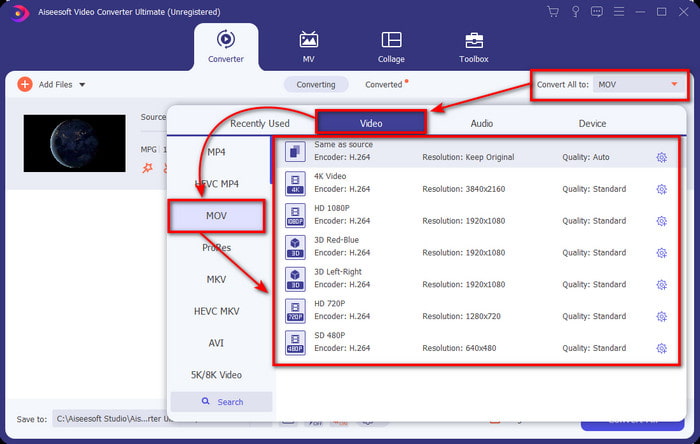
Adım 3. Açılır menü düğmesine tıklayın ve listede bulunan MOV formatını veya diğer herhangi bir formatı seçin.
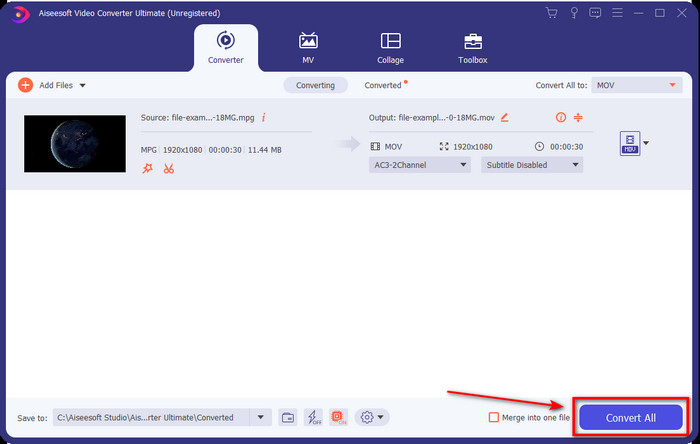
Adım 4. Dönüştürme işlemini başlatmaya hazır olduğunuzda Tümünü Dönüştür’e tıklayın.
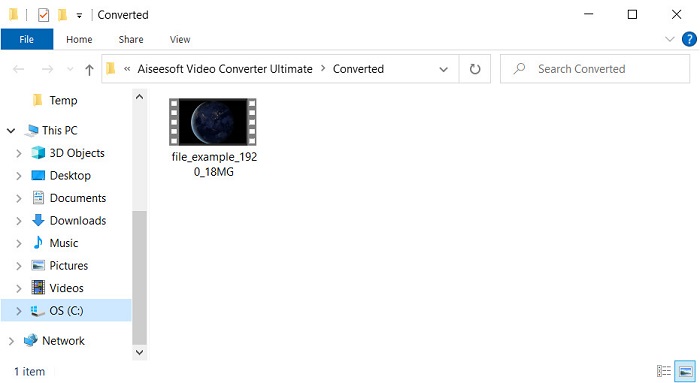
Adım 5. Birkaç saniye sonra .mov dosyanız hazır olacaktır ve klasör ekranınızda açılırsa, Apple cihazınızda izlemek veya düzenlemek için ilk dosyaya tıklayın.
Bölüm 2. Quicktime Kullanarak MPG'yi MOV'a Dönüştürün
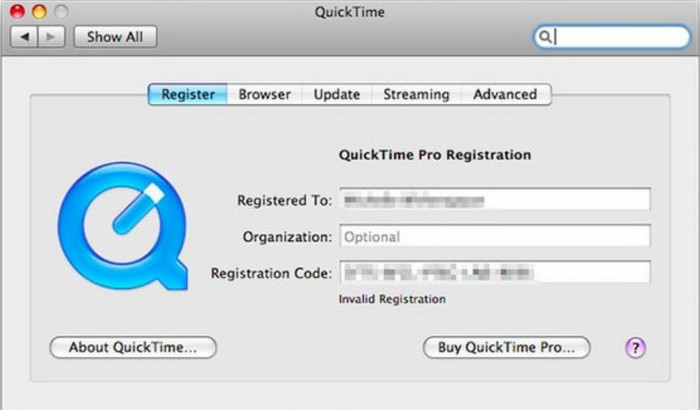
Quicktime Player, neredeyse tüm video ve ses formatlarını oynatmak için Apple cihazları için yapılmış yerel bir medya oynatıcıdır. Peki, bunu bir dönüştürücü olarak da kullanabileceğinizi biliyor muydunuz? Ancak bu aracın sunduğu dönüştürücü, yukarıda bahsedilen ilk dönüştürücü kadar ayrıntılı değildir. Yine de, bir Apple cihazınız varsa ve Quicktime Player ile MPG’yi MOV’a dönüştürmek istiyorsanız, aşağıdaki adımları izleyin.
Adım 1. Mac’inizde Quicktime Player’ı açın, altındaki Dosya’ya tıklayın, Dosya Aç’a tıklayın, klasörde .mkv dosyasını bulun ve Aç’a basın.
Adım 2. Dosya’ya tekrar tıklayın ancak bu sefer Dışa Aktar’ı tıklayın ve listede bulunan çözünürlüklerden birini seçin.
Adım 3. Quicktime’da dosyayı dönüştürmeyi başlatmak için Kaydet’e tıklayın.
Bölüm 3. Ücretsiz Çevrimiçi MPG'yi MOV Dönüştürücü Kullanarak MPG'yi MOV'a Dönüştürün
Yazılım indirme riskine girmek istemiyorsanız, en iyi ücretsiz çevrimiçi MPG’den MOV’a dönüştürücünün hangisi olduğunu bilmek ister misiniz? O halde FVC Free Video Converter Online tam size göre. Basit, tüm tarayıcılarda kullanılabilir, kötü amaçlı yazılımdan arınmış ve güvenilir bir çevrimiçi araçtır. Basit bir dönüştürücünün sahip olması gereken her şey burada mevcuttur. Ayrıca bu yazılım, çok sayıda medya formatını destekler ve hesabınıza giriş yapmadan dönüştürme yapar. Bu aracı kullanmak ister misiniz? O zaman aşağıdaki basit adımları izleyin.
Adım 1. FVC Free Video Converter Online’ın resmi web sitesine gitmek için bu bağlantıya tıklayın.
Adım 2. Artık web arayüzündeyken, Dosyaları Dönüştürmek İçin Ekle’ye tıklayın. Klasörde dönüştürmek istediğiniz .mpg dosyasını bulun, ardından Aç’a basın.
Dosyaları toplu dönüştürmek için Masaüstü Sürümü indirin.
Adım 3. Dosyayı yükledikten sonra, alt menüden MOV formatını seçin.
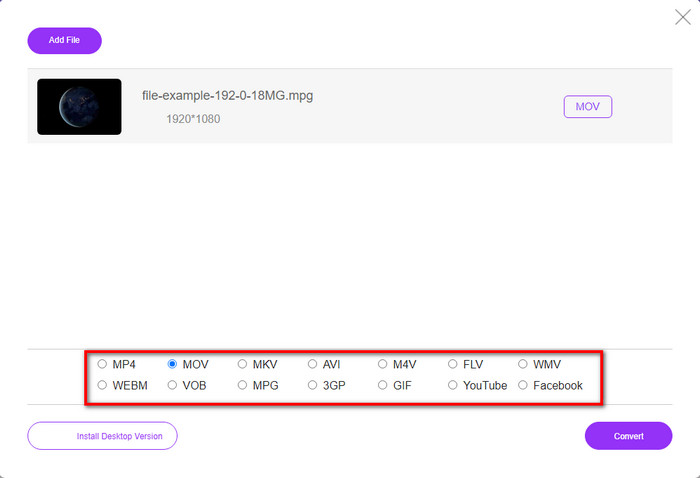
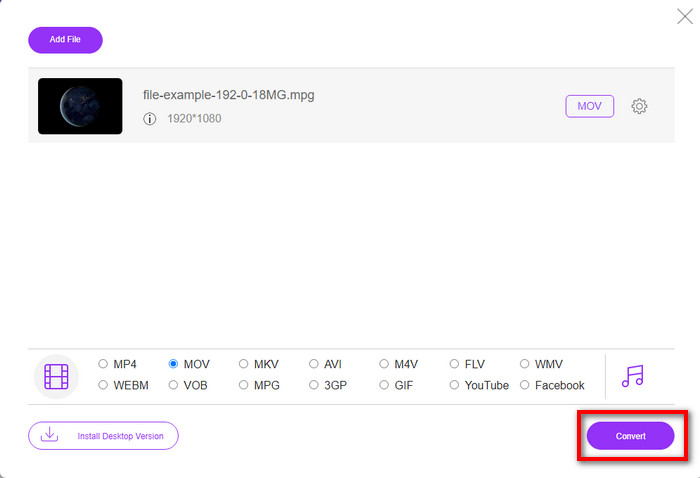
Adım 4. MOV’u zaten seçtiğinize göre, şimdi Dönüştür’e tıklayarak indirmeye geçelim.
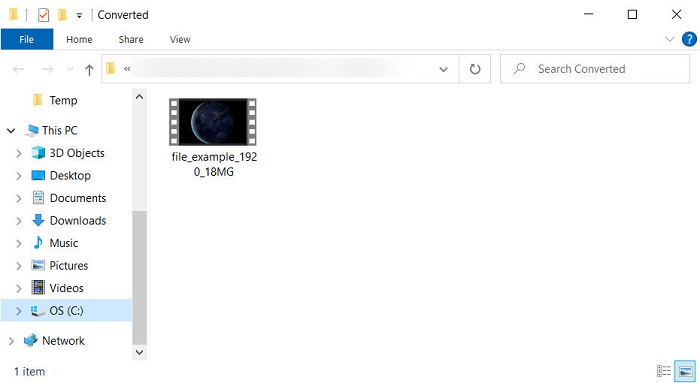
Adım 5. Dönüştürme işleminden sonra, içinde .mov dosyası bulunan bir klasör görüntülenecektir.
Bölüm 4. MPG'den MOV'a Kapsamlı Bilgi ve Neden Onu Dönüştürmemiz Gerekiyor
MPG, MPEG'i dijital standart video formatı olarak kullanan iyi bilinen bir medya formatıdır. Bu dosya türü genellikle medya dosyası kodlayıcı olarak MPEG-1 ve MPEG-2 kullanır. Özellikle daha yüksek çözünürlüklü videoları depolamak için kompresörün her eksikliğini desteklemek için bu iki kompresörü kullanır. Daha önce de belirtildiği gibi, bu biçim üç öğe içerebilir: filmlerin web'de daha hızlı dağıtılması için tek bir akışta ses, video ve meta veriler.
Ancak MOV, genellikle videoyu düzenlemek için kullanılan yüksek kaliteli bir videoyu ve kristal netliğinde sesi saklayabilir. MPG'den farklı olarak, bu multipleks medya formatı video, ses ve altyazı gibi farklı medya verilerini takip edebilir. Ancak bu formatın yaygın olarak kullanılan kodlayıcısı ve kod çözücüsü MPEG-4'tür.
MPG'nizi MOV'a çevirmek en iyisi olacaktır çünkü dosyayı Apple cihazlarına aktardığınızda Quicktime'da oynatılmayacak veya iMovie'de düzenlenmeyecektir. Quicktime Player ve iMovie, MPEG-1 ve MPEG-4'ü desteklese de, .mpg'nin kullandığı MPEG-2 gibi diğer MPEG'ler desteklenmez. Apple cihazlarında uyumlu hale getirmek için dosyayı MOV'a dönüştürmenizin nedeni budur.
MPG ve MOV karşılaştırması
Hareketli Resim Uzmanları Grubu (MPEG) tarafından yapılan MPG, video, ses ve meta veri bilgilerini depolamak için yaygın bir dijital video formatıdır. İnternette paylaşmak için filmler oluştururken oldukça kullanışlıdır. MPG'deki bu dosyalar genellikle MPEG-1 veya MPEG-2 video/ses sıkıştırması içerir.
MOV formatı bir film, TV programı, kısa video klip veya ev filmi depolamak için kullanılabilir. Aslında 1991'de Apple tarafından tanıtılan QuickTime Dosya Formatında (QTFF) kaydedilmiştir. MOV dosyaları genellikle insanlar bir videoyu yüksek kalitede kaydetmek istediğinde kullanılır.
Bölüm 5. MPG ve MOV Dönüştürme hakkında SSS
MPG'yi dönüştürmek ne kadar sürer?
Dönüştürme sürecinizi etkileyebilecek iki faktör vardır. Birincisi, çevrimiçi bir dönüştürücü kullanıyorsanız, internetinizin ne kadar hızlı olduğuna bağlı olacaktır. Bu işlem, diğer tabanlı olmayan dönüştürücü ile karşılaştırıldığında daha uzun sürer. Ve son olarak, dosya boyutu ne kadar büyük olursa, onu dönüştürmek o kadar uzun sürer. Bu nedenle, .mpg dosyanızın boyutu büyükse, genellikle bitmesini beklersiniz.
.mpg dosyalarını VLC'de oynatabilir miyim?
VLC, videoları yerel medya oynatıcınızda oynatılamayan formatta oynatmak için tüm cihazlara indirebileceğiniz başlıca medya oynatıcılardan biridir. Burada ayrıca tüm MPEG-1, MPEG-2, MPEG-3 ve MPEG-4 formatlarını oynatabilirsiniz.
MPG'yi sıkıştırmak kaliteyi etkiler mi?
Bir dosyayı sıkıştırmak, kalitesini etkilememelidir çünkü yaptığınız şey onu sadece küçültmektir. Ancak .mpg dosyanızı çok fazla sıkıştırdığınızda, kalitesinde biraz değişiklik olacaktır. Bunu önlemek için, kullanabileceğiniz en iyi 7 video sıkıştırıcısını anlatan bu yazıyı okumanız gerekir.
Sonuç
Yukarıda belirtilen tüm ayrıntılı bilgileri özetlemek için, videoyu Apple cihazlarında kullanmak istiyorsanız MPG'nizi MOV'a dönüştürebilirsiniz. Quicktime ve iMovie gibi yazılımlar MPEG-1 ve MPEG-4'ü desteklese de, yine de MPEG-2 ve MPEG-3 desteklenmez. Bu nedenle, Apple cihazlarınızda uyumlu hale getirmek için dönüştürmek idealdir. Burada bahsedilen araçların tümü, dosyayı dönüştürürseniz çok etkili ve kullanımı kolaydır.
-
 FLV'den MPG'ye - Mac, PC ve Çevrimiçi Ücretsiz'de FLV'yi MPG'ye Dönüştürme
 FLV MPEG dönüştürmek nasıl? FLV'yi ücretsiz olarak MPG'ye dönüştürebilir miyim? Bu gönderi, FLV'yi kalite kaybı olmadan MPG'ye dönüştürmenize yardımcı olacak 3 ücretsiz video dönüştürücüyü paylaşıyor.
-
 MPG'yi GIF Formatına Dönüştürme [Çevrimiçi ve Çevrimdışı]
 Çok daha iyi bir duygu ifade etmek ister misiniz? O zaman bunun yerine GIF kullanmalısın. Bu yazı, duygularınızı çok daha iyi ifade etmek için bir MPG dosyasını GIF'e nasıl dönüştüreceğinizi öğretecektir.
-
 [2022] MPG'yi AVI'ye Dönüştürmenize Yardımcı Olan MPG'den AVI'ye Dönüştürücünün Popüler Seçimleri
 MPG'nizi sadece video oynatıcınızda oynatmak için bir AVI video dosyasına dönüştürmeyi hiç merak ettiniz mi? İşte yukarıdaki konuyla ilgili bulabileceğiniz en iyi makale.

