


 Video Dönüştürücü Ultimate
 Ekran kaydedicisi
 Video Onarımı
Mac'te OGV Dosyalarını Dönüştürmek için OGV'den MOV'a Dönüştürücünün Başı
Web sayfalarında video içerik depolamak için sıklıkla kullanılan en iyi kayıplı video biçimlerinden biri OGV’dir. Bu biçim, OGG dosyalarıyla neredeyse aynı yapıya sahiptir, ancak video içerir. Bu biçim ortam dosyalarını depolayıp internet üzerinden iletebilse de, hâlâ medya oynatıcılar ve düzenleyiciler tarafından küresel ölçekte desteklenmemektedir. Biçimi Mac’teki video oynatıcı ya da düzenleyicinizin standartlarına uygun hâle getirmek için OGV dosyalarını MOV gibi kabul gören bir formata dönüştürmeniz gerekir. Neyse ki, kalitesini değiştirmeden OGV’yi MOV’a dönüştürme işlemini kolayca yapabileceğiniz adımları sunuyoruz.

Bölüm 1. En İyi OGV'den MOV'a dönüştürücü ile OGV'yi Mac'te MOV'a dönüştürün
Mac’te en iyi OGV’den MOV’a dönüştürücü hangisi mi? Dileğiniz buysa, o hâlde FVC Video Converter Ultimate’ı kullanın. Neden mi? Çünkü OGV kodlama ve kod çözme işlemlerinizi 1-2-3 kadar kolay hâle getirebileceğiniz olağanüstü bir dönüştürücüdür. Ayrıca, diğer çevrimiçi ve çevrimdışı dönüştürücülere kıyasla dönüştürme işlemini bir dakikadan kısa sürede, hatta saniyeler içinde tamamlayabilirsiniz.
Sadece bununla da kalmaz; videonuzu düzenleyebilir, birleştirebilir, GIF’ler oluşturabilir, videoları hızlandırabilir ya da yavaşlatabilir ve daha birçok işlem yapabilirsiniz. Hiç kuşkusuz, bu olağanüstü dönüştürücü pek çok kullanıcıya şimdiden yardımcı oldu ve sırada siz varsınız. Sorununuzu çözmek için, dönüştürücünün nasıl kullanılacağına dair eğitime geçelim.
Adım 1. Bu aracı Mac’inizde kullanmak için önce indirmeli, ardından kurmalısınız. Bu işlemin ardından bir karşılama penceresi açılacaktır; burada Şimdi Başlat’a tıklayın.
Ücretsiz İndirWindows 7 veya üstü içinGüvenli İndirme
Ücretsiz İndirMacOS 10.7 veya üstü içinGüvenli İndirme
Adım 2. .ogv dosyanızı buraya aktarın, ardından klasörde dosyayı bulmak için Dosya Ekle veya + seçeneğine tıklayın.
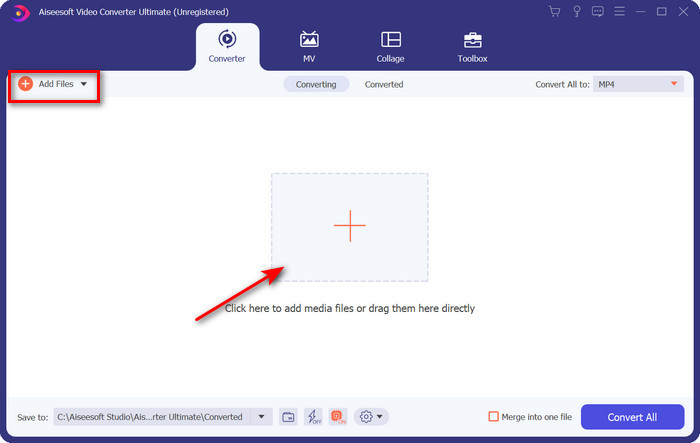
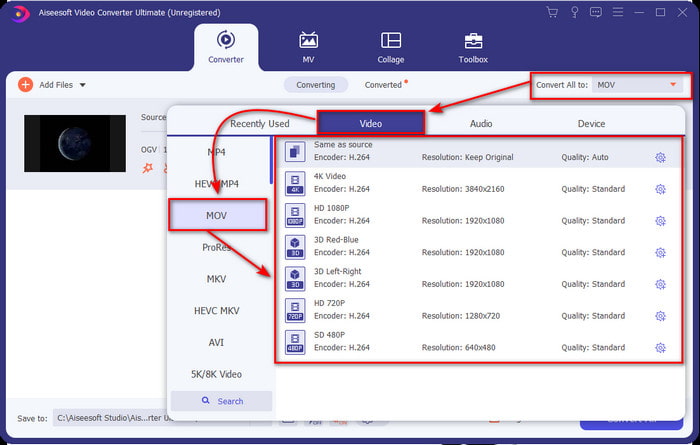
Adım 3. Dosyayı yükledikten sonra, Tümünü Dönüştür bölümünün altında biçimi MOV olarak değiştirmeniz gerekir.
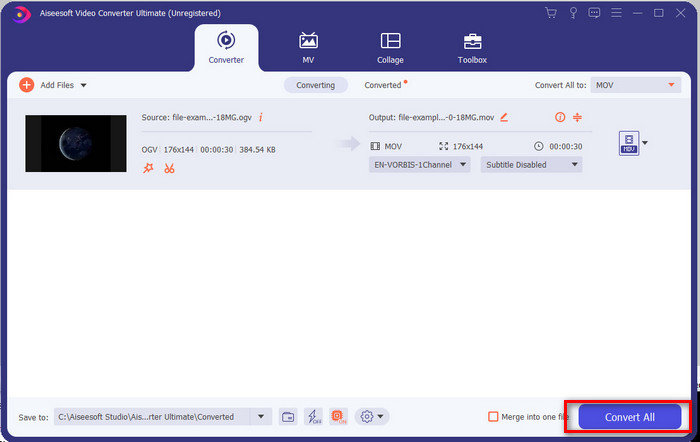
Adım 4. Tümünü Dönüştür düğmesine tıklayarak dönüştürme işlemini başlatın.
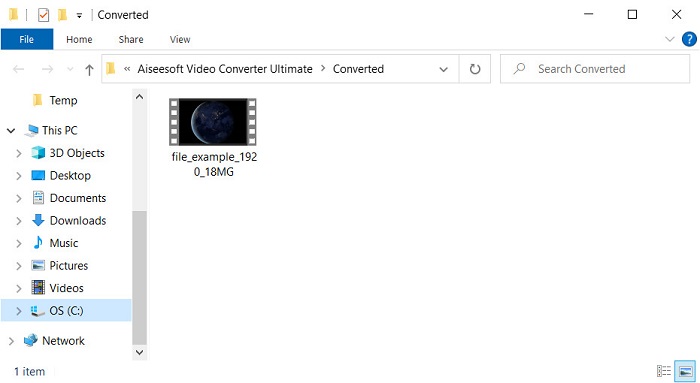
Adım 5. OGV’yi MOV’a dönüştürme tamamlandığında, dosyanızın bulunduğu başka bir klasör açılacaktır. Artık bu dosyaya tıklayarak yeni MOV biçimindeki ortam dosyasını izleyebilir veya düzenleyebilirsiniz.
Artıları
- Mac'te ve hatta PC'de kullanabileceğiniz bir sonraki seviye dönüştürücü.
- Düzenleme, birleştirme, kesme, kırpma ve daha fazlası gibi gelişmiş özellikler Araç Kutusundadır.
- Bu yazılımın ne kadar hafif olması nedeniyle her zaman dönüştürme yapan kullanıcılar tarafından uygun seçim.
- OGV, MOV, AVI, MKV, MP4, 200'den fazla formatı burada toplu olarak dönüştürün.
Eksileri
- Yazılımı kullanmak için ödeme yapın.
Bölüm 2. Ücretsiz ve Kullanımı Kolay Dönüştürücü ile OGV'yi MOV Online'a Dönüştürün
Dönüştürücüyü indirme, kurma ve ayarlama zahmetiyle uğraşmak istemiyor musunuz? O hâlde tüm arama motorlarında erişilebilen bu çevrimiçi OGV’den MOV’a dönüştürücüyü deneyin. FVC Free Video Converter Online, desteklenmeyen biçiminizi oynatılabilir bir formata dönüştürmek için kullanılan yenilikçi bir çevrimiçi video dönüştürücüdür. Birçok internet kullanıcısı bu web aracının genel performansından hâlihazırda memnun. Bunun dışında, bu aracı kullanmadan önce kayıt olmanız gerekmez ve dönüştürme sırasında can sıkıcı reklamlara maruz kalmazsınız. Ancak, internet bağlantınız yoksa bu aracı kullanamazsınız. Şimdi, alıştığınız dönüştürücüyü değiştirmek istiyorsanız bunu kullanın ve aşağıdaki adımları izleyin.
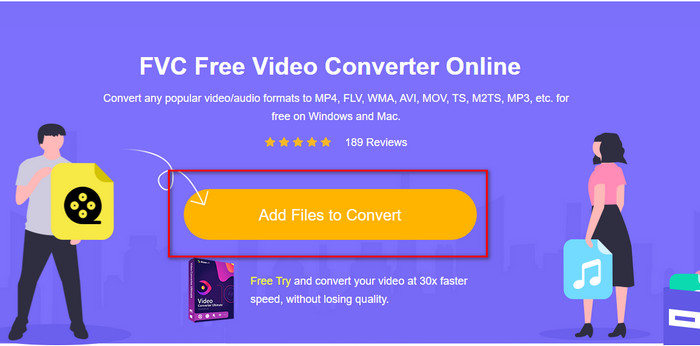
Adım 1. Web aracının sitesine gitmek için şu bağlantıya tıklayın: FVC Free Video Converter Online.
Adım 2. Web arayüzünde Dönüştürülecek Dosyaları Ekle seçeneğine tıklayın; ardından OGV dosyasını bulabileceğiniz klasör açılacaktır, dosyayı seçip Aç’a tıklayın.
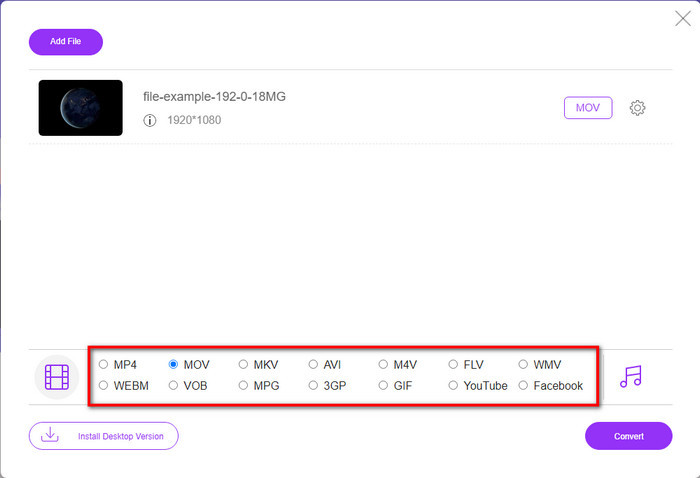
Adım 3. Aşağıdan MOV biçimini ya da çıktının hangi biçimde olmasını istiyorsanız onu seçin.
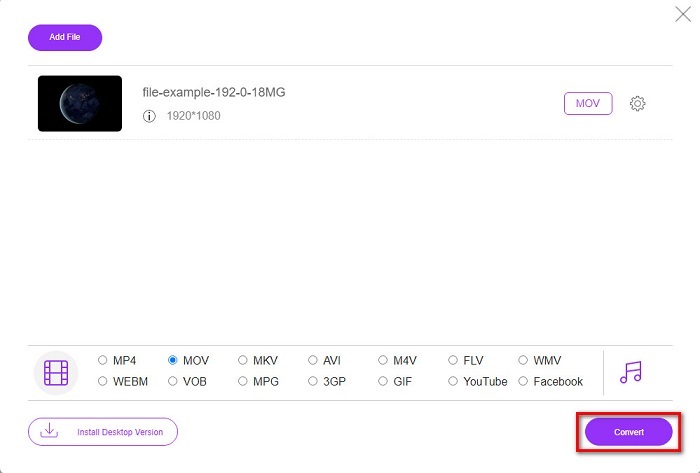
Adım 4. Dönüştürme işlemini başlatmak için Dönüştür seçeneğini işaretleyin.
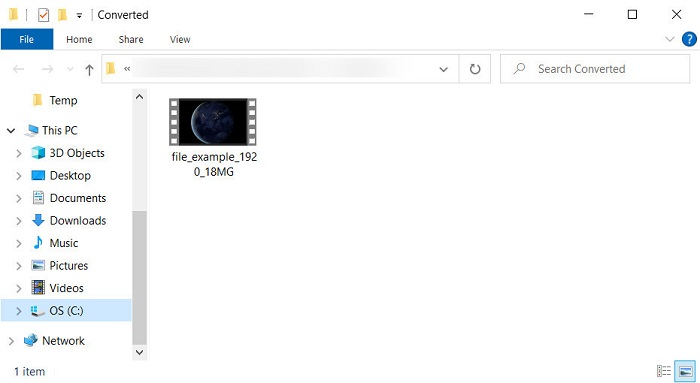
Adım 5. Dönüştürme tamamlandıktan sonra Dosya Gezgini açılacaktır; dönüştürdüğünüz dosya burada yer alır, izlemek için dosyaya tıklayın.
Artıları
- Orta menzilli formatı destekler ve tüm web tarayıcılarında uyumludur.
- Kullanımı ücretsiz ve kayıt olmanıza gerek yok.
- Sinir bozucu reklamlar, web aracında ve dönüştürme sırasında sunulmaz.
Eksileri
- İnternete bağlı.
- Toplu dönüştürmeyi desteklemez.
Bölüm 3. OGV ve MOV
OGV, HTML 5 video etiketleri için Theora, Dirac veya Daala gibi birden çok codec bileşeni kullanan bir multimedya dosya biçimidir. Ancak HTML'de kullandığınızda, dosya video içeriği içermesine rağmen .ogg olarak adlandırılır. Bir web sitesinde olduğu için, biçimlerin benzersiz yapısı ve çoklu kodekler nedeniyle varsayılan bir medya oynatıcısında oynatmak zordur. Ancak web sitenize mükemmel bir görsel ve ses eklemek istiyorsanız, bu bir zorunluluktur.
MOV, ses, video ve altyazıların kalitesini korurken birden fazla parça ve medya verisini depolamak için Apple tarafından oluşturulan formattır. Ayrıca, MPEG-4 veya diğer codec bileşenleri ile kodlanmış medya parçalarını senkronize edebilirsiniz. Biçim Quicktime için olsa da, desteklendiğinden Windows Media Player'da oynatabilirsiniz.
Her şeyi özetlemek için, web sitenize bir video ve ses eklemek ve verileri daha hızlı aktarmak istiyorsanız OGV'yi kullanın. Ancak önce videoyu düzenlemek ve Mac'inizde oynatmak istiyorsanız, desteklenmediği için OGV kullanmayın. Bunun yerine MOV'u kullanın çünkü ister Mac, iPhone, iPod veya iPad olsun tüm Apple cihazlarıyla uyumludur. OGV'nizi MOV'a dönüştürmek, Quicktime player, iMovie veya Apple'da bulabileceğiniz diğer araçlarla uyumluluğa sahip olmak için bir zorunluluktur.
Bölüm 4. OGV'den MOV'a Dönüşüm hakkında SSS
OGV'yi sıkıştırabilir miyim?
Dosyayı sıkıştırmak özellikle e‑posta ile göndermek istediğinizde gereklidir, çünkü burada ortam dosyaları için boyut sınırlaması vardır. Bu yüzden, dosya boyutunu küçültmek isterseniz, OGV dosyalarını sıkıştırma yollarını öğrenmek için bu makaleyi okuyun.
VLC, oynatılacak OGV dosyalarını destekliyor mu?
Bu formatın amacı HTML 5 etiketi üzerinde olmak olsa da, indirilen OGV dosyalarını izlemek için yine de VLC oynatıcıyı kullanabilirsiniz. Ancak bu formatı oynatmak için kullanabileceğiniz başka VLC alternatifleri olduğunu biliyor muydunuz? VLC için medya oynatıcı alternatiflerinin neler olduğunu bilmek istiyorsanız, bu bağlantıya tıklayın.
Dönüştürmeden sonra OGV'nin kalitesi değişecek mi?
OGV dosyasını dönüştürdükten sonra, kalitesi orijinaliyle aynı kalmalıdır. Ancak FVC Video Converter Ultimate'ın yardımıyla video hızını daha yüksek veya daha düşük yapabilirsiniz. Kaliteyi isteğinize göre yönlendirmeyi sağlamayan diğer dönüştürücülerin aksine. Ayrıca, yüksek çözünürlüklü bir video istiyorsanız bunu 1080 veya 4k olarak ayarlayabilirsiniz.
Sonuç
Bulguların bir sonucu olarak, indirilen OGV dosyasını oynatmadan veya düzenlemeden önce dönüştürmek bir zorunluluktur. Bu sefer hangi yolu kullanacağınızı seçmek ve OGV dosyalarınızı MOV'a dönüştürmek sizin elinizde. Kısa bir özet vermek gerekirse, dosyaları çevrimiçi olarak ücretsiz ve rahatsızlık vermeden dönüştürmek istiyorsanız, FVC Free Video Converter Online ile devam edin. Ancak, yeni dönüşüm zirveleri yaşamak istiyorsanız, FVC Video Converter Ultimate'ı indirmelisiniz. OGV formatı ile ilgili probleminize yardımcı olacak en iyi dönüştürücüyü seçin.
-
 DivX'i MOV'a Ücretsiz Dönüştürmenin 4 Yolu [Çevrimiçi ve Çevrimdışı]
 Bir DivX'in sınırlamaları ile mücadele ediyor musunuz veya bu formattaki videolara erişmek için medya oynatıcılarınız yok mu? MOV formatına dönüştürmek istiyorsanız, boşlukları doldurmak için bu makaleyi okumaya devam edin.
-
 Ücretsiz M4V'den MOV'a Dönüştürücü – M4V'yi MOV'a Dönüştürme
 Medya yürütücünüz M4V'yi desteklemiyorsa, iPhone'unuzda film izlemek için hiç zorlandınız mı? Bu makalenin ana konusu, onu bir MOV video dosyasına dönüştürmektir.
-
 MPEG'i MOV'a Dönüştürmenin 3 Etkili Yöntemi [Çevrimdışı ve Çevrimiçi]
 MPEG video formatınızı oynatmak için medya oynatıcı bulmaktan sıkıldınız mı? Özellikle Mac'te, örneğin bir MOV video formatı gibi, oynatılması muhtemel diğer formatlara dönüştürmeyi deneyin. Daha fazla bilgi için bu makaleyi okuyun.
