


 Video Dönüştürücü Ultimate
 Ekran kaydedicisi
 Video Onarımı
 Güvenli İndirme
H.264'ü MP4'e Kolayca Dönüştürmenin En İyi 3 Yöntemi [2024]
Uyumsuzluk sorunları nedeniyle videolarınızı H.264 formatında oynatmakta zorluk mu çekiyorsunuz? Yalnız değilsiniz. Birçok kullanıcı aynı sorunu yaşıyor ve dosyayı MP4 gibi çeşitli cihazlar tarafından yaygın olarak desteklenen bir formata dönüştürmeyi tercih ediyor.
Dolayısıyla, eğer onlardan biriyseniz ve bu dosyayı cihazınızda sorunsuz oynatabilmek için dönüştürme yolları arıyorsanız, bu makale size H.264’ü MP4’e kolayca dönüştürmenin en iyi yöntemlerini sunacaktır. Videolarınızı evrensel olarak uyumlu hale getirmeye hazır mısınız? Hadi başlayalım!

Bölüm 1: H.264 MP4 ile Aynı mıdır?
Hem H.264 hem de MP4 video formatlarıdır, ancak farklı amaçlara hizmet ederler. AVC (Advanced Video Coding) olarak da bilinen H.264, yüksek çözünürlüklü video içeriğini kaydetmek, sıkıştırmak ve dağıtmak için yaygın olarak kullanılan bir video sıkıştırma standardıdır. Öte yandan MP4 (MPEG-4 Part 14), video, ses, altyazı ve durağan görüntüler dahil olmak üzere çeşitli veri türlerini depolayabilen bir kapsayıcı formattır.
H.264 özellikle video sıkıştırma teknolojisini ifade ederken, MP4 daha geniş bir multimedya içeriği yelpazesini kapsar. Daha basit bir ifadeyle, H.264 video verilerini sıkıştırmak için kullanılan kodlama yöntemi gibidir, MP4 ise sıkıştırılmış videoyu diğer multimedya bileşenleriyle birlikte tutan kap gibidir.
Bölüm 2: H.264'ü MP4'e Dönüştürmenin Hızlı ve Kolay Yolu
H.264'ü MP4'e dönüştürmenin en hızlı ve en kolay yolu, FVC Video Converter Ultimate kullanmaktır. Bu masaüstü yazılım aracı, MP4, MKV, MOV, AVI, FLV, WMV, WEBM, M4V, TS, MXF, MPG, 3GP, VOB ve daha birçok format gibi çeşitli video ve ses dosyalarını işlemek için tasarlanmıştır. Böylece H.264 dosyanızı dönüştürmek istediğiniz format konusunda birçok seçeneğe sahip olursunuz. Ayrıca, video codec’i, çözünürlük, kare hızı, bitrate ve daha fazlası gibi çıktı ayarlarını düzenleyebileceğiniz özel bir profil de sunar. Son olarak, diğer dönüştürücü araçlara göre 30× daha yüksek dönüştürme hızını destekleyip 4K çözünürlüğe kadar çıktı alabildiği için hızlı bir dönüştürme süreci ve kayıpsız kaliteyi garanti edebilirsiniz.
Adım 1. Önce yazılımı indirin ve bilgisayarınıza kurun.
Ücretsiz İndirWindows 7 veya üstü içinGüvenli İndirme
Ücretsiz İndirMacOS 10.7 veya üstü içinGüvenli İndirme
Adım 2. Dönüştürücü sekmesinde, Dosya Ekle düğmesine tıklayın ve H.264 dosyalarınızı içe aktarın.
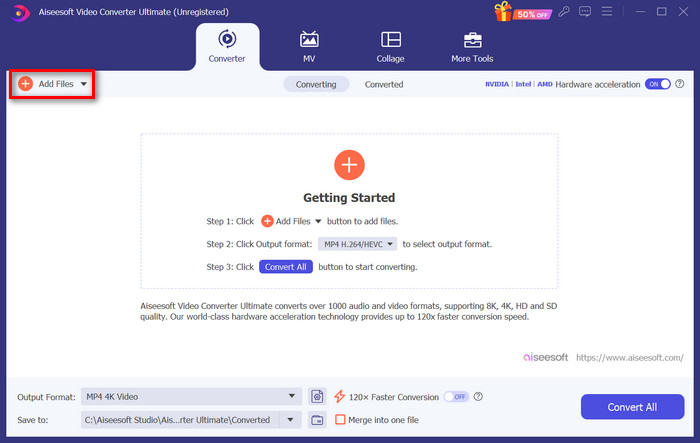
Adım 3. H.264 video dosyası içe aktarıldıktan sonra, Çıktı formatı düğmesine tıklayarak format listesinden MP4’ü seçin.
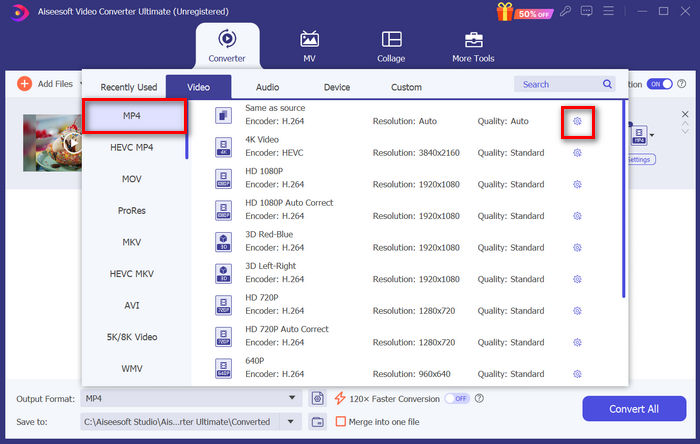
Bu arada, Özel Profili özelleştirmek isterseniz, Ayarlar iletişim kutusuna gidin. Buradan video codec’ini, kaliteyi, dosya adını vb. düzenleyebilirsiniz. İşiniz bittiğinde, kaydetmek için Yeni Oluştur düğmesine tıklamanız yeterlidir.
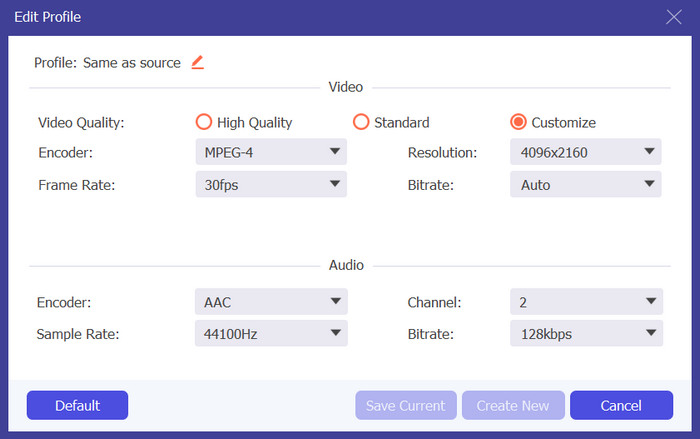
Adım 4. Tüm ayarlar tamamlandığında, sadece Tümünü Dönüştür düğmesine tıklayın.
FVC Video Converter Ultimate ile H.264'ü MP4'e dönüştürme işlemi, fazla zaman ve emek harcamadan hızlı bir şekilde yapılabilir. Ayrıca, H.265 ve AVCHD’yi MP4’e gibi diğer formatları da dönüştürebilirsiniz. Bunların yanı sıra, süreç boyunca yüksek çıktı kalitesini koruyacağınızdan emin olabilirsiniz.
Bölüm 3: FFmpeg Kullanarak H.264'ü MP4'e Dönüştürme
FFmpeg, oynatmadan dönüştürmeye ve düzenlemeye kadar çeşitli yetenekler sunan, multimedya dosyalarını yönetmek için kullanılan bir komut satırı aracıdır. Çok yönlü özellikleriyle, bu araç kullanıcıların H.264'ü MP4 formatına verimli bir şekilde dönüştürmesine olanak tanır ve komut satırı arayüzleriyle rahat olanlar için kullanışlı bir çözüm sunar.
Adım 1. Öncelikle, bilgisayarınıza FFmpeg çalıştırılabilir dosyalarını indirmeniz gerekir.
Adım 2. Ardından, çalıştırılabilir dosyaların bulunduğu klasörde komut satırı penceresini açın. Bir terminal penceresi açılacaktır.
Adım 3. Sonrasında, MP4’e dönüştürmek istediğiniz H.264 dosyasını ekleyin.
Adım 4. Son olarak, şu komutu girin: ./ffmpeg.exe -i inputfilename.mkv outputfilename.mp4 ve Enter tuşuna basın.
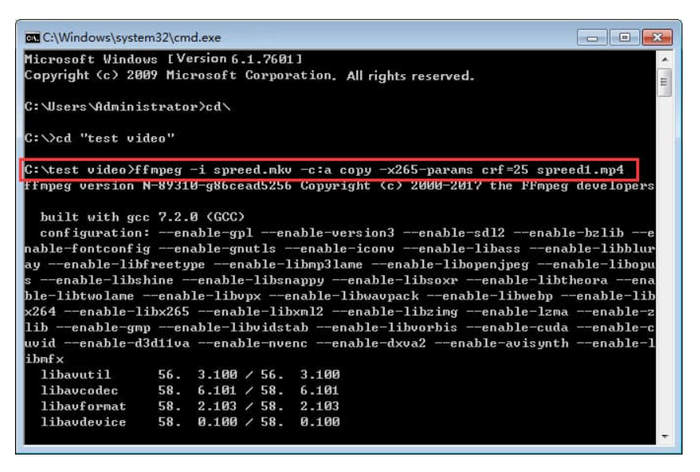
Komut satırlarına aşinaysanız, H.264'ü MP4'e dönüştürürken FFmpeg sizin için en iyi şekilde çalışabilir. Ancak aşina değilseniz, bu aracı gezinmesi zor bulacaksınız, bu da yeni kullanıcılar için kullanılabilirlik söz konusu olduğunda eksikliklerinden biridir.
Bölüm 4: H.264'ü MP4'e Çevrimiçi Dönüştürme
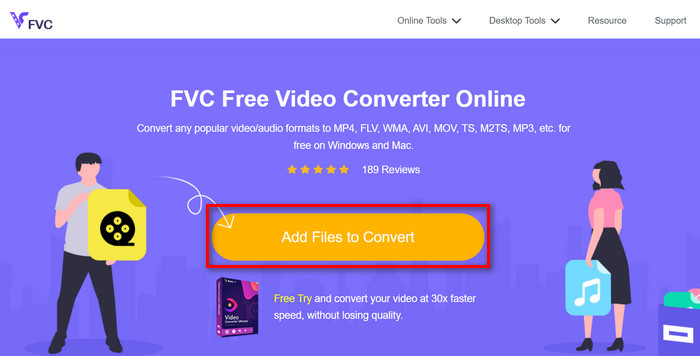
H.264'ü MP4'e çevirmek için çevrimiçi bir araç arıyorsanız, bunun için kullanabileceğiniz en iyi araç FVC Free Video Converter Online’dır. Bu araç, H.264 dosyalarını istediğiniz formata dönüştürmenin hızlı ve son derece sezgisel bir yolunu sunar; yapmanız gereken tek şey dosyayı içe aktarmak ve tercih ettiğiniz formatı seçmektir, gerisini araç halleder.
Adım 1. Önce, dönüştürmek istediğiniz H.264 dosyasını Dönüştürülecek Dosyalar Ekle düğmesine tıklayarak içe aktarmanız gerekir.
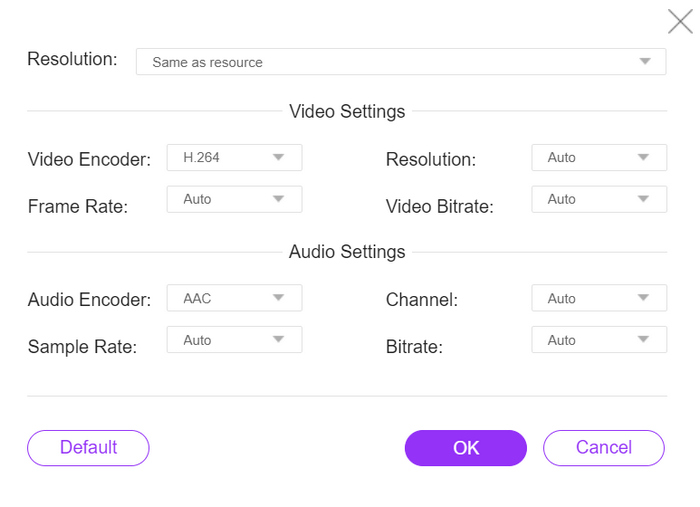
Adım 2. Ardından, çıktı formatı olarak MP4’ü seçin. Ayrıca çözünürlüğü, video kodlayıcıyı, bitrate’i vb. elle ayarlamak isterseniz, çıktı formatının yanındaki Dişli simgesine tıklamanız yeterlidir. Ayarları yaptıktan sonra Tamam düğmesine tıklayın.
Adım 3. Son olarak, dönüştürme sürecini başlatmak için Dönüştür düğmesine tıklayın.
Dönüştürülen H.264 dosyasının çıktı kalitesi konusunda endişelenecek bir şeyiniz yok, çünkü bu araç 1080P'ye kadar video çözünürlüğünü destekliyor. Ayrıca, dönüştürme hızı diğer dönüştürücü araçlara kıyasla 30 kat daha hızlı olduğu için çok uzun sürmeyecek.
Bölüm 5. H.264'ü MP4'e Dönüştürme Hakkında SSS
H264 vs mp4, hangisi daha iyi?
Uyumluluk söz konusu olduğunda, MP4 harika görünüyor, çünkü insanlar genellikle gelişmiş cihaz desteği ve oynatma deneyimi için H.264'ü MP4'e dönüştürmeyi tercih ediyor. Ancak, her iki formatın da güçlü yanları var ve farklı amaçlara etkili bir şekilde hizmet ediyorlar.
H.264 videomu MP4'e dönüştürdüğümde orijinal kalitesini koruyabilir miyim?
Evet, özellikle FVC Video Converter Ultimate veya FFmpeg gibi saygın bir dönüştürme aracı kullanıyorsanız, MP4'e dönüştürürken H.264 videonuzun orijinal kalitesini koruyabilirsiniz. Bu araçlar, yüksek kaliteli çıktı sağlamak için çözünürlük, bit hızı ve kodek gibi ayarları ayarlama seçenekleri sunar.
Hangi video oynatıcılar H.264 formatıyla uyumludur?
VLC Media Player, Windows Media Player ve QuickTime Player gibi çok sayıda video oynatıcı H.264 formatını oynatabilir.
Sonuç
Hepsi bu! Artık H.264’ü MP4’e zahmetsizce dönüştürmek için gereken tüm araç ve yöntemlere sahipsiniz. İster masaüstü yazılımını, ister komut satırı aracını, ister çevrimiçi dönüştürücüyü tercih edin, seçim size kalmış. Hemen başlayın ve her cihazla uyumluluğu garanti edin!
-
 2024'ün En İyi Ücretsiz MPG'den MP4'e Dönüştürücü (Derinlemesine İnceleme)
 MPG'yi neden MP4 olarak değiştirmeniz gerekiyor? Bu gönderideki cevabı alın ve piyasadaki yüksek dereceli MPG'den MP4'e dönüştürücüyü tanıyın.
-
 Sesi MP4'e: Herhangi Bir Ses Dosyasını MP4 Formatına Dönüştürme
 Eşsiz bir ses ve görsel karışımı için favori şarkılarınızı, podcast'lerinizi ve kayıtlarınızı MP4 formatına dönüştürün. WMA'yı MP4'e veya diğer sesleri video formatına nasıl dönüştüreceğinizi keşfedin.
-
 Ücretsiz ve Ücretli En İyi 5 FLV'den MP4'e Dönüştürücü (2024 İnceleme)
 Bu gönderide kalın ve FLV ve MP4 dosyalarıyla ilgili güncellemeler hakkında bilgi edinin. Ayrıca, MP4'e en güvenilir FLV dönüştürücüyü seçtik.
