


 Video Dönüştürücü Ultimate
 Ekran kaydedicisi
 Video Onarımı
 Güvenli İndirme
Windows / Mac / Çevrimiçi'de VOB Dosyalarını MP4'e Dönüştürmenin 3 Ücretsiz Yolu
VOB, DVD Video Nesnesi dosya formatı olarak bilinir. Bu nedenle, DVD diskleri video, ses ve altyazı akışlarını varsayılan olarak VOB formatında kaydeder. MP4'e gelince, video, ses ve altyazı verilerini depolamak için popüler bir kapsayıcı formatıdır. VOB VS MP4 arasındaki en büyük karşılaştırma uyumluluktur. Hemen hemen tüm taşınabilir cihazlar ve oynatıcılar MP4 videoları oynatabilir. VOB'u MP4 formatına dönüştürmenin en büyük nedeni budur.
Dahası, VOB dosyaları her zaman büyük dosya boyutlarındadır. Depolama alanından tasarruf etmek ve uyumsuzluk sorununu gidermek için VOB'u MP4'e dönüştürmek iyi bir seçimdir. Aynı video içeriğini oldukça iyi kalitede ve çok daha küçük dosya boyutunda depolayabilirsiniz. Sonuç olarak, VOB videolarını MP4 formatına dönüştürdükten sonra doğrudan telefonunuzda veya bilgisayarınızda oynatabilirsiniz.

Bölüm 1: VOB'u MP4 Online'a Toplu Olarak Dönüştürme
Toplu dönüştürmeyi destekleyen çevrimiçi bir VOB’tan MP4'e dönüştürücü var mı? Elbette var. Bu, kullanıcıların VOB dosyalarını toplu halde çevrimiçi ve ücretsiz olarak MP4'e dönüştürmesine izin veren FVC Free Online Video Converter’dır. Herhangi bir maksimum süre sınırı yoktur. Aşırı büyük dosya boyutları için endişelenmenize gerek yoktur. Dolayısıyla, sınır olmadan çalışan çevrimiçi bir VOB’tan MP4’e dönüştürücü arıyorsanız, FVC Free Online Video Converter ilk tercihiniz olabilir.
- • Orijinal kaliteyi korurken toplu olarak VOB dosyalarını MP4'e dönüştürün.
- • Dosya boyutu sınırı yok. Büyük VOB'u ücretsiz olarak MP4 dosyalarına dönüştürebilirsiniz.
- • VOB'u MP4 formatına dışa aktarmadan önce video çözünürlüğünü, örnek hızını, kare hızını ve daha fazlasını ayarlayın.
- • Filigran yok. Dönüştürülmüş MP4 videolarınız tamamen filigransız olacaktır.
Adım 1: Add Files to Convert seçeneğine tıklayın ve başlatıcısını (launcher) yükleyin. Açılan pencerede VOB dosyanızı bulun ve ekleyin.
Adım 2: Çevrimiçi video dönüştürücünün alt kısmında, çıktı video formatı olarak MP4’ü ayarlayın.
Adım 3: Çıktı video ayarlarını yapılandırmak için yanındaki dişli simgesine tıklayın.
Adım 4: VOB’u çevrimiçi ve ücretsiz olarak MP4'e dönüştürmek için Convert düğmesine tıklayın.
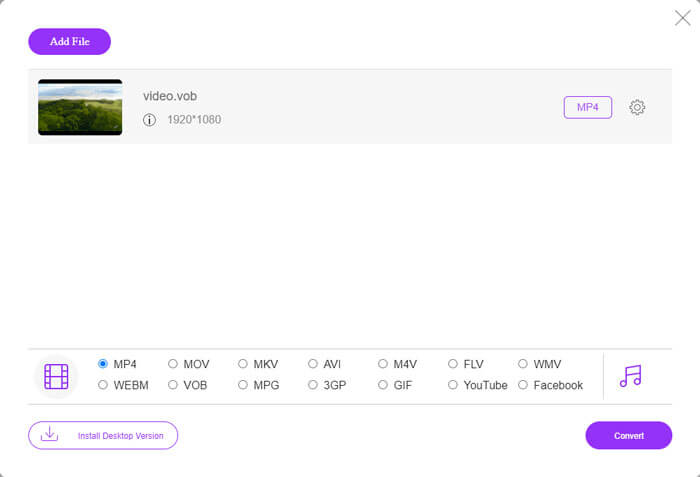
Bu ücretsiz çevrimiçi MP4 dönüştürücü, M2TS, MTS, MOV, MKV, WMV, TS vb. diğer formatları da MP4’e dönüştürebilir.
Denemeniz için masaüstü versiyonu da mevcut:
Ücretsiz İndirWindows 7 veya üstü içinGüvenli İndirme
Ücretsiz İndirMacOS 10.7 veya üstü içinGüvenli İndirme
Bölüm 2: Windows'ta VOB'u MP4'e Dönüştürme (VLC ile)
VLC, Windows, Mac, iOS ve Android kullanıcıları için ücretsiz VOB'dan MP4'e dönüştürücü uygulamanız olabilir. VOB dosyasını telefonunuzda veya bilgisayarınızda kolaylıkla MP4'e dönüştürebilirsiniz. Burada, VLC Media Player kullanarak Windows 10'da VOB'u MP4'e nasıl dönüştürebileceğinizi göstereceğiz.
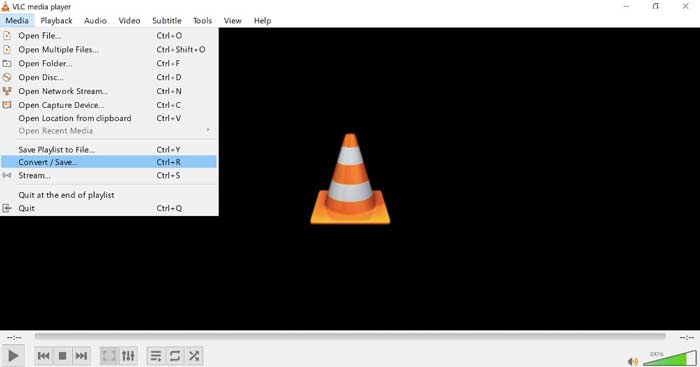
Adım 1: VLC’yi çalıştırın. Üstteki Media menüsünden Convert/Save seçeneğini seçin.
Adım 2: Open Media penceresinde Add düğmesine tıklayın. Göz atarak bir VOB videosunu VLC’ye aktarın.
Adım 3: Sağ alt köşedeki Convert/Save seçeneklerinden Convert seçeneğini seçin.
Adım 4: Profile bölümünde çıktı video formatı olarak MP4’ü ayarlayın.
Adım 5: VOB dosyalarını VLC ile MP4'e dönüştürmeye başlamak için Start düğmesine tıklayın.
Bölüm 3: Mac'te VOB'u MP4'e Dönüştürme (HandBrake ile)
HandBrake, Windows, Mac ve Linux'ta VOB'u MP4'e ücretsiz olarak dönüştürebilen açık kaynaklı bir video dönüştürücüdür. Aynı anda birkaç VOB dosyasını MP4'e dönüştürmek desteklenir. Video dönüştürme hızı hızlı olmasa da.
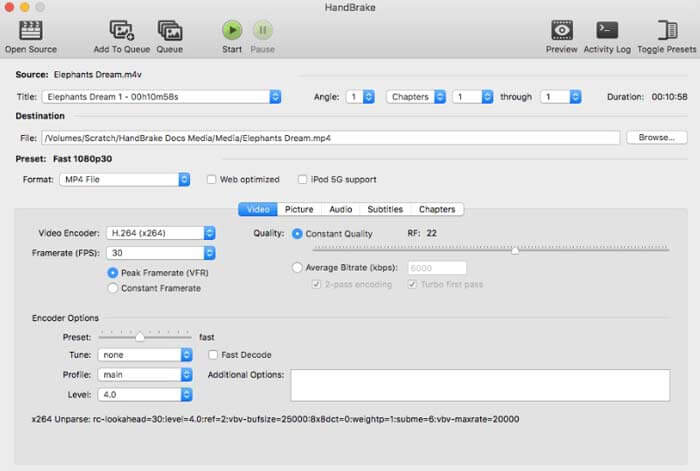
Adım 1: HandBrake’i çalıştırın. DVD VOB dosyasını eklemek için Open Source seçeneğine tıklayın.
Adım 2: Yeni bir hedef klasör belirlemek için Browse seçeneğine tıklayın.
Adım 3: Preset bölümünde, Format listesinden MP4’ü seçin.
Adım 4: Diğer video çıktı ayarlarını yönetin.
Adım 5: Mac’te HandBrake ile VOB’u MP4'e dönüştürmek için Start düğmesine tıklayın.
-
Bölüm 4: VOB'u MP4'e Dönüştürme Hakkında SSS
FFmpeg kullanarak VOB'u MP4'e nasıl dönüştürebilirim?
FFmpeg, Windows ve Mac kullanıcıları için iyi bir VOB dönüştürücüdür. Ancak FFmpeg, yeni başlayanların kullanması ve uygulaması açısından pek kullanıcı dostu değildir. Komut satırlarına aşinaysanız, FFmpeg penceresine ffmpeg -i input -acodec libfaac -vcodec mpeg4 -b 1200k -mbd 2 -flags+mv4+aic -trellis 2 -cmp 2 -subcmp 2 -metadata title=filename output.mp4 komutunu yazabilirsiniz. Ardından VOB’u FFmpeg ile MP4'e dönüştürmek için Enter tuşuna basın.
Windows Media Player kullanarak VOB'u MP4'e dönüştürebilir misiniz?
Hayır. Windows Media Player yalnızca VOB oynatıcınız olabilir. Windows Media Player'da bir VOB dosyası oynatabilirsiniz. Bu arada, Windows'ta VOB dosyalarını ilk kez oynattığınızda, codec bileşenlerini indirmeniz gerekecek.
İPhone ve Android'de VOB dosyaları nasıl oynanır?
VOB, yerel olarak cep telefonları tarafından desteklenmemektedir. VLC Media Player gibi bir VOB oynatıcı kurmanız gerekir. Veya dosya boyutunu etkili bir şekilde sıkıştırmak için VOB'u diğer formatlara dönüştürebilirsiniz. Örneğin, iPhone ve Android oynatmak için MP4'ten VOB dosyaları oluşturabilirsiniz.
MP4 dönüştürücü için en iyi VOB nedir? Farklı insanların farklı cevapları vardır. Bazı insanlar kalite kaybı olmadan VOB'u MP4'e toplu olarak dönüştürmek isterken, diğerleri sezgisel arayüz, gelişmiş özellikler ve daha fazlasına odaklanır. Her neyse, başka bir şey yüklemek istemiyorsanız, ancak yine de büyük VOB dosyalarını MP4'e dönüştürmeniz gerekiyorsa, FVC Free Online Video Converter sizin güzel seçiminizdir. Sınırsız ve filigran olmadan VOB dosyalarını çevrimiçi olarak MP4'e dönüştürebilirsiniz.
Daha Fazla Okuma-
 Kaliteyi Düşürmeden M2TS'yi MP4'e Dönüştürme
 Videoyu HD video kameradan ortak MP4'e dönüştürmek ister misiniz? Windows ve Mac'te M2TS dosyasını MP4 olarak değiştirmenin 5 basit ve ücretsiz yolu.
-
 Kaliteyi Kaybetmeden MOV'u MP4'e Dönüştürme
 MOV (Apple QuickTime Movie) dosyalarını MP4'e dönüştürmek ister misiniz? Bu gönderi, MOV video dosyalarınızı Windows 10/8/7 / XP ve Mac OS X'te MP4 formatına dönüştürmek için 4 ücretsiz yöntem paylaşıyor.
-
 M2TS Dosyalarını Ücretsiz Olarak Düzenleme ve Dönüştürme
 M2TS dosyalarını ücretsiz olarak nasıl düzenlerim? M2TS dosyalarını dönüştürmenin herhangi bir yolu var mı? Bu kılavuzda, M2TS dosyalarını kolaylıkla düzenlemenize ve dönüştürmenize yardımcı olacak en iyi ücretsiz M2TS düzenleyicisini göstereceğiz.
-
