


 Video Dönüştürücü Ultimate
 Ekran kaydedicisi
 Video Onarımı
 Güvenli İndirme
Hata Kodu 224003'ü Düzeltme: Bilmeniz Gereken Her Şey
Bir kişinin deneyimlemek istediği en az şey, 224003 Hata Kodunun ekranlarında görülmesidir. Ağ sorunları, tarayıcı uyumluluğu ve güncel olmayan yazılımlar gibi Hata Kodu 224003'ün yaygın nedenlerini anlamak, etkili sorun giderme için çok önemlidir. Böyle bir konuyla uğraşırken doğru araçları bilmek önemlidir; bu, video dosyasını tamamen mahvetmeyeceğinizden emin olmak için karar vermeyi gerektirir.
Bu makale, her olası nedeni ele alarak adım adım çözümleri inceleyecek ve hatayı gidermek için pratik ipuçları sunacaktır. Kılavuzun sonunda, Error Code 224003’ün karmaşıklıklarında yolunuzu bulmak ve kesintisiz bir dijital deneyim sağlamak için gerekli bilgiyle donanmış olacaksınız. Bu hatayla ilk kez karşılaşıyor olun ya da defalarca yaşamış olun, kılavuzumuzun amacı, gelecekte Error Code 224003 hatasını gidermek, düzeltmek ve önlemek için sizi gerekli araçlarla güçlendirmektir. Gelecekte tekrar ortaya çıkma ihtimaline karşı nasıl başa çıkacağınızı öğrenmek için lütfen bugün makalenin tamamını okuyun.

Bölüm 1. Video Hata Kodunu 224003 Anlamak
Hata Kodu 224003, çeşitli şekillerde ortaya çıkabilir ve genellikle sistemdeki bir aksaklığa veya soruna işaret eder. Kullanıcılar belirli uygulamaları, akış hizmetlerini veya tarayıcıları kullanırken bu hatayla karşılaşabilir ve bu da önemli rahatsızlıklara yol açabilir. Bu hatayı etkili bir şekilde ele almak ve çözmek için aşağıda listelenen potansiyel nedenlerini anlamak çok önemlidir.
Hata Kodu 224003'ün Yaygın Nedenleri
◆ Ağ Sorunları: Zayıf veya dengesiz internet bağlantısı, özellikle çevrimiçi içerik izlerken, Error Code 224003 hatasını tetikleyebilir. Bu durum, Error code 232404 için de bir nedendir.
◆ Tarayıcı Uyumluluğu: Bazı tarayıcılar, kullanılan uygulama veya hizmetle tam uyumlu olmayabilir ve bu da hataya yol açabilir.
◆ Güncel Olmayan Yazılım: Tarayıcılar ve uygulamalar dahil eski yazılımlar, bu hatanın ortaya çıkmasında etkili bir faktör olabilir.
◆ Bozulmuş Önbellek veya Çerezler: Tarayıcınızda biriken önbellek ya da bozulmuş çerezler, uygulamanın düzgün çalışmasını engelleyerek Error Code 224003 hatasına neden olabilir.
Hata Kodu Hangi Durumlarda Oluşur?
◆ Yayın Platformu Kaynaklı Sorunlar: Bakım çalışmaları, teknik problemler veya yoğun trafik gibi yayın platformunun sunucu tarafındaki sorunları, error code 224003 hatasıyla sonuçlanabilir. Bu tür durumlarda kullanıcının sorunu çözme konusunda sınırlı kontrolü vardır ve platformun sorunu gidermesini beklemesi gerekebilir.
◆ Donanım Hızlandırma: Tarayıcı ayarlarınızdaki donanım hızlandırma, bazı video içerikleriyle uyumluluk sorunlarına yol açarak error code 224003 hatasını ortaya çıkarabilir. Böyle durumlarda donanım hızlandırmayı devre dışı bırakmak, yeşil ekranlı video, videonun donması ve benzeri diğer oynatma sorunlarını çözmek için olası bir çözüm olabilir.
◆ Cihaz ile Uyumsuzluk: Bazı cihazlar veya işletim sistemleri, video içeriğiyle tam uyumlu olmayabilir ve bu da oynatma sırasında hatalara neden olabilir.
◆ Ağ Güvenlik Duvarı veya Güvenlik Yazılımı: Bazı güvenlik yazılımları veya güvenlik duvarları, belirli video içeriklerinin akışını engelleyebilir ve bunun sonucunda Error Code 224003 görüntülenebilir.
◆ Tarayıcı Eklentilerinin Müdahalesi: Bazı tarayıcı eklentileri veya eklentiler (add-on’lar), çevrimiçi video oynatıcıların düzgün çalışmasını engelleyerek Error Code 224003 hatasına yol açabilir.
224003 hata koduyla sonuçlanan spesifik koşulların farklı olabileceğini anlamak çok önemlidir; dolayısıyla sorun giderme önlemleri de farklı olabilir. Temel nedeni belirlemek, sorunu doğru şekilde çözmek için hatanın oluştuğu bağlama bağlıdır.
Bölüm 2. 224003 Hatasını Çözmek İçin Adım Adım Kılavuz
Aiseesoft Video Onarımı
Error 224003, herhangi bir zamanda ve herhangi bir video dosyasında herkesin başına gelebilir ve bu hata oluştuğunda 'Error 224003: The video file cannot be played' gibi bir mesaj görebilirsiniz. Aiseesoft Video Repair, 224003 hatası gibi bozuk veya hasarlı video dosyalarından kaynaklanan sorunları gidermek için güvenilir bir araçtır. MP4, MOV, AVI, WMV, MKV ve FLV dahil çeşitli formatlardaki videoları onarabilir. Ayrıca virüsler, kötü amaçlı yazılımlar ve diğer etkenler nedeniyle hasar görmüş videoların onarımını da destekler. Aiseesoft Video Repair kullanarak bu adım adım kılavuzu izleyin ve videolarınızı ilk günkü kusursuz hâline geri döndürerek sorununuzu çözün.
Aiseesoft Video Repair Kullanarak Error 224003’ü Çözme Adımları:
Adım 1. Aiseesoft’un web sitesini ziyaret edin, Video Repair programını indirin ve kurulum talimatlarını izleyin.
Ücretsiz İndirWindows 7 veya üzeri içinGüvenli İndirme
Ücretsiz İndirMacOS 10.7 veya üzeri içinGüvenli İndirme
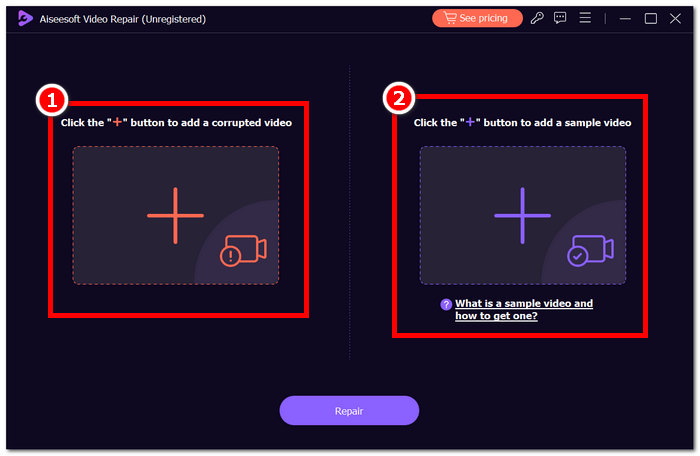
Adım 2. Aiseesoft Video Repair’i açın ve error code 224003 hatasını veren videoyu kırmızı + simgesini kullanarak ekleyin. Sağ taraftaki mor + simgesine tıklayarak örnek videonuzu ekleyin.
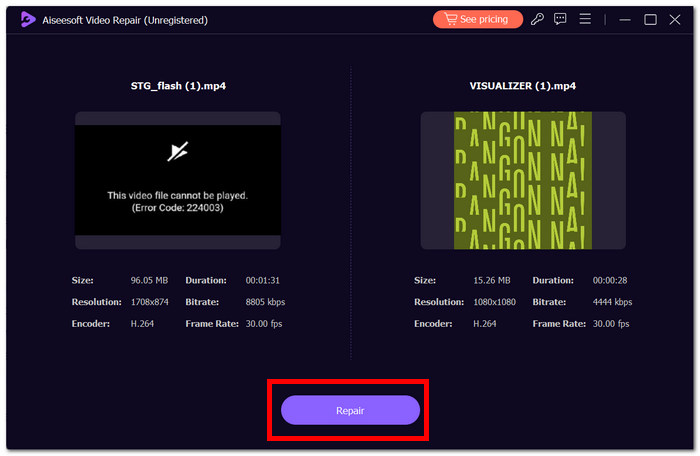
Adım 3. Repair seçeneğine tıklayın; yazılım videoyu analiz edip onaracaktır.
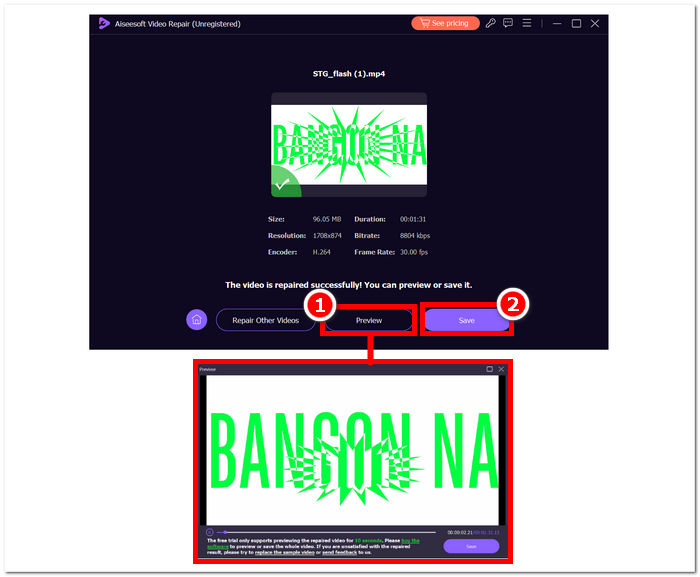
Adım 4. Onarım tamamlandıktan sonra doğrulamak için Preview’a tıklayın. Ardından Save’e tıklayarak onarılan videonun indirilmesini sağlayın ve Error 224003 hatasının giderilip giderilmediğini kontrol etmek için medya oynatıcınızla açın.
Ek İpuçları:
◆ Herhangi bir onarım girişiminde bulunmadan önce orijinal video dosyasının yedeğini alın.
◆ Optimum performans için Aiseesoft Video Repair'ın en son sürümünü kullandığınızdan emin olun.
Bu adım adım talimatları özenle takip ederek, Aiseesoft Video Repair'ı verimli bir şekilde kullanarak Hata 224003'ü çözebilir ve ortadan kaldırabilir, video dosyalarınızı işlevsel ve eğlenceli bir duruma döndürebilirsiniz. Onarılan videoyu tercih ettiğiniz konuma kaydetmeyi ve Hata 224003 sıkıntısı yaşamadan kesintisiz izlemenin keyfini çıkarmayı unutmayın. İşlem sırasında herhangi bir sorunla karşılaşırsanız, Aiseesoft Video Onarım belgelerine bakın veya daha fazla rehberlik için destek kaynaklarından yardım isteyin.
Bölüm 3. Hata Kodu 224003 Hakkında SSS
Firefox neden sürekli 224003 video hata kodunu söylüyor?
Ağ bağlantısı sorunları, tarayıcı ayarları tutarsızlıkları veya video içeriğiyle uyumsuzluk nedeniyle Firefox video hatası 224003 ortaya çıkabilir. Bu hatayı gidermek için internet bağlantınızın kararlılığını doğrulayarak, tarayıcınızın güncel olduğundan emin olarak ve tarayıcınızın önbelleğini ve çerezlerini temizleyerek başlayın. Ayrıca, uzantıları tarayıcınızdan geçici olarak kaldırmak, uyumluluk çakışmalarını tespit edip çözmenize yardımcı olabilir ve video oynatımı sırasında 224003 hatasının oluşmasını potansiyel olarak ortadan kaldırabilir.
Video dosyasını düzeltmek video kalitesini düşürür mü?
Bir video dosyasının düzeltilmesi, düzgün bir şekilde yürütülürse kaliteden ödün vermeden gerçekleştirilebilir. Bu işlem öncelikle dosyadaki bozulma veya biçimlendirme hataları gibi endişeleri giderir. Güvenilir video onarım araçlarına güvenmek ve önlem olarak, herhangi bir onarım prosedürünü başlatmadan önce orijinal video dosyasının yedeğini oluşturmak çok önemlidir.
Çevrimiçi video hata kodunu düzeltebilir misiniz?
224003 gibi çevrimiçi video hata kodunu gidermek için sayfayı yenileyin, internet bağlantınızı kontrol edin ve tarayıcınızı güncelleyin. Sorun devam ederse uyumluluk açısından farklı bir tarayıcı denemeyi düşünün. Her şey başarısız olursa, hatayı çözme ve kesintisiz video oynatmayı geri yükleme konusunda yardım almak için platformun desteğine veya topluluk forumlarına başvurun.
Sonuç
Error Code 224003 can sıkıcı olabilir, ancak doğru bilgi ve sorun giderme adımlarıyla üstesinden gelebilirsiniz. Ağ sorunları, tarayıcı uyumluluğu ve güncel olmayan yazılımlar gibi olası nedenleri tespit edip düzelterek bu hatayı kolayca giderebilir ve kusursuz bir dijital deneyimi geri getirebilirsiniz. Eğer Error Code 224003 hatasıyla tekrar karşılaşırsanız, adım adım çözüm için lütfen eğitim içeriğimize (tutorial) bakın. Bu içgörüler sayesinde teknoloji kaynaklı sıkıntılarınız geçmişte kalacak ve dijital faaliyetlerinizin tadını kesintisiz bir şekilde çıkarabileceksiniz.
-
 Videodaki 0xc10100bf Hatası Nedir ve Nasıl Düzeltilir
 Videonuz 0xc10100bf Hatası nedeniyle oynatılmıyor ve bunu düzeltmenin yollarını mı arıyorsunuz? Bu makalede bunun ne olduğunu ve nasıl düzeltileceğini öğreneceksiniz.
-
 Video Oynatılamıyor Hatası 150'yi Düzeltmek İçin Hızlı Çözümler
 Video izleme deneyiminiz sırasında 150 numaralı video hatasını oynatamama sorunuyla hiç karşılaştınız mı? Endişelenmeyin, çünkü bunu nasıl düzeltebileceğinizi size anlattık.
-
 [Ayrıntılı Kılavuz] Google Drive Videosunun Bilgisayarda Oynatılmaması Nasıl Düzeltilir
 Google Drive'daki videolar, "Bu video oynatılırken bir sorun oluştu" hatasıyla oynatılmıyor. Google Drive'ın kendisinden veya krom sorunlarından kaynaklanabilir. Bu makale 6 çözümü ayrıntılı olarak tanıtacaktır.
