


 Video Dönüştürücü Ultimate
 Ekran kaydedicisi
 Video Onarımı
 Güvenli İndirme
3GP Ses/Video Kaydedici için Web'deki Kullanılabilir Araç ve Platformların Listesi
Küçük boyutuyla bilinen, 3G ağları ve benzerlerinde veri aktarmaya son derece uygun olan ISO standartlı bir kapsayıcı biçimidir. Gelişmiş bazı 3GP çağrı kaydedicileri, standart tabanlı biçim olarak bunu kullanır. Bir süre sonra 3GP biçiminin ortaya çıkışı, yavaş internet bağlantısına sahip olsak bile akıllı telefonlarımızda büyük dosyaları görüntülememize yardımcı oldu. Çoğu kullanıcı bu dosyayı; video, ses ve metin biçimini desteklediği için kullanır. Bu nedenle, kullanıcılar hâlâ 3GP videoları kaydetmek ya da bir 3GP ses dosyasını MP3 gibi yeni bir biçime kaydetmek istemektedir. Böyle bir durumda, bir 3GP video kaydedici veya 3GP ses kaydedici vazgeçilmez bir araç hâline gelir. O hâlde hız kesmeden devam edin ve aşağıdaki ayrıntılara göz atın.

Bölüm 1. Ücretsiz 3GP Videoları Yakalamak için En İyi Çevrimiçi 3GP Kaydedici
FVC Ücretsiz Ekran Kaydedici
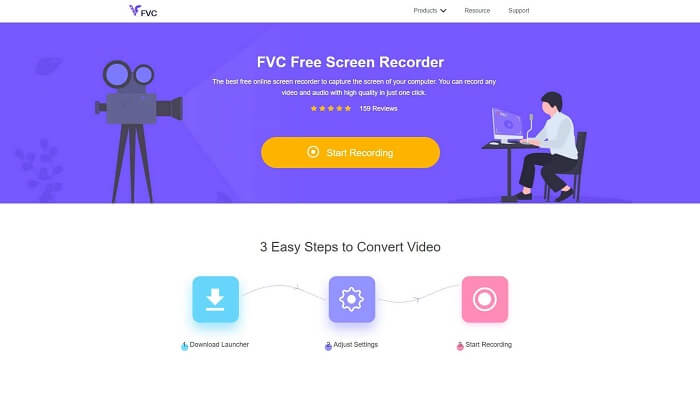
Herhangi bir dosya indirmek istemeyen ve kayıt yapmak için sabit bir internet bağlantısına sahip kullanıcılar için en iyi araçtır. Siz de böyle bir kullanıcıysanız, FVC tarafından geliştirilen bu ücretsiz çevrim içi ekran kaydedici sizin için en iyisidir, adı da FVC Free Screen Recorder’dır. Bu araç, bilgisayarınızın ekranında gerçekleşen tüm görüntü hareketlerini yakalamanıza olanak tanır. Oyun oynayışınızı, iş toplantılarını, görüşmeleri ve benzeri etkinlikleri kaydetmek istiyorsanız bu araç sizin için en uygun seçenektir. Daha ayrıntılı bilgi ve adımlar için lütfen dikkatlice okuyun ve listelenen talimatları izleyin.
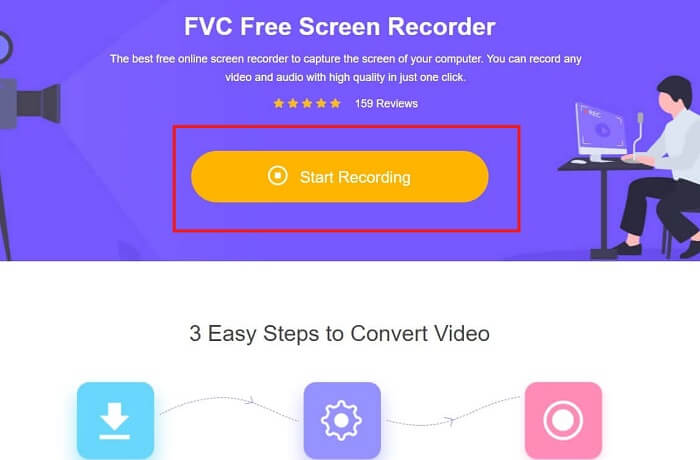
Adım 1. Sitenin ana arayüzüne geçmek için bu bağlantıya tıklayın. Kayıt başlat’a tıklayın ve aracı çalıştırın.
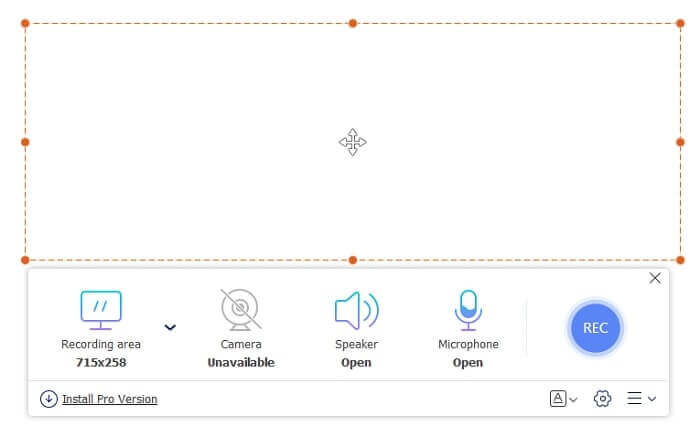
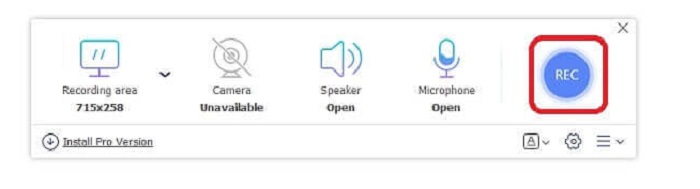
Adım 2. Araç zaten açıksa, buna benzer kayan bir ekran fark edeceksiniz.
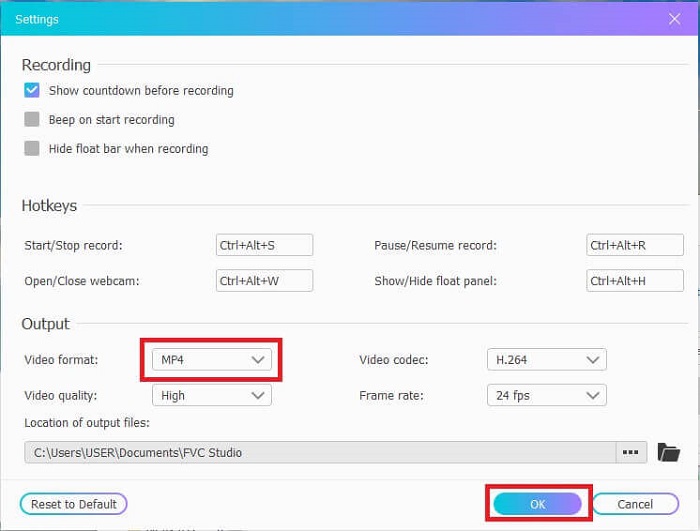
Adım 3. Biçimi ve tercih edebileceğiniz diğer ayarları düzenlemek için Ayarlar’a basın, ardından kaydetmek için Tamam’a tıklayın.
Adım 4. Kayan araç çubuğunda, çerçeve boyutunu ayarlayabilir veya tam ekran görüntü için Tam Ekran’a tıklayabilirsiniz. Çerçeve boyutunun yanında, kayıt sırasında yüzünüzü eklemek için Webcam, sistem sesini almak için Hoparlör ve son olarak sesinizi eklemek için Mikrofon bulunur. Hazırsanız, kaydı başlatmak için disk şeklindeki düğmeye tıklayın.
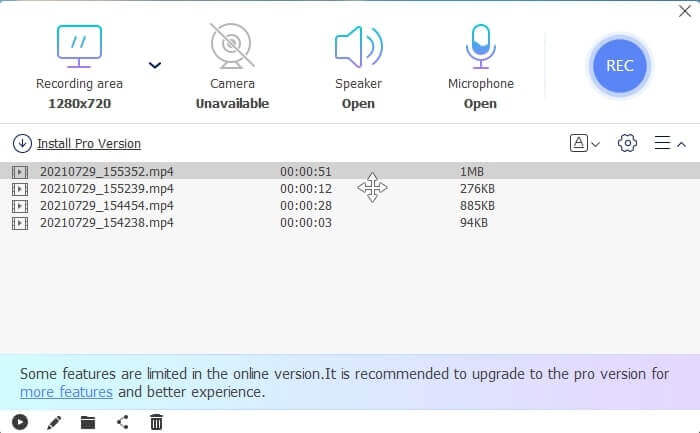
Adım 5. Kayıt bittiyse, kare düğmeye tıklayın; kayan araç çubuğunun altında en yeniden en eskiye sıralanmış bir Geçmiş listesi görünecektir.
Artıları
- Tüm platformlarda kullanılabilen en iyi Çevrimiçi ücretsiz araç.
- Diğer çevrimiçi araçların aksine, kullanımı kolaydır ve kayıt sırasında hiçbir reklam aniden açılmaz.
- Kaydolmak için aracı kullanmanız gerekiyordu.
Eksileri
- İnternete bağlı, internet bağlantısı veya veri olmadan çalışmaz.
- Kilitli Ekran özelliği yoktur. Yalnızca aracın premium sürümünde mevcuttur.
Bölüm 2. Windows ve Mac için Diğer Popüler 3GP Video ve Ses Kayıt Cihazları
1. FVC Ekran Kaydedici
Hiç dünya çapında kullanıcı tarafından seçilen en iyi ekran kaydedicilerden birini duydunuz mu? O zaman değilse, bu sizin için. FVC Ekran Kaydedici Bu ekran kaydedici, bilinen tüm farklı platformlarda mevcuttur. Diğer ekran kaydedici ile karşılaşabileceğiniz en yaygın sorunlar, bazı android ses kaydedici 3gp ses çıkışı yok. Aracı kullanırken sistem sesi için hoparlörü ve sesinizi eklemek için mikrofonu kapatmadığınız sürece bu tür bir sorunla asla karşılaşmazsınız. Bu çok amaçlı aracı nasıl kullanacağınızı öğrenmek istiyorsanız, iyice okuyun ve aşağıdaki talimatları izleyin.
Adım 1. Aracı indirin. Şu anda kullandığınız iki işletim sisteminden birini seçin. Aracı kurun, ardından Tercihler’i isteğinize göre ayarlayın ve devam etmek için Bitir’e tıklayın.
Ücretsiz İndirinWindows 7 veya üzeri içinGüvenli İndirme
Ücretsiz İndirinMacOS 10.7 veya üzeri içinGüvenli İndirme
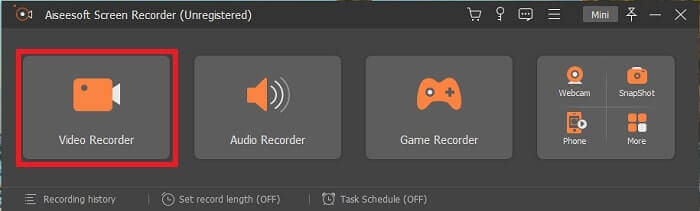
Adım 2. Kurulumdan sonra, ekranınızda buna benzer kayan bir araç çubuğu belirecektir. Bu, kullandığınız uygulamanın program üzerinden zaten çalıştığını gösterir. Video Kaydedici’ye tıklayın.
Adım 3. Buna tıkladıktan sonra, görüntüyü tam ekran yapın veya bir bölge de seçebilirsiniz. Bilgisayarınızın sesini eklemek için Sistem Sesi’ne basın. Diğer seçenekler ise yalnızca kullanmak isteyip istemediğinize bağlıdır. Webcam ve Mikrofon’u açarak yüzünüzü ve sesinizi de ekleyebilirsiniz.
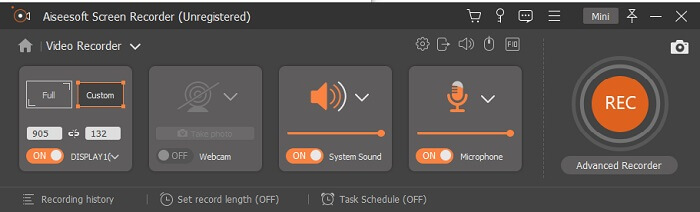
Adım 4. Başlamadan önce, Ayar düğmesine tıklayıp gerekirse ayarları yapın, ardından ayarları kaydetmek için Tamam’a tıklayın. Tüm hazırlıklar bittiğinde, yuvarlak düğmeye tıklayın ve kaydı başlatın.
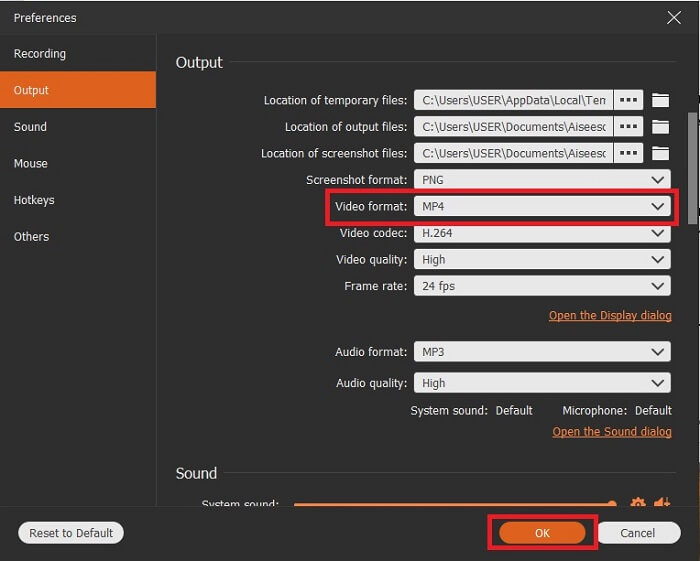
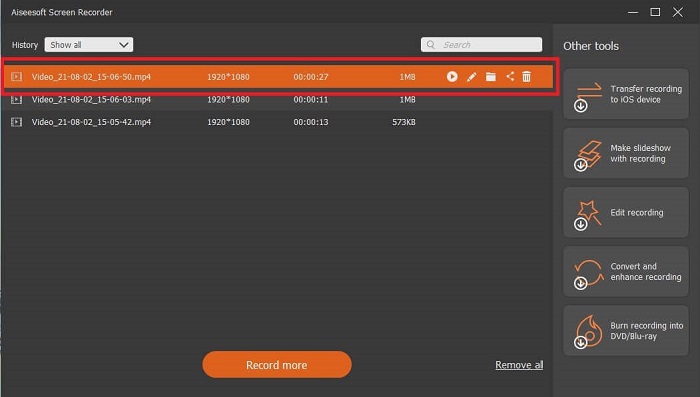
Adım 5. Kaydı bitirmek istiyorsanız, araç çubuğundaki küçük kare düğmesine tıklayıp Durdurun. Kaydet’e tıklayın ve nereye kaydedeceğinizi seçin. Ardından ekranınızda bir liste görünecektir. Bu liste yeniden eskiye doğru sıralanmıştır. Videoyu tekrar izlemek için en üstteki ilk videoya tıklayın.
Artıları
- İnternete bağlı değildir. İstediğiniz zaman, istediğiniz yerde istediğiniz kadar kaydedin.
- Profesyonel bir çıktı almak isteyen yeni başlayanlar veya kullanımı kolay bir ekran kaydedici arayan profesyoneller için kullanıcı dostu ve en iyi seçimdir.
- Bu benzersiz özelliğe, Kilitli Ekrana sahiptir.
Eksileri
- Kullandıkça öde aracı ve yine de kullanıcılar onu kullanıyor.
- İndirmek için 2,4 MB depolama alanı gerektirir.
2. Ekran Akışı
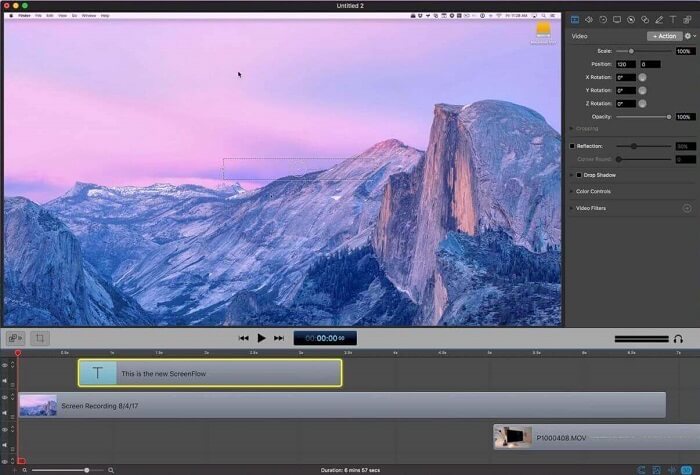
Mac kullanıcıları için başka bir en iyi araç. Screenflow, mac işletim sistemindeki en iyi ekran kayıt aracı olarak kabul edilen bir araçtır. Kullandıkça ödeyen bir araçtır. Yani, bu aracın ucuz olduğunu düşünüyorsanız, cevap değil. Bu aracın maliyeti, bir ekran kaydedicinin sunabileceği sınırın neredeyse üzerindedir. Diğer kullanım için ödemeli ekran kaydedicilerin sunabileceklerini sunabilir. Ve bazı nedenlerden dolayı, mac kullanıcıları bunu kişisel seçim ekran kaydedici olarak tercih ediyor.
Artıları
- Mac için kullanılabilen kullanımı kolay araç.
- Güncel araç.
- Kötü amaçlı yazılım sorunu yok.
Eksileri
- Yalnızca Mac'te kullanılabilir.
- Seçiminiz kadar maliyetli olabilir.
3. Fraps
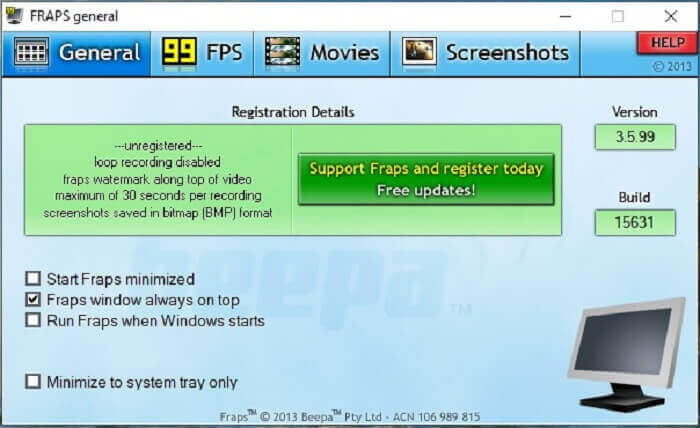
Diğer araç gibi, Fraps da en iyi 10 ekran kaydediciye kolayca yerleştirilebilir. Bu araç, ekran kaydınızı mümkün olduğunca kolaylaştırır. Aletin yerinde talimatı nedeniyle. Ancak bu araç güncellemede yok. Araca yapılan daha az güncelleme nedeniyle, popülaritesi giderek azaldı, ancak yine de bazı kullanıcılar onu olduğu gibi tercih ediyor.
Artıları
- AVI dosya biçimini destekleyen benzersiz bir araç.
- Ayrıntılı talimat ile kullanıcı dostu arayüz.
- 7680x4800'e kadar çözünürlükleri destekler.
Eksileri
- Arayüze bakmak sıkıcı.
- AVI dosya formatı nedeniyle. 20 dakikalık video kaydederseniz, neredeyse 4 gib'lik bir depolama alanı gerekir. Uzun kayıt için en iyi seçim değil.
Bölüm 3. Karşılaştırma Tablosu
| Özellikler | FVC Ücretsiz Ekran Kaydedici | FVC Ekran Kaydedici | ekran akışı | Fraps |
| Video/Ses Ekran Kaydı |  | | | |
| açıklama ekle | | | | |
| Kötü Amaçlı Yazılım Güvenli | | | | |
| Donanım ivmesi |  | | | |
| Kilit Ekranı | | | | |
| Dosya boyutu | Başlatıcı için birkaç kbps | 2.1mb | 85,3 mb | 2.4mb |
| Kullanılabilir İşletim Sistemi | Tüm Platformlarda | Tüm Platformlarda | Mac os işletim sistemi | Windows XP, 2003, Vista ve Windows 7 |
| Fiyat aralığı | Ücretsiz Açık Kaynak Çevrimiçi Kaydedici | 1 ay için: $25.00 Bir yıl için: $31.20 Ömür Boyu Lisans için: $55.20 | SCREENFLOW(Hacim indirimli fiyatları): $149 EKRANSüper Paket: $209 EKRANSüper Pak + Premium Destek: $239 | Ücretsizdir, ancak $37'ye de kayıt olabilirsiniz. |
Bölüm 4. 3GP Kaydedici hakkında SSS
3GP ortam dosyası biçimimi neden ortam yürütücümde oynatamıyorum?
Bunun nedeni, medya oynatıcınızın bu tür bir kodeği desteklememesi olabilir. 3GP dosya biçiminizi izlemek istiyorsanız, FVC Free Video Player'ı kullanabilirsiniz. Bu medya oynatıcı ücretsizdir ve farklı video-ses biçimlerini destekler. İnternet bağlantınız olduğu sürece, ücretsiz sürüme göre daha fazla seçenek ve özellik sunan premium sürümü de edinebilirsiniz. Ya da istediğiniz oynatıcıyı bulmak için En İyi 3GP Oynatıcıları yazısını okuyabilirsiniz.
.3gp ses dosyasını bir android ses kaydediciden mp3'e nasıl kaydederim?
3GP’yi MP3'e dönüştürebilen bir dönüştürücü kullanın. Bunun güzel bir örneği FVC Free Online Video Converter’dır. Tüm platformlarda kullanılabilen 200’den fazla medya dosyası biçimini dönüştürebilir.
Farklı 3GP dosyalarını tek bir medya çıktısında birleştirmek mümkün müdür?
Evet, FVC Free Online Merger yardımıyla bu mümkündür. Bu çevrim içi araç, 2 veya daha fazla 3GP dosyasını tek bir dosyada birleştirmeyi mümkün kılar. FVC tarafından üretilen bir diğer harika araçtır. Devam etmek için birleştiriciye tıklayın.
Sonuç
Çoğu kullanıcının hala farklı amaçlar için kayıt yaptığı sonucuna varıyoruz. Montaj, iş toplantıları, öğretmen tartışmaları ve daha pek çok şey için kayıt cihazı olarak kullanıp kullanmadıklarını. Ama yine de, kaydettiğiniz neden ne olursa olsun veya hangi formatta olursanız olun, nihai ürünün çıktısı olmak istersiniz. Tüm kayıt cihazları, istediğiniz gibi işi yapabilir.
Ancak internetteki ve bu listedeki tüm farklı kaydedicilere rağmen hâlâ size en uygun olanın hangisi olduğunu merak ediyor olabilirsiniz. Size ne seçmeniz gerektiği hakkında fikir vermeden önce bunu iyice düşünmelisiniz. Ekran kaydedicinizin bugünkü ve belki gelecekteki ihtiyaçlarınızı karşılayıp karşılamayacağını değerlendirin. FVC Screen Recorder sizin için en iyi araçtır. Burada listelenen diğer araçların aksine, bu araç web üzerindeki tüm ekran kaydedicileri arasında kendine özgü bir yer açacak kadar benzersizdir. Yine de kullanımı her zaman basittir ve hem acemilerin hem profesyonellerin isteyeceği en iyi performansı sunar. Öyleyse ne bekliyorsunuz? Sadece ücretsiz olana ya da pahalı olana razı olmayın; bu araçtan daha fazlasını yapabilen, uygun fiyatlı bir sürümü satın alabilirsiniz.
-
 Ekran Videosu Yakalamak için 4 En İyi Ücretsiz Web Başlatma Kaydedici
 Ekrandaki etkinlikleri bir kuruş ödemeden masaüstünüze kaydetmenin en iyi yolunu mu arıyorsunuz? İşte en sık kullanılan 4 ücretsiz web başlatma kaydedici.
-
 Tarafsız Cinch Review Ses Kaydedici ve En İyi Alternatif
 Cinch Audio Recorder, akış sitelerinden müzik indirmenin en iyi yoludur. Tarafsız inceleme ve makaleden en iyi alternatif hakkında daha fazla bilgi edinin.
-
 Windows ve Mac için En İyi 5 En İyi Fare ve Klavye Kaydedici
 İşte fare hareketlerinizi ve klavye tıklamalarınızı kaydedebilen ve olayları tekrarlayabilen en iyi beş fare ve klavye kaydedici programı.
