


 Video Dönüştürücü Ultimate
 Ekran kaydedicisi
 Video Onarımı
 Güvenli İndirme
En İyi 3 Facebook Arama Kaydedici - Facebook Video Görüşmeleri Nasıl Kaydedilir
Facebook görüntülü aramalarını kaydederek seninle arkadaşların ve ailen arasındaki değerli anları nasıl saklayabilirsin? Facebook görüntülü arama özelliğini sunmaya başladığından beri, giderek daha fazla kullanıcı telefon aramaları yerine Facebook aramalarıyla iletişim kurmayı tercih ediyor. Ancak bir sosyal medya platformunun ek iletişim işlevi olarak, telefon aramalarında olduğu gibi kayıt özelliğine sahip değil. Bununla birlikte, türetilmiş bağımsız uygulama olan Facebook Messenger’ın da yerleşik bir kaydedicisi yok. Bu durumda, bu makaledeki ayrıntılı yönergelerle bilgisayarlar, iOS cihazları ve Android telefonlar için kullanımı kolay 3 farklı Facebook arama kaydedicisi hakkında bilgi edinebilirsin.

Bölüm 1: Windows/Mac için En İyi Çevrimiçi Facebook Çağrı Kaydedici
Herhangi bir üçüncü taraf yazılım indirmeden, FVC Free Screen Recorder kullanarak Facebook görüntülü aramalarını çevrimiçi ve ücretsiz olarak kaydedebilirsin. Bu araç, ihtiyaç duyduğun birçok özelliğe sahip sade bir arayüze sahip, kullanıcı dostu bir Facebook arama kaydedicisidir.
- 1. Facebook aramalarını ve videolarını basit adımlarla ücretsiz olarak çevrimiçi kaydedin.
- 2. Yüksek kaliteli videoları saklamak için ses ve videoların kayıpsız kaydı.
- 3. Sahipliğinizi korumak için filigran yok.
- 4. Kayıtlar otomatik olarak medya kitaplığına kaydedilecektir ve SNS'de özgürce silmeyi, indirmeyi ve paylaşmayı seçebilirsiniz.
Adım 1: Herhangi bir tarayıcıda FVC Free Screen Recorder web sitesine git. Start Recording düğmesine tıklayarak başlatıcıyı birkaç saniye içinde yükle ve ardından kaydediciyi başlatmak için tekrar Start Recording düğmesine tıkla.

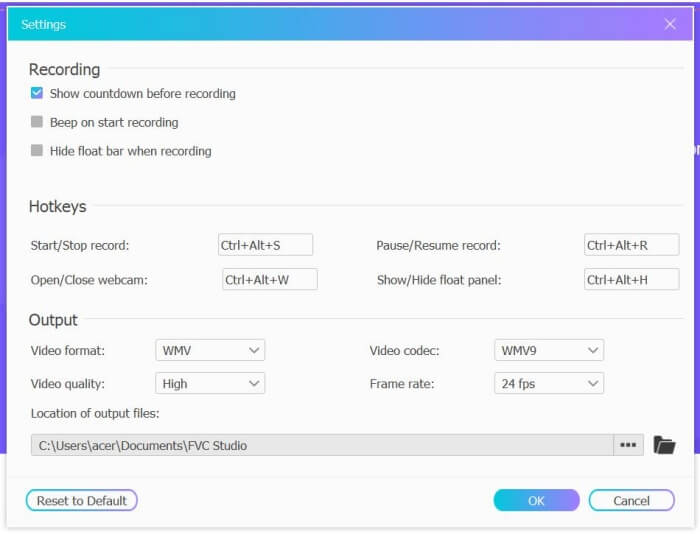
Adım 2: Tam ekranı seçmek veya serbestçe bir bölge belirlemek için Recording Area menüsüne tıkla. Ardından Microphone ve Speaker sesini aç. Video ayarlarını düzenlemek için Setting simgesine tıklayabilirsin. Kayıtların yüksek kalitede olması için MP4 formatını, High (Yüksek) kaliteyi ve 24 fps’i seçebilirsin. Daha sonra Facebook aramalarını kaydetmeye başlamak için REC düğmesine tıkla.
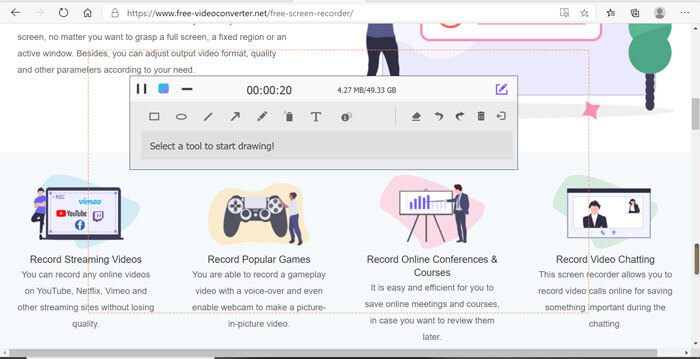
Adım 3: Birden fazla düzenleme aracına sahip bir araç kutusu açılacaktır. İhtiyacına göre şekiller, yazılar ve çizgiler ekleyebilirsin. Ardından kaydını buluta kaydetmek için Stop simgesine tıkla. Bilgisayarına indirmek için sağ tuşla tıklayıp indirme seçeneğini belirleyebilirsin.
Bu ücretsiz çevrimiçi Facebook görüntülü arama kaydedicisini kullanmak, bilgisayar kullanıcılarının çevrimiçi Facebook görüntülü aramalarını kaydetmelerinin en iyi yoludur. Kayıt ayarlarını önceden yaparak, Facebook aramalarını küçük boyutlu ve yüksek kalitede MP4 formatında kaydedebilir. Facebook'un mobil cihazlarda arama yapmasına alışkınsanız, lütfen bu makaleyi okumaya devam edin.
Bölüm 2: Varsayılan Kaydedici aracılığıyla iOS için Facebook Çağrısı Nasıl Kaydedilir
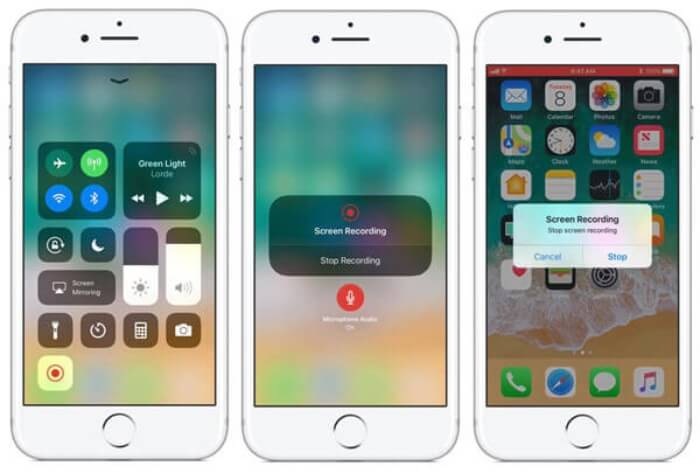
Güncellenmiş iOS 11 veya üzeri sürüm, iPhone ve iPad'inizde herhangi bir uygulama indirmeden Facebook video görüşmelerini yakalamak için en iyi seçim olan yeni bir varsayılan kaydediciye sahiptir. Facebook arama kaydediciyi kontrol merkezindeki kısayollara nasıl ekleyeceğinizi ve nasıl kullanılacağını buradan öğrenebilirsiniz.
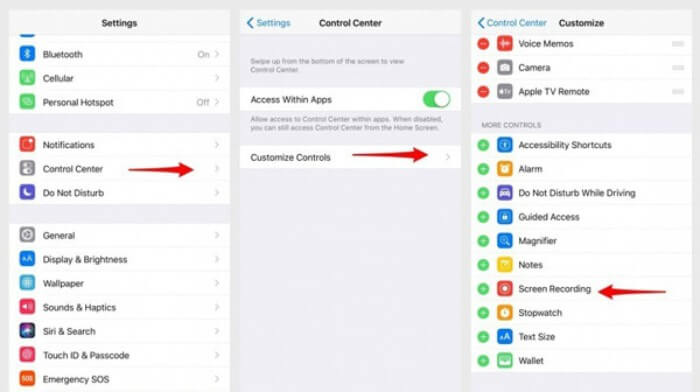
Adım 1: iPhone/iPad’inde Settings (Ayarlar) uygulamasına dokun ve aşağı kaydırarak Control Center (Denetim Merkezi) seçeneğini bul. Ardından Customize Controls (Denetimleri Özelleştir) sekmesine dokun ve Screen Recording (Ekran Kaydı) işlevini bul. Bu özelliği Denetim Merkezi’ne eklemek için Plus simgesine dokun.
Adım 2: Denetim Merkezini açmak için telefon ekranının üst kısmından aşağı doğru kaydır ve altta kayıt uygulamasını göreceksin. Kaydı başlatmak için Screen Recording simgesine dokun; yalnızca videoyu ya da sadece ses parçasını kaydetmeyi seçebilirsin. Bitirmek istediğinde, üstteki kırmızı Status Bar çubuğuna dokun ve açılan pencerede Stop seçeneğine bas.
Bölüm 3: Android için Kolay Bir Facebook Messenger Kaydedici
Bazı Android telefonların yerleşik kaydedicileri yoktur ve aralarından seçim yapabileceğiniz çok fazla Facebook görüntülü arama kaydedici vardır. Böylece, aşağıdaki bölümdeki ayrıntılı adımlarla Android cep telefonları için en iyi kayıt cihazlarından birini öğrenebilirsiniz.
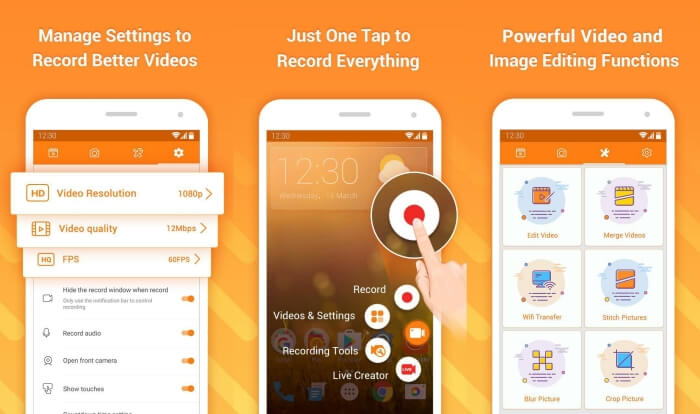
DU Recorder, Android için kullanımı kolay bir Facebook arama kaydedicisidir ve akıcı kayıt performansıyla bilinir. Root erişimi gerektirmeden herkes, tek dokunuşla Facebook Messenger aramalarını kaydetmek için kullanabilir.
Adım 1: Kaydediciyi başlat; kayıtlar, ekran görüntüleri, düzenleme araçları ve ayarlar olmak üzere dört menü göreceksin. Öncelikle video parametrelerini ayarlamak için Settings menüsüne dokun. Yüksek kaliteyi korumak için 1080p çözünürlük ve 30 fps kare hızını seçebilirsin.
Adım 2: Kaydediciyi kapatma ve sadece Facebook Messenger’ı aç. Ardından ekranında kaydedici simgesini göreceksin. Simgeye dokun ve ekranı ve sesi kaydetmeye başlamak için Recording simgesini seç. Kaydı durdurmak için tekrar dokunabilirsin. Daha sonra kaydı kırpmak ve müzik eklemek için Editing simgesine dokun.
Şunlar da ilginizi çekebilir:
Action Screen Recorder İncelemesi
Bölüm 4: Facebook Çağrı Kaydedici ile İlgili SSS
1. Dose Facebook, video görüşmelerini PC'ye kaydetmek için varsayılan kaydediciye sahip mi?
Hayır, değil. Bu nedenle, diğer profesyonel Facebook arama kayıt cihazlarına güvenmeniz gerekir. Bilgisayarınızdaki depolama alanını kaplayacak başka bir yazılım indirmek istemiyorsanız, FVC Free Screen Recorder en iyi seçiminizdir.
2. Facebook Messager Uygulamasında bir arkadaşınızla nasıl sohbet başlatılır?
Öncelikle cep telefonunuzda Facebook Messenger'ı açın, ardından Facebook araması yapmak istediğiniz arkadaşınızın sohbet kutusunu seçin. Ve şimdi Video simgesini görebilir, böylece bir video görüşmesi başlatmak için üzerine tıklayabilirsiniz.
3. Facebook Messenger kayıt cihazlarını kullanırken kayıtları kaydetmek için hangi formatı seçmeliyim?
İster bilgisayarda ister mobilde Facebook arama kaydedici kullanıyor olun, Facebook görüntülü aramalarını kaydetmek için en iyi biçim MP4'tür. Daha fazla depolama alanı kazandırabilir ve tüm cihazlarla uyumludur.
Sonuç
Yukarıdaki makalede 3 farklı Facebook görüntülü arama kaydedicisi tanıtıldı. iPhone, iPad ve bazı Android telefonlarda, telefonun yerleşik kaydedicisini kolayca kullanabilirsin. Aksi halde Google Play’deki DU Recorder dahil olmak üzere herhangi bir kaydediciyi tercih edebilirsin. Bilgisayar için ise, Facebook aramalarını kaydetmek üzere FVC Free Screen Recorder en iyi seçeneğindir. Facebook arama kaydedicilerini kullanırken başka sorunlarla karşılaşırsan, lütfen aşağıya yorumunu bırak.
-
 Snagit 2021 İncelemesi - Artıları, Eksileri ve En İyi Alternatif
 Snagit'e en iyi alternatif nedir? Snagit gibi bir ekran yakalama aracı var mı? Bu gönderi Snagit'i inceleyecek ve ekranı yakalamak için Snagit'e en iyi alternatifi paylaşacaktır.
-
 Masaüstünde ve Çevrimiçi Olarak Kaçırmamanız Gereken En İyi 6 WAV Kaydedici
 Bu makalede paylaştığımız en iyi WAV kayıt yazılımı, profesyoneller gibi ses ve ses yakalamanıza yardımcı olan çeşitli kullanışlı özelliklere sahiptir.
-
 Yüksek Kaliteli Ses Üreten En İyi 4 Ücretsiz AIFF Ses Kayıt Cihazı
 Bu makale, AIFF ve yüksek kaliteli AIFF formatı oluşturmak için kullanabileceğiniz en popüler araçlardan bazıları hakkında konuşuyor.
