


 Video Dönüştürücü Ultimate
 Ekran kaydedicisi
 Video Onarımı
 Güvenli İndirme
FBX Oyun Kaydedici + En İyi Alternatif [Derinlemesine İnceleme]
FBX Game Recorder hakkında meraklı bir oyuncu musunuz? Çoğu oyuncu çeşitli sebeplerle oyun deneyimini ekran kaydıyla kaydeder, bu yüzden gözünüz FBX’teyse, okumaya devam edin!
Bu incelemede, FBX Game Recorder'ı öne çıkaran özellikleri, performansı, uyumluluğu ve kullanıcı deneyimini derinlemesine inceleyeceğiz. Ayrıca, artılarını ve eksilerini keşfedecek ve bu ekran kayıt aracı ihtiyaçlarınızı tam olarak karşılamıyorsa değerlendirebileceğiniz en iyi alternatifi keşfedeceksiniz. Öyleyse, kayıt düğmesine basmadan önce, FBX Game Recorder'ın oyun kurulumunuz için gerçekten değerli olup olmadığına bakalım. Hadi başlayalım!

Bölüm 1. FBX Oyun Kaydedici İncelemesi
FBX Game Recorder, oyuncular için özel olarak geliştirilmiş, performans odaklı bir ekran kayıt ve canlı yayın yazılımıdır. NVIDIA, AMD ve Intel'in gelişmiş donanım hızlandırma teknolojilerini kullanarak, kullanıcıların oyunlarını kare düşüşü veya gecikme olmadan sorunsuz bir şekilde kaydetmelerine veya yayınlamalarına olanak tanır.
Standart ekran kaydedicilerin aksine, bu ekran kaydedici araç oyun için optimize edilmiştir. HD ve 4K kayıt, anında tekrar yakalama ve oyun oynarken bile önemli anları kaydetme özelliklerini destekler. Arka planda sessizce çalıştığı için sisteminizin performansını etkilemez, bu da onu oyun oynarken kesintisiz kayıt ihtiyacı duyanlar için ideal kılar.
Ana Özellikler:
• NVIDIA, AMD ve Intel teknolojilerini kullanır.
• HD ve 4K çözünürlükte kayıt desteği sağlar.
• Canlı yayın desteği.
• Arkaplan kaydı.
• Temel video düzenleme özellikleri sunar.
Artıları
- Yüksek performanslı oyunlarda bile akıcı kayıt.
- Arayüzü basit ve oldukça kullanıcı dostu.
- Birden fazla donanım hızlandırma seçeneğini destekler.
- Aynı anda hem kayıt hem de canlı yayın yapabilirsiniz.
Eksileri
- Sınırlı gelişmiş düzenleme araçları.
- Bazı özelliklere ücretli planlarda erişilebiliyor.
- Ücretsiz versiyonda filigran bulunmaktadır.
- Sınırlı işletim sistemi desteği.
Karar:
FBX Game Recorder’ın harika bir oyun ekran kaydı aracı olduğuna şüphe yok. Kullanımı kolay, hafif ve yüksek performanslıdır. Ancak, ücretsiz planda sınırlı ekran kaydı ve düzenleme özellikleri gibi bazı kısıtlamaları da vardır. Son olarak, Windows’u desteklemesi harika olsa da, macOS gibi diğer işletim sistemleri bu özel ekran kaydı aracını kullanamamaktadır.
Bölüm 2. FBX Oyun Kaydedici Güvenli mi?
Evet, FBX Game Recorder'ı resmi web sitesinden indirdiğiniz sürece güvenle kullanabilirsiniz. Güvenilir bir geliştirici tarafından üretilmiştir ve herhangi bir virüs veya kötü amaçlı yazılım bildirimi yoktur. Ancak, istenmeyen programlar içerebileceğinden, üçüncü taraf sitelerden indirmemeye dikkat edin. Diğer ekran kaydediciler gibi, FBX de ekranınıza ve sesinize erişim izni isteyecektir; bu normaldir. Genel olarak, oyununuzu kaydetmek ve yayınlamak için güvenli ve güvenilir bir araçtır.
Bölüm 3. FBX Oyun Kaydedici Nasıl Kullanılır?
Artık FBX Game Recorder'ın ne olduğunu öğrendiğinize göre, oyun deneyiminizi kaydetmek için nasıl kullanıldığını öğrenmenin zamanı geldi.
1. Adım. Öncelikle, aracı resmi web sitesinden indirip kurmanız gerekir.
2. Adım. Kurulum tamamlandıktan sonra aracı açın. Buradan, FBX kısayol tuşlarını ayarlamak için aracın Ayarlar bölümüne gidin. Ardından, kaydı başlatmak ve durdurmak için kısayol tuşları atayın.
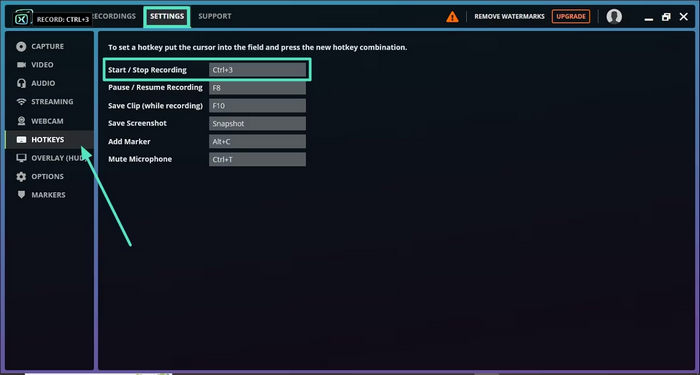
3. Adım. Oyununuzu başlatın ve kaydı başlatmak için atadığınız kısayol tuşlarına basın, kaydı durdurmak için de aynı kısayol tuşlarına tekrar basın.
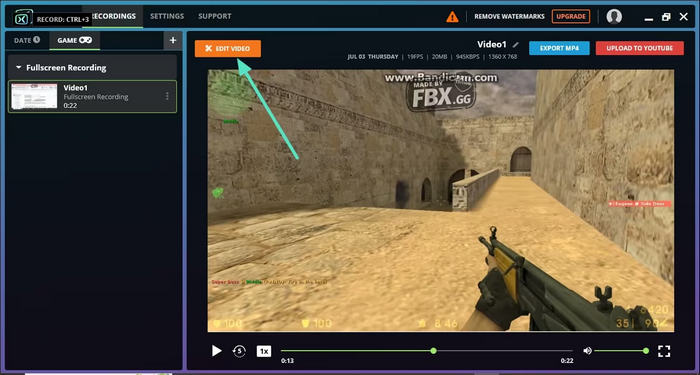
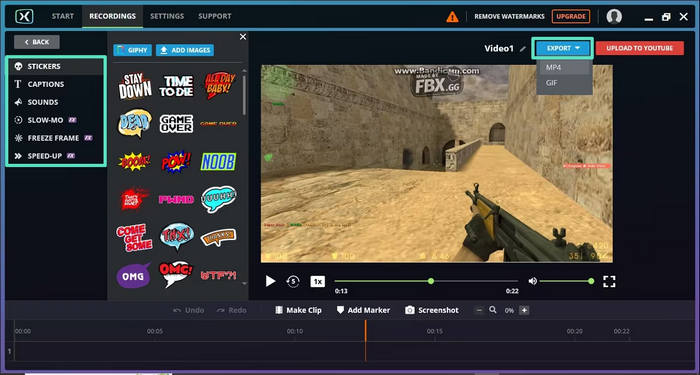
4. Adım. Ekran kaydınızın sonucunu daha yaratıcı hale getirmek istiyorsanız, oyun ekran kaydı videonuza efektler, altyazılar veya hız ayarlamaları ekleyebilirsiniz.
5. Adım. Her şey hazır olduğunda, Dışa Aktar düğmesine tıklayın ve indirmek için tercih ettiğiniz dosya biçimini ve çözünürlüğü seçin.
Bölüm 4. FBX Oyun Kaydedicisine En İyi Alternatif
Artık FBX’in ne olduğunu ve diğer ekran kaydı araçlarından nasıl farklı olduğunu biliyorsunuz. Eğer bunun yeterli olmadığını düşünüyorsanız, deneyebileceğiniz alternatif bir araç var. FVC Screen Recorder, FBX Screen Recorder’a en iyi alternatiftir. Bu araçla ekranınızı kaydedebilir, ekran görüntüleri alabilir, bunları düzenleyebilir ve açıklama ekleyebilirsiniz. Ayrıca hem Windows hem de macOS’ta çalışır; böylece kullanıcılar, işletim sistemleri ne olursa olsun esnek bir şekilde kullanabilir. Dahası, bu ekran kaydı aracı sistem sesini, mikrofon girişini ve hatta web kamerası kaydını destekler; bu da onu çevrim içi toplantılar, video eğitimleri ve oyun kayıtları için harika bir seçenek haline getirir.
Ana Özellikler:
• Tam ekran, seçili pencere veya özel alanı kaydetmenize olanak tanır.
• Görüntülü görüşmeleri, toplantıları, oyun oynamayı ve çevrimiçi dersleri kaydedin
• Kayıt sırasında metin, çizgi, vurgulama ve şekil eklemeye olanak tanır.
• Hem sistem sesini hem de mikrofon sesini kaydedebilir.
• Çeşitli video ve ses çıkış formatlarını destekler.
• Ekran kayıt videolarını HD olarak kaydedin.
• Hem Windows hem de macOS için kullanılabilir
FVC Ekran Kaydedici'nin Nasıl Kullanılacağına İlişkin Adımlar:
1. Adım. Bilgisayarınıza FVC Screen Recorder’ı indirin ve kurun.
Ücretsiz İndirinWindows 7 veya üzeri içinGüvenli İndirme
Ücretsiz İndirinMacOS 10.7 veya üzeri içinGüvenli İndirme
2. Adım. Programı başlatın ve Fortnite oyun oynayışınızı kaydetmeye başlamak için Game Recorder’ı seçin.
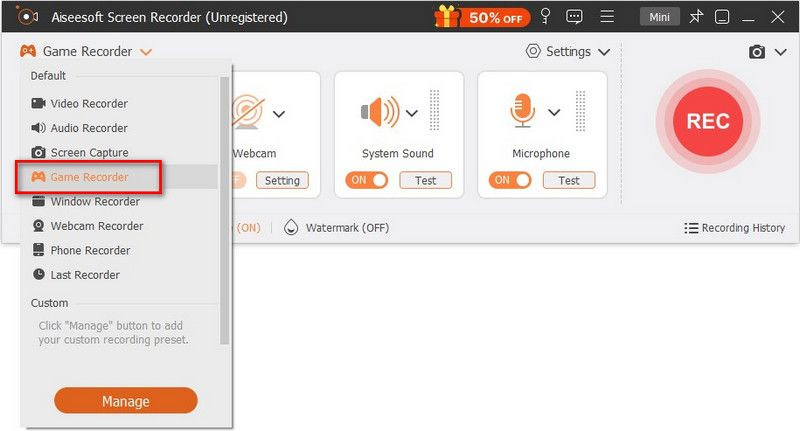
3. Adım. Oyunu Seç panelinde, açılır ok simgesine tıklayın ve çalışan oyunlar listesinden Fortnite’ı seçin. Ayrıca, oyun içi ses ve sesli yorum istiyorsanız Sistem Sesi, Mikrofon veya her ikisini de etkinleştirebilirsiniz.

4. Adım. Her şey hazır olduğunda, oyun kaydınızı başlatmak için REC düğmesine tıklayın.

5. Adım. İşiniz bittiğinde Durdur düğmesine, ardından kaydedilen Fortnite klibini saklamak için Dışa Aktar seçeneğine tıklayın.
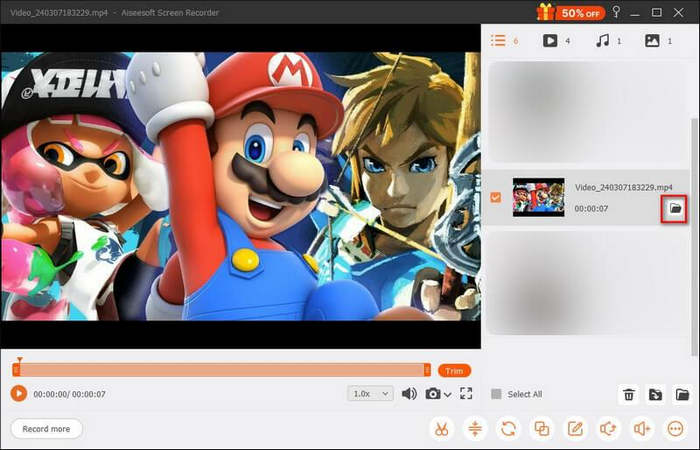
FVC Ekran Kaydedici, basit, esnek ve hem Windows hem de macOS'ta çalıştığı için FBX Game Recorder'a en iyi alternatiftir. FBX'in aksine, sadece oyun oynamakla sınırlı değildir; diğer ekran kaydı ihtiyaçlarınız için de kullanabilirsiniz.
Kolay kontrolleri ve HD çıkışıyla FVC Ekran Kaydedici, akıcı ve yüksek kaliteli ekran kayıtları isteyen herkes için harika bir çok yönlü araçtır.
Bölüm 5. FBX Oyun Kaydedici hakkında SSS
FBX Game Recorder'ı kullanmak ücretsiz mi?
Evet, FBX Game Recorder, temel özelliklerle oyun kaydı yapmanıza olanak tanıyan ücretsiz bir sürüm sunar. Ancak, ücretsiz sürüm videolarınıza filigran ekler ve bazı gelişmiş seçenekleri sınırlar. Bu kısıtlamaları kaldırmak için ücretli plana yükseltebilirsiniz.
FBX Game Recorder 4K kalitesinde kayıt yapabiliyor mu?
Evet, FBX Game Recorder, sisteminizin donanım özelliklerine bağlı olarak HD ve 4K çözünürlüğe kadar kayıt desteği sunar. Donanım hızlandırma özelliğini kullanarak gecikmesiz, akıcı ve yüksek kaliteli kayıt sağlar.
FBX Game Recorder macOS'ta çalışıyor mu?
Hayır, FBX Game Recorder şu anda yalnızca Windows için mevcuttur. Mac kullanıyorsanız, benzer özellikler sunan ve hem Windows hem de macOS'ta çalışan FVC Ekran Kaydedici'yi deneyebilirsiniz.
FBX Game Recorder ile canlı yayın yapabilir miyim?
Evet, FBX Game Recorder kullanıcıların Twitch, YouTube ve Facebook gibi popüler platformlara doğrudan canlı oyun yayını yapmalarına olanak tanır. Ayrıca yayın ayarlarınızı ve kalitenizi özelleştirme seçenekleri de sunar.
Sonuç
FBX Game Recorder, oyun performansını etkilemeden akıcı ve yüksek kaliteli kayıt yapmak isteyen oyuncular için sağlam bir seçenektir. Donanım hızlandırma özelliği ve basit arayüzü, oyun anlarını yakalamak veya canlı yayın yapmak için idealdir. Yine de yalnızca Windows’la sınırlı olması ve bazı düzenleme araçlarından yoksun oluşu, herkesin ihtiyacına uymayabileceği anlamına gelir. İşte burada FVC Screen Recorder devreye girer; daha fazla esneklik, çapraz platform desteği ve açıklama ekleme, web kamerası yakalama ve birden fazla ses kaynağı gibi ek özellikler sunar. Güçlü ama daha çok yönlü bir ekran kayıt aracı arıyorsanız, FVC Screen Recorder mutlaka listenizde olmalıdır.
-
 Mac'te Ekran Alıntısı Aracının Nasıl Kullanılacağını Öğrenin: Tüm Adımlar
 Mac'te kırpma aracının nasıl kullanılacağını öğrenmek istiyorsanız, bu yazıyı kaçırmayın. Bilmeniz gereken her şeyi ve ayrıntılı adım adım kılavuzu burada hazırladık.
-
 Ücretsiz PC Oyunları İndirme Sitelerini Keşfedin: Sizin İçin 6 Seçenek
 Heyecan verici bilgisayar oyunlarının keyfini çıkarmaya hazırsanız ancak kaynakları nereden indireceğinizi bilmiyorsanız, bu rehbere göz atın. İşte 6 ücretsiz PC oyunu indirme sitesi.
-
 Windows 10/11'de Ekran Görüntüsü Alma Özelliğinin Çalışmaması Nasıl Düzeltilir
 Ekran görüntüsü alma konusunda sorun mu yaşıyorsunuz? Windows 10/11'de Print Screen özelliğinin çalışmaması sorununu sürücü güncellemeleri ve ayar kontrolleri gibi kolay adımlarla nasıl çözebileceğinizi burada bulabilirsiniz.
