


 Video Dönüştürücü Ultimate
 Ekran kaydedicisi
 Video Onarımı
 Güvenli İndirme
En İyi OGG Ses Kaydedici, OGG'nin Tüm Platformlarda Kaydedilmesine Yardımcı Olur
OGG, MP3’ten daha iyi bir ses dosyası biçimidir. Bu açık kaynaklı ses formatı Xiph.org tarafından korunmaktadır. Bu tür format, daha iyi ses vermesi ve dosyaları çok daha küçük boyuta sıkıştırması nedeniyle oyun endüstrisi tarafından ses formatı olarak kullanılmaktadır. Ancak standart ses biçimi MP3 olduğundan, bazı kayıt cihazları bu formatı desteklemediği için kullanıcılar bunu zor bulma eğilimindedir. Aşağıdaki liste, bu biçimi destekleyen en iyi OGG kaydedicileridir. Daha detaylı adımları ve bilgileri öğrenmek için dikkatlice okuyun; böylece kullanıcı olarak isteklerinize, hatta belki gelecekte bir müşteri olarak ihtiyaçlarınıza en uygun araçların özelliklerini anlayabilirsiniz.

Bölüm 1. PC ve Mac Kullanıcıları için En İyi OGG Kaydedici Yazılımı
Aşağıdaki listede, adımlar ve bilgilerle birlikte tüm farklı işlevlerde bulunan en iyi OGG kaydediciler bulunmaktadır.
FVC Ücretsiz Ses Kaydedici

Ses biçimi kaydetmeye özel bir araçtır. FVC Free Audio Recorder, internette bulabileceğiniz en iyi çevrim içi araçlardan biri olarak bilinir. Bu açık kaynaklı araç, internet bağlantınız olduğu sürece ihtiyacınız olan her yerde ses kaydı yapmanıza yardımcı olabilir. Ayrıca iyi bir OGG kaydedici seçeneğidir. Bu harika araç hakkında daha kapsamlı bilgiler sunmak için okumaya devam edin ve ses kaydının nasıl yapılacağına dair adımları takip edin.
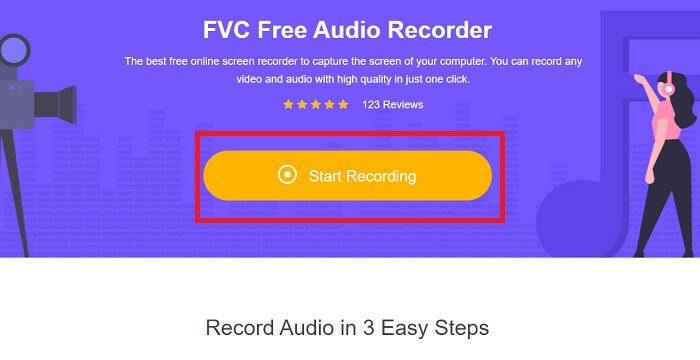
Adım 1. Aracın web sayfasına gitmek için bu bağlantıya tıklayın. Start Recording (Kaydı Başlat) düğmesine tıklayın ve aracı başlatın.
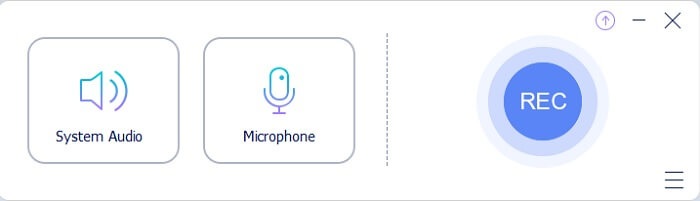
Adım 2. Ekranda bunun gibi yüzen bir araç çubuğu belirecektir.
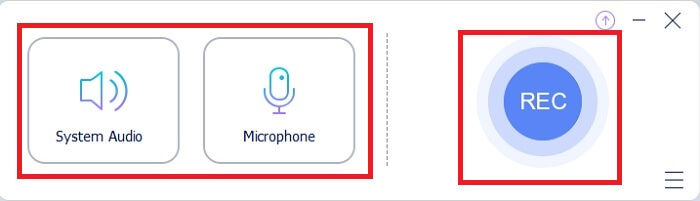
Adım 3. Sistem sesini eklemek için Speaker (Hoparlör) ve sesinizi eklemek için Mic (Mikrofon) seçeneğini açın. Kayda başlamak için Yuvarlak düğmeye tıklayın.
Adım 4. Kayıt düğmesine tıkladıktan sonra, kaydın başladığını gösteren bu ekranla karşılaşacaksınız.
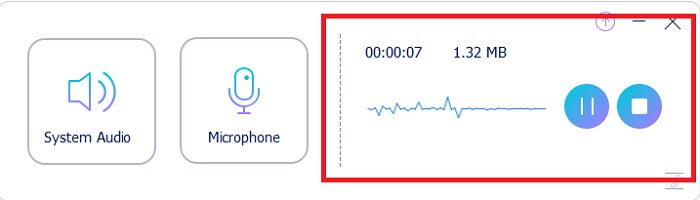
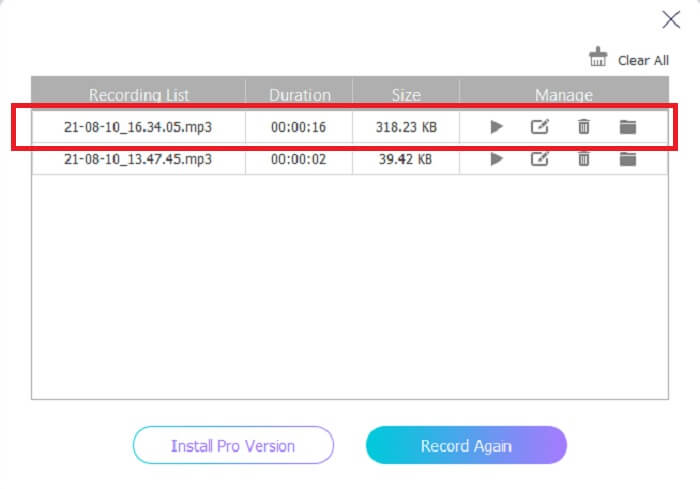
Adım 5. Kayıt bittiğinde Stop (Durdur) düğmesine tıklayın; kayıt otomatik olarak cihazınıza kaydedilir. Kayıt geçmişi listeniz ekranda görünecektir. Çıktının tadını en iyi kalitede çıkarın.
Artıları
- Yerinde talimatı nedeniyle kullanıcı dostu.
- Sıkıştırılmış bir ses formatı üretir, bu nedenle depolama dostudur.
- Açık kaynak olduğundan aracı kullanmak isteyen herkes tarafından kullanılabilir.
Eksileri
- Kullanmadan önce bir internet bağlantısına ihtiyacı var.
- Premium gibi gürültü engelleme yok.
Bölüm 2. Tüm İşletim Sistemleri için Diğer Faydalı OGG Kayıt Cihazları
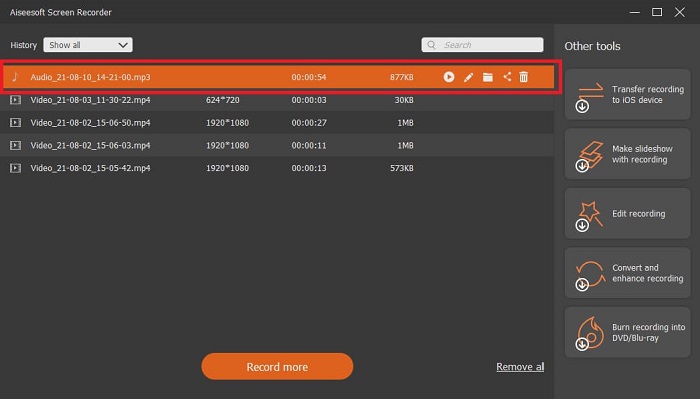
1. FVC Ekran Kaydedici
Yukarıdaki aracın akıllı bir araç olduğunu düşünüyorsanız, daha somut bir örnek vermek gerekirse; Galileo Galilei modern bilimin babasıysa, bu araç da modern kayıt sisteminin babasıdır. FVC Screen Recorder, ister ses ister video biçiminde olsun, en iyi kaydedicidir. Size en iyi çıktılardan birini sunarken aracı kullanmak için en ufak bir çaba göstermenize bile gerek kalmaz. Diğer araçların aksine, bu araç kullanıcıya hayal edebileceği en iyi deneyimi sunmak üzere programlanmıştır. Dolayısıyla, sesi kaydetmekte zorlanan kullanıcılardan biriyseniz, aşağıda verilen basit adımları dikkatlice takip edin.
Adım 1. Aracı, işletim sistemi özelliklerinize göre indirin. İndirme ve kurulum yalnızca birkaç saniye sürecektir. Preference (Tercih) ayarlarını isteğinize göre değiştirin ve devam etmek için Finish (Bitir) düğmesine tıklayın.
Ücretsiz İndirinWindows 7 veya üzeri içinGüvenli İndirme
Ücretsiz İndirinMacOS 10.7 veya üzeri içinGüvenli İndirme
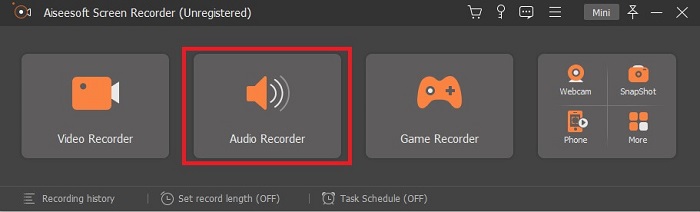
Adım 2. Araç çubuğunda Audio Recorder (Ses Kaydedici) seçeneğine tıklayın.
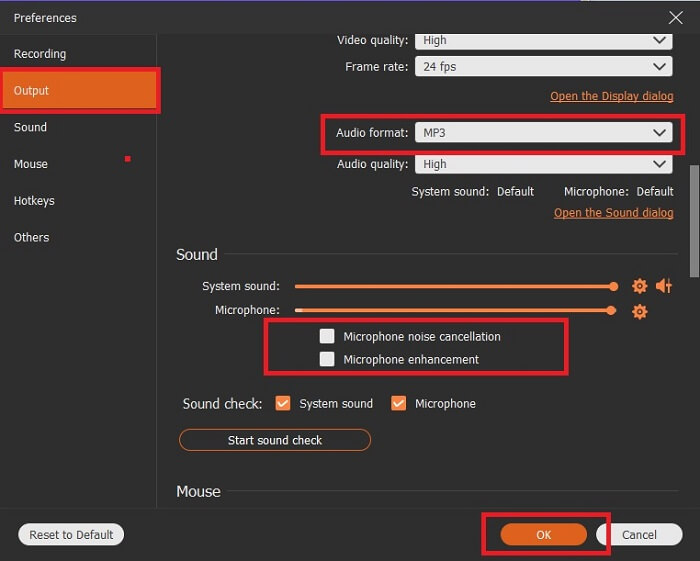
Adım 3. Diğer seçenekleri ayarlamak için Gear (Dişli) simgesini bulun. Output (Çıkış) bölümüne giderek biçimi MP3, WMA veya istediğiniz başka bir formata değiştirin. Bunu fare tekerleğini aşağı kaydırarak yapabilirsiniz. Kayıt sırasında kullanabileceğiniz diğer seçenekler arasında Noise cancelling (Gürültü engelleme) ve Microphone enhancement (Mikrofon geliştirme) yer alır. Devam etmek için OK (Tamam) düğmesine tıklayın.
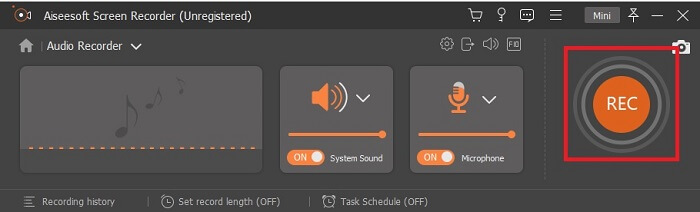
Adım 4. Ayarları yaptıktan sonra, araç çubuğunda Speaker (Hoparlör) ve Microphone (Mikrofon) seçeneklerini açarak kaydınıza ses çıkışını ekleyin. Tüm bunlardan sonra kaydı başlatmak için Round-shape (Yuvarlak şekilli) düğmeye tıklayın.
Adım 5. Kaydı sonlandırmak isterseniz, durdurmak için Square (Kare) düğmesine tıklayın. Devam etmek için Save (Kaydet) ve Next (İleri) düğmelerine tıklayın. Ardından OGG ses kaydedicinizi herhangi bir medya platformunda oynatın.
Artıları
- Kristal netliğinde ses ile bu araçla her zaman her yerde kayıt yapabilirsiniz.
- Bu aracı zaten kullanan kullanıcı için harika bir deneyim sağlar.
- Hepsi bir arada kayıt.
Eksileri
- Kullandıkça öde.
- Depolama alanınızın 2,4 mb'ına ihtiyacı var.
2. Screencast-O-Matic
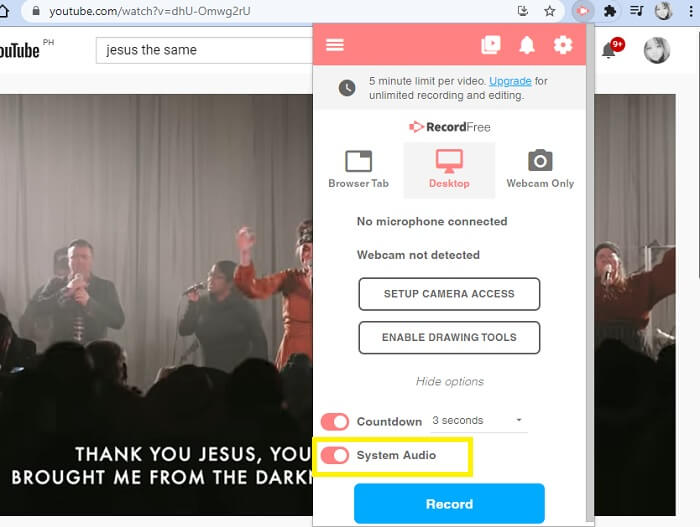
İşi yapacak başka bir en iyi ekran kayıt aracı. Screencast-O-Matic, web'de bulabileceğiniz en iyi araçlardan biridir. Kaydınızı kolay ve verimli hale getirir. Ayrıca, çevrimiçi web sitesini ziyaret ederseniz çevrimiçi aracı da vardır, ancak işlemin çevrimiçi aracı tamamlaması bir veya iki dakika sürecektir. Bu nedenle, sırada beklemeyi sevmiyorsanız, bu sizin için en iyi seçim değildir. Ama beklemeyi seviyorsanız sonuna kadar değer.
Artıları
- Kullanımı Camtasia'dan daha kolaydır.
- Güvenlik şifresine sahip bir birey yerine bir organizasyon olarak çalışın.
- Çok ilgi çekici ve iyi bir kayıt cihazı.
Eksileri
- Araç arayüzü yerinde ancak tek renklidir, bu nedenle kullanımı daha az ilginç hale getiren yumuşak renkli olmasını bekleyin.
- Yalnızca ücretsiz sürümde kullanıcının maksimum 15 dakika kaydetmesine izin verir.
3. ShareX
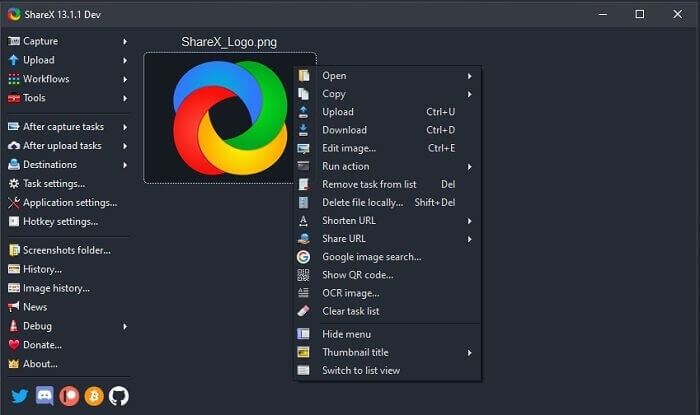
Eğer bir ekran kaydedici arıyorsanız, internette karşınıza çıkabilecek araçlardan biri de budur. Yalnızca Windows işletim sistemi için mevcuttur. Yani bir Mac veya Linux kullanıcısıysanız, bu araç bu işletim sistemlerini desteklemediği için çalışmayacaktır. Share, web üzerinde mevcut en iyi 20 ekran kaydedici arasına kolayca girebilir. Çünkü son çıktıyı aktarabileceğiniz 80’den fazla hedefi desteklemektedir.
Artıları
- Özelleştirilebilir araç.
- Gerekirse kendi düzenleme araçlarını sağlar.
- Kaydı kolaylaştırmak için kısayol tuşlarını değiştirin.
Eksileri
- Bu araca yeni başlayan biri için ezici. Bu aleti kullanmayı öğrenmek tam bir baş belası.
- Mac kullanıcıları için mevcut değildir.
Bölüm 3. Karşılaştırma Tablosu
| Özellikleri | FVC Ücretsiz Ses Kaydedici | FVC Ekran Kaydedici | Ekran Video Kaydı-O-Matic | ShareX |
| Ses kaydı |  | | | |
| Gürültü Engelleme |  | | | |
| Mikrofon Geliştirme | | | | |
| Aracın Karmaşıklığı | Noktada çevrimiçi kayıt talimatı. | Kullanım amacının ne olduğu ve nasıl performans gösterdiği araçta zaten belirtildiği için kullanımı kolaydır. | Daha az ayrıntıya sahip kullanımı kolay bir araçtır. | Aracın karmaşıklığı yeni kullanıcı için zordur. |
| Mevcut Platformlar | Tüm İşletim Sistemleri. | Tüm İşletim Sistemleri. | Windows PC, Mac ve Chromebook. | Windows 7 SP1 veya üstü. |
| Kullanılabilir ses Formatı | MP3 ve OGG | MP3, WMA, AAC, M4A, FLAC, OGG, Opus ve çok daha fazlası. | Ses ayrı olarak kaydedilemez. | MP3 ve WAV |
| Fiyat aralığı | Ücretsiz çevrimiçi araç | 1 ay için: $25.00 Bir yıl için: $31.20 Ömür Boyu Lisans için: $55.20 | Ücretsiz bir sürümü var. Premium solo için. Delüks $1.65/ay Premier $4,00/ay Takım planları için. Takım deluxe veya takım premier olarak ayarlayabilirsiniz. | ücretsiz ve açık kaynaklı program. |
Bölüm 4. OGG Kaydedici hakkında SSS
Ses kaydedici ile OGG dosyası nasıl yapılır?
Yukarıdaki listedeki gibi bir ses kaydedici kullanın. Daha ayrıntılı bilgi için, OGG için ses çıkış formatı ile nasıl kayıt yapılacağına ilişkin bilgi ve adımlar için yukarıdaki makaleyi okuyun.
En iyi ses formatı hangisidir? MP3 veya OGG?
OGG en iyi ses dosyası formatıdır. Ancak kullanıcılar, OGG'den daha standart olduğu için MP3'ü kullanma eğilimindedir. Bununla birlikte, OGG, örneğin sanatçının adı ve parça verileri gibi daha az depolama alanına ve en iyi ses çıkışına sahip meta veriler içerir.
OGG formatım medya oynatıcımda neden oynatılamıyor?
Bazı medya oynatıcılar bu tür biçimi desteklemez. Bu nedenle FVC Free Online Video Converter’ı dönüştürücü olarak kullanabilirsiniz. Bu araç, kullanıcının OGG dosyasını çalınabilmesi için MP3'e veya tercih edebileceğiniz başka bir ses biçimine dönüştürmesine olanak tanır. Ya da FVC Free Video Player’ı veya bu türdeki formatı oynatmak için diğer OGG oynatıcılarını kullanabilirsiniz; çünkü bu araç neredeyse tüm farklı ses ve video biçimlerini oynatır.
Sonuç
Tartışmanın sonunda, sadece okuyarak ve talebinize uygun aracı seçerek yeni bir bilgi edindiniz. Bu makalede farklı seçenekler, adımlar ve araçla ilgili bazı bilgilerle birlikte listelenmiştir. Sadece adımları takip edin ve anlamanız için okumaya zaman ayırın. Akıllıca seçmelisiniz.
Ancak örnek olarak, FVC Screen Recorder kullanıcının taleplerine tam anlamıyla uyar. Bir kullanıcı olarak bir kaydedicide ihtiyaç ve isteklerinize öncelik vermelisiniz. Örneğin; kaydedicinin kolay kullanılır olması, ses kaydı için en iyi seçeneklerden biri olması, hemen hemen tüm platformlarda kullanılabilir olması, eğer ücretliyse ucuz olması ama çıktı kalitesinin en iyi düzeyde bulunması gerekir. Tüm bu sayılan özelliklerin hepsi FVC Screen Recorder içinde mevcuttur. Daha azıyla yetinmeyin, çünkü daha fazlasını hak ediyorsunuz.
-
 Snagit 2025 İncelemesi – Artıları, Eksileri ve En İyi Alternatif
 Snagit'e en iyi alternatif nedir? Snagit gibi bir ekran yakalama aracı var mı? Bu gönderi Snagit'i inceleyecek ve ekranı yakalamak için Snagit'e en iyi alternatifi paylaşacaktır.
-
 QuickTime Ekran Kaydı - Mac ve PC'de Sesli Video Kaydetme
 Mac'te sesli kayıt ekranı kullanışlıdır. Yerleşik oynatıcı, QuickTime Player bunu yapabilir. Yazısını okuyun ve Mac ve PC'de ekranı sesli olarak nasıl yakalayacağınızı öğrenin.
-
 DU Recorder İncelemesi 2025: Güvenlik&Fiyat&Fonksiyonlar&Kullanım&Derecelendirmeler
 DU Recorder, iPhone ve Android için bir ekran ve ses kaydedicidir. İndirmeye değer mi? Güvenli mi? Uygulamanın size uygun olup olmadığını görmek için incelemenin tamamını okuyun.
