


 Video Dönüştürücü Ultimate
 Ekran kaydedicisi
 Video Onarımı
3GP'yi WMV'ye Profesyonel Bir Şekilde Dönüştürme [Çevrimiçi ve Çevrimdışı]
3GP, mobil telefonlar üzerinden fazla bant genişliği harcamadan veri aktaran ve aynı zamanda yer tasarrufu sağlayan, popüler bir mobil formattır. Ayrıca bu format, 3. nesil cep telefonlarında video çekimi için standartlaştırılmıştır; ancak merak etmeyin, videoyu 2. ve 4. nesil telefonlarda da oynatabilirsiniz. Telefonlarda mükemmel olmasına rağmen yalnızca akıllı telefonlarla sınırlıdır. Bu nedenle, .3gp dosyasının masaüstünde iyi çalışmaması şaşırtıcı değildir. Yine de, 3GP’yi masaüstünde çok daha geniş destek gören bir formata, örneğin WMV’ye dönüştürmeyi öğrenebilirsiniz. 3GP’yi profesyonel bir şekilde WMV’ye dönüştürmek mi istiyorsunuz? Öyleyse vakit kaybetmeden birlikte göz atalım.

Bölüm 1. 3GP Nedir?
Kayıplı sıkıştırma için mükemmel olan video için H.263 veya H.264 ve ses için AMR veya AAC gibi medya akışlarını depolayan ISO tabanlı bir formattır. Ayrıca, bu 3. nesil format, verileri IOS'ta bile telefonlarımızdaki taşınabilir sürücülerde depolamak için depolama dostudur. 3GP hala mevcut olmasına rağmen, bu formatın etkinlik oranı düşmeye başladı ve bu nedenle 3GPP sahneye katıldı ve daha iyi bir versiyonu haline geldi.
Bölüm 2. WMV Nedir?
Windows tarafından çevrimiçi video akışı için geliştirilmiş tescilli bir multimedya formatıdır. 3GP gibi diğer formatlardan farklı olarak WMV, dosyayı daha da sıkıştırılmış hale getirmek için çok katlı bir kodlayıcı kullanır. Birçok kodlayıcı kullanma yeteneği nedeniyle, videoları bu formatta verimli bir şekilde paylaşmak daha erişilebilir. Ancak, özellikle düzenleme ve oynatma sırasında çok sayıda kodlayıcı kullanmanın bir dezavantajı vardır, çünkü tüm medya oynatıcılar ve editörler çok çeşitli codec bileşenlerini desteklemez. Biçim sıkıştırıcı kullanıyor olsa da, medya kalitesi değiştirilmeyecek veya düşürülmeyecektir.
Bölüm 3. Video Converter Ultimate ile 3GP'yi WMV'ye Dönüştürmenin Profesyonel Yolu
Platformunuzda 3GP’yi WMV’ye dönüştürebilen profesyonel bir dönüştürücüyü ücretsiz olarak edinmek mi istiyorsunuz? FVC Video Converter Ultimate, fazla çaba harcamanıza gerek kalmadan uzman bir dönüştürme süreci sunar. Bu dönüştürücü, size çevrimiçi veya çevrimdışı diğer dönüştürücülerin sağlayamadığı üst düzey bir dönüşüm deneyimi yaşatır. Ayrıca bu kapsamlı araç, diğer pek çok aracın aksine 200’den fazla medya formatını destekler.
Bu dönüştürücüye sahip olduğunuz sürece, dönüştürülmüş medya biçiminizde her zaman profesyonel bir çıktı bekleyin. 3GP dosyalarınızı dönüştürmek için profesyonel dönüştürücüyü kullanmak ister misiniz? Bu durumda, nihai araçla başarılı bir şekilde dönüştürmek için aşağıdaki adımları takip edebilirsiniz.
FVC Video Converter Ultimate ile 3GP dosyasını WMV’ye dönüştürme adımları
Adım 1. Aşağıda sunulan indirme düğmelerinden, kullandığınız platforma karşılık geleni seçin. Örneğin, Windows kullanıcısıysanız Windows indirme düğmesine tıklayın. Mac kullanıcısıysanız diğerine tıklayın. İndirme işlemi tamamlandıktan sonra dönüştürücüyü kurun ve Start Now’a tıklayarak programı çalıştırın. Daha da önemlisi, başlattıktan sonra sonraki adımlara geçmeden önce arayüzüne kısa süreli de olsa alışmanız gerekir.
Ücretsiz İndirWindows 7 veya üstü içinGüvenli İndirme
Ücretsiz İndirMacOS 10.7 veya üstü içinGüvenli İndirme
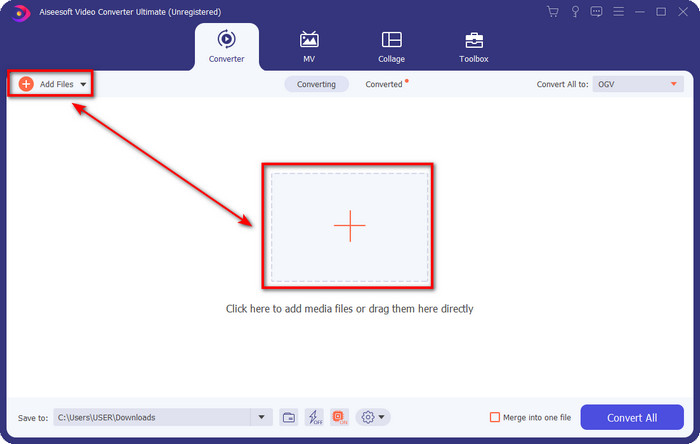
Adım 2. Arayüzün sol üst kısmında Add Files seçeneğini göreceksiniz; buna tıklayın ve bir klasör penceresi açılacaktır. Bilgisayar sürücünüzdeki .3gp dosyasını bulun ve Open düğmesine basarak içe aktarın.
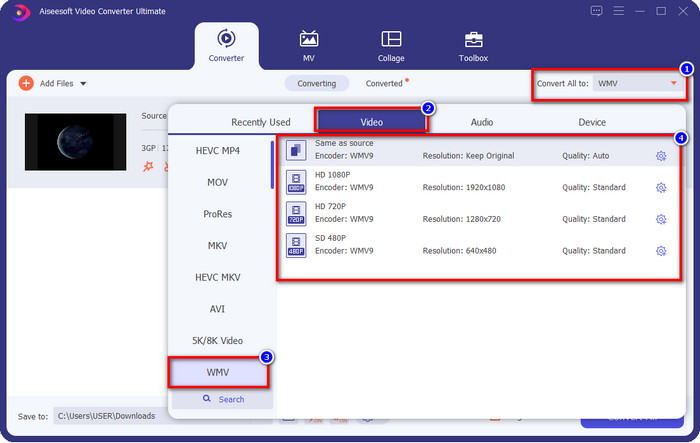
Adım 3. Nihai çıktı olarak istediğiniz WMV formatını seçmek için Convert All to düğmesine tıklayın ve WMV formatını belirleyin.
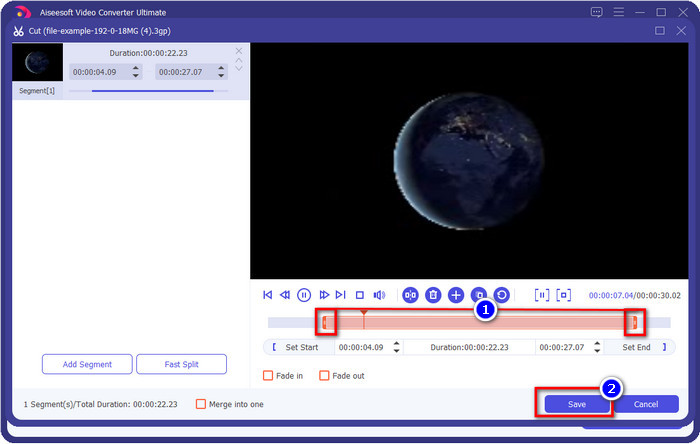
İsteğe bağlı. 3GP dosyasını WMV’ye dönüştürmeden önce, bu aracın sunduğu diğer özelliklerden kısaca bahsedelim. Kesme mi yapmanız gerekiyor? Sorun değil. makas simgesine tıklayın, isterseniz her iki taraftaki kaydırma çubuğunu sürükleyin ve yaptığınız kesmeyi uygulamak için Save düğmesine basın.
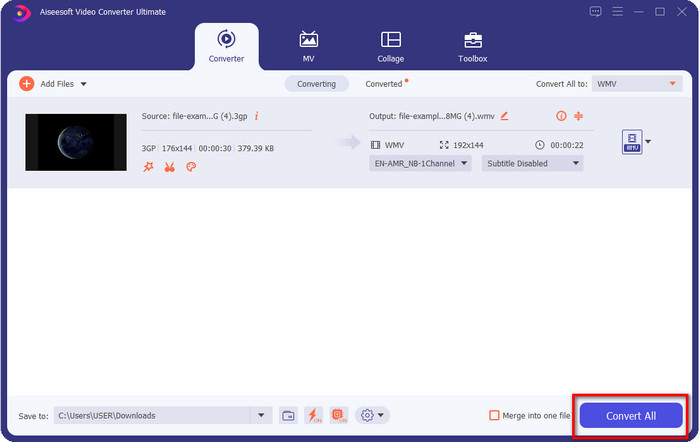
Adım 4. Convert All düğmesine tıklayarak dönüştürme işlemini başlatın. Dönüştürme kısa bir süre içinde tamamlanacak ve işte bu kadar, WMV dosyası bilgisayar sürücünüze kaydedilecektir.
Bölüm 4. Ücretsiz Video Dönüştürücü Çevrimiçi ile MXF'yi WMV'ye Dönüştürmenin Çevrimiçi Yolu
Bir diğer FVC ürünü, ancak bu kez çevrimiçi bir çözüm olan FVC Free Video Converter Online’dır. Bu çevrimiçi profesyonel dönüştürücü, diğer web tabanlı dönüştürücülere kıyasla sade ve temiz bir arayüz sunar. Dahası, kullanmadan önce dönüştürücüyü cihazınıza indirmeniz gerekmez; bunun yerine tarayıcınızı açıp dönüştürücüyü ziyaret etmeniz yeterlidir. Her ne kadar çevrimiçi dönüştürücü gayet başarılı olsa da bu aracın sunamadığı pek çok ileri seviye özellik vardır. Yine de 3GP’yi WMV’ye çevrimiçi olarak dönüştürmek istiyorsanız, bu doğru seçimdir; aracı kullanmak için aşağıdaki adımları uygulayın.
FVC Free Video Converter Online ile 3GP’yi çevrimiçi ve ücretsiz olarak WMV’ye dönüştürme adımları
Adım 1. Çevrimiçi dönüştürücüyü açmak için bu bağlantıya tıklayın.
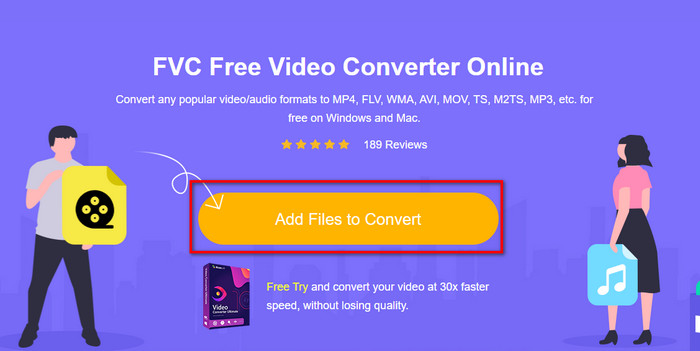
Adım 2. Tıkladıktan sonra dönüştürücüyü başlatmak için Add Files to Convert düğmesine basın. Bu dönüştürücüyü ilk kez kullanıyorsanız, Add Files to Convert düğmesine tıklayarak küçük bir başlatıcı (launcher) kurmanız gerekir; ancak bu, kapsamlı masaüstü araç kadar büyük değildir. Dönüştürmek istediğiniz 3gp dosyasını bulun ve Open düğmesine basın.
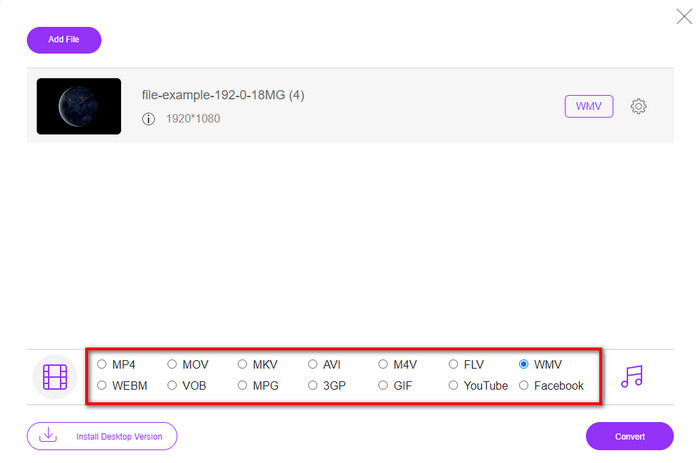
Adım 3. 3GP dosyasını yükledikten sonra, artık aşağıda sunulan formatlardan birini seçme veya doğrudan WMV’ye tıklama zamanı geldi.
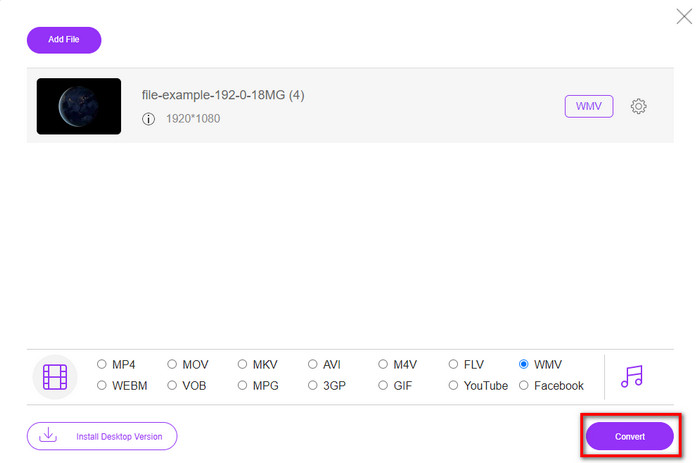
Adım 4. Formatı seçtiniz mi? Öyleyse, dönüştürme işlemini başlatmak için Convert düğmesine tıklayın.
Bölüm 5. 3GP'den WMV'ye Dönüştürme hakkında SSS
3GP'den WMV'ye dönüştürücüyü çevrimiçi kullanmak harika bir fikir mi?
Cihazınıza bir dönüştürücü indirmek istemiyorsanız, çevrimiçi bir dönüştürücü kullanmak idealdir. Ancak unutmayın, tüm çevrimiçi veya çevrimdışı dönüştürücülerin kullanımı güvenli değildir. Yüklerseniz veya görevi etkili bir şekilde yapmazsanız, çoğu zaman virüsleri vardır. Ancak dönüştürme işleminizde güvence istiyorsanız, FVC dönüştürücü ürünlerini kullanmanızı öneririz çünkü bu 101% kötü amaçlı yazılım içermez ve dönüştürme işleminizin başarılı olmasını garanti eder.
Birden fazla 3GP videosunu birleştirmek mümkün müdür?
Evet, FVC birleştirme araçlarının yardımıyla 3GP formatındaki birden çok videoyu birleştirebilirsiniz. Dolayısıyla birden fazla 3GP videonuzu nasıl birleştireceğinizi öğrenmek istiyorsanız, bunu nasıl yapacağınızı görmek için bu makaleyi okumanız gerekir.
3GP videoların kalitesi iyi mi?
3GP iyi kaliteye sahiptir, ancak yüksek tanımlı kaliteyi depolayamaz, bu nedenle 3GP'nin video kalitesinin düşük olmasını bekleyin.
Sonuç
Sonuç olarak, bu makalede listelenen dönüştürücüler, profesyonel çıktı standartları göz önünde bulundurularak seçilmiştir. Buna ek olarak, burada bahsedilen araçları bizzat kullanarak özellikleri hakkında yalnızca gerçeklere dayalı bilgiler sunduk. Dahası, masaüstünüze yerden tasarruf etmek için bir dönüştürücü indirmek istemiyor ancak yine de profesyonel bir çıktı elde etmek istiyorsanız, FVC Free Video Converter Online’ı kullanmanızı şiddetle öneririz. Öte yandan, 3GP dosyalarınızı çok daha profesyonel bir şekilde yeniden kodlamak isterseniz, FVC Video Converter Ultimate’ı kullanmanızı kuvvetle tavsiye ederiz. Hâlâ verdiğimiz açıklamalardan tatmin olmadınız mı? Öyleyse, bu aracın sunduğu uzman dönüştürme deneyimini bizzat yaşamak ve 3GP’yi WMV’ye nasıl dönüştüreceğinizi öğrenmek için mutlaka kendiniz denemelisiniz.
-
 3GP'yi AVI Formatına Dönüştürmenin En Etkili 4 Yolu [2025]
 3GP dosyalarımı AVI'ye dönüştürebilir miyim? 3GP'den AVI'ye dönüştürme probleminize olası tüm çözümleri bir araya getirdiğimiz için mevcut bu araçları denerseniz kolayca dönüştürebilirsiniz.
-
 3GP'yi FLV'ye Dönüştürmede Kullanılacak En İyi 3GP'den FLV'ye Dönüştürücü [2025]
 Hiç 3GP'yi FLV'ye dönüştürmeyi denediniz mi, ancak ne tür bir dönüştürücü kullanacağınızı bilmiyor musunuz? 3GP'yi FLV'ye dönüştürmeyle ilgili tüm ayrıntıları öğrenmek için bu makaleyi okuyun.
-
 Desteklenmeyen 3GP'yi DivX'e Dönüştürmenin En İyi 2 Yolu [2025]
 Pek çok kullanıcı 3GP'yi DivX'e nasıl dönüştüreceğini soruyor. Şimdi, .3gp dosyanızı sorunsuz bir şekilde dönüştürmenize yardımcı olacak bir makale sunuyoruz.
