


 Video Dönüştürücü Ultimate
 Ekran kaydedicisi
 Video Onarımı
Ücretsiz Dönüştürücüler Kullanarak AVI'yi WMV'ye Dönüştürme [Hızlı Adımlar]
AVI or Audio Video Interleave files, developed first by Microsoft Corporation, have a high-end video format. This file format has a high-quality resolution, but its file size is too big. One common way to play your video or use your file on any platform is to convert your AVI file to a WMV file. Therefore, if you want to know more about how to convert AVI to WMV, try to proceed further as we tackle the different converters, provided with steps.

Bölüm 1. AVI'nizi Windows 10/11'de WMV'ye Dönüştürün
Windows 10 Operating System supports various files that you can find online. Files like AVI and WMV are both supported by Windows 10. Therefore, converting your AVI file to a WMV file will be easy, primarily if you use this lightning-speed converter, FVC Video Converter Ultimate. This converter is one of the reliable converters that trends today. Moreover, this converter allows you to edit, enhance, and compress your file. It is also easy-to-use and can quickly convert AVI files to WMV on Windows 10.

FVC Video Dönüştürücü Ultimate
5.689.200+ İndirme- AVI dahil olmak üzere çeşitli dosya formatlarını WMV, MP4, MOV, VOB, vb. dönüştürmenize olanak tanır.
- Birden fazla dosyayı tek bir dosyada birleştirmenizi sağlayan özelliklere sahiptir.
- Dosyanızı düzenleyebilir, geliştirebilir ve sıkıştırabilirsiniz.
Ücretsiz İndirWindows 7 veya üstü içinGüvenli İndirme
Ücretsiz İndirMacOS 10.7 veya üstü içinGüvenli İndirme
AVI dosyanızı WMV dosya biçimine nasıl dönüştüreceğinize ilişkin adımlar şunlardır:
Step 1. To install FVC Video Converter Ultimate on your Windows 10, click the download button below. Then follow the installation process, and run the app.
Ücretsiz İndirWindows 7 veya üstü içinGüvenli İndirme
Ücretsiz İndirMacOS 10.7 veya üstü içinGüvenli İndirme
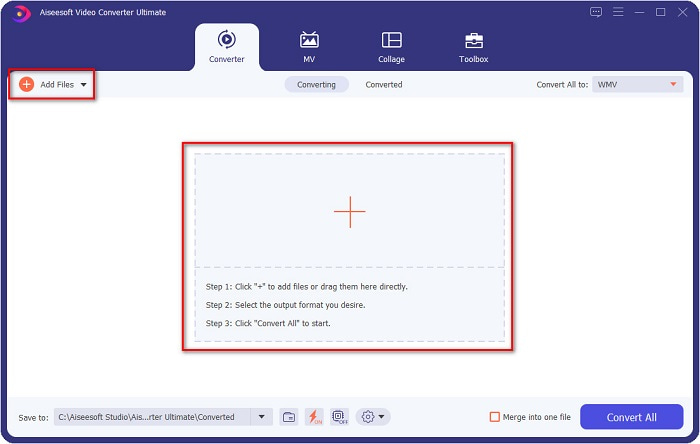
Step 2. After you open the application, click the Add files button located at the upper left of your screen, or the + button, to add your AVI files on the software's main interface. Your computer files will appear, then select your AVI file that you will convert as WMV. Click the Open button to upload your file.
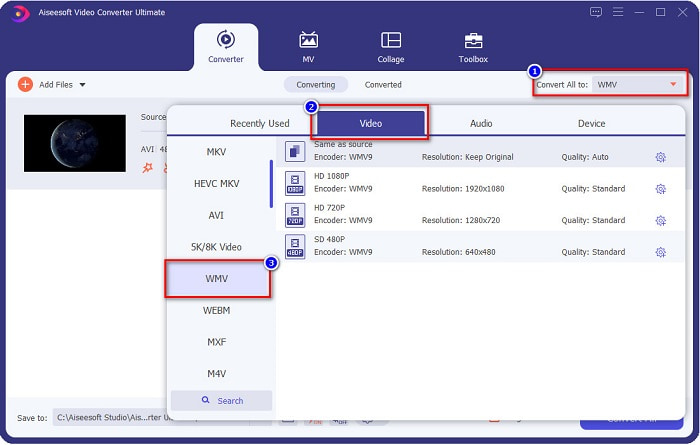
Step 3. For you to change the file format, click the Convert All to button at the upper right corner of the software's interface. A list of file formats will appear, then select WMV from the category of Video.
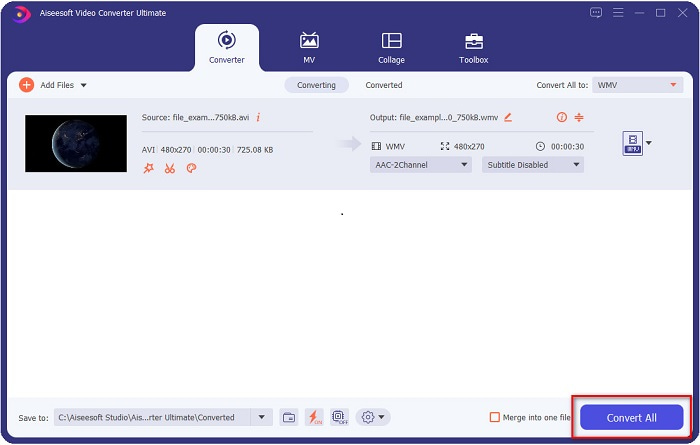
Step 4. After choosing the WMV file format, click the Convert All button to convert your AVI to a WMV file. Wait for a few seconds, and that is it! As simple as that, you can easily convert your AVI file to WMV.
Bölüm 2. AVI'yi WMV'ye Ücretsiz Dönüştürme
When converting your AVI files to WMV, you can also use free downloadable converter tools. One well-known converter is Freemake Video Converter. This offline converter allows you to convert for over 500+ formats like AVI to WMV, MP3, MP4, DVD, and more. However, the Graphics User Interface or GUI is not that good, and its interface is also not easy to use. Nonetheless, it is still being used by many users when it comes to converting files.
Freemake Video Converter kullanarak AVI dosyanızı WMV dosyasına nasıl dönüştüreceğinize dair hızlı kılavuz:
Step 1. Download the app by searching Freemake Video Converter in your browser. After downloading, open the application.
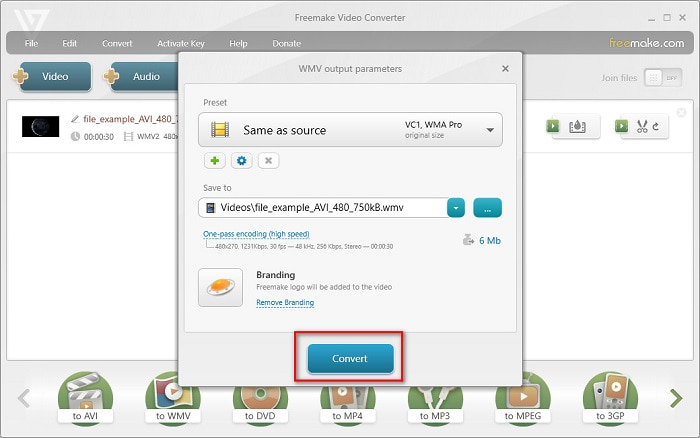
Step 2. After opening the application, click the Video button; select your AVI file when your computer files appear. Press Open to add your AVI file to the queue.

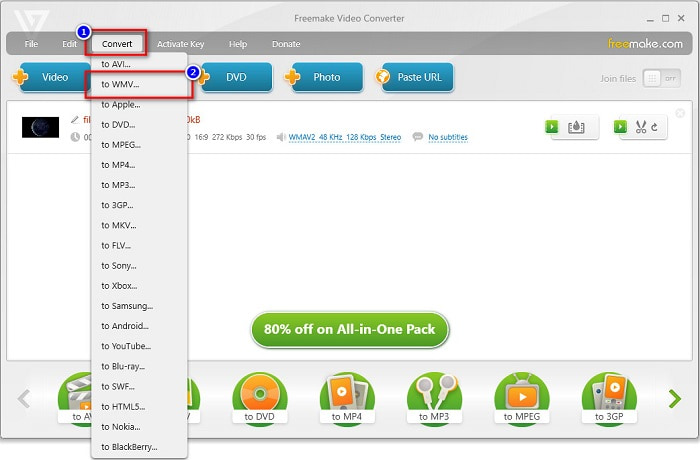
Step 3. After choosing your AVI file, click the Convert option located at the upper part of the software’s interface. A list of file formats will appear, then select WMV.
Step 4. A new interface will appear where you will now convert your file. Click the Convert button to start converting your AVI file to WMV.
Bölüm 3. AVI Dosyalarını Çevrimiçi Olarak WMV Dosyalarına Dönüştürme
We could not deny that it is more convenient to convert files online. Therefore, we tried some online converters to convert AVI to WMV online and chose FVC Free Video Converter Online as the best to recommend. This converter allows you to convert large files without limitations. However, you may encounter slow conversion because this converter is internet-reliant. It means that it depends on the internet connection on how fast you can convert. Nevertheless, FVC Free Video Converter Online has been used by many and proven to be one of the best online converters.
Steps on how to Convert your AVI file to WMV using FVC Free Video Converter
Step 1. In your browser, search FVC Free Video Converter Online.
Step 2. When you are already on the webpage, click the Add Files to Convert button. Then download the launcher that will appear when you click the Add Files to Convert button. And then, select your AVI file.
Dosyaları toplu dönüştürmek için Masaüstü Sürümü indirin.
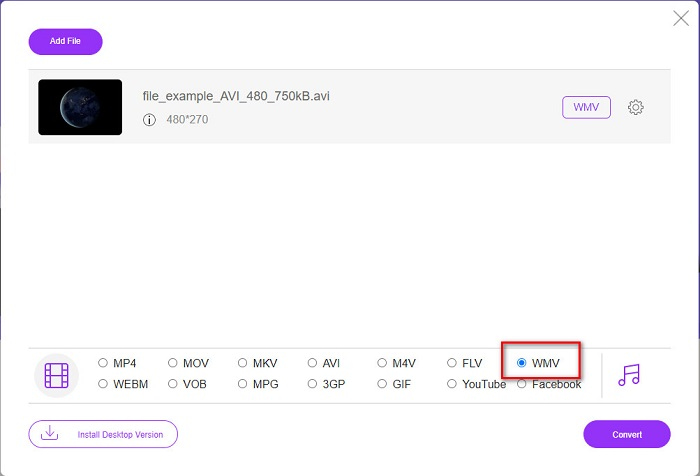
Step 3. After you select your file, in the second interface of the software, you will see the list of file formats, then click WMV.
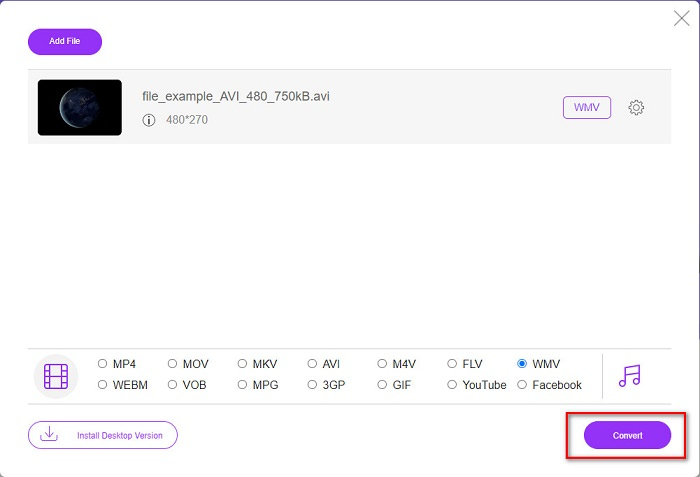
Step 4. Lastly, click the Convert button at the bottom right part of the software's interface. Your computer files will appear, where you can select the destination of your converted file. Then your AVI to WMV file will start to convert.
Bölüm 4. AVI ve WMV hakkında daha fazla bilgi
AVI or Audio Video Interleave files are the standard video formats for Windows machines. These files contain audio and video and use various codecs, including DivX and XviD. However, this file format is minimally compressed. Therefore, the file size of it is quite huge. On the other hand, WMV or Windows Media Video supports many software devices, and the Windows Media Player compresses these types of files. Moreover, Windows System usually plays this type of file. Read on Best WMV Players, if you want to play WMV files with ease.
AVI ve WMV
Kaynak Değişim Dosyası Formatına (RIFF) dayalı olarak, AVI formatı 1992'de Microsoft tarafından tanıtıldı. Daha az sıkıştırma kullandığından yüksek kaliteli video/ses kaydedebilir. Ancak bu, sınırlı alan olduğunda sorun olabilecek bir AVI dosyasının büyük dosya boyutuna da neden olur.
Microsoft tarafından üretilen WMV, 2000'lerde en yaygın video formatlarından biriydi. Web üzerinden görülebilir ve Windows'ta çeşitli medya oynatıcılar tarafından oynatılabilir. Ayrıca Windows Media Player'ın varsayılan video dosyası biçimidir. Ancak son zamanlarda diğer formatlar tarafından devralındı.
Bölüm 5. AVI'yi WMV Dosya Biçimine Dönüştürme Hakkında SSS
AVI'yi WMV olarak değiştirmek dosyanın kalitesini bozar mı?
AVI'yi WMV'ye dönüştürdüğünüzde, dosyalarınızın kalitesi etkilenmemelidir. Ancak, bazı dönüştürücüler yüksek kaliteli piksel videoları desteklemez ve bu da kalitenin düşmesine neden olur.
AVI dosyalarını sıkıştırabilir misiniz?
Yes. You can use video compressors available online. You can also convert your AVI file to WMV format to reduce the file size. Moreover, you can use FVC Video Converter Ultimate to compress your AVI files.
Dönüştürdükten sonra AVI dosyamın dosya boyutu değişecek mi?
AVI dosyanızın dosya boyutunda orijinalinden farklı olabilecek bazı durumlar vardır. Çünkü dosyalar dönüştürüldüğünde, sıkıştırılmış dosyalar sıkıştırılmamış olacak ve bu da dosya boyutunun biraz değişmesine neden olacaktır.
Sonuç
Hepsini özetlemek gerekirse, yukarıda sunulan çevrimiçi ve çevrimdışı araçlar, konu AVI'yi WMV dosyalarına dönüştürmek olduğunda ihtiyaçlarınızı karşılayabilecek umut verici dönüştürme özellikleri gösterir. Ancak, ihtiyaçlarınızı karşılamanıza yardımcı olacak birçok özellik içeren bir dönüştürücü arıyorsanız, FVC Video Converter Ultimate'ı kullanmanızı öneririz; bu konuda hala şüpheleriniz mi var? Şimdi deneyin ve dosyalarınızdan en iyi şekilde yararlanın!
-
 AVI'yi FLV'ye Ücretsiz Dönüştürmenize Yardımcı Olacak Somut Kılavuz
 AVI'yi FLV'ye dönüştürmek için güçlü bir video dönüştürücüye ihtiyacınız var. Neyse ki, bu tek makaleden ikisini ve adım adım kılavuzunu öğrenebilirsiniz.
-
 AVI Videolarını Windows/Mac'te Animasyonlu GIF Dosyalarına Dönüştürme
 GIF memleri oluşturmak için ilginç AVI bölümlerini seçmek ister misiniz? Bu makale, AVI videolarını kırpmak ve AVI'yi ücretsiz olarak animasyonlu GIF dosyalarına dönüştürmek için en iyi 2 yöntemi anlatacaktır.
-
 Hangisinin İdeal AVI - MP3 Dönüştürücü Yazılımı olduğuna karar verin [PC & Mac]
 AVI'yi MP3 ses formatına nasıl dönüştüreceğinizi bilmek ister misiniz? Aşağıdaki listede ihtiyaçlarınıza uygun farklı araçlar ve adımlarla da karşılaşacaksınız.

