


 Video Dönüştürücü Ultimate
 Ekran kaydedicisi
 Video Onarımı
 Güvenli İndirme
FLAC ve WAV'ı Dönüştürmenin En Hızlı Yolları (Çevrimdışı / Çevrimiçi)
Free Lossless Audio Codec, commonly known as FLAC, is an audio file format with a remarkable resemblance to MP3. It provides users an excellent audio quality while occupying a relatively small size on your disc space. Besides that, this type of format is lossless, which says that a large portion of your audio data is retained despite the compression process. On another note, there are cases when you need to convert FLAC files to another format like WAV if you want to make your listening experience to its optimum and superior quality. Should you choose between the two? Find out below how you can get both using the best FLAC to WAV conversion tools out there.

Bölüm 1. FLAC ve WAV'ı Çevrimdışı Dönüştür
Video Converter Ultimate is a top-notch tool for transforming files to any audio format, including WAV and FLAC. This program offers a batch conversion feature that allows you to convert a collection of audio files in one sitting. Moreover, you can maximize the quality of every song you wish to work on since the program allows users to adjust output technicalities such as the sample rate and bitrate. If you wish to batch convert WAV to FLAC or vice versa, read the quick guide we prepare beneath.
Step 1. Launch the program on your device by selecting the appropriate Free Download button below. In the next step, follow the on-screen instructions to launch the program. You can get a hand with its interface once installed.
Ücretsiz İndirWindows 7 veya üstü içinGüvenli İndirme
Ücretsiz İndirMacOS 10.7 veya üstü içinGüvenli İndirme
Step 2. Hit the Add icon on the main screen and import the audio file you want to work on. Afterward, you will be directed to a preview of the imported file. You can upload a folder if you wish to convert in bulk. Choose from your directory the folder that contains all the audio files you need.
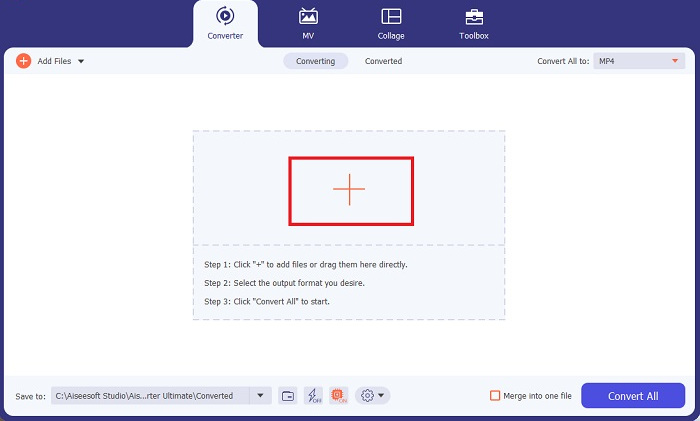
Step 3. Now, you can change the output format by clicking the Converter button above the program’s screen. From there, choose WAV from the Audio Output selection tab. Meanwhile, you can adjust the sample rate and bitrate of your output file to match your preferred quality.
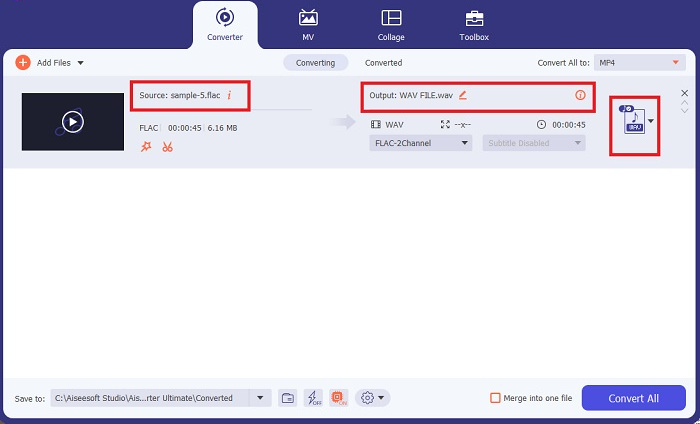
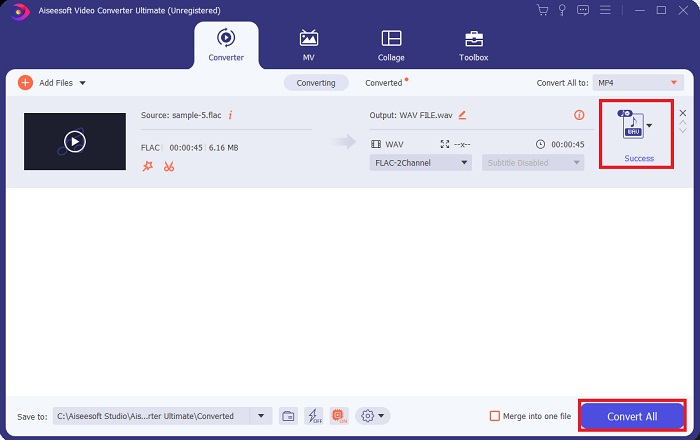
Step 4. For the final step, initialize the conversion process by clicking the Convert All button below. Afterward, the program will automatically open the output folder for you to check on your file’s new format.
Artıları
- FLAC'ı toplu olarak WAV ses dosyası biçimine dönüştürebilir.
- Program hem Windows hem de Mac OS ile iyi çalışır.
- Hızlı bir dönüşüm hızına sahiptir.
Eksileri
- Ücretsiz denemeden sonra ücretli bir abonelik ücreti gerektirir.
- Program, Linux işletim sistemi cihazlarında çalışmaz.
Bölüm 2. FLAC'ı WAV'a veya WAV'ı FLAC Online'a Dönüştür
While your search engine may show you a plethora of FLAC to WAV or WAV to FLAC online converters, here is what we could do to ease your struggle. Free Audio Converter Online is an excellent option to exempt yourself from installing a desktop program. This online converter works seamlessly, providing safety and security for your personal data while accomplishing the conversion. Moreover, you can take advantage of the software's bulk conversion feature just as f you are using a desktop program.
Step 1. Click the link above to land on the Free Online Video Converter main website. Select the Add Files to Convert on the main screen and upload your audio file.
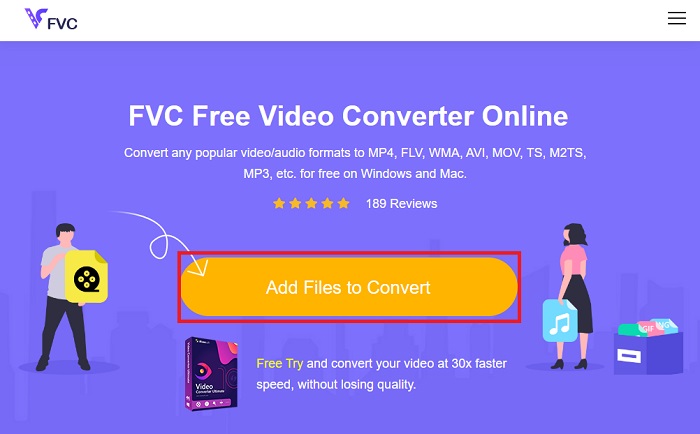
Step 2. The preview of your original file will show on the screen. From the same panel, turn below and choose your desired output format.
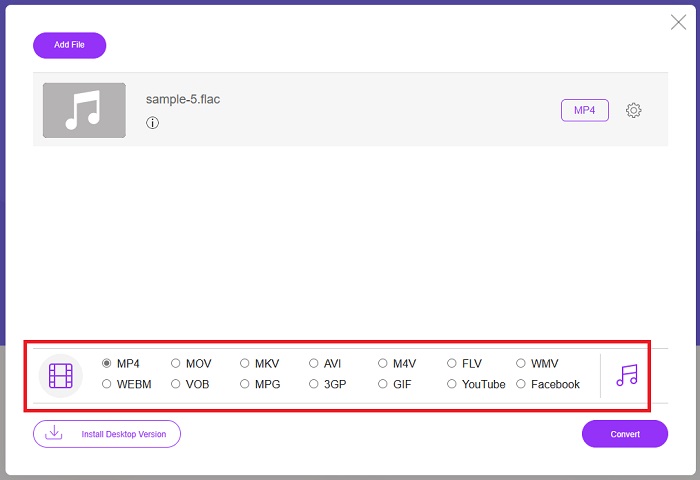
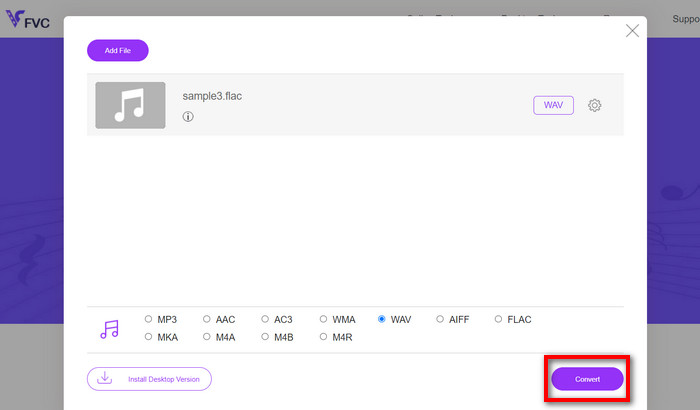
Step 3. Hit the Convert button to change FLAC to WAV format. If you wish to convert another file, repeat this guide from the start.
Artıları
- Google Chrome, Safari, Firefox ve daha fazlası gibi herhangi bir arama motorunda çalışır.
- MP3, AAC ve WMA gibi çeşitli popüler ses dosyası formatları sunar.
- Kullanıcılar her gün sınırsız dönüşümün keyfini çıkarabilir.
Eksileri
- Dönüşüm hızı internet bağlantı gücüne bağlıdır.
Daha Fazla Okuma:
Convert FLAC to MP3 Conversion to Preserve Audio Quality
Easy Steps to Convert WAV to OGG for Optimal Audio Size
Bölüm 3. FLAC ve WAV Dönüşümü hakkında SSS
Bir dosyayı FLAC'tan WAV'a dönüştürmek kaliteyi düşürür mü?
Çözünürlüğü sıkıştırılmamış olduğundan, ses dosyalarınızı FLAC'tan WAV'a dönüştürmek kaliteyi düşürmez. Ancak, bir dosyayı WAV'dan FLAC'a dönüştürdüğünüzü varsayalım. Bu durumda, özellikle kulakları ayrıntılara çok takılanlar için küçük değişiklikler fark edebilirsiniz. Hangisini tutacağınıza karar vermek için yardıma ihtiyacınız varsa, işte bakabileceğiniz bir bakış açısı; FLAC ses formatları, bir yığın şarkıyı depolamak için iyi bir seçimken, WAV dosyalarının boyutu daha büyüktür ancak ses düzenleme için uygundur.
WAV en yüksek çözünürlüklü ses formatı mı?
WAV, IBM ve Microsoft tarafından geliştirilen Waveform Audio File Format kısaltmasıdır. Bu format, dijital müzik endüstrisindeki en yüksek çözünürlüklü format olarak kabul edilir çünkü ham ve tavizsiz ses frekansları içerir.
En iyi çevrimiçi FLAC'den WAV'a dönüştürücü nedir?
Şüphesiz, FVC Ücretsiz Çevrimiçi Video Dönüştürücü, çevrimiçi olarak en iyi ücretsiz FLAC'den WAV'a dönüştürücüdür. Yazılımı kullanarak herhangi bir video ve ses dosyasını dönüştürmek için teknik beceri kazanmanıza gerek yoktur. Kullanıcı dostu olduğu ve benzersiz dönüştürme hızına sahip olduğu için işinizi verimli bir şekilde yapabilir. Ayrıca, bu çevrimiçi program, bildiğimiz popüler ses formatlarının hepsini olmasa da çoğunu sağlar.
Sonuç
Conversion can happen either way from FLAC to WAV and WAV to FLAC. Since both file formats are prevalent in digital music today, picking which one to choose may depend on the task you will use them for. With the tools mentioned above, you can switch back and forth between formats anytime. Follow the steps mentioned above to change FLAC to WAV or WAV to FLAC, and you should face zero difficulties.
-
 MP3'ün WAV Formatına Nasıl Dönüştürüleceğini Öğrenin
 MP3'ü WAV'a nasıl dönüştüreceğinizi bilmek ister misiniz? Hangi araçların alabileceğiniz en kaliteli dönüşümü ürettiğini belirleyin.
-
 WAV Player - Android, iPhone, PC ve Mac için En İyi 5 WAV Oynatıcı Uygulamaları
 Android telefonda WAV dosyaları nasıl oynanır? WAV'ı hangi oyuncu oynayabilir? Bu gönderi Android, iPhone, Mac ve PC için en iyi 5 ücretsiz WAV oynatıcıyı paylaşıyor.
-
 Mac ve Windows'ta En İyi 3 FLAC Meta Veri Düzenleyici [Güncellenmiş 2023]
 FLAC meta verilerini değiştirmek istiyor musunuz? Bu durumda, kullanabileceğiniz en son FLAC meta veri düzenleyicisi hakkında yeterli bilgiyi sağladığımız için bu makaleyi okumalısınız.
