


 Video Dönüştürücü Ultimate
 Ekran kaydedicisi
 Video Onarımı
Mac/Windows/Linux'ta Kalite Kaybı Olmadan M4V'yi MKV'ye Dönüştürmenin 3 Etkili Yolu
İTunes'a indirdiğim M4V videolarını çevirmem gerekiyor. Mac'te M4V'yi MKV'ye nasıl dönüştüreceğim ve daha sonra TV'mde nasıl kullanacağım hakkında bir fikriniz var mı?
Bu sorun yaygındır, özellikle iTunes üzerinden indirilen M4V videolarda görülür; çünkü bu biçim Apple’ın Fair Play Politikası kapsamındadır ve koruma altındadır. Bu nedenle, dönüştürme işlemi yapmadan .m4v videolarını diğer cihazlarda hemen oynatamazsınız. Bu makale, kullanabileceğiniz dönüştürücüler hakkında bilgiler vererek M4V biçimini başarıyla dönüştürmenize yardımcı olacaktır. Daha fazla vakit kaybetmeden, Mac ya da Windows’ta M4V’yi MKV’ye dönüştürmenin etkili yöntemini öğrenmeye başlayalım.

Bölüm 1. Mac ve Windows'ta iTunes M4V'yi MKV'ye Dönüştürün [En Çok Seçilen]
Piyasada indirebileceğiniz birçok ücretsiz M4V’den MKV’ye dönüştürücü vardır ve bunlardan biri de FVC Video Converter Ultimate’tır. Ancak bu gelişmiş araç; yıldırım hızında dönüştürme, sınırsız dosya yükleyip dönüştürme ve sezgisel arayüzü sayesinde diğer dönüştürücülere göre çok daha etkili bir dönüştürme sunar. Bu gelişmiş dönüştürücüler sizi şaşırttı mı? Yoksa bu dönüştürücü hakkında daha fazla mı bilgi edinmek istiyorsunuz? Öyleyse, bu dönüştürücüyü kullandığınızda göreceğiniz başlıca özellikler aşağıda yer almaktadır.

FVC Video Dönüştürücü Ultimate
2.999.368+ İndirme- Birden fazla iTunes M4V'yi MKV'ye veya MOV, AVI, MP4 vb. gibi 200'den fazla medya formatına dönüştürebilir.
- Ultra hızlı dönüştürme ile M4V'nizi anında dönüştürme süreciniz
- Videonuzu daha da iyi hale getirmek için gelişmiş düzenleme özellikleri mevcuttur.
- Araç Kutusu altında sıkıştırmak, yeniden boyutlandırmak, GIF oluşturucu vb. için harika özellikler ayarlayın.
Ücretsiz İndirWindows 7 veya üstü içinGüvenli İndirme
Ücretsiz İndirMacOS 10.7 veya üstü içinGüvenli İndirme
Tüm bu özelliklerin tek bir araçta olması şaşırtıcı değil mi? Daha fazla zaman kaybetmeyelim ve aşağıdaki adımları izleyerek bu aracın iTunes M4V'nizi MKV'ye nasıl etkili bir şekilde dönüştürdüğünü belirleyelim.
Adım 1. Öncelikle aşağıdaki indirme düğmesine tıklayarak bu gelişmiş dönüştürücüyü bilgisayarınıza indirin. Hâlihazırda kullandığınız platformu seçin, kurulum adımlarını izleyin ve devam etmek için Şimdi Başlat’a basın. Unutmayın, zorluk yaşamamak için aracın arayüzüne iyice aşina olmanız gerekecek.
Ücretsiz İndirWindows 7 veya üstü içinGüvenli İndirme
Ücretsiz İndirMacOS 10.7 veya üstü içinGüvenli İndirme
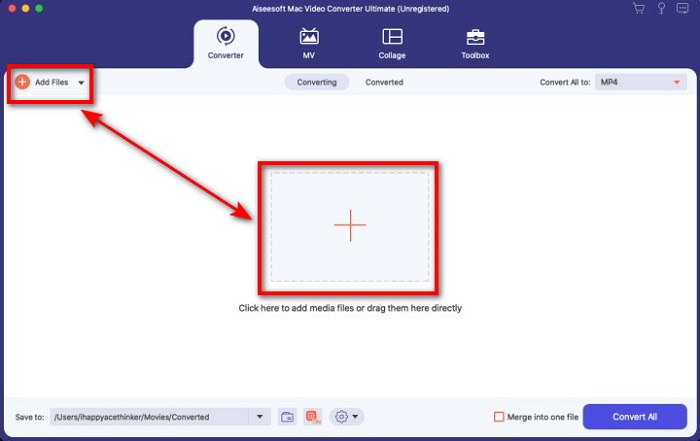
Adım 2. Arayüze M4V dosyasını yüklemek için Dosya Ekle ya da + düğmesine tıklayın. Ardından, bilgisayar klasörü ekranınızda açılacaktır; .m4v dosyasını bulun ve Aç’a basın.
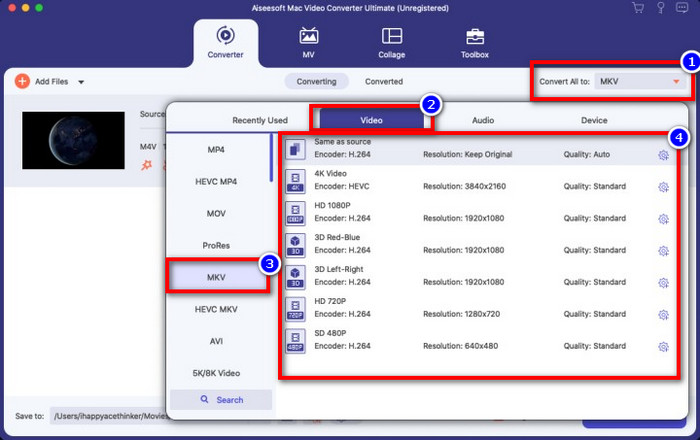
Adım 3. Tümünü Dönüştür bölümünün altından MKV biçimini seçin ve üzerine tıklayın.
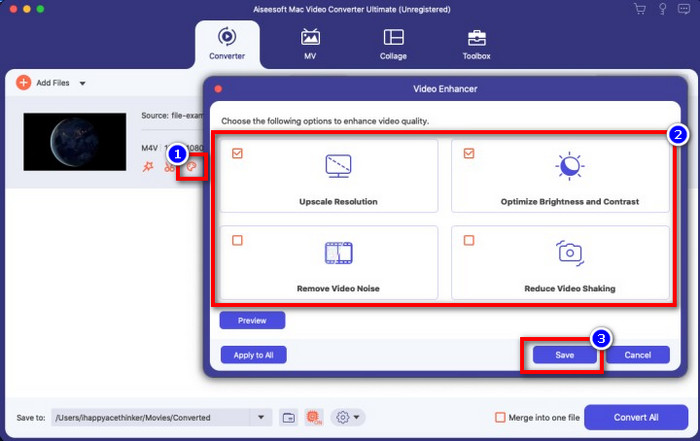
İsteğe bağlı. Şimdiye kadar, bu aracın ne kadar etkili olduğu tartışmasız biçimde ortada. Peki bu aracın video geliştiriciler de sunduğunu biliyor muydunuz? Videoyu geliştir seçeneğine tıklarsanız bir ileti kutusu açılır; videonuzda iyileştirmek istediğiniz kutucukları işaretleyin ve uygulamak için Kaydet’e tıklayın.
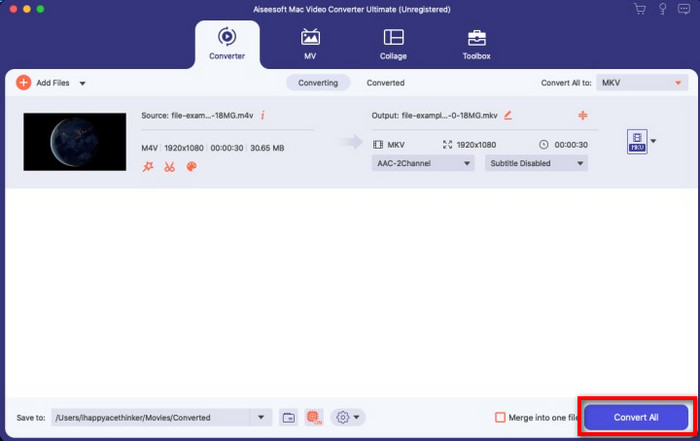
Adım 4. Tümünü Dönüştür düğmesine tıkladığınızda, dönüştürme kısa süre içinde başlayacaktır. İşte bu kadar; artık videonuzun dosya uzantısı .mkv oldu.
Bölüm 2. M4V'yi MKV Online'a Dönüştür
M4V dosyalarını dönüştürmek için ücret ödemek istemiyor, bunun yerine M4V’yi çevrimiçi olarak MKV’ye dönüştürmek mi istiyorsunuz? Öyleyse, FVC Free Video Converter Online web üzerinden bile dönüştürme işleminizin verimliliğini garanti eden çevrimiçi bir dönüştürücüdür. Dönüştürücüyü satın almadan ya da indirmeden işi tamamlayabilirsiniz. Ayrıca, bunu kullanmak için reklam ya da kayıt zorunluluğu da yoktur. Dönüştürücü ücretsiz olmasına rağmen burada sunulan özellikler yalnızca dönüştürme işlemine odaklanır. Gelişmiş araca kıyasla, bu araç geniş kapsamlı ve etkileyici ekstra özellikler sunmaz. Buna karşın, M4V dosyalarınızı çevrimiçi dönüştürmeniz gerekiyorsa bu dönüştürücüyü kullanın ve aşağıdaki adımları izleyin.
Adım 1. FVC Free Video Converter Online’ı açmak için lütfen bu bağlantıya tıklayın.
Adım 2. Dönüştürmek istediğiniz M4V dosyasını başlatmak ve yüklemek için Dönüştürülecek Dosyaları Ekle seçeneğine basın.
Dosyaları toplu dönüştürmek için Masaüstü Sürümü indirin.
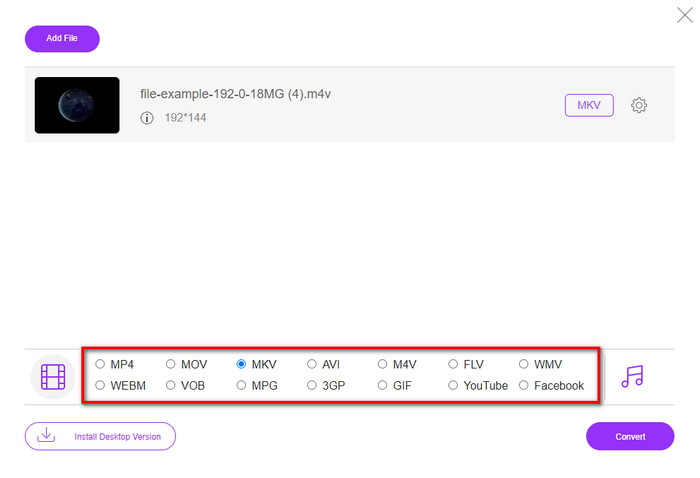
Adım 3. Aşağıdan MKV biçimini ya da sahip olmak istediğiniz diğer biçimi seçin.
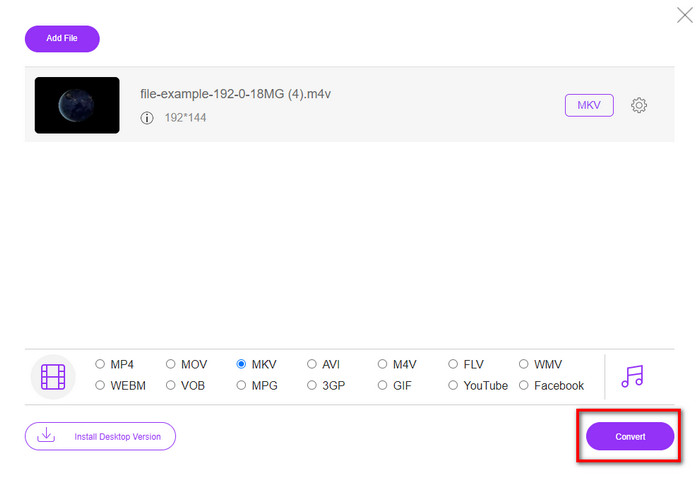
Adım 4. İşlemin başlaması için Dönüştür’e tıklayın.
Bölüm 3. M4V'yi MKV'ye Ücretsiz Dönüştür
Handbrake, burada tanıtılan diğer dönüştürücüler gibi hızlı ve etkili bir dönüştürme süreci sunar. Ancak bu aracın desteklediği biçimler sınırlıdır; bu da, videonuzu hangi biçime dönüştüreceğiniz konusunda daha az seçeneğiniz olduğu anlamına gelir. Yine de Handbrake kullanarak M4V’yi MKV’ye dönüştürmek istiyorsanız, aşağıdaki adımları uygulayın.
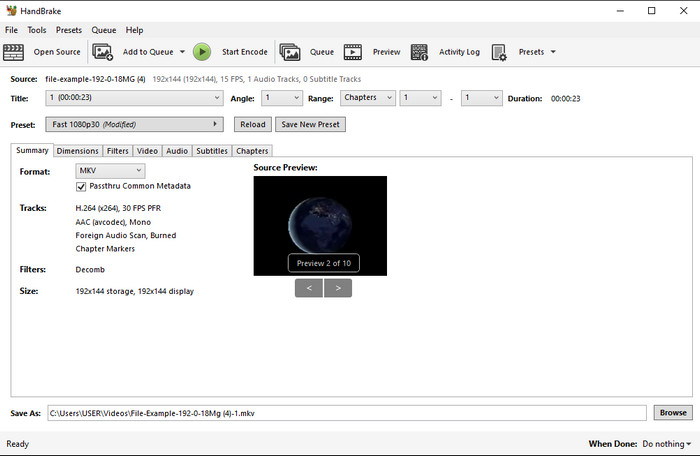
Adım 1. Handbrake’i masaüstünüze indirin. .m4v dosyasını arayüze sürükleyip bırakarak yükleyin. Alternatif olarak, Dosyaya tıklayıp dosyayı bilgisayar klasöründen bulabilir ve Aç’a basabilirsiniz.
Adım 2. Biçime tıklayın ve MKV’yi seçin.
Adım 3. Dönüştürme işleminin başlaması için Start Encode’a tıklayın.
Bölüm 4. M4V ve MKV Arasındaki Benzerlikler ve Farklılıklar Nelerdir?
M4V ve MKV'yi karşılaştırmadan önce, bu iki format arasındaki benzerlikleri bulalım. M4V ve MKV, medya içeriği ve öğeleri için her ikisi de kapsayıcıdır. Ayrıca, bu iki biçimin HD videolar veya 4k gibi en iyi video kalitelerinden birini depoladığı bilinmektedir. Ayrıca meta veriler gibi öğeleri içermek için de büyüktürler. Ayrıca, aşağıdaki sonraki ayrıntılar iki format arasındaki farktır.
M4V, MP4 formatına çok benzer; ancak bu biçim DRM kopya koruması altındadır, bu da onu özgürce kullanamayacağınız anlamına gelir. Ancak indirilebilir M4V'lerin bazılarının yetkisiz lisansı olduğundan, M4V dosyalarının tümü Apple korumasına sahip değildir, bu nedenle sisteminize bulaşacak kötü amaçlı virüsten kaçınmak için .m4v dosyasını iTunes'a indirdiğinizden emin olun. Biçimin bir sınırlaması olmasına rağmen, iTunes'da indirdiğiniz videoyu izlemek için bu biçimi birkaç medya oynatıcıda kullanabilirsiniz. Ayrıca, Mac'te korumalı bir tasarıma ihtiyacınız varsa, bu biçim en iyi seçimdir.
Aksine, MKV, tek bir dosyada birden fazla medya içeriği ve öğesi içerecek şekilde özeldir. Bu formatın kullanımı ücretsiz olduğundan ve M4V'den daha esnek olduğundan, bu özellik yalnızca MKV'de mevcuttur. Ayrıca, Mac veya Windows'ta M4V'yi MKV'ye değiştirmek için birçok neden vardır ve bunlardan biri video dosyasını sınırsız hale getirmektir.
M4V ve MKV
M4V, aynı zamanda MPEG 4 kullanan Apple tarafından geliştirilmiştir. M4V dosyaları genellikle, müzik videoları, TV bölümleri vb. gibi Apple iTunes mağazasından indirilen videoları depolamak için kullanılır. Kullandığı için bazı M4V dosyalarını kopyalamaya karşı korumalı bulabilirsiniz. Apple'ın FairPlay DRM telif hakkı koruması.
2002'de piyasaya sürülen Matroska multimedya kap formatı, bir dizi video, ses, görüntü ve altyazı parçasını içerebilen açık kaynaklı bir formattır. Böylece kısa video klipleri, TV şovlarını ve filmleri kolayca saklamak için kullanabilirsiniz. Anime hayran aboneliği için oldukça popülerdir.
Bölüm 5. M4V'den MKV'ye Dönüştürme hakkında SSS
Düzenleme için hangisi daha iyi, M4V veya MOV?
Bahsi geçen iki biçim de Apple biçimlerinden biridir, bu yüzden M4V ve MOV arasında büyük bir fark olmadığını fark edeceksiniz. Ancak MOV, düzenleme için çok daha uygundur; çünkü bu biçim genellikle profesyonel düzenleme için ideal olan bir dizi video oynatma parçası içerir. Belki de düzenleme amacıyla M4V dosyanızı MOV’a dönüştürmeniz gerektiğini düşünüyorsunuz. Öyleyse, M4V’yi MOV’a dönüştürme konusunda kapsamlı bilgi edinmek için bu bağlantıya tıklayın.
M4V ve MP4 aynı mı?
M4V ve MP4, yapı ve video kalitesi açısından çok benzer. Ancak Apple Plays koruması nedeniyle M4V'nin küçük bir destek kapsamı vardır ve .m4v uzantısında yalnızca video oynatamaz veya düzenleyemezsiniz.
M4V'yi destekleyen medya oynatıcılar nelerdir?
DRM koruması nedeniyle pek çok medya oynatıcı bu tür biçimi desteklemez. Dolayısıyla, bir MKV oynatıcı arıyorsanız, çok fazla zaman harcayıp tek tek denemeniz gerekebilir ki bu da oldukça zaman alıcıdır. Fakat bu makaleyi okursanız, tüm platformlarda kullanılabilen en iyi 5 MKV medya oynatıcıyı indirebilir ya da kullanabilirsiniz.
Sonuç
Bu makalede tanıtılan üç araç, adımları takip ederek istediğiniz etkili dönüştürmeyi size mutlaka sağlayacaktır. Dönüştürücülerin pek çok ortak noktası olsa da aralarında önemli farklılıklar da vardır. Yukarıda sunduğumuz ayrıntıları okursanız, bu üç araç hakkında pek çok şey öğrenmiş olursunuz. Eğer tek seferde mükemmel bir dönüştürme yapmak ve yine de yüksek verimlilik elde etmek istiyorsanız, FVC Video Converter Ultimate’ı öneririz. Kulağa inanılmaz mı geliyor? Gerçekten öyle; bu yüzden onu masaüstünüze indirip kendiniz deneyin.
-
 M4V - MP3 Dönüştürücü - M4V Dosyalarından MP3 Ayıklamak için En İyi 4 Yöntem
 M4V videolarından MP3 sesini kolaylıkla çıkarmak istediğinizde, makaleden istediğiniz ses dosyalarını almak için en iyi 4 M4V - MP3 dönüştürücü hakkında daha fazla bilgi edinebilirsiniz.
-
 [Kılavuz] Windows/Mac'te M4V Videolarını Animasyonlu GIF'lere Dönüştürme
 Favori M4V videolarınızdan animasyonlu GIF dosyaları oluşturmak istiyorsanız, M4V videolarını özelleştirilmiş ayarlarla GIF'lere dönüştürmenin 2 kolay ve verimli yolunu öğrenebilirsiniz.
-
 3 Mac'te iTunes M4V'yi AVI'ye Dönüştürmek İçin Kullanılan Video Dönüştürücü Programı
 MKV'yi AVI formatına nasıl dönüştüreceğiniz konusunda bir fikriniz yok mu? Bu makaleyi okumaya devam ederken, bu dosya biçimini dönüştürmenize yardımcı olabilecek 3 aracı öğreneceğiz.

