


 Video Dönüştürücü Ultimate
 Ekran kaydedicisi
 Video Onarımı
5 Erişilebilir MPEG - AVI Video Dönüştürücü ile MPEG'i AVI'ye dönüştürün
MPEG, video ve ses dosyalarını sakladığı için muhtemelen zaten karşılaştığınız en iyi biçimlerden biridir. Ayrıca yalnızca bir kapsayıcı değildir; aynı zamanda MPEG‑1 ve MPEG‑2 sıkıştırmasını da kullanır. Ancak MPEG‑1 ve MPEG‑2, eskiden Blu‑ray’lerde saklanan eski biçimlerdir. Şimdi ise, biçimi AVI’ye dönüştürerek bunu nasıl iyileştirebileceğimizi açıklayacağız. Aşağıdaki listede, MPEG’i AVI’ye dönüştürmek için kullanabileceğiniz farklı araçları ve MPEG ile AVI hakkında daha ayrıntılı bilgileri sunuyoruz.
Bölüm 1. MPEG ve AVI Dosya Formatı Hakkında Kısa Açıklama
MPEG ve AVI, bir medya dosyasını depolamak için kullanabileceğiniz birinci sınıf formatlardan biridir. Harika olmalarına rağmen, MPEG'den AVI'ye video dönüştürücü kullanmanız için hala bazı nedenler var. Ama şimdilik iki format hakkında bir çok detayı anlatacağız ve MPEG ve AVI hakkında fikir sahibi olacağız.
Daha önce de belirtildiği gibi, MPEG yalnızca bir kapsayıcı değil, aynı zamanda yerleşik bir sıkıştırıcıya da sahiptir. Temel olarak, çift amaçlı bir dosya biçimidir. Ayrıca bu biçim, sağladığı kalite ve sıkıştırma nedeniyle Blu-ray'de en çok kullanılan biçimdir. Ayrıca, MPEG formatı 6'ya ayrılmıştır, ancak yaygın olarak kullanılan iki tanesini tartışacağız ve bu MPEG-1 ve MPEG-2'dir. Ayrıca MPEG-1, MPEG'lerin ilk neslidir. Bu format, standart tabanlı çözünürlüğü saklar, ancak diğer formatın çözünürlüğü ile karşılaştırıldığında, MPEG-1 çok daha azdır. MPEG-2, MPEG-1'den çok daha iyi kalite sunarken, en iyi Blu-ray ve DVD'lerde çalışır. Ayrıca, bu biçim en yaygın olarak TV istasyonu tarafından bir videoyu aktarmak ve oynatmak için kullanılır.
Ancak AVI, sıkıştırılmamış olduğu için MPEG’lerden oldukça farklıdır. Ayrıca bu biçimin sunduğu kalite yüksektir, çünkü içerdiği dosyayı sıkıştırmaz. Biçim boyut olarak çok büyük olsa da MPEG dosyalarına kıyasla tüm platformlarda geniş destek görür.
MPEG'i AVI Formatına Çevrimdışı Dönüştürmek İçin Kullanılan En İyi Dönüştürücünün 2. Kısmı
1. FVC Video Dönüştürücü Ultimate
Eğer çok amaçlı bir MPEG’den AVI’ye dönüştürücü ve aynı zamanda indirici arıyorsanız, FVC Video Converter Ultimate bunun için kullanmanız gereken araçtır. Bu araç, sunduğu özellikler ve basitlik sayesinde bu yazıda üst sıralarda yer alıyor. Kullanımı kolay olsa da, her zaman elde etmek istediğiniz olağanüstü çıktıyı sağlayabilirsiniz. Ayrıca diğer dönüştürücülerden farklı olarak bu yazılım, standartları oldukça yüksek bir seviyeye çıkarır. Dolayısıyla, dönüştürme işleminizden önce, sırasında ve sonrasında yüzde 100 başarı elde etmek istiyorsanız bu aracı mutlaka kullanmalısınız. Şimdi ise, FVC Video Converter Ultimate’ı nasıl kullanacağınızla ilgili adım adım eğitime geçelim.
Adım 1. Aracı masaüstünüze indirmek için aşağıda sunulan düğmeye tıklayın. İndirme işlemi bittiğinde programı kurun, hızlı kurulumu yapın ve Start Now’a tıklayın.
Ücretsiz İndirWindows 7 veya üstü içinGüvenli İndirme
Ücretsiz İndirMacOS 10.7 veya üstü içinGüvenli İndirme
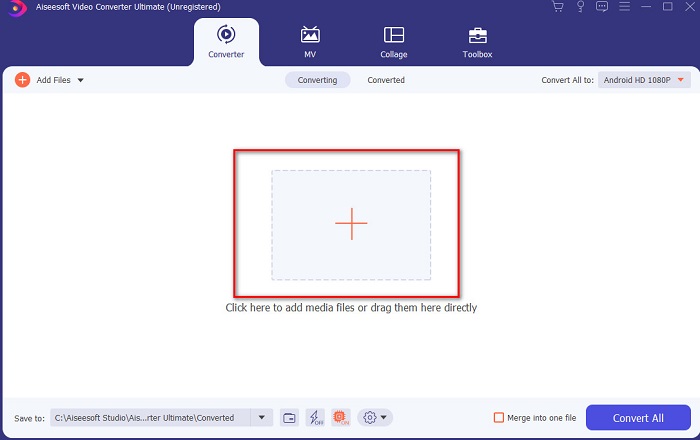
Adım 2. Aracın arayüzü aşağıdaki gibi görünmelidir; ardından ortadaki + işaretine tıklayın. Ekranınızda bir klasör açılacak, dönüştürmek istediğiniz MPEG video dosyasını seçin ve Open’a tıklayın.
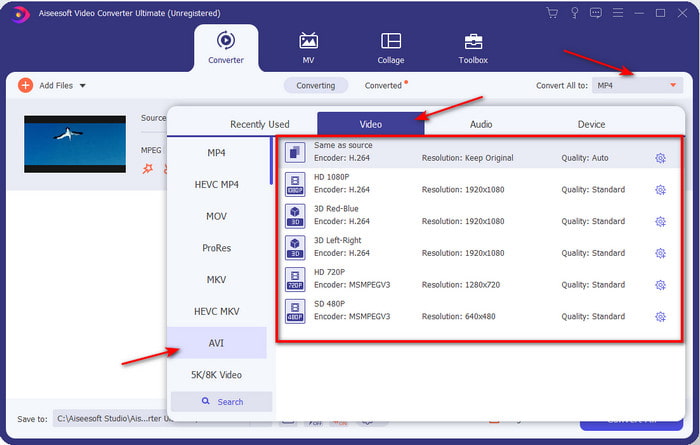
Adım 3. Dosya artık arayüzdeyse, Convert All to: seçeneğine tıklayın ve AVI biçimini bulun.
Adım 4. MPEG‑4 filmleri AVI biçimine dönüştürme işlemini başlatmak için şimdi Convert All düğmesine basın.
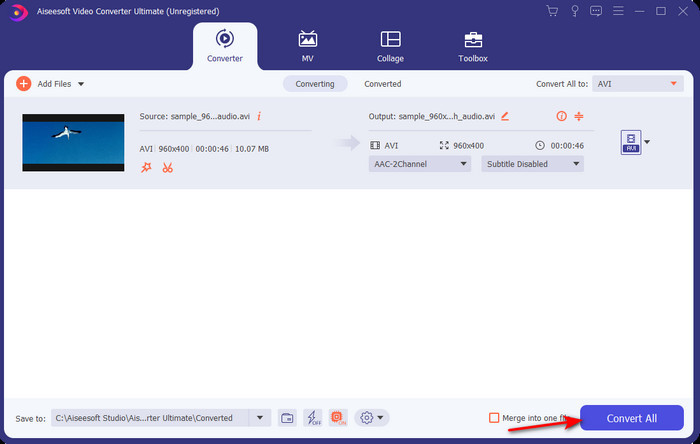
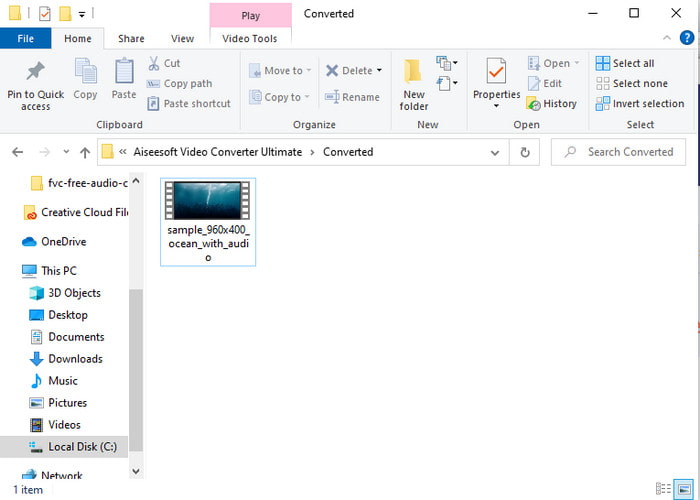
Adım 5. Dosyanın indirilmesi yalnızca birkaç dakika sürecektir ve işlem tamamlandığında dönüştürülmüş biçimi içeren bir klasör açılacaktır. Şimdi, yeni dönüştürülmüş MPEG biçiminizi izlemek için dosyaya tıklayın.
2. FFmpeg
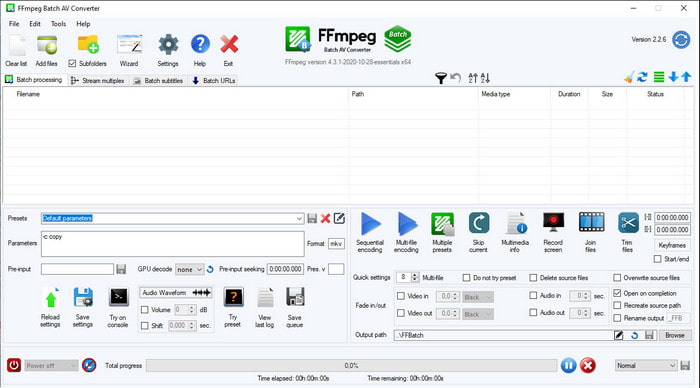
Bu listede yer alan bir diğer yazılım ise FFmpeg’dir. Açık kaynaklı bir yazılım arıyorsanız, internette bulabileceğiniz seçeneklerden biridir. Ancak bu aracın arayüzü, yeni başlayanlar ve hatta ileri düzey kullanıcılar için bile oldukça karmaşık olabilir. Buradaki dönüştürme süreci genel olarak mükemmeldir ve diğer dönüştürücüler gibi yüksek kalitede çıktılar üretir. Dolayısıyla FFmpeg kullanarak MPEG’i AVI’ye dönüştürmek istiyorsanız, anlamayı kolaylaştırdığımız aşağıdaki adımları sırasıyla izleyin.
Adım 1. FFmpeg’i masaüstünüze indirin ve yeni bir klasör oluşturun, ardından dosyayı bu klasörün içine çıkarın.
Adım 2. Window’da CDM’yi arayın ve açın.
Adım 3. Komut istemini kullanarak dosyayı bulun, ardından şu kodu girin: ffmpeg -i input.mpeg -vn -ar 44100 -ac 2 -b:a 192k output.avi ve işlemi başlatmak için klavyenizde Enter tuşuna basın.
MPEG'i Çevrimiçi Olarak AVI Formatına Dönüştürmek İçin Kullanılan En İyi Dönüştürücünün 3. Bölümü
3. FVC Ücretsiz Video Dönüştürücü
Ücretsiz, çevrim içi en iyi MPEG’den AVI’ye dönüştürücüyü arıyorsanız, FVC Free Video Converter beklentilerinize uyacak çevrim içi dönüştürücüdür. Bunun nedeni, web aracının son derece sade bir arayüz sunmasıdır. Ayrıca bu çevrim içi aracı, favori tarayıcınız üzerinden çok kolay bir şekilde kullanabilirsiniz. Dahası, bu araçla dönüştürme yapmanın bir sınırı yoktur; yani istediğiniz zaman, istediğiniz biçimi dönüştürebilirsiniz. Ancak, FVC Video Converter Ultimate’ın aksine burada toplu dönüştürme yapamazsınız. Şimdi bu çevrim içi aracı denemek ve kullanmak istiyorsanız, aşağıda verilen adımları izleyin.
Adım 1. FVC dönüştürücünün ana web sitesine gitmek için önce bu bağlantıya tıklamalısınız.
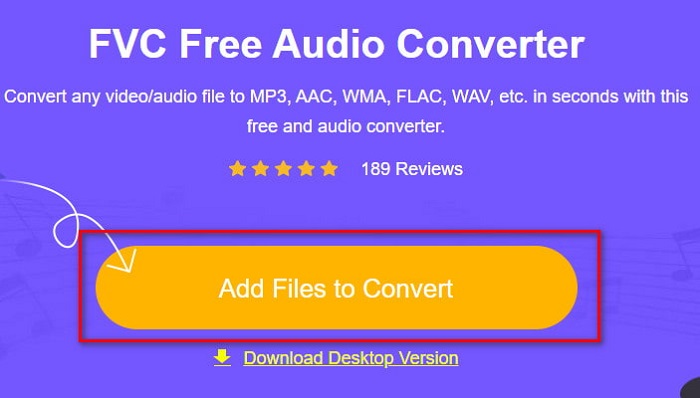
Adım 2. Add Files to Convert düğmesine tıklayın; ardından web aracı açılacak ve bir klasör görünecektir. Dosyayı bulun ve Open’a tıklayın.
Adım 3. Web aracı açıldıktan sonra, bu bölümde sunulan biçimler arasından istediğinizi seçin.
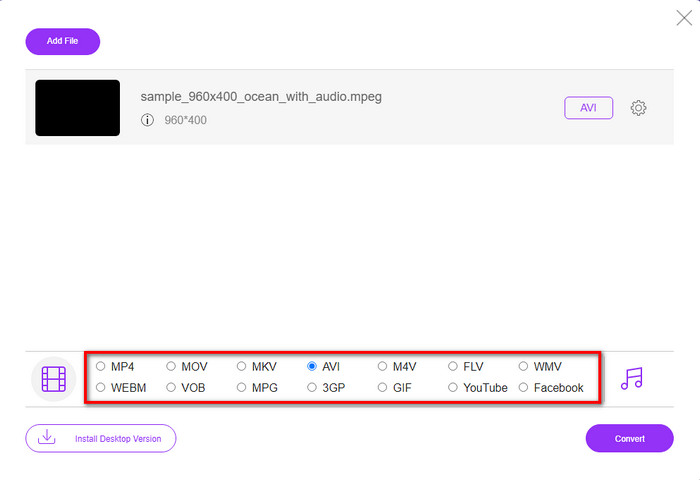
Adım 4. Biçimi seçtiyseniz, şimdi Convert düğmesine tıklayarak dönüştürme işlemine başlayabilirsiniz.
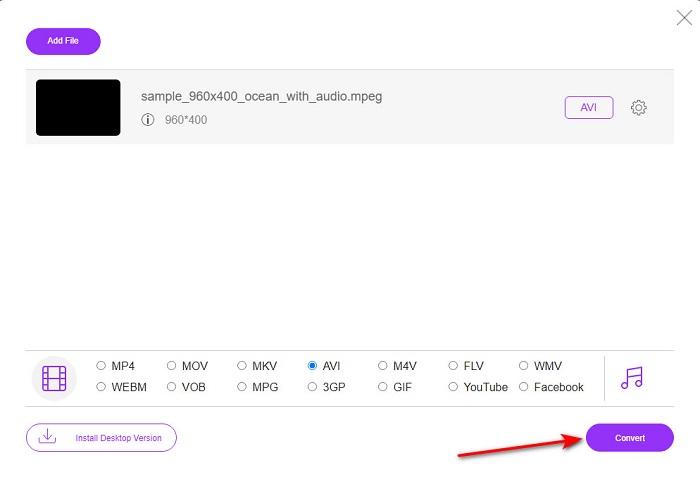
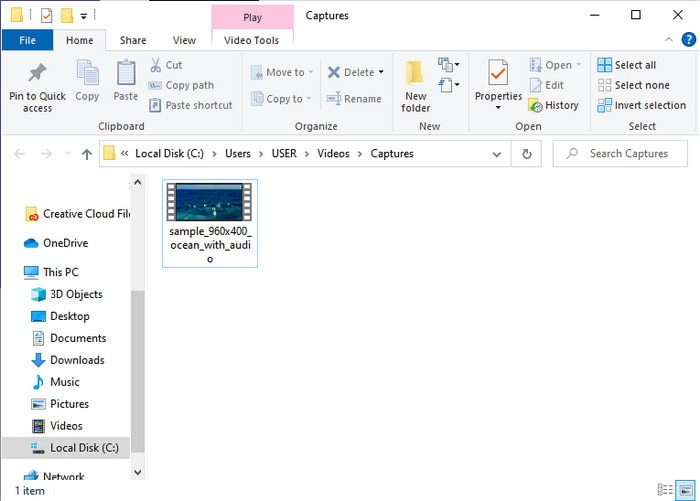
Adım 5. İşlemin kısa süre içinde başlaması için bir dakika kadar bekleyin. İşlem tamamlandığında, az önce dönüştürdüğünüz dosyanın bulunduğu bir klasör açılacaktır.
4. Freeconvert.com
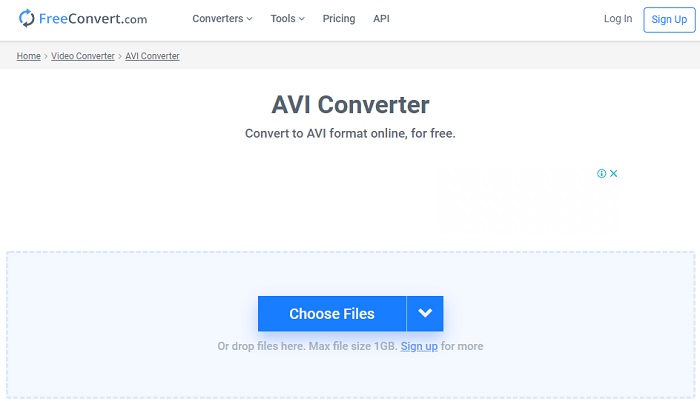
Yukarıda bahsedilen çevrim içi araç gibi, kullanabileceğiniz bir başka çevrim içi araç da Freeconvert.com’dur. Bu web aracı, internetteki kullanıcılar arasında şimdiden popülerlik kazanmıştır. Birçok kullanıcı, kullanımının kolay olması ve diğer işlevleri nedeniyle bu aracı övmektedir. Ancak bu web aracını tercih ederseniz önemli bir dezavantajı vardır: Desteklediği biçimlerin sayısı sınırlıdır. Ayrıca, buradaki dönüştürme işlemi beklenenden biraz daha yavaştır. Şimdi, bu çevrim içi dönüştürücünün nasıl kullanılacağını öğrenmek istiyorsanız aşağıdaki adımları izleyin.
Adım 1. Tarayıcınızda freeconvert.com web sitesini aratın. Ardından Video Converters altında AVIye tıklayın.
Adım 2. Choose File düğmesine basın ve açılacak klasörde MPEG dosyasını bulun. Dosyayı seçtikten sonra Convert To AVIye tıklayın.
Adım 3. Yükleme işleminin bitmesini bekleyin, ardından dosyayı kaydetmek için Download AVIye tıklayın.
Bölüm 4. MPEG'den AVI'ye Dönüştürme hakkında SSS
MPEG'i dönüştürmek kaliteyi kaybeder mi?
Peki, hangi formata dönüştüreceğinize bağlı. Bu nedenle, MPEG'inizi GIF'e çevirirseniz, diğer formattan daha az renk kombinasyonunu desteklediğinden büyük bir değişiklik bekleyin. Ancak, GIF'den başka bir format kullanırsanız, hiçbir kayıp beklemeyin.
MPEG kayıplı mı yoksa kayıpsız mı?
MPEG kayıplı sıkıştırmayı destekler, bu nedenle bu formatı kullanırsanız, uzun bir video ve sesiniz olsa bile daha küçük bir dosya boyutu beklersiniz.
MPEG iyi bir format mı?
Daha önce DVD'lerinizde veri depolamak için kullanabileceğiniz en iyi formatlardan biriydi. Ancak bu çağda MPEG veri depolamak için en iyi seçim değildir. Ancak DVD'lerde, CD'lerde veya Blu-ray'de saklamak ve çok daha hızlı aktarmak istiyorsanız, bu bir seçim olmalıdır.
Sonuç
Özetlemek gerekirse, burada sunulan tüm çevrimiçi ve çevrimdışı yazılımlar, formatı dönüştürmek için kullanılmak için harikadır. Ancak, FVC Video Converter Ultimate ile kolayca olağanüstü bir dönüşüm elde edebileceğinizi kanıtlayan bir araç var. Aslında bunu 3 kelime ile açıklayabiliriz ve bu da kullanımı kolay, etkili ve güvenlidir. Yani, mükemmelliğe ulaşmak istiyorsanız, hemen bu aracı indirin ve deneyin.
-
 MPEG, Windows, Mac, Çevrimiçi Olarak MP4 Dosyalarına Nasıl Dönüştürülür
 Bilgisayarınızda MPEG'yi MP4 dosyalarına dönüştürmenin 3 ücretsiz yolunu okuyun ve edinin. MPEG'i kolaylıkla MP4 formatına dönüştürmek için çevrimiçi ve masaüstü video dönüştürücüleri kullanabilirsiniz.
-
 [2021] MPEG'i MP3'e Dönüştürmenin En İyi Araçları ve Kolay Yolları
 Bu makale, esas olarak, listedeki en güvenilir araçları kullanarak MPEG videolarınızı MP3'e nasıl dönüştürebileceğinizden bahseder.
-
 MP4'ü 7 Ücretsiz Video Dönüştürücüyle AVI Dosyalarına Dönüştürme Eğitimi
 AVI'yi MP4 videoya dönüştürmenin tüm ücretsiz yollarını almak ister misiniz? Bu makaleyi kaçırmamalısınız. AVI dosyalarını Windows, Mac, iPhone, Android ve çevrimiçi olarak ücretsiz olarak MP4'e dönüştürmenin 7 yolu.
