


 Video Dönüştürücü Ultimate
 Ekran kaydedicisi
 Video Onarımı
MPG'yi AVI'ye Dönüştürürken Aydınlanmanız Gereken Detaylar
Genel olarak konuşursak, bir MPG dosyası, Moving Picture Experts Group (MPEG) tarafından standartlaştırılmış dijital video biçimini kullanan tipik bir video dosyasıdır. Birbirine geçirilmiş tek bir dosyada video, ses ve meta verileri depolar. İnternet üzerinden yayınlanan filmler oluşturmak için MPG dosyalarının kullanılması yaygın bir uygulamadır. MPG’yi AVI’ye destekleyen veya dönüştüren herhangi bir dönüştürücü hakkında bilginiz ya da altyapınız yoksa bu tür bir video biçimini dönüştürmek kolay değildir. İstediğiniz dönüştürme işlemini gerçekleştirmek için göz önünde bulundurmanız gereken ayrıntılar ve seçenekler hakkında bilgi edinmek üzere bu makaleyi okumaya devam edin.

Bölüm 1. MPG ve AVI - Genel Bakış
MPEG, Moving Picture Experts Group tarafından geliştirilmiş bir video dosya biçimidir; size MP3 ve MP4 gibi biçimleri de sunan aynı gruptur. Kullanım amacına bağlı olarak MPEG, MPEG-1 veya MPEG-2 dosya sıkıştırmasını kullanır.
VHS düzeyindeki ham videoyu ve CD müziğini çok fazla kalite kaybı olmadan saniyede 1,5 megabite sıkıştırmak için MPEG-1 oluşturulmuştur. Sonuç olarak, dünyadaki en popüler ve en geniş uyumluluğa sahip video/ses biçimlerinden biri haline gelmiştir. MPEG-1 için video verisi genellikle saniyede 30 kare (fps) hızında, yaklaşık 352×240 piksel çözünürlükte iletilir.
Buna karşın, Windows bilgisayarlar varsayılan video biçimi olarak AVI kullanır. DivX veya XviD gibi çoklu ortam kapsayıcı biçimlerinde ses ve video çeşitli kodekler kullanılarak depolanabilir. MPEG ve MOV gibi birçok alternatif video biçimi, bir AVI dosyasına göre daha az sıkıştırma ve daha fazla depolama alanı kullanır. Sıkıştırmasız AVI dosyaları üretmek de mümkündür. Bu da dosyalar artık kayıpsız olduğu için dakikada yaklaşık 2–3 GB’a varan çok daha büyük dosya boyutlarına yol açar. Dosyayı kaç kez açıp kaydederseniz kaydedin, kayıpsız bir dosya kalitesini korur. Ek avantajlar arasında ek bir kodeğe gerek olmadan oynatılabilme yer alır.
Bölüm 2. MPG'yi AVI'ye Dönüştürmek İçin En Etkili Yazılım
MPG bir video dosyasını ücretsiz olarak AVI’ye nasıl dönüştürebileceğinizi hiç merak ettiyseniz, bu yeni ve en iyi yazılım bu makalede size önerilen araçtır. Video Converter Ultimate, Windows ve Mac’te kullanılabilen ve MPG dosyanızı çevrimiçi dönüştürme işlemlerine göre çok daha hızlı bir şekilde AVI’ye dönüştürebilen, ücretsiz indirilebilir bir yazılımdır. Bu iki video dosyası haricinde bu yazılım, seçmeniz için çeşitli biçimleri de destekler. Sunacağı çıktı kalitesi sayesinde en iyisidir. Artık bu yazılımın neler yapabildiğine dair bir fikir sahibi olduğunuza göre, kemerlerinizi bağlayın ve bu yazılımın nasıl çalıştığını birlikte keşfedelim:
Adım 1. Başlamak için, aşağıda verilen Ücretsiz İndir düğmesine tıklamanız yeterlidir. İndirme tamamlandığında, yazılımı Windows veya Mac’e kurmayı seçebilirsiniz. Yazılım bilgisayarınızın masaüstüne yüklendikten sonra, Şimdi Başlat düğmesine tıklayarak kullanmaya başlayabilirsiniz.
Ücretsiz İndirWindows 7 veya üstü içinGüvenli İndirme
Ücretsiz İndirMacOS 10.7 veya üstü içinGüvenli İndirme
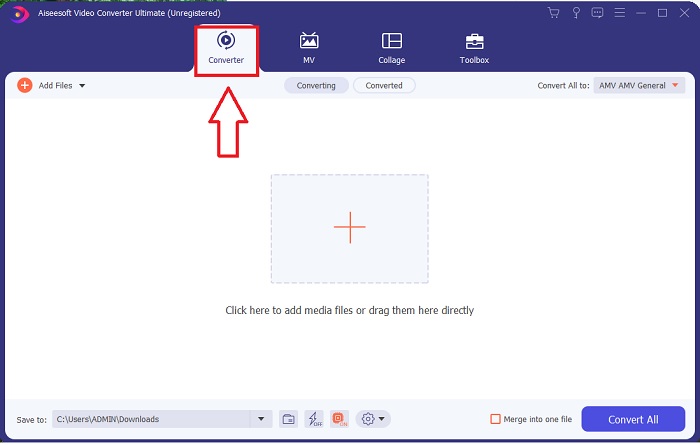
Adım 2. Az önce indirdiğiniz yazılımı açın. Yazılımı ilk açtığınızda karşınıza Dönüştürücü arayüzünün bulunduğu bir pencere çıkacaktır. Videonuzu dönüştürme sürecine burada başlayacaksınız.
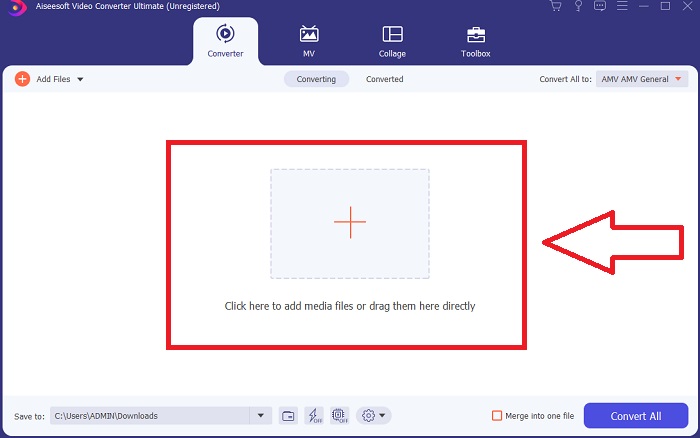
Adım 3. Dosyalarınızı yazılıma içe aktararak dönüştürme işlemine başlayabilirsiniz. Bir videoyu dönüştürmek, onu Artı simgesinin üzerine sürüklemek kadar basittir.
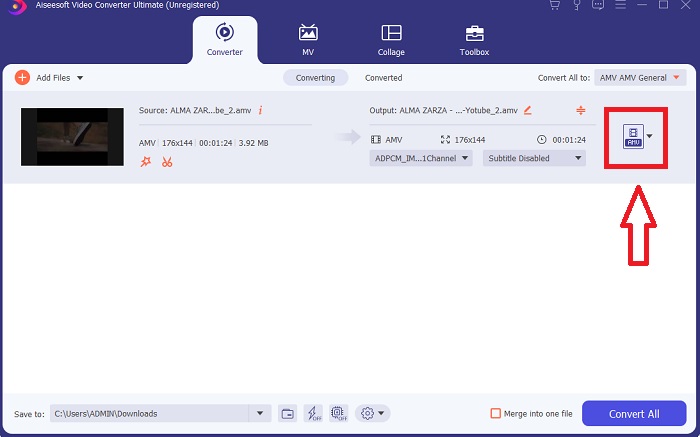
Adım 4. Bir video biçimine sağ tıklayın ve Şuraya Kaydet veya Harici depolamaya kaydet seçeneklerinden birini seçin. Açılır menüden bir AVI dosya türü arayın ve seçin. Bir AVI video dosya türü seçtikten sonra birçok video kalite ayarı mevcuttur. İstediğiniz video çıktısı listede yoksa kalite ayarlarını değiştirebilirsiniz. Dişli simgesi, görüntü çözünürlüğünü, kare hızını ve ses kalitesini değiştirmenize olanak tanır. Düzenlemelerinizi kaydetmek için Yeni Oluştur düğmesine tıklayın.
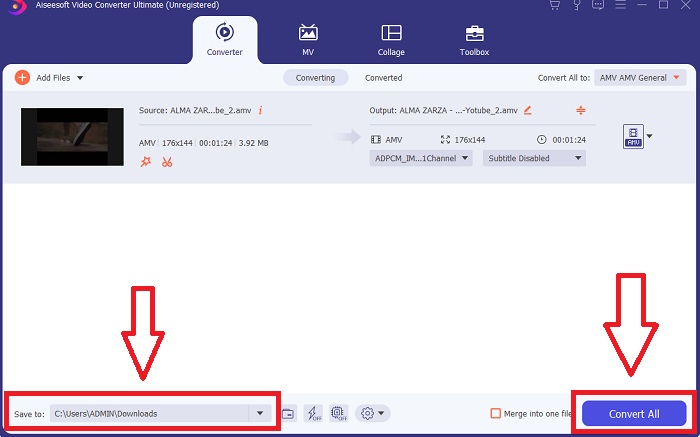
Adım 5. Seçtiğiniz videoyu düzenledikten ve bilgisayarınıza aktarılmaya hazır hale getirdikten sonra Tümünü Dönüştür düğmesine tıklayın.
Bölüm 3. Hızlı İpuçları: Düşünmeniz Gereken Diğer Etkili Araçlar
Yöntem 1. CloudConvert'ı kullanın
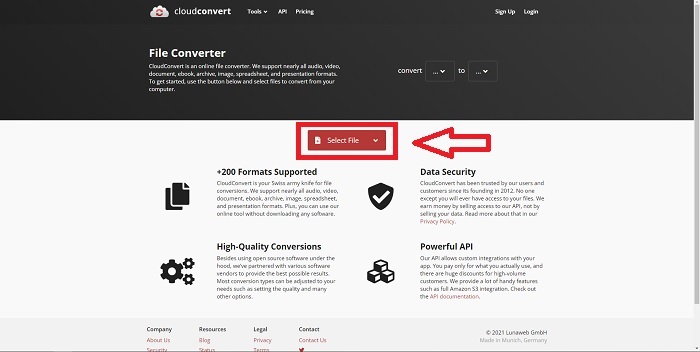
CloudConvert, çevrimiçi bir video dönüştürücüdür. Bu çevrimiçi dönüştürücü, diğer biçimlerin yanı sıra MP4, WEBM ve AVI'yi de destekler. Videonun kalitesini, çözünürlüğünü ve dosya boyutunu seçebilirsiniz. Bu çevrimiçi araçta MPG'yi AVI'ye nasıl dönüştüreceğinizi düşünüyorsanız, nasıl kullanılacağına ilişkin prosedür aşağıdadır:
Adım 1. Dosya Seç düğmesine tıklayarak bilgisayarınızdan bir dosya yükleyin.
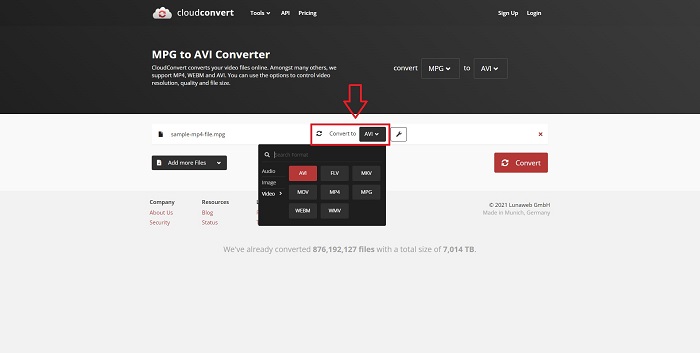
Adım 2. Ardından, dosyanızın hangi biçime dönüştürüleceğini, İngiliz anahtarı simgesinin yanındaki format bölümüne tıklayarak seçin. Dönüştürülecek daha fazla dosya ekleme seçeneğiniz de vardır.
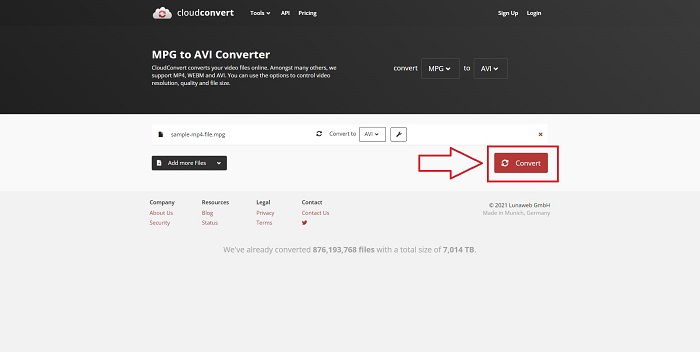
Adım 3. Yüklediğiniz tüm dosyaları dönüştürmek için Dönüştür düğmesine tıklayın.
Yöntem 2. Zamzar'ı kullanın
Zamzar, dosyaları dönüştürmek için web tabanlı bir araçtır. Dönüştürmeler, herhangi bir yazılım indirmeye gerek kalmadan çeşitli formatlarda gerçekleştirilebilir. Zamzar, bir URL girerek veya bir veya daha fazla dosya yükleyerek (hepsi aynı formatta olduğu sürece) bir dosyayı Adobe PDF'den Microsoft Word belgesine gibi bir biçimden diğerine dönüştürebilir. Bu çevrimiçi araç hakkında bilgi sahibi olmak için, sizin için sağlanan adımlar şunlardır:
Adım 1. Herhangi bir arama motorunda Zamzar’ı arayın. Siteye tıkladıktan sonra, arayüzünde Dosya Ekle düğmesine tıklayarak artık bir dosya yükleyebilirsiniz.
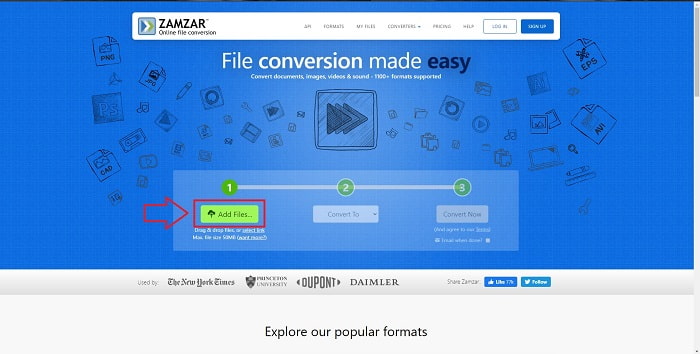
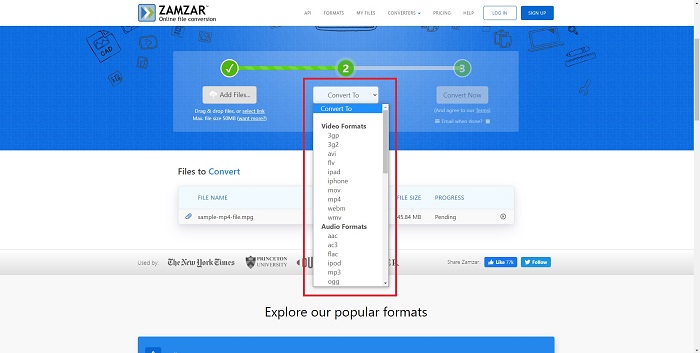
Adım 2. Sonraki adımda, dönüştürmek istediğiniz dosyayı seçerek artık dosyayı dönüştürebilirsiniz. Bu çevrimiçi aracın desteklediği tüm biçimleri görmek için Dönüştürülecek Biçim (Convert To) seçeneğine tıklayın.
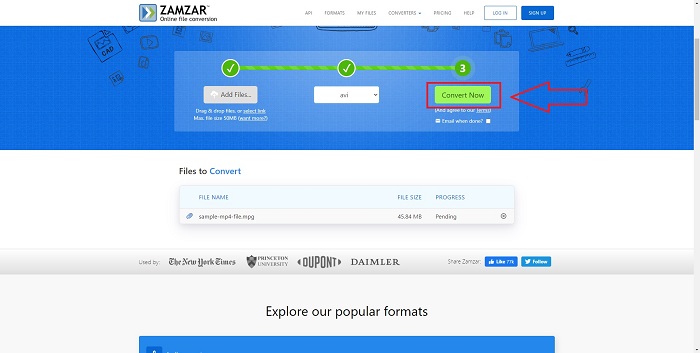
Adım 3. Dosyayı dönüştürmek için Şimdi Dönüştür düğmesine tıklayın.
Bölüm 4. MPG ve AVI hakkında SSS
AVI veya MPG daha mı iyi?
AVI dosyalarıyla depolama mümkündür, oysa video kaydı MPEG dosyalarıyla gerçekleştirilir. AVI, MPEG'den biraz daha üstündür; ancak, kullanılacak biçim MPEG ise, DVD videoları yakmak istersiniz. Microsoft Windows, AVI dosya biçimini Apple'ın MOV dosya biçimine yanıt olarak geliştirirken, Hareketli Resim Grubu MPG biçimini geliştirdi.
AVI'nin avantajları ve dezavantajları nelerdir?
Diğer dosya biçimleriyle karşılaştırıldığında, AVI dosyaları sıkıştırılmamışsa çok büyük olabilir. AVI dosyasının yararları karşılığında biraz disk alanından vazgeçmeye istekli olmalısınız, aksi halde istediğiniz kadar çok dosya depolayamazsınız. Bir AVI dosyasını belirli bir noktadan sonra çevrimiçi olarak sıkıştırırsanız, sonuç olarak video kalitesi düşer.
Hangisi daha küçük boyutlu AVI veya MPG?
İnternet söz konusu olduğunda, daha büyük dosyaların indirilmesi daha uzun sürer. Biraz kalite kaybına yol açsa bile, filmleri daha küçük dosya boyutlarında kodlamak mantıklıdır. Oynatma söz konusu olduğunda ise, daha fazla set üstü oynatıcı AVI dosyalarını MPG dosyalarına kıyasla çalıştırabildiği için hâlâ MPG’den çok AVI tercih edilir. MPG dosyalarınızı bilgisayarınızda oynatmak mı istiyorsunuz, daha fazla bilgi edinmek için buraya tıklayın.
Sonuç
Anlattığımız her şeyi toparlamak gerekirse, Video Converter Ultimate, yukarıda listelenen tüm çevrim içi MPG’den AVI’ye dönüştürücüler yerine kullanmayı düşünmeniz gereken en iyi dönüştürücüdür. Bu yazılım ücretsizdir ve çevrimiçi dönüştürme araçlarına göre en hızlı dönüştürme sürecine sahiptir. Ayrıca birçok biçimi destekler ve size yüksek kaliteli video çıktısı sunar. Bunun dışında, bu yazılımı kullanmamanız için hiçbir neden yoktur.
-
 MPEG, Windows, Mac, Çevrimiçi Olarak MP4 Dosyalarına Nasıl Dönüştürülür
 Bilgisayarınızda MPEG'yi MP4 dosyalarına dönüştürmenin 3 ücretsiz yolunu okuyun ve edinin. MPEG'i kolaylıkla MP4 formatına dönüştürmek için çevrimiçi ve masaüstü video dönüştürücüleri kullanabilirsiniz.
-
 [2025] MPEG'i MP3'e Dönüştürmenin En İyi Araçları ve Kolay Yolları
 Bu makale, esas olarak, listedeki en güvenilir araçları kullanarak MPEG videolarınızı MP3'e nasıl dönüştürebileceğinizden bahseder.
-
 PC ve Mac'te MOV'u AVI'ye Dönüştürmenin 4 Etkili Yolu [2025]
 Web'deki en iyi MOV to AVI dönüştürücünün ne olduğunu bilmek ister misiniz? Ve neden FVC Ultimate Video Converter sizin için uygun olabilir.
