


 Video Dönüştürücü Ultimate
 Ekran kaydedicisi
 Video Onarımı
En İyi Dönüştürücüleri Kullanarak MPG'yi MKV'ye Dönüştürmenin En Basit Yolları [Ücretsiz]
Ne yazık ki MPG dosyaları altyazı izleri içermez; ancak dosyanızı, farklı dillerde çok sayıda altyazı parçasını saklayabilen bir dosya formatına dönüştürebilirsiniz. Ve MPG dosyanızı kolayca MKV’ye dönüştürmenin bir yolunu arıyorsanız, çevrimiçi ve çevrimdışı olarak MPG’yi MKV’ye dönüştürme adımlarını basitçe sunuyoruz; bu makaleyi sonuna kadar okuyun.

Bölüm 1. Neden MPG'yi MKV'ye Dönüştürün
MPG dosya formatı, web'de en yaygın kullanılan dosya formatlarından biridir. Bu dosya formatı MPEG veya Moving Pictures Expert Groups tarafından geliştirilmiştir. Ayrıca bu dosya türü video, ses ve meta verileri depolayabilir. Ayrıca, neredeyse tüm medya oynatıcılar bu tür dosyaları yaygın olarak desteklemektedir. Buna karşılık, MKV veya Matroska dosyaları, video, ses ve altyazı parçalarını tek bir dosyada depolayan bir medya dosyası kapsayıcıdır. Bu dosya türü, farklı dillerdeki ses parçalarını işleyebildiği için film meraklıları için de ünlüdür.
Bölüm 2. MPG'yi MKV Çevrimdışına Dönüştürmenin En Hızlı Yolu
Piyasada MPG’yi MKV’ye dönüştürebilen pek çok dönüştürücü bulunuyor. Ancak ultra hızlı dönüştürme yapabilen bir dönüştürücü istiyorsanız, FVC Video Converter Ultimate en iyi araçtır. Ayrıca videolarınızdan filigran kaldırmak istiyorsanız, bu dönüştürücüde bunu yapma özelliği de vardır. Dahası, birden fazla dosya formatını tek bir dosyada birleştirmek için toplu dönüştürme de yapabilir. Bu MPG’den MKV’ye Dönüştürücüyü kullanmanın avantajlarını mı merak ediyorsunuz? O hâlde aşağıdaki ayrıntıları okuyun.

FVC Video Dönüştürücü Ultimate
5.689.200+ İndirme- Videonuzu açıkça düzenleyin ve geliştirin.
- Bu dönüştürücüde ultra hızlı dönüştürme işlemi mevcuttur.
- MPG dosyalarını MKV, WMV, AVI, MP4 ve diğer 1000'den fazla dosya formatına dönüştürebilir.
- Windows ve macOS gibi tüm işletim sistemlerinde mevcuttur.
Ücretsiz İndirWindows 7 veya üstü içinGüvenli İndirme
Ücretsiz İndirMacOS 10.7 veya üstü içinGüvenli İndirme
MPG dosyanızı MKV'ye dönüştürmek için aşağıdaki adımları izleyin.
1. Adım. Aşağıdaki İndir düğmesine tıklayarak Windows veya macOS için FVC Converter Ultimate’ı indirin. Ardından kurulum işlemini takip edin ve uygulamayı çalıştırın.
Ücretsiz İndirWindows 7 veya üstü içinGüvenli İndirme
Ücretsiz İndirMacOS 10.7 veya üstü içinGüvenli İndirme
2. Adım. Sonraki adımda, MPG dosyanızı yazılımın ana arayüzüne yüklemek için Dosya Ekle veya + işareti düğmesine tıklayın.
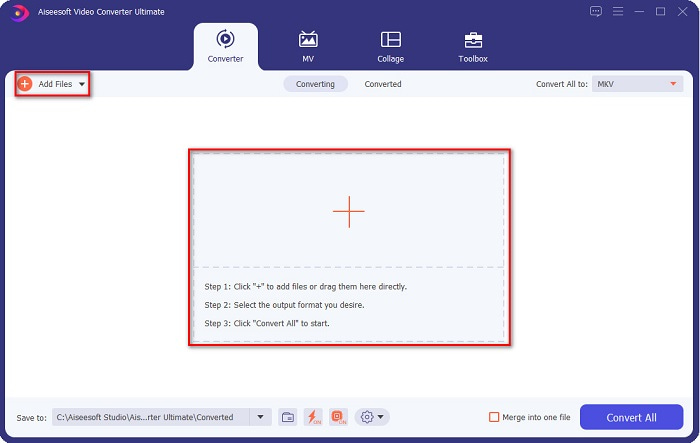
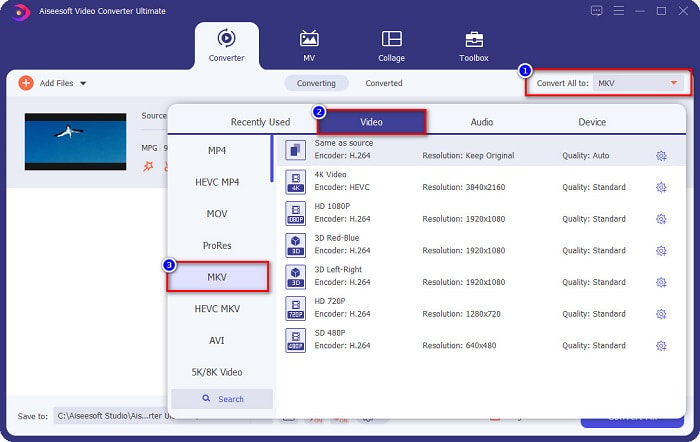
3. Adım. MPG dosyanızı yükledikten sonra, Tümünü Dönüştür düğmesine tıklayarak çıktı formatını seçin. Sizin durumunuzda, MKV dosya formatını seçin.
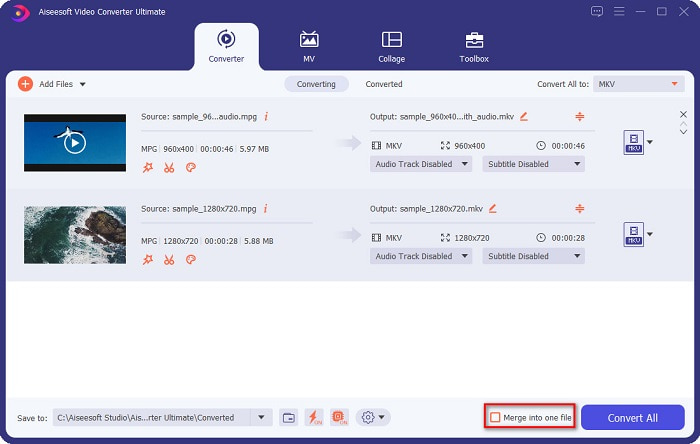
İsteğe bağlı. Birden fazla MPG dosyasını tek bir dosyada dönüştürmek istiyorsanız, Tek dosyada birleştir kutusunu işaretleyin. İstemiyorsanız, bir sonraki adıma geçin.
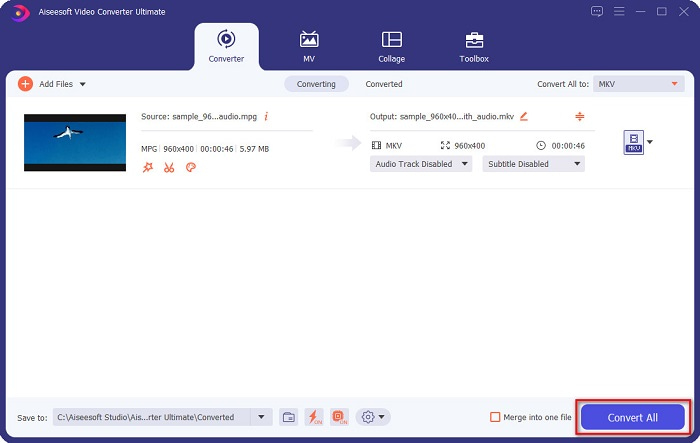
4. Adım. Bitirmek için, MPG dosyanızı MKV dosyasına dönüştürmek üzere Tümünü Dönüştür düğmesine tıklayın. Birkaç saniye bekleyin, hepsi bu kadar! Bu kadar kolay bir şekilde MPG’yi MKV’ye dönüştürebilirsiniz.
Bölüm 3. Ücretsiz Bir Araç Kullanarak MPG'yi MKV'ye Dönüştürün
MPG’yi MKV’ye dönüştürmek için en iyi ücretsiz aracın ne olduğunu hiç merak ettiniz mi? Birçok kullanıcının ilk tercih olarak HandBrake kullandığını gözlemledik. Bu ücretsiz yazılım MPG’yi MKV, WebM ve MP4 dosyalarına dönüştürebilir. Ayrıca kullanıcı dostu bir arayüze sahiptir; bu da yeni başlayanlar için iyi bir özelliktir. Ancak yalnızca sınırlı sayıdaki dosya formatını dönüştürebilir. Yine de MPG’yi MKV’ye dönüştürmek için etkili bir araçtır.
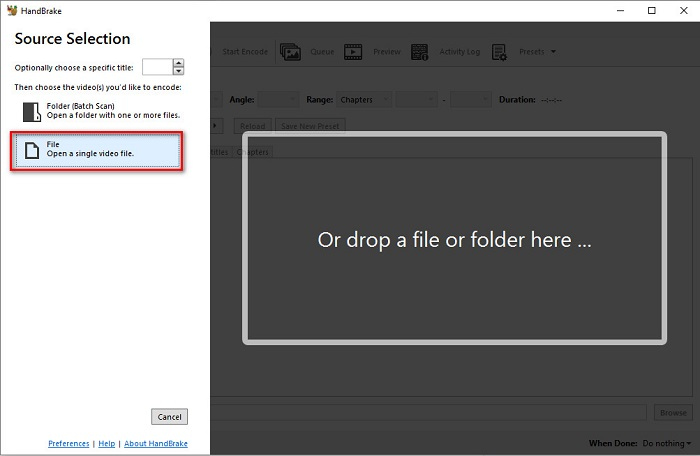
1. Adım. Cihazınıza HandBrake’i indirin ve uygulamayı çalıştırın. Uygulamayı açtıktan sonra, yazılım arayüzünün sağ tarafındaki Dosya seçeneğine tıklayın. Bilgisayarınızdaki dosyalar göründüğünde MPG dosyanızı seçin.
2. Adım. Ardından, Biçim yanındaki açılır menü düğmesinden istediğiniz çıktı dosya formatını seçin. Daha sonra, Gözat düğmesine tıklayarak dosyanızın kaydedileceği konumu belirleyin.
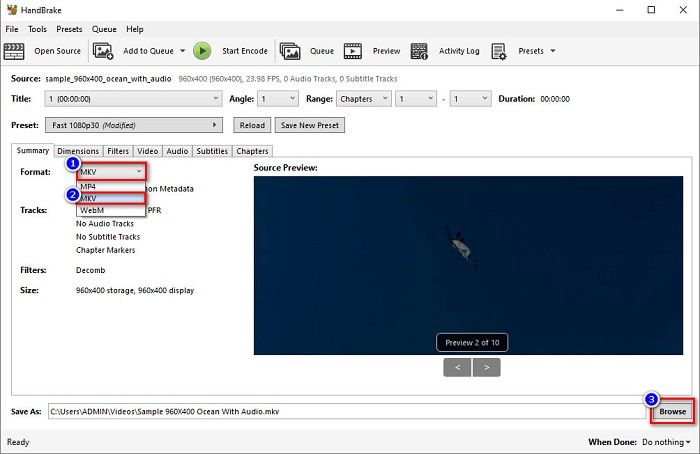
3. Adım. Son olarak, MPG dosyanızı MKV dosya formatına dönüştürmek için Kodlamayı Başlat düğmesine tıklayın.
Yukarıdaki basit adımları izleyerek ücretsiz bir dönüştürücü kullanarak MPG'yi MKV'ye dönüştürebilirsiniz.
Bölüm 4. MPG'yi MKV Online'a Dönüştürmenin 2 Yöntemi
Çevrimiçi dönüştürücüler aracılığıyla dönüştürme, yapılacak en uygun seçenek olabilir. Ayrıca, çevrimiçi dönüştürücüleri kullanırken herhangi bir şey indirmeniz gerekmeyecek. Ancak bunun yerine doğrudan çevrimiçi dönüştürebilirsiniz. Ancak, dönüşüm hızınız internet bağlantınızın ne kadar hızlı olduğuna bağlı olacaktır. Bununla birlikte, MPG dosyanızı MKV'ye dönüştürmek için en iyi iki yöntemi aşağıda listeledik.
Yöntem 1. FVC Ücretsiz Çevrimiçi Video Dönüştürücüyü Kullanın
FVC Free Online Video Converter, çeşitli dosya formatlarını pratik biçimde dönüştüren ücretsiz bir çevrimiçi dönüştürücüdür. MPG’den MKV’ye, AVI, MP4, MOV, MP3 ve daha birçok formatı destekler. Kullanımı kolay bir arayüze sahip olduğundan yeni başlayanlar için de uygundur. Ayrıca dosyanızın video ve ses bit hızını değiştirmenize olanak tanıyan bir özelliği vardır. Bu çevrimiçi MPG’den MKV’ye dönüştürücüyle ilgileniyorsanız, aşağıdaki adımları izleyin.
1. Adım. Tarayıcınızda FVC Free Online Video Converter ifadesini aratın veya doğrudan bu bağlantıya tıklayarak web sayfasına gidin. Ardından yazılımı başlatın.
2. Adım. Uygulamayı başlattıktan sonra Dönüştürülecek Dosyaları Ekle düğmesine tıklayın. Bilgisayarınızdaki dosyalar görünecek, ardından MPG dosyanızı seçin.
Dosyaları toplu dönüştürmek için Masaüstü Sürümü indirin.
3. Adım. Sonra çıktınız için MKV formatını seçin.
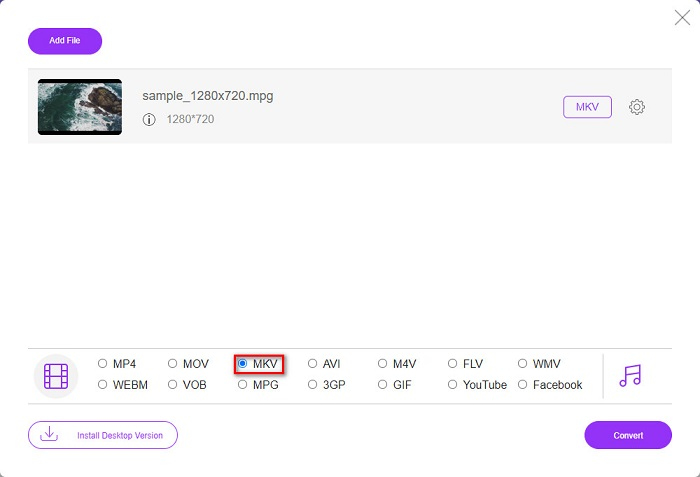
4. Adım. Son adım olarak Dönüştür düğmesine tıklayın. Ardından MPG’den MKV’ye dönüştürme işleminiz başlayacaktır.
Yöntem 2. CloudConvert'i kullanın
Kullanabileceğiniz bir diğer çevrimiçi dönüştürücü ise CloudConverttir. Bu dönüştürücü, sade arayüzü sayesinde oldukça kullanışlıdır. Ayrıca, kullanırken dosyalarınızı sıkıştırma imkânı da sunar. Ancak yalnızca sınırlı sayıda dosya formatını destekler. Buna rağmen, pek çok kişi hâlâ pratik olduğu için bu dönüştürücüyü tercih etmektedir.
1. Adım. Tarayıcınızda CloudConvert’i aratın. Web sayfasına geldiğinizde, Dosya Seç düğmesine tıklayın. Bilgisayarınızdaki dosyalar göründüğünde MPG dosyanızı seçin.
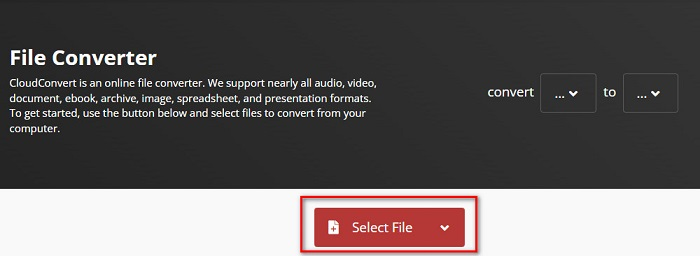
2. Adım. Ardından açılır menü düğmesinden çıktı formatı olarak MKV dosyasını seçin.
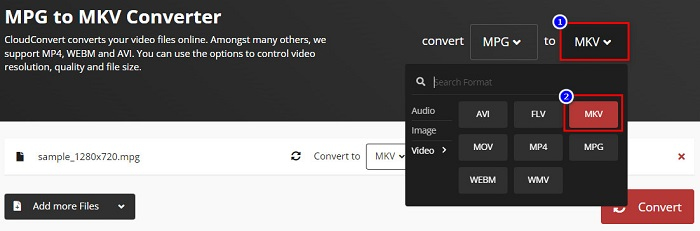
3. Adım. Son olarak Dönüştür düğmesine tıklayın. Dosyanızın dönüştürülmesini bekleyin ve işte oldu! Bu üç basit adımla MPG’yi MKV’ye dönüştürebilirsiniz.
MPG ve MKV karşılaştırması
Hareketli Resim Uzmanları Grubu (MPEG) tarafından yapılan MPG, video, ses ve meta veri bilgilerini depolamak için yaygın bir dijital video formatıdır. İnternette paylaşmak için filmler oluştururken oldukça kullanışlıdır. MPG'deki bu dosyalar genellikle MPEG-1 veya MPEG-2 video/ses sıkıştırması içerir.
2002'de piyasaya sürülen Matroska multimedya kap formatı, bir dizi video, ses, görüntü ve altyazı parçasını içerebilen açık kaynaklı bir formattır. Böylece kısa video klipleri, TV şovlarını ve filmleri kolayca saklamak için kullanabilirsiniz. Anime hayran aboneliği için oldukça popülerdir.
Bölüm 5. MPG'yi MKV'ye Dönüştürme Hakkında SSS
MPG'yi MKV'ye dönüştürmek dosya boyutunu etkiler mi?
Evet, MPG'yi MKV dosyasına dönüştürdüğünüzde o kadar etkilemese de dosya boyutu artıyor.
Hangisinin dosya boyutu daha büyük?
MKV dosyaları, MPG dosyalarına kıyasla daha büyük bir dosya boyutuna sahiptir, çünkü MKV dosyaları tek bir dosyada video, ses ve birden çok altyazı parçası içerir.
MKV dosyalarını sıkıştırabilir misiniz?
MKV dosyalarını bir dosya sıkıştırma aracı kullanarak sıkıştırabilirsiniz. FVC Video Converter Ultimate, büyük video dosyalarınızı sıkıştırmanıza olanak tanıyan bir özelliğe sahiptir.
Sonuç
MPG'yi MKV dosyalarına dönüştürmenin en iyi yollarını arıyorsanız, bu makale size yardımcı oldu. Yukarıda sunulan tüm dönüştürücüler, dosyaları dönüştürürken umut verici performans gösterir. Ancak birçok üstün özelliğe sahip bir dönüştürücü arıyorsanız, ilk tercihiniz olarak FVC Video Converter Ultimate'ı kullanmayı denemek isteyebilirsiniz. Henüz ikna olmadıysanız, kullanabileceğiniz en iyi dönüştürücüyü denemek için indirin.
-
 Mac/Windows/Çevrimiçi Bilgisayarınızda MPG'yi MOV'a Dönüştürmenin 3 Kolay Yolu
 MPG dosyalarınızı dönüştürmek ve daha sonra bunları iOS, iPod, iPad veya Mac'inizde taşımak mı istiyorsunuz? Bu makale, adımlarla MPG'yi MOV'a nasıl dönüştüreceğinizi anlamaya yardımcı olacaktır.
-
 Kaliteyi Kaybetmeden MPG'yi FLV'ye Dönüştürme [Kanıtlanmış]
 En sevdiğiniz filmi bu medya oynatıcıda izlemelisiniz, ancak MPG'yi desteklemiyor. Bu makalede tanıtılan bu dönüştürücüleri kullanarak MPG dosyanızı FLV'ye dönüştürmeyi deneyin.
-
 MPG'yi WMV'ye Ücretsiz Dönüştürmek için 2 Ultimate MPG Dönüştürücü
 MPG'yi WMV'ye ücretsiz dönüştürmek ister misiniz? Bu durumda şanslısınız çünkü MPG dosyalarınızı dönüştürmek için kullanabileceğiniz iki araç olduğunu öğrendik.

