


 Video Dönüştürücü Ultimate
 Ekran kaydedicisi
 Video Onarımı
 Güvenli İndirme
TRP'yi MKV'ye Dönüştürmek İçin Zahmetsiz 3 Yöntem
TRP dosyanızı medya oynatıcınızda veya diğer programlarda oynatamadığınız için zorlanıyor musunuz? Siz de bu tür bir sorunla karşılaşan kullanıcılardansanız, bu makaleyi okumanız kesinlikle tavsiye edilir. TRP dosyanızı MKV’ye dönüştürebilirsiniz; çünkü çoğu program MKV formatını destekler. Bu makale, Windows, Mac ve çevrimiçi araçlar kullanarak TRP’yi MKV’ye dönüştürmenin basit yöntemlerini gösterecek. Ne bekliyorsunuz? Zaman kaybetmeyin ve hemen bu makaleyi okumaya başlayın!

Bölüm 1: TRP ve MKV'nin Tanımı
TRP nedir?
TRP, MPEG-2 bölüm 1 taşıma biçiminde kodlanmış, yüksek çözünürlüklü bir medya dosyasıdır. Genellikle dijital video yayıncılığında kullanılır. Ayrıca ses akışları, çıktı senkronizasyonu ve dijital çoklu video aktarımı için kullanılır ve hata düzeltme için gelişmiş özellikler içerir. TRP, AC3 ses verilerini ve H.264 videoyu da barındırır. Birçok video oynatma programı ile oynatılabilir.
MKV nedir?
MKV veya Matroska, tek bir dosya biçimi içinde çok sayıda ses, altyazı dosyası ve videoyu bir arada tutabilen bir multimedya kapsayıcıdır. MKV, MP4 ve AVI gibi diğer multimedya standartlarından farklıdır; çünkü açık kaynaklıdır ve açık kaynaklı yazılım uygulamalarıyla kullanıcılar tarafından özelleştirilebilir. Son olarak, MKV dosya biçimi en çok HD videolar ve çevrimiçi video akışı için kullanılır.
Bölüm 2: TRP'yi Çevrimdışı MKV'ye Dönüştürmenin En Kolay Yolları
Video Converter Ultimate'ı Kullanma
TRP'yi kayıpsız bir şekilde MKV'ye dönüştürmek için Video Converter Ultimate'ı indirmeli ve kullanmalısınız. Bu uygulamayı kullanarak, TRP ve MKV dahil olmak üzere istediğiniz herhangi bir video dosyası formatını dönüştürebilirsiniz. Birden çok video dosyasını tek bir işlemde dönüştürebilirsiniz, çünkü bu aracın bir toplu dönüştürme işlevi vardır. Ayrıca 30 kat daha hızlı dönüştürme işlemine sahiptir, bu nedenle farklı dosyaları dönüştürmek için daha fazla zaman harcamanıza gerek kalmaz. Bu uygulama, 5K/8K video, ProRes, DV, ASF, M4V, MXF, MP4, MOV ve daha fazlası gibi TRP ve MKV dışındaki çeşitli biçimleri destekler. En güzel yanı da bu uygulamayı Windows ve Mac kullanarak kullanabilmeniz, bu da tüm kullanıcılar için sevindirici bir haber. Üstelik videolarınızın hızını değiştirmek isterseniz Video Speed Controller işlevini kullanabilirsiniz. Videonuzu 0,125x'ten yavaşlatabilir ve orijinal hızdan 8x'e kadar hızlandırabilirsiniz. Ayrıca, videonuzu kırpmak istiyorsanız bunu yapabilirsiniz. Bu araç ayrıca bir video kırpma işlevi sunar,
Bu harika yazılım hakkında daha fazla bilgi edinmek için onu indirmeli ve kendiniz denemelisiniz.
Özellikler:
◆ Çok sayıda dosya biçimini dönüştürün.
◆ Yaratıcı bir kolaj yapabilir.
◆ Müzik Video Oluşturucu sunar.
◆ Videoları geliştirmek için Araç Kutusu sağlar.
Artıları
- Diğer yazılım dönüştürücülerden 30 kat daha hızlı.
- Profesyonel olmayan kullanıcılar için uygun olan kullanıcı dostu bir arayüze sahiptir.
- Dönüştürmenin dışında farklı özelliklere sahiptir.
- Hem Windows hem de Mac'te kullanılabilir.
- FLV, MP4, MOV, WBM, GIF, AMV gibi çeşitli dosya biçimlerini dönüştürün.
- Tarih ayrıntılarını tek tek veya toplu olarak değiştirebilir.
Eksileri
- Daha gelişmiş özellikleri kullanmak için aboneliği satın alın.
TRP'yi MKV'ye dönüştürmek istiyorsanız, aşağıdaki basit adımları izleyin.
Adım 1: Windows veya Mac bilgisayarınızı kullanarak aşağıdaki İndir düğmesine tıklayıp Video Converter Ultimate’ı indirin. İndirme ve kurma işlemi bittikten sonra uygulamayı açın.
Ücretsiz İndirWindows 7 veya üstü içinGüvenli İndirme
Ücretsiz İndirMacOS 10.7 veya üstü içinGüvenli İndirme
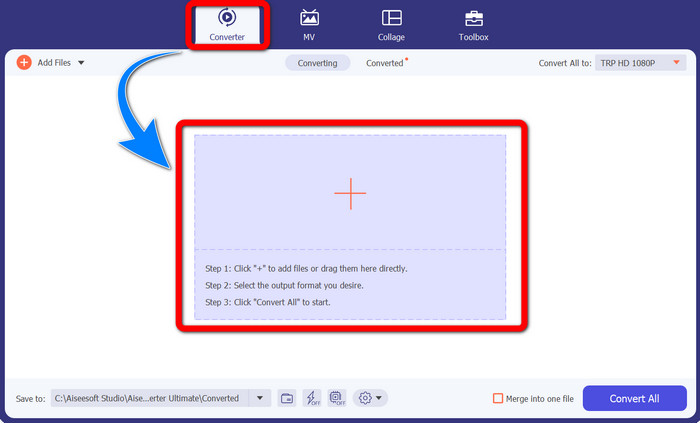
Adım 2: Video Converter Ultimate’ı başlattıktan sonra Converter panelini seçin. Ardından, TRP formatındaki videonuzu içe aktarmak için + simgesine tıklayın.
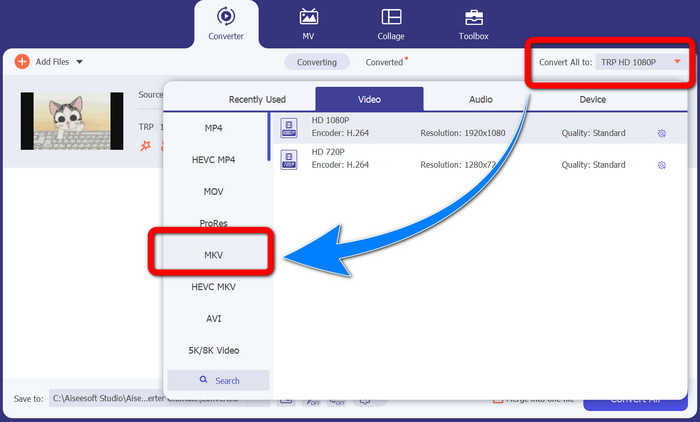
Adım 3: Videonuzu içe aktardıktan sonra Tümünü dönüştür simgesine tıklayın. Biçim seçeneklerinden MKV formatını bulun ve seçin.
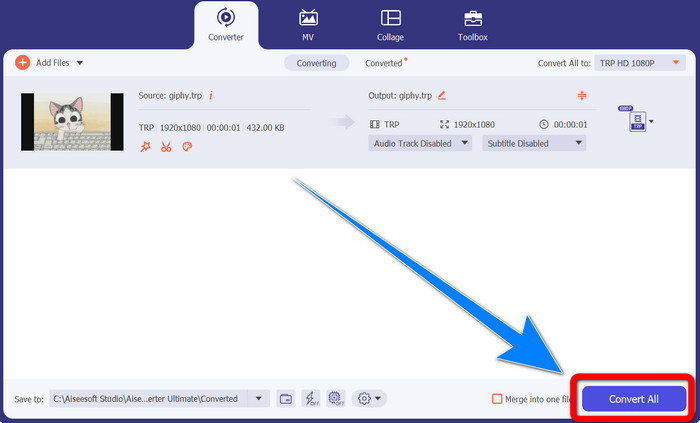
Adım 4: Ardından, TRP dosyanızı MKV formatına dönüştürmek için Tümünü Dönüştür düğmesine tıklayın.
Prism Video Converter'ı Kullanma
Prism, Windows ve Mac’inize indirebileceğiniz bir diğer uygulamadır. Bu uygulama, TRP’yi MKV’ye kolayca dönüştürmenize yardımcı olabilir. Ayrıca AMV, MP4, DVD, VOB, MOV, DIVX, AVI, 3GP ve daha birçok farklı dosya formatını da destekler. Ancak bu uygulama Windows veya Mac’e yüklendiğinde oldukça yavaştır. Dönüştürme işlemi de uzun sürer. Ayrıca arayüzü karmaşıktır ve yeni başlayanları zorlayabilir; bu nedenle bazı eğitimlere bakmanız veya ileri düzey kullanıcılardan yardım almanız gerekebilir. Bu uygulamayı indirmek ve kullanmak isterseniz, aşağıdaki basit adımları izleyin.
Adım 1: Prism Video Converter’ı Mac veya Windows bilgisayarınıza indirin.
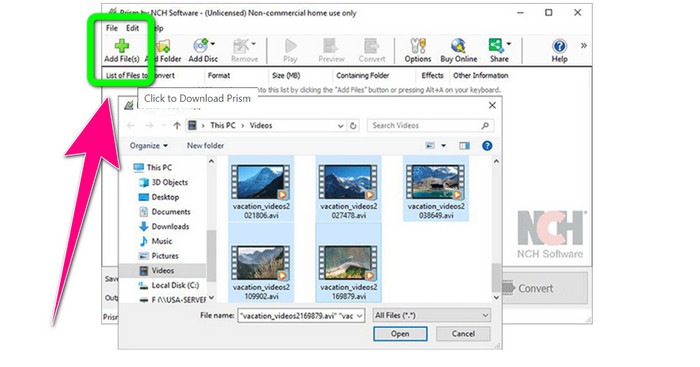
Adım 2: Yeşil Dosya Ekle düğmesine tıklayın ve TRP dosyanızı ekleyin.
Adım 3: Çıktı formatını ayarlayın. Biçim seçeneklerinden MKV dosyasını seçin.
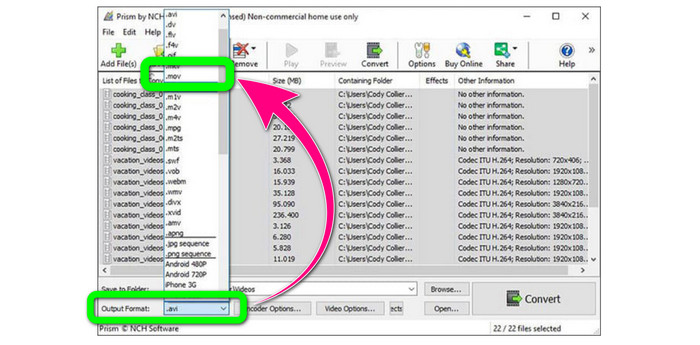
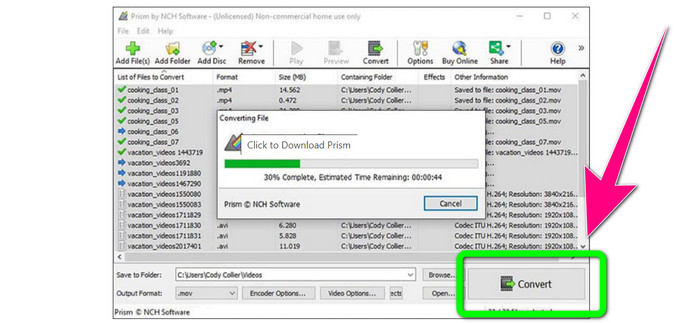
Adım 4: Son olarak, TRP dosyanızı MKV formatına dönüştürmek için Dönüştür düğmesini tıklayın.
Bölüm 3: TRP'yi MKV'ye Dönüştürmek İçin Çevrimiçi Uygulamalar
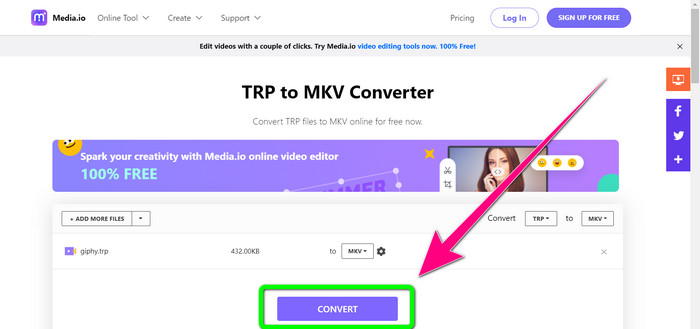
TRP’yi çevrimiçi olarak MKV’ye dönüştürmekle ilgileniyor musunuz? O hâlde Media.io’yu kullanabilirsiniz. Bu uygulamanın yardımıyla TRP’yi MKV’ye dönüştürebilirsiniz. Ayrıca MP4, AVI, WMV, MOV, FLV, DIVX, XVID, 3GP vb. gibi daha birçok formatı da destekler. Ses ve görüntü dönüştürücü olarak da kullanılabilir.
Ayrıca, video düzenleme yeteneğine de sahiptir. Videoları kırpabilir, kırpabilir, birleştirebilir, döngüye alabilir ve daha fazlasını yapabilirsiniz. Ancak, dönüştürme işlemi söz konusu olduğunda yavaştır. İşlemi tamamlamak için biraz daha beklemeniz gerekiyor. Ayrıca ekranda görünen rahatsız edici reklamlar var. Ayrıca, iyi performans göstermesi için hızlı bir internet bağlantısına ihtiyacı var. Media.io kullanarak TRP'yi MKV'ye dönüştürmek istiyorsanız, aşağıdaki adımları izleyin.
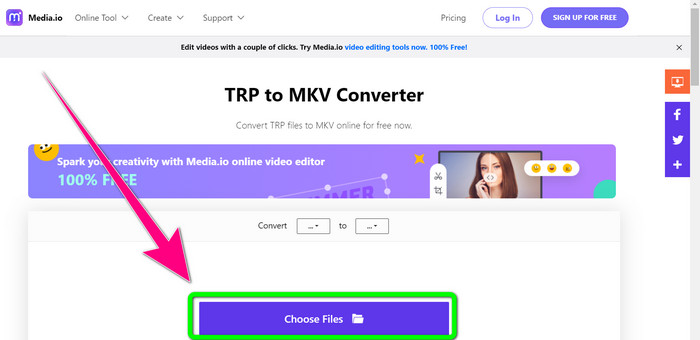
Adım 1: Media.io web sitesine gidin. Ardından, TRP dosya formatındaki videonuzu eklemek için Dosya Seç düğmesine tıklayın.
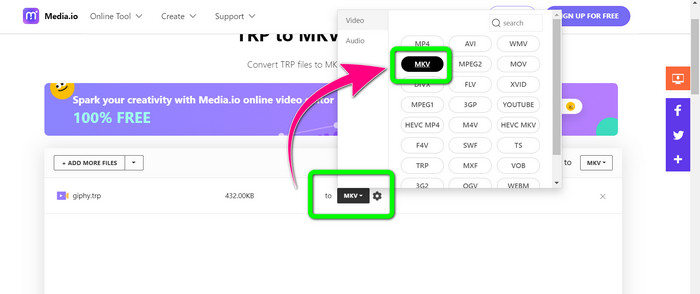
Adım 2: Videonuzu ekledikten sonra biçim seçeneklerine gidin, MKV dosyasını bulun ve seçin.
Adım 3: Son adım olarak, Dönüştür düğmesine tıklayın. Dönüştürme işleminin tamamlanmasını bekleyin ve videonuzu MKV dosya formatında kaydedin.
Daha Fazla Okuma
Ücretsiz Olarak AMV’yi MKV’ye Dönüştürme Konusunda En İyi Yöntemler
Bu Gelişmiş Dönüştürücülerle MTV’yi Kolayca MKV’ye Dönüştürün
Bölüm 4: TRP'yi MKV'ye Dönüştürmeyle İlgili SSS
MKV dosyası neden televizyonumda desteklenmiyor?
Bir MKV dosyası, yalnızca HEVC, MPEG-4, VP9, vb. Gibi birçok codec bileşeniyle kodlanabilen bir video kabıdır. TV'nin bu codec bileşenleriyle uyumluluğu zayıftır, bu nedenle TV'nizde MKV oynatamazsınız.
MKV dosyası kaliteli mi?
MKV dosya biçimi, yüksek kaliteli videolarda popülerdir. Ayrıca daha büyük bir dosya boyutuna sahiptir. Bu, MKV'nin bir kapsayıcı olduğu ve kalite üzerinde hiçbir etkisi olmadığı anlamına gelir.
Bilgisayarımda kullanabileceğim hızlı bir dönüştürücü var mı?
Kesinlikle evet! Hızlı bir yazılım dönüştürücü arıyorsanız, Video Converter Ultimate en iyi uygulamadır. Dosyalarınızı birçok kez daha hızlı ve daha kolay dönüştürebilirsiniz.
Sonuç
Yukarıda belirtilen tüm uygulamalar ve TRP’yi MKV’ye dönüştürme yolları arasında, Video Converter Ultimate kullanmanızı özellikle öneriyoruz. Bu program, ultra hızlı dönüştürme hızıyla çok sayıda dosyayı aynı anda dönüştürebilir. Öyleyse ne bekliyorsunuz? Daha fazlasını keşfetmek için hemen kendiniz deneyin.
-
 TRP'yi MOV'a Dönüştürmek için Mevcut En Etkileyici Yazılımlardan 2'si
 TRP dosyalarını MOV'a dönüştüremediniz mi? Ardından bu makalede verilen kılavuzu izleyin. TRP dosyalarınızı dönüştürmek için kullanabileceğiniz en iyi araçları seçtiğimiz için.
- TRP'yi MOV'a Dönüştürmek için Mevcut En Etkileyici Yazılımlardan 2'si
TRP dosyaları MOV'a dönüştürülemedi mi? Ardından, bu makalede sağlanan kılavuzu izleyin. TRP dosyalarınızı dönüştürmek için kullanabileceğiniz en iyi araçları seçerken
-
 TRP'yi WMV Formatına Dönüştürmek için 2 Profesyonel Dönüştürücü [Kılavuz]
 TRP dosyasıyla karmaşık bir zaman geçiren kullanıcılardan biri misiniz? Öyleyse, TRP'yi WMV'ye nasıl dönüştüreceğinizi öğrenmek ve daha fazlasını öğrenmek için bu makaleyi okumaya devam edelim.
