


 Video Dönüştürücü Ultimate
 Ekran kaydedicisi
 Video Onarımı
VOB'u 3GP'ye Kolayca Dönüştürmenin Olağanüstü Yolları [En İyi Dönüştürücüler]
VOB dosyanızı üçüncü nesil cihazınızda oynatmak istiyor ama bunu yapamıyor musunuz? O hâlde sizin için en iyi çözüm, VOB dosyanızı 3GP dosyasına dönüştürmektir. 3GP dosyaları, 3G cihazların desteklediği dosya türleridir. Bu nedenle, VOB dosyanızı 3GP’ye dönüştürmenin en iyi yolunu arıyorsanız, bu makale aradığınız cevap olabilir. VOB’u 3GP’ye dönüştürmenin en kolay ve en iyi yollarını sunduk.

Bölüm 1. FVC Video Converter Ultimate Kullanarak Nasıl Dönüştürülür
FVC Video Converter Ultimate, internette bulabileceğiniz en iyi dönüştürücülerden biridir. Bu ücretsiz çevrimdışı dönüştürücü; VOB, 3GP, MP4, MKV, MOV, AVI, FLV ve 1000’den fazla dosya biçimi dâhil olmak üzere çok sayıda formatı dönüştürebilir. Bu dönüştürücü ayrıca videonuzun süresini kırpmanıza olanak tanır ve video dosyanızı iyileştirmek için efektler ekleyebilir. Dahası, birden fazla dosyayı birleştirmek istiyorsanız, bu dönüştürücü toplu dönüştürme (batch conversion) sunar. Yani VOB’unuzu zahmetsizce 3GP’ye dönüştürmek istiyorsanız, aşağıdaki ayrıntıları okuyun ve programı ücretsiz indirin.

FVC Video Dönüştürücü Ultimate
5.689.200+ İndirme- Web'de bulunan 1000'den fazla dosya biçimini dönüştürebilir.
- Birden çok dosya biçimini toplu olarak dönüştürebilir.
- Ultra hızlı dönüştürme işlemine ve donanım hızlandırmasına sahiptir.
- Dosyanıza kesmek, altyazı eklemek ve filigran eklemek için gelişmiş düzenleme özelliklerine sahiptir.
- Windows ve Mac gibi tüm medya platformlarında kullanılabilir.
Ücretsiz İndirWindows 7 veya üstü içinGüvenli İndirme
Ücretsiz İndirMacOS 10.7 veya üstü içinGüvenli İndirme
FVC Video Converter Ultimate kullanarak VOB'u 3GP'ye dönüştürmeye ilişkin adımlar şunlardır:
Adım 1. Önce, Windows veya Mac için İndir düğmesine tıklayarak uygulamayı indirin. Ardından kurulum adımlarını izleyin ve uygulamayı açın.
Ücretsiz İndirWindows 7 veya üstü içinGüvenli İndirme
Ücretsiz İndirMacOS 10.7 veya üstü içinGüvenli İndirme
Adım 2. Dosya Ekle düğmesine veya + simgesine tıklayın. Bilgisayarınızdaki dosyalar görünecektir, ardından kuyruğa yüklemek için VOB dosyanızı seçin.
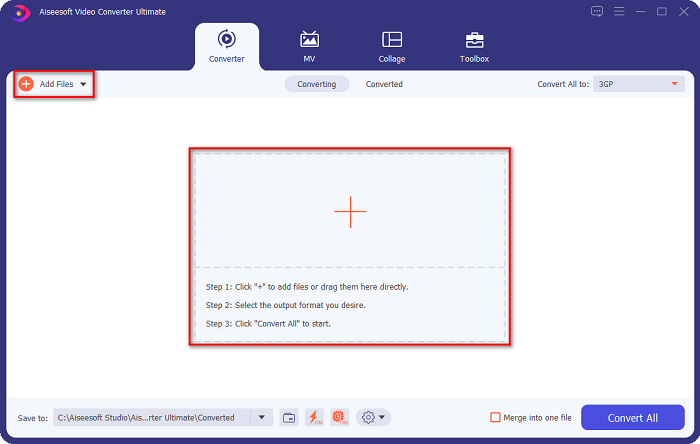
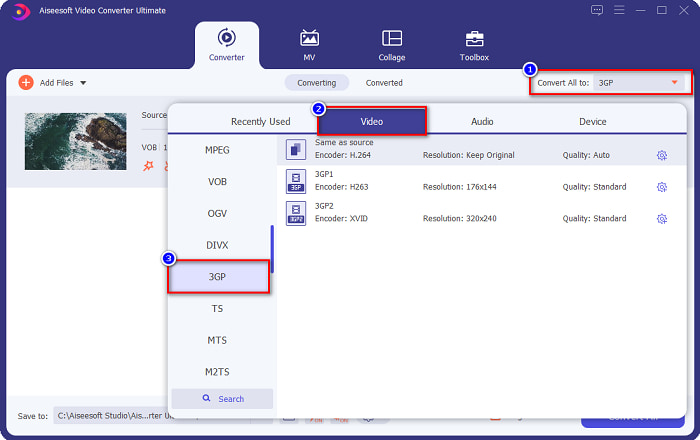
Adım 3. Üçüncü adımda, istediğiniz çıkış formatını seçmek için Tümünü Dönüştür düğmesine tıklayın. 3GP’yi tıklayın ve bir sonraki adıma geçin.
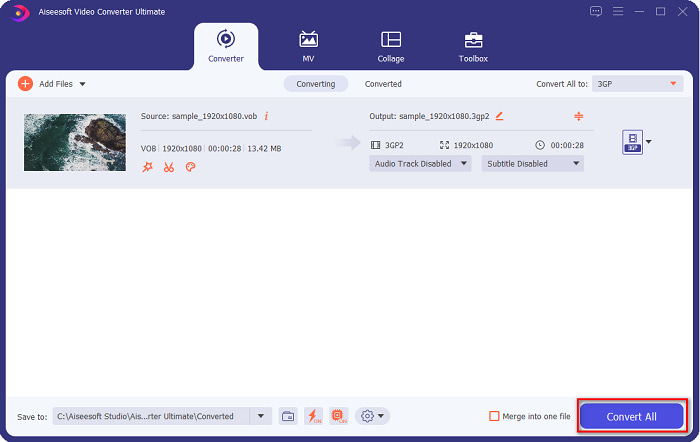
Adım 4. İstediğiniz çıkış formatını seçtikten sonra, dönüştürme işlemini başlatmak için Tümünü Dönüştür düğmesine tıklayın. Birkaç saniye bekleyin ve işte bu kadar! Bu basit adımlarla VOB dosyanızı kolayca 3GP’ye dönüştürebilirsiniz.
Bölüm 2. VOB'u Ücretsiz Çevrimiçi Olarak 3GP'ye Dönüştürme
VOB dosyanızı indirmeden 3GP dosyasına dönüştürmek istiyorsanız, web'de bulunan çevrimiçi dönüştürücüleri kullanabilirsiniz. Çevrimiçi bir dönüştürücü kullanmanın rahatlığı ve verimliliği şüphesiz iyidir. Bu nedenle, VOB dosyanızı 3GP dosya biçimine dönüştürmenin iki yolunu sağladık.
FileProInfo
FileProInfo, kullanıcı dostu bir grafik arayüzüne (GUI) sahip çevrimiçi bir dönüştürücüdür ve bu da onu başlangıç seviyesindeki kullanıcılar için uygun bir araç hâline getirir. İnternette bulunan neredeyse tüm standart dosya biçimlerini destekler. Ancak, bu çevrimiçi dönüştürücülerde birçok rahatsız edici reklam bulunur. Yine de pek çok kişi bu dönüştürücüyü kullanmaya devam etmektedir.
Adım 1. Tarayıcınızda FileProInfo’yu aratın ve web sayfalarına gidin. Yazılımın ana arayüzünde VOB dosyası seç düğmesine tıklayın ve yüklemek için VOB dosyanızı seçin.

Adım 2. Ardından, to kelimesinin yanındaki kutudan istediğiniz çıkış dosya türünü seçin.

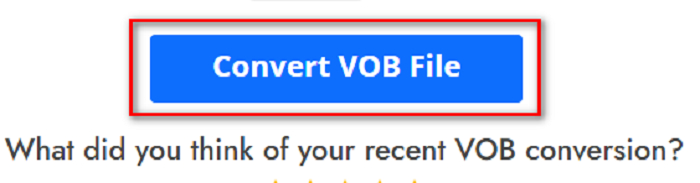
Adım 3. Son olarak, yazılımın arayüzünün alt kısmındaki VOB Dosyasını Dönüştür düğmesine tıklayın. Dönüştürme işleminizin bitmesini bekleyin.
Ve işte bu! Hiç zorlanmadan VOB dosyanızı 3GP'ye dönüştürebilirsiniz.
Convert365
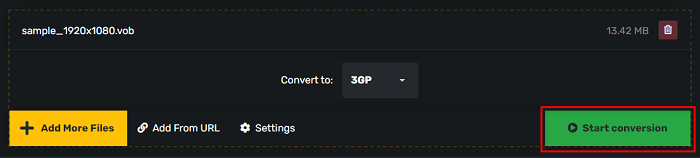
Convert365, VOB’u 3GP’ye dönüştürebilen ve VOB, 3GP, AVI, MOV, MP4, MPEG ve daha birçok standart formatı dönüştürmenize imkân tanıyan çevrimiçi bir dönüştürücüdür. Ayrıca, ses seviyesini normalize edebilen bir çevrimiçi dönüştürücü arıyorsanız, bu araçta o özellik de vardır. Ancak çevrimiçi bir araç olduğundan, internete bağımlı çalışır ve bu da yavaş dönüştürme deneyimi yaşamanıza neden olabilir. Ayrıca, Convert365 kullanarak VOB dosyasını 3GP’ye dönüştürmek için aşağıdaki adımları izleyin.
Adım 1. Tarayıcınızda Convert365 araması yapın, Dosya Ekle düğmesine tıklayın ve bilgisayar dosyalarınız göründüğünde VOB dosyanızı seçin.

Adım 2. Ardından, Dönüştür ifadesinin yanındaki açılır liste düğmesinden çıkış formatınızı seçin. 3GP dosya formatına tıklayın.

Adım 3. Ve son olarak, Dönüştürmeyi başlat düğmesine tıklayın. VOB'unuzu bir 3GP dosyasına dönüştürmek için düğmesine basın.
Bölüm 3. Hangi VOB - 3GP Dönüştürücüyü Kullanmalıyım
VOB'u 3GP'ye dönüştürmek için en iyi dönüştürücüyü seçerken, her zaman hızı, desteklediği dosyaları ve dönüştürücünün özelliklerinin benzersizliğini göz önünde bulundurmalısınız. Yukarıda gösterilen en iyi çevrimiçi ve çevrimdışı dönüştürücüler arasında çevrimdışı FVC Video Converter Ultimate aracını kullanmanızı öneririz. Bu dönüştürücü, GIF oluşturucu 3D oluşturucu, filigran çıkarıcı ve daha pek çok şey gibi diğer dönüştürücülerin sahip olmadığı birçok farklı özellik sunar.
Üstelik her ne kadar profesyonel gibi çıktılar verebilse de kullanımı kolay bir arayüze sahip olduğu için kullanırken zorlanmayacaksınız.
Bölüm 4. VOB ve 3GP hakkında daha fazla bilgi
VOB veya Video Nesnesi, DVD'lerin kullandığı bir dosya kapsayıcı biçimidir. Video, ses, altyazı ve menü içeriği içerir. Bu dosya türünün, doğrudan kopyalanmalarını önlemek için sınırlamaları ve kopyalama kısıtlamaları vardır. Buna karşılık, 3GP dosyaları yalnızca üçüncü nesil mobil cihazlarda oynatılabilen dosya biçimleridir. Bu dosya biçimleri Üçüncü Nesil Ortaklık Projesi (3GPP) tarafından geliştirilmiştir. Ayrıca, bu tür dosyalar 3G cihazlarla paylaşım için yapıldıkları için VOB dosyalarına kıyasla yalnızca küçük bir dosya boyutu içerir. 3GP, 3G telefonlarda yaygın olarak kullanılan video ve ses dosyalarını saklayabilir.
Bölüm 5. VOB'u 3GP'ye Dönüştürme Hakkında SSS
3GP'yi macOS'ta oynayabilir misiniz?
3GP dosyalarını, özellikle QuickTime’ın daha yeni sürümünde, macOS üzerinde oynatmak imkânsızdır. Ancak 3GP dosyanızı macOS’un desteklediği bir dosya türüne, yani MOV’a dönüştürebilirsiniz. 3GP dosyalarını MOV’a dönüştürme hakkında daha fazla bilgi edinmek için bu bağlantıya tıklayın.
VOB'u 3GP'ye dönüştürmek dosyanızın kalitesini etkiler mi?
Kesinlikle evet. VOB'u 3GP'ye dönüştürdüğünüzde dosya boyutu etkilenecektir. 3GP yalnızca video ve ses dosyalarını içerdiğinden ve daha küçük bir dosya boyutuna sahip olduğundan, VOB dosyanızın dosya boyutu daha küçük olacaktır.
3GP dosya formatı ortak bir dosya mı?
Ne yazık ki günümüzde 3GP dosya biçimleri o kadar yaygın değil çünkü bu günlerde daha az 3G telefon var. Günümüzde mobil kullanıcılar için en yaygın dosya MP4 dosya biçimidir.
Sonuç
Windows ve Mac'te VOB'u MOV'a dönüştürmek için en iyi ve kullanımı en kolay dönüştürücüleri sunduğumuzdan, FVC Video Converter Ultimate'ın sunulan çevrimiçi ve çevrimdışı dönüştürücüler arasında en iyisi olduğu sonucuna vardık. Sadece denenecek benzersiz özelliklere sahip olmakla kalmaz, aynı zamanda yüksek hızlı dönüşüm sunar. Hala bu dönüştürücü hakkında şüpheleriniz varsa, şimdi indirin ve en iyi VOB - 3GP dönüştürücüyü deneyin.
-
 VOB'u FLV'ye Dönüştürmenin En İyi Yolları [Ücretsiz ve Çevrimiçi Dahil]
 Bir VOB dosyasını bir FLV dosyasına dönüştürmek ister misiniz? Görevi masaüstü veya çevrimiçi dönüştürücülerle kolayca tamamlayabilirsiniz. Bu kılavuzu okuyun ve VOB'u FLV'ye nasıl kolay ve hızlı bir şekilde dönüştüreceğinizi öğrenin.
-
 VOB Dosyasını AVI Formatına Değiştirmek için Kullanılabilir 3 Kullanışlı Dönüştürücü [2021]
 VOB dosyalarının oynatılması desteklenmediği için bir sorun mu yaşıyorsunuz? Ardından, her dönüştürücüde ayrıntılı adımlar ile aşağıda sunulan 3 yolla dönüştürmeye çalışalım.
-
 VOB'u MOV'a Dönüştürmede Kullanılacak Mükemmel Yöntemler
 Çevrimiçi video indirmeleri uygundur, ancak ya video VOB biçimindeyse ve oynatıcınız' bunu desteklemiyorsa? Bu gönderi size VOB'u MOV'a nasıl dönüştüreceğinizi öğretecek.
