


 Video Dönüştürücü Ultimate
 Ekran kaydedicisi
 Video Onarımı
VOB'u Çevrimiçi ve Çevrimdışı Olarak AVI'ye Dönüştürmenin 3 Yolunu Öğrenin
VOB dosyaları özel akışları depolamak için kullanılır ve MPEG-2 gibi kayıplı video sıkıştırması kullanır. Ayrıca ikisini karşılaştırırsak hemen hemen aynı yapıya sahipler. Ancak, .vob dosyalarının siz onları kullanmadan önce bir sınırlaması ve özelliği vardır. Ve bu nedenle, yerel medya oynatıcınızda bir VOB dosyasını kolayca oynatamazsınız. Şimdi, nasıl açılacağını araştırırken zamandan tasarruf etmek için, aşağıdan bir dönüştürücü seçerek dönüştürmenizi öneririz. Bu durumda, size bulabileceğimiz en iyi dönüştürücüyü sunuyoruz ve listedeki araçlarla VOB'u AVI'ye çevrimiçi veya çevrimdışı olarak nasıl dönüştüreceğinizi öğreniyoruz.
Bölüm 1. VOB'u AVI Online'a Dönüştürme
Eğer bütçeniz kısıtlıysa, size ücretsiz bir aracı kullanmanızı öneririz. İnternette araştırma yaptığımızda, en iyi çevrimiçi dönüştürücü olarak bilinen bir araç bulduk: FVC Free Video Converter. Bunun dışında, bu araç her kullanıcıya son derece basit ve anlaşılır bir kullanım sunar ve daha önce kullananların hepsi, ne kadar iyi çalıştığından oldukça etkilenmiştir. Bu nedenle, siz de bu dönüştürücünün ne kadar iyi olduğuna kendiniz tanık olmak isterseniz, aşağıda belirtilen adımları izleyerek VOB dosyasını AVI formatına dönüştürmeyi deneyin.
1. Adım. Dönüştürücünün sitesine doğrudan gitmek için bu bağlantıya tıklayın.
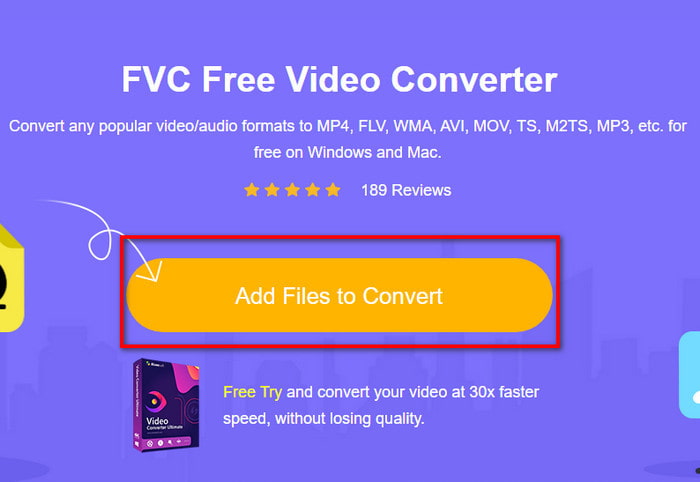
2. Adım. Web sitesinde, yükleyiciyi indirmek için Add Files to Convert düğmesine tıklayın. Endişelenmenize gerek yok, yalnızca birkaç kb boyutunda. Ardından aracı başlatmak için tekrar tıklayın ve klasörünüzden dosyayı bulun; bulduktan sonra Open seçeneğine tıklayın.
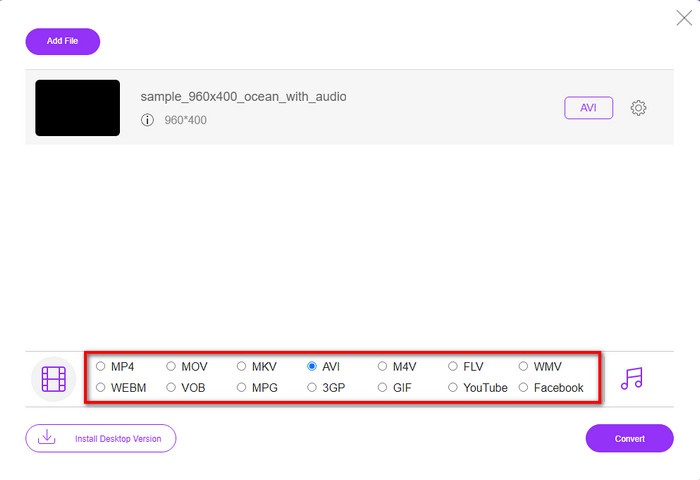
3. Adım. Ekranınızda FVC’nin yeni bir arayüzü açılacaktır. Alttaki listeden AVI formatını ya da dönüştürmek istediğiniz başka bir formatı seçin.
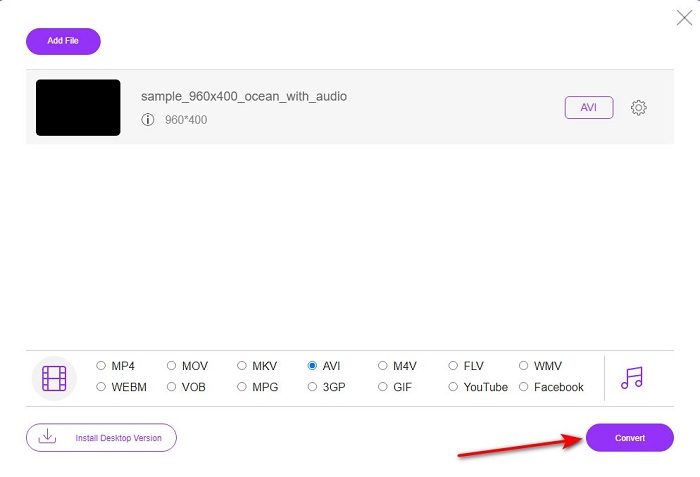
4. Adım. Formatı seçme işlemi bittiğinde, dosyayı dönüştürmeye başlamak için Convert düğmesine tıklayın.
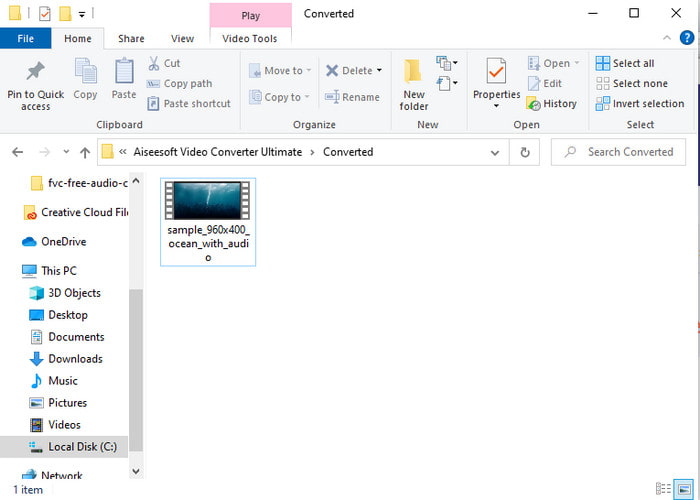
5. Adım. Bu işlem tahmini olarak bir dakikadan daha az sürer; dönüştürme işlemi tamamlandığında, yeni dönüştürülen dosyanın bulunduğu bir klasör açılacaktır.
Bölüm 2. Windows ve Mac'te VOB'u AVI'ye Dönüştürme
Olağanüstü Dönüştürücüyü kullanın: FVC Video Dönüştürücü Ultimate
VOB'dan AVI'ye dönüştürücü indirmek istiyorsanız, bu, yapmayı seveceğiniz en iyi seçimin en iyisi olmalıdır. FVC Video Converter Ultimate, özellikle dönüştürme konusunda karşılaşabileceğiniz her nihai durumu çözen nihai araç olarak her zaman adının hakkını verir. Bu yazılım, bahsedilen iki araçtan çok farklıdır. Belki de nedenini düşünüyorsunuz ve bunun nedeni, ister profesyonel ister yeni başlayan olun, herkese mükemmel şekilde uymasıdır. Bu aracı denediğimizde deneyimlediğimiz genel performans zaten şaşırtıcı ve dönüştürmenin ne kadar hızlı yapılabileceğinden çok etkilendik. Ve şimdi, bahsettiğimiz olağanüstü dönüşümü deneyimlemek istiyorsanız, aşağıda belirtilen adımları izleyin.
1. Adım. Kullanmadan önce aracı indirmeniz gerekir. İndirme tamamlandıktan sonra yükleyin, kurulumu yapın ve Start Now düğmesine tıklayın.
Ücretsiz İndirWindows 7 veya üstü içinGüvenli İndirme
Ücretsiz İndirMacOS 10.7 veya üstü içinGüvenli İndirme
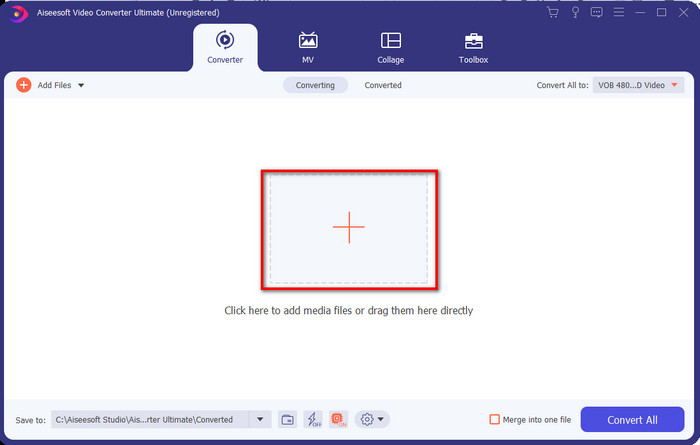
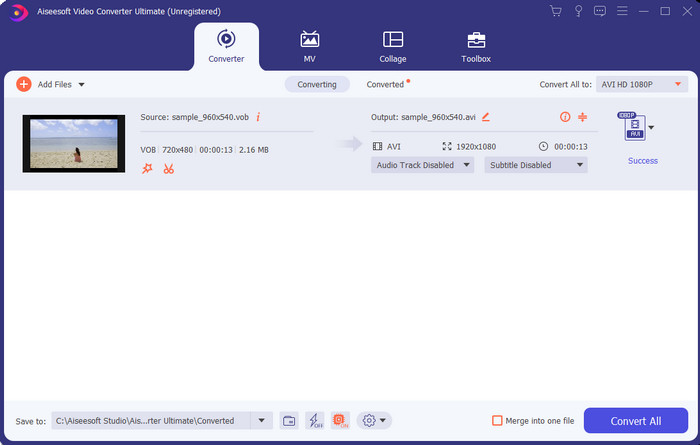
2. Adım. Kurulum tamamlandıktan sonra yazılımı açın. Ekranınızda buna benzer bir arayüz görünecektir. Arayüzün orta kısmındaki + düğmesine tıklayın; ekranda bir klasör penceresi açılır. Sonraki adıma geçmek için Open seçeneğine tıklayın.
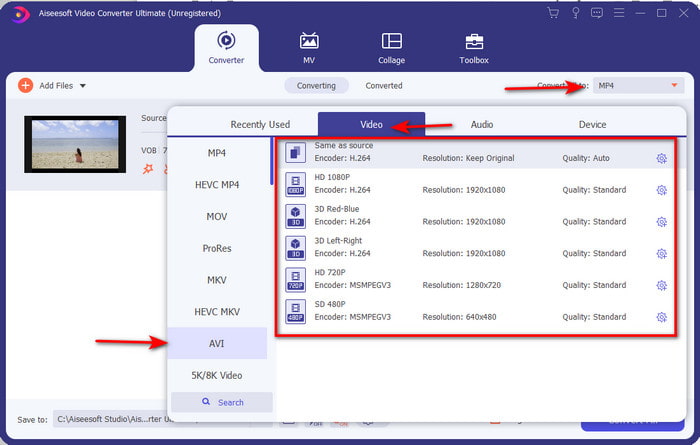
3. Adım. Arayüzün sol üst kısmındaki Convert All to düğmesine tıklayın ve video kategorisi listesinden AVI formatını seçin.
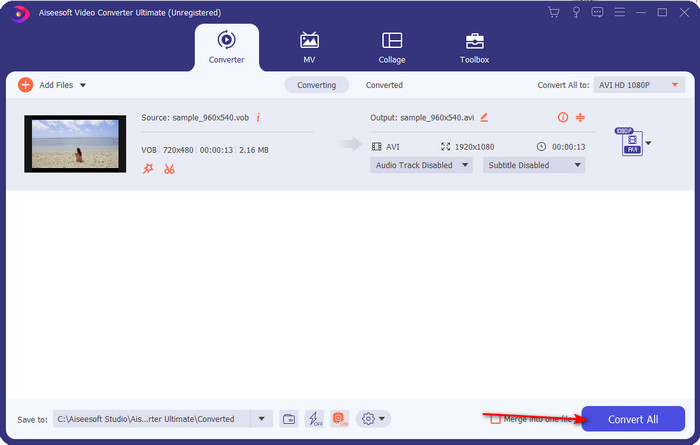
4. Adım. Hangi formatı seçeceğinizi belirledikten sonra dönüştürmeyi başlatmak için Convert All düğmesine tıklayın.
5. Adım. Çok uzun süre beklemeniz gerekmez; işlem birkaç saniyede tamamlanabilir. Ardından az önce dönüştürdüğünüz medya dosyasının bulunduğu klasör ekranınızda otomatik olarak açılır. Dosyaya tıklayın, izleyin ve .vob dosyanızın yeni sürümünün keyfini çıkarın.
Ücretsiz Aracı Kullanın: El Freni
Ücretsiz bir araç arıyorsanız, internet bağlantısı gerektirmeden çalışabilen HandBrake bu konuda size yardımcı olur; tıpkı FVC Video Converter Ultimate gibi çevrimdışı kullanılabilir. Ayrıca, evde, işte veya başka herhangi bir yerde masaüstü bilgisayarı olan herkes tarafından ücretsiz olarak indirilebilir ve kullanılabilir. Ancak aracı indirdiğinizde, kullanmaya başlamadan önce .NET 5.0 adı verilen ayrı bir dosyayı da indirmeniz gerekir. Bazı kullanıcılar, aracı indirdikten sonra bir dosya daha indirmek zorunda kaldıkları için bunu biraz can sıkıcı bulmaktadır. Yine de etkili ve ücretsiz bir dönüştürme işlemi yapmak istiyorsanız, HandBrake ile VOB dosyalarınızı AVI’ye dönüştürmeyi deneyin ve aşağıdaki adımları izleyin.
1. Adım. Önce aracı bilgisayar sürücünüze kurun.
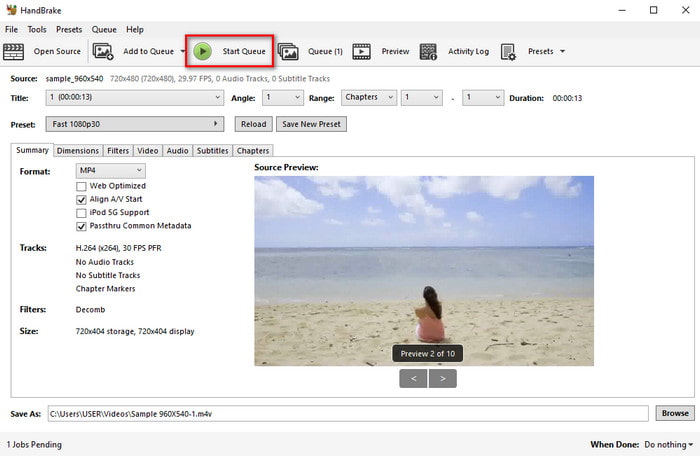
2. Adım. File menüsüne tıklayın ve klasörünüzden .vob dosyasını bulun.
3. Adım. Format seçeneğine tıklayın, listeden bir format seçin ve ardından Start Queue düğmesine tıklayın.
Bölüm 3. VOB Dosyalarını AVI Formatına Dönüştürmek İçin Kullanılacak En İyi Dönüştürücü Hangisi
| Özellikleri | FVC Bedava Video Dönüştürücü | FVC Video Dönüştürücü Ultimate | El freni |
| Dönüştürme Formatı |  | | |
| Donanım ve Dönüşüm Hızlandırma |  | | |
| İnternet bağlanabilirliği | | | |
| Video Geliştirici veya Düzenleme | | | |
| Desteklenen Program | Web tabanlı araç | Masaüstü tabanlı araç | Masaüstü tabanlı araç |
Bölüm 4. VOB ve AVI hakkında SSS
VOB'un içerebileceği diğer dosyalar nelerdir?
VOB çok yönlü bir DVD formatıdır ve bu nedenle sadece video ve ses değil aynı zamanda altyazılar, navigasyon içerikleri ve menü de içerebilir.
Medya oynatıcımda neden VOB dosyalarını oynatamıyorum?
VOB dosyalarının ortam oynatıcıda oynatılamamasının nedenlerinden biri, bu biçimin medya oynatıcılar tarafından yalnızca sınırlı ölçüde desteklenmesidir. Kullanılabilir VOB oynatıcılarına buradan ulaşabilirsiniz. Hâlâ aynı sorunu yaşıyorsanız, uygulanabilir çözümlerden biri, dosyayı yukarıda belirtilen dönüştürücülerle farklı bir formata çevirmektir.
VOB dosyaları neden çok büyük?
Bu biçimin bu kadar büyük olmasının tek nedeni, bir DVD'nin sahip olması gereken farklı verileri içermesidir. Ayrıca videonun uzunluğu olasılığını da göz ardı edemeyiz. Veya VOB dosyalarının nasıl sıkıştırılacağını öğrenmek için buraya tıklayın.
Sonuç
Şimdi, VOB dosyasını dönüştürmek istiyorsanız, yukarıda bulunan araçların yardımıyla kolayca yapılabilir. Bunun dışında, FVC Video Converter Ultimate, bahsedilen diğer çevrimiçi ve çevrimdışı araçlar arasında gerçekten öne çıkan dönüştürücüdür. Çünkü VOB'u Windows'ta ve hatta Mac'te kolayca AVI'ye dönüştürebilirsiniz. Hala ne kullanacağınıza dair bir fikriniz yoksa, açık bir çıktıyı deneyimlemek ve şaşırmak için olağanüstü aracı indirmenizi şiddetle öneririz.
-
 VOB'dan MP4'e - VOB Dosyalarını Toplu Olarak MP4'e Dönüştürmenin 3 Yolu
 Bu makale, MP4 dönüştürücülere 3 ücretsiz VOB ve ilgili eğitimleri tanıtır. VOB'u MP4 dosyalarına ücretsiz olarak Windows / Mac / çevrimiçi olarak kolaylıkla dönüştürebilirsiniz.
-
 VOB'u FLV'ye Dönüştürmenin En İyi Yolları [Ücretsiz ve Çevrimiçi Dahil]
 Bir VOB dosyasını bir FLV dosyasına dönüştürmek ister misiniz? Görevi masaüstü veya çevrimiçi dönüştürücülerle kolayca tamamlayabilirsiniz. Bu kılavuzu okuyun ve VOB'u FLV'ye nasıl kolay ve hızlı bir şekilde dönüştüreceğinizi öğrenin.
-
 VOB Dosyası Nedir ve VOB Dosyasını Ücretsiz Olarak GIF'e Dönüştürme
 VOB dosyaları ve kopyalandıktan sonra nasıl paylaşılacağı hakkında daha fazla bilgi edinmek ister misiniz? veya Neden VOB'u GIF'e dönüştürmeniz gerekiyor? O zaman bu makaleyi dikkatlice okuyun.
