


 Video Dönüştürücü Ultimate
 Ekran kaydedicisi
 Video Onarımı
 Güvenli İndirme
Denemeye Değer En İyi 5 Arnold Maya Filigran Sökücü
Arnold, Autodesk'ten bir oluşturucudur. Oluşturucu grafikler, video ve hatta ses için kullanılır. Ayrıca Arnold, VFX ve animasyon oluşturma ile kullanabileceğiniz gelişmiş bir oluşturma uygulamasıdır. Ayrıca, yüksek kaliteli çıktılar üreterek profesyonel editörler için popüler hale getirir. Ayrıca, bir animasyon oluşturmak için kullanabileceğiniz birçok gelişmiş düzenleme özelliğine sahiptir.
Arnold, kullanıcılarından uygulama için ödeme yapmalarını ister; bu yüzden görüntülerinin üzerine filigran bırakır. Bu nedenle pek çok kişi, fotoğraflarındaki Arnold filigranını kaldırabilecek filigran temizleyiciler arıyor. Fotoğraflarınızdaki Arnold filigranını kaldırmak için en dikkat çekici beş Arnold Maya filigran kaldırıcıyı öğrenmek için bu yazıyı okuyun.

Bölüm 1. En İyi 5 Olağanüstü Arnold Filigran Sökücü
Arnold filigranını görüntünüzden kaldırmak için birçok araç indirebilseniz de, hepsi temiz bir çıktı üretmez, bu nedenle en çok kullanılan filigran çıkarıcıları aradık ve aralarından en iyisini seçtik. Bu bölüm size en mükemmel beş Arnold filigran çıkarıcıyı sunar.
Movavi
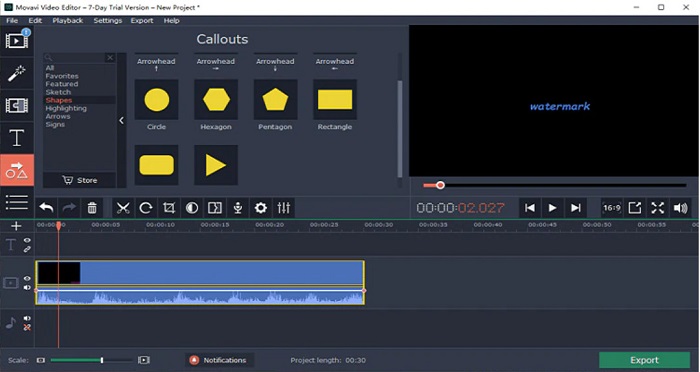
Movavi, görüntünüzden Arnold filigranını kaldırmanıza yardımcı olabilecek başvurulacak bir video düzenleyicidir. Ayrıca, görüntü veya videonuza filigran ekleyebileceğiniz bir seçeneğe de sahiptir. Dahası, görüntünüzü iyileştirmek için kullanabileceğiniz birçok düzenleme özelliği içerir. Ancak, videonuzdaki filigranı soldurmak için renk düzeltme aracını kullanmanız gerekir. Basit kullanıcı arayüzü sayesinde kullanıcı dostu bir araçtır.
Artıları
- Hızlı bir ihracat sürecine sahiptir.
- Windows ve Mac dahil tüm medya platformlarında indirilebilir.
Eksileri
- Filigranı kaldırma özelliğini kullanmadan önce tam sürümü satın alın.
- Geri ödeme politikası sorunları var.
Filigran Kaldırıcı.io
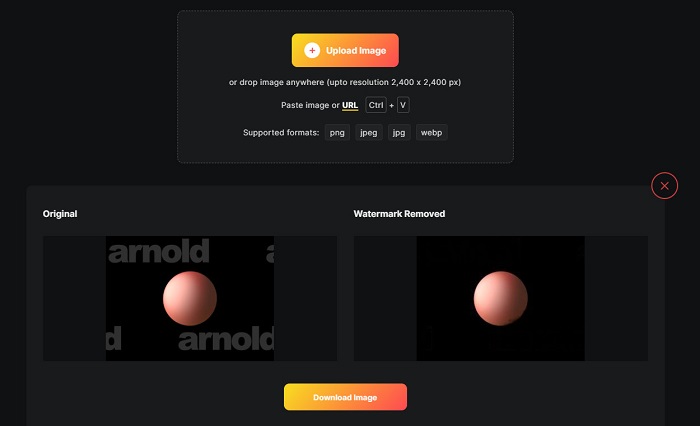
Filigransız bir Maya Arnold render’ı elde etmek istiyorsanız, Watermark Remover.io size yardımcı olabilir. Pek çok başlangıç seviyesi kullanıcı da yazılım arayüzü kullanımı kolay olduğu için bu aracı tercih eder. Ayrıca Watermark Remover.io, Google, Firefox ve Safari gibi tüm web tarayıcılarından erişebileceğiniz çevrimiçi bir araçtır. Mac, Windows, iPhone ve Android cihazlarda da çalışır.
Ayrıca bu filigran kaldırıcı, fotoğraflarınızdaki logolar, metinler veya resimler gibi istenmeyen nesneleri kaldırmanıza olanak tanır. Bu çevrimiçi uygulamanın dezavantajı, web tabanlı bir uygulama olduğu için yavaş bir yükleme işlemi yaşayabilmenizdir.
Artıları
- Ücretsizdir ve kullanımı kolaydır.
- PNG, JPEG, JPG ve WEBP gibi en yaygın görüntü biçimlerini destekler.
- Hızlı işlem arayüzüne sahiptir.
- Alan tahmin özelliği vardır.
Eksileri
- İnternete bağlı bir araçtır.
HitPaw filigran sökücü
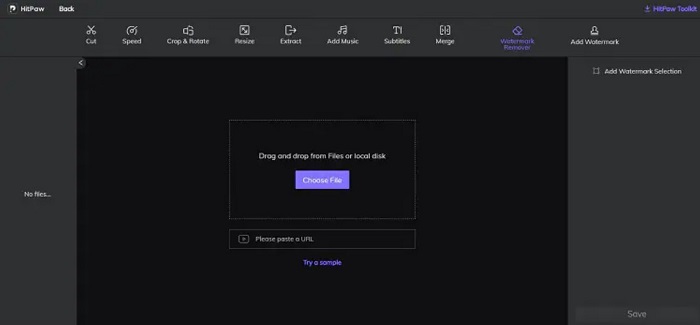
HitPaw, görüntünüzdeki Arnold filigranını kolayca kaldırmanıza olanak tanıyan bir başka filigran kaldırıcıdır. Görüntünüzdeki tüm filigranları profesyonelce düzenleyerek silebilmenizi sağlar. Ayrıca, basit ve kullanımı kolay bir arayüze sahiptir; bu nedenle bu çevrimiçi aracı kullanırken zorlanmazsınız. Arnold videonuz varsa, bu araç o filigranı etkili biçimde kaldırır. Etkileyici olan, hem çevrimiçi hem de çevrimdışı sürüme sahip olmasıdır. Ancak, çevrimdışı sürümünün yazılım arayüzü kullanımı zor olduğundan, başlangıç seviyesindeki kullanıcıların bunu kullanması güçleşir. Yine de birçok kullanıcı filigranları kaldırmak için bu aracı kullanmaya devam etmektedir.
Artıları
- Çevrimiçi ve çevrimdışı sürümleri vardır.
- Çevrimiçi sürümüne Google ve Safari gibi tüm web tarayıcılarında erişilebilir.
- Filigran alanında bulanıklık izi bırakmaz.
Eksileri
- Videolarınızı veya fotoğraflarınızı düzenleyebilmeniz için önce kaydolmanız gerekir.
iç boya
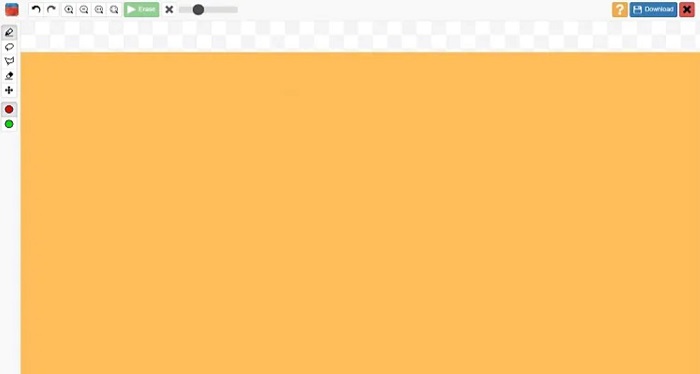
Inpaint, Windows ve Mac’e indirebileceğiniz en popüler filigran kaldırıcılarından biridir. Bu çevrimdışı araç, MP4, MKV, AVI, PNG, JPG vb. gibi çok sayıda video ve görüntü formatını destekler. Birçok kullanıcı, görüntü veya videolarındaki istenmeyen öğeleri kaldırdığı için bu aracı beğenir. Ayrıca, görüntü veya videonuzu geliştirmek için kullanabileceğiniz başka düzenleme özelliklerine de sahiptir.
Artıları
- Windows ve Mac dahil neredeyse tüm medya platformlarında indirilebilir.
- Profesyonelce yapılmış çıktıları ihraç eder.
Eksileri
- Kullanımı zor bir yazılım arayüzüne sahiptir.
- Bazen videolarınızdan veya resimlerinizden karmaşık öğeleri kaldıramaz.
Bölüm 2. Tek Tıklamayla Arnold Filigranı Nasıl Kaldırılır
Resminizdeki Arnold filigranını kaldırmak için daha basit bir yol istiyorsanız, önerilen araca sahibiz. Bu araç ve bu aracı kullanarak filigranların nasıl kaldırılacağı hakkında bilgi edinmek için aşağıdaki bölümü okuyun.
FVC Video Converter Ultimate, görüntünüzdeki istenmeyen nesneleri kaldırmak için kullanabileceğiniz eksiksiz bir araçtır. MP4, MKV, AVI, MOV, M4V ve 1000'den fazla ek format gibi birçok video formatını destekler. Kullanımı kolay arayüzü sayesinde birçok yeni başlayan bu aracı video filigranlarını kaldırmak için kullanır. Ayrıca, video filigran kaldırıcı, renk düzeltme, video kırpıcı ve daha fazlası gibi birçok gelişmiş düzenleme özelliğine sahiptir. Bu yazılımı Arnold filigranını kaldırmak için kullanmak istiyorsanız, aşağıdaki basit kılavuzu izleyin.
FVC Video Converter Ultimate kullanarak Arnold filigranı nasıl kaldırılır:
Adım 1. Aşağıdaki İndir düğmesine tıklayarak cihazınıza FVC Video Converter Ultimate’ı indirin.
Ücretsiz İndirWindows 7 veya üstü içinGüvenli İndirme
Ücretsiz İndirMacOS 10.7 veya üstü içinGüvenli İndirme
Adım 2. Ana yazılım arayüzündeki Araç Kutusu paneline gidin ve Video Filigranı Kaldırıcı seçeneğini seçin.
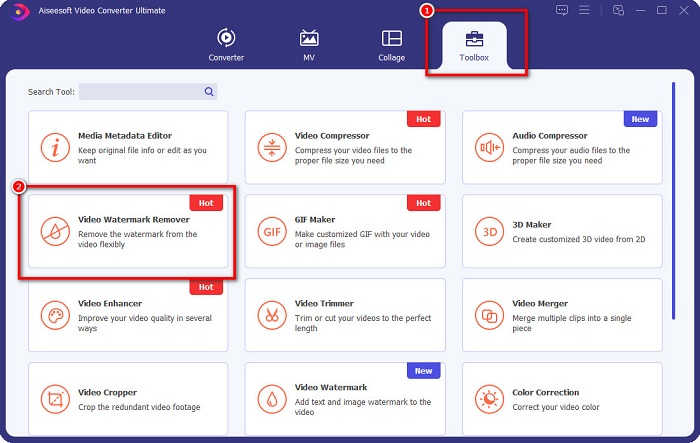
Adım 3. Ardından, filigrandan arındırmak istediğiniz Arnold videosunu yüklemek için + simgesine tıklayın.
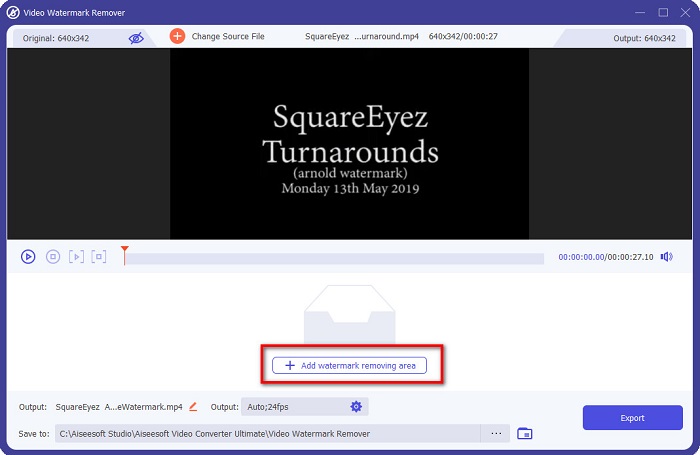
Adım 4. Sonrasında videonuzun önizlemesini göreceksiniz. Bir kaldırma alanı eklemek için Filigran kaldırma alanı ekle düğmesine tıklayın.
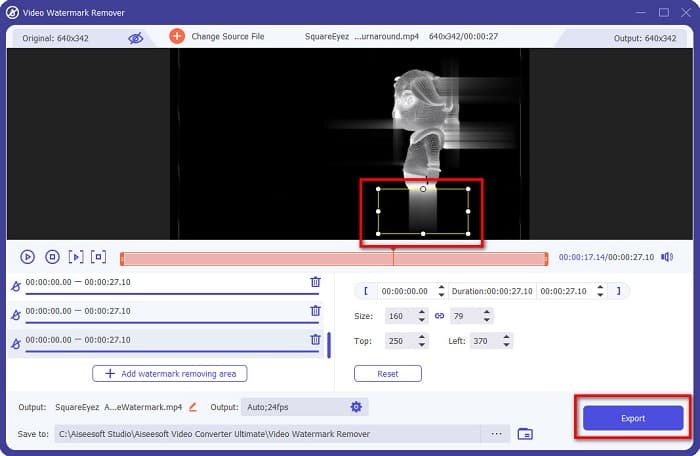
Adım 5. Videonuzdaki filigran bölgesinin üzerine filigran kaldırma alanını yerleştirin. Videonuzda iki veya daha fazla filigran varsa, Filigran kaldırma alanı ekle seçeneğine tıklayın. Ardından, videonuzdaki tüm filigranları kapattığınızda Dışa aktar düğmesine tıklayın. Ayrıca, bu aracı kullanarak Dxtory filigranlarını da kaldırabilirsiniz.
Bölüm 3. Arnold Filigranı Render Sequence Tool Kullanarak Nasıl Kaldırılır
Maya kullanırken lisans olmadığında Arnold filigranları yalnızca render edilen çıktı üzerinde görünür. Bu nedenle filigranı silmek için render dizisi (render sequence) işlemini yapmanız gerekir. Bir animasyon oluşturduktan sonra, render ayarlarını düzenlemeniz gerekir. Bu ayarlar; görüntü formatı, kare veya animasyon uzantıları, başlangıç ve bitiş kareleri, hazır ayarlar ve daha fazlasını içerir. Render ayarlarını düzenledikten sonra Render > Batch Render seçeneğine tıklayın. Bunu yaptıktan sonra tüm görüntülerde filigran olacaktır.
Arnold filigranını kaldırmak için animasyonunuzu render etmeniz gerekir. Render Settings bölümüne gidin ve render etmek istediğiniz kamerayı seçtiğinizden emin olun. Sonra Render Sequence seçeneğine tıklayın. Ardından görüntüleri açın; üzerlerine gömülü hiçbir filigran olmadığını göreceksiniz. Artık bu görüntüleri kullanarak bir animasyon oluşturabilirsiniz.
Bölüm 4. Arnold Filigran Sökücüler hakkında SSS
Arnold ile toplu işleyebilir misiniz?
Evet. Bir dizi çerçevesi oluşturmak için Maya toplu oluşturucusunu kullanabilirsiniz. Bunu, komut satırında Render > Batch Render'a tıklayarak Maya'ya giderek yapabilirsiniz.
Arnold Maya'ya dahil mi?
Varsayılan yüklemede Arnold for Maya, mtoa aracılığıyla dahil edilir. mll eklentisi. Bu eklentide Arnold, Maya'da tercih edilen oluşturucudur.
Arnold'un maliyeti ne kadar?
Yıllık abonelik 380$, aylık abonelik ise aylık 50$'dir.
Sonuç
Yukarıdaki tüm Arnold Maya filigran kaldırıcılar, filigranları kaldırma konusunda umut verici sonuçlar göstermektedir. Ancak, kaliteden ödün vermeden filigran kaldırabilen ve birçok işleve sahip bir yazılım uygulaması kullanmak istiyorsanız, hemen FVC Video Converter Ultimate’ı indirin.
-
 123rf Filigran Sökücüler – Nihai Araçların Kapsamlı İncelemesi
 En seçkin 123rf filigran sökücülerin ne olduğunu bilmek istiyorsanız, bu makaleyi baştan sona okuyun. Bu makale, araçların derinlemesine bir incelemesini sağlar.
-
 Windows ve Mac'te DeviantArt Filigranı Nasıl Kaldırılır
 Resimlerinizdeki DeviantArt filigranını nasıl kaldıracağınızı öğrenmek ister misiniz? En seçkin DeviantArt filigran çıkarıcıları kullanarak bu sinir bozucu filigranları kolayca kaldırabilirsiniz.
-
 Nihai Araçları Kullanarak Pond5 Filigranı Nasıl Kaldırılır
 Aşağıdaki basit adımları izleyerek Pond5 filigranını nasıl kaldıracağınızı öğrenin. Bu etkileyici araçları kullanarak görüntünüzdeki Pond5 filigranını kolayca kaldırabilirsiniz.
