


 Video Dönüştürücü Ultimate
 Ekran kaydedicisi
 Video Onarımı
Ağır Çekim Videoyu Bir Profesyonel Gibi Normal Hıza Nasıl Değiştirirsiniz
Teknoloji yıllar içinde büyük ölçüde gelişti. Sıradan bir videoya bile özgünlük ve yaratıcılık katmak için çeşitli yazılımlar geliştirildi, gelişmiş ekipmanlar icat edildi. Bunlardan biri de ağır çekim videolardır. Ancak çoğu insan yalnızca bu tür videoları çekmeyi bilir, onları tekrar normal hıza döndürmez. Örneğin okul projesi için ya da insanların yaptığı herhangi bir video üretim faaliyetinde çevrimiçi rastgele veya belirli videolar kullanılırken, bu videoların oynatma hızı kullanıcı için uygun olmayabilir. Bu nedenle bu makale, Mac, Windows, iOS ve Android işletim sistemlerinde ağır çekim videoyu normal oynatma hızına çevirmenin en iyi yollarını sunarak, zaman zaman karşılaşılabilen bu sorunu çözmeyi amaçlamaktadır.

Bölüm 1. Mac ve Windows'ta Ağır Çekim Videoyu Normal Hıza Nasıl Değiştirirsiniz
Ağır çekim bir videonun hızını normale çevirme sorununu, dönüştürücüleri indirip çevrimdışı kullanarak çözmek mümkündür. Öte yandan, sunduğu çok sayıda özellikle Video Converter Ultimate mevcut en iyi düzenleme programlarından biridir. Geniş kitleler için erişilebilirliği ve kullanım kolaylığı sayesinde, Mac veya Windows bilgisayarında ağır çekim videoyu normal hıza çevirmek isteyen herkese şiddetle tavsiye ederiz. Yazılımı doğru şekilde kullanmak için önerilen adımlar şunlardır: aracı doğru yönetin.
Adım 1: Programı bilgisayarınızın sabit diskine kaydetmek için Ücretsiz İndir düğmesine tıklayın. Ardından yazılımı kurup özelleştirebilirsiniz.
Ücretsiz İndirWindows 7 veya üstü içinGüvenli İndirme
Ücretsiz İndirMacOS 10.7 veya üstü içinGüvenli İndirme
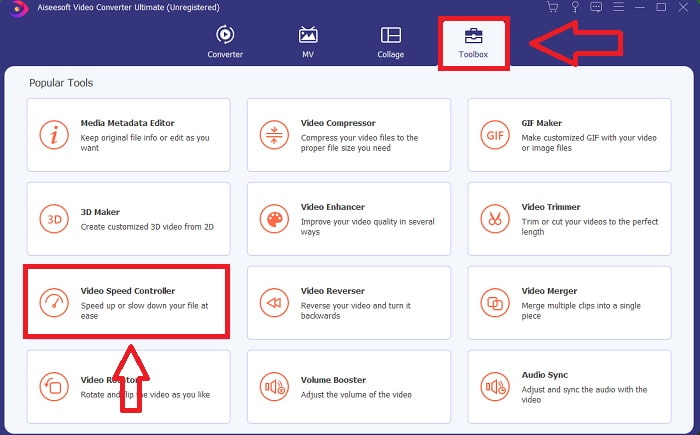
Adım 2: Yazılımı, menü çubuğundaki Araç Kutusu simgesine tıklayıp listeden Video Hız Denetleyicisi’ni seçerek etkinleştirin.
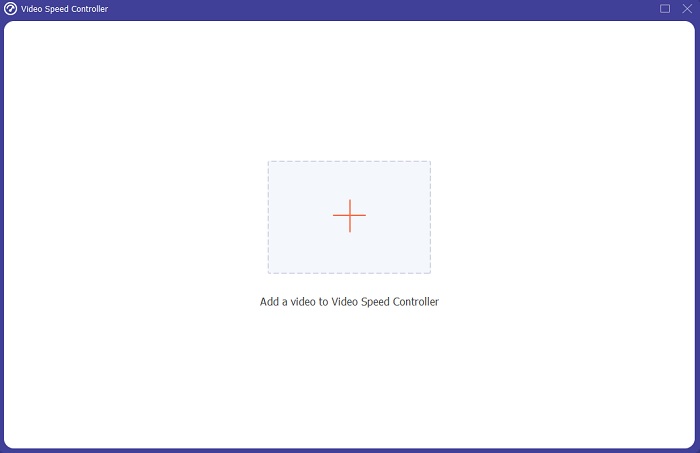
Adım 3: Ağır çekim videoyu eklemek için, tercih çubuğunuzdaki + düğmesine tıklayın ve ardından videoyu düzenlemeye devam edin.
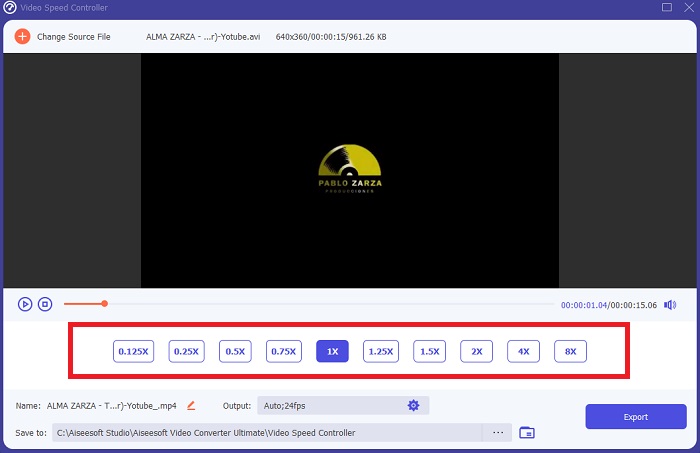
Adım 4: Oynatma hızını ayarlamak için video hızını artırın veya azaltın.
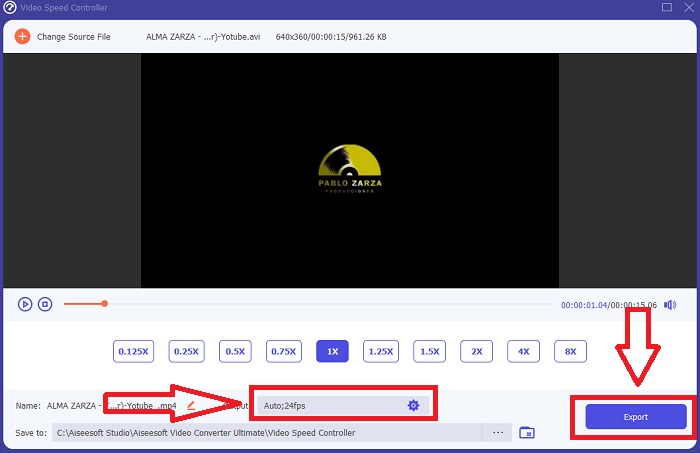
Adım 5: Video klibinizin oynatma hızı ayarlandıktan sonra, çıktı formatı, çözünürlük, kalite vb. tüm ayarları düzenleyebilirsiniz. Çalışmanızı kaydetmeye hazır olduğunuzda Dışa Aktar seçeneğine tıklayın ve bir konum seçin.
Bölüm 2. Fotoğrafları Kullanarak iPhone/iPad'de Ağır Çekim Videoyu Normal Hıza Nasıl Değiştirirsiniz
Ağır çekim videolar, içerik üreticilerinin veya kameramanların yalnızca iPhone gibi cep telefonlarını kullanarak herhangi bir klibe dramatik bir etki katmak için sahip oldukları en iyi seçeneklerden biridir. iPhone, saniyede daha yüksek kare hızında video çekebilen, üst seviye kameralı telefonlardan biri olduğundan, izlemesi tatmin edici klipler elde edebilirsiniz. Ancak düşük oynatma hızına sahip videolar, hazırladığınız her video için her zaman en iyi yaklaşım değildir – ağır çekimin yeterli olmadığı ya da ilgisiz kaldığı türler de vardır. Bu yüzden, iPhone’unuzda ağır çekim videoyu normal hıza çevirmek tek seçeneğiniz haline gelir. Bunu yapmak için, aşağıdaki kolay adımları izleyin:
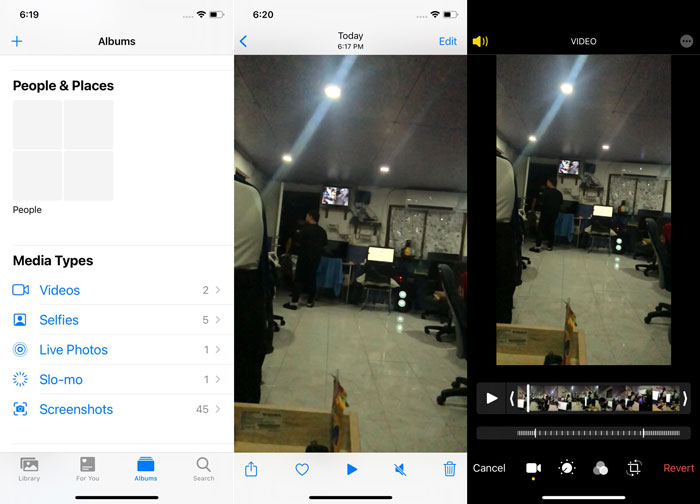
Adım 1: iPhone veya iPad’inizde Fotoğraflar uygulamasını açın ve Albümler sekmesine gidin. En alta kaydırın ve Ortam Türleri bölümünden Ağır Çekim’e (Slo-mo) dokunun. Videoyu tam ekranda görmek için üzerine dokunun.
Adım 2: Sağ üst köşeden Düzenle’yi seçin.
Adım 3: Küçük, dikey beyaz çizgilerden oluşan bir kaydırıcı görünecektir. Seyrek aralıklı çizgiler ağır çekim efekti, sık aralıklı çizgiler ise normal hız efektini temsil eder. Bu iki bölüm, iki adet sürgüyle birbirinden ayrılır. Bir Sürgüyü ekranın bir ucundan diğer ucuna doğru sürükleyin. Seyrek çizgilerin hepsi hizalanmış olacaktır. Bu, videonun artık normal hızda oynayacağı anlamına gelir. Çalışıp çalışmadığını görmek için üçgen oynat düğmesine basın. Önceden ağır çekimde olan video artık normal oynatma hızındadır. Ancak bu işlemi, Düzenle, Geri Al, Orijinale Dön seçeneklerini kullanarak geri alabilirsiniz. Ayrıca, görüntünün hangi bölümlerinin daha yavaş veya daha hızlı oynatılacağını belirlemek için sürgüleri zevkinize göre ayarlayabilirsiniz.
İlgili:
iPhone’da Videolar Oynatılmıyor Sorunu Nasıl Giderilir
iPhone için En İyi Video Oynatıcı
Bölüm 3. Google Fotoğraflar Kullanarak Android'de Ağır Çekim Videoyu Normal Hıza Nasıl Değiştirirsiniz
Android kullanıcıları da tıpkı iPhone kullanıcıları gibi ağır çekim videonun hızını normale ücretsiz olarak ayarlayabilir. Bu durumda, telefonda yüklü gelen Google Fotoğraflar uygulamasını kullanmanız gerekir; ancak isterseniz üçüncü taraf bir uygulama da tercih edebilirsiniz. Erişilebilirlik ve kullanım kolaylığı açısından, Android’de ağır çekim videoyu normal hıza çevirmek için Google Fotoğraflar’ı kullanacağız, yöntem ise şöyledir:
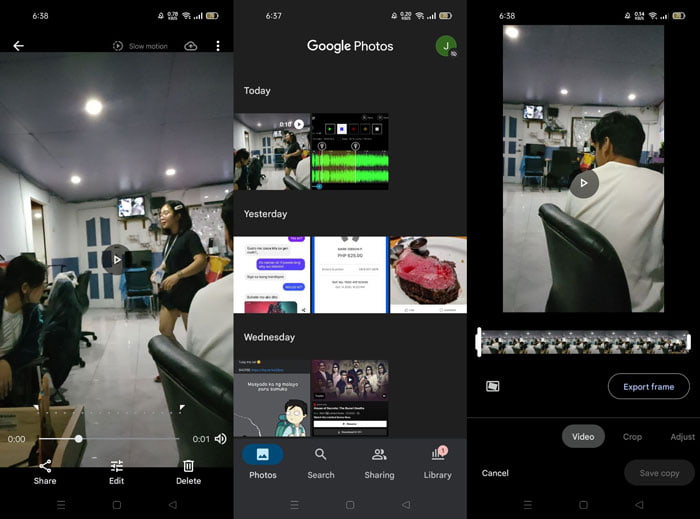
Adım 1: Android telefonunuzda Google Fotoğraflar uygulamasını açın ve hızlandırmak istediğiniz videoya tıklayın. Ekranın alt kısmından Düzenle’yi seçin; bir oynatma hızı denetleyicisi görünecektir.
Adım 2: Ağır çekim videonuzun hızına bağlı olarak oynatma hızını 1,5x ya da 2x’e çıkarmak için Sürgüyü sürükleyin.
Adım 3: Videonun artık istediğiniz hızda olup olmadığını kontrol etmek için üçgen oynat düğmesine tıklayın. Memnun kaldığınızda, kaydetmek için Bitti’yi seçin.
Bölüm 4. Ağır Çekim Videoyu Normal Hıza Değiştirme Hakkında SSS
Ağır çekim bir videoyu nasıl tersine çevirebilirim?
Fikrinizi değiştirmek ve bu videoyu bir kez daha ağır çekim klibe dönüştürmek için videoyu açın ve ekranın altındaki Düzenle düğmesine dokunun. Ardından, kararınızı onaylamak için Geri Dön'e tıklayın ve Orijinale Dön'ü seçin.
Fotoğraflar uygulamasını kullanarak düşük fps videoları ağır çekime dönüştürebilir misiniz?
Fotoğraflar uygulaması, 30 fps veya 24 fps'de kaydedilen normal iPhone videolarını ağır çekime dönüştürmenize izin vermez. Ancak bunu, iMovie veya diğer elma düzenleme uygulamaları gibi üçüncü taraf uygulamaları kullanarak yapabilirsiniz.
Google Fotoğraflar, ağır çekim videoları normal hıza dönüştürmek için en iyi uygulama mı?
Tahmin edebileceğiniz gibi, bu ücretsiz uygulamayı kullanmanın birkaç dezavantajı var. Her şeyden önce, video işleme hızı, özellikle uzun bir video klibi düzenlerken nispeten yavaştır. Ayrıca, videoyu oynatma hızını değiştirmeden önce bölerseniz, arka plan sesi veya sesli anlatım kapatılacaktır. Ne olursa olsun, harika bir ücretsiz Android uygulaması. Üçüncü taraf uygulamaları kullanmaya devam edebilirsiniz, ancak kullanımı kolay olanların çoğu ücretsiz değildir.
Sonuç
Videoların çok yönlülüğü farklı ihtiyaçlara hizmet edebilir; yalnızca oynatma hızını değiştirmek bile, ister eğlence ister eğitim amaçlı olsun, farklı türleri karşılayabilir. Bunun günümüzde erişilebilir uygulama ve yazılımlarla kolayca yapılabiliyor olması, tercihlerimize göre yaratıcılığımızı ortaya çıkaracak ve bize büyük bir kullanım kolaylığı sağlayacaktır. Her ne kadar ağır çekim videoyu çevrimiçi olarak normal hıza dönüştürmek de pratik olsa da, yazılım indirmek bağlantı sorunlarıyla uğraşma zahmetini azaltır. Bu makale, bu yöntemlere henüz aşina olmayanlar için oldukça yararlı olabilir ve sorularına yanıt sunar.
-
 VR Video Oynatıcı - 2021'de En İyi 5 VR Video Oynatıcısının Gözden Geçirilmesi
 VLC, VR oynayabilir mi? En iyi VR video oynatıcı nedir? VR başlığında video nasıl oynanır? VR video oynatıcı ile ilgili tüm sorularınız burada yanıtlanabilir.
-
 2021'de Windows Media Player'da DVD Nasıl Oynanır?
 DVD'im neden Windows Media Player'da oynatılmıyor? Windows 7 medya oynatıcıda DVD nasıl oynanır? Bu gönderi, WMP ile veya WMP'siz DVD oynatmanın 3 yolunu paylaşıyor.
-
 Windows Media Player'da MKV Dosyasını Açın
 MKV dosyalarını Windows Media Player'da oynatabilir misiniz? MKV, Windows Media Player'a nasıl dönüştürülür? MKV dosyasını Windows Media Player'da açmanın 3 yolunu burada bulun.
