


 Video Dönüştürücü Ultimate
 Ekran kaydedicisi
 Video Onarımı
 Güvenli İndirme
MKV Meta Verilerini Masaüstünde En Kolay Şekilde Düzenleme Eğitimi
MKV, Matroska multimedya kapsayıcı biçimleri için çok popüler bir uzantıdır. Peki MKV’yi diğer biçimlerden daha popüler yapan nedir? Birçok kullanıcı MKV’nin aslında ses ve videoda kullanılan bir video sıkıştırma türü olduğunu düşündü, oysa değildir. Bu biçimin popülerleşmesinin nedeni; ses, video ve altyazı için farklı kodeklere uyum sağlayabilen esnek yapısı ve bunların hepsini tek bir dosyada saklayabilmesidir. Bu özellikler sayesinde biçim geleceğe dönük (future-proof) hale gelmiş, yani burada saklanan meta veriler de dahil olmak üzere dosya biçiminin hiçbir zaman demode olmayacağı anlamına gelmiştir. Dolayısıyla MKV dosyanızın meta verilerini eklemek, kaldırmak veya düzenlemek istiyorsanız, bu makaleyi okumaya devam edin ve MKV meta verisi nasıl düzenlenir daha hızlı öğrenin.

Bölüm 1. MKV Dosyasının Meta Verileri Masaüstündeki En İyi 3 Yazılımla Nasıl Düzenlenir
FVC Video Converter Ultimate – Windows ve Mac'teki En Güçlü MKV Etiket Düzenleyicisi
FVC Video Converter Ultimate, işi profesyonelce bitirmek için her iki işletim sistemine de indirebileceğiniz en iyi MKV meta veri düzenleyicisidir. Bu gelişmiş yazılım MKV dosyasını kolayca işleyebilir ve isterseniz meta verilerini değiştirmek için açabilir. Geniş video ve ses biçimi desteği sayesinde MKV gibi medya biçimlerini yüklemek artık asla can sıkıcı değildir. Yazılımı kullanırken, onu kullanmanın mantığını kavrama sürecinizin ne kadar kolay ilerlediğini deneyimleyeceksiniz. Aracı kullanmak istiyor ama güvenebileceğiniz bir eğitim içeriğiniz yok mu? Neyse ki, aşağıda sunduğumuz bilgiler görevi profesyonelce yapmanıza yardımcı olacak; bir dakikadan kısa sürede MKV dosyasının başlığını nasıl değiştireceğinizi öğrenmek için ayrıntıları okuyun.
Adım 1. Öncelikle, indirme düğmesine tıklamak yazılımı masaüstünüze hemen indirecek ve şu anda hangi yazılımı kullandığınızı seçmenizi sağlayacaktır. Ardından, onu masaüstünüze kurun ve MKV dosyalarınıza meta veri eklemek için başlatın.
Ücretsiz İndirWindows 7 veya üstü içinGüvenli İndirme
Ücretsiz İndirMacOS 10.7 veya üstü içinGüvenli İndirme
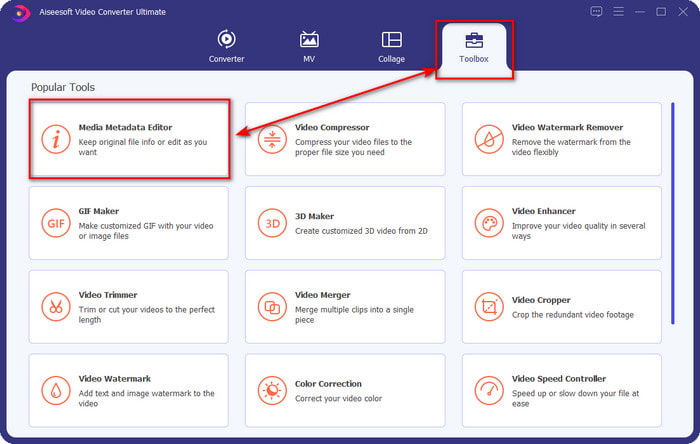
Adım 2. Artık aracı başlattığınıza göre, Toolbox (Araç Kutusu) bölümüne gitmeli ve aşağıdaki listeden Media Metadata Editor (Ortam Meta Verisi Düzenleyici) seçeneğini bulmalısınız.
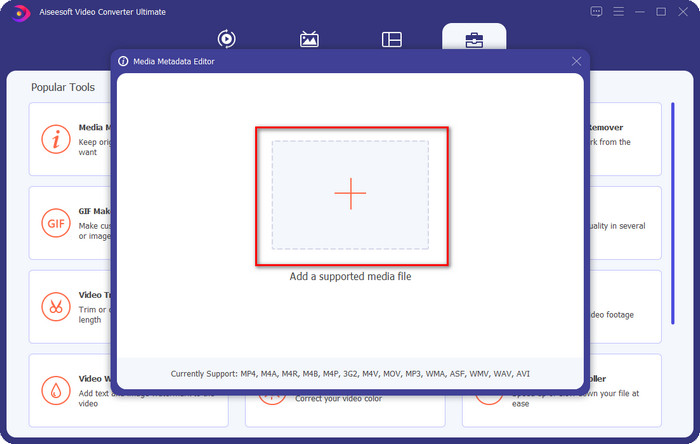
Adım 3. MKV dosyasını eklemek için, ekranda göreceğiniz + düğmesine tıklayın, klasördeki .mkv dosyasını bulun ve sonraki adıma geçmek için Open (Aç) düğmesine tıklayın.
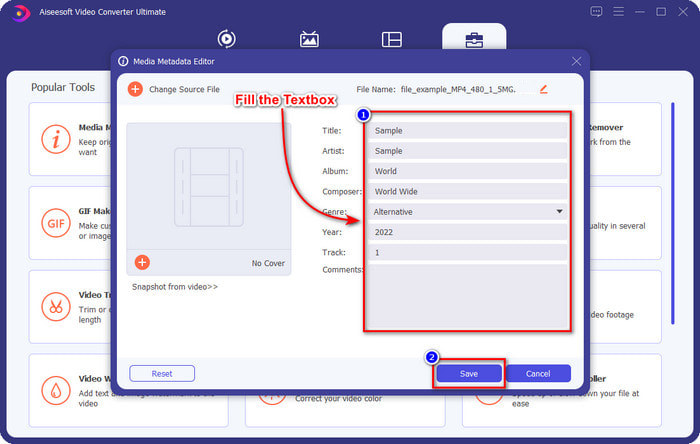
Adım 4. Bu kısımda, MKV’nize ihtiyaç duyduğunuz meta verileri artık ekleyebilirsiniz; bunları isteğinize göre doldurun ve hepsini yaptıysanız ve uygulamaya hazırsanız Save (Kaydet) düğmesine tıklayın. Böylece, dosyanın içinde ne olduğunu hızlıca anlamayı sağlayacak etiketleri MKV dosyanıza eklemiş olursunuz.
VLC Media Player – Ücretsiz MKV Meta Veri Editörü
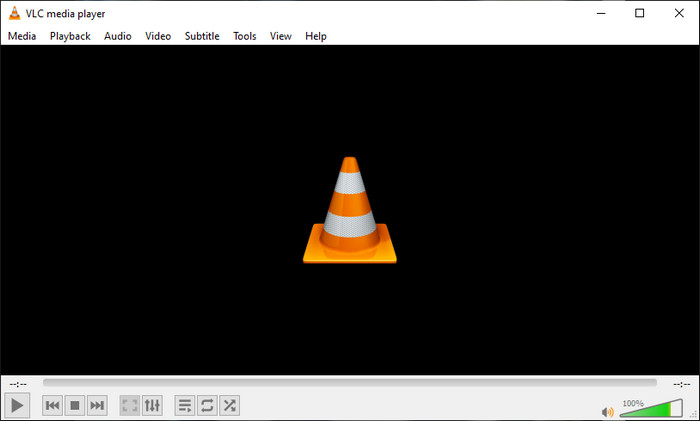
VLC Media Player, MKV dosyanızı kolayca oynatabilir ve etiketlerini düzenleyebilir. Bu araç açık kaynaklıdır, bu yüzden yazılımı masaüstünüze indirirken endişelenmenize gerek yoktur; aracın tüm potansiyelinden ücretsiz olarak yararlanabilirsiniz, ancak isterseniz bağış yapabilirsiniz. Listede yer alan diğer meta veri düzenleyiciler kadar iyi olmasa da, cihazınızda kullanabileceğiniz güvenilir bir araç olarak kabul edilir. Buna ek olarak, yazar adı, başlık, sanatçı, albüm vb. temel bilgileri MKV dosyanıza eklemekte özgürsünüz. Aşağıdaki adımları izleyin ve medya oynatıcıyı bir meta veri düzenleyicisi olarak kullanarak MKV meta verilerini nasıl düzenleyeceğinizi öğrenin.
Adım 1. VLC’yi indirin ve ardından masaüstünüzde açın.
Adım 2. Tools (Araçlar) menüsüne gidin ve Media Information (Ortam Bilgisi) seçeneğine tıklayın. Daha kolay bir yol isterseniz, CTRL + I kısayol tuşuna basarak da yapabilirsiniz. Hangi yolu seçerseniz seçin, işlevleri aynıdır.
Adım 3. İhtiyacınız olan bilgileri yazın ve meta verilerin otomatik olarak kaydedilmesi için Close (Kapat) düğmesine tıklayın.
MKVToolNix GUI – Özel MKV Etiket Düzenleyicisi
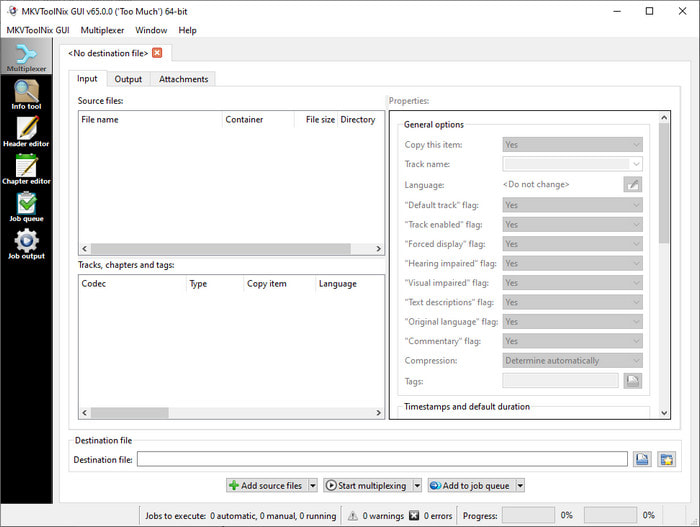
MKVToolNix GUI, MKV dosyaları için özel olarak geliştirilmiş bir çözümdür; her ne kadar diğer biçimleri de yükleyebilseniz de, yazılım bunların biçimini MKV’ye dönüştürecektir. Araç, bir araç setini desteklediği için MKV söz konusu olduğunda tek duraklı bir çözüm olarak tanınmıştır; bu da meta veri düzenlemenin yanı sıra başka işlevlere de sahip olabileceğiniz anlamına gelir. Basit kullanıcı arayüzü (GUI) sayesinde nasıl kullanılacağı konusunda öğrenilecek çok şey yoktur; temelde birkaç dakika içinde kullanmayı öğrenebilirsiniz. Yine de, zaten güçlü bir meta veri düzenleyici kullanan bazı kullanıcılar arayüzünü diğerleriyle karşılaştırdığında, bu aracın onlar için yeterince sezgisel olmadığını söylemiştir. Söylenen her şeye rağmen, MKV dosyasının başlığını nasıl değiştireceğimizi bize öğretebileceği konusunda hâlâ hiçbir şüphe yoktur.
Adım 1. Yazılımı masaüstünüze indirin, açın, Add Source File (Kaynak Dosya Ekle) seçeneğine tıklayın ve klasördeki MKV dosyasını bulun.
Adım 2. Output (Çıktı) bölümüne basın ve meta verileri burada değiştirin.
Adım 3. Bunların hepsini yaptıysanız, artık Start Multiplexing (Çoklama İşlemini Başlat) düğmesine tıklayarak kaydedebilirsiniz.
Bölüm 2. MKV Meta Veri Düzenleyicisi hakkında SSS
VOB'u MKV'ye dönüştürebilir miyim?
Bu bağlantıya tıklayarak VOB’u kolayca MKV’ye dönüştürebilir ve yeni bir sekme açılarak doğrudan VOB’u MKV’ye dönüştürmenize yardımcı olur. VOB ve MKV hakkında daha fazla bilgi istiyorsanız, bu sizin için doğru makaledir.
MKV dosyalarım neden daha büyük bir dosya boyutuna sahip?
MKV dosyalarınızın büyük olmasının nedeni, biçimin yalnızca video ve ses içermiyor olmasıdır. Aynı zamanda altyazılar, meta veriler, değişken bit hızı ve daha birçok öğe de içerir. Peki, kalitesini bozmadan MKV dosyasını küçültmek için sıkıştırmak isterseniz ne yapmalısınız? Çok fazla güvenilir video sıkıştırıcı yoktur ve bu yüzden biz de MKV’yi kalite kaybı olmadan sıkıştırmanıza yardımcı olacak bazı araştırmalar yaptık.
MKV formatının dezavantajları nelerdir?
Dosya biçimi bilinse de, bazı medya oynatıcılar ve düzenleyiciler, codec bileşeni ve öğe sorunu nedeniyle yine de biçimi işleyebilir. Ayrıca, biçimin boyutu çok büyüktür ve tüm yazılımlar büyük bir dosya boyutunun yüklenmesini desteklemez, çünkü onu içe ve dışa aktarmak çok zaman alır. Dosyanın bir parçası olduğu için dosya boyutu da artacaktır, meta veri eklediğiniz diğer formatta olduğu gibi. Zayıf yönleri olsa da, medya dosyasını saklama ve gelecekteki amaçlar için güvenli tutma konusunda hala rekabetçidir.
Sonuç
Harika değil mi? Bu üç masaüstü yazılımı size neler sunabilir? Diğeri bir medya oynatıcı, diğeri ise MKV için özel bir editör, ancak hangi aracı kullanmalısınız? En iyisini istiyorsanız, size en iyi aracı memnuniyetle getiriyoruz. FVC Video Converter Ultimate ile MKV meta verilerinin nasıl düzenleneceğini öğrenmek kolay ve etkili oldu. Peki, ne bekliyorsun? Aracı elinizin altında bulundurun ve birkaç tıklamayla bir profesyonel gibi MKV dosyalarınızdaki meta verileri düzeltmek için kullanın.
-
 Ücretsiz Denemeniz Gereken OGG Meta Verilerini Düzenlemenin En İyi 2 Yolu
 OGG meta verilerini düzenlemeniz mi gerekiyor? Doğru yazılımı kullanarak etiketleri düzenlemeyi kolayca halledebilirsiniz. #039'a sahip değilseniz, bu makaleyi mutlaka okuyun.
-
 Pentaho Meta Veri Düzenleyicisi Hakkında Mutlak Bir Bakış [Güncelleme 2022]
 Pentaho Metadata Editor hakkında güvenilir bir makale bulamıyor musunuz? Neyse ki, araç hakkında bileceğiniz gerçekleri sağlamak için aracı kendimiz inceledik.
-
 2022'de Bilmeniz Gereken VLC Meta Veri Düzenleyicisi Hakkında İpuçları ve Püf Noktaları
 VLC'yi meta veri düzenleyicisi olarak kullanmak istiyor musunuz? Bu durumda, VLC meta veri düzenleyicisinin tarafsız bir incelemesini sağladığımız için bu makaleyi okuyabilirsiniz.
