


 Video Dönüştürücü Ultimate
 Ekran kaydedicisi
 Video Onarımı
Kaliteyi Kaybetmeden MKV Dosyalarını Sıkıştırmanın 2 Kolay Yolu
MKV dosyasının boyutunu küçültmek istiyor ama video kalitesinden ödün vermek istemiyor musunuz? MKV dosyalarını sıkıştırmanın özellikle de ücretsiz ve basit bir yolu var mı?
MKV dosyası genellikle iyi bir video ve ses kalitesi sunar, ancak dosya boyutu genelde büyük olur. Bir MKV videoyu yüklemek ve paylaşmak istediğinizde, onu sıkıştırmanız oldukça gereklidir. Peki, MKV dosyalarını kaliteden ödün vermeden nasıl sıkıştırırsınız?

Aslında, piyasada MKV videolarınızın dosya boyutunu küçültmenize yardımcı olabilecek, çevrimiçi ve ücretsiz olanlar da dahil olmak üzere çok sayıda video sıkıştırıcı vardır. Bu yazıda, MKV sıkıştırmak için 2 basit yolu paylaşmak istiyoruz.
Bölüm 1. MKV Dosyalarını Çevrimiçi Olarak Sıkıştırma
Yukarıda da bahsedildiği gibi, birçok ücretsiz çevrimiçi video sıkıştırıcı veya düzenleyici MKV dosyalarını sıkıştırmanıza ve dosya boyutunu küçültmenize yardımcı olabilir. İlk bölümde, bu işi halletmenize yardımcı olacak popüler bir çevrimiçi Ücretsiz Video Sıkıştırıcıyı önermek istiyoruz.
Bu ücretsiz çevrimiçi MKV dosya sıkıştırıcısı, video sıkıştırma için özel olarak tasarlanmıştır. MKV, MP4, MOV, FLV, AVI ve daha fazlası dahil olmak üzere neredeyse tüm video formatlarını yüksek oranda destekler. 4K, HD veya SD video dosyasının dosya boyutunu kaliteden ödün vermeden küçültme özelliğine sahiptir. Dahası, bu MKV sıkıştırma aracı, video sıkıştırma işlemini daha hızlı tamamlayabilmenizi sağlamak için toplu sıkıştırma özelliği taşır.
Adım 1. Tarayıcınızı açın ve bu MKV dosya sıkıştırıcısının resmi sitesine gidin. Google Chrome, IE, Firefox, Safari ve benzeri sık kullanılan tüm tarayıcılarla uyumludur.

Adım 2. MKV sıkıştırma için küçük boyutlu bir başlatıcıyı indirmek ve kurmak üzere Sıkıştırılacak Dosyaları Ekle düğmesine tıklayın.
Adım 3. Sıkıştırmak istediğiniz MKV dosyasını seçip ekleyin. Ardından sağ üst köşede MKV dosyasının boyutunu ve video uzunluğunu görebilirsiniz.

Adım 4. MKV videonun çözünürlüğü, kare hızı ve bit hızında ayarlamalar yapabilirsiniz. Ayrıca, sıkıştırılmış video için uygun bir çıktı formatı da seçebilirsiniz. Tüm bu işlemlerden sonra, MKV sıkıştırmayı başlatmak için Sıkıştır düğmesine tıklayın.

Dosya boyutunu küçültmek için yalnızca birkaç tıklamayla bir MKV dosyasını kolayca sıkıştırabilirsiniz. Daha da önemlisi, sıkıştırılmış videonuza filigran eklenmez. Çoğu çevrimiçi video sıkıştırıcısının çıktı dosyanıza bir filigran ekleyeceğini bilmelisiniz.
Bölüm 2. MKV Dosyalarını Sıkıştırmanın Profesyonel Yolu
Yukarıdaki yöntemle, bir MKV dosyasını çevrimiçi olarak kolayca ve ücretsiz sıkıştırabilirsiniz. Ancak MKV videonuzu aşırı sıkıştırırsanız, büyük olasılıkla düşük kaliteli bir çıktı elde edersiniz. Aslında, kalite kaybı olmadan dosya boyutunu küçültmek için gereksiz bölümleri kesmeyi tercih edebilirsiniz. Burada size MKV dosyalarınızı kalite kaybı olmadan sıkıştırmanıza yardımcı olacak güçlü bir video dönüştürme ve düzenleme aracı, Video Converter Ultimate'ı tanıtıyoruz.
Video Converter Ultimate, çeşitli video dönüştürme ve düzenleme işlemleri için özel olarak tasarlanmıştır. Videoyu kırpma ve yalnızca işe yarar kısmı kaydetme özelliğine sahiptir. Dahası, MKV dosyalarını sıkıştırmak için Video Sıkıştırıcı işleviyle donatılmıştır.
Ücretsiz İndirWindows 7 veya üstü içinGüvenli İndirme
Ücretsiz İndirMacOS 10.7 veya üstü içinGüvenli İndirme
Adım 1. Yukarıdaki indirme düğmesine çift tıklayarak bu MKV dosya sıkıştırma yazılımını bilgisayarınıza ücretsiz olarak kurup başlatın. Bu video sıkıştırıcı, MKV dosyalarını hem Windows PC hem de Mac üzerinde sıkıştırmanıza olanak tanır.
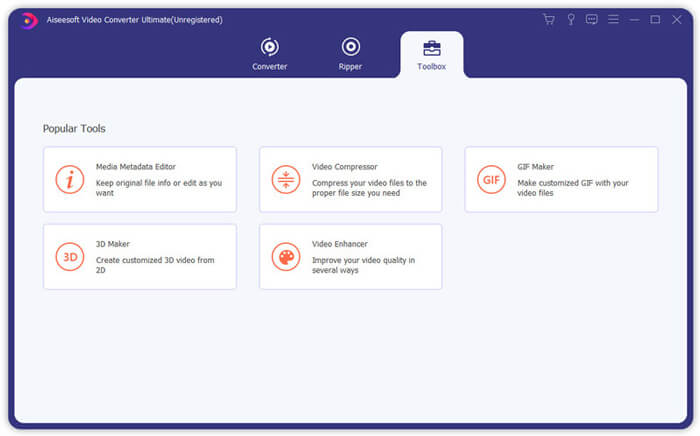
Adım 2. Ana pencereye girdiğinizde, Araç Kutusu sekmesine tıklayın ve ardından Video Sıkıştırıcı özelliğini seçin.
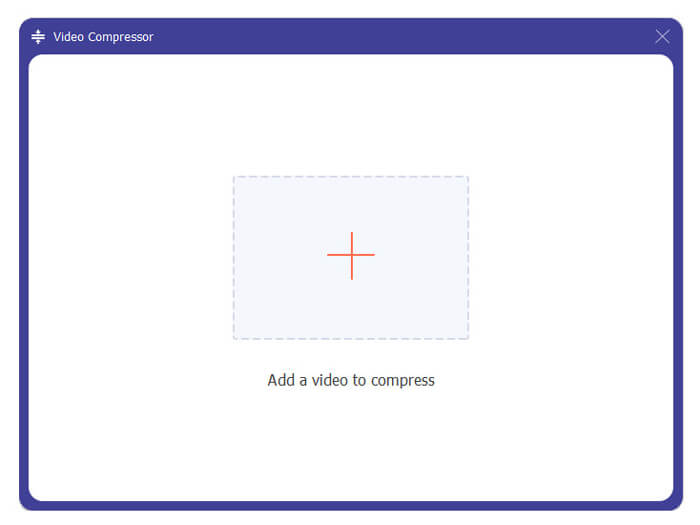
Adım 3. Bir MKV dosyasını sıkıştırmak için içe aktarmak üzere + simgesine tıklayın.
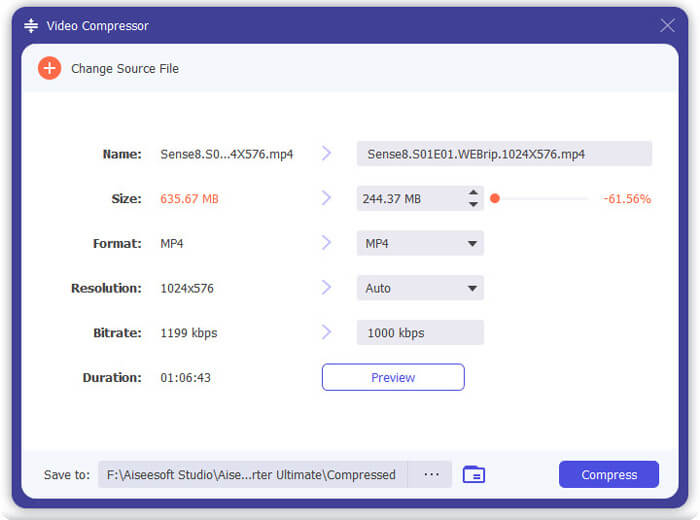
Artık MKV dosya boyutunu ihtiyacınıza göre kolayca azaltabilirsiniz. Bu adım sırasında, istediğiniz gibi özel video çözünürlüğü, bit hızı, süre ve dosya adı da yapabilirsiniz. Ayrıca, sıkıştırılmış video için uygun bir çıktı formatı seçebilirsiniz.
Adım 4. MKV videonuzu daha küçük bir dosya boyutuna sıkıştırmaya başlamak için Sıkıştır düğmesine tıklayın.
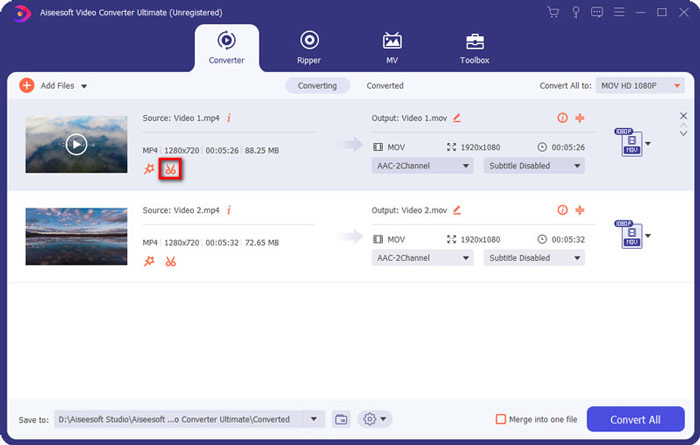
Adım 5. Kırpma özelliğiyle MKV dosya boyutunu azaltmak istiyorsanız, ana pencereye geri dönüp Dönüştürücü seçeneğini seçebilirsiniz. MKV videoyu içe aktardıktan sonra, gereksiz kısımları kaldırmak için Kes simgesine tıklayabilirsiniz.
Adım 6. MKV dosyanızı kırpmak için ilerleme çubuğundaki kırpma işaretçisini sürükleyebilir veya başlangıç ve bitiş süresini doğrudan girebilirsiniz. Ardından işleminizi onaylamak için Kaydet düğmesine tıklayabilirsiniz.
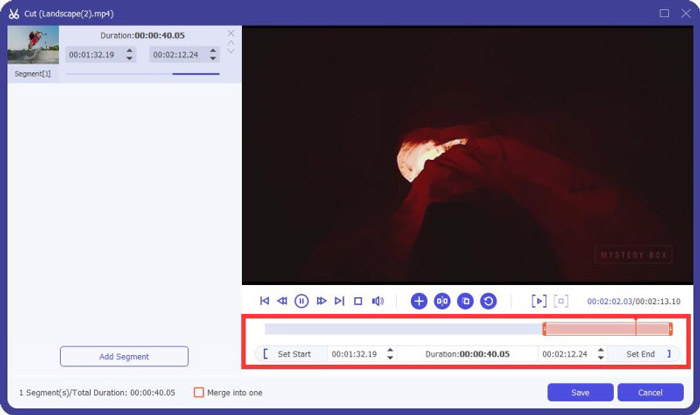
Bundan sonra ana pencereye geri yönlendirileceksiniz. Burada MKV videoyu dışa aktarmak için Tümünü Dönüştür düğmesine tıklayabilirsiniz. Bu MKV dosya sıkıştırma yazılımı, sıkıştırma efektini doğrudan görüntülemenize yardımcı olabilecek yerleşik bir medya oynatıcıyla tasarlanmıştır.
Bir videoyu e‑posta veya WhatsApp için sıkıştırmanız gereksin, bunu bu programda kolayca gerçekleştirebilirsiniz.
Bölüm 3. MKV Dosyasını Sıkıştırma Hakkında SSS
Soru 1. Kaliteden ödün vermeden bir video nasıl sıkıştırılır?
Dosya boyutunu küçültmek için videoyu kırpmayı seçebilirsiniz. Bunu yaparak herhangi bir kalite kaybı olmadan videoyu sıkıştırabilirsiniz. Ücretsiz bir çevrimiçi veya profesyonel video sıkıştırıcı seçerseniz, video kesinlikle biraz görüntü veya ses kalitesini kaybedecektir. Ancak kalite kaybını gözlerinizle fark etmeyebilirsiniz.
Soru 2. Bir MKV dosyasını ücretsiz MP4'e nasıl dönüştürebilirim?
Bir MKV dosyasını MP4 videoya ücretsiz dönüştürmek için güvenilir Ücretsiz Çevrimiçi Video Dönüştürücüye güvenebilirsiniz. Bu araç, MKV'den MP4'e ve diğer video/ses formatlarına dönüşümleri kolaylıkla yapabilir.
Soru 3. MKV dosyaları neden bu kadar büyük?
MKV, daha yüksek sıkıştırma oranına sahip daha iyi bir kodek kullanan bir kapsayıcı formatıdır. MKV dosyaları genellikle Blu-Ray'lerden alınır ve daha yüksek çözünürlüğe sahiptir.
Sonuç
Bu yazıyı okuduktan sonra, MKV dosyalarını sıkıştırmak için 2 kolay yol öğrenebilirsiniz. Önerilen video sıkıştırıcılarla, MKV dosyalarınızın video boyutunu rahatlıkla azaltabilirsiniz. MKV sıkıştırmak için daha iyi bir yönteminiz varsa, lütfen yorumlarda diğer okuyucularla paylaşın.
-
 İPhone / Android / Online'da E-posta İçin Videoyu Sıkıştırma Eğitimi
 Çok büyük e-postayla video gönderemiyor musunuz? Bu sorunu yaşıyorsanız, burada e-posta için bir videoyu sıkıştırmanın uygulanabilir yollarını bulabilirsiniz. Bu makale, büyük video dosyalarını ücretsiz olarak nasıl küçülteceğinizi ayrıntılı olarak gösterecektir.
-
 GIF'i Sıkıştırma ve Dosya Boyutunu Yüksek Kaliteyle Küçültme Eğitimi
 İşte bilgisayarınızda veya cep telefonunuzda GIF sıkıştırmanın 2 kolay yolu. FVC Free Online Video Compressor'ı kullanabilir ve Photoshop, GIF dosya boyutunu farklı yönlerden küçültebilirsiniz.
-
 AVCHD Videolarını Küçük Dosya Boyutlarına Ücretsiz Olarak Sıkıştırmanın 2 Yolu
 AVCHD video dosyalarını sıkıştırmanın 2 kolay yolunu okuyun. Bilgisayarınızda AVCHD video boyutunu ücretsiz olarak azaltmak için çevrimiçi ve çevrimdışı video sıkıştırıcıları kullanabilirsiniz.
