


 Video Dönüştürücü Ultimate
 Ekran kaydedicisi
 Video Onarımı
 Güvenli İndirme
Büyük OGV Dosyalarını Küçültmenin 2 Hızlı Yolu [Ücretsiz ve Çevrimiçi]
OGV dosyaları, HTML5

Bölüm 1. OGV Dosyalarını OGV Kompresörü ile Sıkıştırmanın Çevrimiçi Yolu
Free Video Compressor, kullanıcıların hizmetine sunulan popüler ve kullanışlı, ücretsiz çevrimiçi bir OGV sıkıştırma aracıdır. Birçok yaygın ücretsiz çevrimiçi aracın aksine, Free Video Compressor yüklediğiniz dosyaların sayısı veya boyutu üzerinde herhangi bir kısıtlama getirmez. Daha da önemlisi, dışa aktarılan video dosyalarınızda filigran olmaz. Ayrıca, kaliteyi bozmadan MP4, AVI, WMV, MOV ve birçok diğer yaygın video dosyasını da sıkıştırmanıza imkân tanır.
Ücretsiz Video Sıkıştırıcı kullanarak OGV Dosyaları Nasıl Sıkıştırılır
Adım 1. https://www.free-videoconverter.net/free-video-compressor/ adresini tarayıcınızın çubuğuna yazarak çevrimiçi OGV video sıkıştırıcı sitesine gidin.
Adım 2. Add Files to Compress (Sıkıştırılacak Dosyaları Ekle) düğmesini bulun ve tıklayın, ardından hizmeti etkinleştirmek için başlatıcısını indirin. Açılan pencerede OGV dosyalarınızı bulun ve onaylamak için Open (Aç) düğmesine basın.

Adım 3. Daha sonra dosyayı küçültmek için sıkıştırma ayarlarını belirlemeniz gerekir. Videonuzun boyutunu ayarlayabilir, çözünürlüğü değiştirebilir, bit hızını (bitrate) seçebilir ve daha fazlasını yapabilirsiniz.

Adım 4. İşlemi başlatmak için Compress (Sıkıştır) düğmesine tıklayın. İşlem tamamlandığında dosya otomatik olarak bilgisayarınıza indirilecektir.

Ayrıca, bu ücretsiz video sıkıştırıcı, diğer video sıkıştırma sorunlarını çözmenize yardımcı olabilir. Aşağıdaki makaleleri kontrol etmeniz yeterli:
E-posta için Video Nasıl Sıkıştırılır
Windows ve Mac’te AVCHD Video Dosyaları Ücretsiz Nasıl Sıkıştırılır
Bölüm 2. Clideo ile OGV Dosyası Nasıl Sıkıştırılır ve Optimize Edilir
Clideo, ücretsiz bir hepsi bir arada video araç setidir. Tüm popüler formatlarla çalışır ve hızlı bir şekilde sıkıştırılır ve herhangi bir indirme gerektirmez. Bir OGV dosyasını ücretsiz olarak 500 MB'a kadar sıkıştırmanıza izin verir, ancak bir miktar sınırı yoktur. Şimdi OGV dosya boyutunuzu küçültmek için aşağıdaki adımları takip edebilirsiniz.
Adım 1. https://clideo.com/compress-video adresini ziyaret edin ve ardından Choose file (Dosya seç) düğmesine tıklayın.
Adım 2. Bilgisayarınızdan sıkıştırmak istediğiniz bir OGV dosyası yükleyin. Mavi aşağı ok simgesine tıklayarak Dropbox veya Google Drive’dan da dosya seçebilirsiniz.
Adım 3. Dosya yüklendiğinde araç videoyu işlemeye başlayacaktır. İşleme süresi, videonun boyutuna bağlıdır.
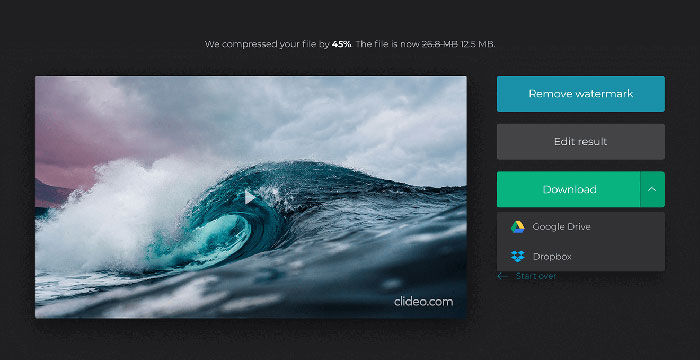
Adım 4. Sıkıştırma tamamlandığında, ilk dosya boyutunu ve sıkıştırılmış olanı görebilirsiniz. Şimdi sonucu önizleyerek iyi görünüp görünmediğinden emin olabilirsiniz. Eğer memnunsanız, Download (İndir) düğmesine tıklayarak videoyu cihazınıza veya bulut depolamanıza kaydedebilirsiniz.
Bölüm 3. OGV Dosyalarını Sıkıştırmayla İlgili SSS
OGV dosyası nedir?
Bir OGV dosyası, Xiph.Org açık kaynak Ogg kapsayıcı biçiminde kaydedilmiş bir video dosyasıdır. Theora, Dirac veya Daala gibi bir veya daha fazla farklı codec kullanabilen video akışları içerir. OGV dosyaları, çeşitli medya oynatıcılar kullanılarak oynatılabilir.
OGV sıkıştırması nasıl çalışır?
OGV dosya sıkıştırması söz konusu olduğunda, video kareleri arasında oluşan benzerlikleri kaldırarak dosya boyutunu küçültmeye yol açan kareler arası sıkıştırmadır.
MP4'ü OGV formatına nasıl sıkıştırabilirim?
MP4 dosyalarınızı OGV'ye sıkıştırmak için yukarıda belirtilen aracı - Ücretsiz Video Sıkıştırıcı'yı kullanabilirsiniz. Veya yapmanıza yardımcı olacak bir video dönüştürücü uygulaması seçebilirsiniz.
Sonuç
Yukarıdaki çevrimiçi yöntemler, OGV küçültme videosunu verimli bir şekilde sıkıştırmanıza yardımcı olabilir. Hangisini kullanmayı tercih ettin? Önerilerinizi aşağıdaki yorumlarda paylaşabilirsiniz!
-
 50MB - 5MB - MP4 Dosyasını Saniyeler İçinde Sıkıştırma
 MP4 video yüklemek için çok mu büyük? Video boyutunu küçültmek mi istiyorsunuz? MP4 dosyasını sınırsız olarak daha küçük boyuta sıkıştırmanın 3 etkili yolu.
-
 Eğitim - Videoları Kaliteyi Kaybetmeden Ücretsiz Olarak Sıkıştırmanın 7 Yolu
 Bilgisayarınızda veya telefonunuzda videoları ücretsiz olarak sıkıştırmanın 7 yolunu okuyun ve edinin. Büyük videoları e-posta, Twitter, Instagram, YouTube, WhatsApp ve daha fazlası için küçük dosya boyutlarına indirgeyebilirsiniz.
-
 Windows, Mac, iPhone ve Android'de MOV Dosyaları Nasıl Sıkıştırılır
 Bu makale, QuickTime MOV videolarının telefonunuzda veya bilgisayarınızda nasıl sıkıştırılacağını ayrıntılı olarak gösterir. MOV videonuz gönderilemeyecek, paylaşılamayacak veya kaydedilemeyecek kadar büyükse, burada 4 uygulanabilir çözüm bulabilirsiniz.
