


 Video Dönüştürücü Ultimate
 Ekran kaydedicisi
 Video Onarımı
Instagram Çevrimiçi ve Masaüstünde Videoları Sıkıştırmanın 2 Yöntemi
Instagram için videolar nasıl sıkıştırılır? Saatlerce uğraştığınız videonun boyutu yüzünden Instagram'a yüklenemediğini öğrenince çaresiz miydiniz? Panik yapma. Az önce doğru yere geldiniz. Bu makale, Instagram yüklemesi için videoları sıkıştırmanın en kolay 2 yolunu sağlayacaktır.

Bölüm 1: Instagram İçin Videoları Neden Sıkıştırmam Gerekiyor?
Yukarıda belirtildiği gibi, büyük video dosyalarının üzerinde Instagram'a yüklenemez. Instagram videolarını 20MB altındaki MP4 dosyalarına sıkıştırmanız gerekiyor. Video kare hızı, bit hızı olarak 3500KBPS ile saniyede 30 kare olmalıdır. Video boyutu tipik olarak 1080 piksel genişliğindedir. 4:5 çözünürlük önerilir. Ayrıca videolarınız 3 saniyenin üzerinde ve 60 saniyenin altında olmalıdır.
Bölüm 2: Instagram Çevrimiçi Video Dosyaları Nasıl Sıkıştırılır
FVC Free Video Compressor, çeşitli formatlardaki videoları sıkıştırmak için akıllı bir çevrimiçi araçtır. Programı indirmeniz gerekmez. Sıkıştırma işleminin tamamı bir web sayfası üzerinde gerçekleştirilir. Bu araçla, videolarınızı istediğiniz herhangi bir boyuta küçültebilirsiniz.
Öne Çıkan Özellikler:
- 1. MKV, FLV, WMV, AVI, TS, MOV vb. gibi çeşitli büyük videoları sıkıştırın.
- 2. Yeni başlayanlar için ayarları özelleştirmek için kullanımı kolay arayüz
- 3. 30 kat daha hızlı çalışın ve çıktılarda filigran bırakmayın
- 4. 4K Ultra HD videoları kalite kaybı olmadan işleyin
Bu araçla çevrimiçi olarak Instagram için video dosyalarını sıkıştırma adımları şunlardır:
Adım 1: Tarayıcınızda FVC Free Video Compressor sayfasını açın.
Ortadaki Add Files to Compress (Sıkıştırılacak Dosyalar Ekle) düğmesine tıklayın. Bu aracı ilk kez kullanıyorsanız, fvc-launcher adlı bir dosya indirip çalıştırmanız gerekir. Ardından tekrar Add Files to Compress düğmesine tıklayın. Sonrasında Instagram için sıkıştırmak istediğiniz video dosyalarını seçebilirsiniz.

Adım 2: Instagram için sıkıştırmak istediğiniz videonun ayarlarını özelleştirin.
Boyut: Yüzdelik çubuğu sürükleyerek ayarlayabilirsiniz. Bir videoyu Instagram için sıkıştırmak istiyorsanız, çıkış boyutunun 20 MB’ın altında olduğundan emin olun. Çıkış boyutundaki değişiklikler aynı anda çıkış Bit Hızını (Bitrate) da etkiler.
Format: Şu anda videoyu MP4, MKV, AVI, FLV vb. dahil 12 formattan birine dönüştürebilirsiniz. Bir videoyu Instagram için sıkıştırmak üzere yalnızca MP4 formatını seçmeniz yeterlidir.
Çözünürlük: Çözünürlüğü 320*240, 480*360 ve benzeri daha düşük değerlere indirmenize izin verilir. Ya da orijinal çözünürlüğü koruyup yalnızca bit hızını azaltarak videoyu Instagram için sıkıştırabilirsiniz.

Adım 3: Sıkıştırmayı başlatın ve aracın görevi tamamlamasını bekleyin.
Mor renkli Compress (Sıkıştır) düğmesine tıklayın ve çıktı videosunu kaydetmek istediğiniz hedef klasörü seçin. Video işlenirken tarayıcınızı veya web sayfasını kapatmayın. Aksi takdirde, Instagram için videoyu en baştan yeniden sıkıştırmanız gerekir. İşlem hızı büyük ölçüde donanımınıza bağlıdır.
Bölüm 3: Masaüstünde Instagram için Video Dosyaları Nasıl Sıkıştırılır
Boyuttan daha fazlası olarak, videonuzun süresi 3 ile 60 saniye arasında olmalıdır. Ancak, çevrimiçi aracın işlevleri bir web sayfasında çalıştığı için oldukça basittir. Çevrimiçi araçla videoyu kırpmanız (trim) desteklenmez. Peki hem sıkıştırmak hem de videoyu düzenlemek istiyorsanız hangi aracı kullanabilirsiniz? Aiseesoft Video Converter Ultimate muhtemelen en iyi seçeneğinizdir.
Öne Çıkan Özellikler:
- 1. WMA, MP4, AVI, MOV, WMV, MP3, FLAC vb. dahil olmak üzere 1.000'den fazla formatla uyumludur.
- 2. Gelişmiş donanım hızlandırma teknolojisi, benzeri görülmemiş bir hız sağlar
- 3. Video klipleri bir dizi filtre ve temel efektle kırpın ve birleştirin.
- 4. 3D Maker aracı, 3D gözlüğünüzde inanılmaz 3D videoların keyfini çıkarmanızı sağlar
- 5. Neredeyse profesyonel bölünmüş ekran videoları oluşturun
- 6. Videonuzu geliştirmek için yerleşik dört nihai yol
Ücretsiz İndirWindows 7 veya üstü içinGüvenli İndirme
Ücretsiz İndirMacOS 10.7 veya üstü içinGüvenli İndirme
Video Converter Ultimate ile Instagram için videoları sıkıştırma adımları:
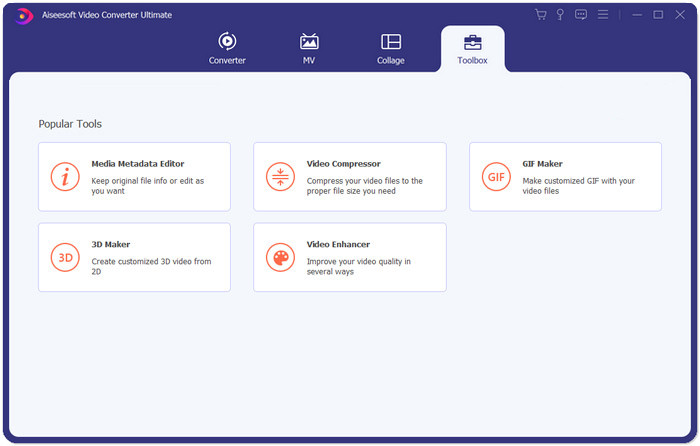
Adım 1: Aiseesoft Video Converter Ultimate programını indirin, kurun ve çalıştırın. Toolbox sekmesine geçin ve Instagram için sıkıştırmak istediğiniz videoyu eklemek üzere “+” düğmesine tıklayın.
Adım 2: Videoyu ekledikten sonra Video Compressor arayüzünde olacaksınız. Çıkış dosyasının boyutunu ayarlamak için boyut çubuğunu sürükleyin ve istediğiniz çözünürlüğü ile çıktı formatını seçin.
Not: Bit hızını yalnızca farklı çözünürlük ve çıkış boyutu kombinasyonlarını deneyerek dolaylı olarak değiştirebilirsiniz.
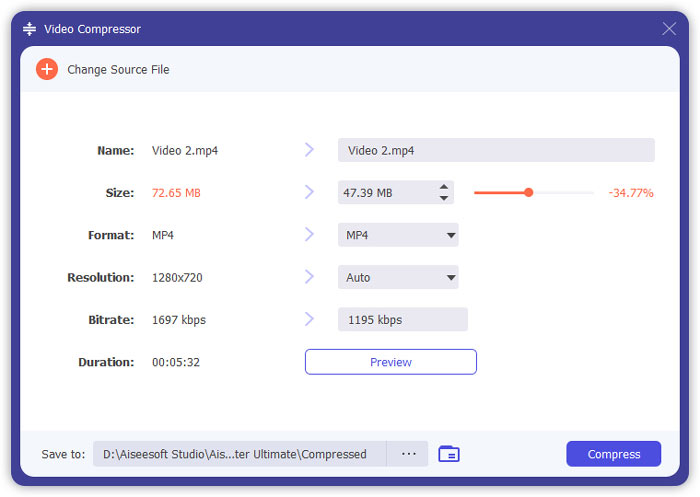
Adım 3: Instagram için videoyu sıkıştırmaya başlamak üzere sağ alttaki Compress düğmesine tıklayın.
Ek Okuma:
WhatsApp için Videolar Çevrimiçi Nasıl Sıkıştırılır (100MB/500MB/1GB…)
E-posta için Video Nasıl Sıkıştırılır ve 25MB’den Küçük Hale Getirilir
4. Bölüm: Instagram'a Video Yüklemeyle İlgili SSS
Instagram video yükleme gereksinimleri nelerdir?
Format: MP4
Codec: H.264
Bit hızı: 3500 kbps’in altında
Kare hızı: saniyede 30 kareden az.
Instagram videoları için en iyi en boy oranı nedir?
En iyi en boy oranı, çoğu akıllı telefonun standart oranı olan 9:16'dır.
Videom Instagram'a yüklemek için hangi ses biçimini kullanmalıdır?
AAC ses.
Sonuç
Bu makaleden, videonuzu Instagram için sıkıştırmak için iki kullanışlı araca sahipsiniz. Bunlar FVC Free Video Compressor ve Video Converter Ultimate'dır. Videoyu Instagram için sıkıştırırken videonuzun 3 ila 60 saniye ve 20 MB'ın altında olmasına dikkat edin.
-
 Yükleme için Vimeo Video Boyutunu Küçültmenin En İyi Yolu
 Bu yazıda, videoyu Vimeo'ya yüklemek için video dosyanızı nasıl sıkıştıracağınızı ve video ve ses sıkıştırması için ihtiyaç duyabileceğiniz yönergeleri göstereceğiz.
-
 YouTube için Video Dosya Boyutu 2 Yolda Nasıl Çıkarılır
 YouTube videoları büyük ve yüklenmesi yavaş mı? YouTube için video dosyası boyutunu çevrimiçi olarak ve bilgisayarda 2 şekilde daha küçük hale getirin.
-
 Facebook Ücretsiz ve Çevrimiçi için Video Nasıl Sıkıştırılır
 Facebook'a büyük bir video yüklemeniz yasaklandıysa endişelenmeyin. Ücretsiz video sıkıştırıcıyla büyük video boyutunu GB'den MB'ye sıkıştırmanız yeterlidir.
