


 Video Dönüştürücü Ultimate
 Ekran kaydedicisi
 Video Onarımı
Windows, Mac ve Cep Telefonlarında Bir Videonun Çözünürlüğü Nasıl Düşürülür
Videos on 1080 and 720 HD have the best resolution you would love to use, especially watching. Although these resolutions are best, sooner or later, you will need to convert the video resolution into less to save some space on your drive. But the question is how to convert the video resolution to lower it? This article will identify the leading video resolution converter to lower the video resolution on Windows, Mac, Online, Android, & iPhone.

Bölüm 1. Video Çözünürlüğünü Neden Düşürmeniz Gerekiyor?
Video çözünürlüğünü düşürmeden önce bir hazırlık olarak, bir videonun çözünürlüğünü düşürmek için neden değiştirmemiz gerektiğinin nedenini belirleyelim. Aşağıda sağladığımız bilgiler, çözünürlüğü azaltmak için ihtiyaç duyacağınız en yaygın örnektir.
Sebep 1. Mobil Cihazlarda Desteklenmiyor
Bazı mobil cihazlar, cep telefonunuz tanımadığından daha yüksek video çözünürlüğünü desteklemez. Bazen format uyumluluğundan dolayı videonun açılmadığını düşündük ama bu da başka bir sebep. Videoyu oynatmak istiyorsanız, telefonunuza kaydettiğiniz videonun çözünürlüğünü aklınızda tutmalısınız.
Sebep 2. Dosyayı Medya Oynatıcıya Yüklemek için Zaman Ayırın
Her medya oynatıcı videonuzu mümkün olan en yüksek çözünürlükte oynatabilir, ancak hepsi videoyu hemen yüksek kalitede yükleyemez. Yüksek çözünürlüklü bir video izlemek, daha düşük bir video izlemekten daha zevkli olsa da. Videoyu medya oynatıcıda çok az veya daha az yük ile anında izlemek istiyorsanız, videonun çözünürlüğünü nasıl düşüreceğinizi öğrenmek bir zorunluluktur.
Sebep 3. Yüksek Kaliteli Video Çok Yer Yiyor
Bu sebep bizim için yeni değil; yüksek kaliteli videonun büyük bir dosya boyutuna sahip olma olasılığı daha yüksektir. Yüksek kaliteli çıktı nedeniyle, dosya boyutunun büyük olmasını beklemelisiniz. Örneğin, 720 ve 1080 en iyi kalitelerden bazılarıdır, ancak 720 videonun dosya boyutu 1080 videodan çok daha küçüktür. Öte yandan, 1080 çözünürlüğü 720'den çok daha yüksek.
Artık video çözünürlüğünü neden azaltmamız gerektiğine dair bir fikrimiz olduğuna göre, aşağıdaki sonraki bilgiler size videonuzun çözünürlüğünü azaltmak için kullanabileceğiniz farklı araç setlerini öğretecektir. Bu konuda kapsamlı bir fikir sahibi olmak için topu yuvarlamaya devam edin.
Bölüm 2. Masaüstünde Video Çözünürlüğünü Azaltmanın En Kolay Yolu
If you need a user-friendly video converter that can help you quickly change the video resolution, then Video Converter Ultimate will offer this to you. This tool supports 200+ formats with different presets you can choose from. Want to know what impressed us about this converter? With this tool, you can create presets that can go up to 4k or as low as 360 resolution. Moreover, you don't need to be a professional video editor to learn how to convert video to a lower resolution; by following the steps below, you can convert resolution successfully.
Step 1. Kindly click the appropriate button to get the version you are currently using, whether Windows or Mac. Open the download file to install the software follow the installation process to install it properly. After installation, open the Video Converter Ultimate and proceed to the next step.
Ücretsiz İndirWindows 7 veya üstü içinGüvenli İndirme
Ücretsiz İndirMacOS 10.7 veya üstü içinGüvenli İndirme
Step 2. Upload the video with the highest resolution by dragging and dropping it on the tool's interface. But you can click the + button to open the folder, locate the file and click Open to upload the video.
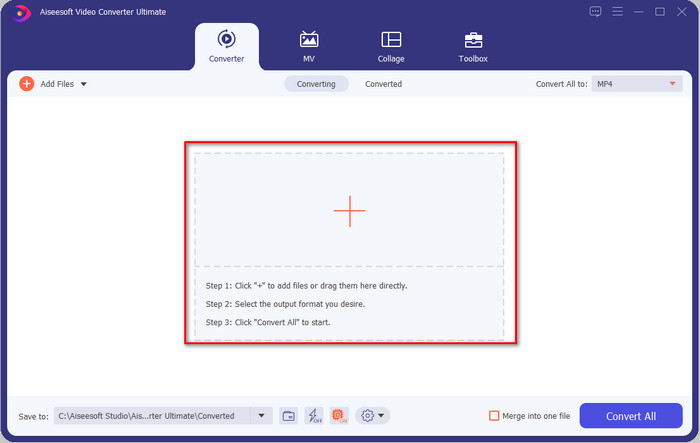
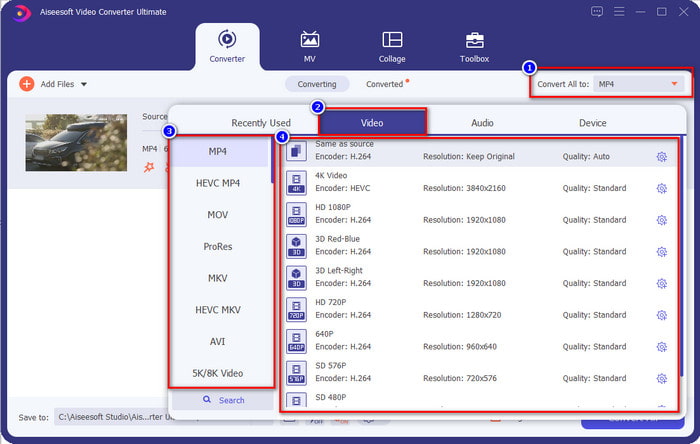
Step 3. Click Convert All to, and a setlist of the premade format will show. You can select different formats such as MP4, MOV, AVI, MKV, and 200+ more with different resolutions, click the format you want, and proceed.
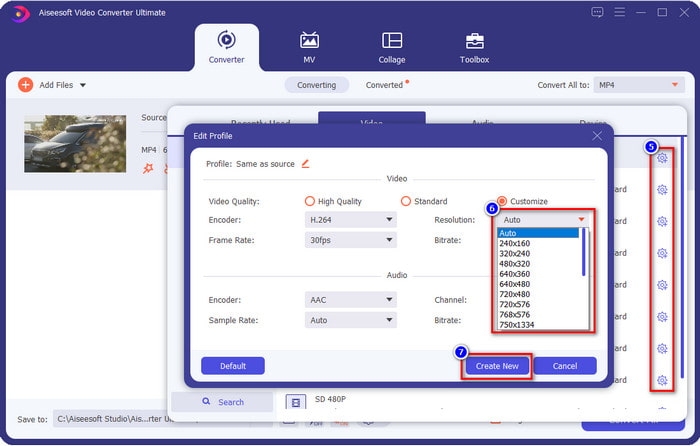
What if the resolution you want to achieve is not on the pre-made list? No need to worry; you can create your resolution. After clicking the Convert All to, choose the format you want and click the gear with a plus icon. Click the drop-down button, select the resolution you want, click Create New, and click the preset you've made.
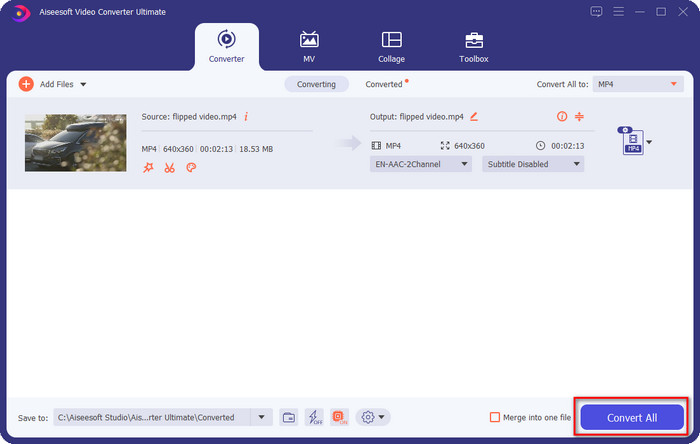
Step 4. To start lowering your video resolution, hit the Convert All button. With the ultra-fast conversion, the download will take less than a minute. And voila, the resolution of your video is now lowered, all thanks to the ultimate tool.
Bölüm 3. Video Çözünürlüğünü Web'de Daha Düşük Çözünürlüğe Dönüştürmenin Ücretsiz Yolu
If you are looking for a way to convert HD video to lower resolution online, then you can use the FVC Free Video Converter Online as a solution. This web tool supports numerous formats you can upload and export into. Unlike the ultimate tool, you won't need to download this tool to convert the high-resolution video into a lower one. However, the tool doesn't have an ultra-fast converting process, and the supported format is not as many as the ultimate tool. So, if you want to try and use this web tool, you can follow the steps below.
Step 1. To go to the main webpage of FVC Free Video Converter Online, click this link.
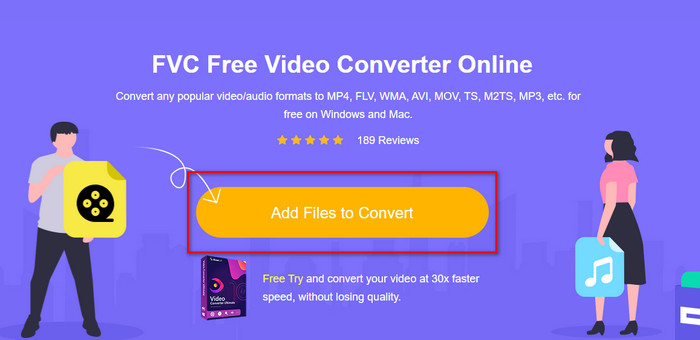
Step 2. Press Add Files to Convert to upload the video you want to lower the resolution. Additionally, if this is your first time using the tool, you must download the launcher. After that, click the Add Files to Convert again to upload the file.
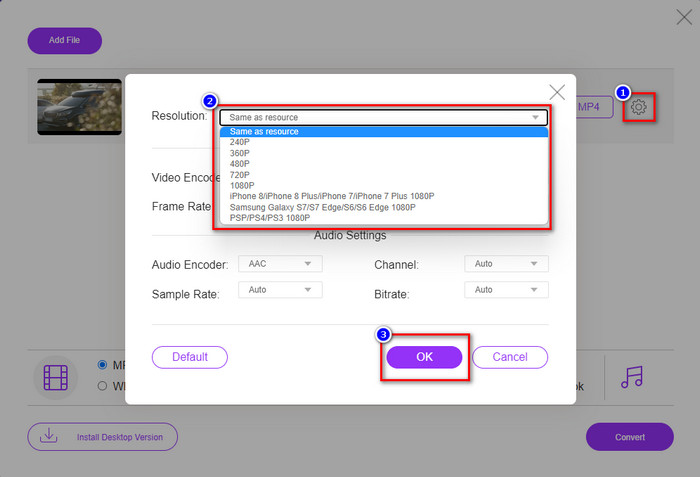
Step 3. Click the gear icon on the right side of the window that will show. Choose the resolution you want by clicking the drop-down button and pressing OK to save.
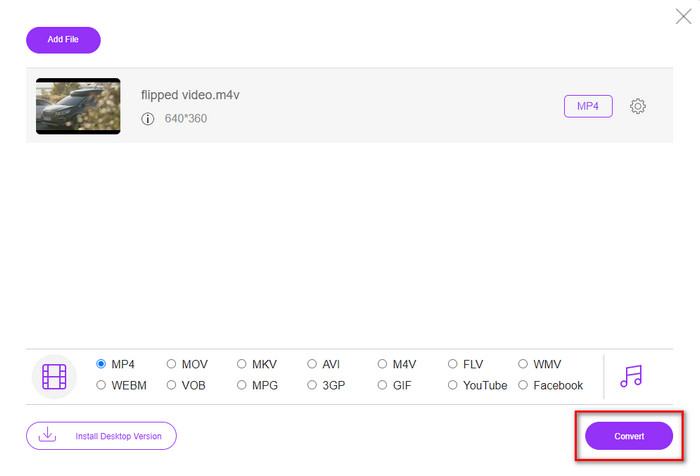
Step 4. To export the lower-quality video, click Convert and wait to download it on your drive.
Bölüm 4. iPhone ve Android'de Video Çözünürlüğünü Azaltmak İçin En İyi 2 Uygulama
Video Format Fabrikası (Yalnızca Android Kullanıcıları İçin)
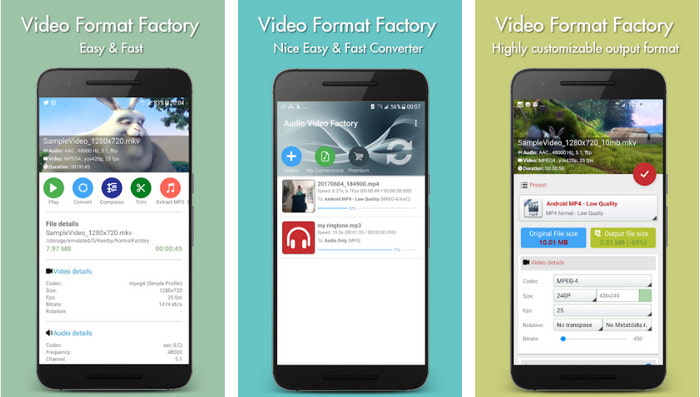
Android'de video çözünürlüğünü nasıl azaltacağınızı öğrenmeniz gerekiyorsa, Audio Video Factory size yardımcı olabilir. Bu uygulama ile videonuzun video çözünürlüğünü ücretsiz olarak kolayca dönüştürebilirsiniz. Ancak, siz dönüştürme yaparken bazı reklamlar çıkacaktır ve aracı satın almazsanız aracın tüm potansiyelini kullanamazsınız. Bu nedenle, size nasıl kullanılacağını öğretmek için adımları izleyin.
Step 1. Download the app on Playstore, then open it.
Step 2. Click Add to upload the video, choose where your video is, and click the video. After that, click Convert; click the Size and choose the resolution you want.
Step 3. Scroll up and click Convert Now to begin the process.
Düşük- Çok Düşük Çözünürlüklü Kamera (Yalnızca iOS Kullanıcıları İçin)
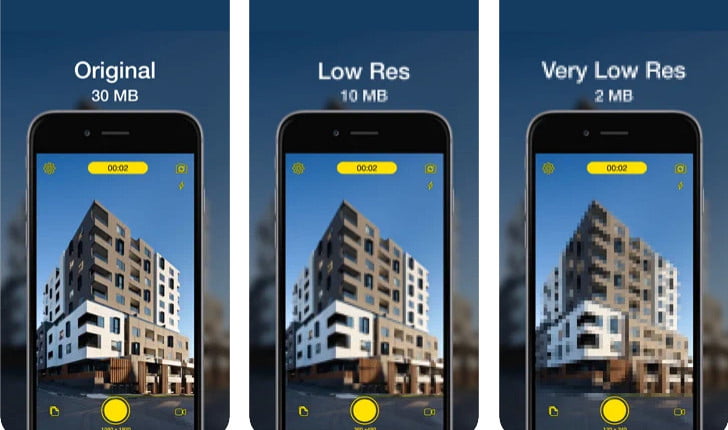
If you are an iOS user, you can still learn how to reduce the resolution of the video on the iPhone by using the Lower- Very Low Res Camera. Unlike the tools in this list, you can shoot a video with a lower resolution if you download this app on the App Store. However, the tools have some limitations, and it has pop-up ads while using the app.
Step 1. Download the app on the App Store, then click it to open.
Step 2. Click the file's icon and select the video you want to convert; after clicking the video, press Resize.
Step 3. Select the Recording Quality, and the process of converting it will begin.
Bölüm 5. Video Çözünürlüğünü Düşürme Hakkında SSS
VLC 4k çözünürlüğü destekliyor mu?
Yes, VLC 3.0 supports playing videos that are on 4k resolution. But did you know there are many things VLC can do? If you want to explore VLC more, click this link and learn about VLC and its other perfect alternatives to use.
Video çözünürlüğünü dönüştürmek için kullanabileceğim diğer araçlar nelerdir?
This review will learn the 8 of the best video resolution converters you can use on different platforms. By clicking this link, you will have more detailed information and different varieties of converter choices.
Sahip olabileceğim en yüksek video çözünürlüğü nedir?
8k video çözünürlüğü, TV'de kullanabileceğiniz en yüksek video çözünürlüğüdür. Bu çözünürlük 4k'dan 4 kat daha keskin ve 1080'den 16 kat daha iyi.
Sonuç
Finally, we now have a clearer idea on how to lower the video resolution in your platform; whether you are using a Windows, Mac, Online, Android, or iPhone, you can use the converters in this list. But if you want a tool that can change your resolution without reducing the quality, we recommend using the FVC Video Converter Ultimate. As we present above, there are many reasons you should use this tool, and if you still do not believe us, you can download the tool and try if it works, as we explain in this post.
-
 En İyi Kılavuz Çapraz Platformlarda Bulunan Video Çözünürlüğü Nasıl Değiştirilir
 Videonun video çözünürlüğünü değiştirmeniz mi gerekiyor? Öyleyse, izlediğiniz videonun video çözünürlüğünü kolayca değiştirmek için yapabileceğiniz farklı yolları öğrenin.
-
 Çoklu Platformlarda Kullanılacak En İyi 8 Video Çözünürlüğü Dönüştürücü [Güncelleme 2022]
 Cihazınızdaki en iyi video çözünürlüğü dönüştürücü hakkında bir fikriniz yok mu? Öyleyse, mevcut video dönüştürücüler hakkında daha fazla bilgi edinmek için bu makaleyi tamamen okuyabilirsiniz.
-
 2021'de Windows/Mac/iOS/Android için En İyi 1080p HD Video Oynatıcı
 Bilgisayarınızda 1080p yüksek çözünürlüklü videolar izlemek için bir video oynatıcı arıyorsanız, Mac, Windows PC, iOS ve Android için en iyi 1080p HD video oynatıcı seçimlerimize göz atın.
