


 Video Dönüştürücü Ultimate
 Ekran kaydedicisi
 Video Onarımı
 Güvenli İndirme
Etkileşimi ve Instagram Varlığını Artırmak için Instagram için Videoyu Yeniden Boyutlandırın
Instagram akışınızdaki beceriksizce kırpılmış videolardan bıktınız mı? İçerik oyununuzu hızlandırmanın ve videolarınızı öne çıkarmanın zamanı geldi! Video içeriğinin artmasıyla, görsellerinizin Instagram için mükemmel bir şekilde optimize edildiğinden emin olmak her zamankinden daha önemli. Ama merak etmeyin. Videolarınızı bir profesyonel gibi kırpmak için profesyonel bir editör olmanıza gerek yok.
Bu rehber yazıda, takipçilerinizin dikkatini çeken etkileyici içerikler oluşturmak için videolarınızı gerekli spesifikasyonlara göre tasarlanmış şekilde Instagram için kırpma konusunda bilmeniz gereken her şeyi adım adım anlatacağız. Hadi başlayalım!

Bölüm 1. Instagram Video En Boy Oranı Standardı
Instagram video en boy oranı standardı 1:1'dir, bu da videonun genişliğinin ve yüksekliğinin eşit olması gerektiği anlamına gelir. Bu kare en boy oranı, Instagram videoları için varsayılan ayardır ve platformda en çok kullanılan biçimdir. Ancak Instagram, 4:5, 16:9 ve 9:16 gibi diğer en boy oranlarını da destekler.
Bu farklı en boy oranları, videolar oluştururken daha fazla esneklik sağlar, ancak belirli oranların, videolarınızın kalitelerini olumsuz yönde etkileyebilecek şekilde kırpılmasına veya yeniden boyutlandırılmasına neden olabileceğini unutmamak önemlidir. Dolayısıyla "Instagram videomu neden kırpıyor?" gibi soruları olanlar için en iyi cevap bu olabilir. Instagram video en boy oranı standardını takip ederek, videolarınızın gösterişli ve profesyonel görünmesini ve platformda görüntülenmek üzere optimize edilmesini sağlayabilirsiniz.
Kısım 2. Instagram Çevrimdışı için Videoyu Yeniden Boyutlandır
FVC Video Converter Ultimate, videolarınızı Instagram için kırpmada mükemmel bir seçenektir. Platforma uygun, etkileyici içerikler oluşturmayı kolaylaştıran çeşitli özellikler ve araçlar sunar. FVC Video Converter Ultimate’ın öne çıkan özelliklerinden biri, Instagram için standart en-boy oranı olan 1:1 dahil olmak üzere çok sayıda en-boy oranını desteklemesidir.
Bu, kalite veya çözünürlükte herhangi bir kayıp endişesi duymadan videolarınızı Instagram için mükemmel bir şekilde kırpabileceğiniz anlamına gelir. Bu yardımcı program, özellikle gönderiler, makaralar ve hikayeler için Instagram için videoları kırpmak için harika bir uygulamadır. Ayrıca, 16:9, 4:3, 21:9 gibi diğer en boy oranlarından ve çok daha fazlasından yararlanabilirsiniz. Instagram için videoların nasıl kırpılacağını öğrenmek için şu basit adımları izleyin:
Adım 1. Programı edinin ve kurun
Öncelikle, bilgisayarınızın işletim sistemine uygun Ücretsiz İndir düğmesine tıklayarak uygulamayı bilgisayarınıza indirin. Ardından, kurulum tamamlandıktan sonra programı kurup başlatın.
Ücretsiz İndirWindows 7 veya üzeri içinGüvenli İndirme
Ücretsiz İndirMacOS 10.7 veya üzeri içinGüvenli İndirme
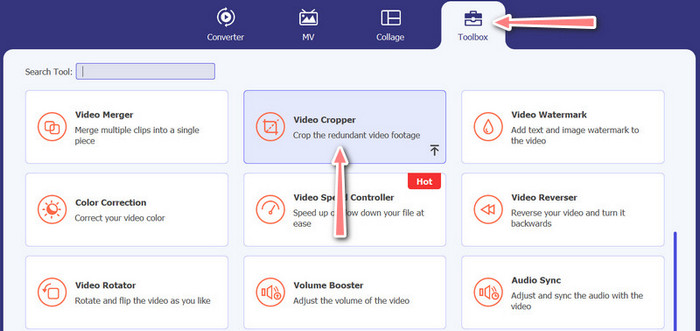
Adım 2. Araç Kutusu ve Video Kırpıcı’ya erişin
Şimdi, Araç Kutusu sekmesine tıklayarak programın araç kutusuna gidin. Bu panel size çeşitli seçenekler sunacaktır. Buradan Video Kırpıcı seçeneğini seçin.
Adım 3. Kırpılacak bir video içe aktarın
Video Kırpıcı seçeneğinin yükleme alanındaki Artı simgesine tıklayarak kırpmak istediğiniz videoyu ekleyin. Ardından, yüklediğiniz videoyu kırpabileceğiniz başka bir panele yönlendirileceksiniz.
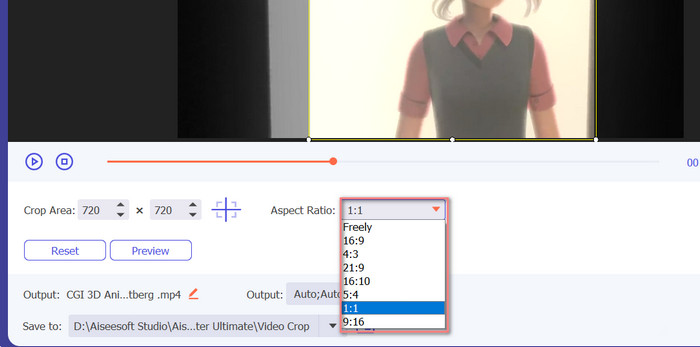
Adım 4. Videoyu kırpın
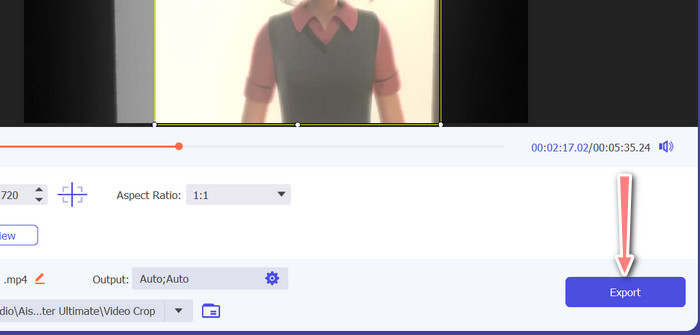
Videonuz için kullanmak istediğiniz en-boy oranını seçin. Instagram için standart en-boy oranları 1:1 (kare) ve 4:5 (dikey) şeklindedir. İstediğiniz en-boy oranını, video önizlemesinin altındaki açılır menüye tıklayarak seçebilirsiniz. Dışa aktarmak için, arayüzün sağ alt köşesindeki Dışa Aktar düğmesine tıklayın. Ardından videonuzu takipçilerinizle paylaşabilir veya Instagram hesabınıza yükleyebilirsiniz.
Bölüm 3. Instagram Çevrimiçi için Videoyu Kırp
Kapwing, karmaşık yazılımlarla uğraşmak zorunda kalmadan Instagram için videolarını hızlı ve kolay bir şekilde kırpmak isteyen herkes için ideal, popüler bir çevrimiçi video düzenleyicidir. Kapwing'in kullanıcı dostu olacak şekilde tasarlandığından bahsetmiyorum bile, bu nedenle deneyimli bir video düzenleyici olmasanız bile platformu yüksek kaliteli içerik oluşturmak için kullanabilirsiniz. Instagram için videoyu ücretsiz olarak kırpmak için Kapwing'i nasıl kullanacağınıza ilişkin adımlar şunlardır:
Adım 1. Kapwing web sitesine gidin ve Düzenlemeye Başla düğmesine tıklayın.
Adım 2. Kırpmak istediğiniz videoyu Kapwing düzenleyicisine sürükleyip bırakarak ya da Yükle düğmesine tıklayıp dosyayı bilgisayarınızdan seçerek yükleyin.
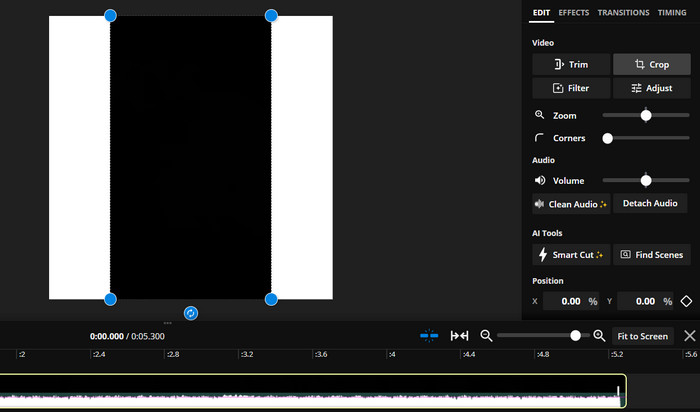
Adım 3. Sağ taraftaki menüden Kırp aracına tıklayın. Sonra, hazır seçeneklerden birini seçerek veya özel bir en-boy oranı oluşturarak videonuzu kırpmak istediğiniz en-boy oranını belirleyin. Videoyu istediğiniz boyuta kırpmak için video önizlemesindeki tutamaçları kullanın. Bu yöntemi, Instagram gönderileri için videoları kırpmak amacıyla da kullanabileceğinizi unutmayın.
Bölüm 4. Android'de Instagram için Videoları Kırpın
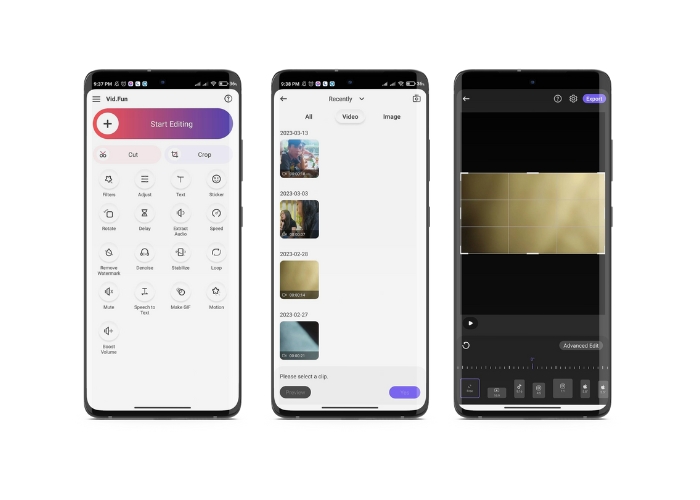
Vid.fun, ister akıllı telefon ister tablet kullanın, videolarınızı Instagram için mükemmel boyuta kırpmanıza imkân tanır. Uygulama, yalnızca birkaç dokunuşla videolarınızı kolayca kırpmanıza olanak veren güçlü bir video kırpıcı da dâhil olmak üzere, yüksek kaliteli videolar oluşturmanıza yardımcı olacak pek çok özellikle donatılmıştır. Ayrıca, seçebileceğiniz çeşitli en-boy oranları sunar; böylece videolarınızın Instagram’da harika görüneceğinden emin olabilirsiniz. İşte bu uygulamayı Android cihazınızda kullanarak Instagram Reels için videoları nasıl kırpacağınıza dair bir rehber.
Adım 1. Vid.fun’u Google Play Store’dan indirin ve kurun. Hemen ardından uygulamayı başlatın. Ana ekrandaki Kırp simgesine dokunun.
Adım 2. Cihazınızın galerisinden seçim yaparak bir medya dosyası ekleyin. Ardından, ekranın alt kısmındaki menüden seçim yaparak istediğiniz en-boy oranını belirleyin. Alternatif olarak, kırpmayı ayarlamak ve videoyu istediğiniz şekilde konumlandırmak için video önizlemesindeki tutamaçları kullanabilirsiniz.
Adım 3. Kırpılmış videonuzu, istediğiniz gibi göründüğünden emin olmak için önizleyin. Kırpmadan memnun kaldığınızda, sağ üst köşede bulunan Dışa Aktar düğmesine dokunun.
Daha Fazla Okuma:
Somut Öğretici – Instagram için Videoları Birleştirmenin 2 Yöntemi
Instagram’da GIF Paylaşmanın Farklı Yolları [Web ve Program Tabanlı Araç]
Bölüm 5. Instagram için Videoları Yeniden Boyutlandırma hakkında SSS
Videom Instagram için gereken en boy oranıyla eşleşmezse ne olur?
Videonuz Instagram için gereken en boy oranına uymuyorsa, ya yanlarda ya da üstte ve altta siyah çubuklarla görünür ya da çerçeveye sığması için otomatik olarak kırpılır.
Instagram'a önceden yüklenmiş bir videoyu kırpabilir miyim?
Hayır, zaten Instagram'a yüklenmiş bir videoyu kırpamazsınız. Instagram'a yüklemeden önce videoyu kırpmanız gerekecek.
Bir videoyu kalite kaybı olmadan kırpabilir miyim?
Evet, çok fazla kırpmadığınız sürece bir videoyu kalite kaybı olmadan kırpabilirsiniz. Bir videoyu aşırı derecede kırpmak, videonun çözünürlüğünü düşüreceği için kalite kaybına yol açar.
Sonuç
Instagram Hikâyeleri, gönderileri veya Reels için videoyu kırpmak, videonuzun harika görünmesi ve gerekli en-boy oranına uyması açısından önemlidir. FVC Video Converter Ultimate, Kapwing veya Vid.fun gibi doğru araçlarla videolarınızı doğru en-boy oranına kolayca Instagram için kırpabilirsiniz.
-
 Resim Göndermeden Önce Instagram Filtresi Nasıl Eklenir ve Yapılır?
 Instagram'daki filtreler nelerdir? Nasıl uygulanır? Nasıl yapılır? Bu soruların bu yazıda basit cevapları olacak, bu yüzden onları okuyun.
-
 Bir Profesyonel Gibi Instagram'da Bir Videoyu Hızlandırmanın En İyi Teknikleri
 Instagram'a hızlandırma videosu yüklemek ister misiniz? Bu durumda, bu makale videoları kolayca hızlandırmak için kullanabileceğiniz en iyi teknikleri sağlayacaktır.
-
 Masaüstünde, iPhone'da veya Android'de Instagram için Fotoğrafları Yeniden Boyutlandırın
 Instagram için fotoğraflarınızı yeniden boyutlandırmak istiyorsanız, bunun nasıl yapılacağına dair adımları size göstereceğiz. Instagram için fotoğrafları yeniden boyutlandırma adımlarını öğrenmek için okuyun.
