


 Video Dönüştürücü Ultimate
 Ekran kaydedicisi
 Video Onarımı
 Güvenli İndirme
Windows/Mac'te Birden Çok ASF Dosyasını Birleştirmenin En İyi 2 Yöntemi
Genellikle, tamamı tek bir video dosyasında saklanması beklenen uzun bir hikâyenin, eksik video klipler hâlinde dağılmış olduğunu görürüz. Örneğin bir film sitesinden UHD bir video indirmiş ve videonun ZIP paketleri içinde ayrı ayrı ASF dosyalarına bölünmüş olduğunu fark etmiş olabilirsiniz. Peki bu ASF dosyalarını nasıl birleştirip videoyu yeniden eksiksiz hale getirir ve kesintisiz oynatırsınız? Bu makale size yardımcı olabilir. ASF video kliplerini tek bir tam dosyada birleştirmenin en iyi 2 yöntemini özetledik.

Bölüm 1: Birden Çok ASF Dosyasını Çevrimiçi Olarak Ücretsiz Olarak Birleştirin
En hızlı çözüm, ASF dosyalarını ücretsiz birleştirmeniz için hafif bir çevrim içi araç olan FVC Free Online Video Merger’ı kullanmaktır. Herhangi bir program indirip kurmanız gerekmez. Sadece video dosyalarınızı yükleyin ve ardından tek tıkla birleştirmeye başlayın.
Öne Çıkan Özellikler
- • Video kalitesinde herhangi bir kayıp olmadan ASF video dosyalarına katılın
- • Birleştirilmiş videoda filigran bırakmayın
- • Birleştirilmiş videoyu 9 formatta kaydedin
- • Videolarınızı 1 saniyede ekleyin ve dosyaları sunucuya yüklemenize gerek yok
Adım 1. Tarayıcınızda FVC Free Online Video Merger’ı açın. Web sayfasının ortasında büyük bir 'Upload Videos to Merge' düğmesi göreceksiniz. Ona tıklayın.
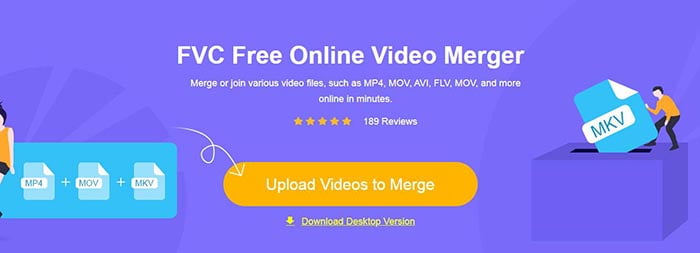
Not: Bu aracı ilk kez kullanırken, bir başlatıcı indirip kurmanız gerekir.
Adım 2. Bir dosya gezgini penceresi açılacaktır. Burada ASF dosyalarınızı seçip yükleyebilirsiniz. Birden fazla dosya seçmek için klavyenizdeki Ctrl tuşuna basılı tutup dosyaların üzerine tek tek tıklamanız yeterlidir.
Adım 3. Seçilen dosyaları eklemek için 'Open' düğmesine tıklayın; ardından 'ASF merging' arayüzünü göreceksiniz. Burada mevcut videoları kaldırıp yenilerini ekleyerek video sırasını ayarlayabilirsiniz.
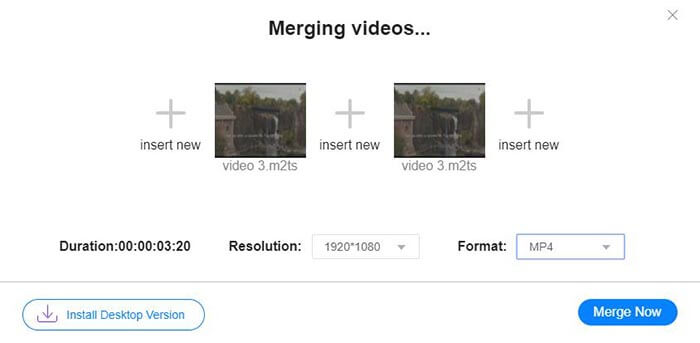
Adım 4. Ardından çıktı formatını ve çözünürlüğünü seçebilirsiniz. Çözünürlüğü orijinalde bırakmanız da mümkündür. Ancak bu çevrim içi ASF birleştirici, birleştirilmiş dosyayı ASF formatında dışa aktarmanızı desteklemez. Bu yüzden listeden başka bir format seçerek videoyu dönüştürmeniz gerekir.
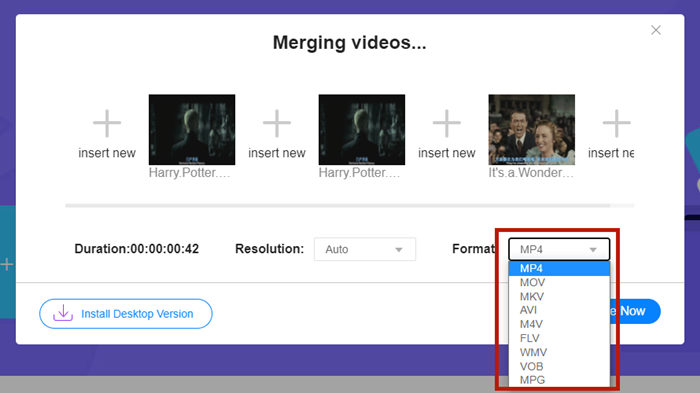
Adım 5. ASF dosyalarını birleştirmek için arayüzün sağ alt köşesindeki 'Merge Now' düğmesine tıklayın. Araç sizden dışa aktarılan dosya için bir hedef klasör belirlemenizi isteyecektir.
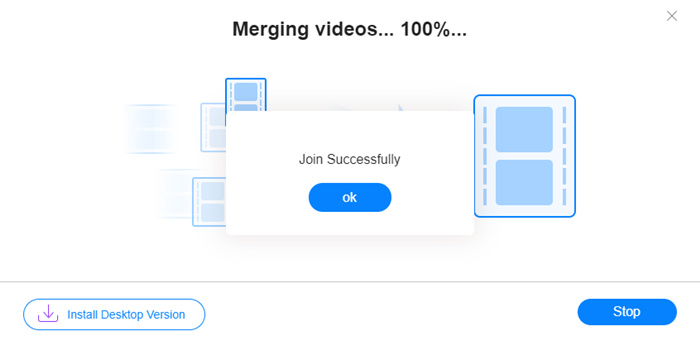
'Join Successfully' bildirimini gördüğünüzde, hedef klasöre gidip birleştirilmiş dosyayı görebilirsiniz.
Bu yöntem, ASF dosyalarına katılmanın gerçekten en hızlı yoludur. Tüm süreç gördüğünüz kadar basit. Ancak kullanımının kolay olması ve hafif olması özelliklerini sınırlamıştır. Videoların sırasını uygun şekilde düzenleyemezsiniz. İstediğiniz çözünürlüğü veya çıktı biçimini uygulayamayabilirsiniz. En kötüsü, farklı çözünürlük ve yönlere sahip ASF videolarını birleştirmek istediğinizde, bu araç her şeyi alt üst edebilir. O zaman bunu yapmak için başka bir araca ihtiyacınız olabilir.
2. Bölüm: ASF Dosyalarını Sorunsuz ve Daha Hızlı Bir Şekilde Birleştirin
Video Converter Ultimate, ASF dosyalarınızı döndürmenize, kırpmanıza, kesmenize ve daha da önemlisi birleştirmenize yardımcı olabilir. Bu programla, birleştirilmiş ASF dosyasını dilediğiniz format ve çözünürlükte kaydedebilirsiniz. Video Converter Ultimate içindeki birleştirme süreci de son derece hızlıdır.
Öne Çıkan Özellikler
- • ASF dosyalarına katılmadan önce istenmeyen başlangıçları ve bitişleri kırpın.
- • Videoları farklı yönlerde döndürün.
- • Tüm video klipleri aynı çözünürlükte yapmak için Kırp.
- • ASF dosyasını sıkıştırın YouTube, Facebook vb. için daha küçük bir boyuta
- • Donanım hızlandırma, size 70 kat daha hızlı video birleştirme hızı getiriyor.
Ücretsiz İndirWindows 7 veya üstü içinGüvenli İndirme
Ücretsiz İndirMacOS 10.7 veya üstü içinGüvenli İndirme
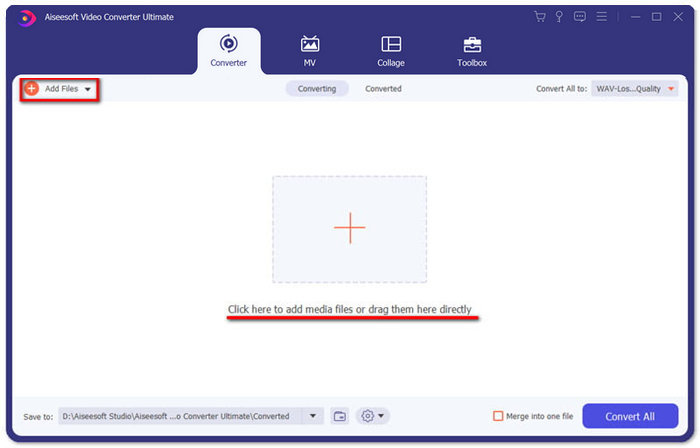
Adım 1. Video Converter Ultimate’ı indirin, kurun ve başlatın. Ana arayüzün ortasındaki büyük + düğmesine tıklayarak birleştirmek istediğiniz ASF dosyalarını ekleyin. Ekledikten sonra içe aktarılan klipleri sürükleyerek sıralarını ayarlayabilirsiniz.
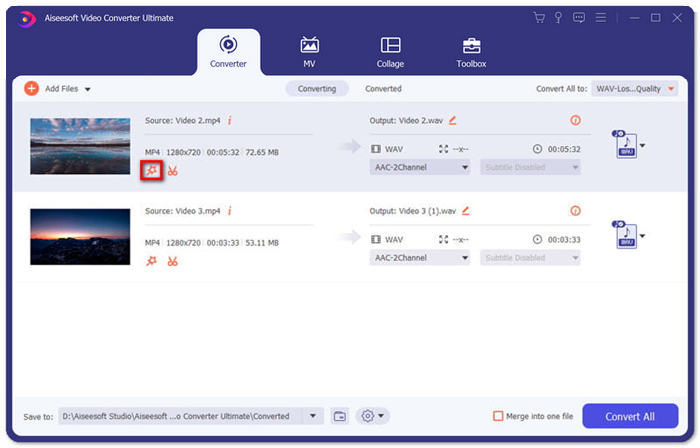
Adım 2. Kırpmak, döndürmek veya en-boy oranını değiştirmek istediğiniz klipler için 'Edit' düğmesine tıklayabilirsiniz. Böylece 'Rotate & Crop' sayfasına geçersiniz.
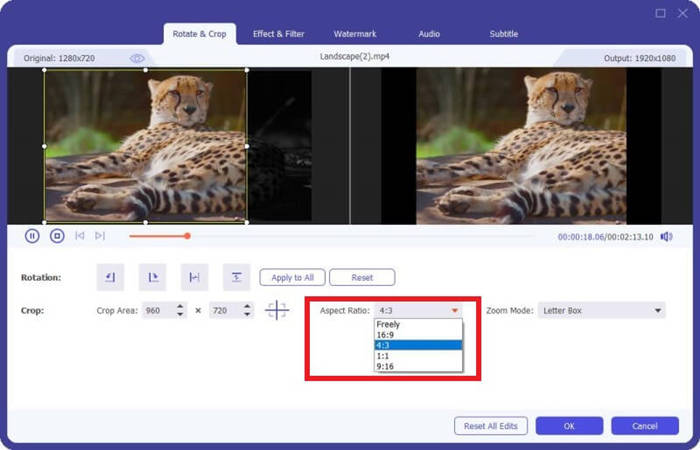
Burada 'Aspect Ratio' bölümünden en-boy oranını değiştirebilirsiniz. Çözünürlüğü değiştirmek için sol taraftaki önizleme ekranının çerçevesini serbestçe sürükleyebilirsiniz. Döndürme işlemi de burada mümkündür. Ayarları kaydetmek için 'OK' düğmesine tıklamayı unutmayın.
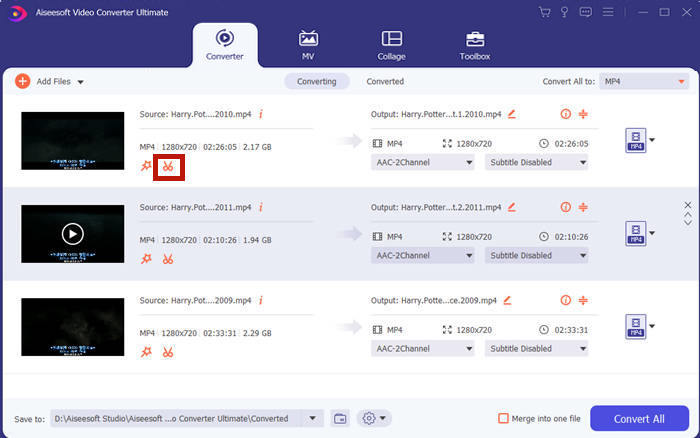
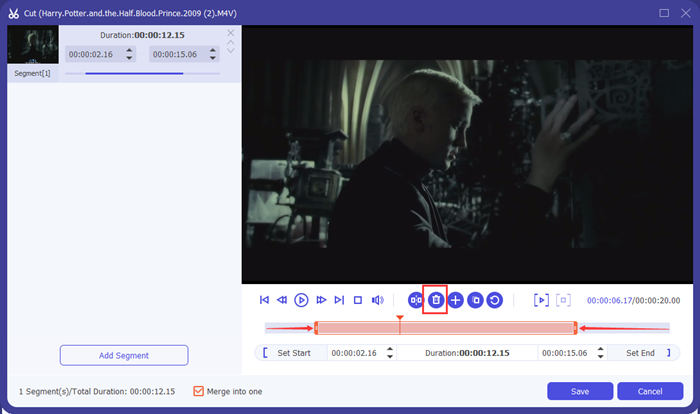
Adım 3. İstenmeyen bölümleri kesmek için 'Cut' özelliğini kullanmanız gerekir. 'Cut' düğmesine tıklayarak 'Cut' sayfasına gidin.
Burada bir segment seçip 'Delete' (çöp kutusu simgesi) düğmesine tıklayarak onu kaldırabilirsiniz. Son olarak kaydet’e tıklayıp geri dönün.
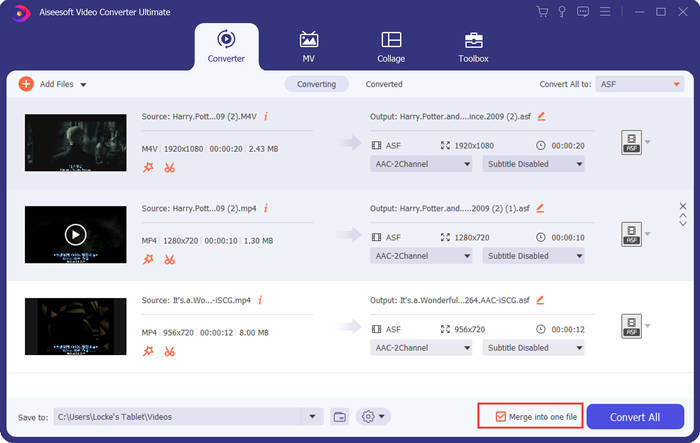
Adım 4. Ana arayüzde, sağ alt köşedeki 'Merge into one file' kutucuğunu işaretleyin.
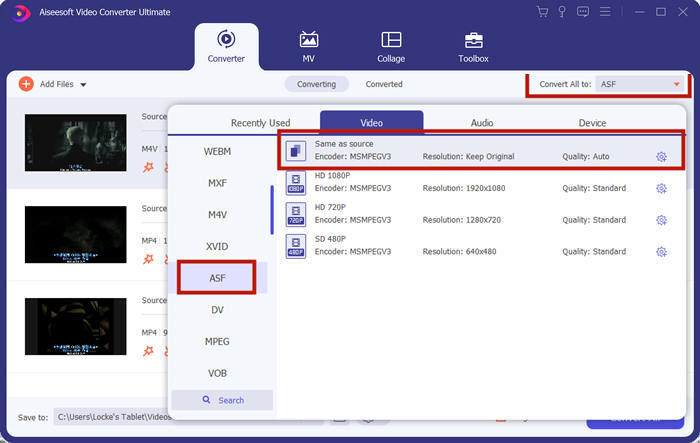
Adım 5. Ardından arayüzün sağ üst köşesindeki 'Convert All to' bölümünü kullanarak çıktı formatını seçebilirsiniz. Listeden 'ASF'yi bulun ve tıklayın.
Son olarak, ASF dosyalarını birleştirmeye başlamak için 'Convert All' düğmesine tıklayın. İşlem tamamlandığında, çıktı dosyası ana arayüzün sol alt köşesinde belirlediğiniz klasöre kaydedilecektir. Son olarak, ASF dosyalarını birleştirme hakkında en sık sorulan 3 soruyu derledik.
Bölüm 3: ASF Dosyalarına Katılma Hakkında SSS
Neden hiçbir oynatıcı uygulamasında bir ASF dosyasını oynatamıyorum?
ASF uzantısını kullanan üç tür dosya vardır. Bunlar Advanced Systems Format, Acclaim Skeleton File ve Electronic Arts Sound File'dır. Belki de ASF'niz Advanced Systems Format video dosyası değildir.
Bir ASF dosyasını oynatırken neden herhangi bir görüntü göremiyorum?
Bir ASF dosyasını oynatırken neden herhangi bir görüntü göremiyorum? Her ASF dosyası en az bir video içermez. Bazen bir ASF yalnızca bir parça WMA sesi içerebilir. Hoparlörlerinizin veya kulaklığınızın sesini yükseltin ve dosyanın oynatılmasından herhangi bir ses gelip gelmediğini bulun.
Akıllı TV'mde bir ASF dosyasını oynatabilir miyim?
Duruma bağlıdır. Bazı akıllı TV’ler ASF dosyalarını desteklerken bazıları desteklemez. Akıllı TV’niz ASF dosyasını oynatmıyorsa, dosyayı önceden MP4'e dönüştürebilirsiniz.
Sonuç
Bir ASF dosyası genellikle bir WMV veya WMA dosyası içerir. Birçok cihaz ve program tarafından geniş ölçüde desteklenir. Bu makale, birden fazla ASF dosyasını kaliteyi düşürmeden ve filigran eklemeden tek bir dosyada birleştirmenin en etkili iki yolunu sunar. FVC Free Online Video Merger tartışmasız en hızlı çözümünüzdür. Ancak videoları sorunsuz bir şekilde birleştirmek için kırpmak veya döndürmek istiyorsanız, Video Converter Ultimate’ı kullanmanız daha iyi olacaktır. ASF dosyalarını birleştirirken herhangi bir zorlukla karşılaşıyor musunuz? Yorumlarda bize yazın.
-
 İPhone'da Videoları iMovie ile veya iMovie olmadan Birleştirme (Ücretsiz Kullanım)
 Eğitim - iPhone'daki Videoları Yenisiyle Birleştirmenin 4 Ücretsiz Yolu
-
 Sürekli Film İzlemek için MKV Dosyalarına Katılmanın En İyi 2 Yolu
 MKV Film Dosyaları Birleştirme: Birden Fazla MKV Dosyasını Birine Nasıl Katılır
-
 WMV Kliplerine Çevrimiçi Nasıl Katılabilirsiniz? İşte Kanıtlanmış 3 Yöntem
 WMV Dosyalarına Ücretsiz Çevrimiçi Katılmak için En İyi 3 Yöntem (2021 Güncellemesi)
