


 Video Dönüştürücü Ultimate
 Ekran kaydedicisi
 Video Onarımı
 Güvenli İndirme
Bilgisayardaki MPG Dosyaları Nasıl Birleştirilir
DVD’den bilgisayara bir filmi kopyalamaya (rip etmeye) çalıştığınızda, genellikle MPG formatında kaydedilir. Kopyalanan film çoğu zaman birkaç kısa MPG klibine bölündüğü için, tam bir film dosyası elde etmek amacıyla bu MPG formatlı film kliplerini birleştirmek isteyebilirsiniz. Bu yazıda, size MPG dosyalarını birleştirme yollarını (MPG dosyaları nasıl birleştirilir) 2 farklı yöntemle göstereceğiz.

Bölüm 1. Video Converter Ultimate ile MPG Dosyalarına Nasıl Katılırım?
MPG filmlerini birleştirmek ve düzenlemek için profesyonel video birleştirme yazılımına ihtiyacınız olabilir. Video Converter Ultimate, sorununuzu çözmenin en iyi yoludur. Güçlü video birleştirme, dönüştürme ve düzenleme özellikleriyle, birçok MPG dosyasına katılabilir ve bunları bilgisayarınızda ayarlayabilirsiniz.
- 1. Tek bir tıklama ile MPG dosyaları dahil çeşitli video formatlarına katılın ve dönüştürün.
- 2. Kırpma, bölme döndürme ve filigran ve altyazı ekleme dahil olmak üzere çoklu MPG video düzenleme özellikleri.
- 3. Video kalitesini yükseltmeniz için MPG video geliştirici sağlayan özel araç kutusu.
- 4. mpg film kliplerinizi süslemek için tema ve filtreler ekleyin
Ücretsiz İndirWindows 7 veya üstü içinGüvenli İndirme
Ücretsiz İndirMacOS 10.7 veya üstü içinGüvenli İndirme
Adım 1. Video Converter Ultimate’ı indirin ve kurun. Ardından Converter arayüzünü seçin. Arayüzün ortasındaki Add Files kutusuna tıklayarak birleştirmek istediğiniz MPG dosyalarını ekleyebilirsiniz. Ayrıca birden fazla MPG dosyasını doğrudan bu kutuya sürükleyip bırakabilirsiniz. Program, birden çok MPG dosyası eklemenizi ve bunları tek bir dosyada birleştirmenizi destekler.
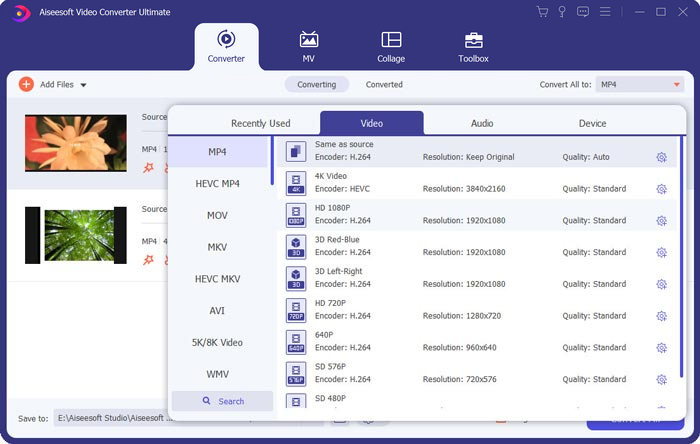
Adım 2. Daha sonra sağ taraftaki Convert All to alanına tıklayarak çıktı almak istediğiniz video formatını seçin. Menüden MP4, MOV, MKV vb. dâhil olmak üzere çeşitli format türlerini seçebilirsiniz. Formatın parametrelerini manuel olarak ayarlamak için dişli simgesine tıklayabilirsiniz.
Adım 3. Videolarınızı düzenlemek için makas simgesine tıklayarak düzenleme arayüzünü açabilirsiniz. Videolarınızın başlangıç ve bitiş sürelerini ayarlayarak kırpma yapabilirsiniz. Sol çubuktaki MPG videolar kronolojik sıraya göre listelenir. Videoların sırasını değiştirmek isterseniz, onları sürükleyip farklı bir sıraya bırakabilirsiniz. Son birleştirilmiş videoda üstte yer alan video, alttaki videodan önce oynatılacaktır.
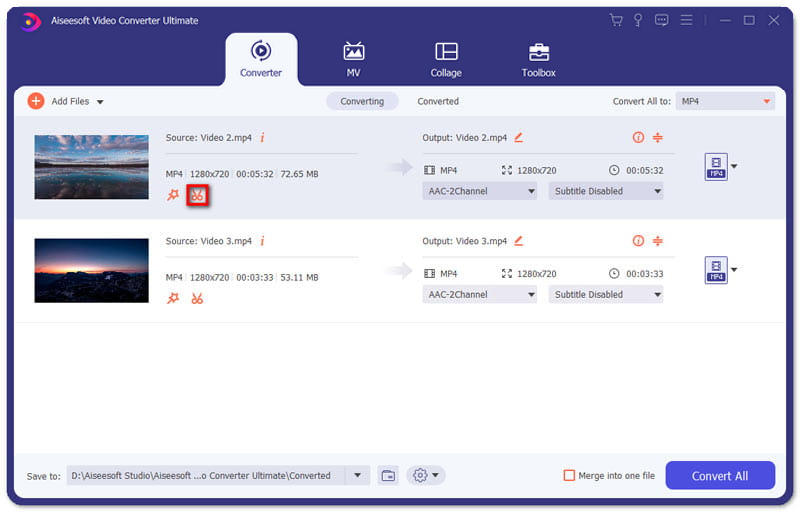
Adım 4. Düzenlemeyi bitirdiğinizde, videoları birleştirip son projeyi dışa aktarabilirsiniz. Videoların, düzenleme arayüzündeki sıralarına göre kronolojik olarak birleştirileceğini bilmelisiniz. Birleştirmeyi başlatmak için Merge into One File kutusunu işaretleyip Convert All düğmesine tıklamalısınız. İşlem tamamlandıktan sonra, birleştirilmiş videoyu klasörde bulabilirsiniz.
Daha sonra MPG dosyalarını doğrudan MPG MPEG player ile oynatabilirsiniz.
Bölüm 2. MPG Dosyalarına Ücretsiz Çevrimiçi Katılma
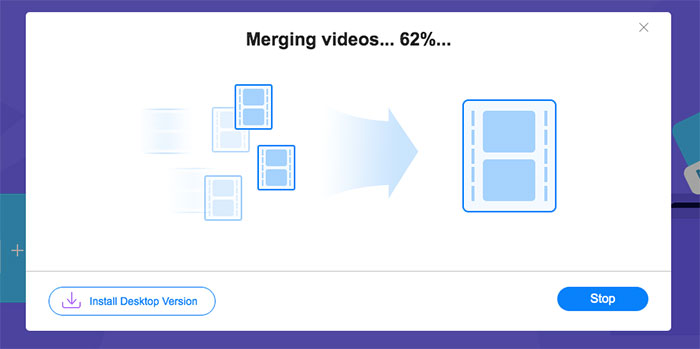
MPG dosyalarını çevrimiçi ve ücretsiz bir şekilde birleştirmek isterseniz, Free Online Video Merger aracını kullanabilirsiniz. Basit ve iyi tasarlanmış arayüzü, tüm kullanıcılar için oldukça kullanışlıdır.
Adım 1. Başlatıcıyı indirin ve birleştirme aracını kurun. Ardından arayüzdeki + simgesine tıklayarak MPG dosyaları ekleyebilirsiniz. Ekranın alt kısmındaki menüden birleştirilmiş videonun çözünürlüğünü ve formatını ayarlayabilirsiniz. Ekranda videoların sırası soldan sağa doğru kronolojik olarak gösterilir.
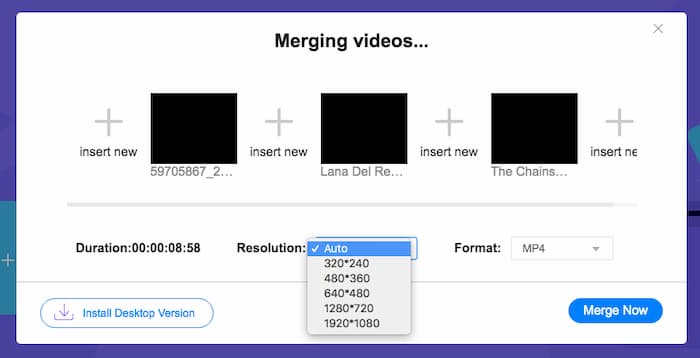
Adım 2. Birleştirmeyi başlatmak için Merge Now düğmesine tıklamalısınız. Birleştirme işlemi tamamlandığında, videoyu bilgisayarınızdaki varsayılan Download klasöründe bulabilirsiniz.
Bölüm 3. MPG Dosyalarına Katılma Hakkında SSS
1. Bir MPG video dosyasını nasıl açabilirim?
MPG video dosyası genellikle MPEG-1 ve MPEG-2 sürümleridir. MPEG-1, Windows Media Player ve VLC Media Player gibi ana akım medya oynatıcılarının çoğu ile uyumludur. MPEG-2, DVD videolar için tasarlanmıştır. Açmak için üçüncü taraf bir DVD kod çözücüyü indirebilirsiniz.
2. MPG dosyası nedir?
MPG dosyası, video ve ses verilerini kaydetmek için çılgınca kullanılan bir video dosyasıdır. Kaliteyi kaybetmeden büyük ses ve video verilerini küçük boyutta kaydedebilir ve sıkıştırabilir. Moving Picture Experts Group (MPEG) tarafından standardize edilmiştir. MPG, filmleri İnternette kaydetmek ve dağıtmak için kullanılır. MPG dosyaları, bir program akışı kapsayıcı biçiminde PS veya MPEG-PS olarak kaydedilir.
3. MPG video dosyalarını ücretsiz olarak nasıl birleştirebilirim?
İnternette birçok ücretsiz video birleştirme aracı vardır. Yukarıda bahsedilen Ücretsiz Çevrimiçi Video Birleştirme, talebinizi karşılayabilecek kolay ve net bir arayüze sahip ücretsiz bir araçtır.
Sonuç
Birden fazla MPG dosyasını tek bir dosyada birleştirmek istediğinizde, profesyonel bir video birleştirme aracına ihtiyacınız vardır. Bu yazıda, ihtiyacınızı karşılamak için video birleştiricilerin nasıl kullanılacağını öğrenebilirsiniz. Video birleştirme araçlarıyla ilgili herhangi bir sorunuz varsa veya MPG dosyalarını birleştirme hakkında daha fazla bilgi almak istiyorsanız, lütfen aşağıya yorumunuzu bırakın.
-
 Sony X70'ten MXF Videolarına Katılmak için 2 Nihai Yöntem
 Sony X70'ten bazı MXF videoları çektiyseniz, MXF dosyalarına katılmanın en iyi yöntemleri nelerdir? İşte videoları yüksek kaliteyle birleştirmenin 2 etkili yöntemi.
-
 YouTube için Videoyu Sıkıştırmanın 2 Yolu
 YouTube videoları büyük ve yüklenmesi yavaş mı? YouTube için video dosyası boyutunu çevrimiçi olarak ve bilgisayarda 2 şekilde daha küçük hale getirin.
-
 GIF Oynatıcı - Windows PC, Mac, Android ve iPhone için En İyi 5 GIF Oynatıcı
 GIF dosyalarını hangi program açar? GIF'leri Android'de nasıl görüntülerim? İPhone'da GIF'leri açmak için bir GIF oynatıcı var mı? Bu gönderi sizin için en iyi 5 GIF oyuncusunu paylaşıyor.
