


 Video Dönüştürücü Ultimate
 Ekran kaydedicisi
 Video Onarımı
 Güvenli İndirme
Sony Video Kameradan MXF Video Dosyalarını Orijinal 4K Kalitesiyle Birleştirme
S: “Sony X70'i Canon XF100 fotoğraf makinemi değiştirmesi için sipariş ettim. Canon XF100 ile tüm MXF dosyalarını hızlı bir şekilde birleştirmek için Canon XF Utility'yi kullanabilirim. Sony X70 tarafından oluşturulan MXF dosyalarını birleştirmek için benzer bir yazılım var mı?”
Sony XDCAM (Sony X70 dahil), Canon XF305 ve Panasonic AG-HPX500M gibi profesyonel kameralarla video çekmek için 4K modunu kullandığınızda, video dosyaları yüksek kalitede MXF formatında kaydedilir. Ancak video birleştiricilerin çoğu MXF dosyalarını desteklemiyor. İşte bilmeniz gereken en sık kullanılan MXF birleştiriciler.

Bölüm 1: MXF Dosyalarını Ücretsiz Çevrimiçi Birleştirme
Boyut sınırlaması olmadan bazı büyük MXF dosyalarını yalnızca birleştirmek istiyorsanız, FVC Free Online Merger dikkate alabileceğiniz çok yönlü bir yöntemdir. Birden fazla biçimdeki videoları yüklemenizi sağlar. Ayrıca, üzerine filigran eklenmemiş etkileyici bir video üretebilirsiniz.
- 1. MXF video dosyalarını herhangi bir boyut sınırlaması olmaksızın çevrimiçi olarak yan yana koyun.
- 2. Birden fazla MXF video dosyasını 1080p çözünürlükte MP4 formatında birleştirin.
- 3. Çözünürlük ayarlarını çeşitli ön ayarlarla yapılandırın ve ayarlayın.
- 4. Yüklenen MXF'yi 24 saat içinde kaldırmak için gizliliği koruyun.
Adım 1: FVC Free Online Merger sayfasına gidin ve tarayıcı eklentisini yüklemek için Upload Videos to Merge düğmesine tıklayın ve birleştirmek istediğiniz MXF dosyalarını seçin.

Adım 2: Diğer MXF dosyalarını istediğiniz sırayla eklemek için Artı simgesine tıklayın. Ardından videoların YouTube’a sorunsuz bir şekilde yüklenip oynatılmasını sağlamak için MP4 formatını seçin. Yüksek video kalitesini korumak için 1920*1080P çözünürlüğünü seçebilirsiniz.

Adım 3: Bundan sonra, birleştirilmiş videolarınızı bilgisayara kaydedeceğiniz yolu ayarlayabilir ve MXF dosyalarını otomatik olarak birleştirmeye başlamak için sağ alt köşedeki Merge Now düğmesine tıklayabilirsiniz.

Bölüm 2: Orijinal Kalite Olmadan MXF Dosyalarına Nasıl Katılırsınız
MXF videolarının orijinal 4K kalitesini koruyarak film veya dizi oluşturmanız gerektiğinde, FVC Video Converter Ultimate, MXF, MKV, MP4 ve daha fazlası dahil olmak üzere video dosyalarını birleştirmenin çok yönlü bir yoludur. İstediğiniz bölümü kırpmanızı, dosyayı sıkıştırmanızı ve başka bir video formatına dönüştürmenizi sağlar. Ayrıca, MXF dosyalarını 1080P veya 4K çözünürlükle birleştirmenize de olanak tanır.
- 1. MXF, MKV, MP4 ve daha fazlası dahil olmak üzere farklı video formatlarını birleştirin.
- 2. Çözünürlüğü yükseltmek, video gürültüsünü gidermek vb. için 4 yöntem sağlayın.
- 3. Video çözünürlüğünü, bit hızını, kare hızını ve diğer parametreleri ayarlayın.
- 4. Birleştirilmiş videoyu sosyal medya siteleri için başka bir video formatına dönüştürün.
Ücretsiz İndirWindows 7 veya üstü içinGüvenli İndirme
Ücretsiz İndirMacOS 10.7 veya üstü içinGüvenli İndirme
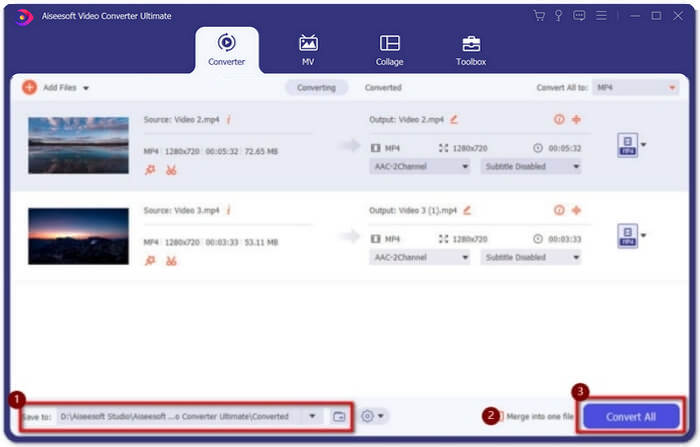
Adım 1: Video Converter Ultimate’ı indirin ve başlatın. Birleştirmek istediğiniz tüm MXF dosyalarını seçmek için Add Files düğmesine tıklayın. Dosyaları yazılıma sürükleyip bırakabilirsiniz. Sıralamayı ayarlamak isterseniz, videoları sürükleyip doğru sırada bırakmanız yeterlidir.

Adım 2: Ardından, Convert All to düğmesine tıklayabilir ve video satırında MXF formatını bulabilirsiniz. Orijinal yüksek kaliteyi korumak için 4K veya Same as Source düğmesini seçin. Ayrıca, gereksinimlerinize göre video çözünürlüğünü yükseltebilirsiniz.

Adım 3: İstediğiniz depolama yolunu seçtikten sonra, Merge into one file kutusunu işaretleyin ve MXF dosyalarını birleştirmek için Convert All düğmesine tıklayın. Videoları birleştirdikten sonra, dosyaları bilgisayarınıza kaydedebilir veya sosyal medya sitelerinde paylaşabilirsiniz.
Bölüm 3: MXF Video Dosyalarını Birleştirmek İçin SSS
1. MXF nedir?
MXF, profesyonel bir ses ve video medya formatı olan Material Exchange Format'ın kısaltmasıdır. 4K modunda profesyonel kameralar tarafından çekilen videolar her zaman MXF formatındadır, bu nedenle film ve televizyon endüstrisinde genellikle video üretmek ve düzenlemek için kullanılır.
2. YouTube için MXF videolarını birleştirmek istersem hangi formatı seçmeliyim?
MXF, YouTube için çok büyük, nispeten yüksek kaliteyi küçük boyutta tutmak için MXF dosyalarını MP4'te birleştirmeyi seçmeniz daha iyi olur. Ayrıca, çoğu cihaz ve oynatıcı MP4 video oynatmayı destekler.
3. MXF video dosyalarını QuickTime oynatıcı ile oynatabilir miyim?
Evet, oynatabilirsiniz. Yaygın olmayan bir format olmasına rağmen, Mac’te QuickTime ve Windows’ta Zoom Player dahil bazı video oynatıcılar MXF videolarını oynatmayı destekler. MXF videolarını oynatamıyorsanız, MXF dosyalarını MP4 ve AVI gibi yaygın formatlara dönüştürmeyi deneyebilirsiniz.
Sonuç
Profesyonel kameralar tarafından çekilen MXF video dosyalarını birleştirmek için en sık kullanılan MXF marangozlarını makaleden bulabilirsiniz. Bu birleştirilmiş videoları yalnızca YouTube'a yüklemek istiyorsanız, ücretsiz çevrimiçi birleştiriciyi kullanmak en iyi seçimdir çünkü MXF dosyalarını daha küçük boyutlarda MP4'te birleştirmenize yardımcı olabilir. Ancak, profesyonel bir film veya televizyon oluşturmak istiyorsanız, orijinal 4K kalitesini korumak için Ultimate Video Converter'ı seçmelisiniz.
-
 6 En İyi AVI Birleşmeleri: Windows ve Mac'te AVI Video Dosyalarına Nasıl Katılılır
 Bir DVD için AVI videolarına katılmak istediğinizde, makaleden masaüstü programlarının yanı sıra ücretsiz çevrimiçi araçlar da dahil olmak üzere en iyi 6 AVI birleştiricisinin özellikleri hakkında bilgi edinebilirsiniz.
-
 Premiere Pro ve Ücretsiz Çevrimiçi ile MXF Nasıl Sıkıştırılır
 MXF daha küçük dosya boyutuyla nasıl sıkıştırılır? Adobe Premiere Pro'da MXF dosyaları nasıl sıkıştırılır? Bu gönderi, MXF dosyalarını sıkıştırmanın 2 yolunu paylaşıyor.
-
 M2TS Dosyalarına Ücretsiz Nasıl Katılırım
 Video kameralar tarafından yakalanan M2TS / MTS dosyalarını ücretsiz birleştirme mi istiyorsunuz? Bu gönderi, 2 M2TS dosyasını yeniden kodlamadan tek bir dosyada birleştirmenin etkili yollarını paylaşıyor.
