


 Video Dönüştürücü Ultimate
 Ekran kaydedicisi
 Video Onarımı
 Güvenli İndirme
WebM Dosyalarını Kaliteyi Kaybetmeden Birleştirmenin 2 Etkili Yöntemi
WebM dosyaları nasıl birleştirilir? Başkalarından çevrimiçi olarak yüklenen bir dizi videoyu indirdiğinizde ve daha iyi bir görüntüleme deneyimi için sürekli olarak yeniden oynatmak istediğinizde, bu WebM videolarını tek bir videoda birleştirmeyi düşünebilirsiniz. Ancak, yüksek kalitesi ve küçük boyutu nedeniyle, yüksek kaliteyi nispeten küçük bir boyutta tutmak için WebM dosyalarını MKV'ye birleştirmeniz daha iyi olur. Bu nedenle, WebM'yi MKV dosyaları olarak birleştirmenize yardımcı olacak iki etkili yol vardır.

Bölüm 1: WebM Dosyalarını Ücretsiz Çevrimiçi Kayıpsız Birleştirme
FVC Ücretsiz Çevrimiçi Video Birleştirici, WebM dosyalarını çevrimiçi ve ücretsiz birleştirmeyi de içerecek şekilde, her formatta dosyayı birleştirebilen çok yönlü bir birleştiricidir. Herhangi bir yazılım indirmenize gerek yoktur; WebM dosyalarınızı doğrudan tarayıcıya yükleyip birkaç tıklamayla birleştirebilirsiniz.
- 1. Herhangi bir miktarda WebM video dosyasını tamamen ücretsiz bir çevrimiçi olarak birleştirmek için basit tıklamalar.
- 2. MKV formatı da dahil olmak üzere çoğunlukla popüler video formatlarını yüksek kalitede dışa aktarma desteği.
- 3. Videoları doğrudan YouTube, Facebook veya diğer platformlara yüklemek için filigran yok.
- 4. Gizliliğinizi korumak için yüklenen dosyaları 24 saat içinde kalıcı olarak silin.
1. Adım: FVC Ücretsiz Çevrimiçi Birleştirici’ye gidin ve eklentiyi birkaç saniye içinde kurmak için yönergeleri izleyin. Ardından, istediğiniz WebM video dosyalarından birini seçmek için Birleştirilecek Videoları Yükle düğmesine tıklayın.

2. Adım: Birleştirmek istediğiniz diğer WebM video dosyalarını eklemek için artı simgesine tıklayın. Bu videoları, birleştirilmiş videoda görünmesini istediğiniz sırayla eklemelisiniz. Daha sonra videoların yüksek kalitesini korumak için MKV formatını ve 1920*1080 Çözünürlüğünü seçin.

3. Adım: Şimdi Birleştir düğmesine tıklayın ve yerel klasörü seçtikten sonra, WebM video dosyalarını otomatik olarak birleştirmeye başlayacaktır.
Bölüm 2: Yeni Bir Dosya Oluşturmak için WebM Dosyalarına Katılmanın En Profesyonel Yolu
Ücretsiz çevrimiçi birleştirici, WebM videolarını kolayca birleştirmenize yardımcı olabilir. Ancak, WebM dosyalarının yalnızca belirli kısımlarını birleştirip yeni bir video oluşturmak istiyorsanız, yalnızca WebM dosyalarını birleştirmekle kalmayıp aynı zamanda birleştirmeden önce düzenlemenize de olanak tanıyan profesyonel araç Video Converter Ultimate’ı kullanmanız gerekir.
- 1. WebM video dosyalarını MKV dahil çeşitli formatlarda birleştirin.
- 2. 1080p HD ve 4K dahil olmak üzere WebM videolarının orijinal kalitesini koruyabilir.
- 3. Videoları kırpmak, filtreler eklemek, video efektlerini ayarlamak ve videoları bölmek için kullanımı kolay düzenleme araçları.
- 4. Birkaç WebM video dosyasını birkaç dakika içinde birleştirmek için hızlı birleştirme hızı.
Ücretsiz İndirWindows 7 veya üstü içinGüvenli İndirme
Ücretsiz İndirMacOS 10.7 veya üstü içinGüvenli İndirme
1. Adım: Video Converter Ultimate’ı indirin ve çalıştırın. Birleştirmek istediğiniz tüm WebM dosyalarını seçmek için sol üst köşedeki Dosya Ekle düğmesine tıklayın.

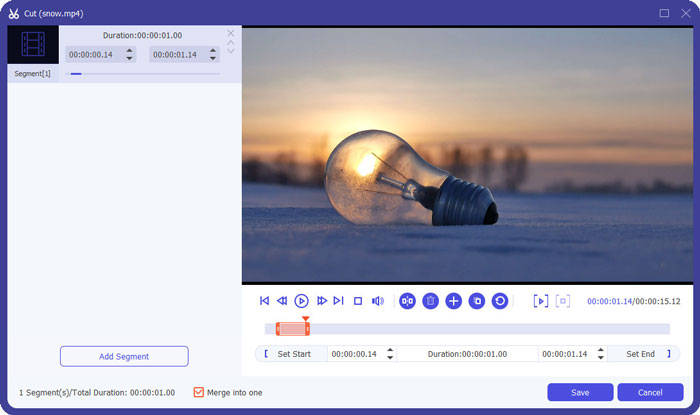
2. Adım: Her bir videoyu tek tek kırpmak için Kes düğmesine tıklayın. Zaman çizelgesini sürükleyin veya ihtiyaç duyduğunuz bölümleri seçmek için tam zaman noktasını girin. Ardından ayarları korumak için Kaydet düğmesine tıklayın.
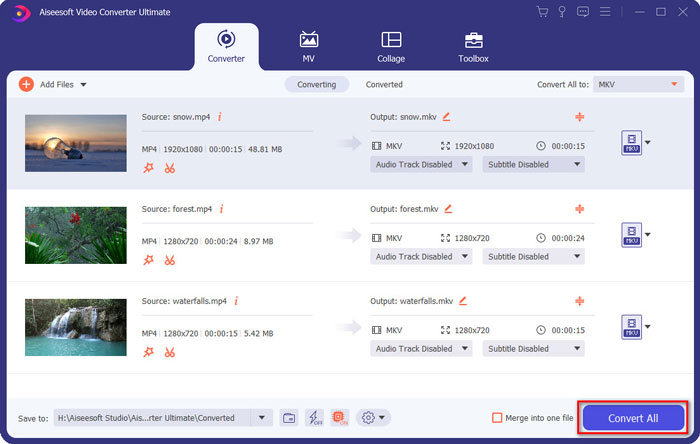
3. Adım: Tümünü dönüştür > Video > MKV düğmesine tıklayın ve Kaynakla Aynı düğmesini seçin. WebM dosyalarının boyutunu biraz artırsa da, kalite orijinal videolarla aynıdır.

4. Adım: Depolama yolunu seçtikten sonra, Tek dosyada birleştir seçeneğini işaretleyin ve kaydetmek için Tümünü Dönüştür düğmesine tıklayın.
Ayrıca Şunları da Bilmek İsteyebilirsiniz: iPhone’da Videolar Nasıl Birleştirilir.
Bölüm 3: WebM Dosyalarına Katılmayla İlgili SSS
1.WebM nedir?
WebM, Google tarafından önerilen bir tür video formatıdır. Ve WebM videoları, Google Chrome, Firefox vb. dahil olmak üzere hemen hemen tüm tarayıcılarda yüksek kalitede ve küçük boyutta akıcı bir şekilde oynatılabildiği için her zaman web sitesinde kullanılır.
2.WebM dosyalarını birleştirmek video kalitesini düşürür mü?
Evet, özellikle birkaç WebM dosyasını tek bir WebM dosyasında birleştirdiğinizde olacaktır. Orijinal kaliteyi korumanın en iyi yolu, WebM video dosyalarını MKV dosyaları olarak bir araya getirmektir.
3.WebM video dosyalarını birleştirdikten sonra WebM biçimini koruyabilir miyim?
Evet, yapabilirsiniz. Ancak formatı, WebM’in prototipi olan MKV’ye dönüştürmeniz daha iyidir. Çünkü WebM küçük boyutta yüksek kalite sunabilse de, MKV formatı WebM’e göre daha yaygın kullanılır. Yine de isterseniz WebM’i MP4’e de dönüştürebilirsiniz.
Sonuç
Daha akıcı bir görüntüleme deneyimine sahip olmak için web sitesinde indirilen WebM video dosyalarını birleştirmek istediğinizde, size yardımcı olacak ücretsiz bir çevrimiçi video birleştirici kullanmak en kolay yoldur. Ancak, WebM video dosyalarını birleştirerek yeni bir video oluşturmak istiyorsanız, katılmadan önce gerekli kısımları kırpmanız gerekir. Bu durumda, WebM dosyalarını aynı anda kırpmak ve birleştirmek için profesyonel video dönüştürücü - Video Converter Ultimate'ı indirmek.
-
 Android/iPhone/Windows/Mac için En İyi 5 WebM Oynatıcı
 Cihazınızda bir WebM'yi başarılı bir şekilde oynatmak istiyorsanız, bu makaleden Android, iPhone, Windows, Mac için en iyi 5 WebM oynatıcı hakkında daha fazla bilgi edinmelisiniz.
-
 WebM'yi Sıkıştır - WebM Dosyası Çevrimiçi Nasıl Sıkıştırılır
 Çevrimiçi WebM dosyası nasıl sıkıştırılır? Büyük dosyaları sıkıştırmanın en hızlı yolu nedir? Bu gönderi, WebM'yi sıkıştırmanın 2 ücretsiz yolunu anlatıyor.
-
 MP4 - WebM Dönüştürücü - MP4'ü WebM'ye Dönüştürmenin En İyi 4 Yöntemleri
 MP4'ü ücretsiz olarak WebM'ye dönüştürmek istediğinizde, istediğiniz videoları makaleden ücretsiz olarak almak için en sık kullanılan 4 yöntem hakkında daha fazla bilgi edinebilirsiniz.
