


 Video Dönüştürücü Ultimate
 Ekran kaydedicisi
 Video Onarımı
 Güvenli İndirme
Bandicam Filigranını Kullanılacak En İyi 3 Filigran Sökücüyle Kaldırın
Bandicam, özellikle oyun oynarken, toplantıdayken, izleme yaparken ve benzeri durumlarda ekranda olan biteni anbean kaydetmek için herkesin kullanmayı sevdiği bir araçtır. Diğer ekran kaydedici rakiplerinden farklı olarak, bu ekran kaydedici DirectX/OpenGL/UWP/Vulkan kancalama ve diğer gelişmiş hızlandırma teknolojileri sayesinde 480 FPS’ye kadar video çekmenize olanak tanır. Premium sürümünü satın almamış olsanız bile, yine de Bandicam’i kullanabilir ve tercihen yüksek olacak şekilde 60 veya 120 FPS ile video kaydedebilirsiniz; ancak videoda filigran bulunur. Bandicam’de videoyu filigransız kaydetmenin yolu, tam sürümünü satın almaktır.
Neyse ki bu makaleye eklediğimiz araçlar, Bandicam'ın dışa aktarılan videoya eklediği filigranı kaldırabilir. Bunların ne olduğunu bilmek ister misiniz? O halde fikri kavramak için bu makaleyi okumaya devam etmelisiniz!

Bölüm 1. En Etkili 3 Filigran Sökücü Kullanarak Bandicam Filigranı Nasıl Kaldırılır
FVC Video Dönüştürücü Ultimate
Bandicam filigranını kaldırmanın en etkili yolu, FVC Video Converter Ultimate gibi yardımcı bir araç kullanmaktır. Bu araç, videonuzdaki filigranı seçme kutusunu filigranın üzerine yerleştirerek algılar ve ardından hop, filigran yok olur. Sihir gibi çalışır; dosyayı dışa aktardığınızda videoda filigrana dair hiçbir iz kalmaz. Artık Bandicam’de yaptığınız kaydı logonun engellemesi olmadan keyifle izleyebilirsiniz.
Bu aracın en olası özellikleri Dönüştürücüler, geliştiriciler, Araç Kutusundaki düzenleyiciler ve daha fazlasıdır. Bu aracı kullanırsanız ve hemen masaüstünüze indirirseniz tüm bu özelliklere ve işlevlere sahip olabilirsiniz. Bu nihai yazılımla Bandicam filigranını nasıl kaldıracağınızı öğretmek için aşağıya eklediğimiz eksiksiz yazılı öğreticiyi takip edebilirsiniz.
Adım 1. Öncelikle, buraya eklediğimiz indirme düğmesine tıklayarak resmi yazılımı masaüstünüze indirmeniz gerekir. Endişelenmenize gerek yok; indirme bağlantısı Windows ve Mac kullanıcıları için güvenlidir. Dosyayı indirdikten sonra üzerine tıklayıp yükleyin, WinRAR kurulum adımlarını izleyin ve aracı başlatmak için Şimdi Başlat’a tıklayın.
Ücretsiz İndirWindows 7 veya üstü içinGüvenli İndirme
Ücretsiz İndirMacOS 10.7 veya üstü içinGüvenli İndirme
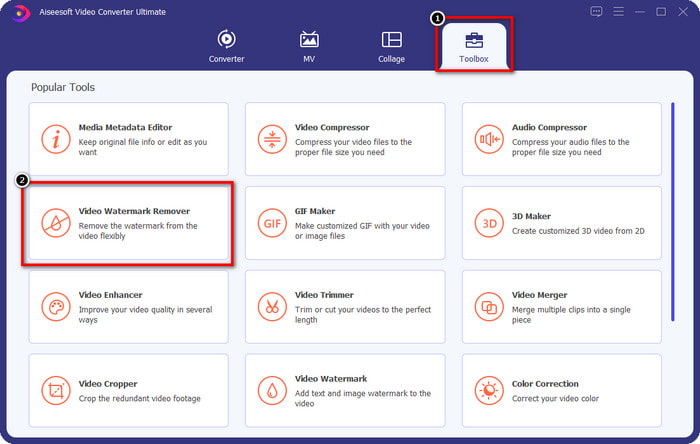
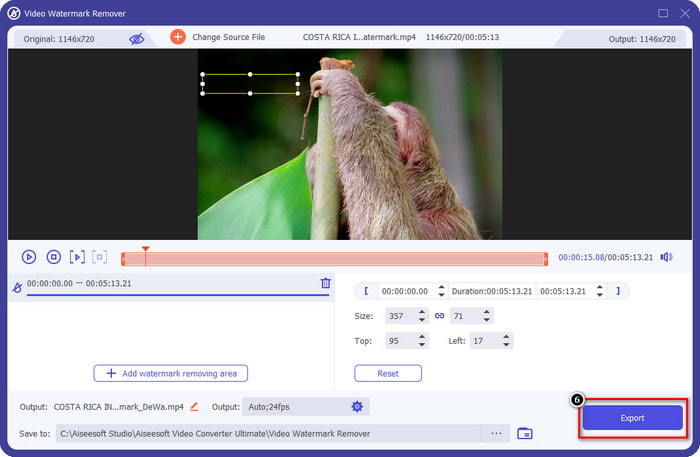
Adım 2. Araçların ana arayüzünde, Araç Kutusu bölümüne gitmeniz gerekir ve bunun altında Video Filigran Kaldırıcı seçeneğini göreceksiniz; bu özelliği açmak için üzerine tıklayın.
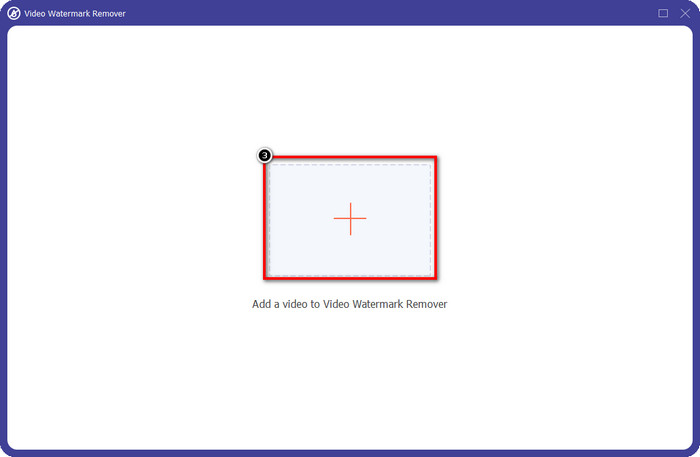
Adım 3. Ekranınızda yeni bir pencere açılacaktır; filigranlı video dosyasını yüklemek için + simgesine tıklayın. Video dosyasını yerel sürücünüzde bulun ve ardından Aç’a tıklayın.
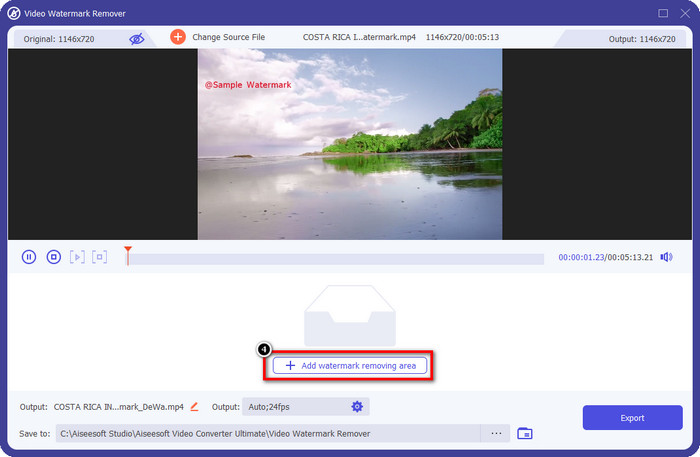
Adım 4. Tüm bunlardan sonra, Bandicam videolarını filigransız hale getirmek için Filigran Kaldırma Alanı Ekle seçeneğine tıklayarak kullanmaya başlayın.
Adım 5. Önizlemede, seçim kutusunu filigranın üzerine yerleştirin; filigrana tam oturması için kutunun boyutunu değiştirebilirsiniz.
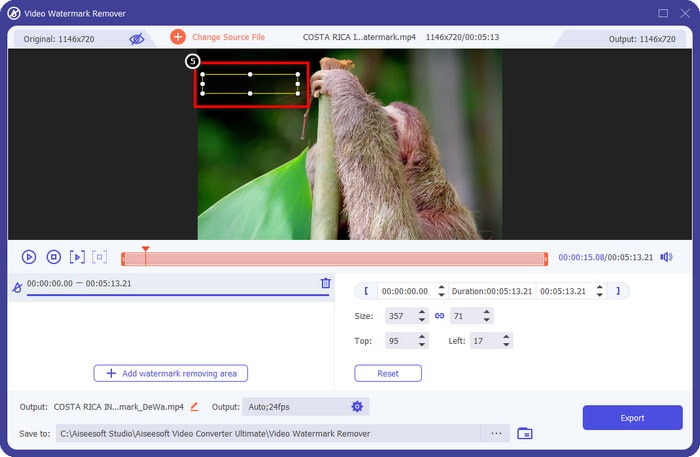
Adım 6. Seçim kutusunu filigranın üzerine yerleştirdikten sonra, Bandicam’in eklediği filigran olmadan videoyu indirmek için Dışa Aktar seçeneğine tıklayın.
Logoyu Hemen Kaldırın!
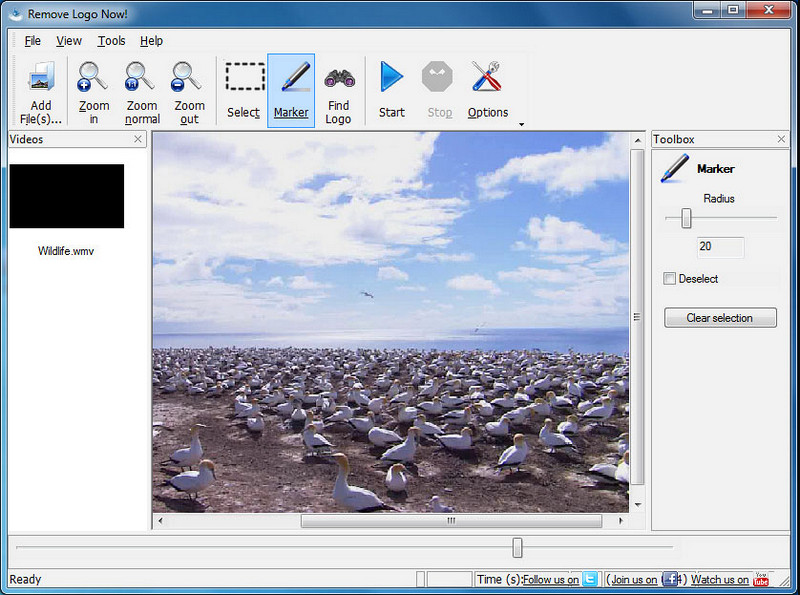
Remove Logo Now!, videolarınızda sabitlenmiş logoları kaldırmak için kullanabileceğiniz kapsamlı bir filigran kaldırma aracıdır. Bu araç, algoritmaların yardımıyla filigranı otomatik olarak algılayabilir. Yine de, dilerseniz filigranı elle de tarayabilirsiniz. Hangi tür filigran olursa olsun, bu yazılımı kullanarak zahmetsizce kaldırabilirsiniz. Ancak, yazılım yalnızca Windows kullanıcılarıyla sınırlıdır ve arayüzü biraz demode görünmektedir. Yine de bunu Windows PC’nizde denemek isterseniz, Bandicam filigranını ücretsiz kaldırma adımlarını göstereceğiz.
Adım 1. Remove Logo Now! programını indirmek için web sitesini ziyaret edebilirsiniz. Lütfen sitenin güvenliğini kontrol ederek söz konusu aracın resmi sitesi olduğundan emin olun.
Adım 2. Kurduğunuz yazılımı açın ve filigranlı Bandicam videosunu yüklemek için Dosyaya tıklayın.
Adım 3. Video yüklendikten sonra, videonuzdaki filigranı otomatik olarak algılamak için Logoyu Bul seçeneğine tıklayın.
İsteğe bağlı: Eğer Logoyu Bul özelliği videodaki filigranı algılayamazsa, filigranı elle vurgulamak için İşaretleyiciyi kullanmanız ve ardından kaldırmak için Seçimi Temizleye tıklamanız gerekir.
Adım 4. Videoyu dışa aktarmak ve Bandicam filigranı olmayan kayıt sürümünü elde etmek için Başlat seçeneğine tıklayın.
Apowersoft Çevrimiçi Filigran Kaldırıcı
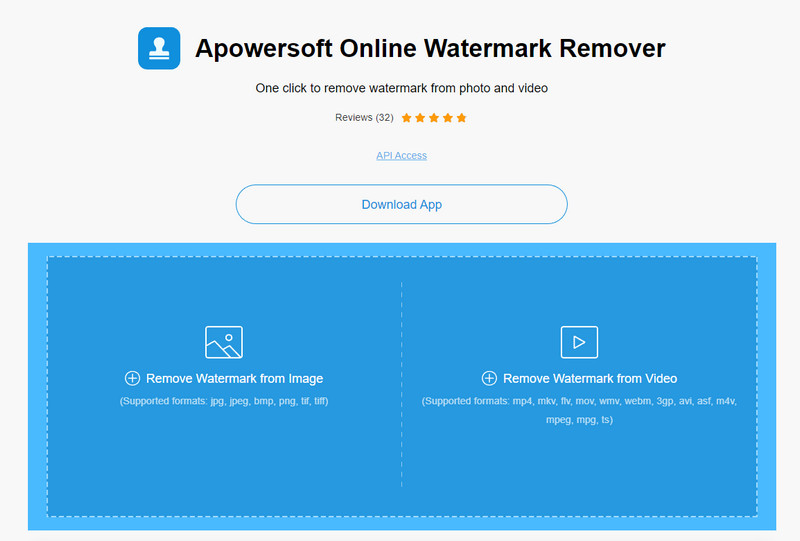
Apowersoft Online Watermark Remover, görüntü ve videolardaki filigranları etkili bir şekilde kaldırmak için kullanabileceğiniz güvenilir ve indirme gerektirmeyen bir araçtır. Bu araç, dışa aktarılan videoda iz bırakmadan filigran kaldırma işini başarıyla yaptığı için oldukça tanınır. Web tabanlı bir araç olmasına rağmen, videoyu dışa aktardıktan sonra kalite düşüşü yaşamazsınız. Bandicam’in filigransız tam sürümünü satın almak yerine, aşağıdaki adımları izleyerek filigranı kaldırmayı deneyebilirsiniz.
Adım 1. Tercih ettiğiniz web tarayıcısına gidip bu çevrimiçi filigran kaldırma aracının adını aratabilirsiniz.
Adım 2. Burada iki seçenek göreceksiniz: Videodan Filigranı Kaldır seçeneğine tıklayın. Sürücünüzde Bandicam logosu olan video dosyasını seçin ve ardından Aç’a basın. Yükleme işlemi için bekleyin; özellikle video uzun ise biraz zaman alabilir.
Adım 3. Videonun üzerinde bir seçim kutusu çizin ve filigranın dikdörtgen alanın içinde kaldığından emin olun.
Adım 4. Video dosyasını indirmek için Sil seçeneğine tıklayın; bu kez videoda filigran olmayacaktır.
İlgili:
Renderforest’ten Dışa Aktarılan Videolardaki Filigran Nasıl Kaldırılır
Viva Video Filigranı Videolardan Nasıl Kaldırılır
Bölüm 2. Bandicam Filigranı Nasıl Kaldırılır Hakkında SSS
Bandicam'ın filigranı var mı?
Ücretsiz denemeyi kullanan kullanıcılar için, dışa aktardığınızda bir filigran olacaktır. Bu sorunu önlemek için aracı Bandicam'ın resmi web sitesinden satın alabilirsiniz.
Bandicam'ın ücretsiz sürümünü kullanırken sınırlamalar var mı?
Bandicam'in ücretsiz sürümünü kullanıyorsanız, 10 dakikalık kayıt, filigran ekleme, 60 ila 120 FPS desteği, dosya biçimleri ve işlem hızı gibi birçok sınırlama vardır. Bu çoğu için bir sorun olsa da, Windows'unuzda kullanabileceğiniz en iyi ekran kaydedicilerden biri olarak kabul edilir.
Bandicam'da filigran nasıl kaldırılır?
Bandicam'daki filigranı kaldırmanın başka bir yolu yoktur ve bu, onun profesyonel sürümünü satın alarak yapılır. Bandicam'ın resmi web sitesini açın, Tam Sürümü Al'a tıklayın, istediğiniz lisansı seçin ve Şimdi Satın Al'a tıklayın.
Sonuç
Gerçekten de Bandicam, ücretsiz olarak kullanabileceğiniz birinci sınıf bir ekran kaydedicidir. Ama bir şey kesin; ücretsiz sürümü kullanmak, dışa aktarılan videoya bir filigran ekleyecektir. Bu yazıda eklediğimiz yöntemlerle, tercihiniz olabilecek ideal filigran sökücü ile filigranı başarıyla kaldırabilirsiniz. Filigranı kaldırmak için bir araç kullanmak istemiyorsanız ne olur? O zaman videolardaki filigranı kaldırmak için Bandicam satın almanızı öneririz. Size mal olacak, ancak profesyonel sürüm kullanmaya değer. Bu makalenin, Bandicam'daki filigranı kaldırmak için ihtiyaç duyacağınız bilgileri sağladığını umuyoruz.
-
 Etkili PlaceIt Filigran Sökücülerinin Tam İncelemesi [222]
 Burada incelediğimiz PlaceIt filigran kaldırıcı, PlaceIt'e aktardığınız videodaki filigranı kaldırmak için kullanabileceğiniz etkili araçlardır.
-
 En İyi Araçları Kullanarak B612 Filigranını Kaldırmanın 5 Yolu
 Fotoğraflarınızdan B612 filigranlarını nasıl kaldıracağınızı bilmek ister misiniz? Bu olağanüstü araçları kullanarak B612 filigranını resimlerinizden zahmetsizce kaldırabilirsiniz.
-
 WOW Kaydırıcı Filigranının Nasıl Kaldırılacağına İlişkin Kolay Adımlar [Çözüldü]
 WOW Slider, harika bir slayt gösterisi oluşturmak için bir uygulamadır. Ancak, çıktısına filigran yerleştirir. WOW Slider filigranını nasıl kaldıracağınızı öğrenmek için aşağıyı okuyun.
