


 Video Dönüştürücü Ultimate
 Ekran kaydedicisi
 Video Onarımı
 Güvenli İndirme
iSkysoft Logosunun Videodan Kaldırılmasına Dair Zorlu Yöntemler
iSkysoft, birçok harika özelliğe sahip, onu diğer başvuru programlarından öne çıkaran mükemmel bir uygulamadır. Video formatını başka bir formata dönüştürmenizi ve bazı temel video düzenleme işlemlerini yapmanızı sağlayan basit bir uygulamadır. Ancak bu yazılımın en üzücü yanı, bu uygulamayı kullandıktan sonra videolarınızda büyük bir iSkysoft filigranı oluşmasıdır. Videonuzun üzerinde büyük bir filigran/logo olması izlerken hiç de tatmin edici değildir. Neyse ki, iSkysoft logo/filigranı gibi rahatsız edici nesneleri kaldırmak için kullanabileceğiniz güvenilir uygulamalar vardır. Videonuzdan iSkysoft logosunu kaldırmanın en iyi yöntemlerini öğrenmeye hevesliyseniz, bu yazıyı mutlaka okumalısınız.

Bölüm 1: iSkysoft Logosunu Masaüstündeki Videodan Kaldırma
Ekranınızdaki iSkysoft logosu özellikle en sevdiğiniz videoları izlerken gerçekten sinir bozucudur. Ama artık endişelenmenize gerek yok. Bu logodan, Video Converter Ultimate’ı kullanarak kurtulabilirsiniz. Bu güvenilir yazılım, videolarınızdaki iSkysoft logosunu iki kolay yolla kaldırmanıza yardımcı olabilir: Video Watermark Remover aracı ve Video Cropper aracı. Bu araçlarla, videonuzdan iSkysoft logosunu kolayca kaldırabilirsiniz. Eğer iSkysoft logosu videonuzun köşesinde yer alıyorsa, Video Cropper aracını kullanmanız önerilir. Ancak logo orta kısma yerleştirilmişse, Video Watermark Remover aracını kullanabilirsiniz. Bu sayede, sevdiğiniz film ve videoları logodan rahatsız olmadan izleyebilirsiniz.
Ayrıca Video Converter Ultimate, videolarınızdaki filigranları kaldırmanın yanı sıra daha fazla özelliğe sahiptir. Bir video geliştirici, video birleştirici, kırpıcı, düzeltici, döndürücü, dönüştürücü ve daha fazlasına sahiptir. Ek olarak, bu uygulamanın ana işlevlerinden biri, çeşitli video dosyası formatlarını dönüştürmektir. Basit bir arayüze sahip olduğu için profesyonel olmayan kullanıcılar da bu uygulamayı kullanabilir. iSkysoft logosunu videonuzdan nasıl kaldıracağınızı öğrenmek istiyorsanız, size bu uygulamanın sağladığı iki kolay yolu göstereceğiz.
Video Filigran Kaldırıcıyı Kullanma
Adım 1: Bu harika yazılımı kullanmak için önce masaüstünüze Video Converter Ultimate’ı indirmeniz gerekir. İndirdikten sonra kurulum işlemini takip edin ve uygulamayı başlatın.
Ücretsiz İndirWindows 7 veya üstü içinGüvenli İndirme
Ücretsiz İndirMacOS 10.7 veya üstü içinGüvenli İndirme
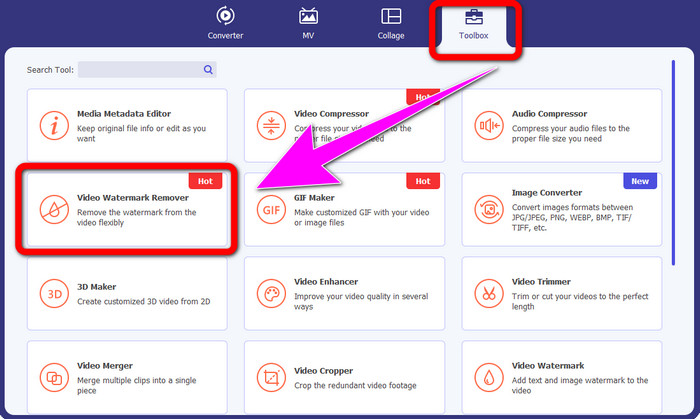
Adım 2: Yazılımı zaten başlattığınızda, Toolbox paneline ilerleyin ve Video Watermark Remover aracını seçin. Ekranınızda başka bir arayüzün belirmesini bekleyin.
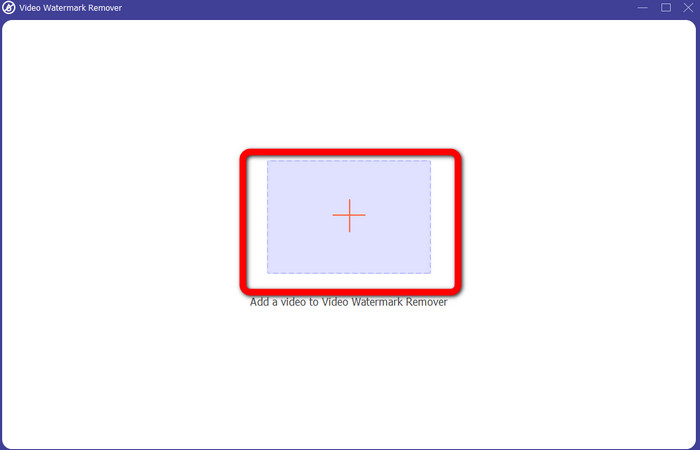
Adım 3: Yeni arayüzü gördüğünüzde, artı simgesine tıklayın ve kaldırmak istediğiniz iSkysoft logolu videonuzu ekleyin.
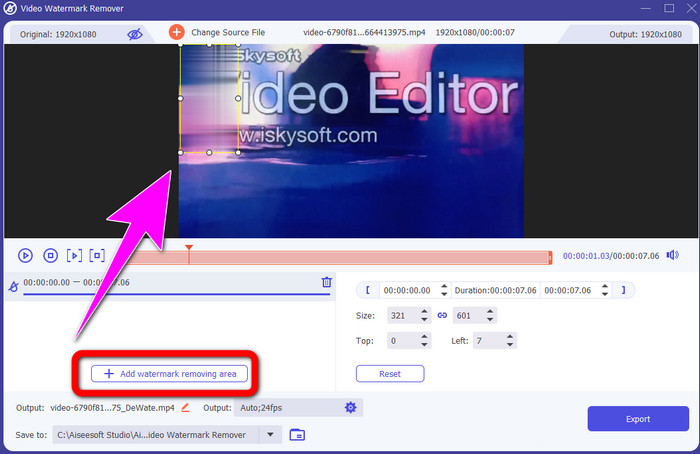
Adım 4: Ardından, Add Watermark Removing Area düğmesine tıklayın. Kutuyu videonuzun üzerinde hareket ettirin ve iSkysoft logosunu kapatın.
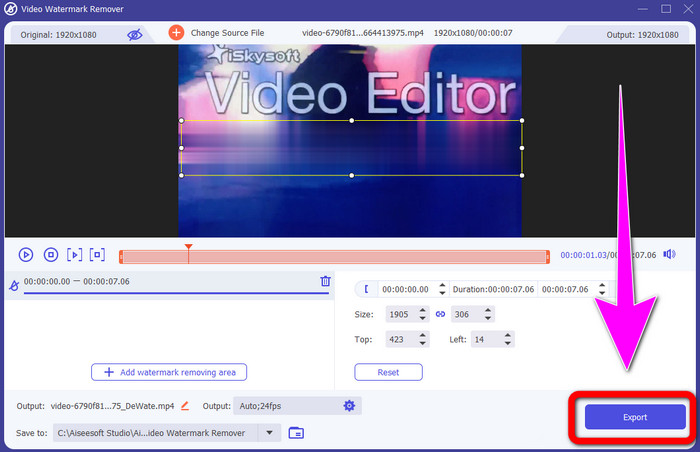
Adım 5: Son olarak, nihai videonuzu kaydetmek için Export düğmesine tıklayın.
Video Kırpıcıyı Kullanma
Bu bölümde, Video Kırpma aracını kullanarak iSkysoft logosunu videonuzdan nasıl kaldıracağınızı göstereceğiz.
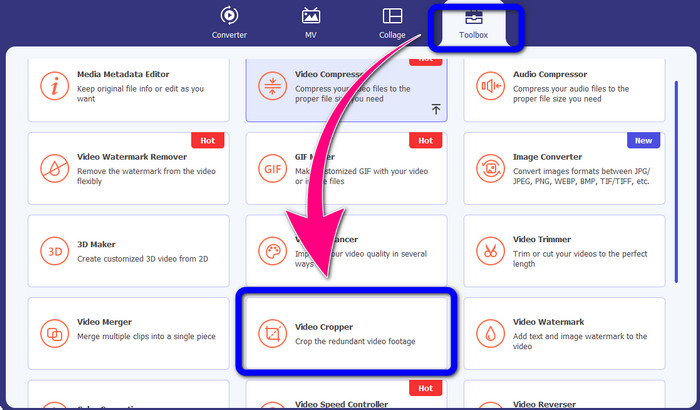
Adım 1: Uygulamayı masaüstünüzde çalıştırın. Toolbox paneli altında, Video Cropper aracına tıklamanız gerekir. Yukarıdaki diğer araçta olduğu gibi, ekranınızda başka bir arayüzün belireceğini bekleyin.
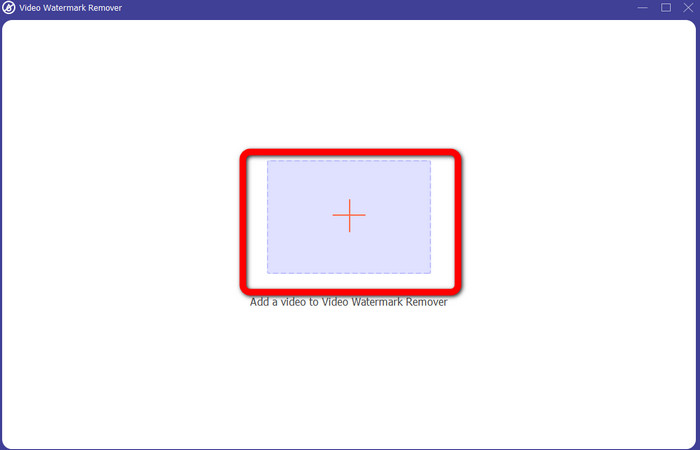
Adım 2: iSkysoft logolu videonuzu içe aktarmak için Plus işareti düğmesine tıklayın.
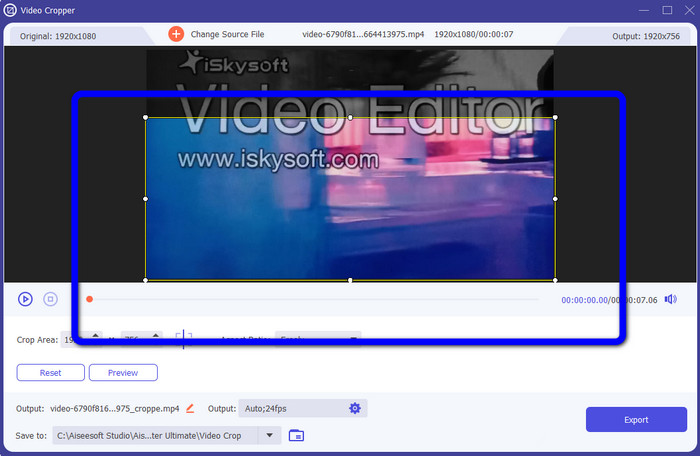
Adım 3: Bu kısımda, videoyu kırparak iSkysoft logosunu videonuzdan kaldırabilirsiniz. Videonun kenarlarını hareket ettirmek için farenizi kullanın.
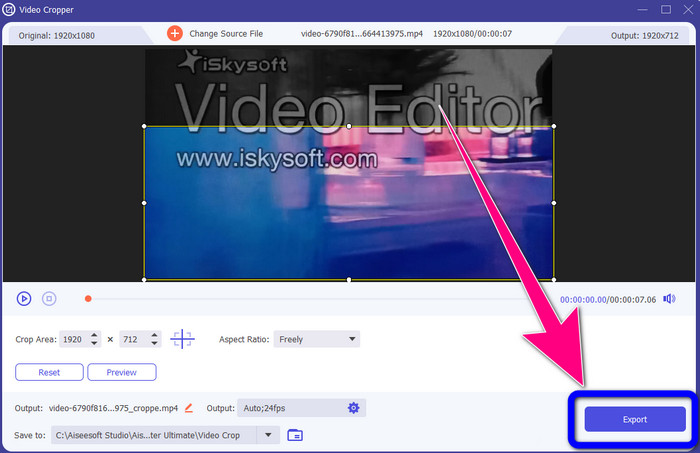
Adım 4: Son adım olarak, Export düğmesine tıklayın ve çıktınızı masaüstünüze kaydedin.
Bölüm 2: Video Online'dan iSkysoft Logosu Nasıl Kaldırılır
HitPaw'ı Kullanma
iSkysoft logosunu çevrimiçi olarak da kaldırabilirsiniz. Kullanabileceğiniz en iyi araçlardan biri HitPaw’dır. Bu çevrimiçi uygulama, videonuzdan logoyu kolayca kaldırabilir. Hem masaüstünde hem çevrimiçi olarak kullanılabilir, bu da herkes için oldukça kullanışlıdır. Ayrıca, HitPaw kullanmak için güvenlidir. Videoların yalnızca sizin tarafınızdan düzenlenmesini ve görülmesini sağlar. Ek olarak, bu yazılımın kısıtlamaları konusunda endişelenmenize gerek yoktur. Videolarınızdan logo kaldırma konusunda herhangi bir sınırı yoktur. Bu uygulamayı satın almanıza gerek yoktur çünkü ücretsizdir. Ancak, logoyu ya da herhangi bir
videonuzdan gereksiz öğeler, biraz daha beklemeniz gerekir. Bu uygulama, kullanıcılar için zaman alan yavaş bir kaldırma prosedürüne sahiptir. Ayrıca, internet bağlantınıza bağlıdır. Hızlı bir bağlantınız varsa iyi performans gösterecektir. Ancak, yavaş bir bağlantınız varsa, biraz gecikme bekleyin. iSkysoft logosunu videolarınızdan kaldırmak için aşağıdaki basit adımları izleyin.
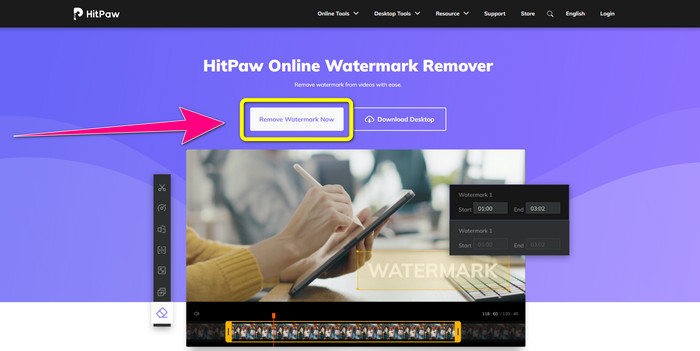
Adım 1: HitPaw web sitesini ziyaret edin. Kaldırmak istediğiniz iSkysoft logolu videonuzu eklemek için Remove Watermark Now - Choose File düğmesine tıklayın.
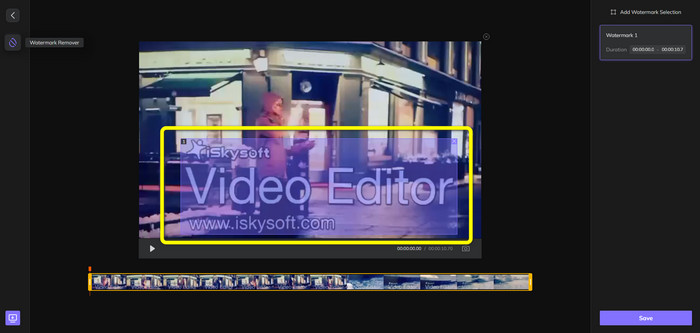
Adım 2: Video dosyanızı eklediğinizde, ekranınızda mavi renkli bir kutu belirecektir. Bu kutuyu iSkysoft logosunu kapatmak için kullanın. Kutunun boyutunu yeniden ayarlayabilirsiniz.
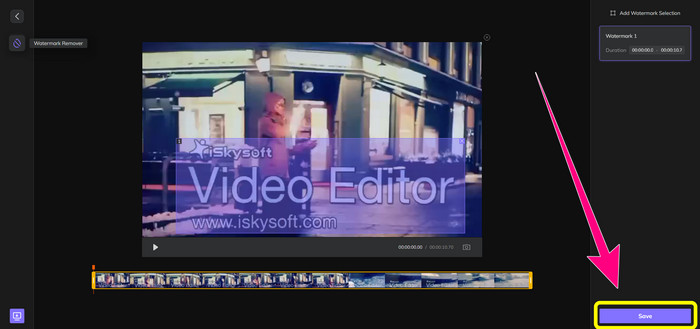
Adım 3: Videonuzdaki iSkysoft logosunu kapatma işini bitirdiyseniz, Save düğmesine tıklayın. Kaldırma işlemini bekleyin ve videonuzu kaydedin.
Video Filigran Sökücüyü Çevrimiçi Kullanma
Kullanabileceğiniz bir diğer çevrimiçi araç ise Video Watermark Remover Online’dır. Bu uygulamayı kullanarak videolarınızdaki iSkysoft logosunu kaldırabilirsiniz. Ayrıca, kullanımı kolay bir yazılımdır ve bu nedenle profesyonel olmayan kullanıcılar için de uygundur. Videolarınızın kalitesini kaybetmeden, videolarınızdaki her türlü rahatsız edici öğeyi de kaldırabilirsiniz. Ancak, ücretsiz sürümü kullanırken logoları videolarınızdan kaldırma konusunda bir sınırlama vardır. Sadece 5 videodan logo veya filigran kaldırabilirsiniz. Video Watermark Remover Online ile daha fazla video eklemek isterseniz, abonelik satın almanız gerekir. Ayrıca, çıktınızı başka bir formata kaydedemezsiniz. Yalnızca aynı formatta kaydedebilirsiniz, bu da pek iyi değildir. Son olarak, dosya işleme süreci yavaştır. Videolarınızdan iSkysoft logosunu kaldırmak için aşağıdaki basit yönergeleri izleyin.
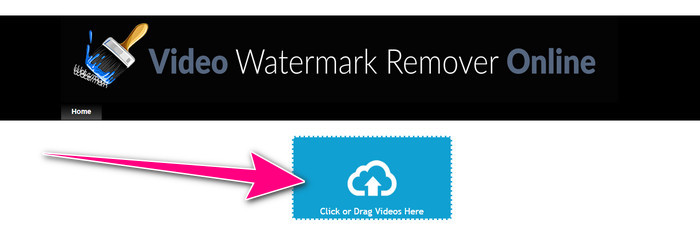
Adım 1: Video Watermark Remover Online web sitesine gidin. Kaldırmak istediğiniz iSkysoft logolu video dosyanızı içe aktarmak için Click or Drag Videos Here düğmesini seçin.
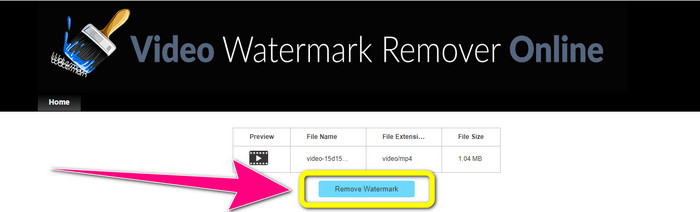
Adım 2: Ardından, Remove Watermark düğmesine tıklayın ve kaldırma işlemini bekleyin.
İlgili:
Adobe Premiere Pro’da Videodan Logo Kaldırmanın En Hızlı Yolu
Windows Movie Maker Kullanarak Videodan Logo Nasıl Kaldırılır
3. Bölüm: iSkysoft Logosunu Kaldırma hakkında SSS
Bir resimden bir logoyu kaldırabilir misiniz?
Evet, logoyu resminizden kolay ve hızlı bir şekilde silmek için FVC Free Watermark Remover kullanabilirsiniz.
Filigranı kaldırmak yasa dışı mı?
ABD Telif Hakkı Yasası, bölüm 1202'ye göre, filigranların sahibinin izni olmadan kaldırılması yasa dışıdır.
Logoyu ücretsiz olarak nasıl kaldırırım?
Videonuzdaki bir logoyu ücretsiz olarak kaldırmak için Video Converter Ultimate'ın ücretsiz deneme sürümünü kullanabilirsiniz.
Sonuç
Bu makale, masaüstü ve çevrimiçi araçlar kullanarak videonuzdan iSkysoft logosunu kaldırmanın mükemmel yöntemlerini sundu. Ancak kullanabileceğiniz mükemmel bir logo kaldırma programı arıyorsanız, o zaman Video Converter Ultimate’ı indirebilirsiniz. Bu uygulama hızlı bir kaldırma işlemi sunar. Ayrıca tüm kullanıcılar için erişilebilirdir.
-
 8 Olağanüstü Video Filigran Sökücü Çevrimiçi ve Çevrimdışı
 Windows, Mac, iPhone ve Android telefonlarınızda kullanabileceğiniz en iyi ücretsiz video filigran temizleme yazılımını arıyorsanız, bu makale tam size göre
-
 Videodan Isırılabilir Filigranı Kaldırmanın En İyi Yöntemleri
 Bu makale size en güvenilir ve harika bir ısırılabilir filigran sökücü gösterecektir. Bu harika uygulamalar, bu tür sorunları çözmenize yardımcı olacak
-
 Videodan Logoyu Kaldırmak İçin Öğrenmesi Kolay Prosedürler
 En iyi ve kolay video logo çıkarıcıyı mı arıyorsunuz? O zaman, bu makale sizin için iyi. Bir videodan logo kaldırma hakkında bilgi edinme fırsatını yakalayın.
