


 Video Dönüştürücü Ultimate
 Ekran kaydedicisi
 Video Onarımı
Windows, Mac, Çevrimiçi ve Telefonlar aracılığıyla Dosyalardan Meta Veriler Nasıl Kaldırılır
Every media file has metadata connected about the file, whether a video, image, audio, etc. Suppose you post a media file online; through that post, someone has information about coordinates about your location, time, date, manufacturer, device model, and many more, known as EXIF data. Isn't it scary to think someone can get information through your post with the metadata? Thankfully, this article will teach you how to remove metadata on any media file on Windows, Mac, Online, and even your phones before posting it online.

Bölüm 1. Windows'ta Herhangi Bir Dosyadaki Meta Verileri Kaldırmanın En İyi Yolları
Bu makalede sunacağımız yöntemler, Windows'ta kullanabileceğiniz yerleşik veri kaldırıcı ve meta verileri kolayca silmek için kullanabileceğiniz üçüncü taraf aracıdır. Bu nedenle, dosyanızdaki meta verileri nasıl sileceğiniz konusunda daha fazla fikir edinmek için aşağıdaki ayrıntıları okuyabilir ve başarılı bir şekilde yapmak için adımları izleyebilirsiniz.
Windows'ta Özellikleri Kullan
Windows'ta, isterseniz meta verileri videolardan kolayca kaldırabilirsiniz. Aşağıdaki adımları izleyerek dosyanızla ilgili bilgileri çevrimiçi yayınlamadan önce kaldırabilirsiniz.
Step 1. Locate the file on your desktop and tap the right click on your mouse; under it, you will see Properties, then click it.
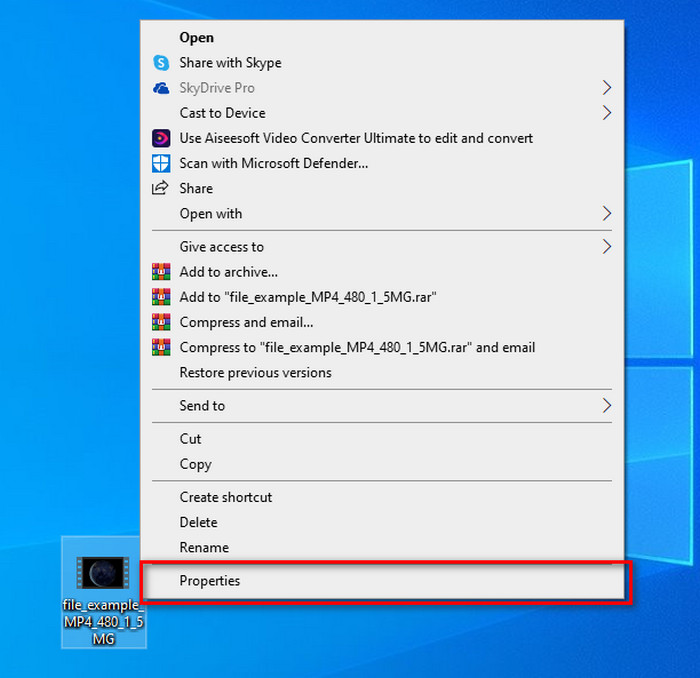
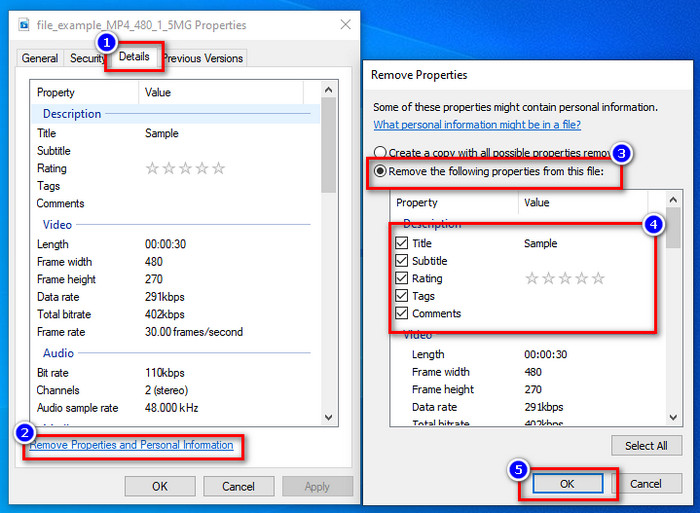
Step 2. Go to Details, and then under it, click the Remove Properties and Personal Information.
Step 3. Please tick the box of metadata you don't want to include on your media file before posting it. If you've done this, press OK; it will create a copy of the file without its metadata.
Windows ve macOS'ta En İyi Meta Veri Kaldırma Aracını kullanın
Suppose you want the best metadata removal tool, then FVC Video Converter Ultimate is the tool that you're looking for. It is the expert's tool to remove the metadata on your media file before the users post the file online. Although it is an expert choice tool, anyone can easily use it without exerting too much effort to remove the data on your file. Furthermore, this is a third-party option for you if the techniques we taught you can't remove the metadata on your file entirely. The corresponding steps will help you wipe the data you want to delete on your file and follow it accordingly.
Step 1. Before removing the metadata, you must first download the tool by clicking the below download button. Click the corresponding operating system you are using, whether Windows or Mac, then install it promptly. After that, open the tool by hitting the Start Now.
Ücretsiz İndirWindows 7 veya üstü içinGüvenli İndirme
Ücretsiz İndirMacOS 10.7 veya üstü içinGüvenli İndirme
Sorunsuz bir seyir süreci için, bir sonraki adıma geçmeden önce araçların kullanıcı arayüzüne aşina olmanız gerekir.
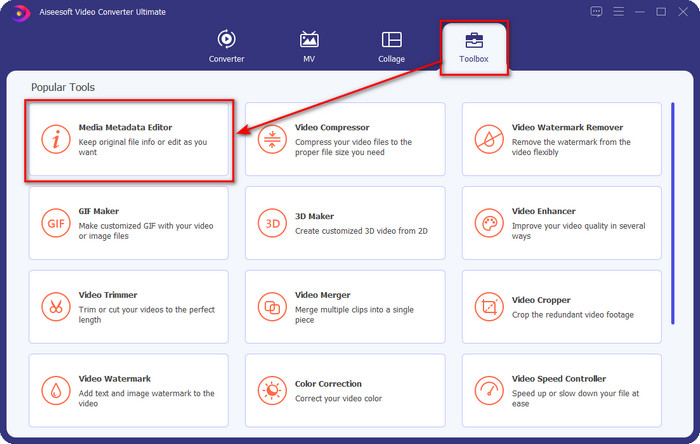
Step 2. Now that you've opened the Toolbox section, hit the Media Metadata Editor under it.
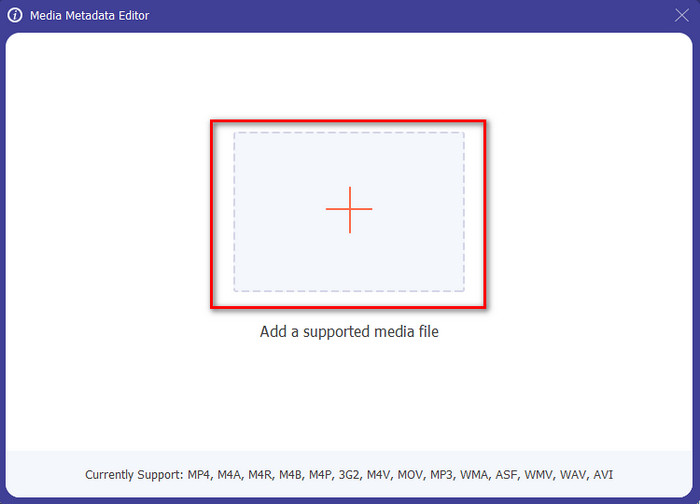
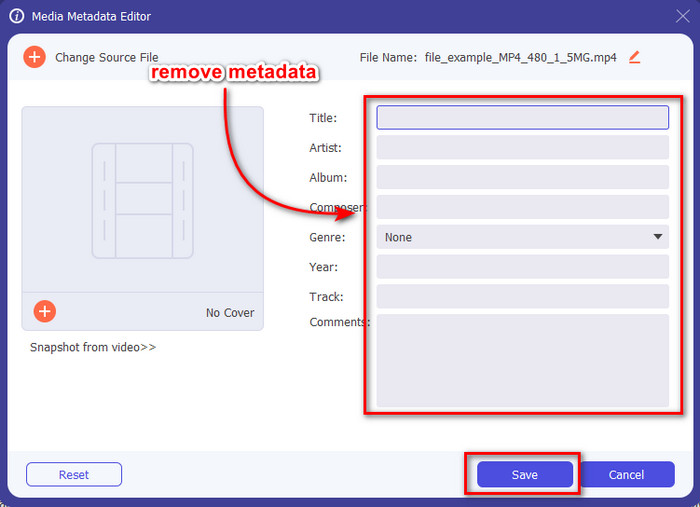
Step 3. A new window will show on your screen; by tapping the + button, you can add the media file you want to remove the metadata, then tap Open to upload it.
Step 4. Click the text box of each metadata you want to remove, then click the Delete Key on your keyboard. To save the file, you can click Save, and it will not make a copy with no metadata. Easy isn't it? It saves space on your desktop because it didn't create a copy of the file you remove metadata.
Bölüm 2. Mac'teki Dosyalardan Meta Verileri Silmenin En İyi Yolu
Mac'te fotoğrafınızla ilgili bilgileri kolayca kaldırabilirsiniz; ancak, yalnızca konum verilerini kaldırabilirsiniz. Bu nedenle, Mac'teki bir dosyadan meta verileri konumdan daha fazla kaldırmayı öğrenmek istiyorsanız, yukarıda sunduğumuz aracı kullanmalısınız.
Step 1. Go to the Preview and open the file.
Step 2. Click Tools, then Show Inspector and click i to see the location data.
Step 3. On the GPS tab, click Remove Location info, and it will automatically remove information about your media file.
Bölüm 3. Android ve iOS Cihazlarda Meta Veriler Nasıl Kaldırılır
Exiftool'u kullanın - fotoğraf ve videonun meta verilerini görüntüleyin, düzenleyin (Android)
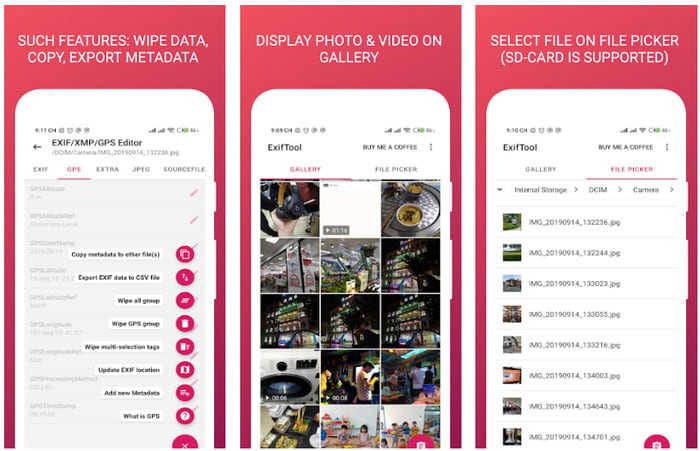
Exiftool – view, edit metadata of photo and video can help you remove video metadata on Android by downloading the tool. With this tool, you can add, remove, and update the EXIF data of the video and photos for free. So, if you want to use this app, follow the steps below.
Step 1. Download the app on the Playstore and click Install.
Step 2. Open the app and select the file you want to remove its metadata.
Step 3. Press the option and click Wipe Quicktime Group to remove the metadata automatically.
Fotoğraf ve Video Meta Veri Sökücüyü (iOS) kullanın
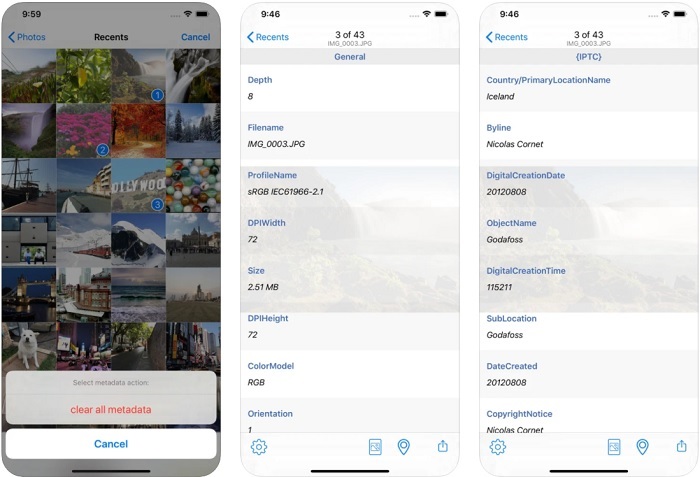
Bir iOS kullanıcısıysanız, Fotoğraf ve Video Meta Verilerini Kaldırıcı'yı kullanabilir ve iOS cihazlarınızda meta verileri nasıl temizleyeceğinizi öğrenebilirsiniz. Bu uygulama, Apple aygıtlarındaki tüm yerel medya biçimlerini destekler ve işini tam olarak bir meta veri kaldırıcı olarak yapar. Bir iOS cihazınız varsa, aşağıdaki adımları kopyalayabilirsiniz.
Step 1. To download the app, you must go to the App Store, search it, then install it.
Step 2. Open the tool and allow the app to access your Photos, select the video or photo you want to remove the metadata.
Step 3. Tap the gear icon, then click clear all metadata, and it will create a copy of the file without metadata on it.
Bölüm 4. Bir Web Aracını Ücretsiz Olarak Kullanarak Meta Veriler Nasıl Kaldırılır
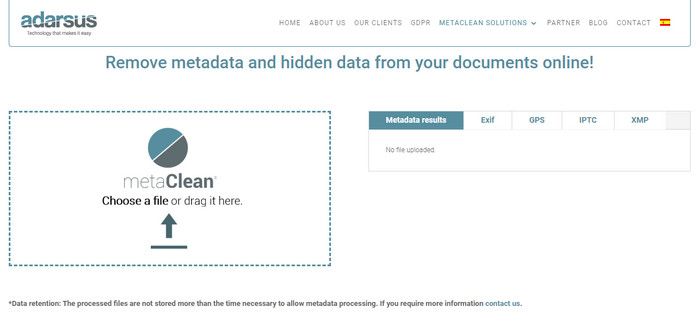
Adarsus – Remove Metadata can help you remove metadata online, and it is for free. Unlike the other converters above, you will not need to download the tool on your desktop to use because it is a web tool; to access it, you will need an internet connection. If you want to experience removing metadata for free, follow the steps below.
Step 1. Open your web browser, and search the tool.
Step 2. On the tool's website, click the upload button and choose the file to remove the metadata.
Step 3. Click Get my File Clean, and it will create a copy without metadata.
Bölüm 5. Windows, Mac, Online, Android ve iOS'ta Metadata Remover ile ilgili Karşılaştırma Tablosu
| Özellikleri | FVC Video Dönüştürücü Ultimate | Windows'taki Özellikler | Mac'te önizleme | Exiftool – fotoğraf ve videonun meta verilerini görüntüleyin, düzenleyin (Android) | Fotoğraf ve Video Meta Veri Sökücü | Adarsus – Meta Verileri Kaldır |
| Kullanıma uygun |  | | | | | |
| Kullanıcı dostu | | | | | | |
| Tüm Meta Verileri Temizle | | |  | | | |
| Meta Verileri Düzenle | | | | | | |
| Dosyayı çoğalt | | | | | | |
| Sınırlamalar | Mobil cihazlarda ve çevrimiçi olarak kullanılamaz | Bazen veriler tamamen silinmez. | Konum dışındaki diğer meta verileri kaldırmaz. | Nihai araç kadar etkili değil. | Çoğu zaman, meta verileri kaldırmada başarısız olur | Dosya boyutunda 5 MB olan bir sınırlama vardır. |
Bölüm 6. Meta Verileri Kaldırma Hakkında SSS
Meta verileri kaldırmak dosya boyutunu küçültür mü?
Evet, çünkü meta veriler, bilgileriyle medya dosyasına boyut katar. Kaldırarak daha az yerden tasarruf edebilirsiniz ve eskisinden daha küçük olacaktır. Ancak, dosyanızdaki bilgiler kaldırılır.
Meta verileri kaldırdıktan sonra kalite bunu etkiler mi?
Hayır, olmayacak; medya dosyanızın meta verilerini değiştirseniz veya kaldırsanız bile kalite etkilenmeyecektir. Bu nedenle, endişelenmeyin çünkü metadata olmadan veya metadata olsa bile aynı kaliteye sahip olacaksınız.
Tüm dosya biçimlerinin meta verileri var mı?
Most media formats have different metadata structures, but not all media formats have metadata. In some cases, formats can't contain metadata because of their build, design, and many more factors.
Sonuç
We have now learned how to remove metadata on the file to protect your privacy as easy as that. With the tool presented in this article, it became possible to remove it before posting on the web. Although we offer five tools to erase the metadata, there is no doubt of the capabilities of FVC Video Converter Ultimate because the tool can entirely remove the entire data or certain parts as quickly as 1-2-3. If you doubt our review, you can check out the tool by downloading it on your computer drive and test it out if it is the real deal!
-
 Mac, Windows ve Çevrimiçi Kayıpsız Bir Şekilde WMV'yi MKV'ye Dönüştürmenin 4 Yolu
 Mac ve Windows'ta WMV'yi MKV'ye dönüştürmek ister misiniz? Bu makale, WMV'yi MKV'ye hızlı bir şekilde dönüştürmenin en iyi yollarını sunar.
-
 Çevrimiçi ve Çevrimdışı En İyi 4 Meta Veri Görüntüleyici [Güncelleme 2022]
 Dosyamın meta verilerini kontrol edebilir miyim? Evet, yapabilirsiniz, bu yazının yardımıyla size kullanabileceğiniz farklı meta veri görüntüleyicilerini tanıtacağız.
-
 Hızla Dönüştürmek İçin Kullanmanız Gereken En İyi WebM - MKV Dönüştürücüler
 WebM'yi MKV dosyalarına dönüştürmenin yollarını mı arıyorsunuz? Bu makale, denemeniz için en iyi WebM'den MKV'ye dönüştürücüleri sunar.
