


 Video Dönüştürücü Ultimate
 Ekran kaydedicisi
 Video Onarımı
 Güvenli İndirme
Renderforest Dışa Aktarılan Videolardan Filigran Nasıl Kaldırılır?
Renderforest, girişler, çıkışlar, başlıklar, reklamlar vb. için mükemmel animasyonlu şablonlardan oluşan eksiksiz bir anlaşmadır. Burada sıfırdan başlayabilir veya mevcut şablonları kullanabilirsiniz. Video düzenleme konusunda uzman olmasanız bile, bu web platformunu kullanarak üstesinden gelmeyi başarabilirsiniz. Kullanımı ve optimum avantajı nedeniyle, bir abonelikten yararlanırsanız, birçok kullanıcı yüksek kaliteli, verimli, uyumlu ve güvenilir bir tasarım oluşturmak için bu platformu seçti.
Bu nedenle, burada düzenlediğiniz videoyu üye olmanız şartıyla ücretsiz olarak indirebilirsiniz, ancak üzerinde filigran bulunur. Bu filigran, videoyu buradan zaten dışa aktarmış olan ve aracın abonelik ücretini karşılayamayan birçoğumuz için sorun yaratır. Aşağıda, araştırmamız sırasında biriktirdiğimiz en kullanışlı araçları kullanarak Renderforest filigranını kaldırma konusunda eğitimler listeleyeceğiz. Yazının bir sonraki bölümünü okumaya devam ederseniz bunları sizinle paylaşabiliriz.

Bölüm 1. Renderforest Video'dan Filigranı Kaldırmanın 3 Etkili Yolu
FVC Video Dönüştürücü Ultimate
FVC Video Converter Ultimate, Renderforest filigranını nasıl kaldıracağınıza dair adım adım yol gösterebilen olağanüstü bir video filigran kaldırma aracıdır. Videonuzdaki filigranı zahmetsizce kaldırmak için bu araca güvenebilirsiniz. Bu üstün aracı diğerleriyle karşılaştıracak olursak, bu araç, yapay zekâ teknolojisinin desteğiyle videonuzdaki filigranı kaldırma gücüne sahiptir. Üstelik, yüklediğiniz herhangi bir formatta videodaki filigranı kaldırmak için en iyi araçtır. Peki bu aracı mükemmel kılan nedir? Kullanmaya başlamak için teknik bilgili olmanıza gerek yok; aşağıdaki basit kılavuz ve adımlarla Renderforest’in videoya eklediği filigranı kaldırabilirsiniz.
Adım 1. Uygun indirme düğmesine tıklayarak yazılımı masaüstünüze indiriniz. İndirme dosyasına tıklayın, yükleyin ve yazılımı hemen başlatmak için Şimdi Başlat’a tıklayın.
Ücretsiz İndirWindows 7 veya üstü içinGüvenli İndirme
Ücretsiz İndirMacOS 10.7 veya üstü içinGüvenli İndirme
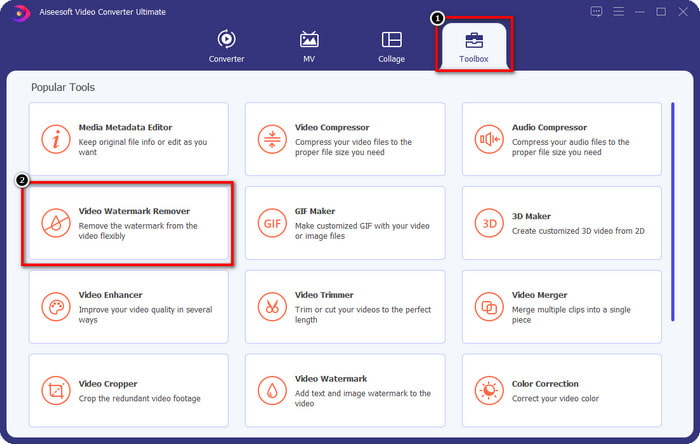
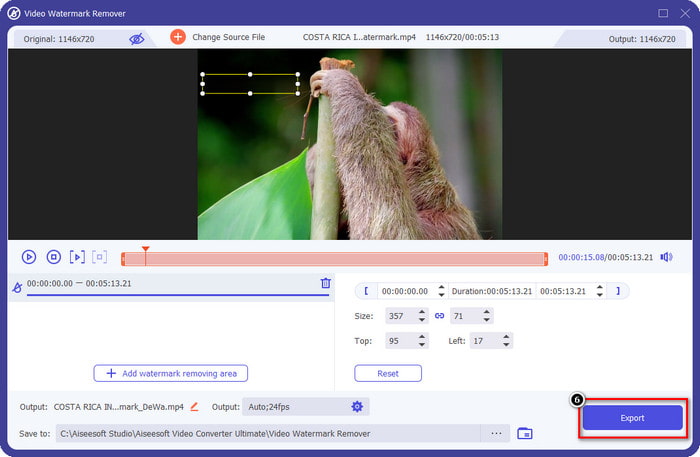
Adım 2. Yazılımı başlattıktan sonra Araç Kutusunu açın, ardından altındaki Video Filigran Kaldırıcıya tıklayın.
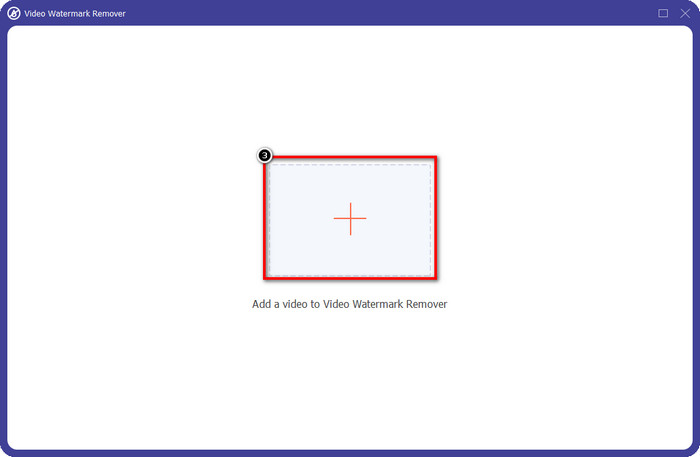
Adım 3. Filigranlı olarak Renderforest’ten dışa aktardığınız videoyu yüklemek için ekrandaki + simgesine tıklayın.
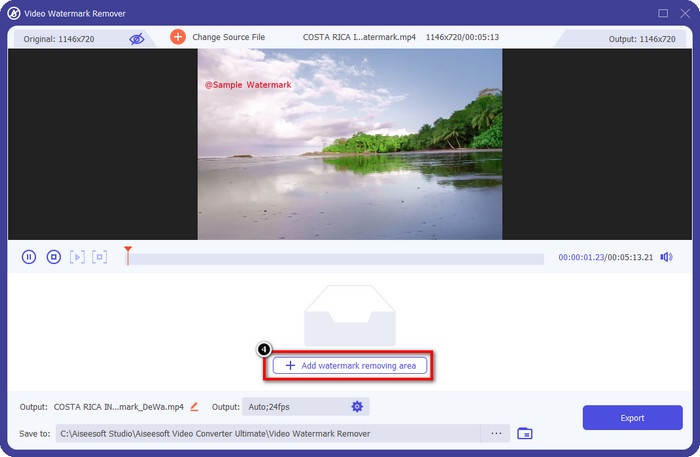
Adım 4. Renderforest filigranını kaldırmaya başlamak için Filigran Kaldırma Alanı Ekleye basın.
Adım 5. Ekranınızdaki yeni pencerede, seçim kutusunu sürükleyin ve filigrana tam olarak oturacak şekilde ayarlayın. Gerekirse seçim kutusunu dilediğiniz gibi ayarlayabilirsiniz.
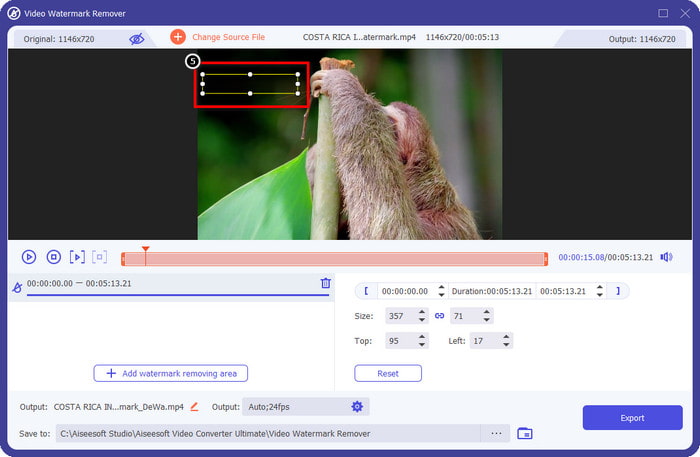
Adım 6. Seçim kutusu videonuzdaki filigranı algıladığında, filigranı kaldırmaya ve videoyu filigransız kaydetmeye başlamak için Dışa Aktara tıklayın. Video çok kısa sürede işlenecek ve artık videoyu rahatsız edici filigran olmadan kullanabileceksiniz.
İlgili:
Video Helper Filigranını Kaldır
Logoyu Şimdi Kaldır
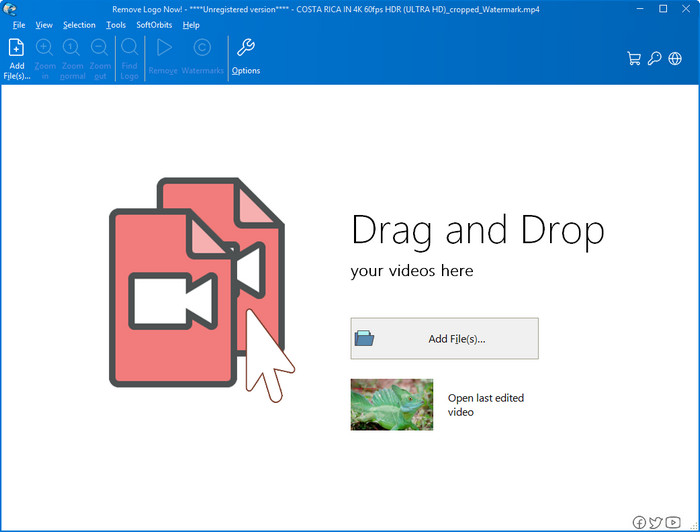
Listemizde sırada, Remove Logo Now Windows’ta bindirilmiş filigranları kaldırma konusunda mükemmel bir itibar kazanmıştır. Bu araç sayesinde, bir PC’de Renderforest filigranını nasıl kaldıracağınızı bilmek için uzman olmanıza gerek yoktur. Filigranı kaldırdıktan sonra, dikkatlice bakarsanız filigranın bulunduğu yerde bazı izler kalabilir. Ancak derinlemesine incelemezseniz, dışa aktarılan videoda filigranı ya da izlerini fark etmezsiniz. Aşağıdaki eğitim, Windows cihazlarınızda videonuzdaki filigranı nasıl kaldıracağınızı öğretecektir.
Adım 1. Remove Logo Now’u masaüstünüze indirin ve yükleyin, ardından kurulum sürecini takip edin.
Adım 2. Yazılımı başlatın ve videoyu yüklemek için Dosya Ekleye tıklayın. Dosya yüklemeyi daha verimli hâle getirmek için videoyu buraya sürükleyip bırakabilirsiniz.
Adım 3. Filigranı işaretlemek için hangi aracı kullanmak istediğinizi seçin. Birini seçtikten sonra filigranı vurgulayın ve Kaldıra tıklayın.
Adım 4. Bu aracın sunduğu filigran kaldırma sürecini başlatmak için Başlata tıklayın.
Video Filigran Temizleyici Çevrimiçi

Masaüstünüze yazılım indirmek istemiyor ama yine de Renderforest filigranını nasıl kaldıracağınızı bilmek istiyorsanız, Video Watermark Remover Onlineı kullanmayı deneyin. Bu tamamen otomatik filigran kaldırma aracını, videonuzdaki filigranı masaüstünüze bir şey indirmeden ücretsiz olarak ortadan kaldırmak için kullanabilirsiniz. Burada bahsedilen araçlar gibi, video düzenleme veya filigran kaldırma konusunda acemi olsanız bile bu aracı birkaç dakika içinde ustalıkla kullanabilirsiniz. Nasıl kullanacağınızı öğrenmek için aşağıdaki eğitimi takip edebilirsiniz.
Adım 1. Tercih ettiğiniz web tarayıcısında aratarak çevrimiçi filigran kaldırma sitesini açın.
Adım 2. Renderforest’ten dışa aktardığınız videoyu eklemek için ana sitedeki bulut yükleme simgesine tıklayın.
Adım 3. Yükleme işlemi tamamlanana kadar bekleyin; araç videonuzdaki filigranı otomatik olarak kaldıracaktır. Ardından videoyu filigransız almak için İndire tıklayın.
Bölüm 2. Renderforst Filigranının Nasıl Kaldırılacağına İlişkin SSS
Renderforest abonelik ücreti ne kadar?
Renderforest, yararlanabileceğiniz üç farklı fiyatlandırma türünü destekler; Her ay Lite için $ 14.99, Pro için $24.99 ve İş için $29.99. Bu fiyatlandırmanın birbirinden farklı bir amacı vardır; Boşuna almak istediğiniz abonelikte bulunanların neler olduğunu görmek için ana web sitesine gidebilirsiniz.
Filigranı Renderforest Video'dan bir araç olmadan kaldırmak mümkün müdür?
Evet, Renderforest'ınızdaki filigranı herhangi bir araç kullanmadan kaldırabilirsiniz ve bu şekilde yazılım için aylık veya yıllık ücret satın alabilirsiniz. Böylece video dosyasını dışa aktardığınızda, ona filigran eklenmez.
Renderforest için en iyi plan hangisi; Aylık mı Yıllık mı?
Aracı birkaç kez kullanmak istiyorsanız aylık abonelik iyi bir seçimdir, ancak yazılımı uzun bir süre kullanmaya karar verirseniz, Yıllık plandan yararlanmak daha iyidir, çünkü size yenilenmesinden daha az maliyetli olacaktır. her ay. Ancak boşuna olmadan önce, hesabınızı buraya giriş yaparak Renderforest'ı ücretsiz olarak kullanabilir, ardından sağladığı diğer şablonları ücretsiz olarak kullanmayı deneyebilirsiniz.
Sonuç
Aslında bu makale, Renderforest filigranını kullanabileceğiniz en yararlı üç filigran sökücüyü kullanarak ücretsiz olarak kaldırmak için güçlü kanıtlar sunmaktadır. Windows kullanıcısıysanız ve masaüstünüzdeki filigranı kaldırmak istiyorsanız, Şimdi Logoyu Kaldır'ı kullanmayı denemelisiniz. Ancak yazılım indirmekten hoşlanmıyorsanız, bu aracı filigranları etkili bir şekilde kaldırmak için kullanabileceğiniz için Çevrimiçi Video Filigran Kaldırıcı'yı kullanmayı denemelisiniz.
Ancak, etkili bir filigran sökücü isteyen bir Windows veya Mac kullanıcısıysanız, şüphesiz kullanabileceğiniz en iyi filigran sökücü FVC Video Converter Ultimate'dır. Renderforest videonuzu rahatsız eden filigranı verimli ve profesyonel bir şekilde kaldırmak için kullanabileceğiniz en iyi filigran sökücüdür.
-
 Windows ve Mac'te VSDC Filigranını Hızla Kaldırmanın 2 Yolu
 Videolarınızdaki VSDC filigranını kaldırmanın bir yolunu mu arıyorsunuz? Bu yazımızda filigrandan kurtulmak için kullanabileceğiniz araçlar sunuyoruz.
-
 Videolardaki Animoto Filigranını Kolay ve Etkili Bir Şekilde Kaldırın
 Videodaki Animoto filigranı nasıl kaldırılır? Nasıl yapılacağına dair eksiksiz bir eğitim verdiğimiz için bu makaleyi okumaya devam edin.
-
 Final Cut Pro Kullanarak Videodan Filigran Nasıl Kaldırılır [Komple Kılavuz]
 Videolardaki filigranla ilgili bir sorun mu yaşıyorsunuz? Final Cut Pro kullanarak videodan filigranın nasıl kaldırılacağına dair bir eğitim sağladığımız için daha fazlasını söylemeye gerek yok.
