


 Video Dönüştürücü Ultimate
 Ekran kaydedicisi
 Video Onarımı
 Güvenli İndirme
SmartDraw'da Filigranı 2 Olası Yolla Kaldırma
Eğer grafikler, çizimler ve haritalar oluşturmak için kolay ama güçlü bir yol arıyor, ardından bunları kurumsal düzeyde bir kaliteyle sunmak istiyorsanız SmartDraw kullanın. Hayal gücünüzü kullanarak, SmartDraw’ın yardımıyla bunları gerçeğe dönüştürebilirsiniz. Araç ücretsiz mi? Üzerinde filigran bulunan bir sürümle aracı ücretsiz kullanmak için sunduğu yedi günlük ücretsiz denemeden yararlanabilirsiniz. Dışa aktarılan dosyadaki filigranla uğraşmak ise can sıkıcı olabilir. Bu noktada sizi, pazarda bulabileceğiniz ve filigranı kaldırmada verimli çalışan en iyi aracı tanıttığımız bu blog yazısıyla tanıştırıyoruz. Aşağıdaki bilgileri okuyarak SmartDraw’daki filigranı iki etkili yöntemle nasıl kaldıracağınızı öğrenin.

Bölüm 1. Bir Lisans Anahtarı Satın Alarak Smart Draw'da Filigranı Kaldırma [Resmi Sürüm]
SmartDraw'dan filigran nasıl kaldırılır? Size tanıtacağımız ilk yol budur ve bu araç için lisans anahtarını satın almaktır. Bu platform size, sonunuza fayda sağlayacak farklı türde planlar sunar. Ayrıca, bu araca bir aylık erişim satın alamazsınız, bu nedenle lisans anahtarını satın almayı planlıyorsanız, aylık olarak faturalandırılırsınız, ancak ödeyeceğiniz toplam tutar, yıllık sürümündedir. Bu aracın performansını beğendiyseniz ve satın almak istiyorsanız aşağıda eklediğimiz adımları takip edebilirsiniz.
Bir Lisans Anahtarıyla SmartDraw'da Filigranın Nasıl Kaldırılacağına İlişkin Adımlar:
Adım 1. SmartDraw’ın resmi web sitesini açın ve güvenli bir işlem yapmak için doğru siteye girdiğinizden emin olun.
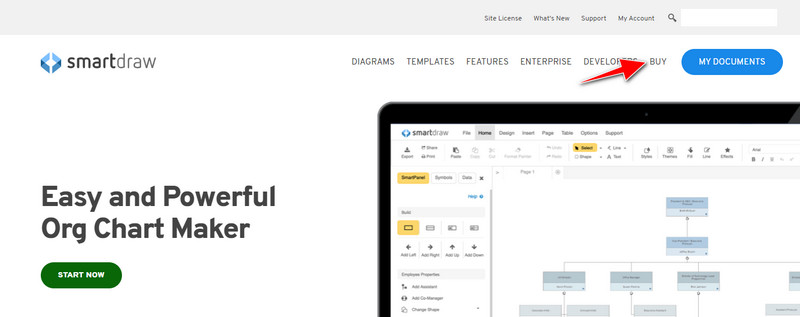
Adım 2. Sitede, mevcut planları görmek için Satın Al düğmesine tıklayın.
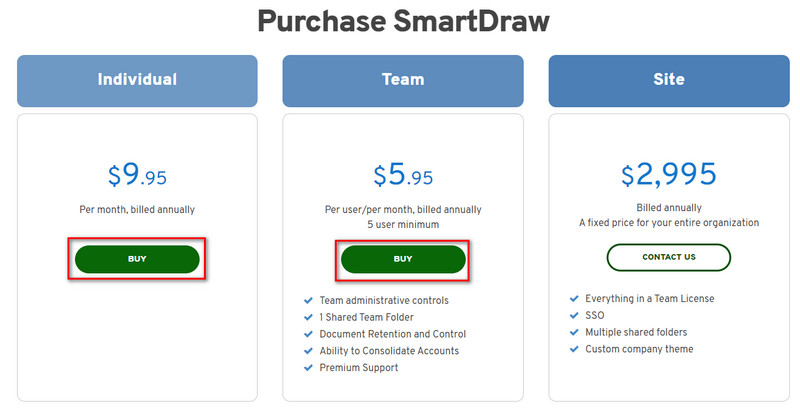
Adım 3. SmartDraw’ı Bireysel, Ekip veya Site olarak satın alabilirsiniz. Eğer Bireysel ya da Ekip sürümünü alacaksanız Şimdi Satın Al’a tıklayın.
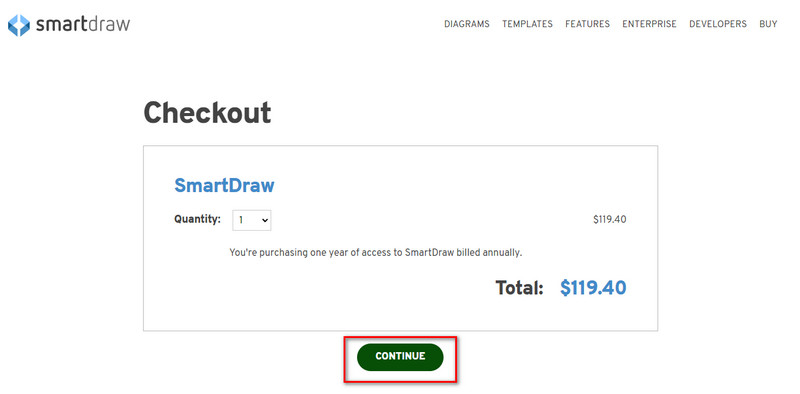
Adım 4. Sağ tarafta, aracın yıllık toplam ücretini göreceksiniz; devam etmek için Devam’a tıklayın.
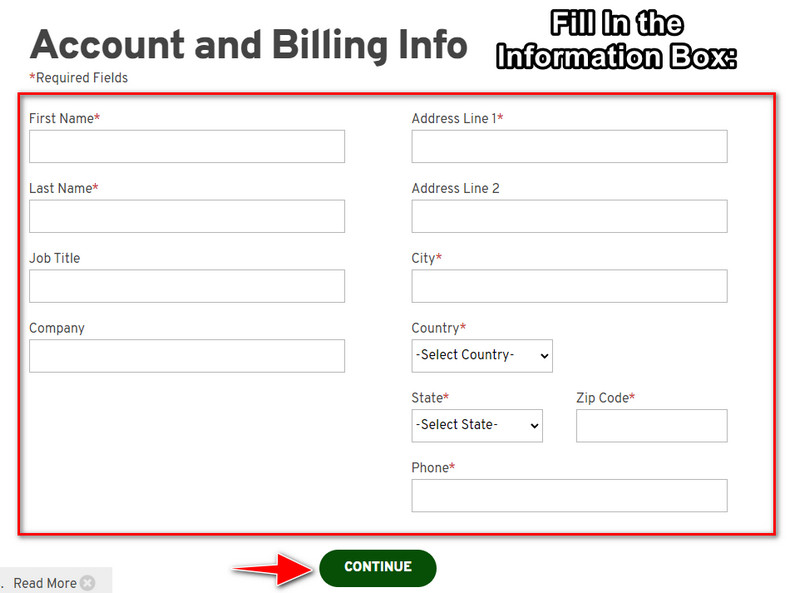
Adım 5. Hesap ve fatura bilgilerinizi gerekli alanlara ekleyin, ardından lisans anahtarını almak için Devam’a basın.
Bölüm 2. Web Hizmetini Kullanarak Smart Draw'da Filigranı Ücretsiz Olarak Kaldırma [Ücretsiz]
SmartDraw deneme sürümündeki filigranı satın almadan nasıl kaldırabilirsiniz? Bunun için FVC Free Watermark Remover Online’ı kullanmanız gerekir. Bu filigran kaldırıcı, kullanımınıza hazırdır. Görselinizdeki filigranı kaldırmak için uzman olmanız gerekmez, çünkü bu aracı kullanmak zorlayıcı olmayacaktır. Uzman olsanız bile, görselinizdeki istenmeyen filigranları veya nesneleri kaldırmak için bu yazılımı kullanabilirsiniz. Bu filigran kaldırıcı sayesinde, görselinizde onun kaldıramayacağı hiçbir leke kalmayacaktır. Lisans anahtarı satın almak yerine bu yazılımı denemek ister misiniz? Öyleyse, görsellerdeki filigranı etkili şekilde kaldırmak için aşağıya eklediğimiz bu eğitimi takip edin.
SmartDraw Filigranını Grafikte veya Şemada Ücretsiz Olarak Kaldırma Adımları:
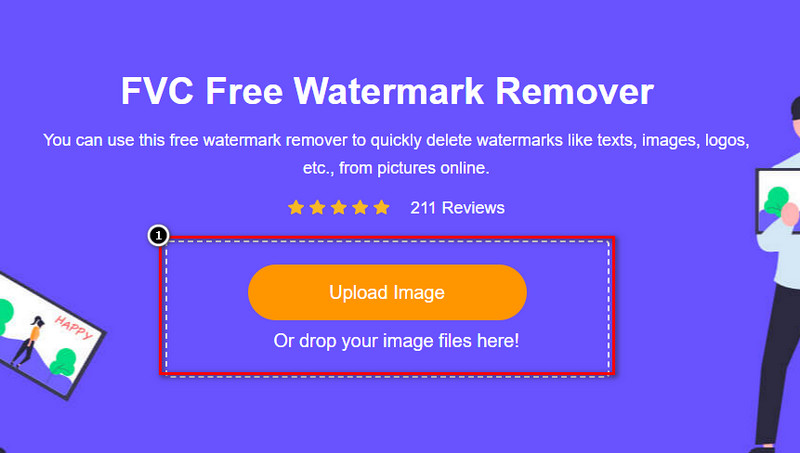
Adım 1. Web tarayıcınızda web aracını aramak yerine, yeni bir sekmede açılacak bu bağlantıya tıklayarak açabilirsiniz.
Adım 2. Farenizi kullanarak SmartDraw’da oluşturduğunuz görüntü, grafik veya diyagramı sürükleyip bırakın ve yükleyin.
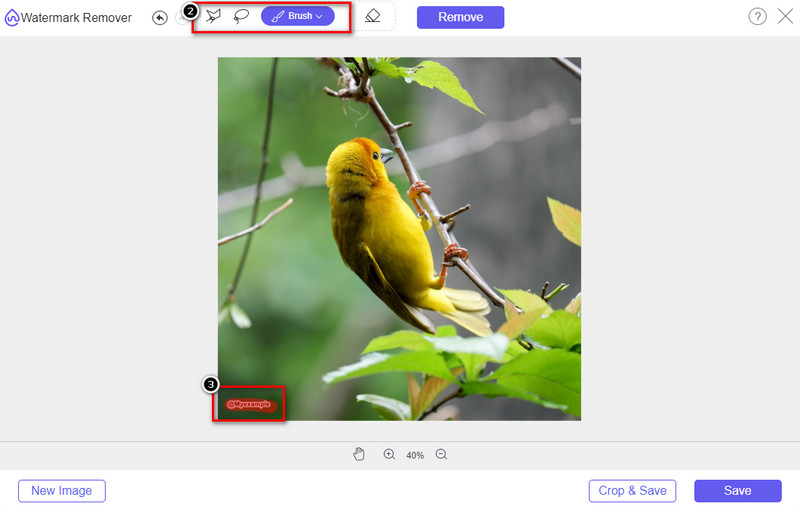
Adım 3. Çevrimiçi filigran kaldırıcı açıldığında, görseldeki filigranı vurgulamak için kullanmak istediğiniz aracı seçin.
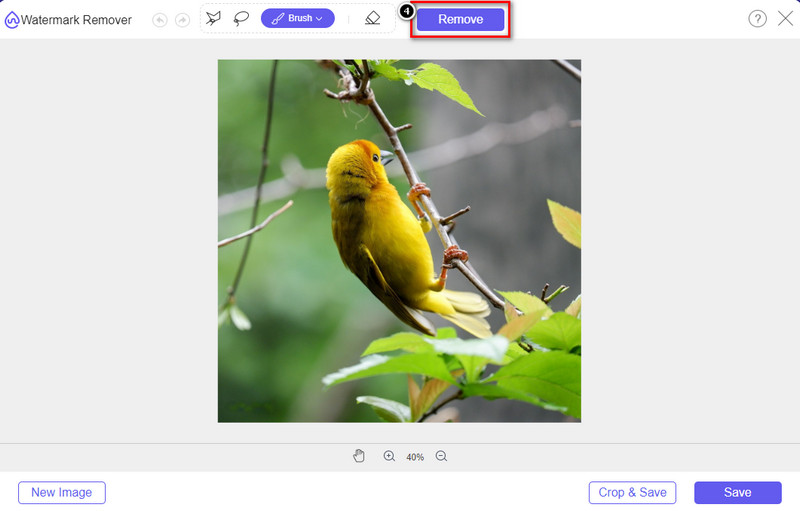
Adım 4. Yüklediğiniz görseldeki filigranı veya logoyu vurguladıktan sonra Kaldır’a basın.
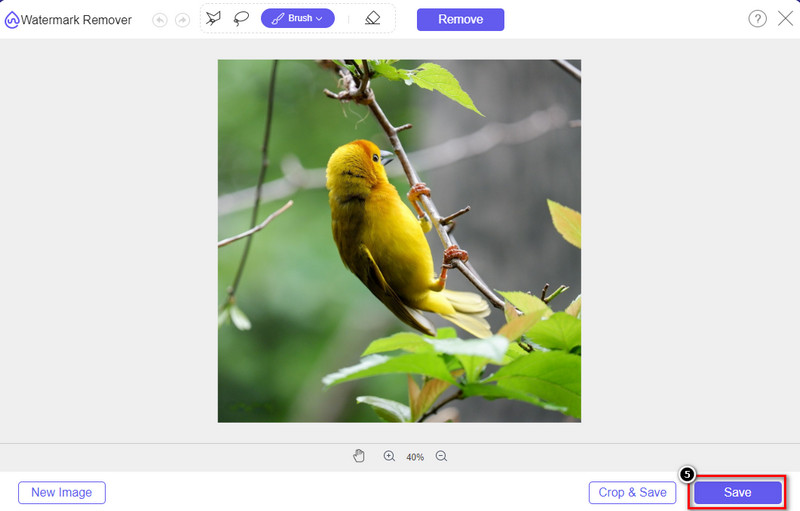
Adım 5. Filigranın kaldırılma işleminin tamamlanmasını bekleyin ve ardından yüklediğiniz grafik veya diyagramı indirmek için Kaydet’e tıklayın. Ekranınızda bir klasör açılacaktır; şimdi, oluşturduğunuz grafik veya diyagramın filigransız sürümünü kontrol edin.
FVC Free Watermark Remover Online’ı Kullanmanın Avantajları:
◆ Web'de mevcut olduğundan uygulamayı indirmek gerekli değildir.
◆ Çok çeşitli görüntüleri destekler ve filigranları etkili bir şekilde kaldırabilir.
◆ Yüksek kaliteli çıktı üreten özel bir filigran sökücüdür.
◆ Dışa aktarıldıktan sonra nihai çıktıya filigran eklenmez.
◆ Kaç kez kullanılacağına ve dosya boyutuna ilişkin sınırlama yoktur.
Bölüm 3. Ek Bölüm – SmartDraw'da Ayrıntılı Adımlarla Bir Grafik, Grafik veya Diyagram Nasıl Yapılır
Önceki kısım size SmartDraw filigranından nasıl kurtulacağınızı öğretir. Bu bölümde size SmartDraw yardımıyla nasıl çizelge, grafik ve diyagram yapılacağını öğreteceğiz; nasıl yapılacağını öğrenmek için aşağıya eklediğimiz adımları takip edebilirsiniz.
Adım 1. Bir grafik, tablo veya diyagram oluşturmak için resmi web sitesine gidin.
Adım 2. Resmi web sitesini açtığınıza göre, Şimdi Başla’ya tıklayın ve hesabınızı açın.
Adım 3. Sol taraftan, hangi tür şablona sahip olmak ya da hangisini oluşturmak istediğinizi seçin.
Adım 4. Her akış şemasına (flow chart) bilgileri ekleyin. Sitenin sol bölümünde kullanabileceğiniz ek seçenekler de olacaktır.
Adım 5. Dışa Aktar düğmesine tıklayın, hangi format tipine sahip olmak istediğinizi seçin ve işlemi başlatmak için tıklayın. Ücretsiz sürümü kullanıyorsanız, bir filigran olacaktır; filigranı kaldırmak için 2. kısımdaki adımları kopyalayabilirsiniz.
Daha Fazla Okuma:
Görsellerinizden B612 Filigranı Nasıl Kaldırılır
WOW Slider Filigranı Ücretsiz Nasıl Kaldırılır
Bölüm 4. SmartDraw Filigranı Nasıl Kaldırılır Hakkında SSS
SmartDraw PNG resimlerini dışa aktarabilir mi?
Evet, PNG formatında şeffaf bir grafiğiniz olabilir. Ancak, ücretsiz sürümü kullanırsanız bir filigran ekleyecektir. Resmi sürümü satın alabilirsiniz, böylece dışa aktarılan görüntüde bir filigran olacaktır.
SmartDraw'ın fiyatı ne kadar?
SmartDraw'da bir plan satın almak üzereyseniz, planını $ 5,95'ten başlayarak satın alabilirsiniz. Sağladığı diğer fiyatları resmi web sitesinde kontrol edebilirsiniz.
SmartDraw'ın premium sürümünü satın almanın avantajı nedir?
Bireysel planlar için ekip yöneticisi kontrolü, ekip klasörü, premium destek ve filigran olmadan görüntüleri dışa aktarabilirsiniz. Diğer premium avantajlar için resmi web sitesini ziyaret edebilir ve hangi özellikleri ve işlevleri alabileceğinizi görebilirsiniz.
Sonuç
Artık eklediğimiz iki yöntemle SmartDraw'ı filigran olmadan nasıl kaydedeceğinizi biliyorsunuz. Ya satın alırsınız ya da dışa aktarılan dosyadaki filigranı kaldırmak için bir araç kullanırsınız. Aracı satın almaktan hoşlanmıyorsanız, filigranı ortadan kaldırmak için en etkili web aracı olduğu için kullanmalısınız. Bu makalenin sorunu çözmenize yardımcı olduğunu düşünüyorsanız, bize 5 yıldız verin.
-
 GIF'ten Filigranı Kaldırmanın En İyi 4 Yolu [Çevrimiçi ve Çevrimdışı]
 GIF'ten filigranı kaldırmanız mı gerekiyor? Bu makaledeki araçla, platformunuzda bulunan farklı filigran kaldırıcı ile farklı stilleri öğreneceksiniz.
-
 Herhangi Bir Medya Dosyasındaki Meta Verileri Kaldırmanın En Kolay 5 Yolu
 Meta veriler nasıl kaldırılır? Bunu yapmak zor mu? Etiketleri kaldırmak için ücretsiz bir araç satın almam veya kullanmam gerekir mi? Tüm bu soruların cevapları bu yazıda.
-
 Olağanüstü Photobucket Filigran Sökücü Çevrimiçi ve Çevrimdışı
 Bu harika Photobucket filigran çıkarıcıyı kullanarak Photobucket filigranını fotoğraflarınızdan nasıl çıkaracağınızı öğrenin. Yolları öğrenmek için bu makaleyi okuyun.
