


 Video Dönüştürücü Ultimate
 Ekran kaydedicisi
 Video Onarımı
 Güvenli İndirme
Bilmeniz Gereken Weibo Filigranını Nasıl Kaldıracağınıza Dair Eğitimi Tamamlayın
Weibo, Çin'de sıklıkla kullanabileceğiniz Twitter gibi bilgileri paylaşmak, yaymak ve almak için kullanılan bilinen bir sosyal medya platformudur. Ayrıca burada küçük resimler, fotoğraflar ve videolar yayınlayabilir ve indirebilirsiniz. Ancak, dışa aktardığınızda bir filigran olacaktır. Birçok kullanıcı içeriğin görselliğini bozduğu için kaldırmak istiyor.
Binlerce filigran kaldırma aracı olmasına rağmen, bunların çok azı filigranı gerçekten etkili bir şekilde kaldırabiliyor. Yani indirdiğiniz görsel medyadaki filigranı sevmiyorsanız, bu makale kullanabileceğiniz en iyi araçları bir araya getiriyor. Bu araçları tek tek test ederek filigranı kaldırmada gerçekten işlevsel ve pratik olduklarını kanıtladık. Size Weibo filigranı nasıl kaldırılır öğretmek için, bu makaleyi dikkatle okumaya devam etmeniz gerekiyor.

Bölüm 1. Ultimate Watermark Remover Kullanarak Weibo Videodan Filigran Nasıl Kaldırılır
Weibo filigranı, diğer araçlarda sorun olabilir çünkü çoğu araç filigranın yerinde bir leke bırakır. Ancak FVC Video Converter Ultimate kullanırsanız, filigranın yerinde hiçbir iz kalmaz. Filigran ne kadar büyük ya da küçük olursa olsun, bu araç onu hiçbir iz bırakmadan etkili bir şekilde silebilir. Böylece Weibo’da dışa aktardığınız videoyu keyifle izleyebilirsiniz. Başka bir deyişle, bu aracın yardımıyla filigranı kaldırmak çocuk oyuncağıdır.
Ayrıca, bu aracı kesme, birleştirme, sıkıştırma, kırpma, GIF oluşturma ve daha fazlası gibi başka şeyler için de kullanabilirsiniz. Ve kimsenin sizden çalmaması için videonuza bir filigran eklemek istiyorsanız, bunu yapmak için bu yazılımı kullanabilirsiniz. Masaüstünüzde ihtiyaç duyulan hepsi bir arada yazılımdır. Weibo videosundan filigranı nasıl kaldıracağınızı bilmek ister misiniz? Nasıl yapıldığını adım adım anlattığımız için sonraki adımları takip edebilirsiniz.
Ücretsiz İndirWindows 7 veya üstü içinGüvenli İndirme
Ücretsiz İndirMacOS 10.7 veya üstü içinGüvenli İndirme
': Sonraki adımları uygulamadan önce, filigranı kaldırmak istediğiniz Weibo videosunu klasörde kolayca bulabilmeniz için dışa aktardığınızdan emin olun.
Adım 1. Öncelikle, yazılımı masaüstünüze indirmeli ve işletim sisteminize uygun sürümü seçmelisiniz. Yazılımı kurduktan sonra ekranda belirecek WinRAR kurulum sürecini takip edin, Başlat’a Şimdi Tıkla düğmesine basarak programı açın ve devam edin.
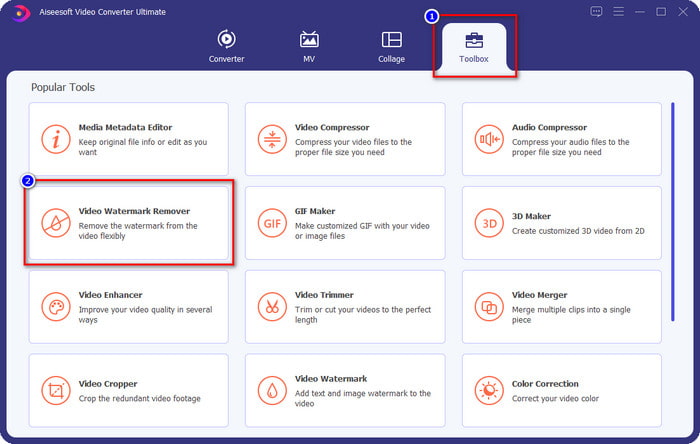
Adım 2. Araç Kutusu bölümüne gidin ve Video Filigran Kaldırıcı seçeneğini bulun; üzerine tıklayın.
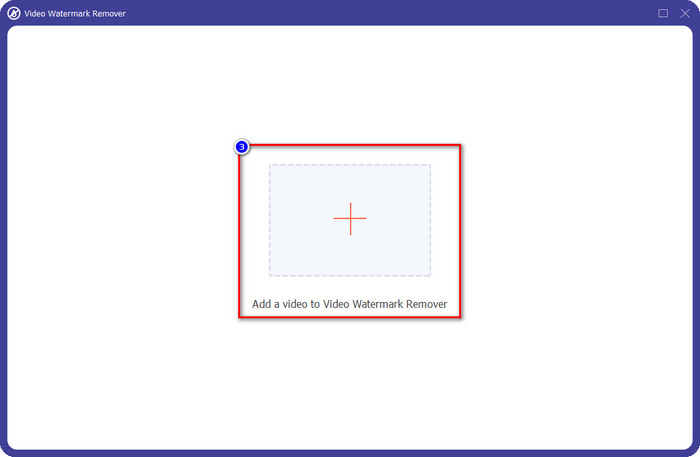
Adım 3. + düğmesine tıklayın, klasörde daha önce indirdiğiniz Weibo video filigranlı dosyasını bulun, dosyayı seçin ve şimdi yüklemek için Aç düğmesine basın.
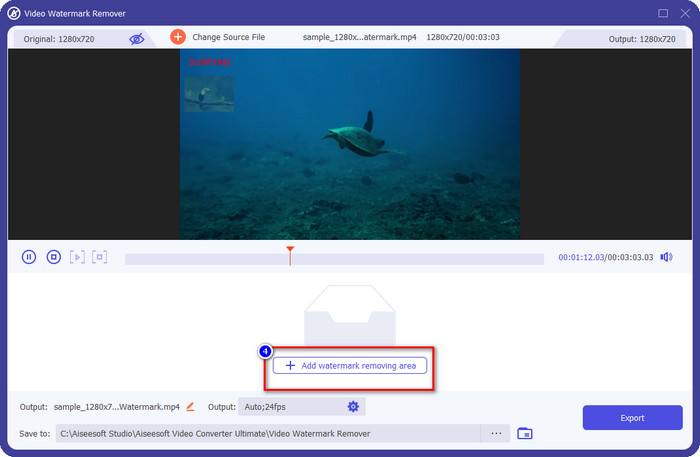
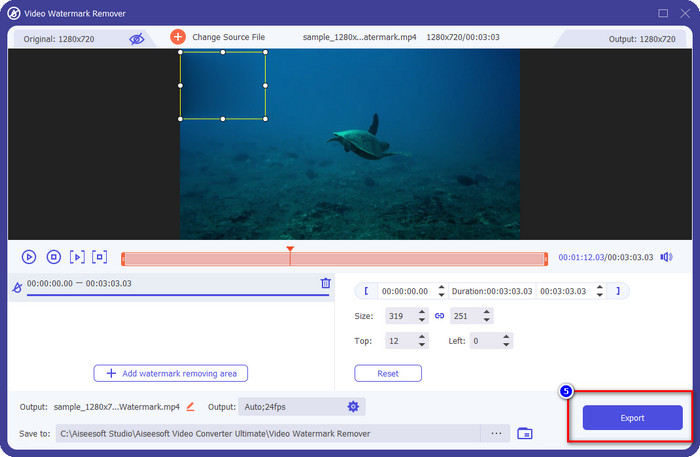
Adım 4. Açılacak yeni pencerede, filigranı kaldırmaya devam etmek için Filigran Kaldırma Alanı Ekle seçeneğine tıklayın.
Adım 5. Filigranı kapatmak için seçim kutusunu sürükleyip basılı tutun; ayrıca, dışa aktarmadan önce ihtiyaçlarınıza göre kutuyu büyütebilir veya küçültebilirsiniz.
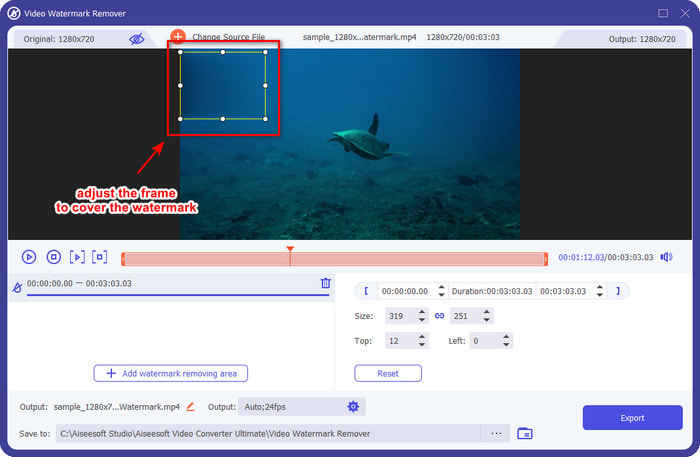
Adım 6. Seçim kutusunu filigranın üzerine yerleştirdikten sonra, yüklediğiniz videodaki filigranı kaldırmak için Dışa Aktar düğmesine tıklayın. Ultra hızlı işlem desteği sayesinde beklemenize gerek kalmaz; birkaç saniye içinde Weibo videosunu filigransız olarak elde edersiniz.
Bölüm 2. Web'deki Ücretsiz Sürümü Kullanarak Weibo Fotoğrafından Filigran Nasıl Kaldırılır
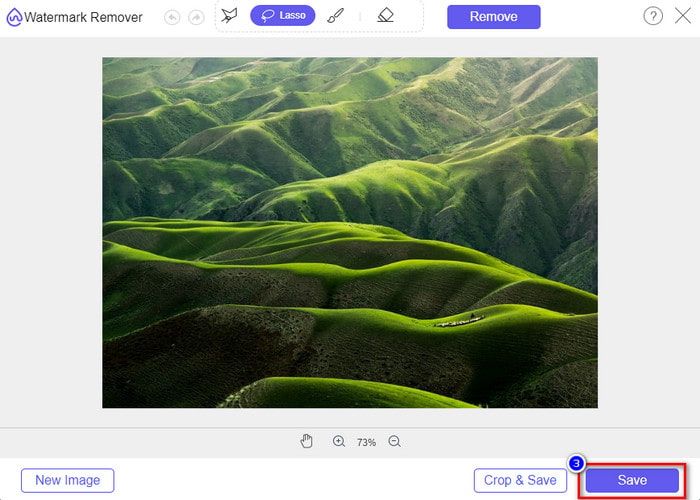
Weibo fotoğraflarını filigransız nasıl kaydedersiniz? Weibo’dan dışa aktarıldığında, görüntüyü filigransız kaydedemezsiniz. Ancak, görsellerdeki filigranı silmek için FVC Free Watermark Remover kullanabilirsiniz. Bu araç, filigranlı görseller için eksiksiz bir filigran kaldırıcıdır. İşlevsellik açısından bakıldığında, bu aracın web üzerinde kullanabileceğiniz diğer filigran kaldırma araçlarından çok daha iyi olduğunu söyleyebiliriz. Yani bir görseldeki filigranı kaldırmak istiyorsanız, ilk denemek isteyeceğiniz seçenek bu olmalıdır. Her ne kadar bir görüntüdeki filigranı kaldırabilse de, videolardaki filigranı kaldırma konusunda ultimate sürümün yaptığı işlemleri yapamaz.
Bununla birlikte, kullanımı ücretsizdir ve web arayüzü temizdir, bu nedenle sizi rahatsız edebilecek herhangi bir reklam görmezsiniz. Bu web aracını nasıl kullanacağınızı bilmek ister misiniz? Ardından, kendiniz denemek için aşağıda belirtilen adımları izleyin.
Not: Videoyla aynı şekilde, sahip olmak istediğiniz Weibo görüntüsünü indirdiğinizden ve klasöre görünür ve erişimi kolay bir yere yerleştirdiğinizden emin olun.
Adım 1. Web üzerinde filigran kaldırıcıya erişmek için bu bağlantıya tıklayın.
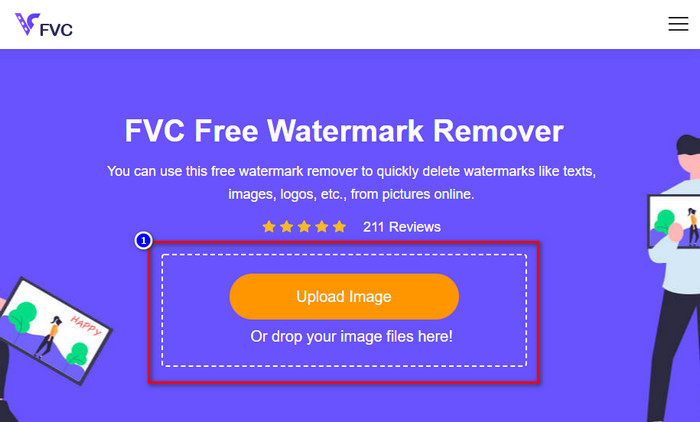
Adım 2. Web arayüzünde, Görsel Yükle seçeneğine tıklayın; ardından ekranda bir klasör açılacak, görseli bulun ve yüklemek için Aç düğmesine basın.
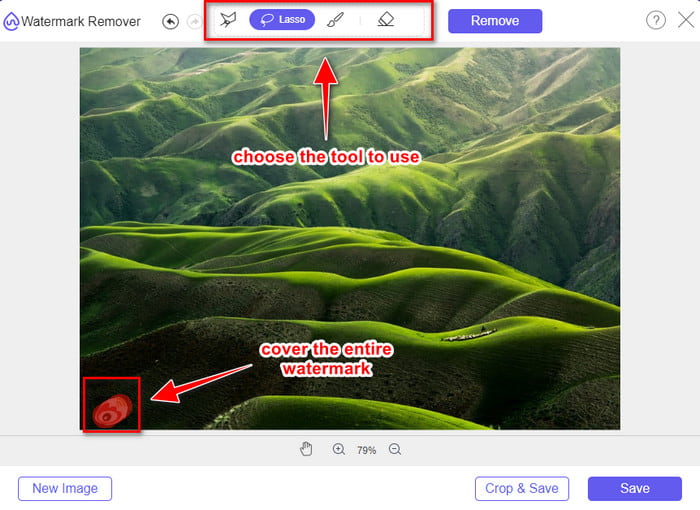
Adım 3. Burada filigranı kaldırmak için filigranı izleyebilir ve filigranın her bir noktasının çizdiğiniz alanın içinde olduğundan emin olabilirsiniz.
Adım 4. Görselinizdeki filigranı silmek için Kaldır düğmesine basın.
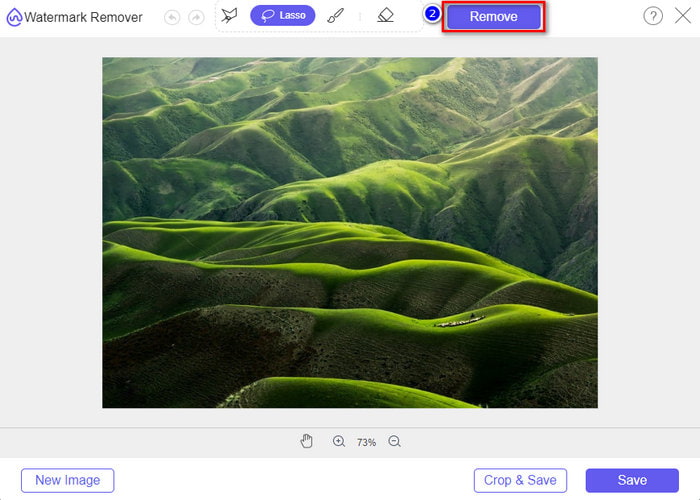
Adım 5. Weibo görselindeki filigranı kaldırdıktan sonra, Weibo görselini filigransız indirmek için Kaydet düğmesine tıklayın.
İlgili:
TikTok Filigranı Nasıl Kaldırılır
Videoya Filigran Nasıl Eklenir
Bölüm 3. Weibo Filigranının Nasıl Kaldırılacağına İlişkin SSS
Weibo filigranı dışa aktardıktan sonra neden bulanıklaştı?
Bazı araçlar filigranı bulanıklaştırır, böylece Weibo'da dışa aktardıkları görsel medyada görülmez. Ancak tüm araçlar filigranları bulanıklaştırmaz; bazıları görsel medyadaki filigranı iz bırakmadan kaldırır. Bu nedenle, Weibo'daki filigranı bulanıklaştırmadan kaldırmak istiyorsanız, kaldırmanıza yardımcı olacak yukarıda bahsettiğimiz aracı bilmelisiniz.
Dışa aktarılan dosyadaki Weibo logosunu kapatabilir miyim?
Evet yapabilirsin. Bu sayede dosya üzerinde Weibo filigranını görmeyeceksiniz. Ancak, kurcalamak dosyanın bazı bölümlerini kapsayabilir, bu nedenle size yardımcı olmak yerine dosyayı daha da kötüleştirebilir. Bu nedenle, dosyanın filigranını silmek için bir filigran sökücü gerekir.
Weibo'da dışa aktarılan tüm dosyaların filigranı var mı?
Bu mikroblog platformunda herhangi bir dosya türünü dışa aktarmak bir iz bırakacaktır. Ne olursa olsun filigranlar dosyaya eklenir. Yine de, bu makalede daha önce bahsettiğimiz araçla kaldırabilirsiniz.
Sonuç
Harika değil mi? FVC, Weibo’daki video ve görsellerdeki filigranı anında kaldırmanız için ihtiyaç duyacağınız araca sahip. Bu tür düzenleme konusunda deneyiminiz olmasa ya da profesyonel olmasanız bile, adı geçen araçla düzenleme yapmak mümkün. Dolayısıyla, ister Weibo’dan dışa aktarılmış olsun ister olmasın, bir görseldeki filigranı kaldırmak istiyorsanız, FVC Free Watermark Remover ihtiyacınız olan tek araçtır. Ancak videolar ve GIF’ler için, FVC Video Converter Ultimate gibi kullanımı kolay ve uygun fiyatlı profesyonel bir yazılım kullanmalısınız. Daha ne bekliyorsunuz? Görsel medyanızdaki filigranı kaldırın ve onu hiçbir iz olmadan izlemenin keyfini çıkarın.
-
 Windows ve Mac'te Photoshop'ta Bir Videoya Filigran Eklemenin En İyi Yolu
 Photoshop'ta bir videoya nasıl filigran ekleneceğini bilmek ister misiniz? Bu durumda, bu makale size bilmeniz gereken bir veya iki şeyi sağlayacaktır.
-
 Videolardan Filigranı Kolayca Kaldırma Konusunda En İyi 3 Çözüm
 Videodaki can sıkıcı filigranı kaldırmak ister misiniz? Bu blog ile bir videodaki filigranı kaldırmayla ilgili farklı fikirleri öğrenebilirsiniz.
-
 GIF'ten Filigranı Kaldırmanın En İyi 4 Yolu [Çevrimiçi ve Çevrimdışı]
 GIF'ten filigranı kaldırmanız mı gerekiyor? Bu makaledeki araçla, platformunuzda bulunan farklı filigran kaldırıcı ile farklı stilleri öğreneceksiniz.
