


 Video Dönüştürücü Ultimate
 Ekran kaydedicisi
 Video Onarımı
Videoları Tüm Platformlarda Sorunsuz Bir Şekilde Hızlandırmak için Kullanabileceğiniz En İyi 5 Araç
Videoları hızlandırmak, özellikle bir videoyu normal yerine daha hızlı bir şekilde izlemek istediğinizde çok kullanışlıdır. Ayrıca, bir videoyu hızlandırmak dosyanın süresini kısaltır ve ham video dosyasına kıyasla dosya boyutunu da küçültebilir. Ancak, videoyu hızlandırmanın bazı dezavantajları da vardır; örneğin hız çok fazla olursa video oynatılamayabilir. Bu sorunu önlemek için, arasından seçim yapabileceğiniz farklı araçlar sunuyoruz. Aşağıda okuyacağınız tüm ifadeler yalnızca gerçeklerden oluşmaktadır ve bu makaleyi yazmadan önce zaten denenmiştir. Şimdi, Windows, Mac ve Linux’ta kullanılabilecek en iyi yazılımların hangileri olduğunu öğrenmek için aşağıda sunulan farklı araçları birlikte inceleyelim.

Bölüm 1. Windows'ta Videoyu Hızlandırmak İçin En İyi 3 Yazılım
1.Video Dönüştürücü Ultimate
Videoyu hızlandırmak ya da yavaşlatmak sorununuzsa, bunun için tek bir çözüm var: Video Converter Ultimate. Bu yazılım, videonuzu eskisinden daha da hızlı hale getirmeye ya da isterseniz yavaşlatmaya hazırdır. Ayrıca, dışa aktarmak istediğiniz çıktının kalitesi düşmez veya çok daha düşük bir kaliteye indirgenmez. Yani, buraya 1080p veya 4K UHD bir video eklediğinizde, hızını değiştirmiş olsanız bile kalitenin değişmeyeceğini bekleyebilirsiniz. Şimdi, Video Converter Ultimate aracılığıyla bir videoyu nasıl hızlandıracağınızı öğrenmek istiyorsanız, aşağıda verilen adımları takip edin. Ek olarak, burada 4x ve 8x hızı önizleyemezsiniz, ancak dışa aktarma sonrasında bu hıza yine de kaliteyi bozmadan ulaşabilirsiniz.
Video Converter Ultimate Yardımıyla Videoyu Nasıl Daha Hızlı Yapacağınıza Dair Adımlar:
Adım 1. Her şeyden önce, aşağıdaki indirme düğmesine tıklayarak PC mi yoksa Mac mi olduğunu seçmeniz gerekir. Ardından programı kurun, isterseniz kurulum ayarlarını değiştirin ve değişiklikleri kaydetmek için bitir’e tıklayın.
Ücretsiz İndirWindows 7 veya üstü içinGüvenli İndirme
Ücretsiz İndirMacOS 10.7 veya üstü içinGüvenli İndirme
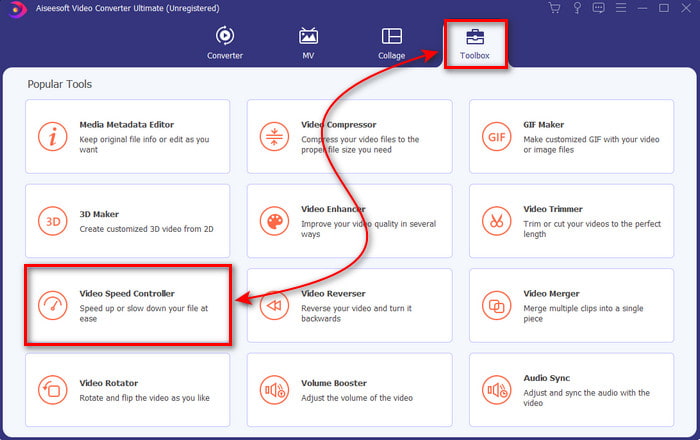
Adım 2. Araç Kutusuna gidin ve Video Hız Denetleyiciyi bulun, ardından üzerine tıklayın.
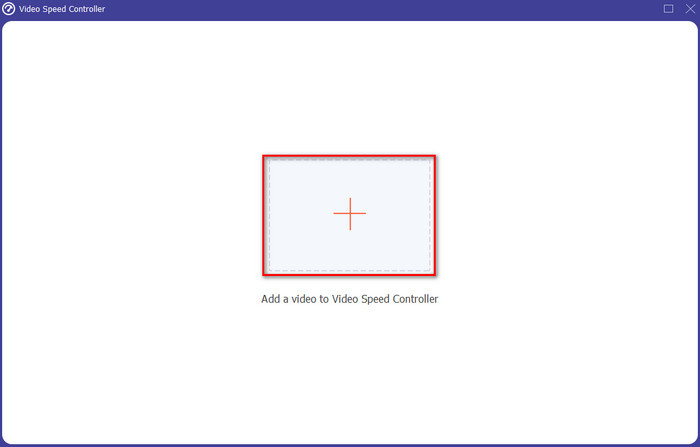
Adım 3. Hızlandırmak istediğiniz video dosyasını eklemek için + işaretine tıklayın ve devam etmek için Aça basın.
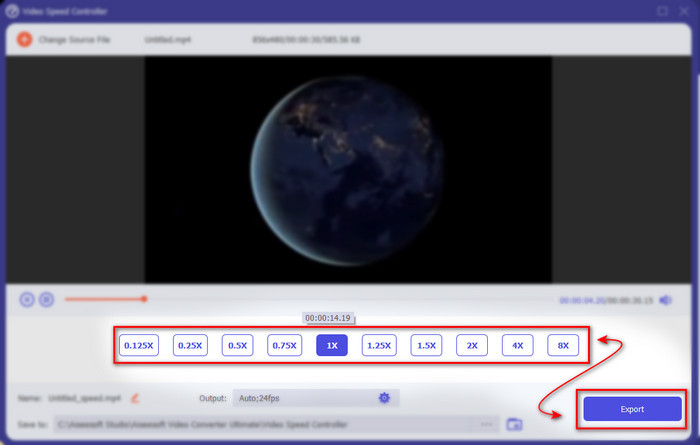
Adım 4. Arayüzde, videoyu yavaşlatmak mı yoksa hızlandırmak mı istediğinize göre bir hız seçeneği belirleyin. Önizlemeler yalnızca 2x ve altındaki hızlar için kullanılabilir. Ardından hızlandırdığınız videoyu kaydetmek için Dışa Aktar düğmesine tıklayın.
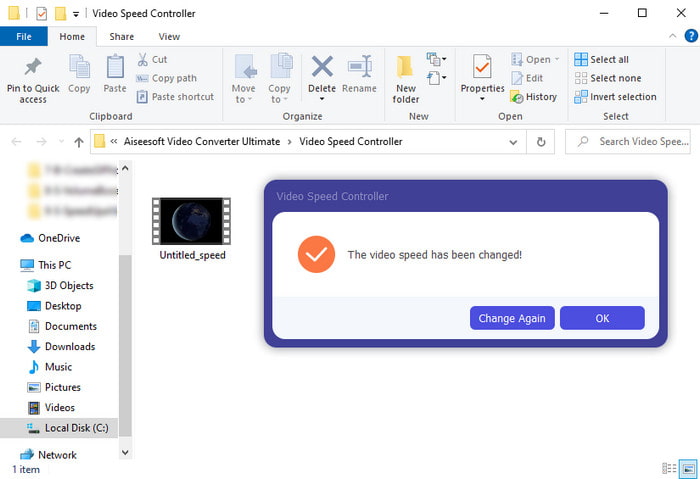
Adım 5. Dışa aktarma işlemi için birkaç dakika bekleyin; video dosyası işlemi tamamlandığında hızlandırılmış videonun bulunduğu bir klasör açılacaktır. Videonun hızlandırılmış sürümünü izlemek için bu videoya tıklayın.
Artıları
- Gelişmiş ve fütüristik düzenleme özellikleri, Video Converter Ultimate'da zaten sunulmaktadır.
- Aracın kullanımı basittir ancak çıktısı etkileyicidir.
- Araç arayüzü, burada sunulan diğer araçlardan zaten daha etkileyici.
Eksileri
- Ücretli ama o kadar pahalı değil.
- Bu aracı kullanabilmeniz için önce onu indirmeniz gerekir.
2. Adobe Premiere Pro
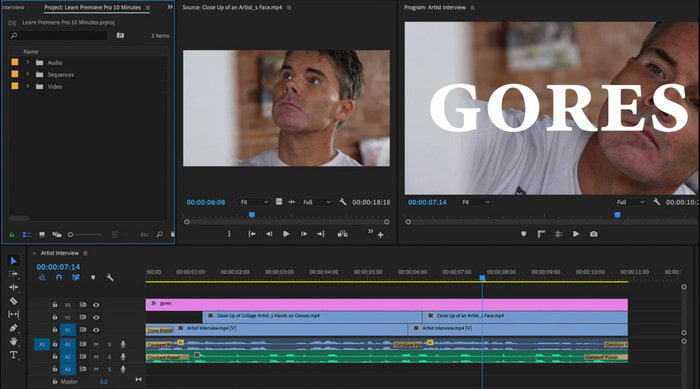
Adobe Premiere Pro, kullanabileceğiniz en iyi video düzenleyicilerden biridir. Bu Adobe aracı, profesyonel bir video düzenleyip oluştururken istediğiniz her şeyi yapabildiğiniz için en çok tercih edilenlerden biridir. Ancak, bu araç Video Converter Ultimate’tan çok daha pahalıdır ve ayrıca kullanıcı dostu değildir. Aracı açtığınız anda düzenlemeye başlamak yerine, Premiere’de videoyu nasıl hızlandıracağınızı araştırmanız gerekir. Ayrıca, bu aracın öğrenme süreci beklenenden biraz daha karmaşıktır; çünkü nasıl kullanılacağını öğrenmek için YouTube’dan videolar izlemeniz ve bu araçla ilgili bazı kılavuzları okumanız gerekir.
Artıları
- Profesyoneller tarafından kullanılan en iyi araçlardan biri.
- Araç, ağır video düzenleme yapabilir.
- Arayüz, başka bir araçtan daha zarif ve daha düzenli görünüyor.
Eksileri
- Adobe Premier Pro, kelimenin tam anlamıyla overpriced.
- Bu aracın öğrenme eğrisi, tam olarak kullanabilmeniz için biraz zaman alacaktır.
3.FFmpeg
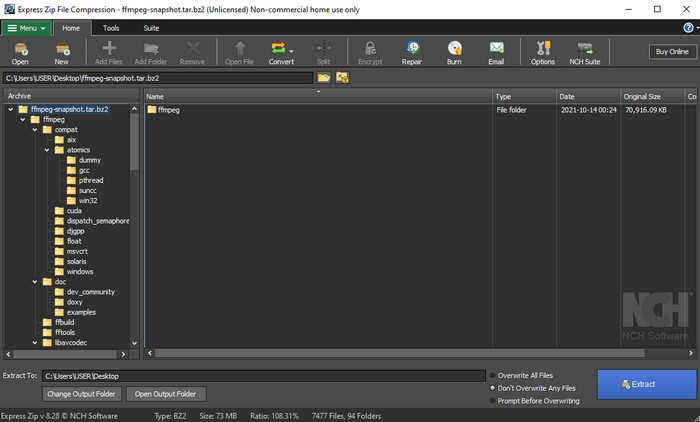
FFmpeg, önde gelen multimedya altyapılarından biri olarak bilinen araçlardan biridir. Bu araç temel olarak video, ses, yayınlar ve ihtiyacınız olan diğer multimedya dosyalarını işlemek için kullanılan bir İsviçre çakısı gibidir. Her ne kadar çok amaçlı bir araç olsa da, bu yazılımın ihtiyaç duyduğu bazı geliştirmeler vardır. Örneğin, FFmpeg’in arayüzünün sadeleştirilmesi gerekir. Adobe Premiere gibi bu araç da arayüzünün göz korkutucu olması nedeniyle yeni başlayanların yönetmesi için zordur. Genel olarak, FFmpeg ile videoyu hızlandırmak mümkündür; bunun için aracı nasıl kullanacağınızı öğrenmeniz gerekir. Bu aracı öğrenmeye çok zaman ayırırsanız, muhtemelen karşılığını alırsınız ama bu uzun soluklu bir süreç olacaktır.
Artıları
- Açık kaynaklı bir yazılım projesidir.
- Çok çeşitli codec bileşenlerini destekler.
- Etkili bir düzenleme özelliği isteyen her profesyonel için harika bir seçim.
Eksileri
- Yeni başlayanlar için kendi başlarına yürütmek için en iyi seçim değil.
- Küçük bir çapraz platform yelpazesini destekler.
- Arayüzü, profesyonel olmayanlar tarafından ele alınamayacak kadar büyüktür.
Videoyu Hızlandırmak için En İyi Mac Yazılımının 2. Kısmı
1.Hızlı Zaman Oyuncusu
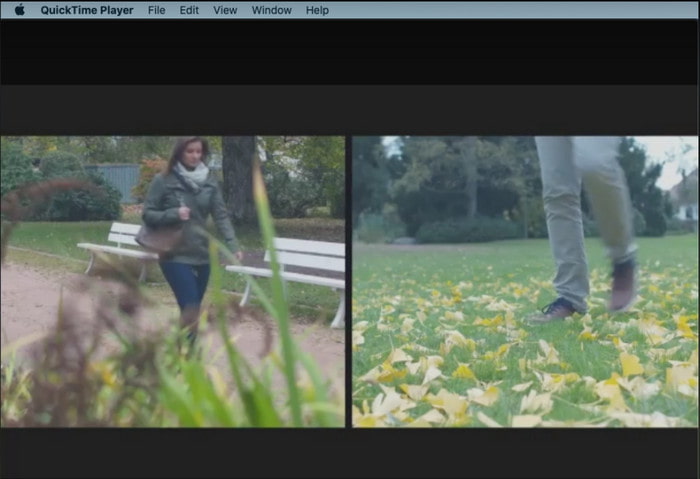
QuickTime’da videoyu hızlandırmayı öğrenmek, çocuk oyuncağı kadar kolaydır. Çünkü bu aracı indirmeniz gerekmez; her Mac masaüstüne önceden kurulu olarak gelir. QuickTime Player’ın, tüm Mac kullanıcıları için yerel bir medya oynatıcı olarak kullanılmak üzere Apple Inc. tarafından üretildiğini biliyoruz. Her ne kadar bu araçta yerleşik hızlandırma ve yavaşlatma özelliği bulunsa da, bunu manuel olarak yapmanız gerekir; bu da sizin için biraz zahmetli olabilir. Yine de, genel arayüzü VLC’ye kıyasla oldukça düzenli ve hoştur; ancak QuickTime yalnızca Apple ürünlerinde mevcuttur ve Windows için QuickTime Player yoktur.
Artıları
- Önceden yüklenmiş olduğundan aracı indirmenize gerek yoktur.
- Aracı kullanmak istiyorsanız internet bağlantısı gerekli değildir.
- Bu aracın yardımıyla kolayca izleyin ve iletin.
Eksileri
- Bu aracın kullanılabilir Windows sürümü yok.
- Hızlandırmayı ve azaltmayı manuel olarak yapın.
- Geniş ölçekli bir medya biçimini desteklemez.
2.Açık Atış
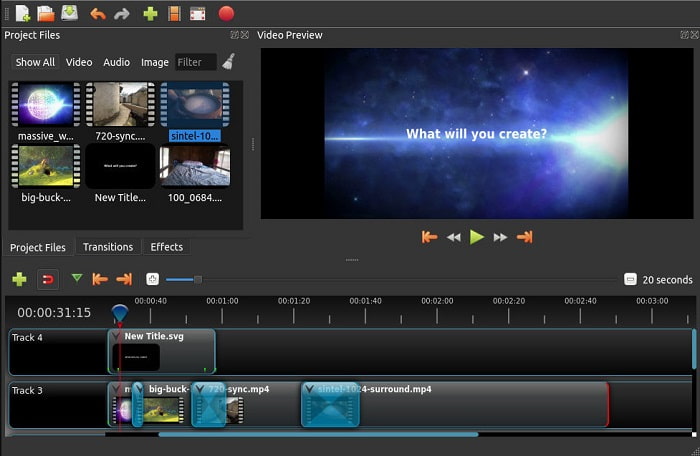
Open Shot, özellikle Mac için kullanabileceğiniz en iyi video düzenleme yazılımlarından biridir. Aracın Windows desteği bulunsa da, Mac sürümü en iyisidir. Ayrıca, Open Shot ile videoyu hızlandırma işlemi bu yazılımın yardımıyla etkili şekilde yapılabilir. Dahası, gelişmiş özelliklere sahip karmaşık araçları kullanma konusunda kendine güveni olmayanlar için bu araç ücretsizdir. Temelde, bu araç kullanmak isteyebileceğiniz bazı temel düzenleme özelliklerini sunar. Ancak, bazı özelliklerin eklenmesi ya da güncellenmesi gerekmektedir.
Artıları
- Son video çıktınızı istediğiniz diğer formatlara kaydetme özelliğine sahiptir.
- Videolar, mevcut araç özelliklerinin yardımıyla kolayca düzenlenebilir.
- Yeni başlayanlar için çok sezgisel talimatlarla birlikte gelir. Yani, nasıl yapılacağını öğrenmek istiyorsanız videoyu hızlandırma Windows 10, Mac veya Linux bu harika bir seçim.
Eksileri
- Bazı gelişmiş özelliklerden yoksun olduğu için inanılmaz bir çıktıya sahip olmak isteyen kullanıcılar için en iyi seçim değil.
- Bazen yaptığınız düzenleme yükü nedeniyle veya bazen bilinmeyen nedenlerden dolayı araç çöküyor.
- En iyisine sahip olmak isteyen bir profesyonel için en iyi seçim değil.
Bölüm 3. Video Windows ve Mac Nasıl Hızlandırılır Hakkında SSS
Videolarımdaki bir bölümü hızlandırabilir miyim?
Kesinlikle evet. Bir video klibini kesip hızlandırabilir ve ardından başka bir videoyla birleştirerek tamamı hızlandırılmış bambaşka bir video oluşturabilirsiniz. Örneğin, hızlandırmak istediğiniz bir AVI dosyanız varsa yukarıdaki adımları takip edebilir ve işiniz bittiğinde bu bağlantıdaki en iyi AVI birleştirme aracı ile birleştirebilirsiniz.
Hangi hız size en uygun; 2x, 4x veya 8x?
Bir film izlerken videonuzu 4x ve üzerine çıkarmak, takip etmeyi zorlaştıracaktır; çünkü video insan gözünün takip edemeyeceği kadar hızlanır. Bu yüzden, bir filmi daha hızlı ama yine de rahatça takip edilebilir şekilde izlemek istiyorsanız, 2x hızında oynatmanız idealdir. Bu bağlantıya tıkladığınızda yeni bir makaleye yönlendirilecek ve videoyu 2x daha hızlı olacak şekilde nasıl hızlandıracağınızı öğreneceksiniz.
Hızlı ileri sarma eğitim videosu nasıl yavaşlatılır?
İndirdiğiniz veya dönüştürdüğünüz video çok hızlıysa, onu En İyi 5 Yavaş Çekim Video Oynatıcı ile ağır çekimde izleyebilirsiniz. O halde videoları nasıl yavaşlatacağınızı öğrenmek için hemen bu makaleye gidin.
Sonuç
Sonuç olarak, yukarıda sunulan araç yardımıyla videoları kolayca hızlandırabileceğinizi anlamamız artık daha kolay. Tüm araçlar, videoların hızını artırma veya yavaşlatma yeteneğine sahiptir. Ayrıca, videoların hızını artırsanız bile gecikmeli bir videoya sahip olmadığını kanıtlayan bir araç var. Ve bu araç, Video Converter Ultimate'ın olağanüstü düzenleyicisidir, bu yazılımın kullanımı kolaydır, profesyoneller ve yeni başlayanlar için en iyi seçimdir, aralarından seçim yapabileceğiniz birçok gelişmiş özelliğe ve daha fazlasına sahiptir. Bu nedenle, Video Converter Ultimate gibi en iyisine sahip olabiliyorsanız, iyi bir araçla yetinmeyin.
-
 Windows Media Player MP4 Oynatmıyor mu? Bunu Düzeltmenin 5 Etkili Yolu
 Windows Media Player'da MP4 oynatılamadı mı? Windows 10 Bilgisayarda Windows Media Player'da MP4 oynatmanın nedenleri ve nihai çözümleri hakkında daha fazla bilgi edinin.
-
 [Ayrıntılı Kılavuz] Google Drive Videosunun Bilgisayarda Oynatılmaması Nasıl Düzeltilir
 Google Drive'daki videolar, "Bu video oynatılırken bir sorun oluştu" hatasıyla oynatılmıyor. Google Drive'ın kendisinden veya krom sorunlarından kaynaklanabilir. Bu makale 6 çözümü ayrıntılı olarak tanıtacaktır.
-
 Windows Media Player'ın Videolarla veya Sesle Çalışmaması Nasıl Onarılır
 Windows Media Player aniden herhangi bir hata istemiyle mi çalışmıyor mu? Bunun birçok nedeni olabilir ve bu makalede bu sorunu çözmenin 4 yöntemi var.
