


 Video Dönüştürücü Ultimate
 Ekran kaydedicisi
 Video Onarımı
Mac/Windows/Android/iPhone/Online'da En İyi 6 Video Ters Çevirici
Bir videoyu tersine çevirmek, günümüzde birçok editörün kullandığı en etkileyici görsel efektlerden biri hâline geldi. Yalnızca bir videoyu tersine çevirerek, önceden hazırlanmış videolarınıza hem “vay be” etkisi katabilir hem de onları göze daha çarpıcı hâle getirebilirsiniz. Bu yazıda, ücretsiz veya ücretli kullanabileceğiniz en iyi video ters çevirme programlarını inceleyeceğiz. Hazırsanız, koltuğunuzun kemerini bağlayın ve keşfe başlayalım.

PC ve Mac için En İyi Video Ters Çevirici Yazılımının Bölüm 1. 2'si
1. Video Dönüştürücü Ultimate
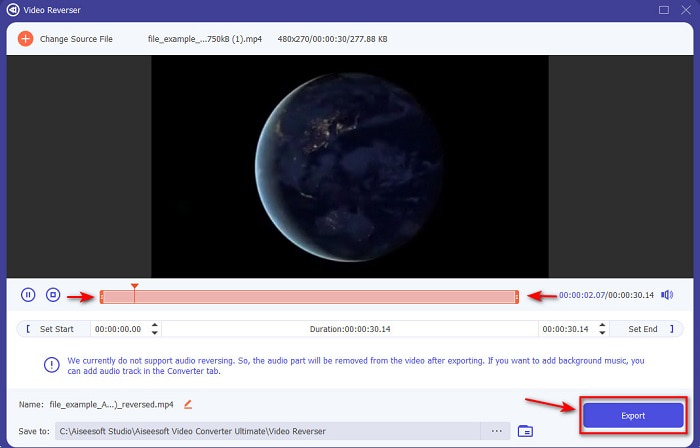
Listemizde ilk sırada, herhangi bir eğitime ihtiyaç duymadan etkileyici videolar hazırlamanıza olanak tanıyan olağanüstü bir dönüştürücü yer alıyor. Net ve anlaşılır yönergeleri sayesinde bu araç, hem yeni başlayanlar hem de etkileyici videolar oluşturmak isteyen profesyoneller için son derece ideal. Video Converter Ultimate, bu listedeki en üst düzey ters video editörü ve en çok tercih edilen düzenleyicidir. Bu araç, kullanıcılarının düzenleme alanındaki potansiyelini zorlanmadan ortaya çıkarmasına yardımcı olur. Daha önce de belirtildiği gibi, net talimatlar ve açıklamalar, kurgu konusunda tecrübesi olmayan birçok kullanıcı için büyük kolaylık sağlar. Profesyonel olsanız bile, mevcut video düzenleyicinizde bulunmayan daha etkileyici videolar oluşturmak için bu aracı kullanabilirsiniz.
Ücretsiz İndirWindows 7 veya üstü içinGüvenli İndirme
Ücretsiz İndirMacOS 10.7 veya üstü içinGüvenli İndirme
Artıları
- Videonuzun diğer düzenleyiciye kıyasla olağanüstü görünmesini sağlamada en iyisi.
- Kullanıcı dostudur, bu aracın nasıl kullanılacağını öğrenmek 15 dakikadan fazla veya daha az sürmeyecektir.
- Tam kapsamlı bir araç arıyorsanız, ilk tercihiniz bu olmalıdır.
Eksileri
- Yazılım ücretli ama karşılaştırma yapacak olursak Movavi çok daha pahalı.
- Kullanmadan önce aracı indirmeniz gerekir.
2. Movavi Video Paketi
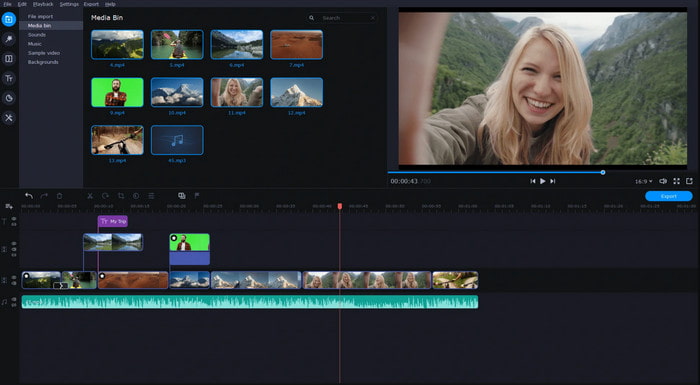
Bu listedeki bir diğer araç ise Movavi Video Suite. Bu Movavi video editörüyle ters çevirme özelliği uzun zamandır piyasada ve milyonlarca kullanıcı tarafından tercih ediliyor. Bunun nedeni, tıpkı Video Converter Ultimate gibi gelişmiş düzenleme özellikleri sunması. Ayrıca, müşterilerine sunacak çok sayıda ek imkânı da bulunuyor. Ancak bu aracın dezavantajı, oluşturma (render) sürecinin oldukça uzun sürmesi ve yavaş olması. Bir diğer eksi yanı ise yalnızca sınırlı sayıda formatı desteklemesi; dolayısıyla, kapsamın dar olması nedeniyle videonuzu dönüştürmek istediğiniz formatı serbestçe seçemiyorsunuz.
Artıları
- Yarı profesyonel bir editör olarak kullanımı kolaydır.
- Arayüze bakmak çok temiz ve sezgisel.
- Mac ve Windows'ta mevcuttur.
Eksileri
- Araç, bu listedeki araca kıyasla çok pahalıdır.
- Windows'ta kullanabileceğiniz özelliklerin çoğu Mac'te mevcut değildir.
- Aralarından seçim yapabileceğiniz daha az şablona sahiptir.
İlgili:
En İyi Çevrimiçi Video Çeviricinin 2. Kısmı
1. Kap kanat
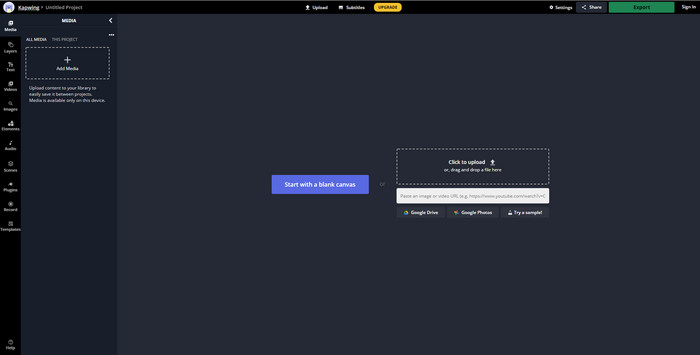
Ödeme yapmak istemiyor musunuz? O hâlde, ücretsiz olarak kolayca kullanabileceğiniz bir Kapwing ters çevirme aracı deneyin. Kapwing, kullanabileceğiniz en kolay çevrimiçi araçlardan biridir. Ayrıca, internet bağlantınız olduğu sürece ücretsiz yararlanabileceğiniz bazı düzenleme özellikleri de sunar. Arayüzü, çevrimiçi bir Adobe Photoshop’u andırdığı için oldukça çekici görünür. Ancak dosya yükleme ve dışa aktarma işlemleri, tamamen internet bağlantınıza bağlı olduğu için biraz zahmetli olabilir. İnternet bağlantınız istikrarsızsa, yavaş bir süreçle karşılaşmanız muhtemel. Ayrıca, videoları buradan dışa aktardığınızda, ters çevrilmiş videonun sağ alt köşesinde bir filigran bulunacaktır.
Artıları
- Ücretsiz web aracı.
- Kullanıcı dostu.
- Takip etmeniz gereken kolay geri alma işlemi.
Eksileri
- İnternete bağlı, yani internet bağlantınız yoksa bu aracı kullanamazsınız.
- Düzenleme süreci hızlıdır ancak dosyaların yüklenmesi ve indirilmesi biraz zaman alacaktır.
- Son çıktının videonun sağ alt tarafında bir filigran vardır.
2. VideoReverser .com
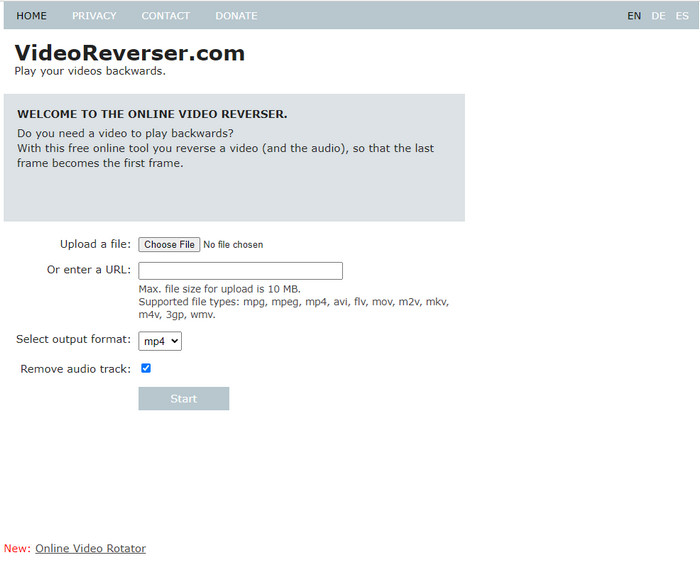
VideoReverser.com, internette bulup kullanabileceğiniz en iyi çevrimiçi video ters çevirme araçlarından biridir. Bu web aracı, basit ve kısa bir video tersine çevirme işlemi yapmak isteyenler için idealdir. Ancak belirtmek gerekir ki, yalnızca 10 MB’tan küçük video dosyaları yükleyebilirsiniz. Diğer araçlarla kıyasladığımızda bu dosya boyutu sınırı epey düşüktür. Yine de tersine çevirmek istediğiniz kısa bir videonuz varsa, bu aracı deneyebilirsiniz.
Artıları
- Araca erişirseniz hiçbir gizli ücret ödemezsiniz.
- Anlaşılması kolay araç arayüzü.
- Araç, videonuzu tersine çevirmeye odaklanır.
Eksileri
- Daha az formatı destekler ve çoğu zaman burada bir videoyu tersine çevirmeye çalıştığınızda başarısız olur.
- Yalnızca 10 mb maksimum dosya boyutu yükleyebilirsiniz.
- İnternet yoksa erişilemez.
Android ve iOS'taki En İyi Video Ters Çevirici Uygulamasının 3. Kısmı
1. videoyu geriye doğru ters çevirin (Android)
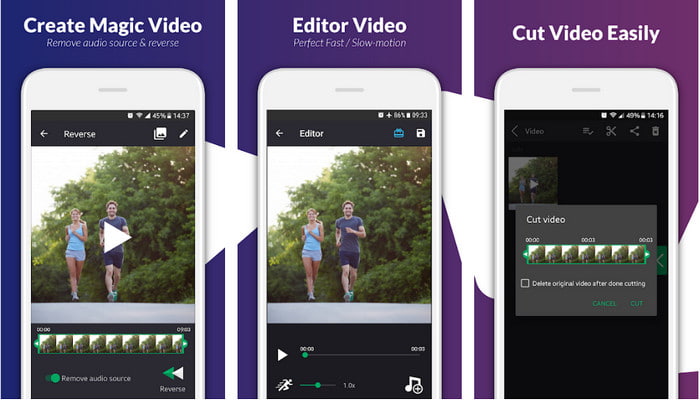
Reverse Video Backward yalnızca Play Store’da ücretsiz olarak sunulmaktadır. Bu ters video yazılımı, Android telefonu olan herkesin rahatlıkla kullanabileceği, videoları tersine çevirmede kullanışlı bir araçtır. Bununla birlikte, pek çok kullanıcı bu aracın sık sık çökmesinden, uygulamayı kapattıktan sonra bile çıkan açılır reklamlardan ve video düzenleme deneyiminden şikâyetçi. Benzer işlevlere sahip diğer Play Store uygulamalarıyla kıyaslandığında, genel puanı oldukça düşüktür.
Artıları
- Aracı indirmeden önce, sihirli bir ters etki yapmak için bazı fikirler verecektir.
- Aralarından seçim yapabileceğiniz 50 farklı dili destekler.
Eksileri
- Aracın bilinmeyen nedenlerle çöktüğü durumlar vardır.
- Sinir bozucu reklamlar aracı kapattığınızda bile her yerde reklamlar ekranınıza gösterilecektir.
- Biz denediğimizde araç arızalı.
2. Ters Video Düzenleyici (iOS)
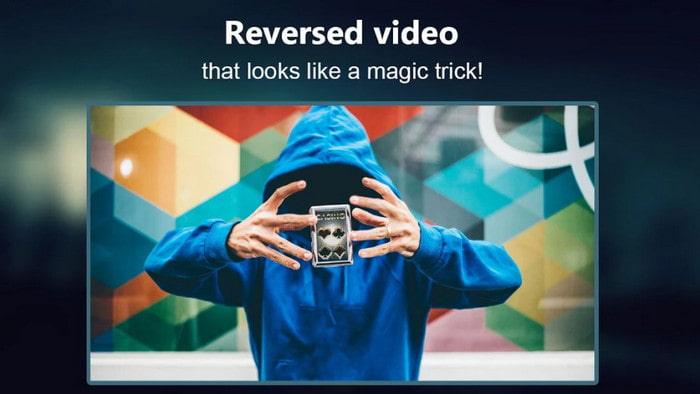
Bu ters video uygulaması iOS cihazınıza ücretsiz olarak indirilebilir. Reverse Video Editor, birçok kullanıcıdan oldukça yüksek puan almış durumda. Uygulamanın 4,5 yıldız gibi bir puana sahip olması, her açıdan çok iyi olduğu izlenimi yaratabilir. Ancak işin aslı pek de öyle değil; çünkü uygulamanın geliştiricisi, kullanıcıların araçtaki özelliklere erişebilmesi için kendilerine 5 yıldız vermelerini teşvik ediyor. Yorumların önemli bir kısmı anlamsız ve büyük olasılıkla uygulamanın popülaritesini artırmak için botlar tarafından yazılmış izlenimi veriyor.
Artıları
- Araç, 67.4 bin kullanıcı tarafından sağlanan harika bir derecelendirmeye sahiptir.
- Arayüzü, diğer iOS ters çeviricilerine kıyasla oldukça harika.
Eksileri
- Kullanıcılar, uygulamadaki özel özelliklerin kilidini açmak için uygulamaya 5 yıldız vermek zorunda kalıyor.
- Aşağıdaki uygulamanın incelemeleri anlamsızdır. Temel olarak, uygulamanın ne olduğunu anlamak istiyorsanız incelemelere bakmayın.
- Bu uygulamada hala hatalar var ve çoğu zaman uygulamaya eklediğiniz video donuyor.
Bölüm 4. Karşılaştırma Tablosu
| Özellikleri | Video Dönüştürücü UltiR | Movavi | kapwing | VideoReverser.com | Videoyu geriye doğru ters çevir | Ters Video Düzenleyici |
| Geri Dönüş Özellikleri |  | | | | | |
| Arayüzdeki Sinir bozucu Reklamlar |  | | | | | |
| Dışa aktardıktan sonra filigran | | | | | | |
| Kesme, Kırpma ve daha fazlası gibi diğer Düzenleme Özellikleri | | | | | Kullanılabilir, ancak incelemeler çalışmadığını söylüyor. | Kullanılabilir, ancak incelemeler çalışmadığını söylüyor. |
| Programın Kullanılabilirliği | Masaüstü Tabanlı Araç | Masaüstü Tabanlı Araç | Web Tabanlı Araç | Web Tabanlı Araç | Android İndirilebilir Tabanlı Araç | iOS İndirilebilir Tabanlı Çok |
| Fiyat aralığı | 1 Ay: $25.00 Ömür Boyu Lisans:$55.20 Çok Kullanıcılı Lisans Ömrü/5 Adet: $119.00 | Movavi Video Düzenleyici $39.95 Movavi Video Düzenleyici Plus $59.95 | Ücretsiz Çevrimiçi Araç | Ücretsiz Çevrimiçi Araç | Uygulama satın almada hayır | Uygulama içi satın alma 3 ila 50 $ aralığı |
Bölüm 5. Video Ters Çevirici hakkında SSS
Ters videolarım neden kalitelerini kaybediyor?
Araçların çoğu, daha yüksek video kalitesi biçimini desteklemedikleri için ters videonun kalitesini düşürür veya ayarları yüksek yerine düşük olarak ayarlamış olabilirsiniz. Yazılımı değiştirerek veya ayarları değiştirerek iki sorundan hiçbiri çözülemez.
Ters videoyu geçiş olarak kullanabilir miyim?
Kesinlikle evet. Eski sürüm animasyonlu geçişi kullanmak yerine, videonuzu görsel olarak daha çekici hale getirmek için tersine çevirebilirsiniz. Profesyonel bir editör aracı kullanmasanız veya düzenleme konusunda deneyim sahibi olmasanız bile, tersine video ile harika bir geçiş elde edebilirsiniz.
Videomu tersine çevirirsem, ters mi olur?
Aslında hayır, çünkü ters çevirme ve ters çevirme benzer değildir. Her ikisi de videonun orijinal görünümünü değiştiriyor olsa da, benzer değiller. Örneğin, bir videoyu tersine çevirirseniz, baştan sona oynatılır, tersine çevirirseniz video baş aşağı döner ve baştan sona oynatılmaya devam eder.
Sonuç
Sonuç olarak, bu yazıda incelediğimiz araçların hepsi, kullandığınız platforma göre kendi içinde gayet iyi. Hepsi; masaüstü, internet bağlantısı ya da cep telefonu kullananlar için rahatlıkla tercih edilebilecek çözümler sunuyor. Yine de seçim yapmakta zorlanıyorsanız, size kendi önerimizi verelim. Video Converter Ultimate, basit bir dönüştürücünün çok ötesine geçerek gelişmiş bir editör hâline gelmiş durumda. Bu araç şimdiden milyonlarca kullanıcıya yardımcı oldu ve şimdi de size yardımcı olmaya hazır. Öyleyse hemen indirin, bu aracın sunduğu imkânların tadını çıkarın ve keşfe başlayın.
-
 MKV Dosyalarını PS3'te Sorunsuz Oynatmak İçin Nasıl Dönüştürülür [Çözüldü]
 PS3'ünüzde MKV videoları oynatmak ister misiniz? Ancak PS3, MKV dosyalarını doğrudan oynatamaz. Bu makale, MKV videolarını PS3'te sorunsuz bir şekilde oynatmak için PS3 destekli video formatlarına dönüştürmenin yollarını gösterecektir.
-
 Android DVD Oynatıcı - Android Cep Telefonlarında DVD Videoları Nasıl Oynatılır
 Android cep telefonlarında DVD dosyaları nasıl oynatılır? Herhangi bir Android DVD oynatıcı var mı? Bu makalede, DVD videolarını harici sürücüyle veya harici sürücü olmadan Android cep telefonlarında oynatmanın 3 yolunu öğreneceksiniz.
-
 HD/4K Videoları Oynatmak İçin En İyi 10 Ücretsiz Android MP4 Oynatıcı
 Android cep telefonlarında MP4 videoları oynatmak için varsayılan oynatıcılar bulunsa da, oynatma ayarlarının ve diğer işlevlerin değiştirilmesini desteklemezler. Böylece, bu makaleden en iyi 10 Android MP4 oynatıcı hakkında bilgi edinebilirsiniz.
