


 Video Dönüştürücü Ultimate
 Ekran kaydedicisi
 Video Onarımı
 Güvenli İndirme
Çevrimiçi Video Döndürücülerden Yararlanın ve Baş Aşağı Videolara Elveda Deyin
Dijital çağda, video içeriği hayatımızın ayrılmaz bir parçasıdır. İster özel bir anı hatırlamak, ister sosyal medya ya da işletmeniz için heyecan verici içerik oluşturmak isteyin, videolar mesajınızı iletmenin harika bir yoludur. Ancak, yanlış yere kaydedildikleri veya yatay veya dikey olarak çevrilmeleri gerektiği için videolarınızın doğru konumda olması gerektiğini fark edebilirsiniz.
Bu yazı, videolarınızı istediğiniz yönde döndürmenize yardımcı olacak en iyi çevrimiçi video döndürücüler hakkında sizi bilgilendirecek. Bu makaleyi okuyarak onlar hakkında daha fazlasını keşfedebilirsiniz.

Bölüm 1. Çevrimiçi En İyi Video Döndürücüler
1. Videomu Döndür
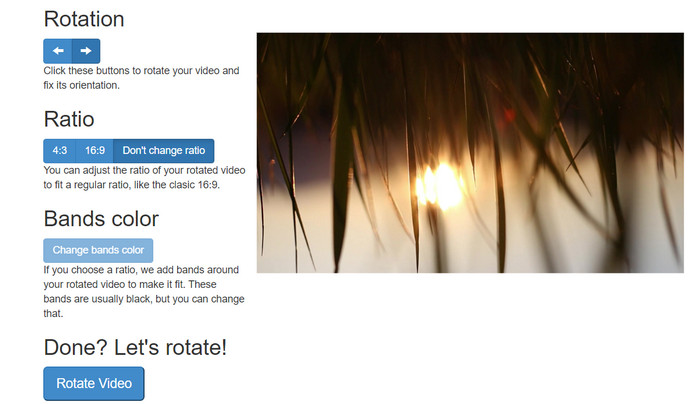
RotateMyVideo, özel bir yazılıma ihtiyaç duymadan videolarınızı herhangi bir yönde döndürmenizi ve çevirmenizi sağlayan basit ve ücretsiz bir çevrimiçi araçtır. Araç, videolarınızı bir seferde 90 derece döndürmenizi sağlar ve işlemi hızlı ve kolay hale getiren basit bir arayüze sahiptir. Bir videoyu kişisel veya işle ilgili nedenlerle döndürmeniz gerekiyorsa RotateMyVideo iyi bir seçimdir. Size zaman ve emek kazandırabilir.
Artıları
- Gizli ücretler olmadan videoları çevrimiçi olarak ücretsiz olarak döndürün.
- 90 derecelik artışlarla döndürmeyi destekler.
- Videoları yatay veya dikey olarak çevirin.
Eksileri
- Yalnızca boyutu 500 MB'tan küçük olan videoları döndürebilir.
- Video dönüştürme işlemi biraz zaman alabilir.
- Kullanıcı arayüzü çekici olmayabilir.
Videoları RotateMyVideo ile çevrimiçi döndürme adımları:
Adım 1. Bir web tarayıcısı açın ve RotateMyVideo web sitesine gidin.
Adım 2. Döndürmek istediğiniz videoyu yüklemek için Pick Video düğmesine tıklayın.
Adım 3. Şimdi, uygun düğmeye tıklayarak istediğiniz video yönünü seçin. Videoyu sola veya sağa döndürebilir, yatay ya da dikey olarak çevirebilir veya orijinal yönünde bırakabilirsiniz.
Adım 4. Döndürülmüş videodan memnunsanız, değişiklikleri kaydetmek için Rotate video düğmesine tıklayın.
2. Klip
Clideo, video döndürme de dahil olmak üzere videoları düzenlemek için güçlü araçlar sunan, sezgisel ve çok yönlü bir çevrimiçi video düzenleme platformudur. Ayrıca Clideo, video kırpma, birleştirme, ses ekleme ve daha birçok özellik sunarak kapsamlı bir video düzenleme aracı hâline gelir. Diğer video düzenleme yazılımlarının aksine Clideo tamamen web tabanlıdır; yani herhangi bir şey indirmeniz veya kurmanız gerekmez.
Artıları
- Çeşitli kaynaklardan videolar yükleyin.
- Birden fazla video formatıyla uyumludur.
- Kullanıcı dostu arayüz.
Eksileri
- Gelişmiş video düzenleme ihtiyaçları için uygun değildir.
- Ücretsiz sürümün sınırlamaları vardır.
Çevrimiçi dikeyden yataya video dönüştürücü için adımlar:
Adım 1. Bir web tarayıcısı kullanarak Clideo web sitesine erişin. Ardından, ana sayfadan tüm araçları görüntüleyin.
Adım 2. Şimdi, menüden Rotate Video seçeneğini seçin ve döndürmek istediğiniz videoyu yüklemek için Choose file seçeneğine tıklayın. Ayrıca video dosyasını siteye sürükleyip bırakabilirsiniz.
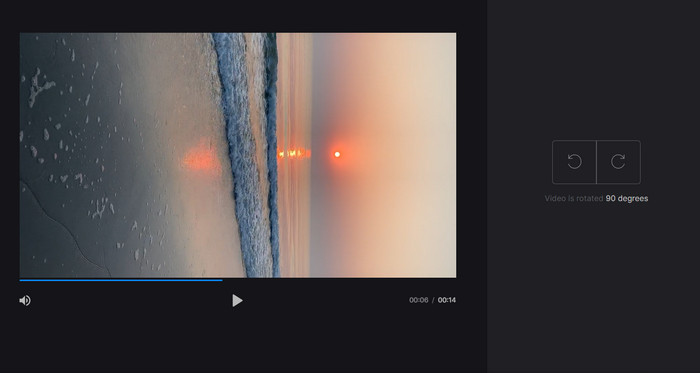
Adım 3. Video oynatıcının sağ tarafındaki Rotate düğmesine tıklayın. İlgili düğmeye tıklayarak video için istediğiniz döndürme yönünü seçin. Video saat yönünde veya saat yönünün tersine, yatay ya da dikey olarak döndürülebilir.
3. Esnek klips
Flexclip, sorunsuz bir şekilde profesyonel görünümlü videolar oluşturmanıza olanak tanıyan etkileyici bir çevrimiçi video düzenleme aracıdır. Flexclip ile ilgili en iyi şeylerden biri, video düzenleme işleminize hızlı bir başlangıç yapmak için kullanabileceğiniz kapsamlı şablon kitaplığıdır. Ayrıca, herhangi bir filigran olmadan bir dakikaya kadar uzunlukta videolar oluşturmanıza izin veren ücretsiz bir sürüm sunar.
Artıları
- Kapsamlı şablon kütüphanesi.
- Bir dizi özelleştirme seçeneği sunar.
Eksileri
- Fiyatlandırma bazı kullanıcılar için yüksek olabilir
- Video kalitesi üzerinde sınırlı kontrol
Flexclip kullanarak videoların filigran olmadan çevrimiçi olarak nasıl döndürüleceğine ilişkin adımlar:
Adım 1. Flexclip web sitesine gidin, ücretsiz bir hesap için kaydolun ya da zaten bir hesabınız varsa giriş yapın. Giriş yaptıktan sonra Start from Scratch düğmesine tıklayın.
Adım 2. Döndürmek istediğiniz videoyu yüklemek için Upload düğmesine tıklayın. Alternatif olarak video dosyasını düzenleyiciye sürükleyip bırakabilirsiniz.
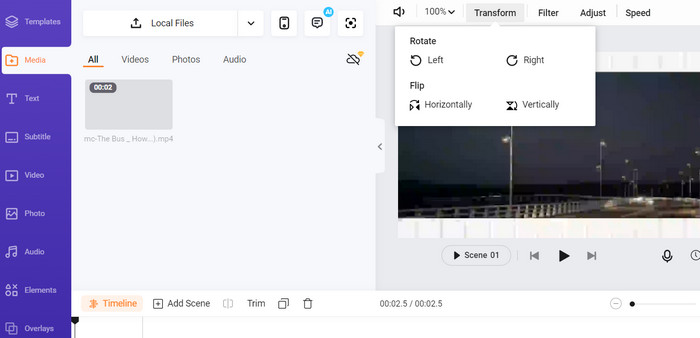
Adım 3. Videonuz yüklendikten sonra, önizlemenin üst menüsünde yer alan Transform düğmesine tıklayın. Videonuzu saat yönünde veya saat yönünün tersine döndürmek için düğmeleri kullanın; istediğiniz yöne gelene kadar devam edin.
4. Kapı Kanat
Bu, videolarınızı döndürmenize olanak tanıyan başka bir ücretsiz çevrimiçi araçtır. Benzer şekilde, 90 derecelik artışlarla döndürmeyi destekler ve videolarınızı çevirmenize de imkân tanır. Metin ekleme, müzik ve özel efektler gibi gelişmiş özellikleri onu kapsamlı bir video düzenleme aracı yaparken; kullanıcı dostu arayüzü ve geniş araç ile şablon kütüphanesi, onu yeni başlayanlar için harika bir seçenek hâline getirir.
Artıları
- Çok yönlü video düzenleme.
- Çevrimiçi ve bulut tabanlı.
Eksileri
- Sınırlı video uzunluğu.
- Sınırlı dosya boyutu.
Kapwing'i kullanarak videoyu çevrim içi olarak döndürme adımları:
Adım 1. Kapwing web sitesine gidin ve ücretsiz bir kullanıcı hesabı için kaydolun ya da zaten bir hesabınız varsa giriş yapın. Yeni bir proje başlatmak için Start Editing düğmesine tıklayın.
Adım 2. Döndürmek istediğiniz videoyu yüklemek için Upload düğmesini işaretleyin.
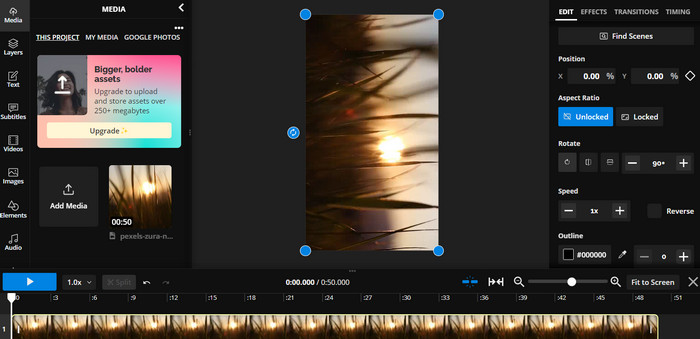
Adım 3. Sonra, zaman çizelgesinden medya dosyasını seçin; düzenleme seçenekleri sağ menüde görünecektir.
Adım 4. Rotate seçeneğini seçin ve videoyu döndürmek istediğiniz yönü belirleyin. Döndürme açısını belirtmek için derece değerini girin. Ardından işlem tamamdır.
5. Çevrimiçi Video Kesici
Bu, videolarınızı herhangi bir yönde döndürmenize izin veren ücretsiz bir çevrimiçi araçtır. Videonuzu yükleyebilir ve ardından videonun yönünü ayarlamak için döndürme aracını kullanabilirsiniz.
Artıları
- Hızlı ve verimli.
- Kullanmak ücretsiz.
Eksileri
- İnternet bağlantısı gereklidir.
- Video kalitesi kaybı.
Çevrimiçi Video Kesici ile videoları çevrimiçi döndürme adımları:
Adım 1. Resmî Online Video Cutter web sitesini ziyaret edin.
Adım 2. Düzenlemek istediğiniz videoyu yüklemek için Open file düğmesine tıklayın.
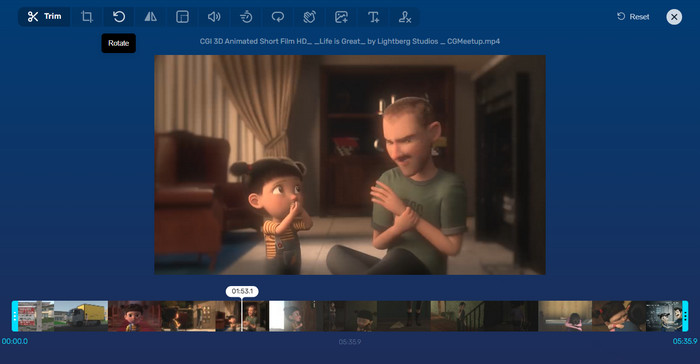
Adım 3. Video içe aktarıldığında, programın düzenleme arayüzüne yönlendirileceksiniz. Bu kez menüden Rotate düğmesine basın.
Adım 4. Videonuzun döndürülme şeklinden memnunsanız, sağ alt köşedeki Save düğmesine tıklayın.
Kısım 2. Alternatif Araç: Çevrimdışı Video Döndürücü
FVC Video Converter Ultimate, Windows ve Mac ile uyumlu bir masaüstü uygulamasıdır. Kullanıcıların videoları çevrimdışı olarak dönüştürmesine ve döndürmesine olanak tanır. Ayrıca kullanıcılar videoları saat yönünde veya saat yönünün tersine 90, 180 ya da 270 derece döndürebilir. Çeşitli video düzenleme araçlarıyla kırpma, birleştirme, video ayarlarını düzenleme ve daha pek çok işlemi de yapabilirsiniz. Bu video döndürücünün nasıl çalıştığını öğrenin.
Adım 1. Aracı edinin ve kurun
Öncelikle programı bilgisayarınıza indirip kurarak edinin. Hemen sonra, hemen başlatın.
Ücretsiz İndirWindows 7 veya üzeri içinGüvenli İndirme
Ücretsiz İndirMacOS 10.7 veya üzeri içinGüvenli İndirme
Adım 2. Döndürülecek bir video yükleyin
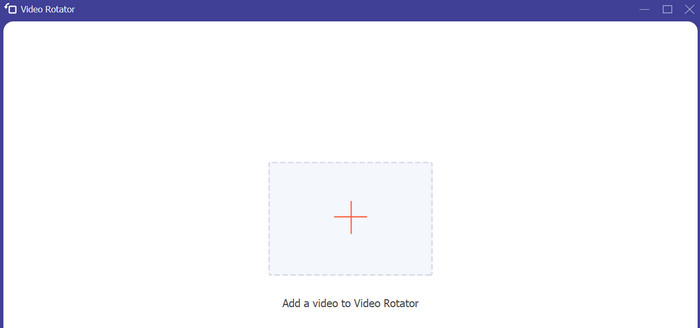
Şimdi, programın Toolbox sekmesine gidin ve Video Rotator seçeneğine erişin. Bu seçeneğe tıkladıktan sonra videonuzu yüklemeniz istenecektir. Şimdi, istediğiniz videoyu eklemek için Plus simgesi düğmesini işaretleyin.
Adım 3. Videoyu döndürün
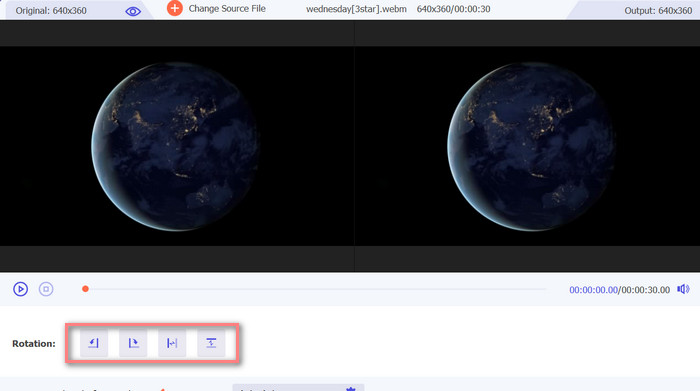
Bu noktada, istediğiniz video yönünü elde etmek için uygun döndürme düğmesini işaretleyin. Önizleme gerçek zamanlı olduğundan hızla ayar yapabilirsiniz.
Adım 4. Döndürülmüş videonun bir kopyasını alın
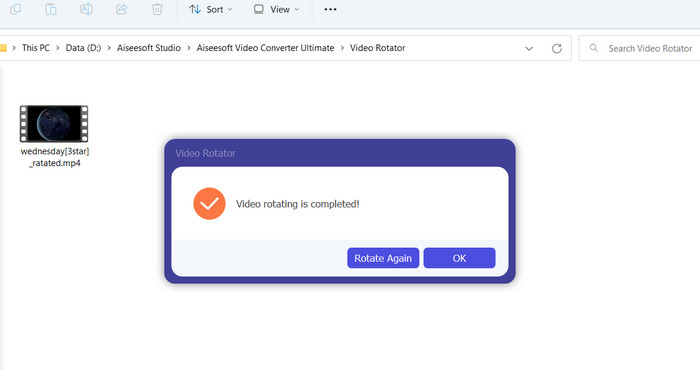
Son olarak, düzenlenmiş videonuzun bir kopyasını almak için Export düğmesine tıklayın. Hemen ardından bir bildirim görünecek ve videonun bulunduğu klasör açılacaktır.
Bölüm 3. Çevrimiçi Video Döndürücüler hakkında SSS
Çevrimiçi video döndürücülerin kullanımı güvenli midir?
İnternet video döndürücülerinin çoğunun kullanımı güvenlidir. Verilerinizin ve gizliliğinizin korunmasını sağlamak için tanınmış ve güvenilir bir araç seçmek çok önemlidir.
Akıllı telefonumda videoları döndürebilir miyim?
Evet, birçok çevrimiçi video döndürücü mobil uyumludur ve akıllı telefonunuzun web tarayıcısından erişilebilir.
Çevrimiçi video döndürücü kullanmanın herhangi bir sınırlaması var mı?
Evet, bazı çevrimiçi video döndürücülerin dosya boyutu kısıtlamaları, sınırlı düzenleme yetenekleri veya düşük video kalitesi gibi sınırlamaları olabilir.
Sonuç
Çevrimiçi video döndürücüler, herhangi bir yazılım indirmeye veya kurmaya gerek kalmadan videoları döndürmenin pratik ve kullanıcı dostu bir yolunu sunar. İnternet bağlantısı olan herhangi bir cihazdan erişilebilirler ve hareket hâlindeyken de kullanılabilirler. Ancak dosya boyutu kısıtlamaları ve düşürülmüş video kalitesi gibi yetenek sınırlamaları olabilir. Bu nedenle, bu sınırlamalara çözüm sunan bir çevrimdışı alternatif de sağladık.
-
 [4 Yol] Videolarınızı Çevrimiçi Olarak Kolayca Hızlandırmanın Yolları
 Çevrimiçi bir videoyu hızlandırmak ister misiniz? Bir videoyu mümkün olan farklı şekillerde hızlandırma hakkında daha fazla bilgi edinmek için bu makaleyi okuyun.
-
 Çevrimiçi Videoyu Uygun Şekilde Kesmenin Mükemmel Yolları
 Bir videoyu kesmek, video vurgulamaları oluşturmanın en iyi yoludur. Bu nedenle, bu gönderi size videoları çevrimiçi olarak kolaylıkla kırpma yöntemleri verecektir. Daha fazlasını öğrenmek için okuyun.
-
 Çevrimiçi GIF Oluşturucu ile En İyi Animasyonlu GIF'inizi Oluşturun [2023]
 Web üzerinden zaten karşılaştığınız veya karşılaşmadığınız bu basit çevrimiçi GIF oluşturucuları kullanarak nasıl GIF yapılacağı hakkında bilgilendirici bir inceleme.
