


 Video Dönüştürücü Ultimate
 Ekran kaydedicisi
 Video Onarımı
 Güvenli İndirme
Renk Düzeltme Nedir ve Nasıl Yapılır?
Yaratıcılığınızın hakkını vermeyen donuk veya ton dışı çekimlerden hiç memnun kalmadınız mı? Endişelerinize veda edin! Yapay zeka destekli renk düzeltme, video çekimlerinize veya filmlerinize hayat vermek için hassas bir şekilde geliştirildi ve her rengin, gölgenin ve tonun istediğiniz gibi ortaya çıkmasını sağlıyor. Bu yenilikçi teknoloji, videolarınızda renk mükemmelliğini geliştirmek ve vermek için yapay zekanın gücünü donatan son teknolojidir.
İster renk kusurlarını düzeltmek, ister belirli bir atmosfer yaratmak ya da sadece genel görsel çekiciliği iyileştirmek olsun, bir Yapay Zekâ destekli video renk düzeltme süreci iş akışını sadeleştirir ve olağanüstü sonuçlar sunar. Hadi, izleyicilerinizi büyüleyen ve kalıcı bir izlenim bırakan canlı, gerçeğe yakın renklerle video içeriklerinize hayat verelim. Bu makalede derinlemesine incelerken dünyanızı parlaklıkla boyamaya hazır olun.

Bölüm 1. Videoda Renk Düzeltme Nedir?
Videodaki renk düzeltme tanımının ne olduğunu anlamak oldukça basittir. İstenilen görünümü elde etmek veya doğruluk ve tutarlılığı sağlamak için videonun renklerini ve tonlarını geliştirmeyi ve değiştirmeyi ifade eder. Bu, bir fotoğraftaki renklere ince ayar yapmak gibidir, ancak hareketli görüntüler için. Bir fotoğraf çektiğinizi ve renklerin biraz soluk, donuk veya aşırı canlı göründüğünü hayal edin. Bu bir videoda da olabilir, ancak genellikle binlerce kare vardır. Renk düzeltme, bu tutarsızlıkların düzeltilmesine yardımcı olarak renklerin video boyunca iyi bir şekilde eşleşmesini sağlar. Örneğin bir sahne bulutlu bir günde çekildiyse renkler sakin ve mavimsi görünebilir. Renk düzeltme, tonları ısıtarak daha doğal görünmelerini sağlayabilir veya mavilerin sanatsal etki yaratmasını sağlayabilir. Ayrıca bir videoda belirli bir ruh hali veya stil oluşturmak için kontrastı, doygunluğu, parlaklığı ve diğer özellikleri de ayarlayabilir.
Bölüm 2. Renk Düzeltme ile Çeşitli Durumlar
Renk düzeltme, video prodüksiyonunda çeşitli durumlarda çok önemlidir. Bunun amacı istenen görsel etkiyi elde etmek ve tutarlılığı korumaktır. Aşağıda bir videoda renk düzeltmeyi içeren bazı durumlar verilmiştir.
Karışık Işık Ortamları - doğal ışık, floresan ve akkor gibi farklı ışık kaynaklarının bulunduğu mekânlarda çekim yaparken renk düzeltme son derece faydalıdır. Renk düzeltme, tüm planlarda renkleri dengeleyip birleştirerek görüntünün doğal ve tutarlı görünmesine yardımcı olur.
Beyaz Dengesi Sorunları - beyaz dengesini düzeltmek, beyazların istenmeyen renk tonlarıyla boyanmadan, gerçek renklerinde görünmesini sağlar. Bu sorun genellikle hatalı kamera ayarları veya değişken ışık koşulları nedeniyle ortaya çıkar.
Pozlama Problemleri - video renk düzeltme, çok parlak olduğunda aşırı pozlanmış ya da çok karanlık olduğunda yetersiz pozlanmış görüntüleri düzeltip ayrıntıları ortaya çıkarabilir ve koyu ile açık tonlar arasında doğru bir denge sağlar.
Estetik için Color Grading - renk düzeltme aynı zamanda color grading’i de içerir; burada videonun renkleri belirli bir ruh hâli veya stil yaratmak için değiştirilir. Buna kontrast ve doygunluğu artırmak ya da videoya vintage bir görünüm kazandırmak da dâhildir.
Günün Saatini Yeniden Yaratma - video renklerini ayarlamak, belirli bir zamanı canlandırmak için kullanışlıdır; örneğin bir gündüz sahnesini yağmurluymuş gibi göstermek, gün batımında çekilmiş gibi hissettirmek ya da sabah veya akşam ışığını yansıtacak şekilde renkleri değiştirmek gibi.
Bölüm 3. Videoda Renk Düzeltme Nasıl Yapılır?
Video düzenlemede renk düzeltme, videonuzun genel görsel kalitesini artırdığı için vazgeçilmez bir işlemdir. Güvenebileceğiniz en iyi araçlardan biri Video Converter Ultimate’tır. Bu güçlü renk düzeltme paleti aracı, videolarınızdaki renkleri hızlı bir şekilde düzeltmenize, böylece görsel çekiciliklerini ve kalitesini artırmanıza imkân tanır. Bu araçla, videonuz için istediğiniz görünümü elde etmek amacıyla çeşitli renk düzeltme seçenekleriyle denemeler yapabilirsiniz. Düzenleme özellikleri sayesinde kullanıcılar videolarını kırpabilir, düzenleyebilir, kesebilir ve efektler ekleyebilir.
Ayrıca, çeşitli video formatları arasında kesintisiz dönüşüme olanak tanıyarak video içeriğinizi farklı cihazlara uyarlamayı kolaylaştırır. Bu aracın övgüye değer bir diğer yanı da kullanıcı dostu olmasıdır. Video Converter Ultimate ile videonuzu daha çekici hale getirmek için renkleri kolayca ayarlayabilir ve düzeltebilirsiniz. Bu aracın nasıl kullanılacağını öğrenmek için adım adım kılavuz:
Adım 1: Video Converter Ultimate’ı İndirin ve Kurun
Araç henüz yüklü değilse, bilgisayarınıza Video Converter Ultimate’ı indirip kurabilirsiniz. Bunun için, bilgisayarınızın işletim sistemine göre aşağıdaki Ücretsiz İndir düğmelerinden birine tıklayın ve kurulum talimatlarını izleyin.
Ücretsiz İndirWindows 7 veya üzeri içinGüvenli İndirme
Ücretsiz İndirMacOS 10.7 veya üstü içinGüvenli İndirme
Adım 2: Video Converter Ultimate’ı Başlatın
Kurulum tamamlandıktan sonra, ana arayüze erişmek için bilgisayarınızda video düzeltme uygulamasını başlatın. Üst menüden Araç Kutusuna gidin. Buradan, aracın Renk Düzeltme özelliğini bulup arayarak seçin ve üzerine tıklayın.
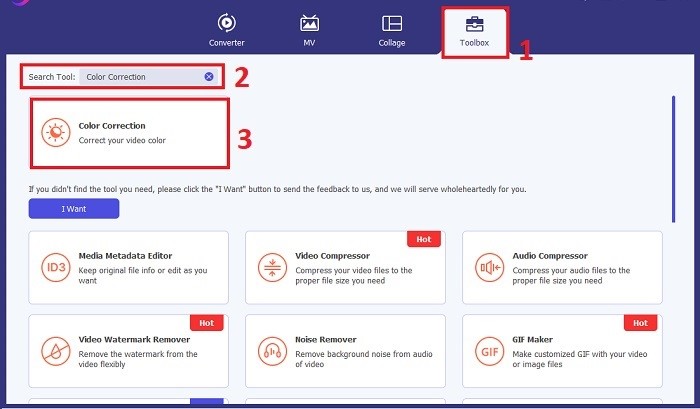
Adım 3: Renk Düzeltilecek Videoyu İçe Aktarın
Renk düzeltmesini yapmak istediğiniz videoyu içe aktarmak için Artı düğmesine tıklayın. Bilgisayarınızda video dosyasını bulun ve yazılıma aktarmak için Aç düğmesine tıklayın.
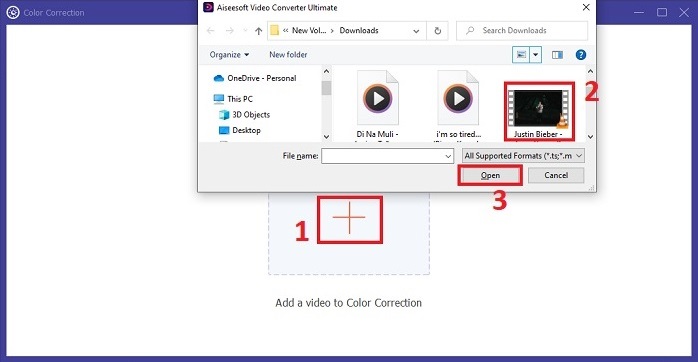
Adım 4: Video Renk Parametrelerini Ayarlayın
Video içe aktarıldıktan sonra, istenen renk düzeltmesini elde etmek için parlaklık, kontrast, doygunluk ve renk tonu gibi parametreleri ayarlayın. Videoyu araç üzerinde düzenlerken, sağ taraftaki panelde değişiklikleri gerçek zamanlı olarak önizlemenize imkân tanır. Renk ayarlarından memnun kaldığınızda Dışa Aktar düğmesine tıklayın. Aracın videoyu işlemesine ve sonucu istediğiniz konuma kaydetmesine izin verin.
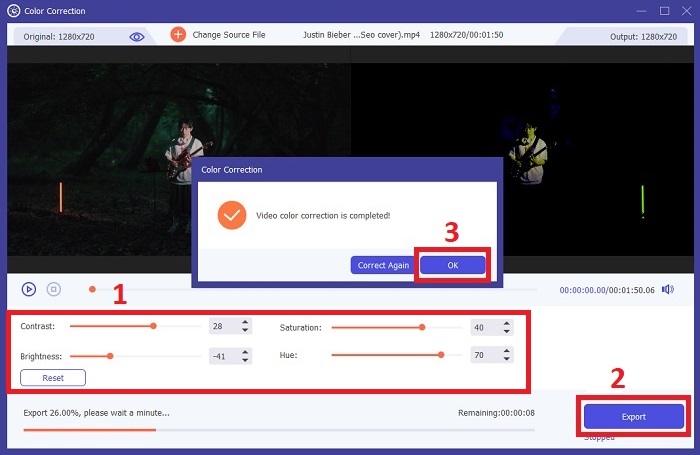
Daha Fazla Okuma:
Video Filtresi: Masaüstünde Filtreler ve Efektlerle Videonuzu Geliştirin
3D Nedir? 3D Hakkında Bilmeniz Gereken Her Şey ve Nasıl Oluşturulur
Bölüm 4. Video Renk Düzeltme Hakkında SSS
Renk düzeltmeye ihtiyacım olup olmadığını nasıl anlarım?
Videonuzun renk düzeltmesi gerekip gerekmediğinden emin değil misiniz? Renkler düzensiz, tuhaf görünüyorsa veya video çekiminizin istenen ruh hali veya konusuyla eşleşmiyorsa, renk düzeltmesi gereklidir.
Renk düzeltme gerçekten gerekli mi?
Kesinlikle! Renklerin doğru ve görsel olarak çekici olmasını garanti etmek için video üretiminde AI video renk düzeltmesi gereklidir. Görsel bütünlüğü artırır ve iyi bir videoyu olağanüstü bir videoya yükseltebilir.
Filmde renk düzeltici nedir?
Filmdeki renk düzeltici, post prodüksiyonda renkleri değiştirmek ve dengelemek için kullanılan donanım veya yazılım aracıdır. Film yapımcılarının belirli bir görünüm, ruh hali veya atmosfer elde etmelerine yardımcı olarak görselleri daha ilgi çekici ve hikaye içinde bütünleşik hale getirir.
Sonuç
Sonuç olarak, videoda renk düzeltme, etkileyici bir görsel deneyim elde etmenin anahtarıdır. Tüm mesele, renkleri ve tonları yaratıcı vizyonunuzla örtüşecek şekilde ince ayar yaparak her bir karenin hedeflenen parlaklığı yansıtmasını sağlamaktır. Yapay zekâ destekli renk düzeltme, videolarınızı dönüştürerek canlı, gerçeğe en yakın renkleri işler ve unutulmaz bir etki yaratır. Karışık ışığı düzeltmekten belirli ruh hâlleri oluşturmaya kadar bu yenilik, hikâye anlatımınızı bir üst seviyeye taşır. Video Converter Ultimate, renk düzeltme sürecini basitleştiren ve sanatsal potansiyelinizi açığa çıkaran güçlü bir yardımcı olarak öne çıkar.
-
 FPS Nedir? Hakkında Bilmeniz Gereken Her Şey
 FPS nedir? Saniyede Kare (FPS) ve farklı durumlarda neler yapabileceği hakkında ihtiyacınız olan her bilgiyi öğrenin. Tüm ayrıntılar için bu makaleyi okuyun.
-
 Android ve iOS'unuzdaki En İyi Fotoğraf Renk Geliştirici Uygulaması Ücretsiz
 Telefonunuzda bir fotoğraf renk geliştirme uygulamasına sahip olmak ister misiniz? Peki, hangi geliştiricilerin ihtiyacınıza en uygun olacağını düşündüğünüzü seçin.
-
 Çapraz Platformlarda Mevcut Video Çözünürlüğünü Değiştirmek için Nihai Kılavuz
 Videonun video çözünürlüğünü değiştirmeniz mi gerekiyor? Öyleyse, izlediğiniz videonun video çözünürlüğünü kolayca değiştirmek için yapabileceğiniz farklı yolları öğrenin.
