


 Video Dönüştürücü Ultimate
 Ekran kaydedicisi
 Video Onarımı
PC için En İyi 5 Video Düzenleyici Hakkında Daha Fazla Bilgi Edinin ve Karşılaştırın
Günümüzde birçok insan unutulmaz anları saklamak için video çekmeyi seviyor ve çoğu bunu para kazanmak için kullanıyor. Vlogger’lar ve influencer’lar gibi, hayranları için ne yaptıklarını göstermek amacıyla sürekli kendilerini videoya alıyorlar. Ayrıca diğer influencer ve vlogger’lardan daha popüler olmak için de bunu yapıyorlar. Eğer sen de kendini videoya çekmeyi seven, vlogger veya influencer olmayı hedefleyen biriysen, o zaman en iyi Windows 10 video düzenleyiciye sahip olmayı düşünmelisin. Böylece videolarını geliştirip etkileyici hale getirerek daha çok beğeni, izlenme, abone ve uzun vadede kâr elde edebilirsin.Başlamadan önce, başarılı bir vlogger veya influencer olma yolunda ilk adımı attığın için seni tebrik etmek isteriz. Ancak kullanacağın doğru aracı seçmek, karşılaşacağın en kritik aşamalardan biridir. Bu yüzden şimdi senin için seçebileceğin, her zamanki gibi etkili ve farklı video düzenleyicileri bir araya getirdik.

Bölüm 1. Çevrimiçi ve Çevrimdışı En İyi 5 Windows Video Düzenleyicisi
En İyi 1. Video Dönüştürücü Ultimate
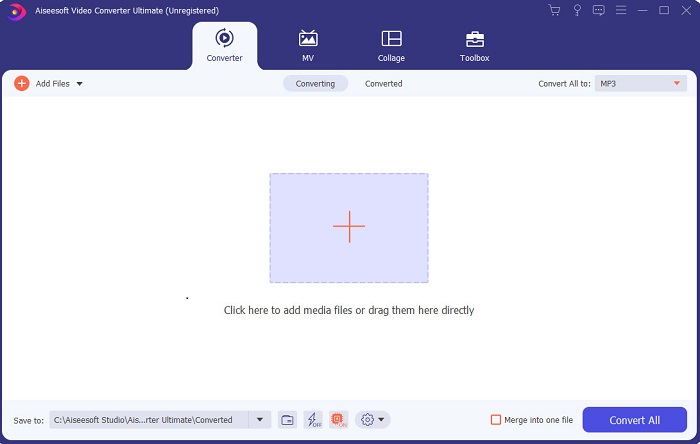
Eğer avantaj elde etmek ve idolün olan kişilerinki gibi mükemmel videolara sahip olmak istiyorsan, o zaman FVC Video Converter Ultimate’ı kullan. Bu dönüştürücü ve Windows video düzenleyici, şimdiden pek çok kullanıcısının dünya çapında popüler olmasına yardım etti ve belki de sıradaki sensin. Tanınmış influencer’ların, vlogger’ların ve video editörlerinin çoğu bunu düzenleyici, geliştirici, güçlendirici ve daha fazlası olarak kullanıyor. Eğer idolün gibi profesyonel bir çıktı elde etmek ve bundan gerçek para kazanmak istiyorsan, bu yazılımı hemen indirerek yeni bir internet fenomeni ve kendinin en iyi versiyonu olmalısın. Ayrıca, bu aracı daha iyi anlayabilmen için artılarını ve eksilerini de sunduk.
Ücretsiz İndirWindows 7 veya üstü içinGüvenli İndirme
Ücretsiz İndirMacOS 10.7 veya üstü içinGüvenli İndirme
Artıları
- Yeni başlayanlar için bu araç onlar için doğru seçimdir. Takip etmeniz ve anlamanız daha kolay olması için basit talimatlar sağladığı için. Temel olarak, yerinde.
- Profesyoneller için, diğerlerinden farklı olarak PC için video düzenleyici Bu aracın birçok fütüristik özelliği var. Örneğin, ses kalitenizi artırmak ve videoyu geliştirmek istiyorsanız bu aracı kullanabilirsiniz. Ayrıca, sesiniz video ile senkronize değilse, bunu düzeltmek için bir ses senkronizasyon özelliği vardır.
- Genel olarak, bu, güvenebileceğiniz olağanüstü dönüştürücü ve düzenleyicidir. Özellikle vloggerların ve etkileyicilerin dünyasına şaşırtıcı bir giriş yapmak istiyorsanız.
- Editör yazılımı indirilebilir ve bunun gibi aynı özelliklere sahip editör araçları yoktur.
Eksileri
- Bu araç ücretsiz değildir ancak fiyatı düşüktür. Başka bir deyişle, ucuzdur ve yüksek kalitede çıktı üretir.
En İyi 2. Windows Movie Maker
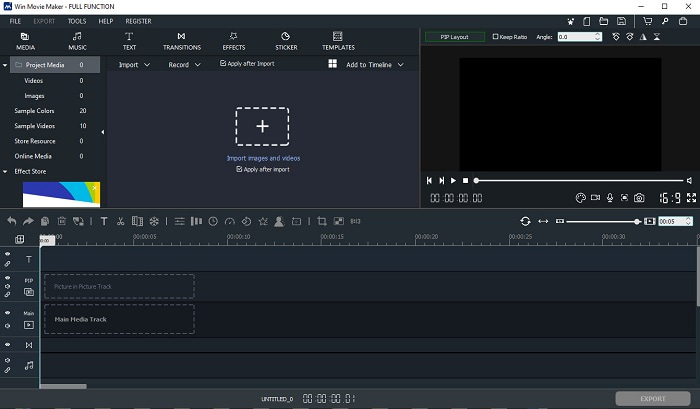
Bu Windows 7, 8, 10 ve XP için video düzenleyici, oluşturma ve düzenleme konusunda en iyilerden biridir. Windows Movie Maker, kendi videolarını düzenlemek isteyen birçok kullanıcı tarafından indirildi. Çünkü gelişmiş ve karmaşık düzenleme özellikleri sunuyor. Ancak bu araç, video yapma ve düzenleme konusunda yeni olanlar için fazlasıyla göz korkutucu olabilir. Fakat eğer profesyonelsen ya da düzenleme konusunda deneyimin varsa mutlaka bu aracı denemelisin. Aracın bir de premium sürümü var ve sunduğu özellikler ücretsiz sürüme oldukça benziyor; ancak dışa aktarma yaptığında çıktı üzerinde filigran olmuyor.
Artıları
- Yeni başlayanlar için bu araç ideal değildir ancak karmaşık düzenleme yapmak harikadır.
- Profesyoneller için, burada sunulan özellikler, deneyiminiz varsa yapılabilir.
- Geçiş, efektler ve çıkartmalar vb. sağlar.
Eksileri
- Burada yapabileceğiniz araç fonksiyonları nedeniyle araç biraz rahatsız edici. Ayrıca, ezici ve nasıl çalıştırılacağına dair bir talimat yok.
- Bu aracın ücretsiz sürümünü kullanıyorsanız, dışa aktardıktan sonra videonun kendisinde bir filigran olmasını bekleyin.
En İyi 3. OpenShot
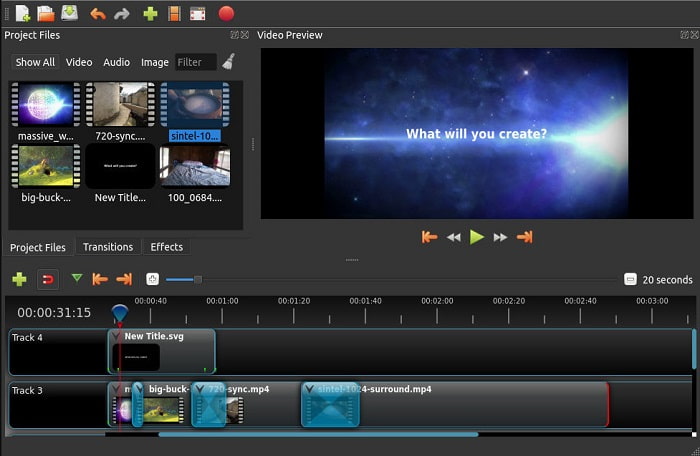
Bir başka filigransız ücretsiz video düzenleme yazılımı da Openshot’tır. Windows Movie Maker’a göre anlaşılması daha kolay işlevler sunar. Ayrıca, aracı yükledikten sonra özellikleri tanıtan kısa bir tur da bulunur. Yine de, anlatılanlar sadece temel özelliklerle sınırlıdır. Bu araç yalnızca temel düzenleme özellikleri sunduğundan, yaratıcılığını tam olarak konuşturamazsın. Ayrıca bu aracı kurduğunda, arayüzün tek renkli (monokrom) yapısı nedeniyle görünüm açısından biraz sıkıcı gelebilir.
Artıları
- Yeni başlayanlar için bu, Windows Movie Maker'ın daha basit bir sürümüdür. Efektler, geçişler ve daha fazlasını ekleyebilirsiniz.
- Profesyoneller için, kullanmaları sorun değil ama en iyisi değil.
- Basit bir düzenleme ile geliyorsa yazılım tamamdır.
Eksileri
- Sıkıcı arayüzü değiştirilemez ve daha az etkileşimlidir.
- Güncellemeden sonra bile bazı büyük ve küçük hatalar burada hala mevcut.
En İyi 4. Işık İşleri
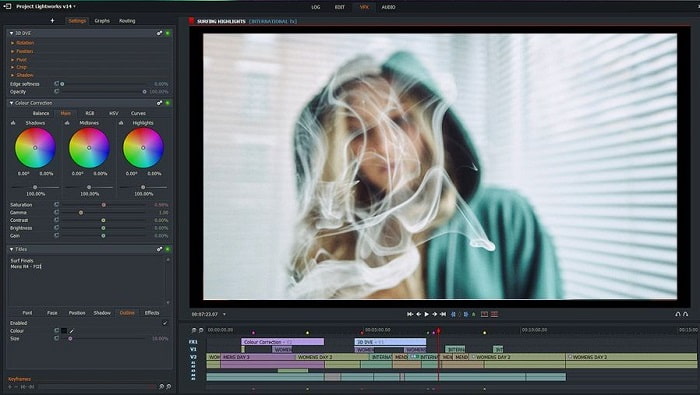
Lightworks, Windows için ücretsiz bir video düzenleyicidir, ancak aynı zamanda bir premium sürüme de sahiptir. Fakat biz aracı indirip denemeye çalıştığımızda, .exe dosyasının bilgisayarımıza zarar verebileceğine dair bir uyarı aldık. Bu yüzden aracı indirmedik ve onun hakkında derinlemesine bir araştırma yaptık. Bu aracı sürücüne kurduğunda, kullanmaya başlamadan önce kayıt olman gerekir. Sağladığı düzenleme özellikleri, yeni başlayan biriysen fazlasıyla ağır gelebilir; hatta profesyoneller için bile biraz zordur. Yine de endişelenmene gerek yok, çünkü deneme yanılma yoluyla kullanmayı öğrenebilirsin.
Artıları
- Yeni başlayanlar için araç çok karmaşık ve ele alınması çok zor olabilir. Özellikle denemek ve sadece basit düzenleme yapmak istiyorsanız.
- Profesyoneller için bu aracın sağladığı gerçek zamanlı düzenleme özelliklerini kullanabilirsiniz. Bazı özellikler yeni olmasına ve çoğu ücretli olmasına rağmen.
- Aracın genel performansı, video düzenleme ve oluşturmada A sınıfı olarak sınıflandırılır.
Eksileri
- 1080px çıktı almak istiyorsanız aracı satın almalısınız. Ve hatta kullanmadan önce bile kayıt olmanız gerekecek.
- Yazılımın zararlı bir .exe dosyası vardır, bu nedenle riski size ait olmak üzere indirin.
En İyi 5. ClipChamp
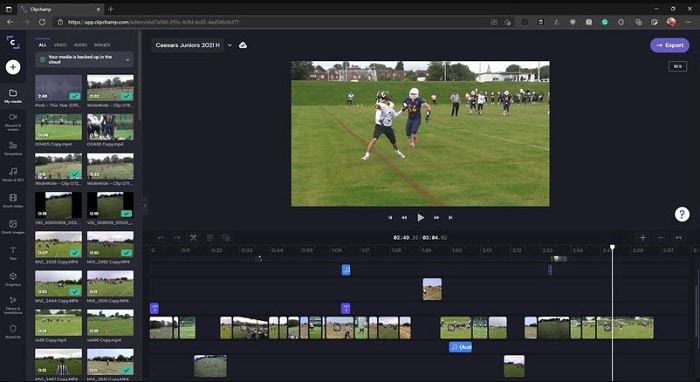
Bu çevrim içi araç, planını yükselttiğinde ek özellikler sunar. Ayrıca, belirli bir yazılım indirmeden video düzenleyebileceğin en kolay erişilebilir araçlardan biridir. Clipchamp kullanmak için harika bir araçtır, ancak erişmeden önce kayıt olman gerekir. Bu çevrim içi Windows 10 video düzenleyici, Lightworks ile benzer özelliklere sahiptir, ancak çevrim içidir. Yine de, düzenlemek üzere buraya video dosyaları aktarırsan, içe aktarma sürecinin yavaş olacağını bilmelisin. Bunun avantajı ise, aracı kullanmak için herhangi bir yazılım indirmen gerekmemesidir.
Artıları
- Yeni başlayanlar için bu araç mutlaka denenmeli, ancak burada video düzenleme ve ekleme işlemi biraz daha yavaş.
- Profesyoneller için sınırlı kaynaklarla basit videoları kullanmak ve düzenlemek sorun değil.
- Genel olarak, aracın anlaşılması Windows Movie Maker'dan daha kolaydır.
Eksileri
- İnternete bağımlı, yani yavaş bir internetiniz varsa, o zaman kararsız bir süreç bekleyin.
- Web aracını kullanmadan önce bir kayıt formuna ihtiyacınız var.
Bölüm 2. Windows için 5 Video Düzenleyici için Karşılaştırma Tablosu
| Özellikleri | Video Dönüştürücü Ultimate | Windows Film Yapıcı | OpenShot | Işık İşleri | KlipŞampiyon |
| Kırpma, kesme, birleştirme vb. Gibi Video Düzenleme. |  | | | | |
| Video Geliştirici | |  | | | |
| Filigran | | | | | |
| Desteklenen Program | Masaüstü tabanlı araç | Masaüstü tabanlı araç | Masaüstü tabanlı araç | Web tabanlı araç | Web tabanlı araç |
| Fiyat aralığı | 1 ay için: $25.00 Bir yıl için: $31.20 | $39.95 Tek seferlik ödeme | Ücretsiz ama bağış yapabilirsiniz | QScan Pro QScan Pro – Aylık Abonelik Aktivasyonları $59.99 | Yaratıcı- $9/aylık İşletme - $19/ aylık |
| Ömür Boyu Lisans için: $55.20 | QTarama Maks. QScan Max – Aylık Abonelik Aktivasyonları $119.99 | Business Platinum – $39/ aylık |
Bölüm 3. Windows Video Düzenleyici hakkında SSS
Kullanabileceğim en iyi Mac Video Düzenleyici nedir?
Burada sunulan araçların hepsi, Video Converter Ultimate hariç, Windows düzenleyicileridir. Diğer Mac video düzenleyicilerin neler olduğunu merak ediyorsan, o zaman bu bağlantıya tıklayıp listeden seçim yapmalısın.
Videolarım neden Android'de oynatılamıyor?
Videoların Android cihazında oynatılamamasının pek çok nedeni olabilir. Bu nedenlerin neler olduğunu öğrenmek ve sorunu hemen çözüp düzeltmek için Android Telefonlarda Oynatılmayan Videolar Nasıl Onarılır başlıklı yazıyı okuman gerekir.
Uzun videolarım nasıl sıkıştırılır ve YouTube'da paylaşılır?
Şu anda maksimum 256 dosya boyutu yükleyebiliyorsun, bu nedenle bunu düzeltmenin en iyi yolu videoyu sıkıştırmak. Videolarını YouTube’da paylaşmak istiyorsan, o zaman dosya boyutunu nasıl küçültüp YouTube’a yükleyeceğini öğrenelim.
Sonuç
Sürekli takip ettiğin vlogger veya influencer’lardan biri olmadan önce, kendi düzenlemeni yapma becerisine sahip olman gerekir. Bugün, Hollywood benzeri düzenleme özellikleri ve kalite sunan bu olağanüstü editörü kullanma fırsatın var. Bu sayede izleyicilerini, takipçilerini ve hatta kendini bile etkileyebilirsin. Bu yüzden bir elmas gibi parla ve FVC Video Converter Ultimate’ın yardımıyla başarıya giden yolu ışığın aydınlatsın.
-
 2025'in Windows ve Mac için En İyi MP4 Editörü
 İster bilgisayarınızı MP4 video düzenleme için kullanıyor olun ister yalnızca telefonunuzda çalışıyor olun, Windows ve Mac için en iyi MP4 düzenleyici dahil olmak üzere burada bazı harika seçenekler bulabileceksiniz.
-
 Bilgisayarınızda / Telefonunuzda Ücretsiz Olarak Videoya Ses ve Müzik Ekleme
 Bu makale, videoya ücretsiz olarak ses eklemenin 4 kolay yolunu gösterir. Videonuza eklemek istediğiniz ses parçası ne olursa olsun, burada tatmin edici sonuçlar elde edebilirsiniz.
-
 Çevrimiçi Şarkılar Nasıl Kesilir ve Birleştirilir - Bilmeniz Gereken En İyi 4 Yol
 Bir müzik parçası oluşturmak için çevrimiçi şarkıları kesmek ve birleştirmek istediğinizde, makaleden şarkıları kırpmak ve dosyaları birleştirmek için en iyi 4 çevrimiçi araç hakkında daha fazla bilgi edinebilirsiniz.
